Stock — Supply Chain Ops Landing Page Template
Forecast is a dashboard-style landing page template built for retail AI inventory forecasting platforms. It combines an immersive dark aesthetic with scroll-driven interactivity, live data simulations, and a progressive sign-up flow. The result is a page that demonstrates product intelligence before asking for commitment, making it ideal for converting operations-minded retail buyers.
by Rocket studio
Quick summary
Forecast is a single-page template designed for retail AI inventory forecasting platforms. It opens with an animated heatmap grid, guides visitors through three interactive demo sections, and closes with a progressive two-step sign-up form. Every scroll deepens the product story. The design feels like a live control room, dark, purposeful, and data-driven from the first pixel.
Who this template is for
This template is built for SaaS platforms that sell inventory intelligence to retail operators. If your product makes predictions, surfaces anomalies, or reduces dead stock and shrink, this page was designed with your buyer in mind.
- Operations directors at mid-market retail chains who manage inventory across multiple locations
- Merchandise planners at direct-to-consumer brands who have been hurt by overstock after failed promotions
- Chief financial officers at grocery franchises who monitor perishable shrink and margin loss
What problem this template solves
Retail buyers are skeptical of forecasting software because most demos feel abstract. A static feature list does not show how the AI thinks. This template solves that by making the scroll itself the demo, letting visitors interact with the product logic before they see a sign-up form.
- Visitors cannot tell how an AI forecasting tool actually works from a standard marketing page
- Decision-makers need to feel competent with the product before they commit to a trial
- Generic SaaS landing pages fail to communicate urgency around real retail pain points like stockouts and margin loss
What you get with this template
You get a fully structured, scroll-driven landing page with three interactive demo sections, a two-step progressive conversion form, and a zero-signup forecast tool. Every section is purpose-built for a retail intelligence buyer.
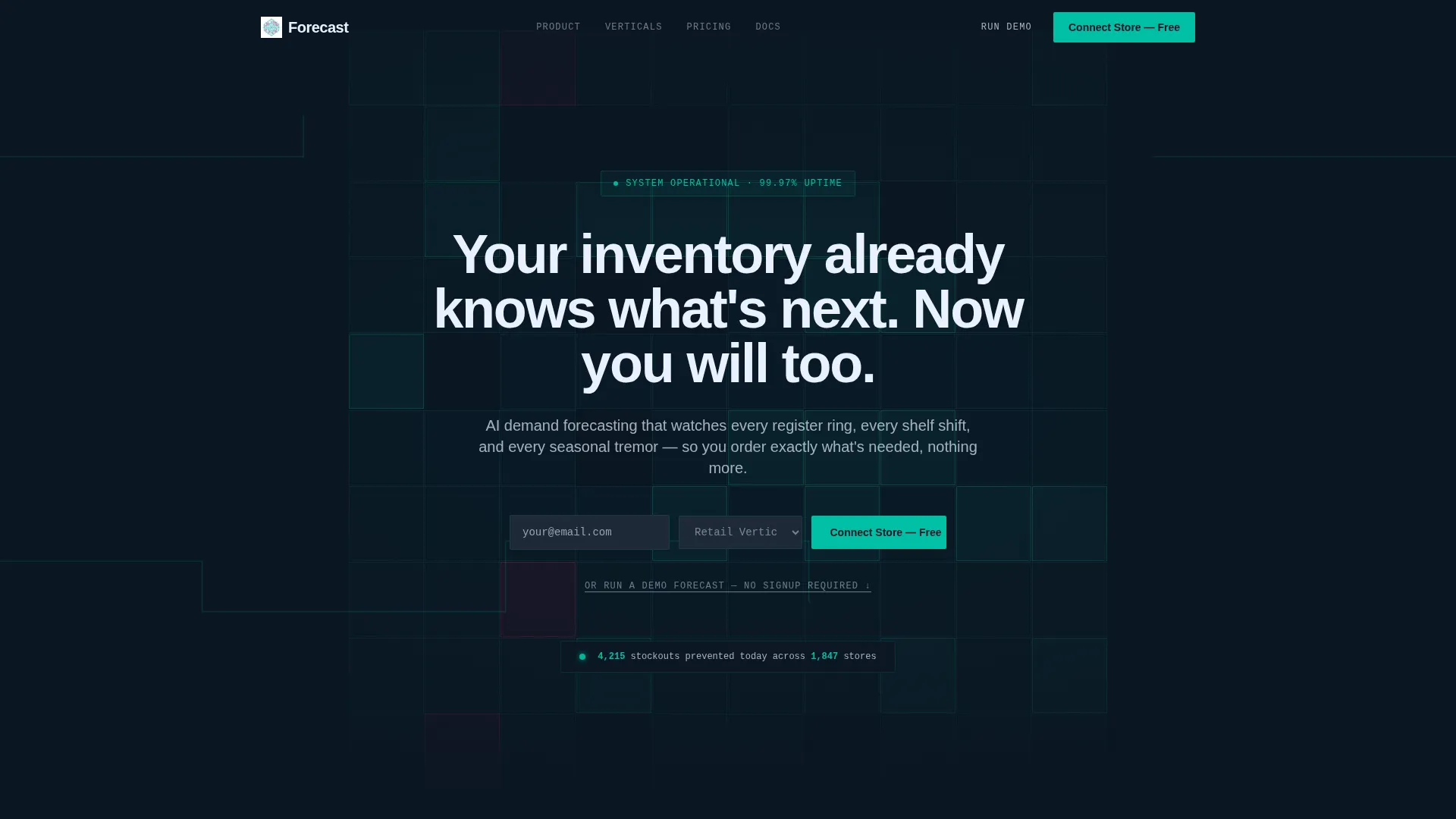
- An animated header with a live-populating SKU heatmap grid and a simulated live ticker showing prevented stockouts
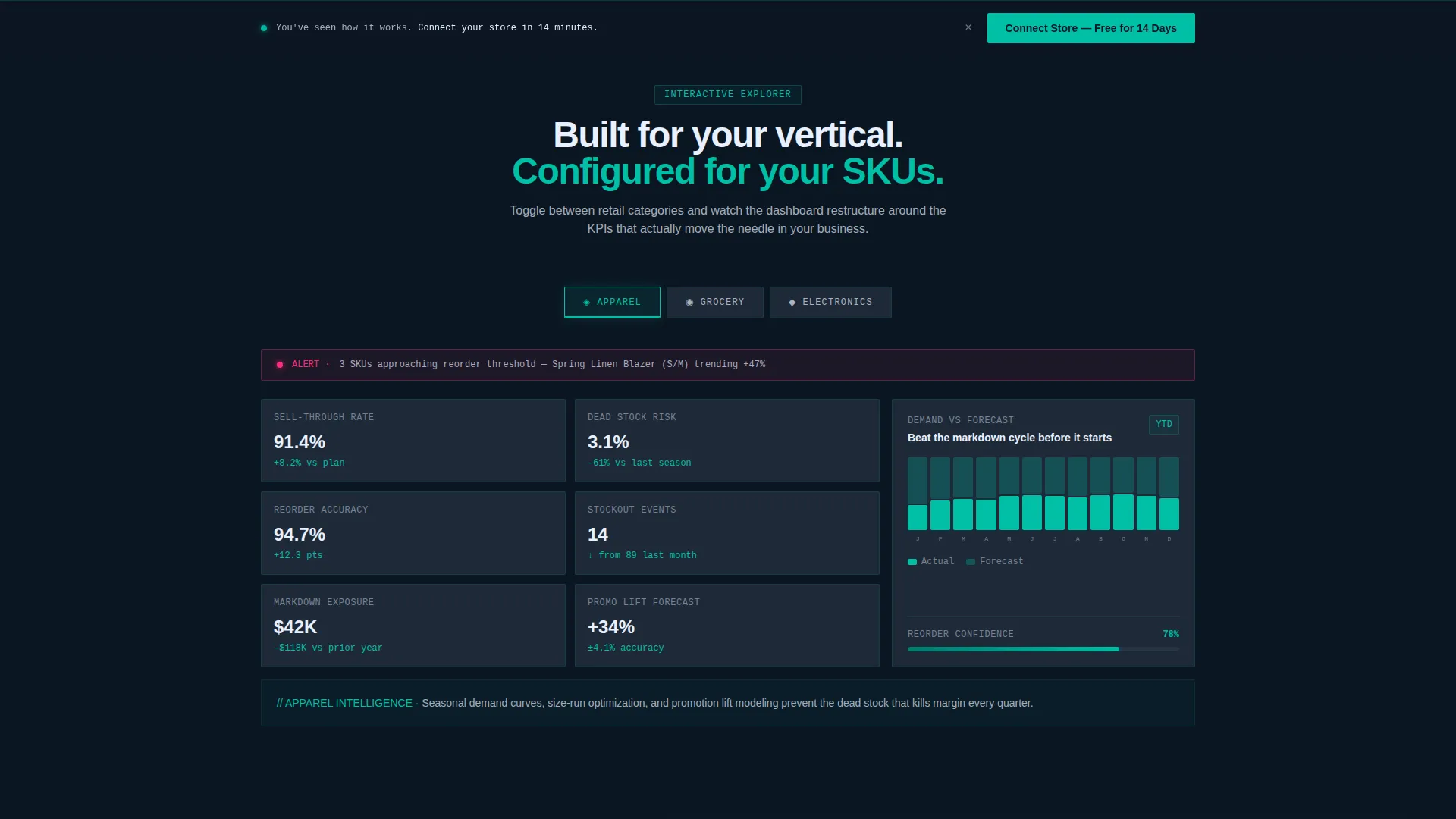
- Three vertical-toggle dashboard sections for apparel, grocery, and electronics, each with distinct KPIs and alert thresholds
- A progressive sign-up flow capturing email and retail vertical in step one, then store platform and SKU count in step two
Feature list
This template delivers six core interactive and visual capabilities, each grounded in the source brief.
Animated Inventory Heatmap Header
The header opens on a full dark canvas. A heatmap grid materializes cell by cell, with each unit glowing teal as it populates with SKU velocity data, stockout probabilities, and reorder countdowns. A headline types itself in signal white, and a live ticker updates with simulated prevention stats.
Retail Vertical Toggle Explorer
Section one lets visitors switch between apparel, grocery, and electronics. Each toggle restructures the dashboard grid with relevant KPIs, seasonality curves, and alert thresholds specific to that vertical. The visitor controls the view and starts to feel fluent in the product.
Single SKU Deep-Dive Card
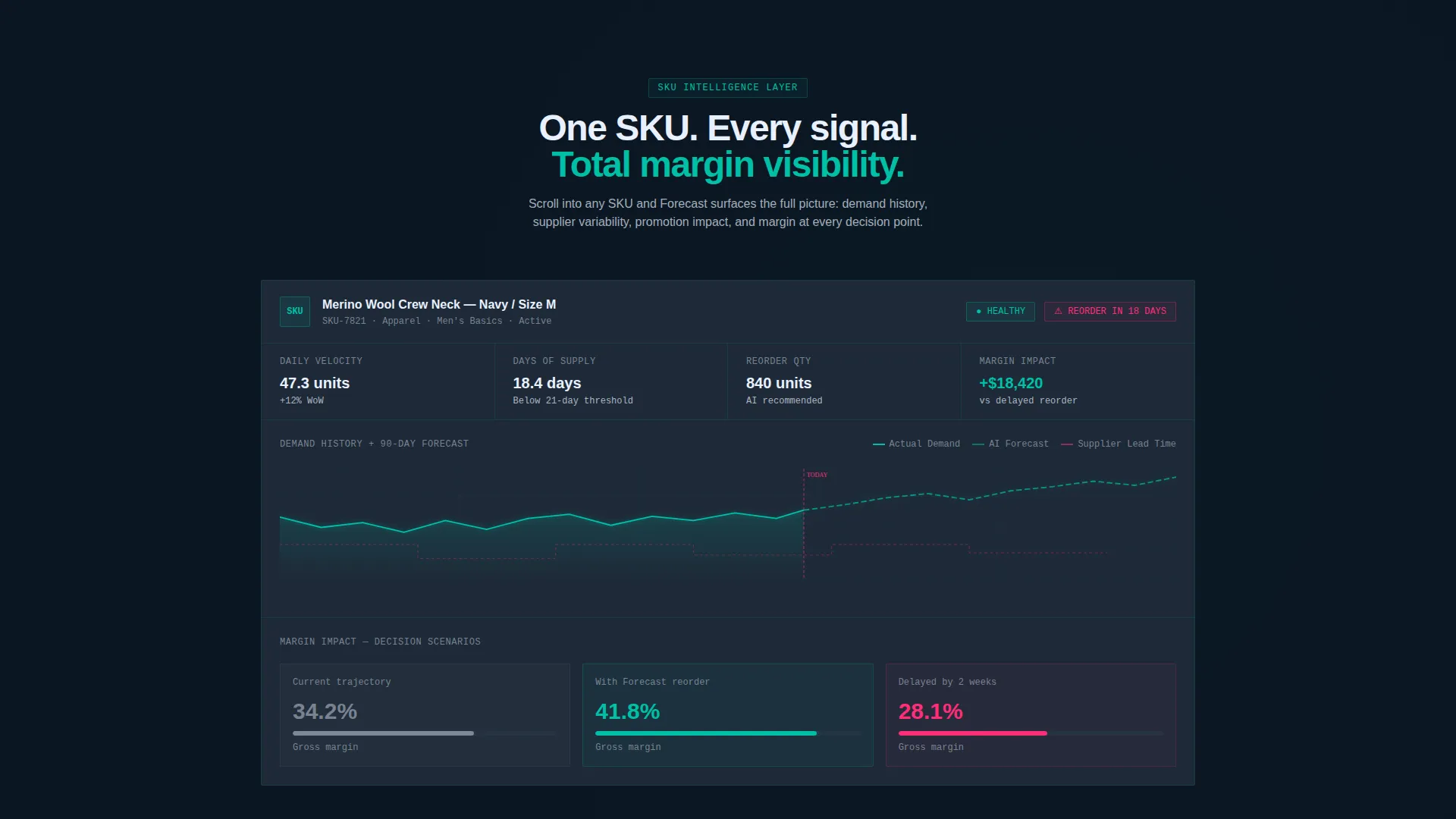
Section two zooms into one SKU card. As the visitor scrolls, the card expands to reveal demand forecasting curves, supplier lead-time overlays, and margin-impact projections. All animations are tied to scroll position, rewarding slow and deliberate reading.
Live Crisis Simulation Module
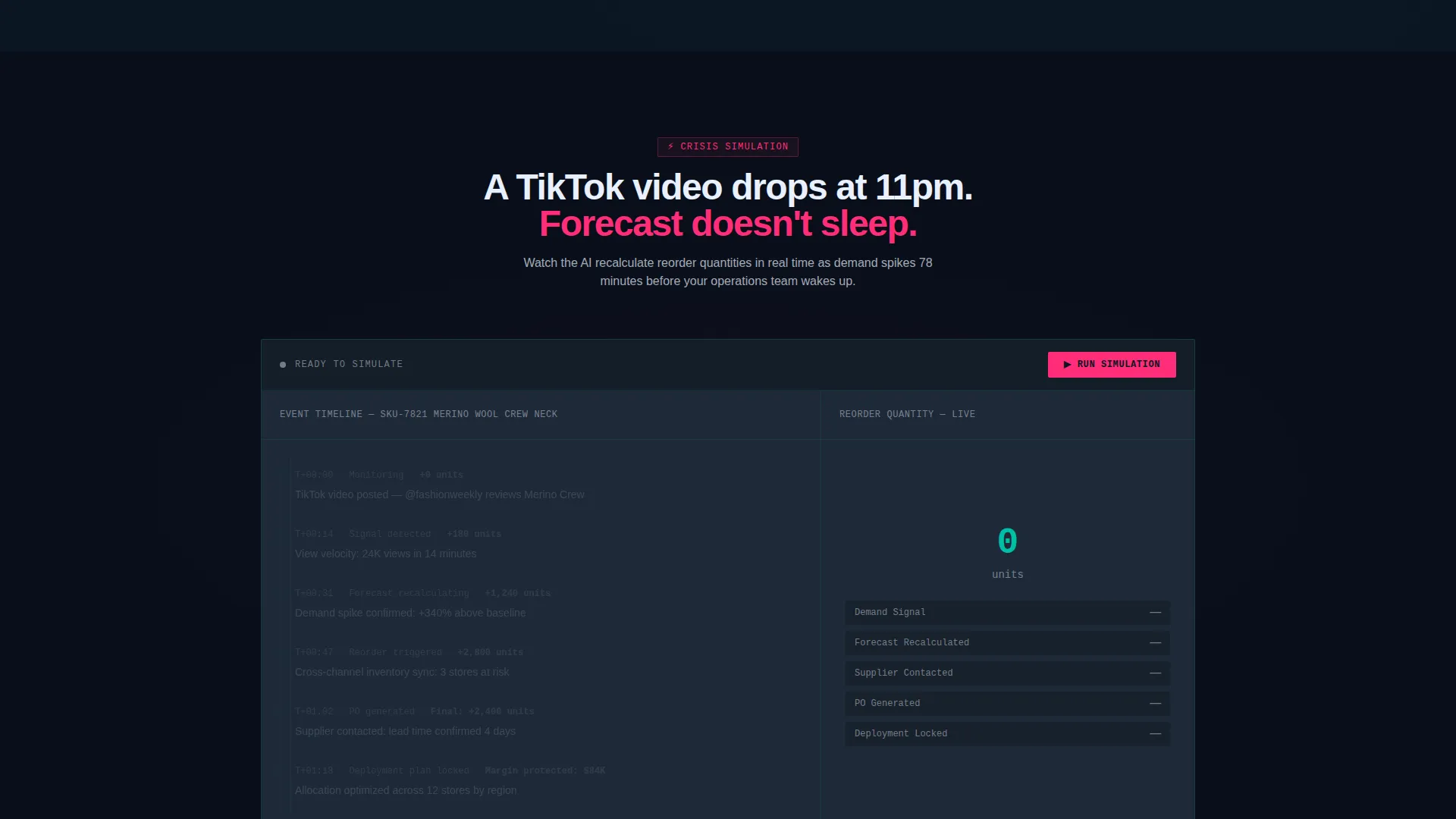
Section three presents a simulated demand spike driven by a sudden viral moment. Visitors watch the AI recalculate reorder quantities in real time. This section converts curiosity into urgency by showing what happens when a platform is not in place.
Zero-Signup Demo Forecast Tool
A secondary conversion path lets visitors paste a CSV of their own SKU data and receive a simplified demand prediction instantly. No account is required. This path captures high-intent visitors who are not ready to commit but are actively evaluating.
Progressive Two-Step Sign-Up Form
The primary call to action uses a two-step form. Step one asks only for email address and retail vertical. Step two requests store platform integration type and average SKU count. The lighter first step lowers friction and increases form completion rates.
Page sections overview
| Section | Purpose |
|---|---|
| Animated Header Grid | Establishes the data-command aesthetic and simulates live inventory intelligence |
| Live Stockout Ticker | Builds immediate credibility with a simulated real-time prevention counter |
| Vertical Toggle Dashboard | Lets visitors explore KPIs relevant to their specific retail category |
| SKU Deep-Dive Scroll | Demonstrates forecasting depth through an expanding single-product data card |
| Crisis Simulation Panel | Shows AI recalculation speed during a sudden demand spike scenario |
| Demo Forecast Tool | Captures intent from visitors who want proof before sign-up |
| Sticky Conversion Bar | Keeps the primary trial call to action visible after the first interactive section |
| Progressive Sign-Up Form | Converts engaged visitors through a two-step, low-friction registration flow |
Design & branding system
The visual identity follows a Data Command theme using the Teal Catalyst color system. Every color choice serves a function: backgrounds recede, teal highlights data in motion, and magenta fires only when action is critical.
- Abyssal background (#0B1622) keeps the canvas dark and focused; card surfaces float on muted graphite (#1E2A38)
- Operational teal (#00BFA6) dominates charts, interactive borders, and the animated grid glow, while signal white (#E8F0FE) delivers crisp typography against every dark surface
- Catalyst magenta (#FF2D78) is reserved exclusively for anomaly alerts and conversion hotspots, creating a visual language where color means something
Mobile & speed optimization
The template is structured with mobile retail buyers in mind. The scroll-driven interactions are designed to translate across screen sizes without losing the core data narrative.
- Interactive sections use scroll-triggered animations that adapt to touch-based vertical scrolling on phones and tablets
- The progressive form flow is especially suited to mobile because step one asks for only two inputs before advancing
How this template helps you convert
This template is engineered around a freemium and free trial conversion strategy. Every structural decision prioritizes earning the click before demanding commitment.
- The zero-signup demo forecast tool captures high-intent visitors who are actively evaluating but not ready to register, creating a low-stakes first conversion event that moves them into the product experience.
- The sticky bottom bar activates after the first interactive section, keeping the "Connect Your Store, Free for 14 Days" call to action visible throughout the rest of the page without interrupting the scroll-driven demo.
Other information about this template
This template was built at the intersection of the Technology category and the AI for Retail subcategory, targeting the retail AI inventory forecasting niche. It is well-suited for platforms that serve mid-market and enterprise retail operators across verticals including apparel, grocery, and consumer electronics.
- The template style is Dashboard and Data Grid, making it a strong fit for any product that surfaces data visualizations, real-time alerts, or predictive analytics as its core value
- The creative direction is Interactive Explorer, meaning the page structure is intentionally scroll-rewarding rather than static
- The header concept is Dark Full-Bleed with Glow, which sets an immersive tone from the first frame and differentiates this page from standard SaaS marketing templates
Theme
Data Command
Creative direction
Interactive Explorer
Color system
Teal Catalyst
Style
Dashboard/Data Grid
Direction
Freemium/Trial
Page Sections
Animated Inventory Heatmap Header
Retail Vertical Toggle Dashboard
Scroll-driven SKU Deep-dive
Live Crisis Simulation Module
Zero-signup Demo Forecast Tool
Progressive Two-step Conversion Form
Related questions
Who is this template designed for?
Can I replace the retail verticals in the toggle dashboard?
How does the two-step sign-up form work?
What is the Run a Demo Forecast tool?
Does the template include real AI or live data?



