Stockroom - Dynamic Inventory Landing Page Template
Stockroom is a dashboard-style landing page template built for entertainment inventory management platforms. It features a tab-switching hero, an interactive asset calculator, and animated data-grid sections that walk visitors through real-time gear tracking, crew check-out logs, and maintenance scheduling. The design is built to convert production managers and rental house teams into free trial sign-ups.
by Rocket studio
Quick summary
Stockroom is a single-page, dashboard-first template designed for entertainment inventory management platforms. It combines an interactive asset calculator, animated feature tabs, and live-feeling data grids to show production managers and rental house teams exactly how the platform works before they ever sign up.
Who this template is for
This template is built for teams that manage physical gear across multiple jobs, locations, or events. If your work involves tracking equipment from warehouse to stage and back, this template speaks your language.
- Production managers handling multiple tours or shows at once
- Rental house coordinators who need real-time visibility into gear availability
- Venue operations teams responsible for knowing where every fixture and flight case is at any given moment
What problem this template solves
Gear goes missing. Spreadsheets fall behind. Someone scrawls a check-out on a whiteboard and nobody updates it. The result is costly lost equipment, double-booked assets, and frustrated crews. This template gives an inventory platform a landing page that feels as organized as the solution itself.
- It removes the confusion of abstract software marketing by letting visitors interact with the product before reading about it
- It replaces vague benefit claims with a personalized cost estimate the visitor calculates themselves
- It reduces sign-up friction by offering a spreadsheet import path alongside the primary free trial flow
What you get with this template
You get a fully structured landing page that doubles as a live product demo. Every section is designed to build confidence and reduce hesitation for a visitor who manages expensive, mobile equipment.
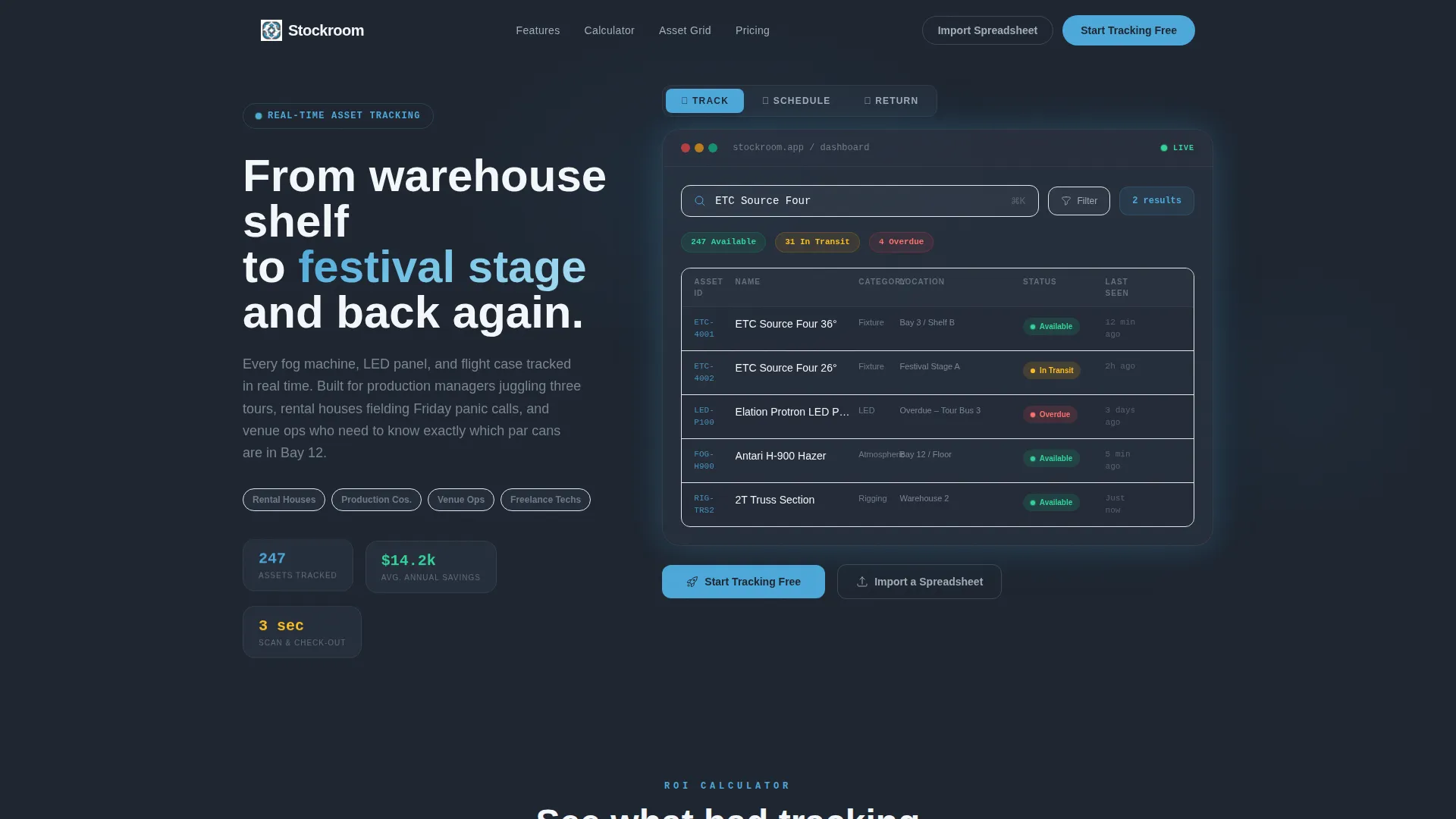
- A Feature Tab Switcher hero with three animated views: Track, Schedule, and Return
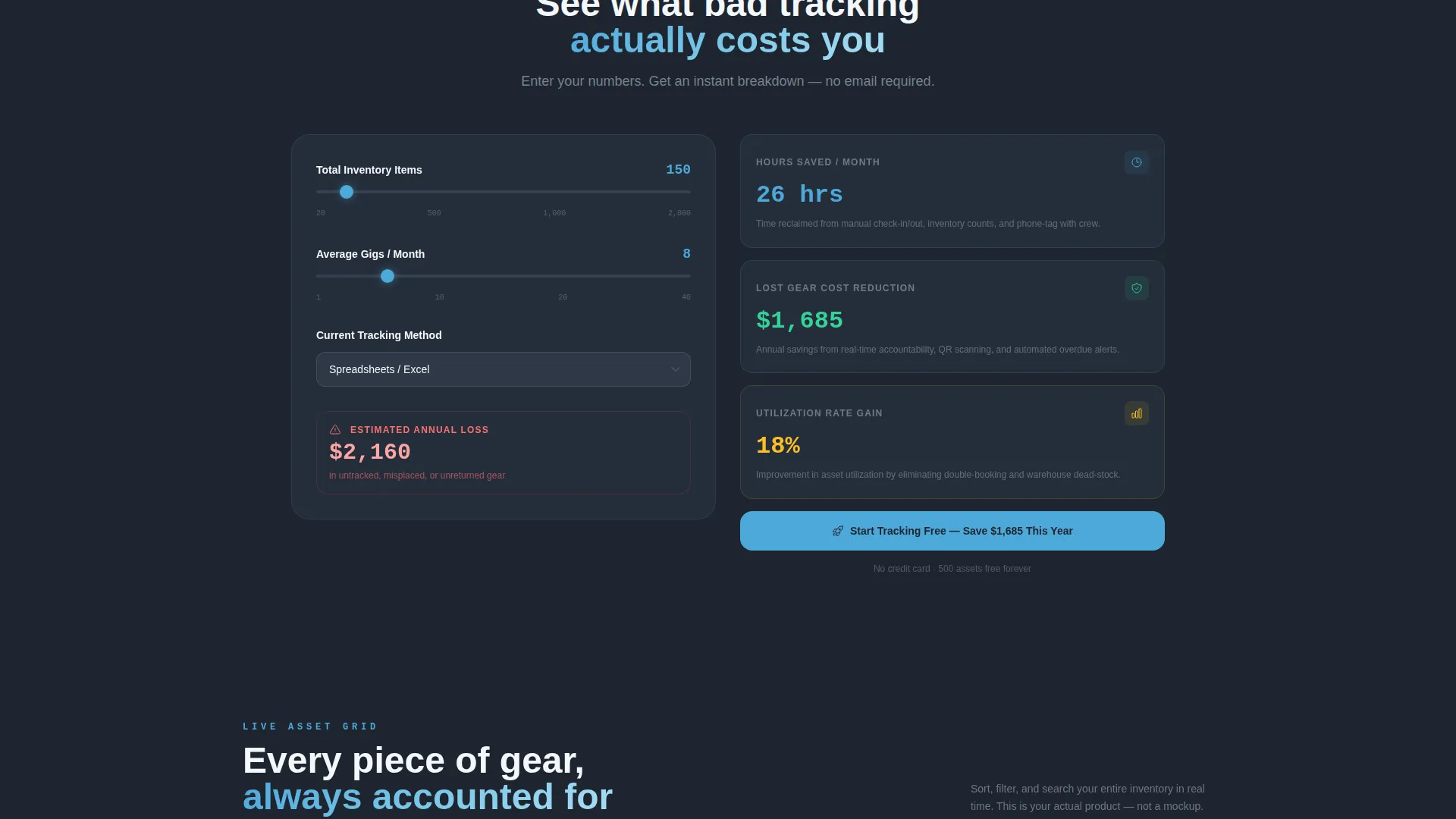
- An embedded asset calculator that produces personalized savings estimates based on inventory size and tracking method
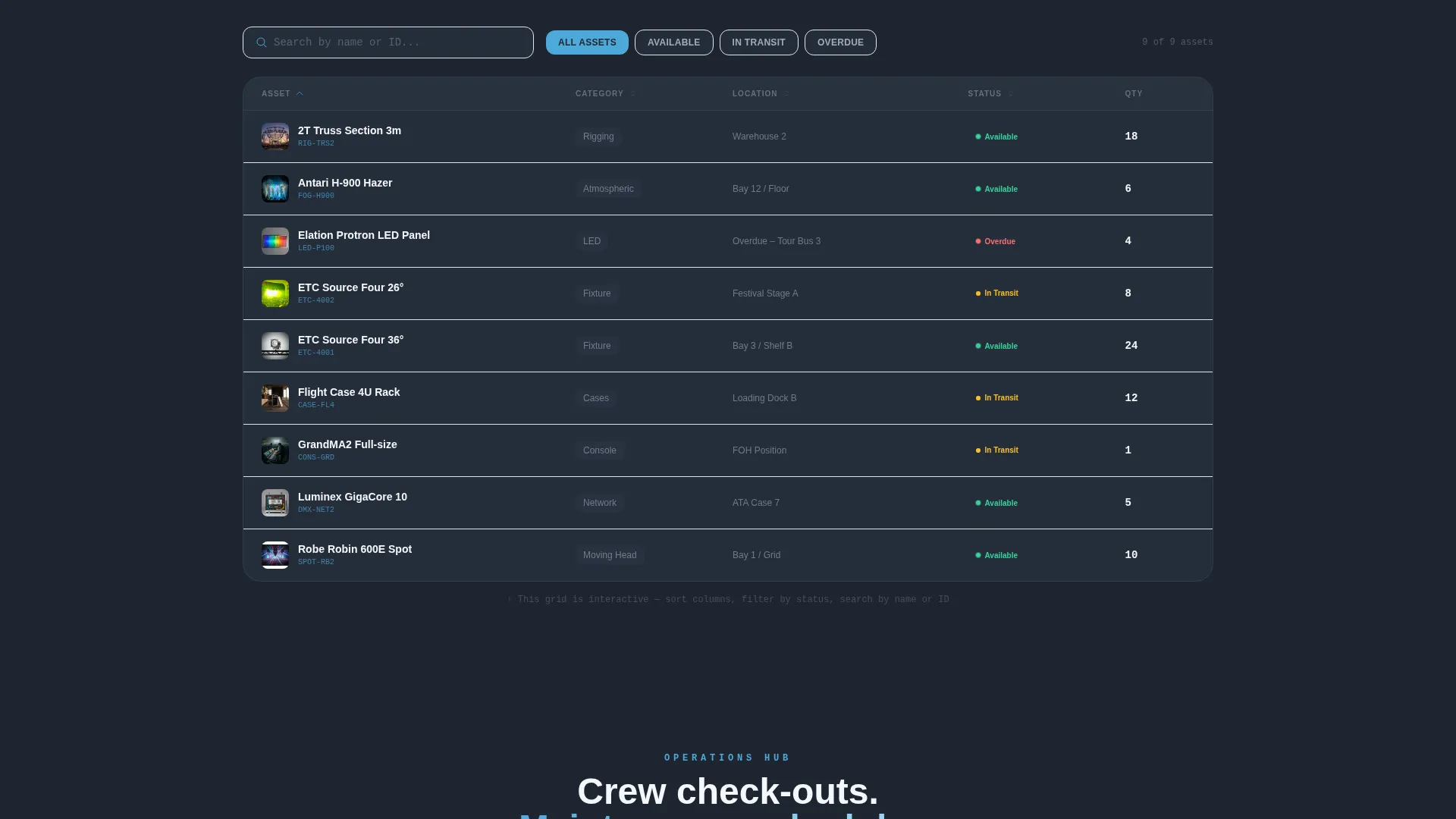
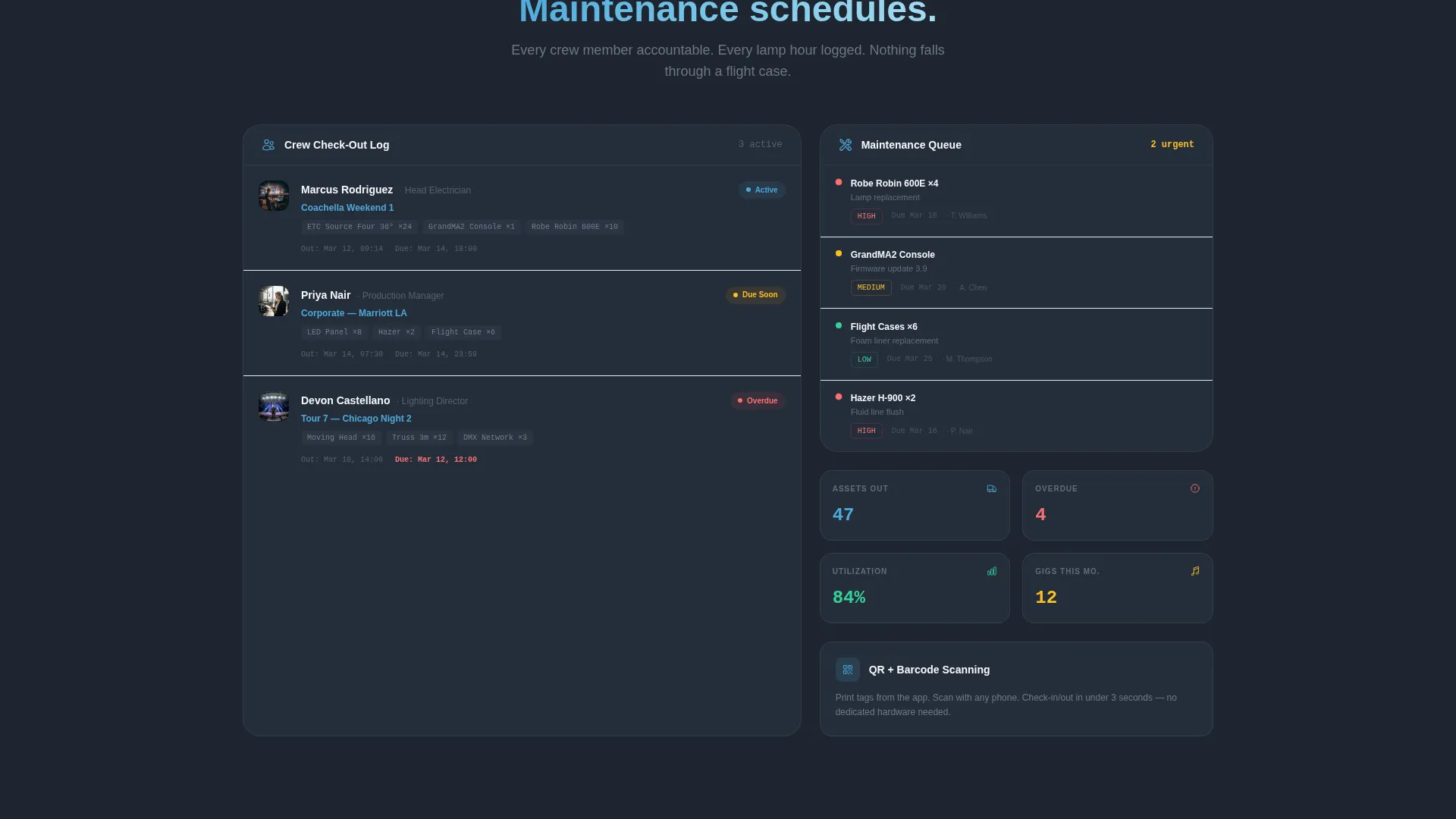
- Interactive data-grid modules covering asset tagging, barcode and QR scanning, crew check-out logs, and maintenance scheduling
- A two-step free trial sign-up flow plus a drag-and-drop spreadsheet import path
Feature list
This template packs several purpose-built components that work together to demonstrate platform value and drive conversions.
Animated Feature Tab Switcher
The hero header contains three clickable tabs labeled Track, Schedule, and Return. Each tab triggers a kinetic panel reorganization, with calendar blocks sliding in for Schedule and a scan-confirmation flow appearing for Return. The motion mirrors the feeling of gear being loaded onto a truck: purposeful, fast, and satisfying.
Interactive Asset Calculator
Visitors enter their total inventory count, average gigs per month, and current tracking method (spreadsheet, whiteboard, or memory). The calculator instantly returns estimated hours saved, a lost-gear cost reduction figure, and a utilization-rate projection. That personalized result becomes the most persuasive element on the page.
Live-Looking Warehouse Grid
The default dashboard view shows a warehouse grid with asset thumbnails and status pills: green for available, amber for in-transit, and red for overdue. A search bar sits mid-query reading "ETC Source Four," making the interface feel actively in use rather than staged.
Sortable and Filterable Data-Grid Modules
Each feature section below the hero is presented as an interactive card row. Visitors can sort and filter rows covering asset tagging, barcode and QR scanning, crew check-out logs, and maintenance scheduling. The page behaves like a product demo, not a brochure.
Dual Conversion Paths
The primary call to action reads "Start Tracking Free" and appears both pinned in the navigation bar and repeated after the calculator result. A secondary path labeled "Import a Spreadsheet" lets existing Excel users migrate with a single drag-and-drop, dramatically lowering the barrier for teams already managing gear in a file.
Purposeful Motion System
Status badges pulse. Transit lines animate between map pins. Numbers count up on scroll. Every motion detail is tied to a real inventory concept, reinforcing the platform's promise of live, real-time gear visibility rather than decorating the page for its own sake.
Page sections overview
| Section | Purpose |
|---|---|
| Feature Tab Hero | Introduce Track, Schedule, Return with animated dashboard panels |
| Asset Calculator | Deliver personalized savings estimates before the visitor scrolls further |
| Warehouse Grid View | Show real-time asset status with thumbnails and color-coded pills |
| Asset Tagging Module | Demonstrate how individual gear items are identified and categorized |
| Barcode and QR Scanning | Illustrate the check-in and check-out scan confirmation flow |
| Crew Check-Out Logs | Display sortable crew activity and equipment assignment records |
| Maintenance Scheduling | Present upcoming service tasks as interactive card rows |
| Free Trial Sign-Up | Capture email, company name, inventory size, and primary use case |
| Spreadsheet Import Path | Offer a drag-and-drop migration entry point for existing Excel users |
Design & branding system
The visual identity follows a Dynamic Motion theme built on the Slate and Sky color system. The palette was designed to feel like a loading dock at dawn: cool, precise, and ready to move.
- Deep equipment-rack charcoal (#1E2530) forms the primary background and dashboard frame
- Brushed-aluminum gray (#A0ADB8) handles secondary text, borders, and inactive states
- Open-sky blue (#4DA8DA) activates on interactive elements, status highlights, and data callouts
- Crisp followspot white (#F4F7FA) fills card surfaces and table backgrounds for contrast and readability
Mobile & speed optimization
The template is structured so that its dashboard-first layout remains navigable and legible on smaller screens. The data-grid modules and calculator are designed to reflow cleanly without losing their interactive character.
- Tab-switcher navigation and calculator inputs are sized for touch interaction
- Status pills and asset thumbnails scale within the grid layout without clipping
- Pinned navigation with the "Start Tracking Free" call to action stays accessible at all scroll positions on mobile
How this template helps you convert
The conversion architecture is built around one principle: let the visitor experience the product value before asking for a commitment.
- The asset calculator produces a specific dollar estimate, such as "$14,200 in estimated lost gear annually," which makes the free trial feel like an obvious next step rather than a risk
- The "Start Tracking Free" call to action is pinned in the navigation bar and repeated directly after the calculator result, catching the visitor at peak motivation
- The "Import a Spreadsheet" secondary path removes the most common objection from teams already using Excel, replacing a migration obstacle with a single drag-and-drop action
Other information about this template
Stockroom is built specifically for the entertainment inventory management niche, where the stakes of misplaced gear are financial and reputational. The template's design and copy decisions are grounded in the real workflows of production managers, rental house coordinators, and venue operations teams.
- The template style is Dashboard and Data Grid, making it well suited for software and SaaS platforms where showing the product interface is more persuasive than describing it
- The Dynamic Motion theme is consistent with how entertainment professionals expect fast-moving, always-updating tools to behave
- The Freemium and Trial conversion direction is supported by both the primary free trial flow and the friction-reducing spreadsheet import path
- The two-step sign-up collects email and company name first, then inventory size range and primary use case (rental house, production company, venue, or freelance), keeping early commitment low
Theme
Dynamic Motion
Creative direction
Calculator/Tool First
Color system
Slate & Sky
Style
Dashboard/Data Grid
Direction
Freemium/Trial
Page Sections
Animated Feature Tab Switcher Hero
Interactive Asset Calculator
Live Warehouse Grid with Status Pills
Sortable Data-grid Feature Modules
Dual Conversion Flow Design
Purposeful Motion and Animation System
Related questions
Who is the Stockroom template designed for?
What conversion paths does the template include?
How does the asset calculator build trust with visitors?
Does the template include a mobile-friendly layout?
What design style does the Stockroom template use?



