Architecture Digital Presence Portfolio Website Template
Slab is a bold brutalist architecture website template built on a bento grid layout. It is designed for architects who want a digital presence that commands attention. A Feature Tab Switcher header, a Carbon Fiber color system, and a Spec Sheet scroll structure combine to showcase portfolio work, studio narrative, and contact inquiry in one striking, opinionated design.
by Rocket studio
Quick summary
Slab is a bento grid architecture website template shaped by bold brutalist design principles. It uses a deep Carbon Fiber color system, a Feature Tab Switcher header, and a Spec Sheet scroll structure. The result is a site that feels as deliberate and material as the buildings its users design. Every section earns its place by proving something specific about the template.
Who this template is for
This template is built for architects who want a website with as much conviction as their built work. It suits independent practitioners and mid-size studios equally, and it rejects the safe, minimal-white aesthetic that makes most architecture portfolios look the same.
- Solo practitioners launching their first professional studio site
- Mid-size firms ready to move past generic, look-alike portfolio templates
- Freelance architects who want a digital presence that reflects an opinionated design voice
What problem this template solves
Most architecture websites either blend into a sea of white space and thin fonts, or they overcomplicate the layout until the work disappears. Slab solves the visibility problem by making the template itself a design statement.
- Architecture portfolios that look identical to every competitor's site
- Layouts that bury strong project photography behind decorative chrome and mockup frames
- The gap between an architect's built work and a digital presence that matches its intensity
What you get with this template
Slab delivers a complete, ready-to-use bento grid landing page structure built around three core content areas: projects, studio, and contact. Every included element is intentional and documented visually on the page itself.
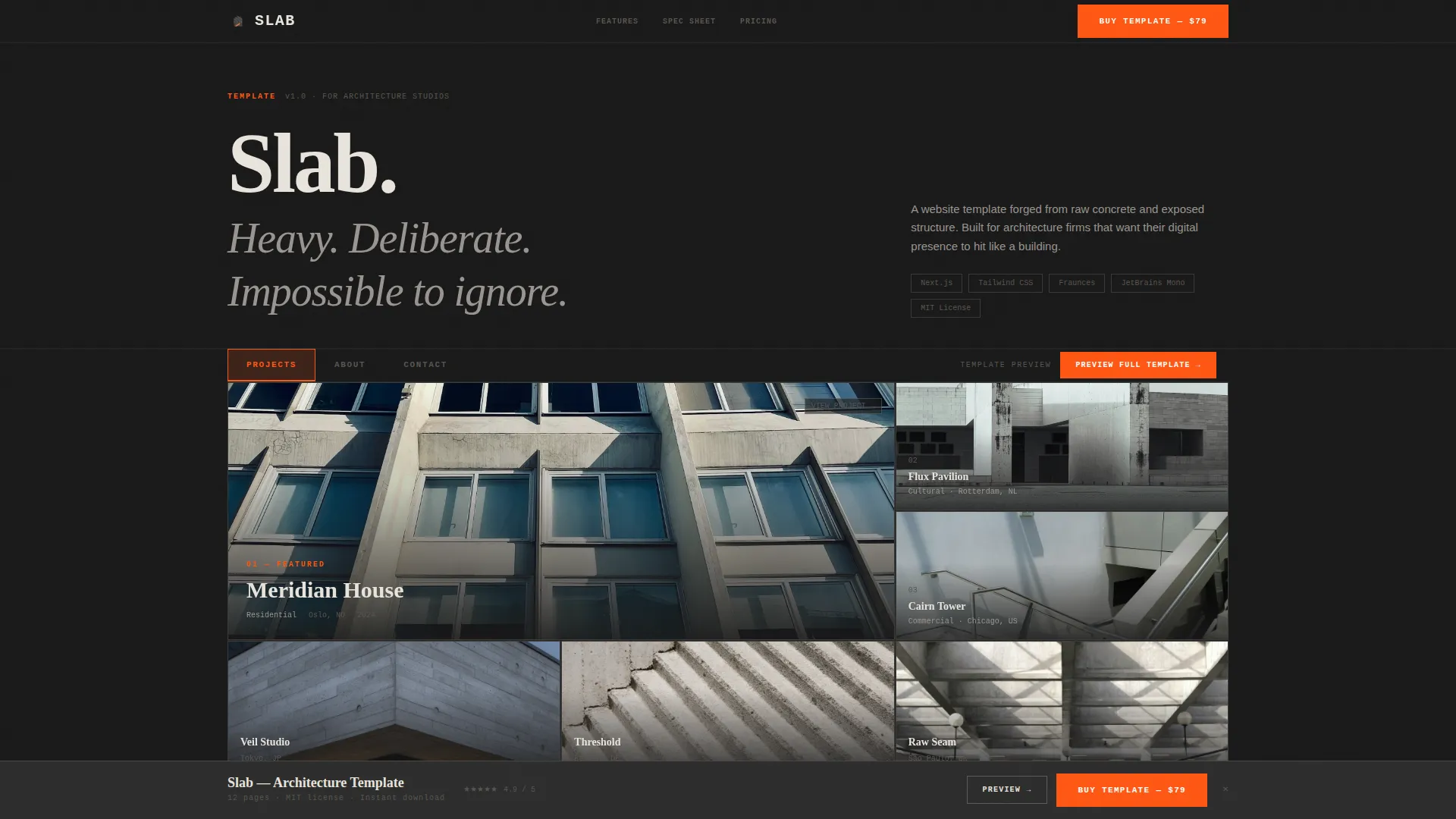
- A Feature Tab Switcher header that restructures the bento grid in real time across three tabs
- A Spec Sheet scroll layout that isolates and proves each technical capability section by section
- A persistent "Buy Template" bottom bar and a primary "Preview the Full Template" call-to-action embedded inside the header grid
Feature list
Slab packs its capabilities into a tight, evidence-based structure. Each feature below is visible and testable before any purchase is made.
Real-Time Feature Tab Switcher Header
Three labeled tabs sit across the top of a near-fullscreen bento grid preview. Clicking any tab, "Projects," "About," or "Contact," restructures the card layout below in real time. This lets visitors see exactly how the template handles portfolio grids, long-form studio narratives, and inquiry forms before committing.
Bento Grid Layout System
The template is built on a deliberate bento grid structure. Cards resize and rearrange to accommodate different content densities without losing the visual weight of the brutalist aesthetic. The grid is the layout, not a decoration over one.
Spec Sheet Scroll Structure
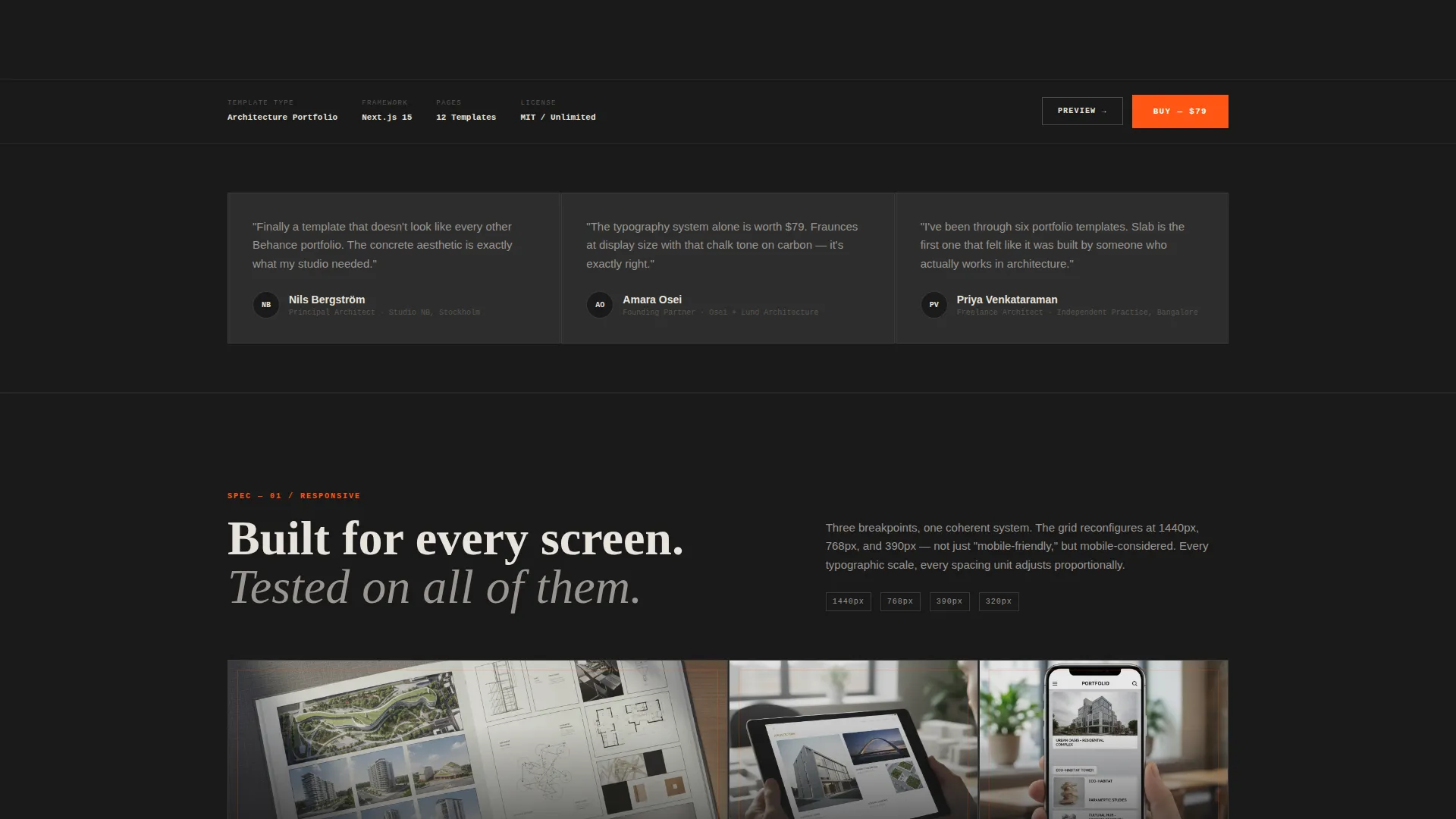
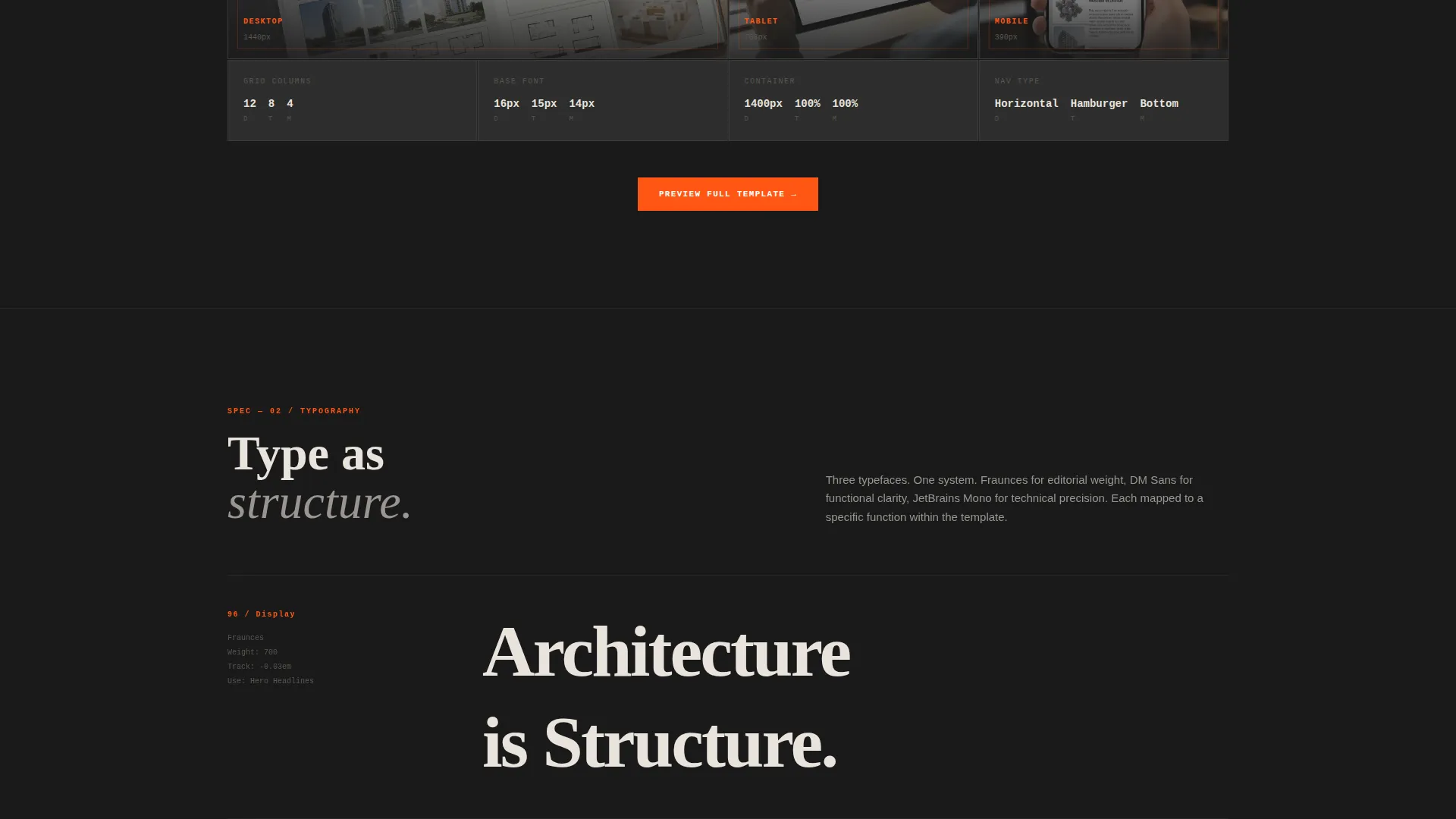
Each scroll section below the header isolates one technical capability and pins it to a visual proof. Responsive breakpoints appear in a triple-device lockup. Typography is shown as a literal specimen sheet with font names, weights, and sizes exposed. Animation options play in looping micro-demos.
Carbon Fiber Color System
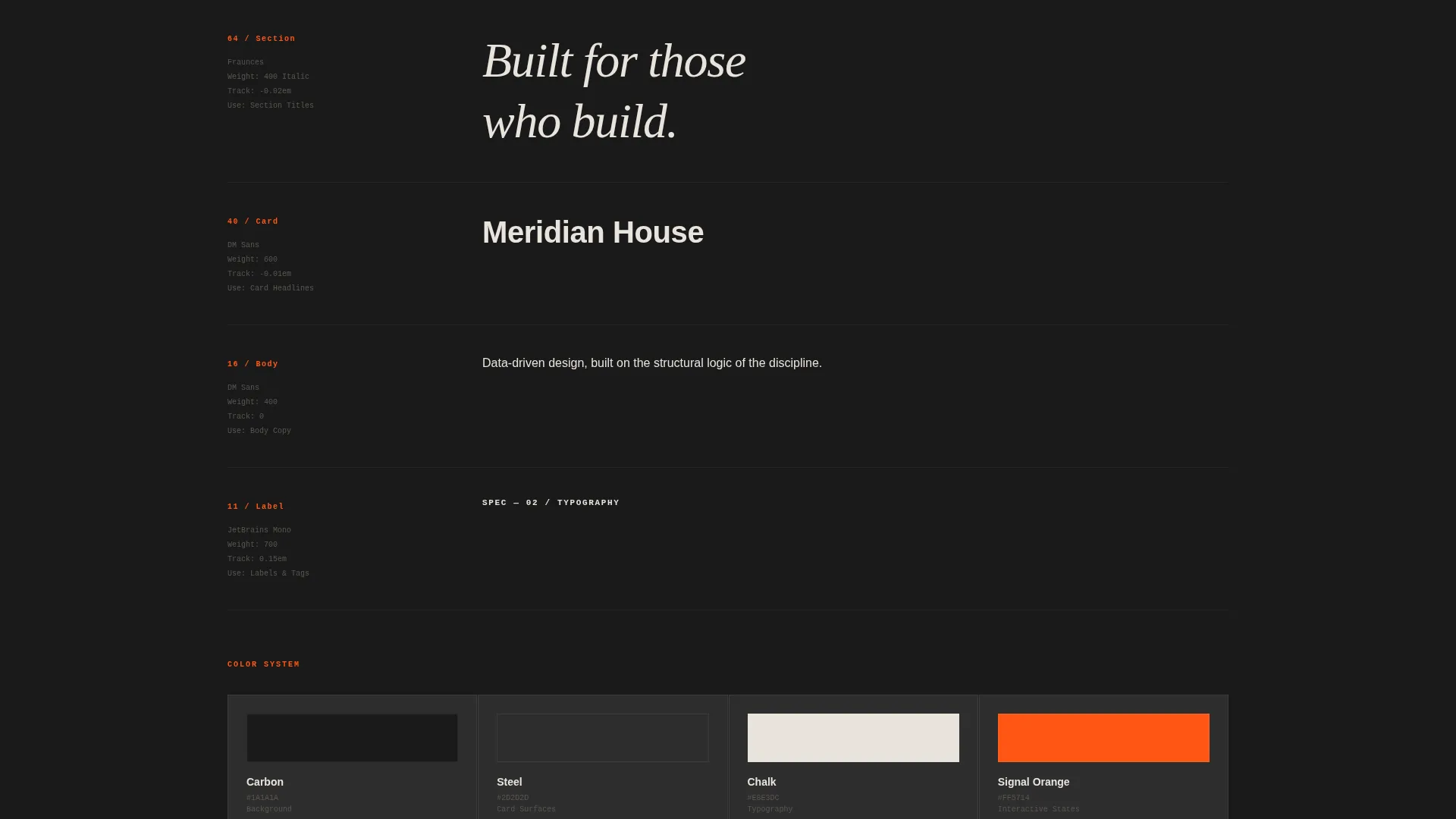
The color palette is built from four deliberate values: deep graphite at #1A1A1A for the dominant background, reinforced steel at #2D2D2D for card surfaces, raw chalk at #E8E3DC for all typography, and signal orange at #FF5714 reserved for hover states and active tabs. Color is used structurally, not decoratively.
Click-Through Conversion Layout
The page is engineered around a two-call to action system. The primary call-to-action, "Preview the Full Template," appears inside the header grid and anchors the bottom of every spec section. The secondary call-to-action, "Buy Template at $79," slides in as a persistent bottom bar after the third scroll section, giving the visitor time to build confidence before the purchase prompt appears.
Tight Architectural Photography Framing
Project imagery is cropped close and purposefully: a corner of cantilevered concrete, a shadow line crossing a stairwell. There are no decorative mockup frames. The template presents photography the same way an architecture publication would, letting the work hold the visual weight.
Page sections overview
| Section | Purpose |
|---|---|
| Tab Switcher Header | Demonstrates real-time grid restructuring across Projects, About, and Contact tabs |
| Portfolio Bento Grid | Displays project photography in a structured, resizable card system |
| Responsive Breakpoints | Shows the template at three device sizes in a side-by-side lockup |
| Typography Specimen Sheet | Exposes font names, weights, and sizes as a readable visual proof |
| Animation Options Demo | Loops micro-demos of available animation choices |
| Primary call to action Anchors | Repeats the "Preview the Full Template" button after each spec section |
| Persistent Bottom Bar | Slides in the "Buy Template" purchase prompt after the third scroll section |
Design & branding system
The visual identity follows a Bold Brutalist theme built entirely around the Carbon Fiber color system. Every color decision has a structural role, and nothing is applied for decoration alone.
- Deep graphite (#1A1A1A) as the dominant background, reinforced steel (#2D2D2D) for card surfaces, and raw chalk (#E8E3DC) for all body and heading text
- Signal orange (#FF5714) used exclusively on hover states and active tab indicators, so it only appears when something is interactive
- Typography is treated as a material: weights and sizes are exposed on the specimen sheet, and the scale is intentional enough to be documented publicly
Mobile & speed optimization
The Spec Sheet scroll structure includes a triple-device lockup that demonstrates how the template responds across screen sizes. Responsive behavior is shown as visual proof, not assumed.
- Responsive breakpoints are demonstrated side-by-side in the template's own spec section
- The bento grid layout is designed to reflow across device widths without losing the visual hierarchy
- No decorative mockup frames or extra chrome add weight to the rendered output
How this template helps you convert
Slab treats conversion as a natural result of demonstrated quality, not persuasive pressure. The page structure builds evidence first and places purchase prompts only after that evidence is established.
- The "Preview the Full Template" button appears inside the header grid immediately, so the most engaged visitors can act at any point during their session.
- The Spec Sheet scroll progressively reveals technical detail, rewarding visitors who scroll deep with the confidence needed to make a purchase decision.
- The persistent "Buy Template at $79" bottom bar slides in only after the third spec section, timing the direct purchase prompt to land after the value case is already made.
Other information about this template
Slab is priced at $79 and routes directly to a live, interactive demo site on click. There is no email gate and no form between the visitor and the product proof.
- The template is positioned for architecture firms, solo practitioners, and freelance architects who want a digital presence that reflects the seriousness of their discipline
- The bento grid structure and brutalist visual language make Slab a strong fit for architecture website builders looking beyond conventional portfolio themes
- The page earns its click through evidence, not through pressure tactics or countdown timers
Theme
Bold Brutalist
Creative direction
Spec Sheet
Color system
Carbon Fiber
Style
Bento Grid
Direction
Click-Through
Page Sections
Real-time Feature Tab Switcher
Bento Grid Layout System
Spec Sheet Scroll Structure
Carbon Fiber Color System
Two-stage Conversion Layout
Architectural Photography Framing
Related questions
Who is this template designed for?
What does the Feature Tab Switcher actually do?
Is there a live demo available before purchasing?
How does the pricing and purchase flow work?



