Self-Storage Vertical SaaS Specialist Cost Calculator Website Template
Occupancy is a single-page self-storage management landing page built around a Data Command visual identity. It opens with an interactive Revenue Recovery Calculator, moves into a twelve-category comparison table, and closes with a prominent app download call to action. The template is designed for operators who need every unit status visible at a glance, before the first decision of the day.
by Rocket studio
Quick summary
Occupancy is a dark-themed, glassmorphic landing page template for self-storage management software. It leads with a Revenue Recovery Calculator that delivers immediate value, then presents a side-by-side comparison table across twelve operational categories. The page closes with a mobile app download call to action and a secondary free facility audit offer.
Who this template is for
This template is built for self-storage software companies targeting operators who manage one or more facilities. It speaks directly to the people running day-to-day storage operations, not just evaluating software in the abstract.
- Independent owner-operators managing two or three facilities from the road
- Regional real estate investment trusts rolling up smaller, independent portfolios
- Third-party property managers overseeing fifteen or more facilities across multiple states
What problem this template solves
Most self-storage operators are still piecing together their workflow from spreadsheets, paper gate logs, and manual lien notices. The gap between what they do today and what modern software can automate is real, but it is hard to communicate through feature lists alone.
- Operators struggle to see vacancy rates, delinquency flags, and payment failures across multiple facilities at once
- Manual workflows slow down lien processing, tenant communication, and move-in follow-up
- There is no clear way to quantify the revenue left on the table until a calculator shows the exact number
What you get with this template
This template delivers a complete, section-led landing page structured to move a skeptical operator from curiosity to download. Every section has a job, and the layout keeps the product front and center throughout.
- An interactive Revenue Recovery Calculator placed before any sales copy
- A twelve-category comparison table contrasting legacy workflows against the software
- Three strategically placed app download calls to action and a secondary free facility audit path
Feature list
This template includes purpose-built components designed specifically for self-storage software positioning. Each section contributes directly to the conversion goal.
Product Screenshot Hero
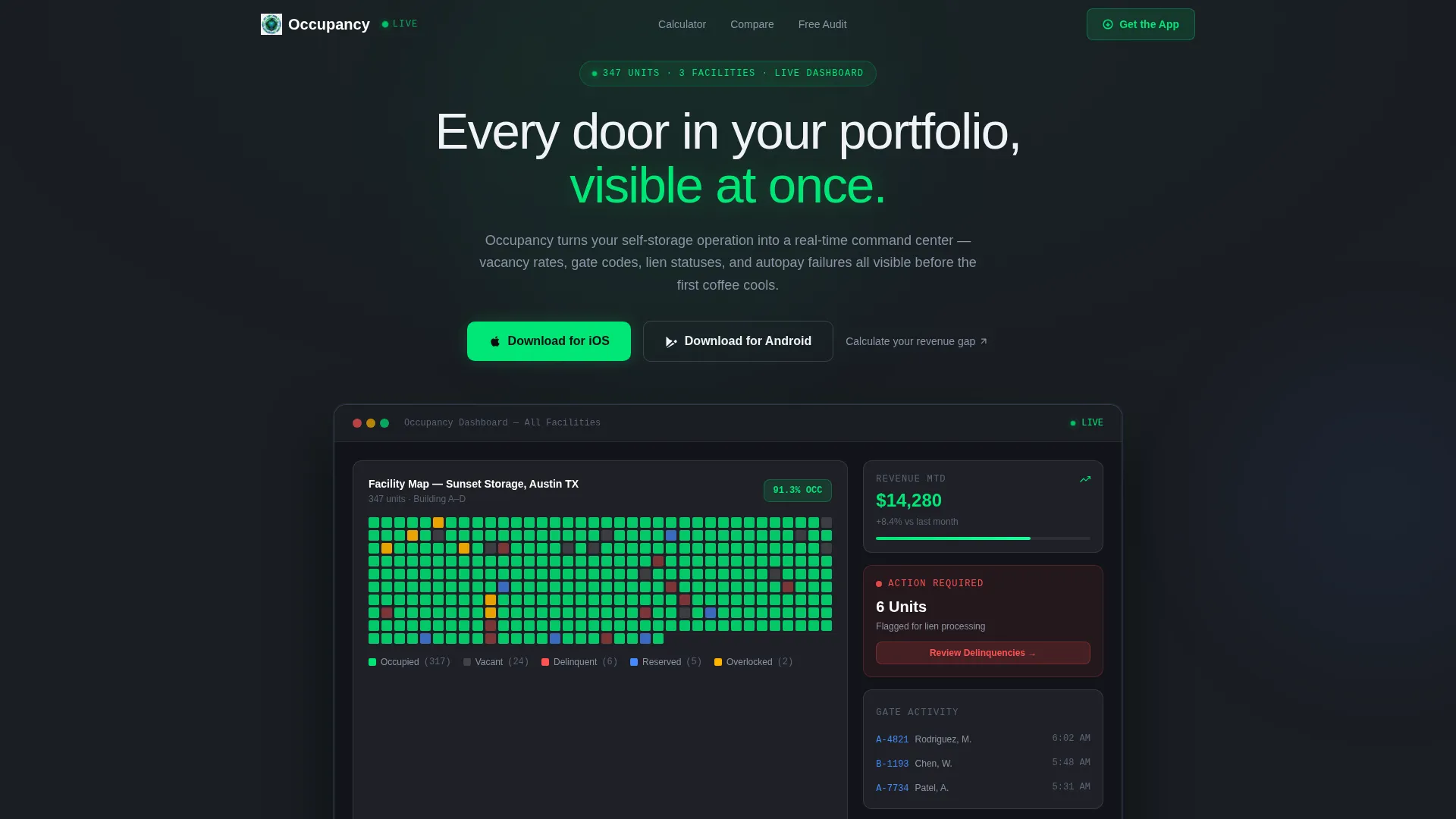
The header features a pixel-accurate dashboard render showing a facility map with 347 color-coded units. Visible figures include 91.3% occupancy, $14,280 in monthly revenue collected, and 6 units flagged for lien processing. The screenshot floats on the charcoal background with a glassmorphic edge treatment that keeps the product as the visual centerpiece.
Revenue Recovery Calculator
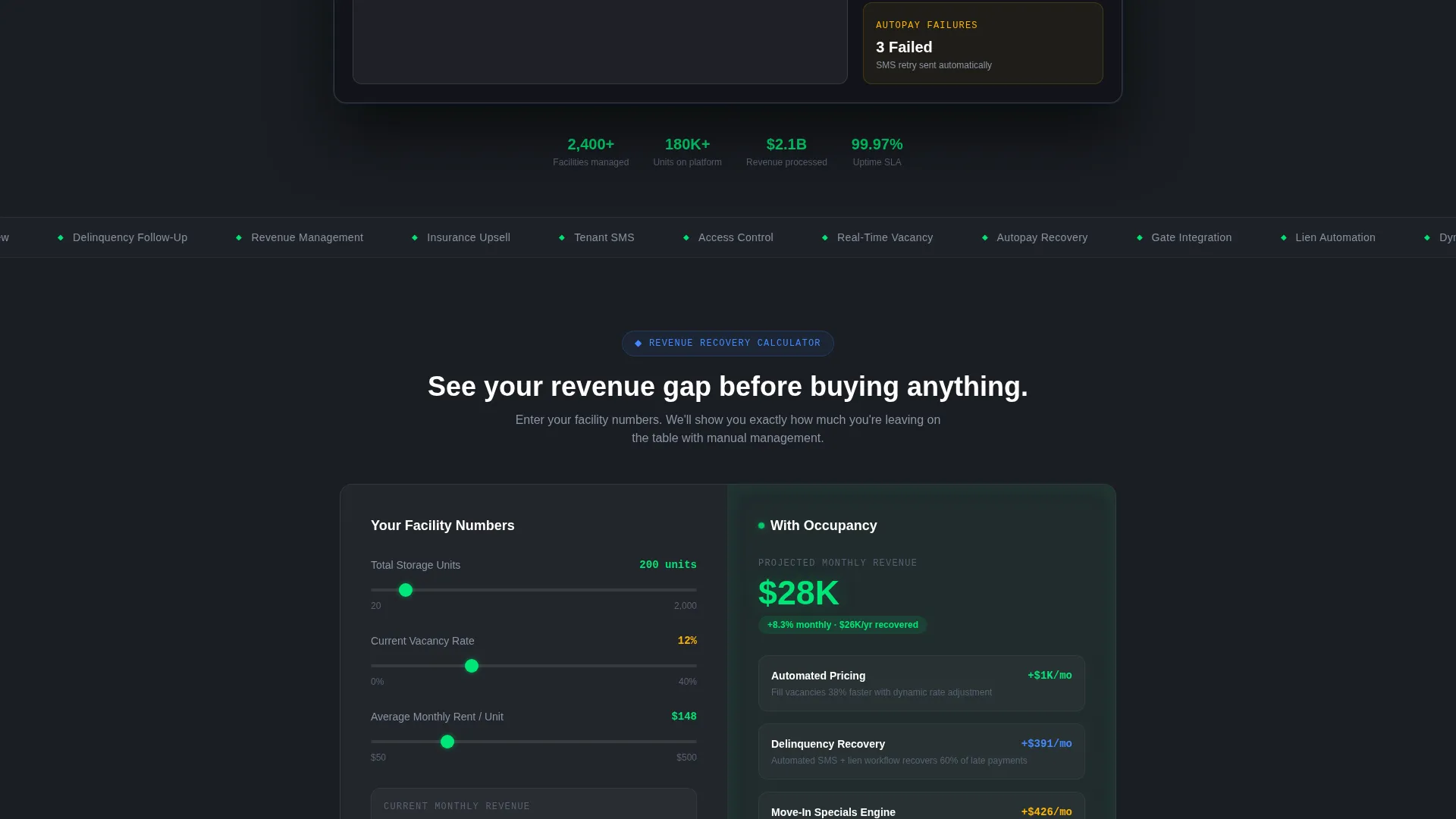
Before any feature list appears, visitors interact with a calculator where they input total unit count, average vacancy rate, and current monthly revenue. The tool instantly projects income gains from automated pricing, delinquency follow-up, and dynamic move-in specials. Calculator results persist as a sticky reminder of the revenue gap throughout the page scroll.
Twelve-Category Comparison Table
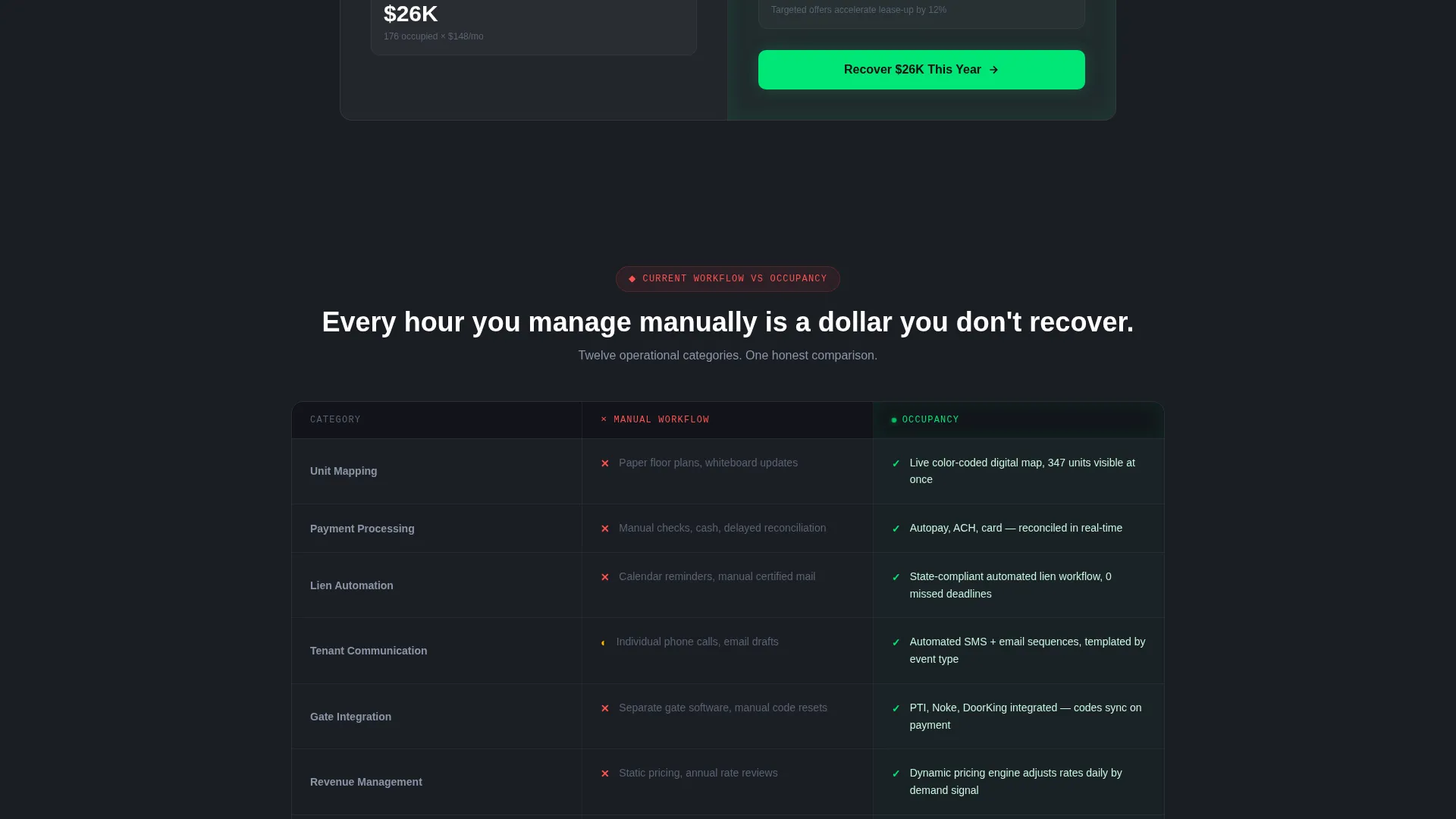
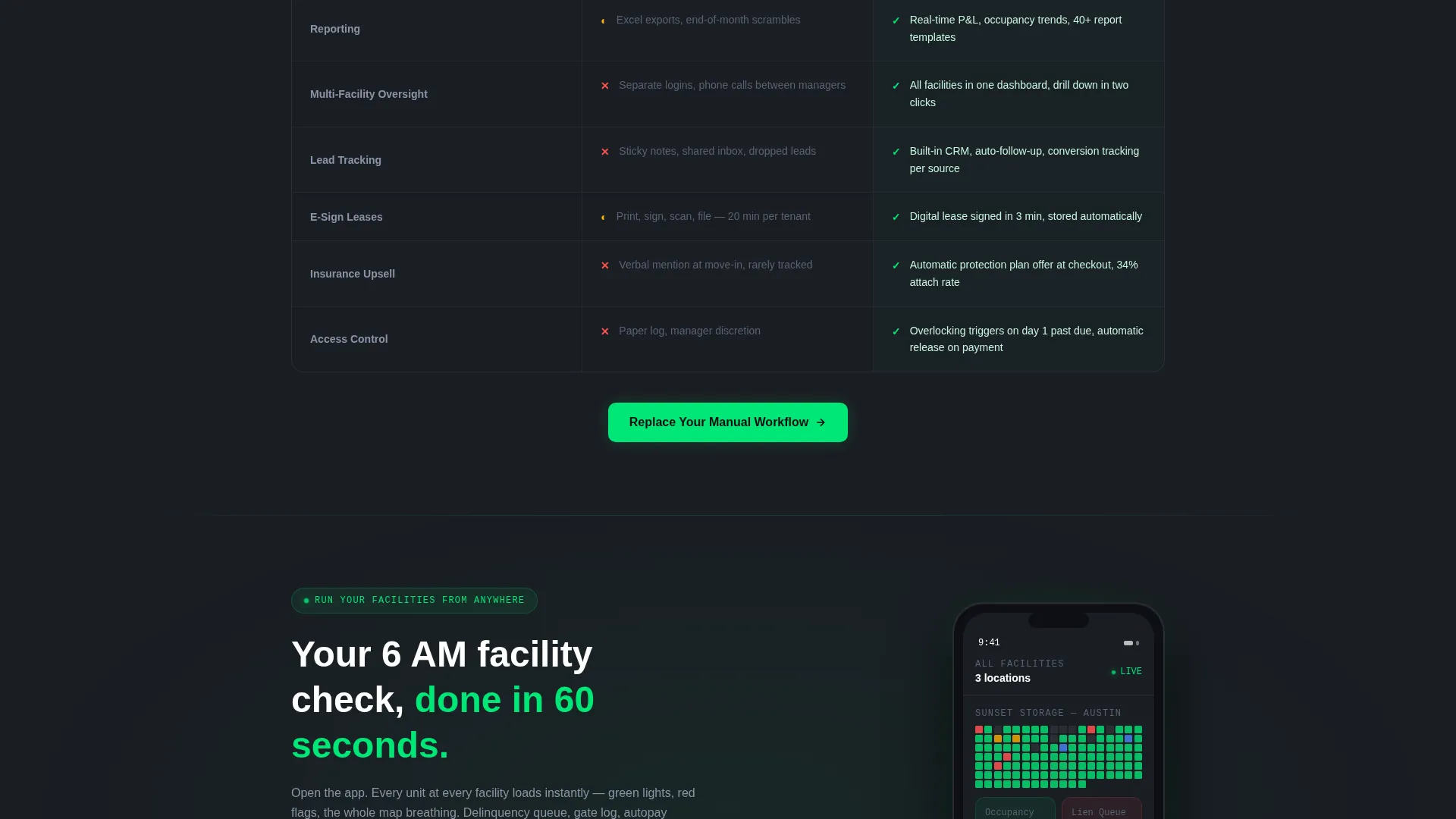
The comparison table stacks the operator's current manual workflow against the software across twelve operational categories. Categories include unit mapping, payment processing, lien automation, tenant communication, gate integration, revenue management, reporting, multi-facility oversight, lead tracking, electronic lease signing, insurance upsell, and access control. Each row uses the frosted glass card treatment, with the software column accented in occupancy green.
App Download Call to Action
The primary call to action reads "Run Your Facilities From Anywhere" and is paired with both App Store and Google Play badges. This call to action appears three times: after the calculator output, after the comparison table, and inside a full-width glassmorphic closing panel that displays a mobile app screenshot with a unit map glowing on a phone screen.
Free Facility Audit Path
A secondary conversion path invites operators to enter their facility count and management style. In return, they receive a personalized operational score. This path runs parallel to the app download flow without competing for visual priority.
Glassmorphic Data Cards
Frosted translucent panels float above the deep charcoal base throughout the page. Electric green pulses on active data points, and cold alert blue marks interactive edges and hover states. The card system gives every data element depth and visual separation without relying on heavy shadows.
Page sections overview
| Section | Purpose |
|---|---|
| Hero Dashboard Screenshot | Establish product credibility instantly with real facility data |
| Revenue Recovery Calculator | Deliver immediate value before any feature copy appears |
| Calculator Results Reminder | Sticky display that keeps the revenue gap visible during scroll |
| Comparison Table | Show the gap between manual workflows and the software side by side |
| App Download Panel | Primary call to action after the comparison table |
| Facility Audit Form | Secondary conversion path for operators not ready to download |
| Closing App Panel | Final full-width call to action with mobile screenshot |
Design & branding system
The visual identity follows a Data Command theme executed through a layered glassmorphic system. Depth is created by transparency rather than shadow, giving the page a security-monitor aesthetic that resonates with operators used to watching live camera feeds.
- Base layer in deep facility charcoal (#1A1D23), frosted panels at 8% white opacity floating above it
- Electric occupancy green (#00E676) reserved for active data points and live status indicators
- Cold alert blue (#448AFF) applied to interactive edges and hover states throughout
Mobile & speed optimization
The template is designed to support operators who check facility status from a pickup truck or a job site. The mobile experience centers on the app download flow, making the path from page visit to install as direct as possible.
- The app download call to action appears three times, with the final instance anchored in a full-width panel featuring a phone screen visual
- The comparison table and calculator are structured to read cleanly on smaller screens without horizontal scrolling
How this template helps you convert
Every structural decision in this template serves a specific conversion purpose. The layout earns trust before asking for action.
- The Revenue Recovery Calculator gives operators a personalized number before any pitch begins, making the value concrete and specific to their own facility.
- The comparison table makes the cost of the current manual workflow visible in twelve categories, removing the need for the visitor to imagine the gap themselves.
- Three placements of the app download call to action ensure that a motivated operator never has to scroll back up to find the next step.
Other information about this template
This template is built for the self-storage vertical as a software-as-a-service positioning page. It is designed for companies operating in a niche where buyers are practical, data-driven, and short on time.
- Template style is a single-page comparison table landing page with a calculator-first creative direction
- The theme and color system are purpose-built for technology products in the self-storage management software niche
- This template works well for product launches, paid traffic campaigns, and direct outreach to owner-operators and regional portfolio managers
- The free facility audit secondary path gives sales teams a warm lead capture option separate from the app install funnel
Theme
Data Command
Creative direction
Calculator/Tool First
Color system
Glassmorphic
Style
Comparison Table
Direction
App Download
Page Sections
Product Screenshot Hero Section
Interactive Revenue Recovery Calculator
Twelve-category Comparison Table
Triple-placement App Download Call to Action
Free Facility Audit Secondary Path
Glassmorphic Data Card System
Related questions
Who is this landing page template designed for?
What does the Revenue Recovery Calculator do?
How many times does the app download call to action appear on the page?
What categories does the comparison table cover?
Does this template support a secondary lead capture goal?



