AI for Construction Cost Estimator Website Template
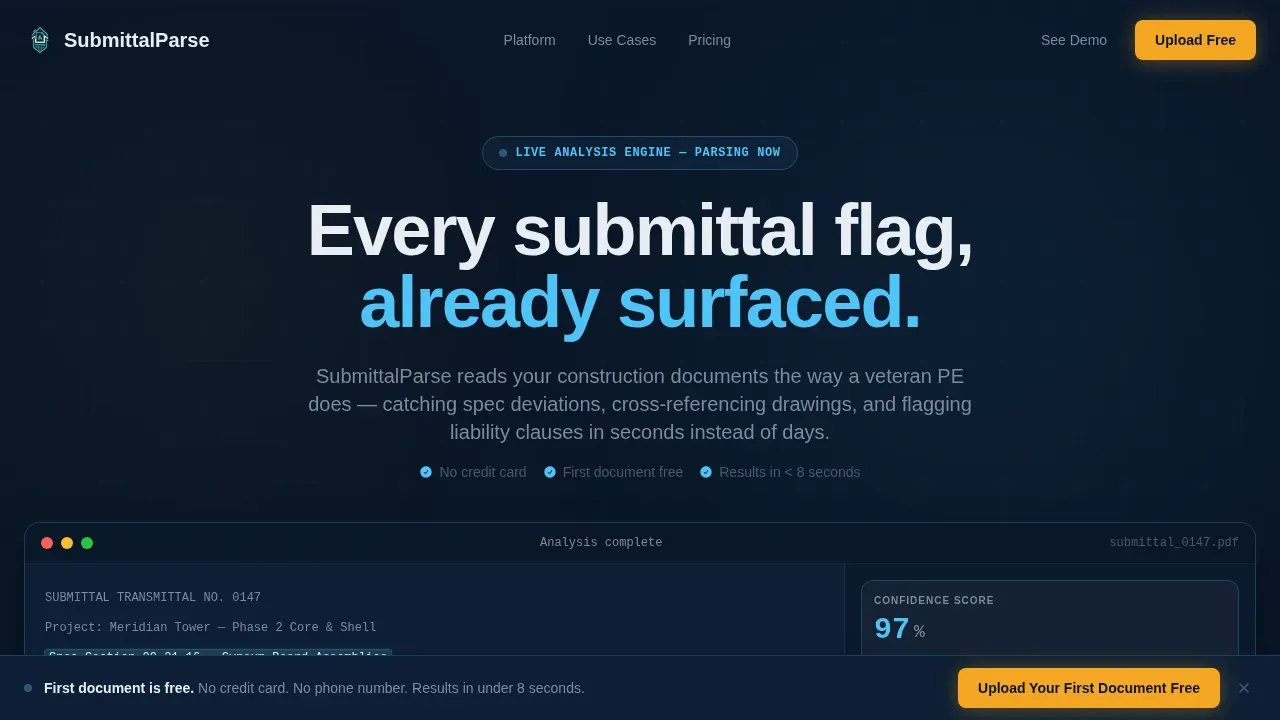
This submittal AI document intelligence landing page template is built for construction technology platforms that parse submittals, RFIs, and change orders at scale. It follows a scroll reveal structure with a live interactive document upload preview, a Document Complexity Estimator tool, and a freemium conversion flow. The dark command-center design uses a Midnight Blue palette to make extracted data feel authoritative and immediate.
by Rocket studio
Quick summary
This submittal AI document intelligence landing page template gives construction AI platforms a complete, conversion-ready single-page layout. The design centers on an interactive document upload preview, a complexity estimator calculator, and progressive scroll reveals that demonstrate parsing capability layer by layer. Every section builds trust through product demonstration before asking a visitor to sign up.
Who this template is for
This template is built for teams shipping AI document intelligence products into the construction technology market. It fits builders and marketers who need a landing page that proves value before requesting identity.
- General contractor software teams targeting project engineers on large commercial builds
- Construction AI founders positioning a document intelligence resource for owner's reps and preconstruction managers
- Product marketers running freemium or free trial acquisition for AI tools in the built environment
What problem this template solves
Document review on large commercial projects is expensive, slow, and error-prone. Project teams spend days reading through submittals, RFIs, and change orders manually, trying to flag spec deviations, cross-reference drawing sets, and surface buried liability language. The page this template creates puts the product's speed and accuracy on screen immediately, eliminating the need to describe capability through claims alone.
- General contractors lose entire review cycles when a single table of spec data gets missed in a submittal package
- Owner's reps tracking compliance across dozens of subcontractor packages have no fast way to extract data and compare it against contract requirements
- Preconstruction managers reconciling addenda against bid documents face unstructured documents with no reliable structure information
What you get with this template
You get a fully structured single-page layout built around progressive disclosure and product-first trust. Every section is designed to create a document intelligence resource that earns the visitor's confidence before converting them.
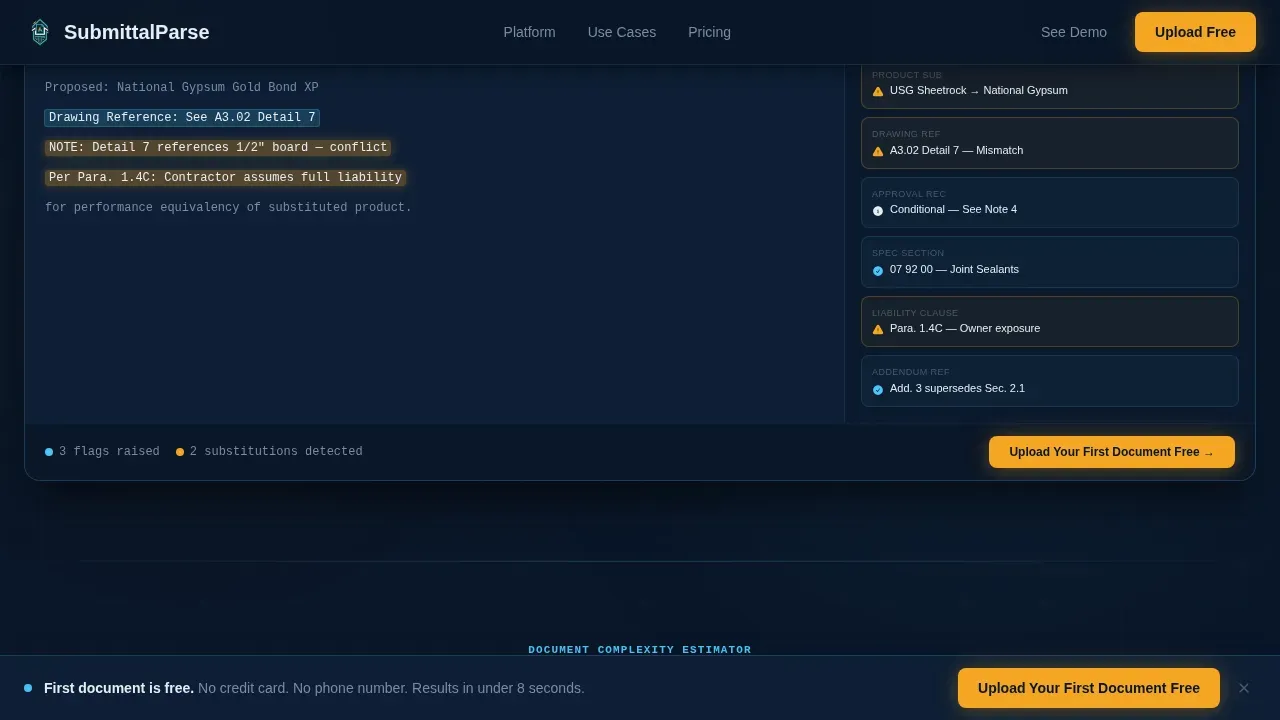
- A live interactive header with a document upload simulation, pulsing blueprint cyan highlights, and a real-time confidence score ticker
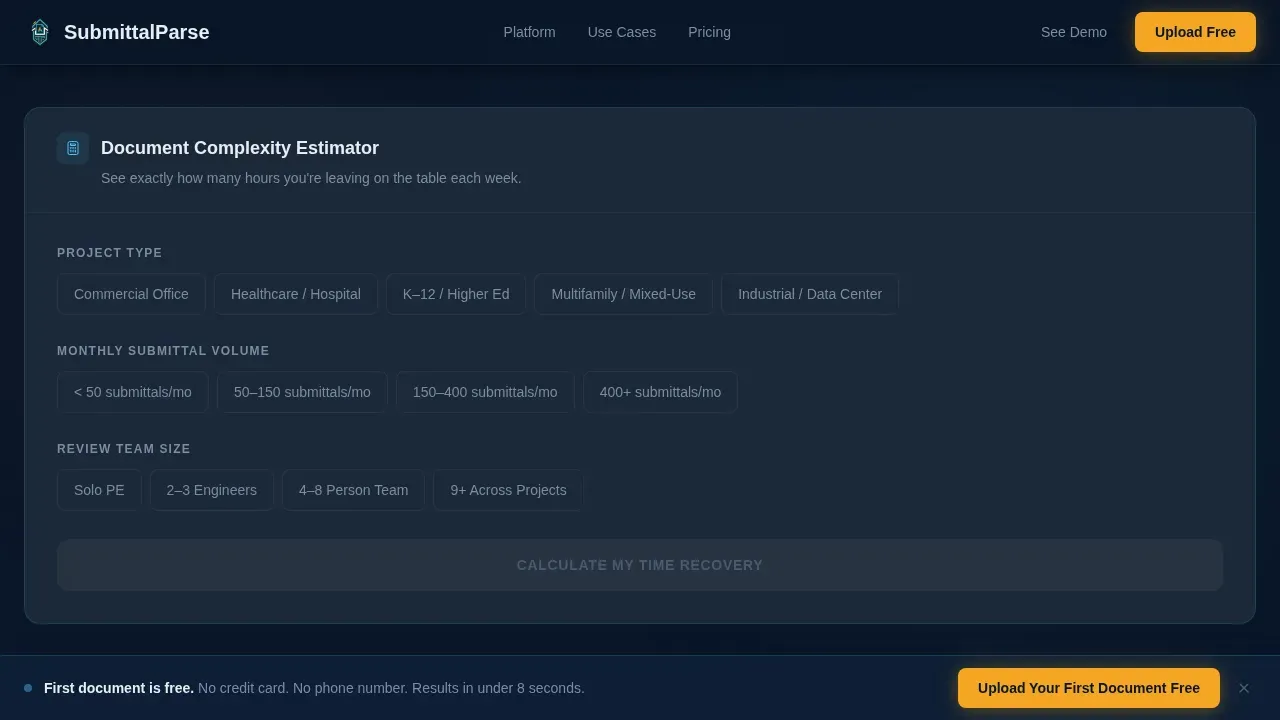
- A Document Complexity Estimator that accepts project type, submittal volume, and review team size, then outputs hours saved and cost recovery in amber-highlighted figures
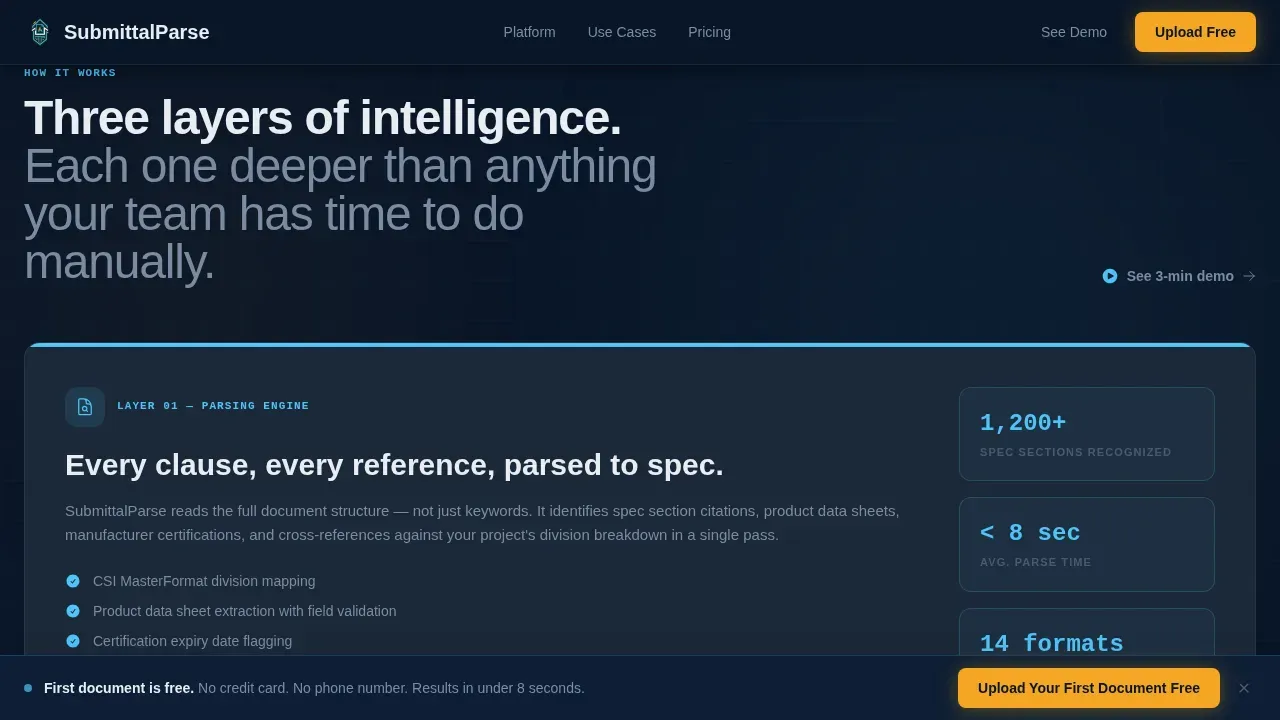
- Three capability reveal sections covering the parsing engine, cross-reference intelligence, and audit trail generation, each materializing on scroll
Feature list
This template provides the following built-in sections and interactive components, all drawn directly from the source brief.
Live Interactive Document Upload Preview
The header drops visitors directly into a functioning document upload zone. A sample submittal package is pre-loaded and shown mid-analysis. Highlighted clauses pulse in blueprint cyan. A sidebar streams extracted data points including spec section references, product substitution flags, and approval status recommendations. A confidence score ticks upward in real time. No stock photography appears. The product itself is the hero, demonstrating document layout analysis and text extraction before the visitor reads a single sentence of copy.
Document Complexity Estimator Calculator
Below the header preview, a calculator lets visitors select their project type, average monthly submittal volume, and current review team size. The model outputs hours saved per week and cost recovery in amber-highlighted figures. This interaction earns trust through demonstrated value. The estimator reflects the best practice of letting visitors self-qualify before committing to a submission form.
Progressive Scroll Reveal Capability Sections
Three capability sections materialize as the visitor scrolls. The first reveals the parsing engine and its ability to extract data from submittals and change orders. The second shows cross-reference intelligence against drawing sets. The third demonstrates audit trail generation. Each section mimics the feeling of documents being processed layer by layer, with complexity building while clarity never breaks.
Social Proof with Specific Project Metrics
A dedicated social proof section displays general contractor and owner's rep testimonials that reference specific project dollar values and review time reduction metrics. Named testimonials with real numbers give the page the credibility of a complete list of project outcomes rather than generic praise.
Minimal Freemium Conversion Flow
The primary call to action, "Upload Your First Document Free," appears three times: inside the header preview, after the estimator results, and in a persistent bottom bar that activates after 40 percent scroll depth. The signup form collects only work email and company name. No credit card and no phone number are required. A secondary path offers a link to a recorded three-minute demo for visitors not ready to upload their own files.
Page sections overview
| Section | Purpose |
|---|---|
| Interactive Header Preview | Show the product parsing a live document before any scroll |
| Complexity Estimator Tool | Let visitors calculate hours saved and cost recovery |
| Parsing Engine Reveal | Demonstrate core document intelligence and data extraction |
| Cross-Reference Intelligence | Show drawing set comparison and spec deviation flagging |
| Audit Trail Generation | Display how the model records and surfaces liability clauses |
| Social Proof | Establish credibility with GC and owner's rep testimonials |
| Primary Call to Action | Capture work email and company name with minimal friction |
| Persistent Bottom Bar | Keep the freemium call to action visible after 40 percent scroll depth |
| Footer | Linear single-row footer with supporting links |
Design & branding system
The template uses a Dashboard Pro theme built on a Midnight Blue color system. The palette is calibrated to feel like a command center at midnight: dark enough that glowing data feels alive, precise enough that every highlighted cell carries authority.
- Deep terminal navy (#0A1628) as the primary background, steel-beam charcoal (#1B2838) for card surfaces, cool white (#E8EDF2) for primary text, and weathered gray (#7A8BA0) for secondary copy
- Blueprint cyan (#4FC3F7) for data highlights, interactive states, and pulsing clause markers throughout the document preview section
- Safety-vest amber (#F5A623) reserved exclusively for call-to-action buttons and critical alert figures output by the estimator calculator
Typography uses Manrope as the primary face and JetBrains Mono for all data and code elements. This pairing keeps the page readable for a project engineer scanning fast while reinforcing the terminal-dashboard aesthetic.
Mobile & speed optimization
The template is designed desktop-first, reflecting the jobsite trailer laptop context of its primary audience. Mobile fallback is included to ensure the page renders cleanly on phones for visitors reviewing the tool outside of the office.
- Touch-friendly interactive elements follow a minimum height and spacing standard, ensuring the estimator calculator and call-to-action buttons are usable on smaller screens
- Server Components handle static sections to keep initial load fast, while Client Components manage the calculator, confidence score ticker, and scroll reveal animations
- The persistent bottom bar, signup form, and primary call-to-action buttons meet sizing guidelines for reliable tap targets on mobile devices
How this template helps you convert
The page is structured around a freemium conversion strategy that proves product value before asking for anything in return.
- The interactive document upload preview in the header puts the AI processing capability on screen immediately, so visitors understand the product's accuracy and speed without reading marketing copy
- The Document Complexity Estimator creates a personalized output for each visitor, making the value of the tool concrete and specific before the signup form appears
- The persistent bottom bar keeps the "Upload Your First Document Free" call to action visible throughout the scroll, while the secondary demo link captures visitors who need more evidence before committing
Other information about this template
This template is purpose-built for teams building or marketing products that use AI document intelligence to process construction documents. The sections and interactions described in this page reflect the capabilities defined in the source brief. The following technical and platform context applies to buyers evaluating this template against their product's underlying infrastructure.
- Azure AI Document Intelligence is a cloud service that uses machine learning to analyze text and structured data from documents. It serves as one common foundation for products like the one this template promotes. Azure AI Document Intelligence outputs data in JSON format, which is widely compatible with many databases and programming languages. It also uses a document intelligence layout model to extract text, tables, selection marks, and document structure from multiple pages and various file types.
- The layout model in Azure AI Document Intelligence extracts titles, section headings, and page headers as structure information, and can output extracted text in HTML or Markdown format. It captures handwritten text alongside printed content, reading both as lines and words with a confidence score. The layout model also identifies selection marks and radio buttons in forms, and handles model pdf image inputs alongside Microsoft Office files.
- Custom template models accurately extract labeled key value pairs, selection marks, tables, regions, and signatures from documents. A custom template model uses document layout cues to extract values and works best for highly structured documents with defined visual templates. Custom models require at least five examples of completed forms as training data to improve accuracy. For best results, submit one clear photo or a high quality scan per document during custom model training to avoid errors from poor image dimensions or low minimum height inputs.
- Custom models can be organized into composed models that route each document to the right custom template model through a single endpoint. You can create a composed model by associating multiple custom models trained on different document types into a single model. This approach supports custom extraction model training and custom classification model training as separate workstreams that share a single document intelligence resource.
- A custom neural model handles unstructured documents and mixed-layout inputs where a fixed template model would fall short. The neural model approach is the right choice when document structure varies across a submission batch or when a custom template alone cannot capture all field types. Custom neural model training differs from template model training in that it learns from document patterns rather than fixed layout cues. The latest version of the platform supports both template and neural model types under the same Azure subscription.
- Retrieval augmented generation (RAG) is a technique that leverages document intelligence to improve information retrieval and generation across large document sets. Retrieval augmented generation RAG workflows depend on the layout model to extract text, tables, and selection marks for semantic chunking. Extracted content can then be chunked and embedded for retrieval in RAG applications. Azure AI search integrates with document intelligence outputs to power these RAG applications at scale. Hierarchical document structure analysis is crucial for organizing extensive documents in these flows.
- Prebuilt models in Azure AI Document Intelligence allow teams to extract data from common document types without custom model training. The prebuilt layout model handles general document layout analysis without labeling. Teams can also explore the document intelligence studio to label training data, review extracted text, and iterate on custom models before deployment. Azure AI services and Azure document intelligence are accessible through an Azure subscription, and a free pricing tier and free tier subscription option are available for teams evaluating the platform. The free tier does not require a credit card and applies a maximum number of transactions per month.
- The signup form on this template follows a best practice for freemium landing pages: limit fields to work email and company name only to maximize conversion on submission. The page does not include any password locked content behind a gate. A complete list of supported languages for document analysis is available in the platform documentation. The template content applies across English-language markets and supports USD currency and Imperial measurements by default. The content applies to construction technology buyers evaluating AI tools for their document workflows.
- The AI solution described in this template can connect to project management tools such as Procore, Autodesk, or SharePoint when the underlying platform supports those integrations. This template does not build those integrations itself but provides the page layout to communicate them clearly. Analyzing documents from a single page submittal or across a multi-package set is a core use case this template is designed to communicate.
Theme
Dashboard Pro
Creative direction
Calculator/Tool First
Color system
Midnight Blue
Style
Scroll Reveal (Progressive)
Direction
Freemium/Trial
Page Sections
Live Document Upload Preview Header
Document Complexity Estimator Tool
Progressive Scroll Reveal Capability Sections
Social Proof with Project-level Metrics
Minimal Freemium Conversion Form
Related questions
What types of construction documents does this template focus on?
Does the signup form require a credit card?
What is the secondary conversion path for visitors not ready to upload a document?
Can this template support products built on different document intelligence platforms?
How does the Document Complexity Estimator help convert visitors?



