Specialist Cloud & DevOps Professional Website Template
The Uptime template is a high-performance game server hosting landing page built on a split-screen layout. It leads with a live dashboard mockup, stats-first scroll rhythm, and a platform-detected download call to action. Designed for server admins and esports organizers, it communicates infrastructure credibility and speed through electric cyan accents, gunmetal tones, and interactive region nodes.
by Rocket studio
Quick summary
Uptime is a single-page template built for game server hosting platforms that need to convert serious buyers fast. The split-screen hero pairs a stark gunmetal headline with a fully interactive dashboard preview. Every scroll section leads with a raw number before its proof. The design feels like a server rack with the panel off: matte, precise, and alive.
Who this template is for
This template is built for hosting businesses that serve technically demanding clients. It speaks directly to people who lose money when a server stutters.
- Minecraft and Rust community admins managing 200 or more concurrent players
- Esports tournament organizers who need guaranteed uptime during live events
- Game hosting platforms launching a panel download or web console product
What problem this template solves
A game server hosting website has one job: make infrastructure feel trustworthy before the visitor clicks download. Generic hosting templates waste that moment with weak headlines and stock photography. This template solves the credibility gap with live-looking data, specific numbers, and a download flow that removes every point of waiting.
- Visitors leave when performance claims feel vague or unverifiable
- Hesitant users need a no-install path to test the service before committing
- Admins need to see global coverage and security proof before they plan a migration
What you get with this template
You get a fully structured landing page ready to customize and deploy. Every section is pre-built around the stats-first content rhythm described in the source brief.
- Split-screen hero with an interactive dashboard mockup on the right half
- Scroll-triggered stat sections with punch-then-prove layout rhythm
- Platform-detected download button showing Windows, macOS, and Linux icons automatically
- Sticky call-to-action bar that reappears after the third stat section
- Secondary inline call to action for a browser-based demo console
- Animated sixty-second flow sequence in the final section
Feature list
This template includes six core design and interaction features grounded in the source brief.
Live Dashboard Hero Preview
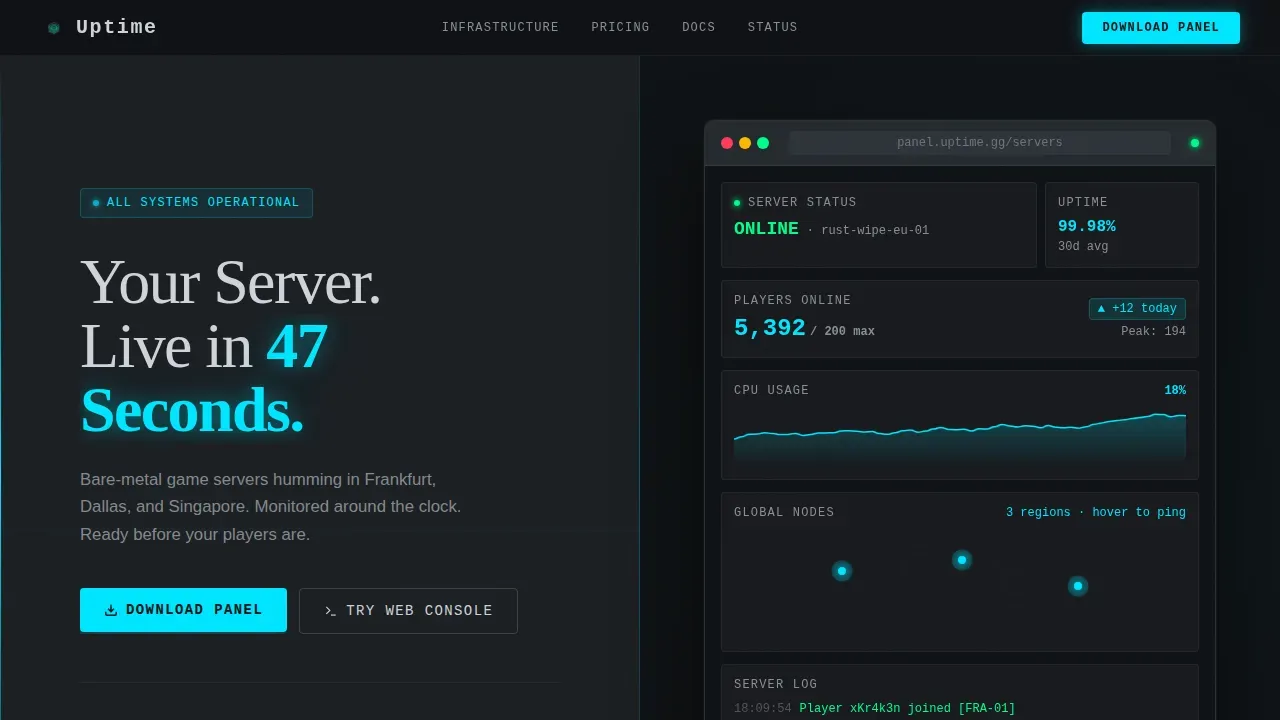
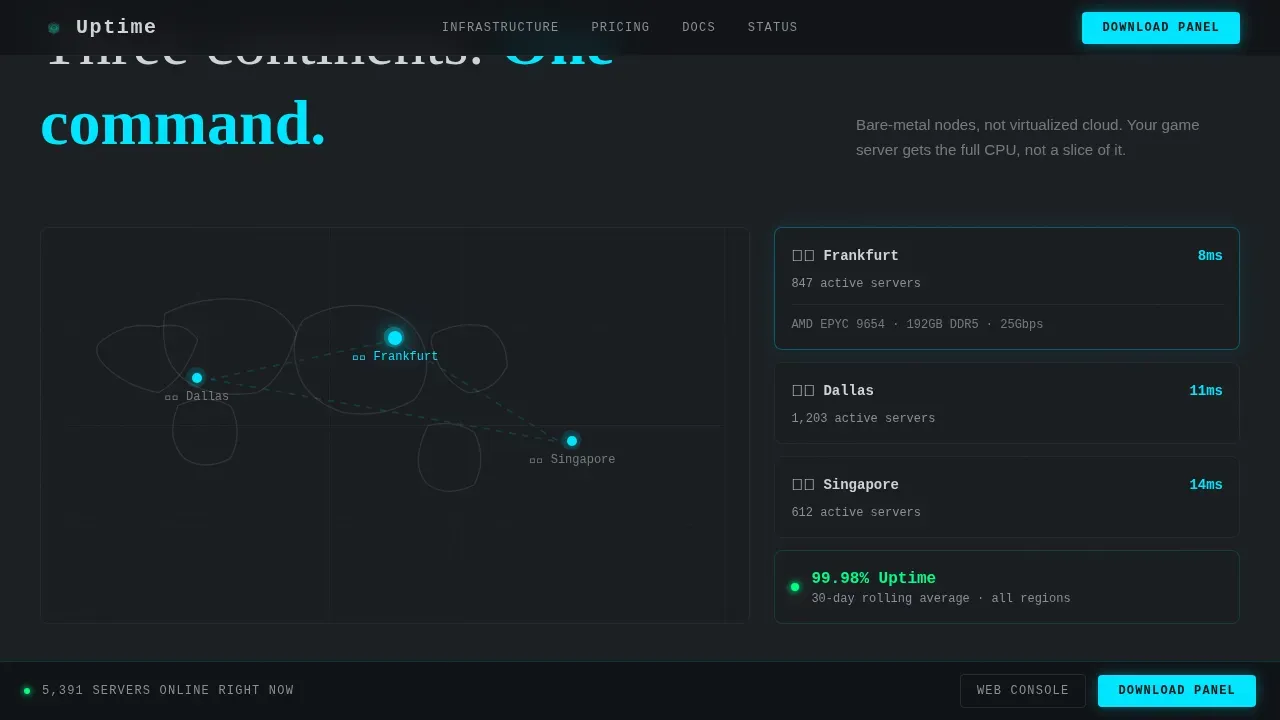
The right half of the split screen displays a browser-chrome mockup showing a functional-looking server dashboard. It includes a ticking player count, a world map with ping nodes for Frankfurt, Dallas, and Singapore, a CPU usage graph oscillating at eighteen percent, and a 99.98% uptime badge. Visitors can hover over region nodes to see latency numbers update in real time.
Stats-First Scroll Sections
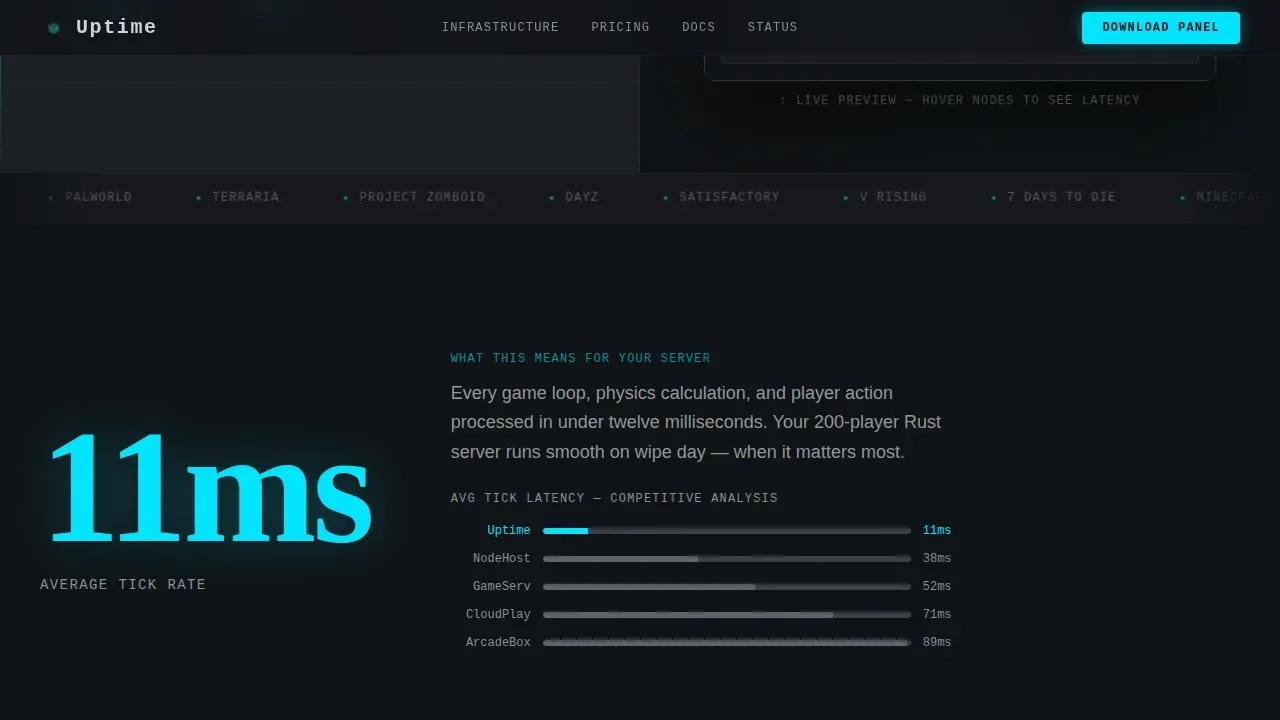
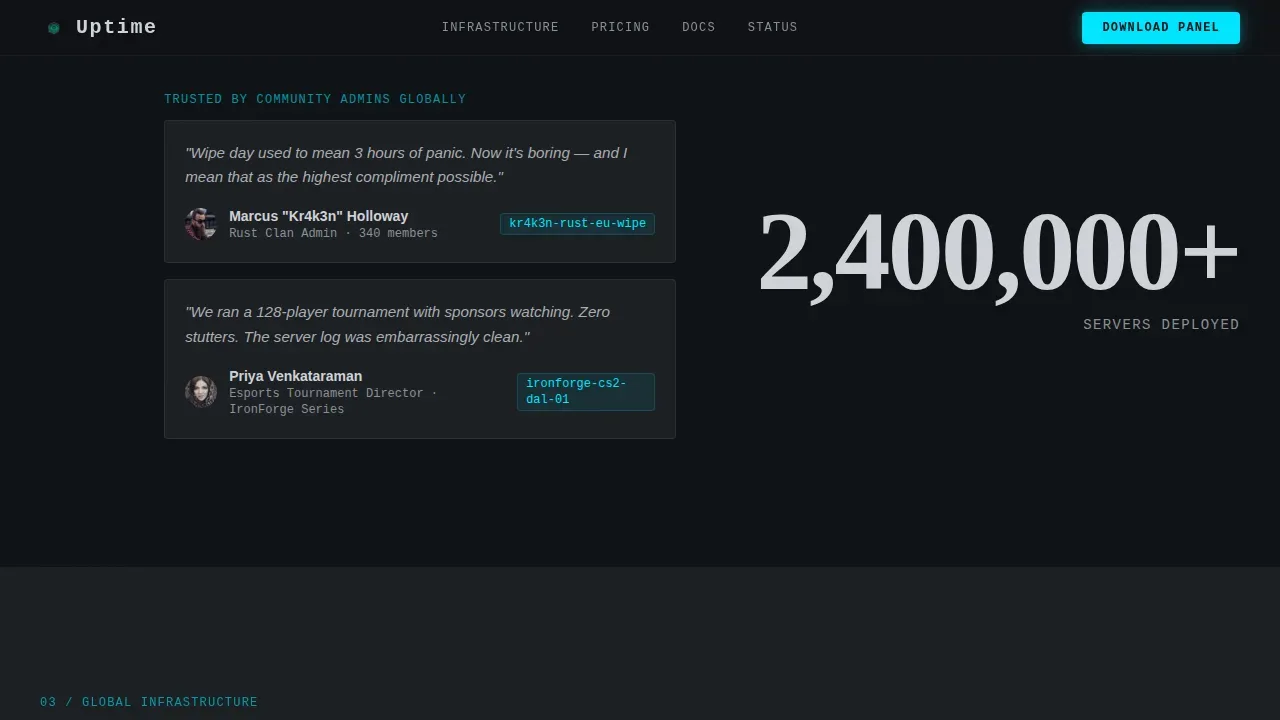
Each scroll section opens with a massive typographic number before revealing its context. "11ms" lands first as average tick rate. "2,400,000+" follows as total servers deployed. The layout places the stat on the left against a testimonial, server log screenshot, or latency bar graph on the right. The rhythm is punch-then-prove throughout.
Platform-Detected Download Button
The primary call to action reads "Download the Panel" and automatically displays the correct platform icon based on the visitor's operating system. Windows, macOS, and Linux are all supported. No email gate stands between the visitor and the download; account creation happens inside the app itself.
Sticky Conversion Bar
After the visitor scrolls past the third stat section, a sticky bar locks to the bottom of the page and re-displays the download call to action. This keeps the primary action visible without interrupting the scroll experience. It disappears cleanly when the visitor reaches the final section.
Sixty-Second Animated Flow Demo
The closing section anchors an animated sequence showing the complete setup process: download, login, game selection, region pick, and server live. The animation runs as a looping graphic that covers the full flow in under a minute, giving hesitant users a concrete preview of the deployment experience.
Latency Comparison Chart
A minimal bar graph rendered in electric cyan on steel grey compares regional latency figures against competitor benchmarks. The chart sits inside the stats scroll section as the "prove" half of the punch-then-prove pair. It gives gamers a visual reason to choose this infrastructure without requiring them to read dense copy.
Page sections overview
| Section | Purpose |
|---|---|
| Split-screen hero | Headline left, live dashboard mockup right |
| Stats impact block | "11ms" stat with latency comparison chart |
| Scale proof block | "2,400,000+" servers with admin testimonials |
| Global infrastructure map | World map nodes with hover latency data |
| Download call to action | Platform-detected panel download and flow demo |
| Footer | Linear single-row link and branding strip |
Design & branding system
The visual identity follows a Dashboard Pro theme using a Monochrome Steel color system. Every design decision references the cold aisle of a server room: matte blacks, machined aluminum tones, and one pulsing indicator light.
- Colors: deep gunmetal (#1B1F23) as the primary background, brushed alloy (#3A3F47) for surface layers, status-light silver (#D0D3D8) for body text, and electric cyan (#00E5FF) reserved for live data, active states, and primary buttons
- Typography: Fraunces display serif for stat headlines, JetBrains Mono for all data and code-style readouts
- Visual tone: the page feels like a rack-mounted chassis with the side panel removed, consistent across every scroll position
Mobile & speed optimization
The template is designed desktop-first, reflecting the reality that server admins and esports teams work at a desk. The layout still adapts cleanly for mobile visitors.
- Animations use GPU-accelerated transforms only, keeping motion smooth without layout reflow
- Player count tickers and scroll-scrub stat counters use requestAnimationFrame for consistent frame pacing
- The split-screen hero stacks vertically on smaller screens so the dashboard mockup remains fully visible
How this template helps you convert
Every layout decision in this template is oriented toward a single outcome: getting the visitor to download the panel or launch the web console.
- The hero places the download button above the fold on the left half, with the live dashboard mockup building instant credibility on the right, so the visitor has a reason to act before scrolling.
- The sticky bar re-surfaces the call to action after three sections of proof, catching visitors who needed more data before committing.
- The secondary "Try the Web Console" inline call to action captures hesitant users who are not yet ready to install anything, letting them explore the product without friction or waiting.
Other information about this template
This template sits inside the Technology category under the Cloud and DevOps subcategory, targeting the game server hosting niche. It is built as a single landing page using a split-screen (50/50) structure.
- The design and section plan support the stats-first content approach, making it straightforward to protect your conversion rate by keeping proof visible at every scroll depth
- Server nodes in this template concept are presented as dedicated servers with resources displayed per region, reflecting the standard practice of showing that hardware is not oversold
- The page supports security messaging sections where DDoS protection, always-on security service coverage, and uptime guarantees can be displayed prominently
- Security verification copy blocks, verification successful states, and respond ray ID style data readouts can be incorporated into the dashboard mockup area as displayed status indicators
- The template supports security-forward messaging: malicious bots, bot traffic filtering, and security-layer callouts fit naturally inside the infrastructure section
- AI-powered tools can assist in building out and customizing this template faster, allowing non-technical users to generate code from natural language prompts and streamline the setup process
- Builders who want flexibility can explore vibrant customization options across color tokens, building out a design system that speaks to their specific vision and audience
- The template plan accounts for peace-of-mind trust signals: uptime badges, live monitor links, and failover callouts can be added to assist visitors who need reliability proof before they connect
- Brand references relevant to the game hosting space, such as PingPerfect and FLYWAYS, represent the kind of established service quality this template is designed to help communicate visually
Theme
Dashboard Pro
Creative direction
Stats-First Impact
Color system
Monochrome Steel
Style
Split Screen (50/50)
Direction
App Download
Page Sections
Live Interactive Dashboard Hero
Stats-first Scroll Rhythm
Platform-detected Download Button
Sticky Conversion Bar
Sixty-second Animated Flow Demo
Latency Comparison Bar Chart
Related questions
Does this template include actual server dashboard functionality?
Can I change the stat numbers and region node locations?
Is this template suitable for a Rust or Minecraft hosting brand?
Does the platform-detected download button support all three operating systems?
Can I remove the animated sections if I prefer a simpler layout?



