Elite Automotive Landing Page Template
Torque is a split-screen automotive landing page built for performance parts stores and online auto retailers. It combines an interactive before-and-after engine bay slider, live inventory counters, a year-make-model fitment selector, and category tiles into one high-impact page. The Void and Violet color system keeps the focus sharp, and every section is engineered to move visitors from browse to buy.
by Rocket studio
Quick summary
Torque is a single-page automotive online store template built around a 50/50 split-screen layout. It opens with a draggable before-and-after engine bay preview, moves through live inventory stats, and lands visitors inside a fitment-driven product discovery flow. The design is dark, precise, and built to earn buyer trust before asking for a click.
Who this template is for
This template fits any business selling automotive parts, performance upgrades, or detailing supplies online. The layout speaks directly to buyers who already know what they need and want fast, fitment-accurate results.
- Weekend mechanics sourcing performance parts for personal builds
- Fleet managers who need OEM replacement parts quickly and reliably
- Tuner shop owners browsing coilovers, suspension, and exhaust components late at night before a build day
What problem this template solves
Most automotive store pages fail the moment a visitor arrives. They show generic hero images, bury the catalog behind navigation, and give buyers no fast way to confirm the store carries their exact fitment. Torque solves that directly.
- Visitors cannot quickly verify inventory depth or fitment match, so they leave
- Category pages feel disconnected from the buyer's specific vehicle and use case
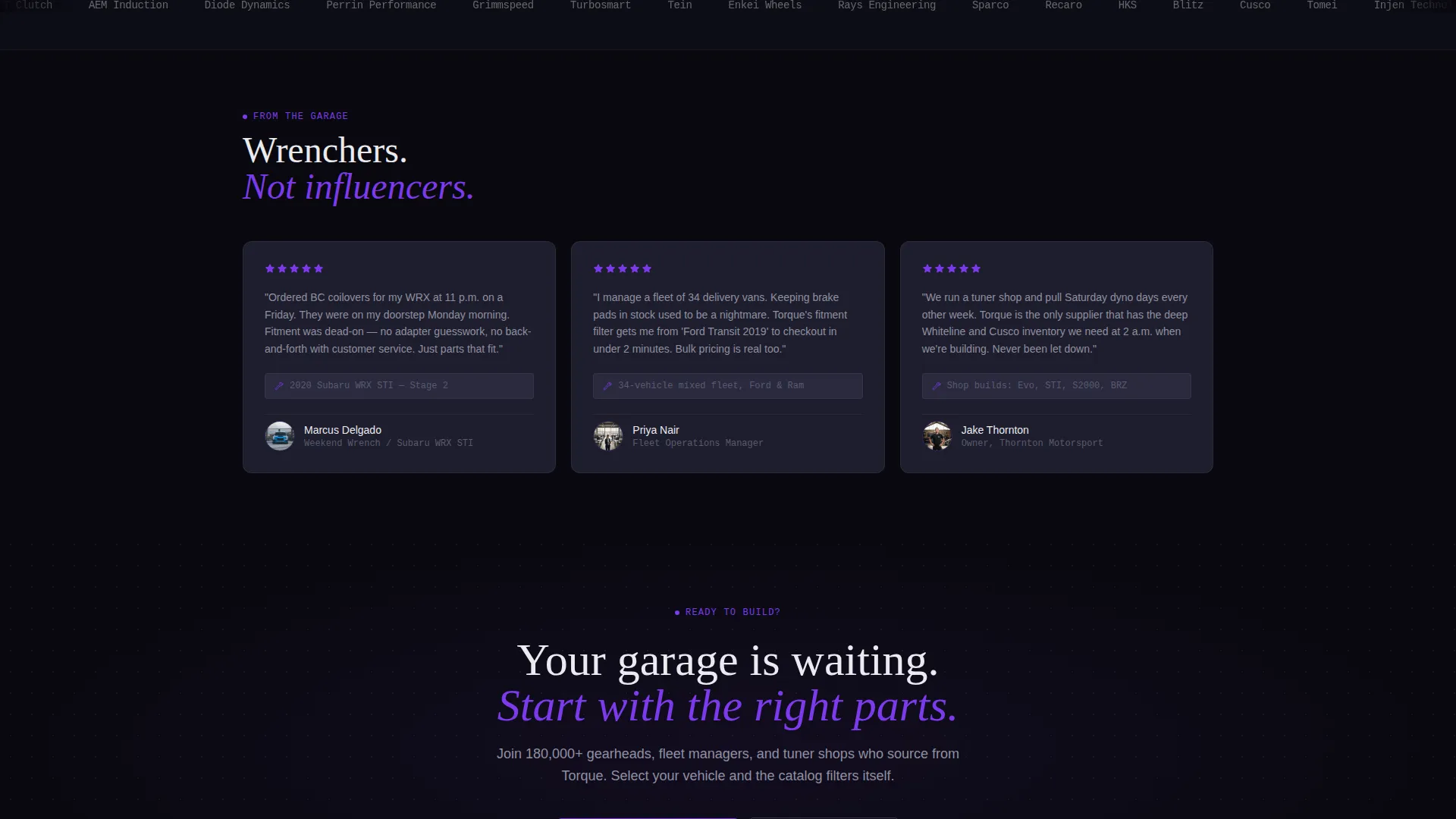
- There is no immediate reason to trust a new store before searching
What you get with this template
Torque delivers a complete, single-page storefront layout with every section purpose-built for automotive parts conversion. The design is ready to drop in your branding, inventory stats, and product photography.
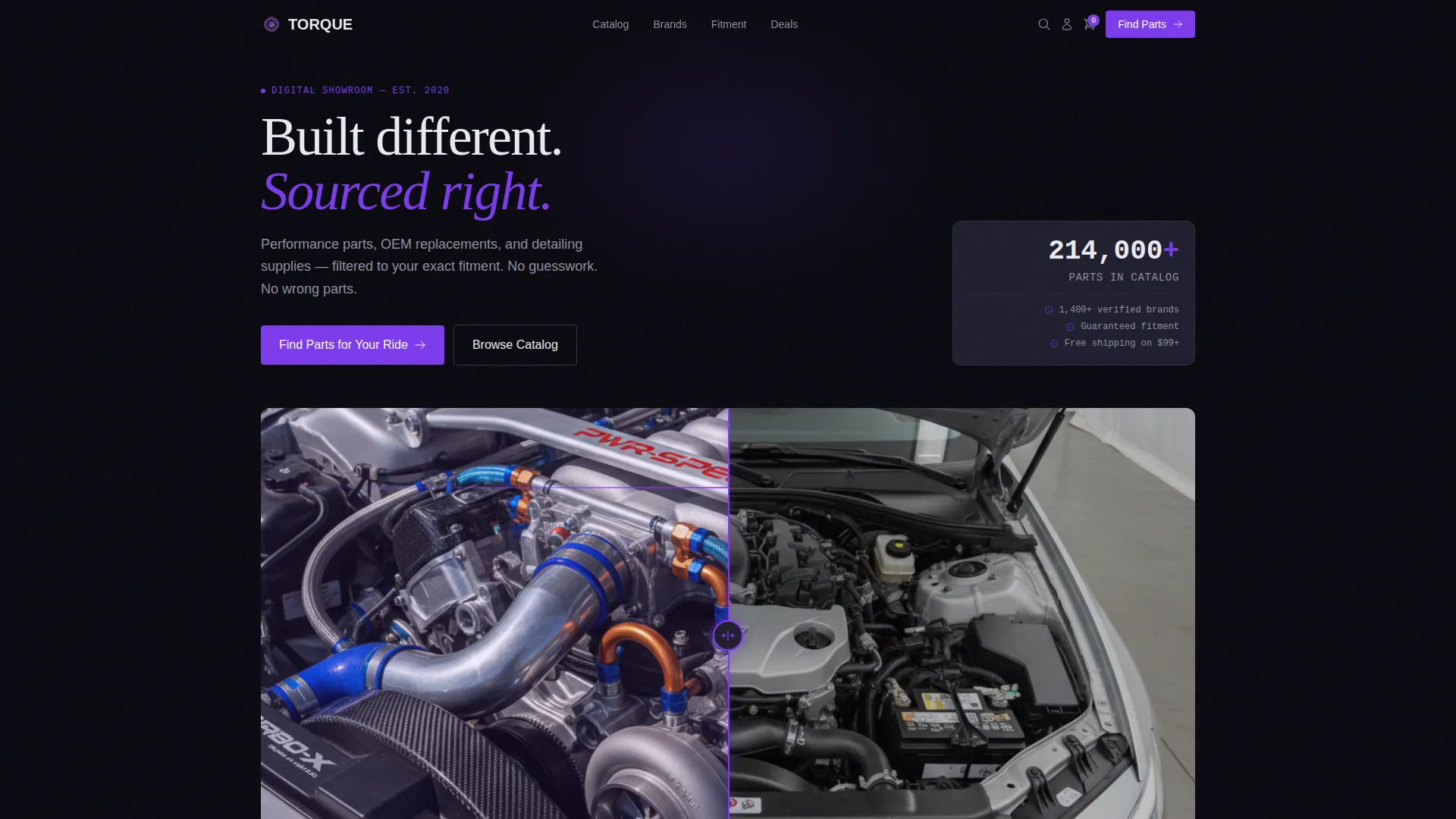
- An interactive split-screen header with a draggable reveal slider and floating price tags on aftermarket parts
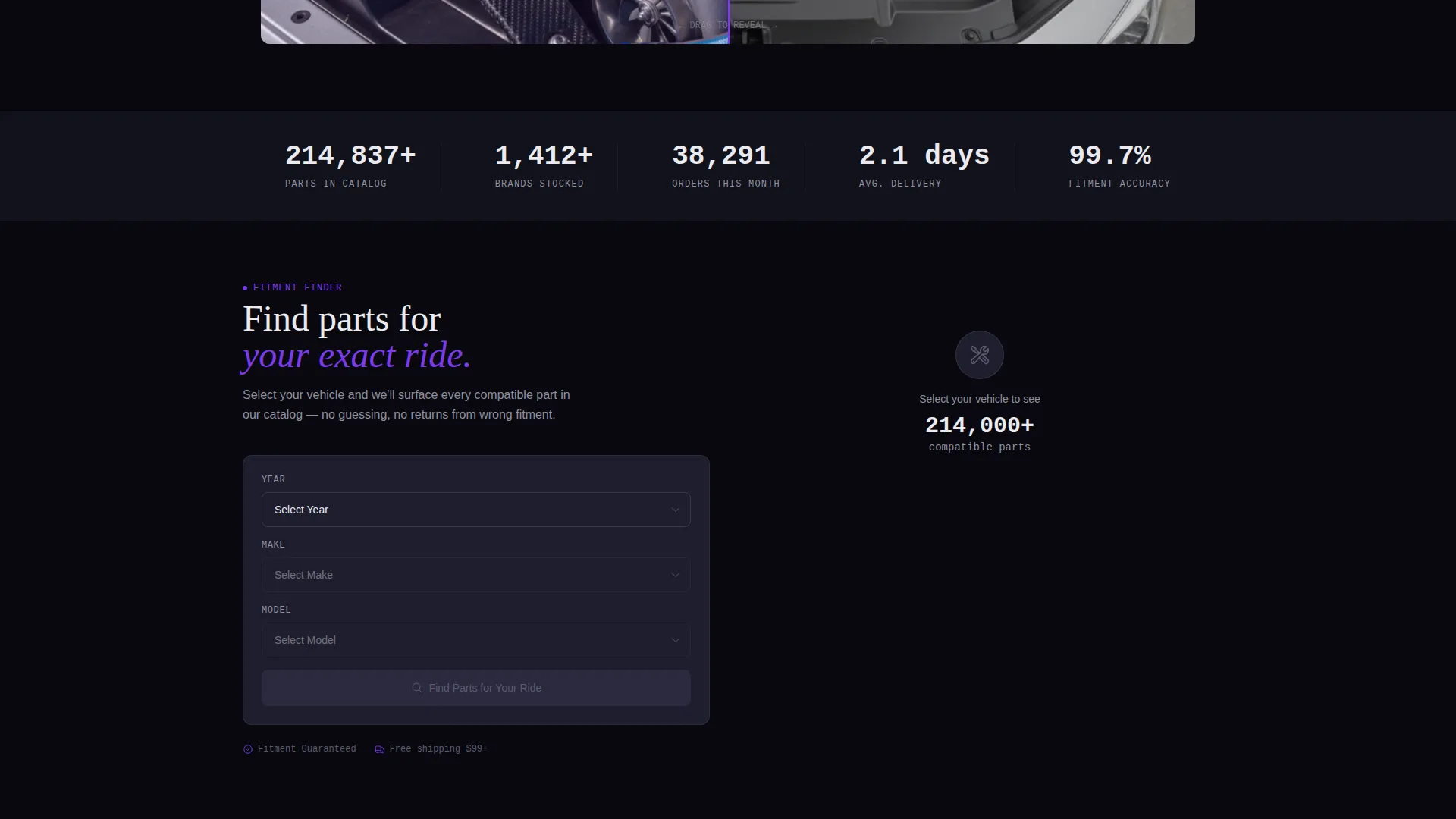
- A full-width live stats bar showing inventory count, orders shipped, and delivery time in large monospaced figures
- A year, make, and model fitment selector paired with a real-time results grid and category tiles with product close-ups and stat clusters
Feature list
This template packs a focused set of high-impact components into one cohesive layout. Each feature is designed to serve a specific stage of the automotive buyer journey.
Interactive Before-and-After Slider
The header splits the viewport into a stock engine bay on the left and a fully built aftermarket bay on the right. Visitors drag a center slider to reveal or hide the upgraded parts. Each tagged component pulses gently and displays a floating violet price chip, inviting a click.
Live Inventory Stats Bar
Immediately below the header, a full-width counter bar displays real inventory figures in large monospaced titanium white type on void black. Numbers tick upward on scroll trigger, communicating scale and activity at a glance without a single word of persuasion copy.
Year, Make, and Model Fitment Selector
A split section places the fitment selector on the left and a live results grid on the right. As the visitor narrows choices by year, make, and model, the grid populates in real time. This turns the page itself into a working product discovery tool.
Category Tiles with Stat Clusters
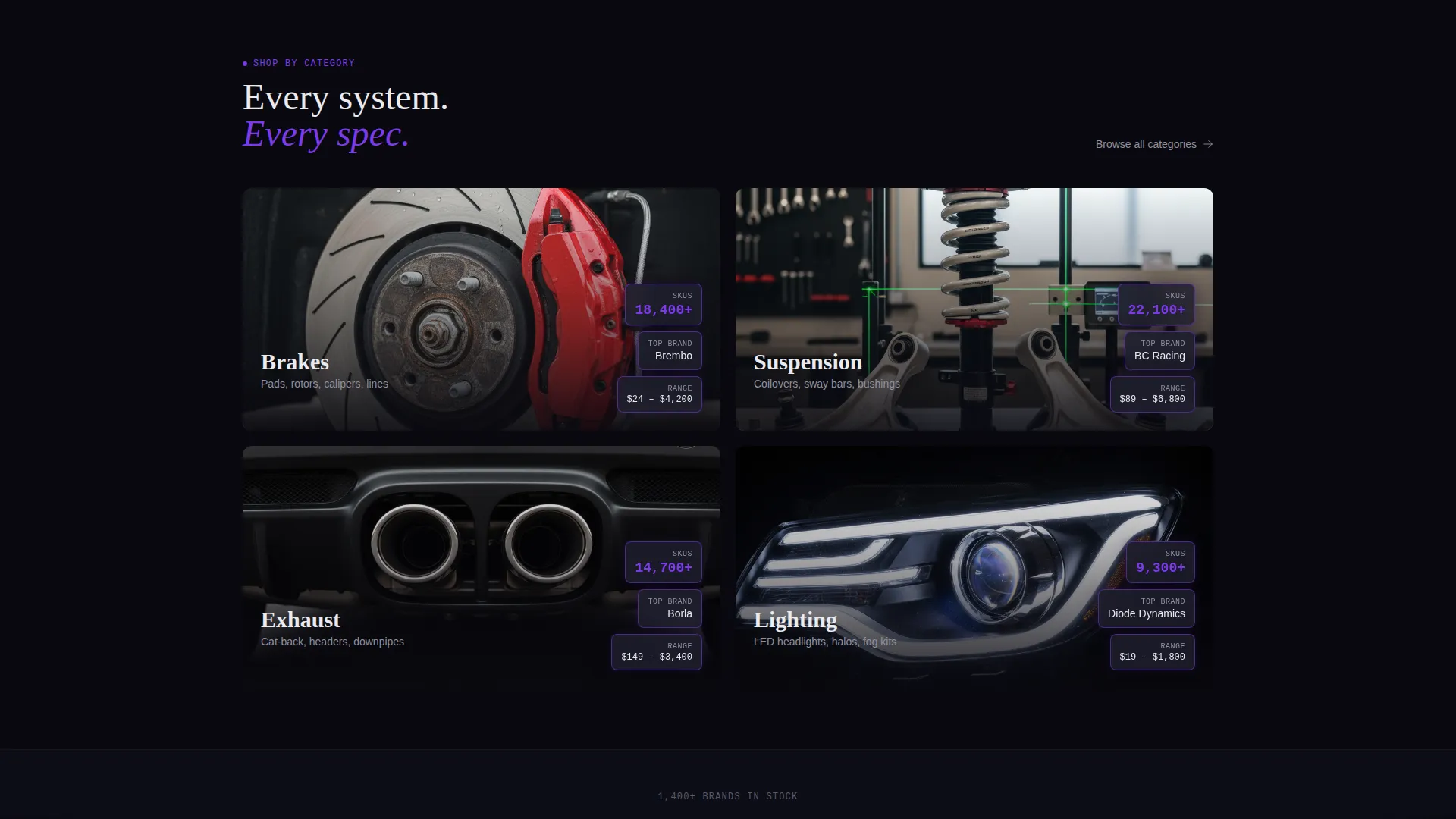
Each category tile for brakes, suspension, exhaust, and lighting splits between a moody product close-up photograph and a stat cluster showing SKU count, top brand, and price range. Every tile communicates both breadth and precision at the same time.
Sticky Garage Bar
A secondary bar anchors to the bottom of the viewport and reads "Your Garage Is Empty. Add Your Vehicle" in electric violet. On tap it collapses into a compact fitment dropdown, keeping the conversion path accessible no matter how far the visitor has scrolled.
Primary call to action Fitment Trigger
The main call to action, "Find Parts for Your Ride," lives inside the fitment selector. Completing the year, make, and model selection and clicking through drops the visitor directly into a filtered catalog page, making the selector itself the conversion mechanism.
Page sections overview
| Section | Purpose |
|---|---|
| Split Header Slider | Reveal stock versus built engine bay with tagged floating price chips |
| Live Stats Bar | Display inventory count, monthly orders, and average delivery time |
| Fitment Selector Split | Let visitors filter by year, make, and model alongside a live results grid |
| Category Tiles Grid | Show brakes, suspension, exhaust, and lighting with stat clusters |
| Sticky Garage Bar | Persistent bottom bar prompting visitors to add their vehicle |
Design & branding system
The Void and Violet color system is built specifically for dark-environment browsing. Every color decision reinforces focus, hierarchy, and the feeling of a precision-tuned build.
- Abyssal black (#09090F) dominates the background, gunmetal (#1E1E2E) structures card panels and navigation, and titanium white (#EAEAEF) carries body text and price figures
- Electric violet (#7C3AED) activates on hover states, active filters, price chips, and the sticky bar, functioning like an underglow accent that draws the eye without disrupting the dark palette
- The Directory and Discovery theme uses monospaced figures, tight grid spacing, and moody product photography to keep the visual identity consistent with how real automotive buyers browse online
Mobile & speed optimization
The split-screen layout and scroll-triggered animations are designed to stay functional and visually tight on smaller viewports. The template accounts for the reality that many parts buyers browse on a phone between jobs or late at night in a shop.
- The 50/50 split sections adapt cleanly to vertical stacking on mobile without losing the before-and-after interactivity
- The sticky garage bar collapses into a compact fitment dropdown on tap, keeping the conversion path usable on touch screens
- Scroll-triggered counter animations activate only when sections enter the viewport, keeping the experience smooth even on mid-range devices
How this template helps you convert
Torque earns buyer trust through demonstrated inventory depth before it asks for any action. The conversion path is short and direct.
- The interactive header and live stats bar prove the store has real depth and real activity, so the visitor arrives at the fitment selector already confident rather than skeptical.
- The fitment selector doubles as the primary conversion mechanism. Selecting a year, make, and model and clicking through completes the conversion in one fluid motion rather than requiring separate search steps.
- The sticky garage bar maintains a persistent low-friction entry point at all scroll depths, so buyers who skip the header still have a direct path to filtered results without scrolling back up.
Other information about this template
This template is part of the Torque design series built around the Stats-First Impact creative direction. It suits any automotive digital presence where inventory depth and fitment accuracy are the primary trust signals.
- The template style is Split Screen (50/50), meaning every major section pairs two complementary panels side by side for visual contrast and information density
- The Interactive Preview header concept is purpose-built for product reveal experiences where the difference between stock and upgraded is the core selling point
- The Click-Through landing page direction keeps every section linked back to one measurable action: entering a vehicle and browsing a filtered catalog
Theme
Directory & Discovery
Creative direction
Stats-First Impact
Color system
Void & Violet
Style
Split Screen (50/50)
Direction
Click-Through
Page Sections
Interactive Before-and-after Reveal Slider
Scroll-triggered Live Stats Bar
Year, Make, and Model Fitment Selector
Category Tiles with Stat Clusters
Sticky Garage Conversion Bar
Related questions
Can I use this template without a live inventory connection?
Is the draggable before-and-after slider functional out of the box?
Who is this template best suited for?
Can I change the Void and Violet color system to match my brand?
Does the sticky garage bar work on mobile devices?



