Pest Control Booking Landing Page Template
Swarm is a single-page pest control booking and scheduling landing page built on a Dashboard and Data Grid layout. It uses a Dynamic Motion theme with a Void and Violet color system to create an urgent, high-trust experience. The page guides property managers, restaurant owners, and homeowners from the discomfort of inaction straight into a clean, interactive scheduling interface, ending at a clear app download call to action.
by Rocket studio
Quick summary
Swarm is a pest control booking and scheduling landing page template designed for dispatch-focused operations. It combines a dark, motion-driven design with an interactive data grid interface to move visitors quickly from problem awareness to confirmed booking. The primary call to action drives app downloads, while a secondary path supports direct scheduling for visitors who act immediately.
Who this template is for
This template is built for pest control businesses that operate on speed and professionalism. It works best for teams that dispatch certified technicians within hours and need a digital presence that reflects that urgency.
- Property managers handling late-night tenant complaints about pests
- Restaurant owners and commercial kitchen operators who face health code pressure
- Homeowners dealing with unidentified sounds or visible pest activity
What problem this template solves
Most pest control websites look static and slow. Visitors arrive anxious and leave without booking because the page never convinces them that help is immediate. Swarm solves this by making the scheduling system the centerpiece of the page.
- Visitors feel stalled when they cannot see technician availability or service timing at a glance
- Generic contact forms fail to communicate urgency or build trust in high-stress pest situations
- Mobile visitors need a fast path to booking, not a page buried in long paragraphs
What you get with this template
You get a complete, single-page landing page structured around a live-style booking dashboard. Every section is purpose-built to move a visitor from first scroll to confident booking action.
- A dark full-bleed header with a sonar-style glow animation and mock service status cards
- An interactive data grid section showing service types, technician availability, and treatment protocol breakdowns
- A floating mobile bottom bar with app download badges and a pinned call-to-action button
Feature list
This template delivers a focused set of visual and structural features grounded in the source brief. Each component earns its place by serving the booking conversion goal.
Sonar Glow Header Animation
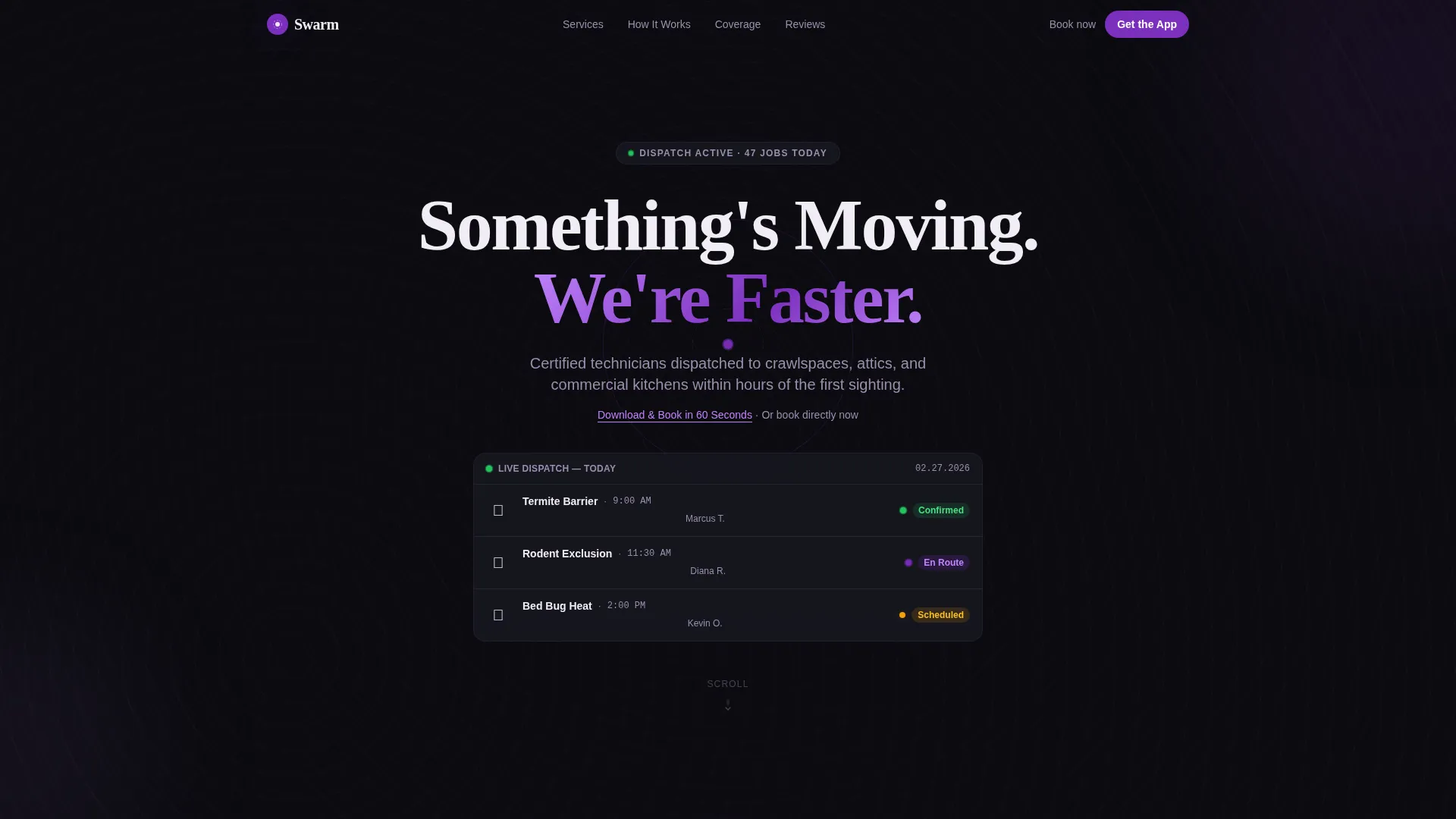
The header opens on pure void black with a faint topographic heat-map pattern beneath the surface. A single violet circle expands outward like sonar, and the headline materializes in sterile white as it ripples. This opening creates an immediate sense of a system already scanning and responding.
Live-Style Dashboard Widget
Directly below the headline, a miniaturized dashboard widget displays three mock service cards. Each card shows a service name, scheduled time, and status label, paired with a pulsing violet status dot. The widget gives first-time visitors the instant impression of an operation already in motion.
Problem-to-Solution Scroll Arc
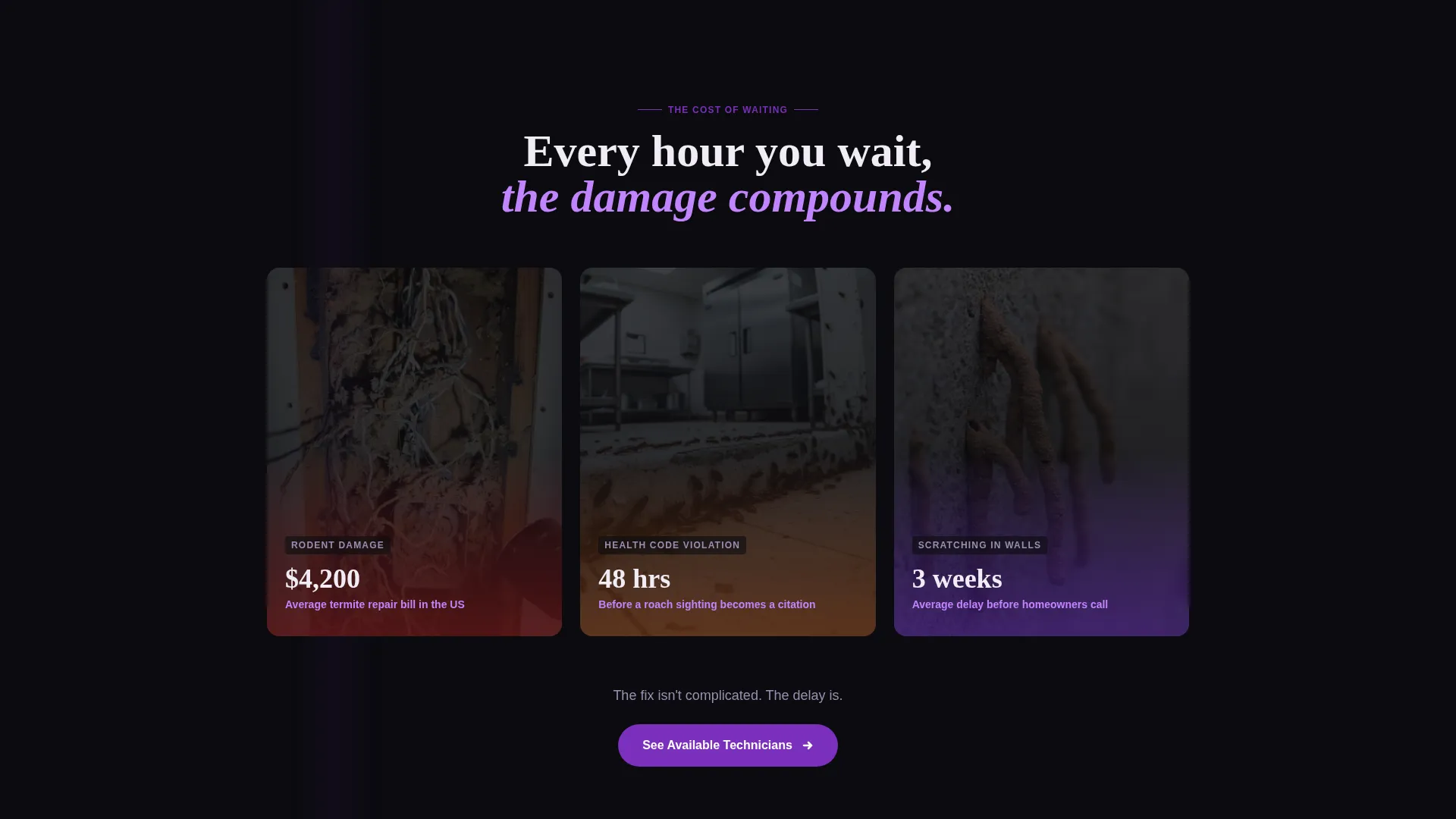
The page deliberately leads with a dark, uncomfortable section showing macro photography of pest damage alongside blunt cost captions. The background then shifts from void black to sterile white, pivoting the visitor into the scheduling interface. This contrast makes the solution feel more powerful by placing it directly after the problem.
Interactive Scheduling Data Grid
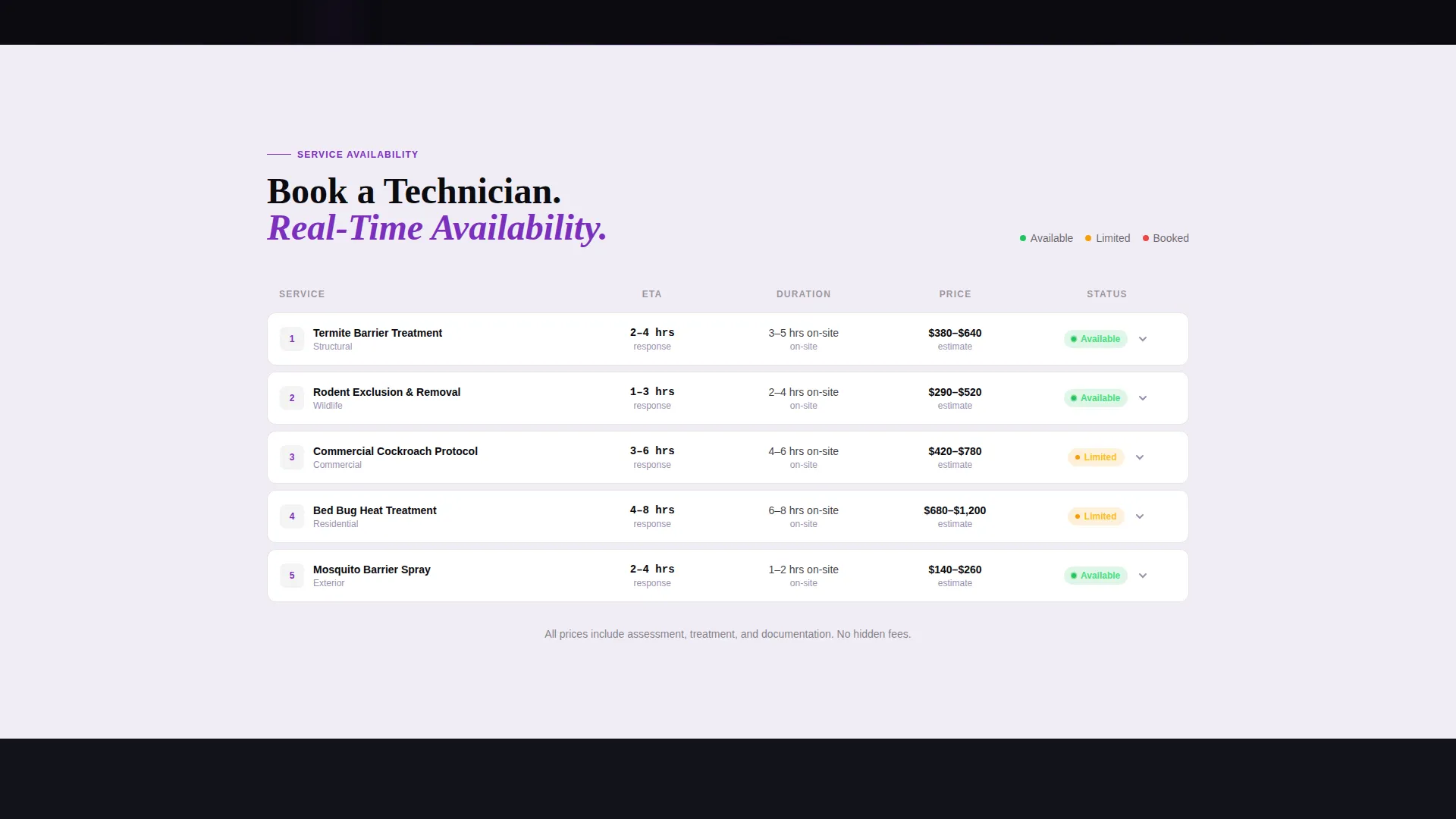
The core of the page is a clean scheduling grid showing service types, technician availability, real-time estimated arrival times, and treatment protocol details. Each row expands to reveal what the technician brings, how long the job takes, and what the follow-up schedule looks like. Cards slide in on scroll and status dots pulse throughout.
Four-Step Job Timeline Animation
A timeline animation tracks a job moving through four stages: Booked, En Route, On Site, and Cleared. This motion sequence helps visitors visualize how fast and structured the service process is, reducing doubt before they commit to downloading or booking.
App Download Conversion Section
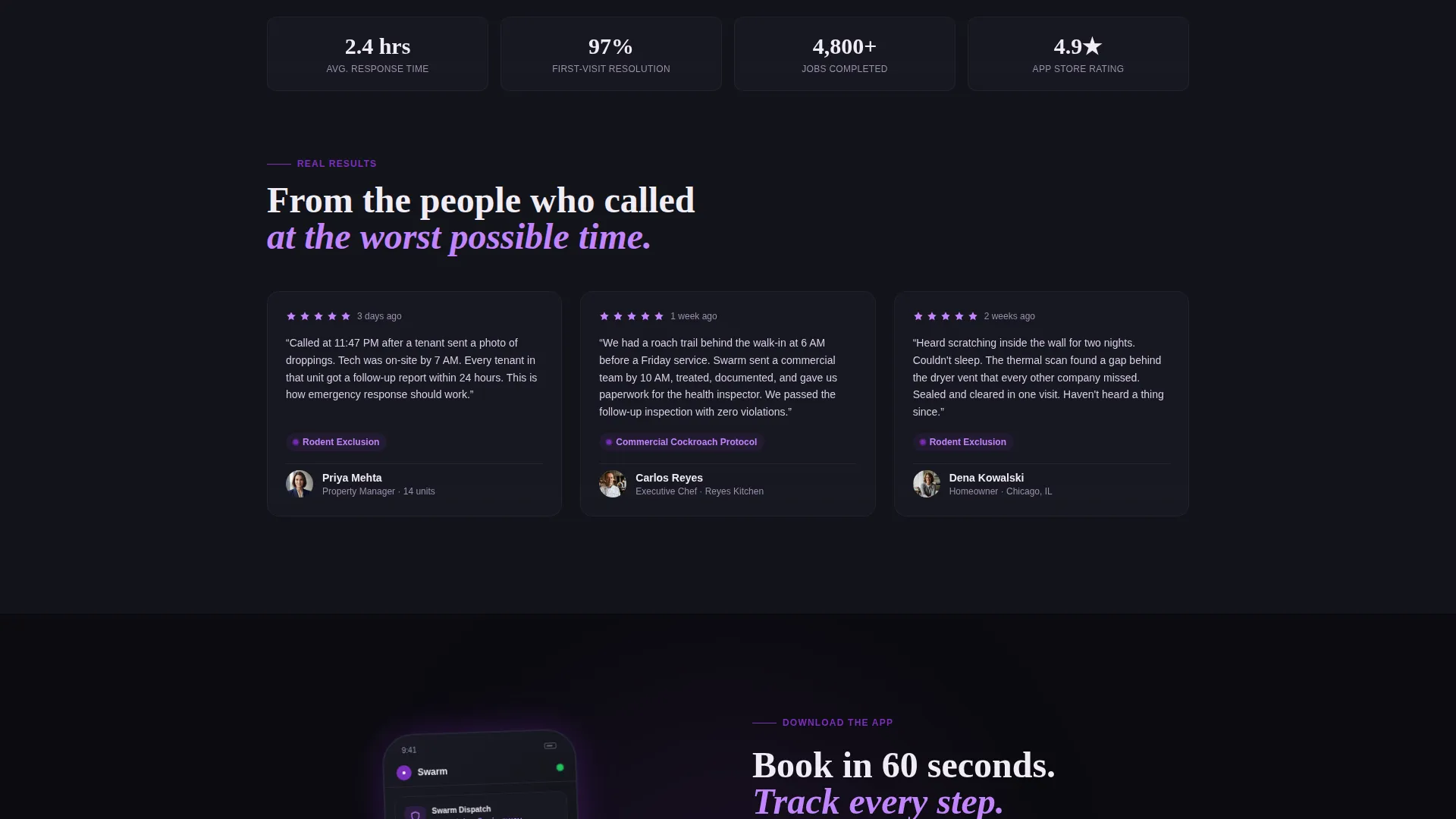
The final section pairs a phone mockup showing a push notification with a five-star review snippet. This closing moment collapses hesitation by letting visitors picture themselves already using the app. The floating bottom bar on mobile keeps the app download call to action visible throughout the entire scroll journey.
Page sections overview
| Section | Purpose |
|---|---|
| Dark Hero Header | Introduce urgency with sonar glow animation and headline |
| Mock Service Cards | Show a live-style dispatch dashboard above the fold |
| Pest Damage Gallery | Use macro imagery and cost captions to frame the problem |
| Scheduling Data Grid | Present interactive service rows with availability and ETAs |
| Job Timeline Animation | Visualize the four-step process from booking to cleared |
| App Download Closer | Drive installs with phone mockup and push notification preview |
Design & branding system
The Void and Violet color system drives every visual decision in this template. The palette is built to feel like a UV blacklight sweeping across a dark room, making everything hidden suddenly visible and handled.
- Void black (#0B0B0F) dominates backgrounds and navigation; ultraviolet pulse (#7B2FBE) runs through progress bars and status indicators; electric lavender (#C084FC) activates on hover and tap states
- Sterile white (#F0ECF5) frames the booking grid and data cells so open time slots read as clean, trustworthy surfaces
- The Dynamic Motion theme drives scroll-triggered card animations, pulsing status dots, and the four-step timeline sequence throughout the page
Mobile & speed optimization
The template is designed with mobile visitors as a primary use case. Pest emergencies happen at midnight on a phone, and the layout reflects that reality.
- A floating bottom bar pins the "Download and Book in 60 Seconds" call to action with App Store and Google Play badges visible throughout the entire mobile scroll
- A secondary text link above the fold reads "Or book directly now" for visitors who want to schedule without downloading the app first
How this template helps you convert
Every structural and visual decision in Swarm is aimed at turning a stressed visitor into a confirmed booking or app install. The page earns the conversion before it asks for it.
- The Problem-to-Solution Arc creates emotional momentum. Visitors see the cost of inaction first, then immediately encounter the clean scheduling grid as relief. This contrast makes action feel like the obvious next step.
- The dashboard demo builds interface familiarity before the app download ask. By the time a visitor reaches the phone mockup section, they have already interacted with the scheduling grid and experienced the product logic. The download feels like keeping something they already want.
Other information about this template
Swarm is categorized under Technology, specifically within the Pest Control Digital Presence subcategory and the Pest Control Booking and Scheduling Site niche. It is a single-page landing page, not a multi-page website build.
- The template style is Dashboard and Data Grid, making it well-suited for businesses that want to lead with operational transparency rather than traditional service pages
- The creative direction follows a strict Problem-to-Solution Arc, meaning section order and visual transitions are intentional and should be preserved when customizing
- The header concept is a Dark Full-Bleed with Glow treatment, which depends on the void black background to maintain its visual contrast and scanning metaphor
Theme
Dynamic Motion
Creative direction
Problem→Solution Arc
Color system
Void & Violet
Style
Dashboard/Data Grid
Direction
App Download
Page Sections
Sonar Glow Header with Topographic Pattern
Live-style Mock Service Dashboard
Interactive Scheduling Data Grid
Problem-to-solution Visual Arc
Four-step Job Timeline Animation
Floating App Download Bottom Bar
Related questions
Who is the ideal business for this template?
Can I use this template without promoting an app?
What makes the dashboard section different from a standard service list?
Is this template appropriate for commercial clients like restaurants?
What do I need to customize this template for my business?



