Swift — Home Service Landing Page Template
Dispatch is a scroll-reveal landing page template built for home services mobile apps. It opens with an interactive tab switcher and a cost estimator that engages visitors before they read a single line of copy. The Acid Digital color system, progressive section animations, and a sticky call-to-action bar work together to move visitors toward a free estimate or app download.
by Rocket studio
Quick summary
Dispatch is a single-page, scroll-reveal landing page template designed for home services mobile apps. It leads with interaction, not text. A tab-switching phone mockup and a live cost estimator hook visitors immediately. Sections materialize as the user scrolls, mirroring the app's own progressive experience and building trust before the download tap.
Who this template is for
This template is built for founders, product teams, and marketers launching or growing a home services mobile app. It suits anyone who needs to turn a cold visitor into a confident first-time user without a long sales pitch.
- Home services app founders who need a high-converting landing page fast
- SaaS product marketers promoting on-demand repair and maintenance platforms
- Agencies building launch pages for home services software clients
What problem this template solves
Getting someone to download a home services app is hard when they land on a page full of marketing copy and no proof. Visitors want to know costs, availability, and trustworthiness before they tap anything. Most landing pages make them hunt for that information.
- Visitors leave before they understand what the app actually does
- Generic hero sections fail to demonstrate real-time booking and cost clarity
- No engagement hook means no reason to scroll past the first section
What you get with this template
You get a fully structured, single-page scroll-reveal landing page with interactive components ready to customize. Every section is designed to build trust progressively, matching the way the app itself discloses information step by step.
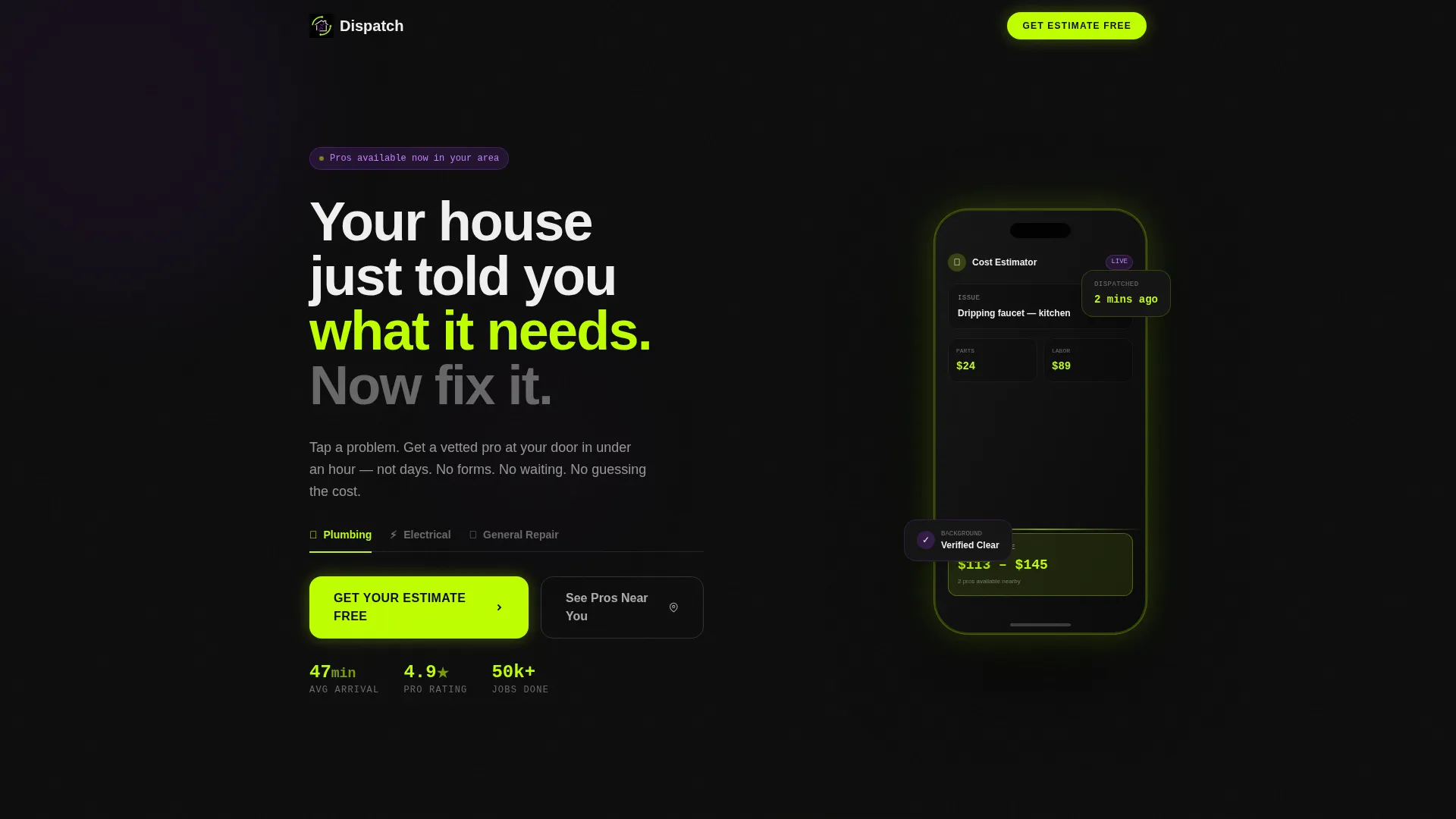
- A Feature Tab Switcher header with a live phone mockup showing three service states
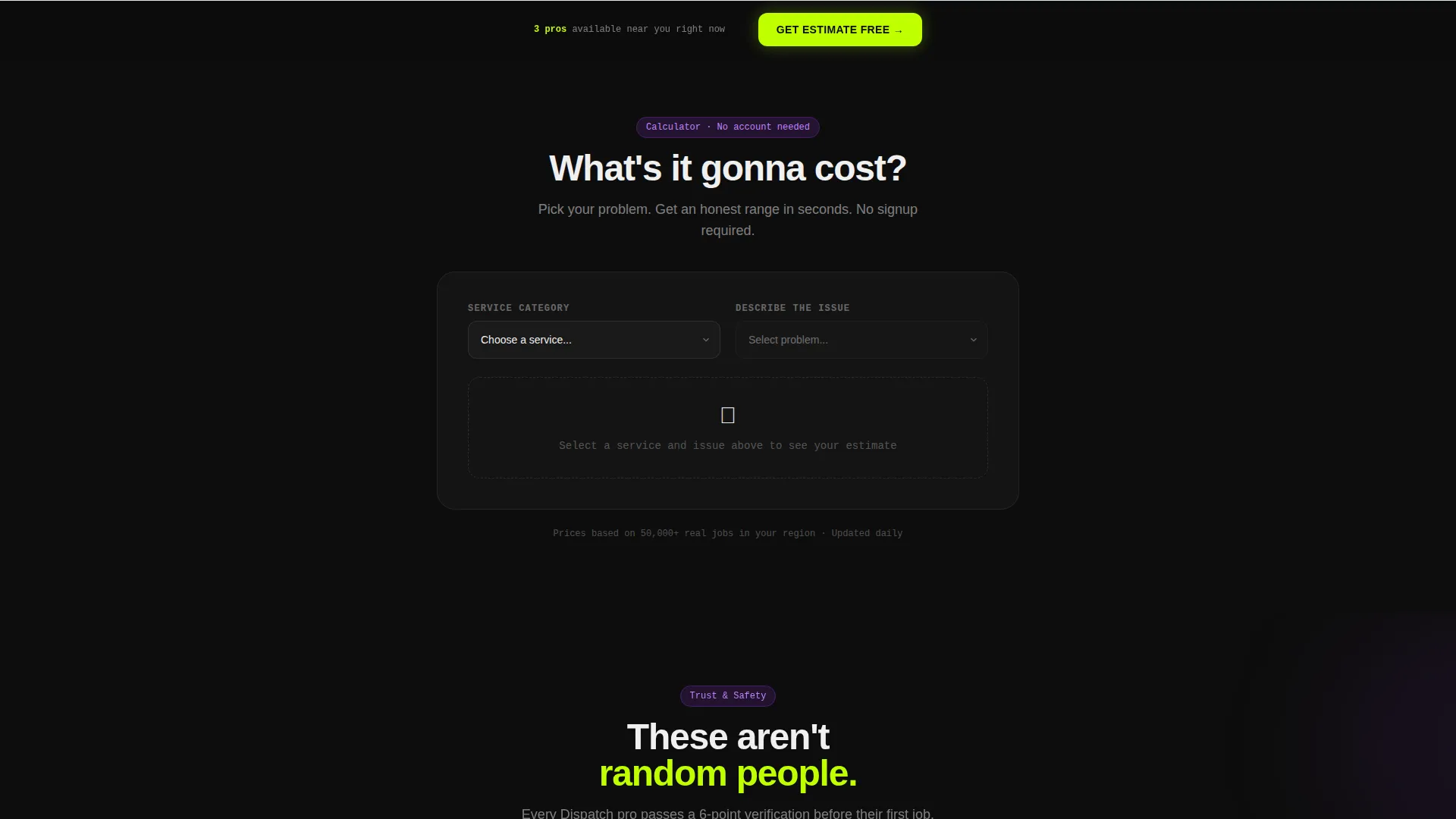
- An interactive cost estimator section positioned immediately below the header
- Scroll-triggered section reveals, a sticky call-to-action bar, and a local pro preview panel
Feature list
This template ships with purpose-built components that reflect real home services app behavior. Each one is designed to reduce friction and earn the tap.
Feature Tab Switcher Header
Three clickable tabs, labeled Plumbing, Electrical, and General Repair, sit above a phone mockup. Each tab click swaps the screen inside the device, showing a cost estimator, a pro profile card, or a booking confirmation with a map pin drop. The phone floats on a void black background with an electric lime edge glow.
Interactive Cost Estimator
A "What's it gonna cost?" estimator sits directly below the header. Visitors pick a service category, choose a common problem from a visual icon dropdown, and receive an instant ballpark price range. This interaction is the core pitch, and the call-to-action button appears inside the result card once the estimate is shown.
Scroll-Reveal Section Animations
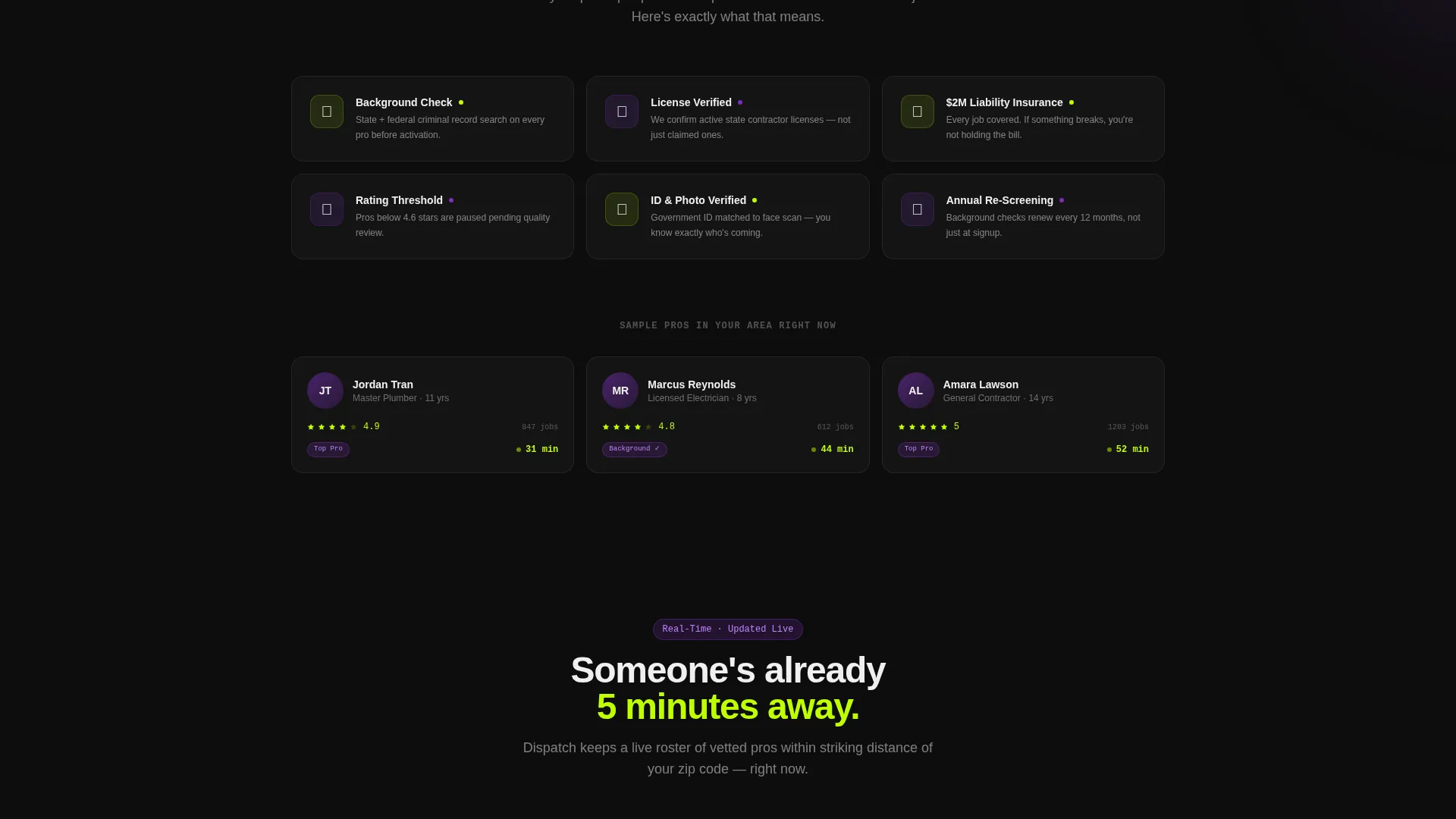
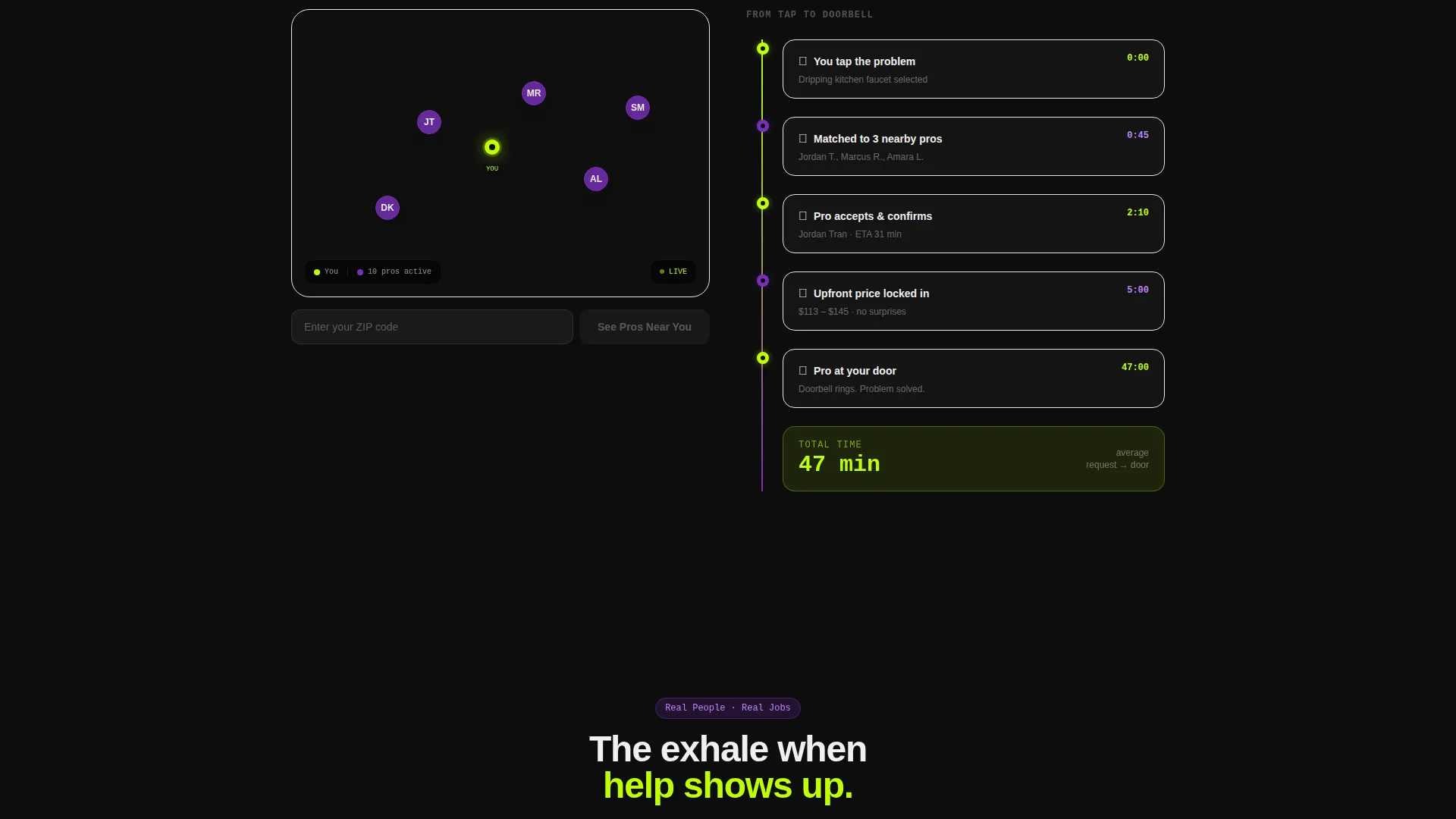
Each content section materializes only as the visitor scrolls into it. Pro vetting badges fade in, a real-time availability map populates, and a timeline animation counts down a 47-minute request-to-doorbell sequence. The page teaches the app's user experience by being that experience.
Sticky Call-to-Action Bar
After the second scroll section, a persistent bottom bar appears with the primary call to action: "Get Your Estimate Free." It stays visible as the visitor continues scrolling, removing the need to search for the next step.
Local Pro Preview Panel
A secondary call-to-action path labeled "See Pros Near You" opens a zip-code input. It previews available contractors in the visitor's area, building local proof without requiring a full sign-up form on the page.
No-Form Click-Through Flow
There are no form fields on this landing page. Every primary call-to-action button routes directly to the app store or a deep link into the app's onboarding flow, keeping the conversion path as short as possible.
Page sections overview
| Section | Purpose |
|---|---|
| Tab Switcher Header | Introduces three core service categories through an interactive phone mockup |
| Cost Estimator Tool | Engages visitors with a live price range before any marketing copy appears |
| Pro Vetting Badges | Builds trust by revealing background check credentials as the visitor scrolls |
| Availability Map | Shows real-time local contractor coverage through a scroll-triggered map reveal |
| Booking Timeline | Animates the 47-minute request-to-doorbell journey to set clear expectations |
| Sticky call to action Bar | Keeps the primary call to action visible after the second scroll section |
| Local Pro Preview | Lets visitors enter a zip code to see nearby contractors before committing |
Design & branding system
The template uses an Acid Digital color system built around four core values. Void black dominates all backgrounds, making every card, button, and icon read like a notification you cannot ignore. Electric lime, UV purple, and interface white each carry a defined role across the layout.
- Void black (#0D0D0D) as the dominant background, electric lime (#BFFF00) reserved for call-to-action buttons and active states only
- UV purple (#7B2FBE) applied to category badges and progress indicators throughout the scroll sequence
- Interface white (#F0F0F0) used on card surfaces and body text to keep dense information readable
Mobile & speed optimization
This template is designed with a mobile-first mindset, which makes sense for a landing page promoting a mobile app. The layout and interactions are built to feel natural on a phone screen, where most of the target audience will land.
- Scroll-reveal animations are structured to perform cleanly on small screens without overwhelming the viewport
- The sticky call-to-action bar is sized and positioned for thumb-friendly tapping on mobile devices
- The tab switcher and estimator components are touch-responsive by design
How this template helps you convert
The template's conversion logic is baked into its structure. Visitors interact before they read, which means they are already invested by the time they reach the download button.
- The cost estimator creates a personal result for each visitor, making the call-to-action feel like a natural next step rather than a cold ask.
- The sticky call-to-action bar ensures the primary button is always within reach, no matter how far the visitor has scrolled into the page.
- The local pro preview adds location-specific social proof, giving hesitant visitors a concrete reason to tap through to the app.
Other information about this template
Dispatch is part of a Directory and Discovery theme family, designed for platforms where users browse, compare, and act quickly. The Calculator/Tool First creative direction is intentional: it positions interaction as the main persuasion layer, not copy.
- The template style is Scroll Reveal (Progressive), meaning sections load in sequence as the visitor moves down the page
- The landing-page direction is Click-Through, with all conversion paths leading directly to an app store link or deep-link onboarding entry
- The template suits home services software and SaaS products in the on-demand repair and maintenance space
- No form fields are included by design, keeping the path from visitor to app user as frictionless as possible
Theme
Directory & Discovery
Creative direction
Calculator/Tool First
Color system
Acid Digital
Style
Scroll Reveal (Progressive)
Direction
Click-Through
Page Sections
Feature Tab Switcher with Phone Mockup
Interactive Cost Estimator Tool
Scroll-reveal Progressive Sections
Sticky Bottom Call-to-action Bar
Local Pro Preview with Zip Code Input
No-form Click-through Architecture
Related questions
Do I need to write copy before using this template?
Can I change the service categories shown in the tab switcher?
Is the cost estimator connected to a live pricing engine?
Does this landing page include any form fields for lead capture?
Can I adapt this template for a web-based home services platform?



