Auto Repair Shop FAQ Website Template
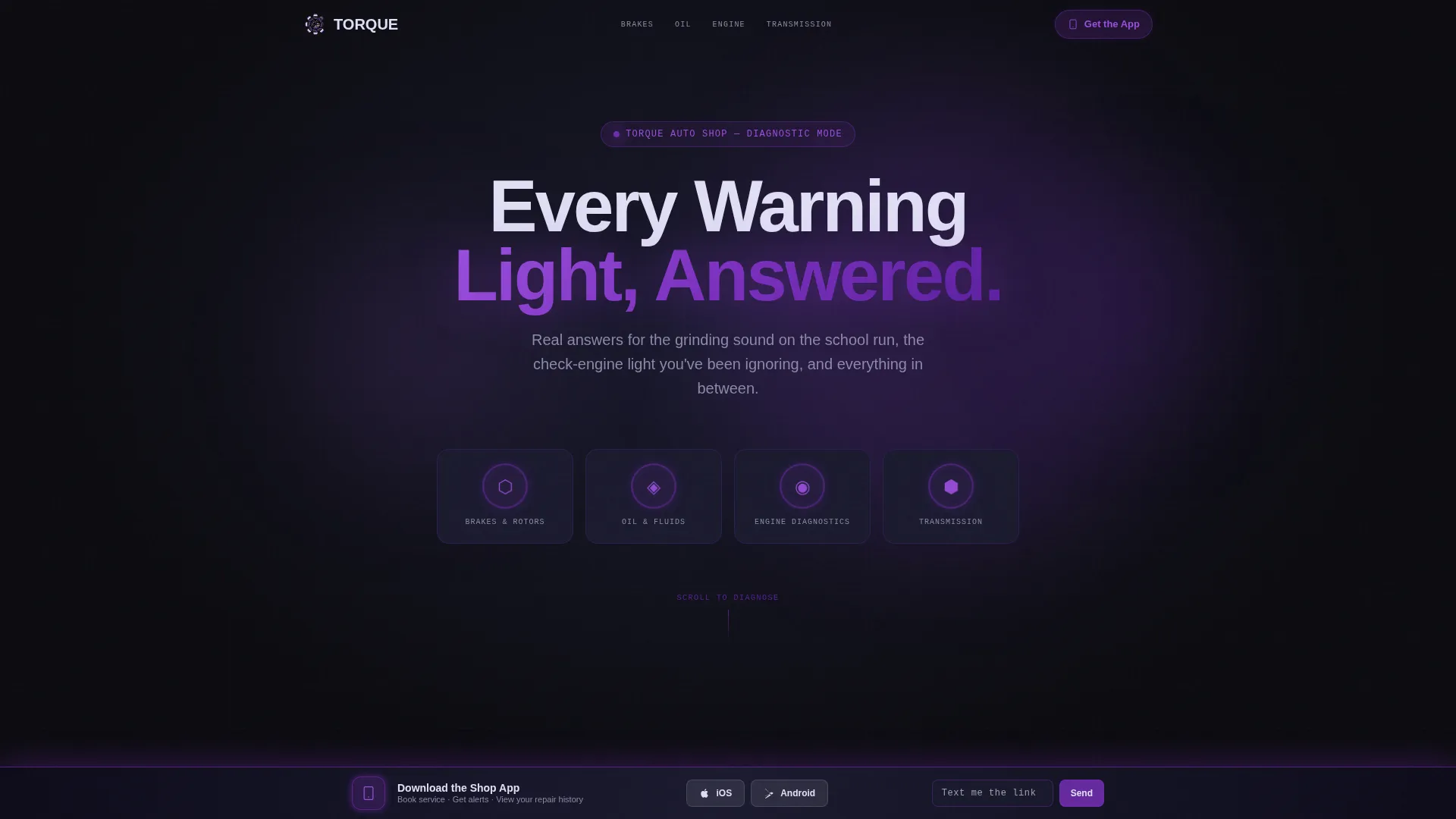
Torque is a dashboard-style FAQ landing page built for auto repair shops. It organizes service questions into illuminated data tiles across categories like Brakes, Oil, Engine Diagnostics, and Transmission. The layout feels like a vehicle instrument panel at night, and every interaction guides visitors toward downloading the shop's mobile app.
by Rocket studio
Quick summary
Torque is a single-page FAQ landing page for auto repair shops. It uses a dark dashboard visual system to display service answers as readable data tiles. Visitors browse by category, explore cost ranges and service intervals, and are gently guided toward booking through a persistent app download prompt.
Who this template is for
This template fits independent garages and diagnostic auto repair shops that want to earn customer trust before asking for a booking. It works especially well for shops serving everyday drivers who arrive with questions rather than certainty.
- Auto repair shop owners who want to reduce repetitive phone inquiries
- Service managers who want to educate customers before they walk in
- Shops promoting a mobile booking app to local commuters and families
What problem this template solves
Most repair shop websites bury service information inside walls of text or generic contact forms. Customers who hear a grinding noise or see a warning light need fast, clear answers, not a brochure. This template puts those answers front and center.
- Visitors leave other pages without enough information to feel confident booking
- Common questions about cost, duration, and service intervals go unanswered
- Shops miss the chance to convert curious browsers into app users or booked appointments
What you get with this template
You get a fully structured FAQ landing page with a bold dark visual identity, category-based navigation, and a persistent app download bar. Every layout decision reflects the auto repair shop's role as a knowledgeable, no-nonsense guide.
- A header section with four illuminated FAQ category clusters and a central headline
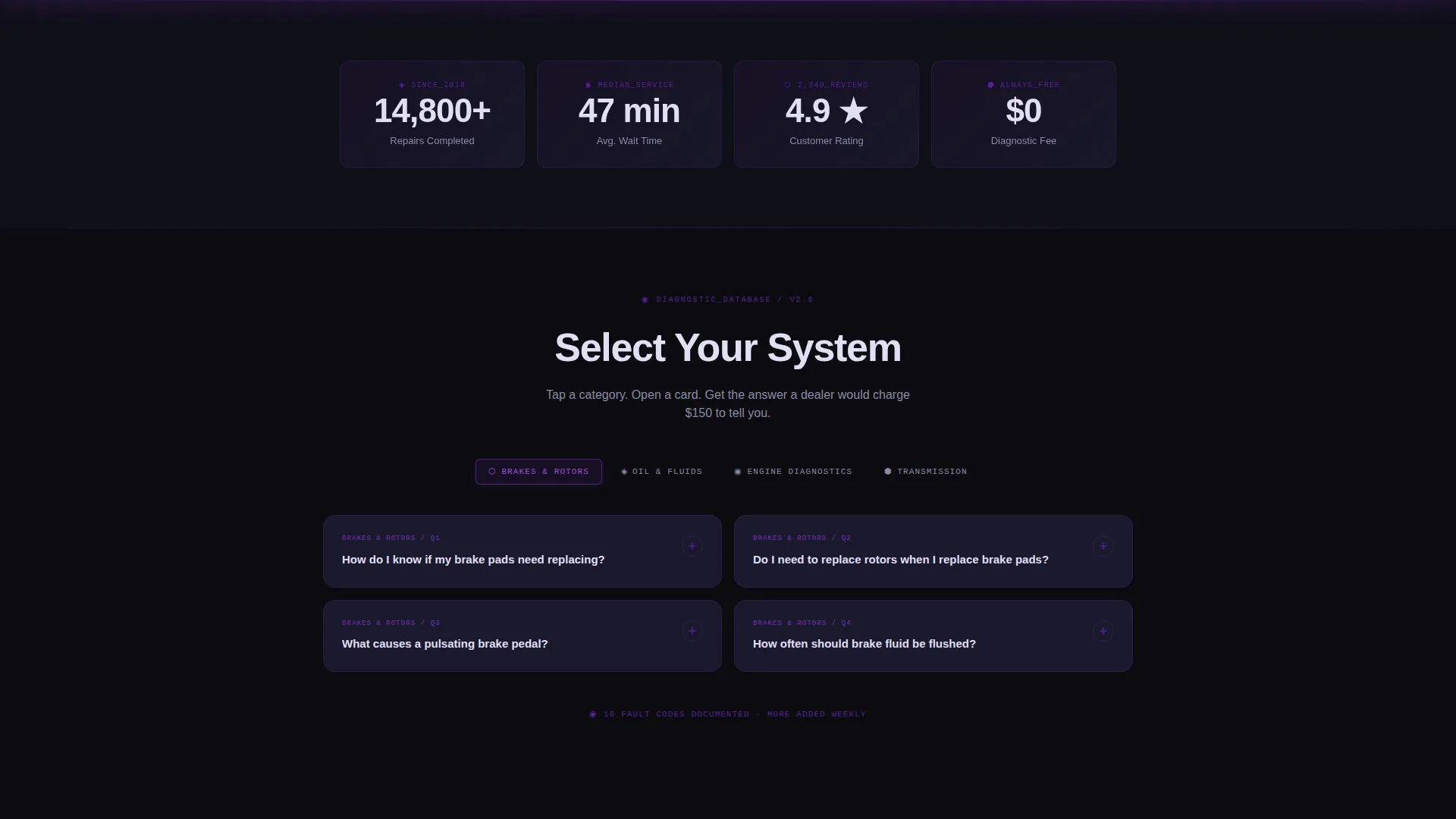
- A data-grid answer system displaying cost ranges, service durations, and mileage intervals as spec badges
- A persistent bottom-edge app download bar with iOS and Android call-to-action prompts
Feature list
This template covers six core feature areas, each drawn from the design and interaction brief.
Illuminated Category Navigation
Four FAQ categories appear as gauge-cluster interfaces in the header: Brakes and Rotors, Oil and Fluids, Engine Diagnostics, and Transmission. Each category has a pulsing violet ring indicator. Tabs switch horizontally like gauge modes on a vehicle instrument panel.
Spec-Badge Answer Cards
Every FAQ answer is displayed as a data tile on the grid. The question appears at the top in violet text, the answer in clean white below it. Estimated cost ranges, service duration, and mileage intervals appear as spec badges along the card's bottom edge.
Contextual App Prompt
After a visitor expands three or more answer cards, a slide-in prompt appears. It reads: "Get alerts when your service is due. Book from your phone." This timing means the prompt arrives after trust is already built through the content itself.
Persistent App Download Bar
A floating bar sits at the bottom of the viewport at all times. It glows violet and carries the primary call to action: "Download the Shop App." iOS and Android icons are included. The bar stays visible as visitors scroll through the FAQ grid.
Text-to-Download Field
A secondary conversion path sits alongside the app bar. Visitors can type their phone number and receive a download link via text message. The single input field keeps friction as low as possible for visitors who prefer that path.
Dark Full-Bleed Header
The header uses a deep black background with a soft violet glow radiating from the center. The headline "Every Warning Light, Answered" emerges from the background with a luminous halo effect. No photography is used; the design relies entirely on data-forward typography and glow treatments.
Page sections overview
| Section | Purpose |
|---|---|
| Dark Bleed Header | Introduces the shop with headline and four illuminated FAQ category clusters |
| Category Tab Row | Lets visitors filter the FAQ grid by service type horizontally |
| FAQ Data Grid | Displays all service answers as interactive spec-badge tiles |
| Contextual Slide Prompt | Triggers after three card expansions with an app booking nudge |
| Persistent App Bar | Anchors the page bottom with the primary app download call to action |
| Text Link Field | Offers a secondary path to receive the app download link via SMS |
Design & branding system
The visual identity is built on the Void and Violet color system, which evokes a luxury vehicle's digital instrument cluster viewed at night. Every element floats in deep darkness, backlit just enough to remain readable without breaking the mood.
- Deep cockpit black (#0B0B0F) as the page background, gauge-cluster charcoal (#1A1A2E) for card surfaces
- Electric violet (#7B2FBE) for active states, pulsing ring indicators, glow effects, and the floating app bar
- Cool dashboard white (#E0DFF5) for all body text and answer copy, keeping contrast clean against dark surfaces
Mobile & speed optimization
The template's layout is designed to translate naturally to smaller screens. The FAQ grid reflows into a single-column stack on mobile, and the persistent app bar remains visible at the bottom of every viewport size.
- Category tabs scroll horizontally on narrow screens without wrapping or collapsing
- Spec-badge rows inside each card reflow cleanly below the answer text on mobile
- The floating app bar and text-link field remain fixed and accessible at all screen sizes
How this template helps you convert
The conversion strategy is built around earning credibility first and asking second. Every layout decision follows that sequence.
- The FAQ grid delivers genuine value immediately, answering cost, duration, and interval questions before any prompt to act appears.
- The contextual app prompt triggers only after a visitor has engaged with at least three answer cards, so it arrives at a moment of demonstrated interest.
- The persistent app bar and text-link input offer two low-friction paths to app download, removing the need for visitors to navigate away or search for next steps.
Other information about this template
This template is part of the Dashboard Pro theme family, which applies data-grid and instrument-panel visual logic to service-industry landing pages. It pairs the Spec Sheet creative direction with the Dark Full-Bleed header concept for a result that feels technical and trustworthy at the same time.
- The template style is classified as a Dashboard and Data Grid layout, suited for information-dense single-page builds
- The Void and Violet color system is a defined palette within the Dashboard Pro theme, not a custom one-off treatment
- The App Download landing-page direction means the primary conversion goal is app installs, not form submissions or direct calls
- This template is listed under the Auto Repair Shop Website Templates subcategory and is specifically scoped to the Auto Repair Shop FAQ Page niche


Theme
Dashboard Pro
Creative direction
Spec Sheet
Color system
Void & Violet
Style
Dashboard/Data Grid
Direction
App Download
Page Sections
Illuminated Category Navigation
Spec-badge Answer Cards
Contextual App Booking Prompt
Persistent App Download Bar
Text-to-download Input Field
Dark Full-bleed Glow Header
Related questions
Can I change the FAQ categories to match my shop's actual services?
Does the template include the mobile app, or just the landing page?
Can I update the cost ranges and service intervals in the spec badges?
How does the contextual prompt know when to appear?
Is this template suitable for a multi-location repair shop?



