Online Course Platform Specialist Reviews Website Template
The Syllabus landing page template is built for professional training platforms that deliver structured, instructor-led courses across finance, leadership, data science, and compliance. Designed in a Corporate Precision style with an Electric Indigo color system, it guides visitors through social proof, course credibility, and a lead-generation flow that routes serious buyers to a solutions advisor.
by Rocket studio
Quick summary
Syllabus is a single-column landing page template for multi-subject corporate training platforms. It combines instructor portraits, learner cohort stories, and a day-in-the-life module timeline to build trust before asking for a commitment. The primary call to action routes visitors to a solutions advisor. A secondary path captures catalog downloads for early-stage prospects.
Who this template is for
This template is designed for training businesses that sell structured, credential-bearing courses to companies and working professionals. It speaks directly to buyers who need more than a course listing, they need proof that the learning works.
- Learning and development managers who build quarterly upskilling calendars for their teams
- Mid-career professionals seeking credentials that support a promotion case
- Operations directors who need groups of employees certified by a firm deadline
What problem this template solves
Generic course platform pages often look like event flyers. They list topics without showing outcomes, and they fail to answer the question every corporate buyer actually asks: will this work for my team? This template fixes that gap.
- Vague course listings that give buyers no sense of structure or rigor
- No visible social proof from real learner groups or recognizable company logos
- A missing human element that leaves visitors unconvinced before they ever reach a form
What you get with this template
You get a complete single-column landing page that moves a visitor from first impression to form submission through layered social proof and clear course positioning. Every section earns the next click.
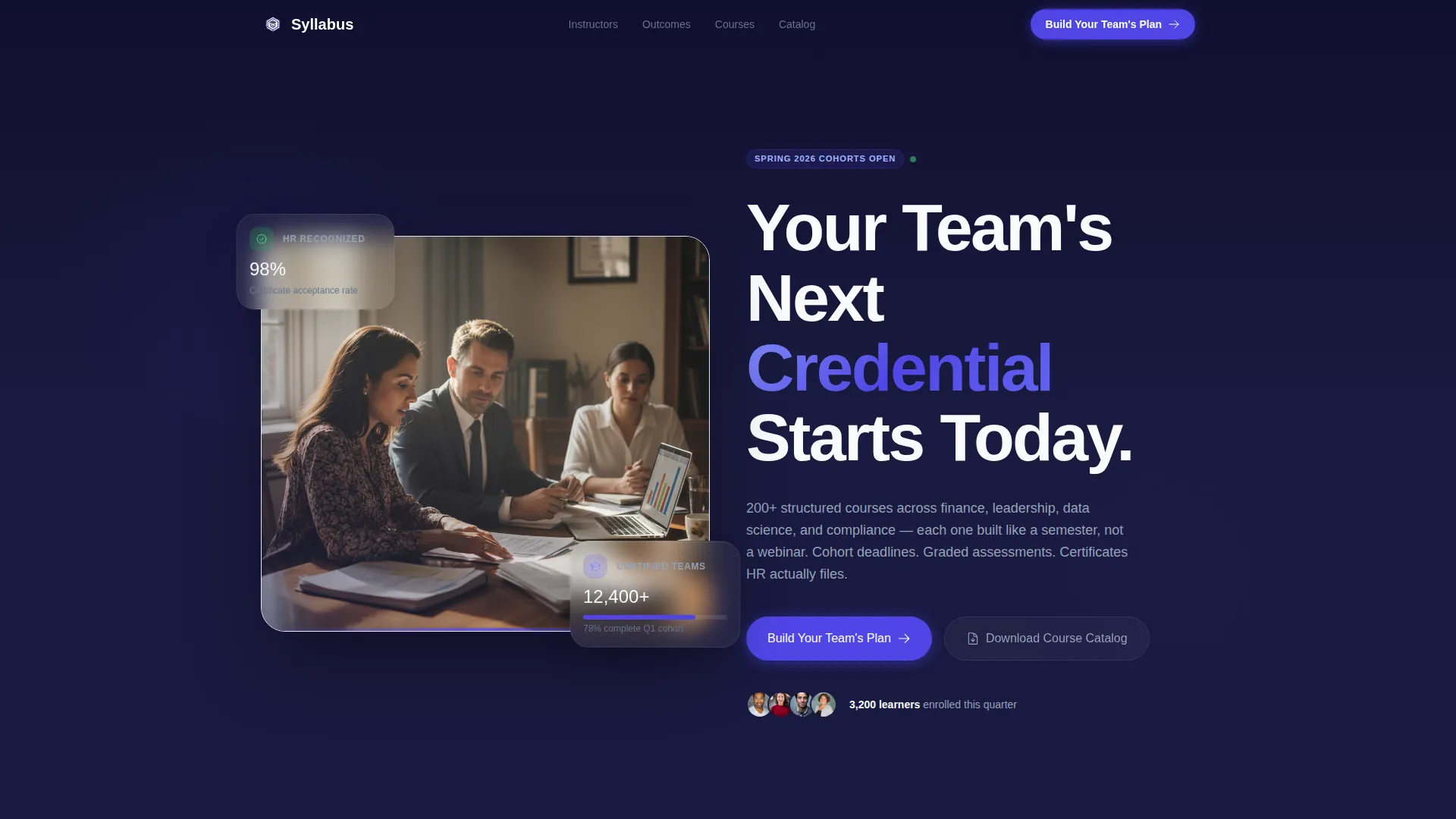
- A half-page header with a photo-and-text split, bold headline, and a primary call-to-action button
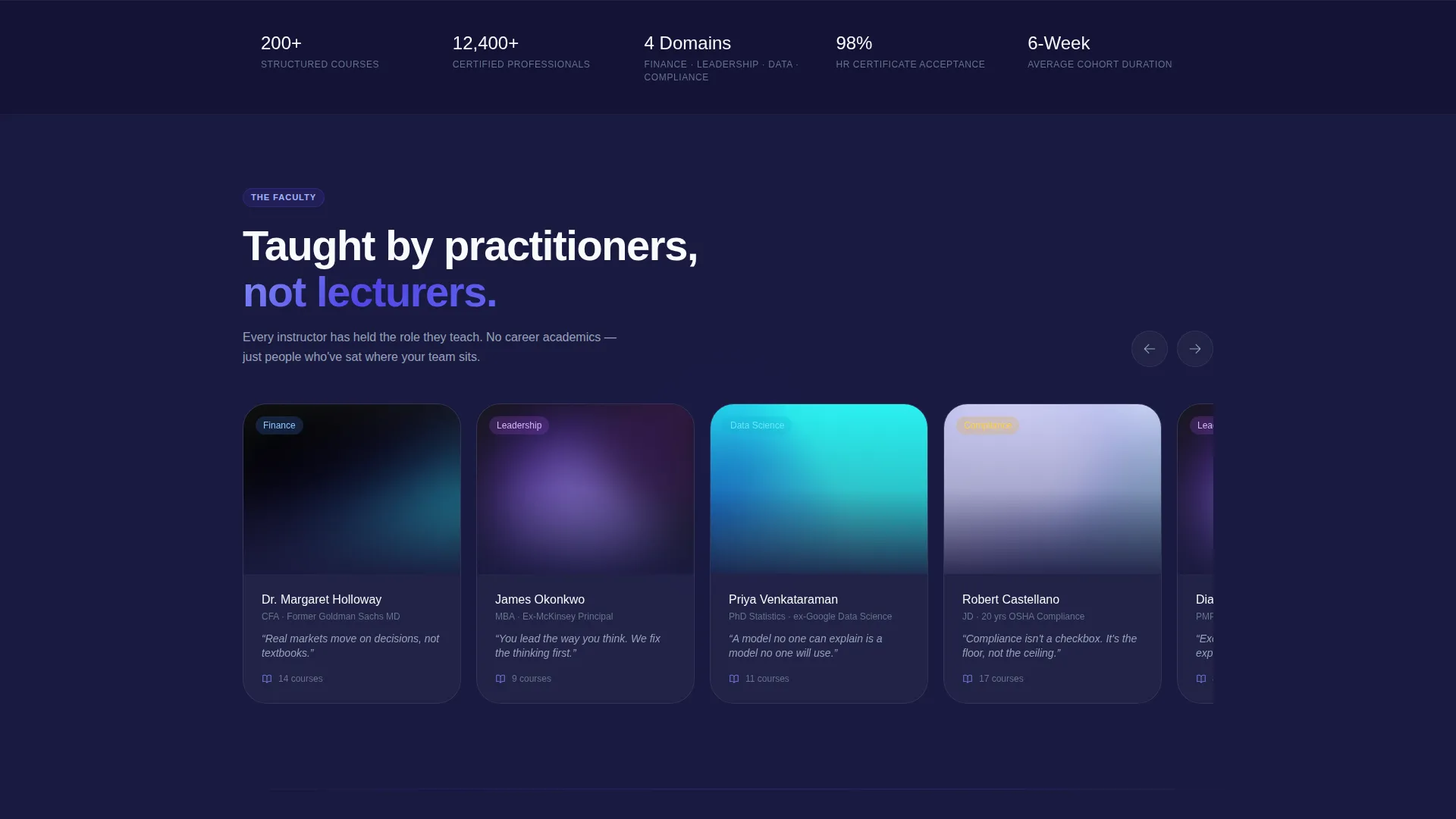
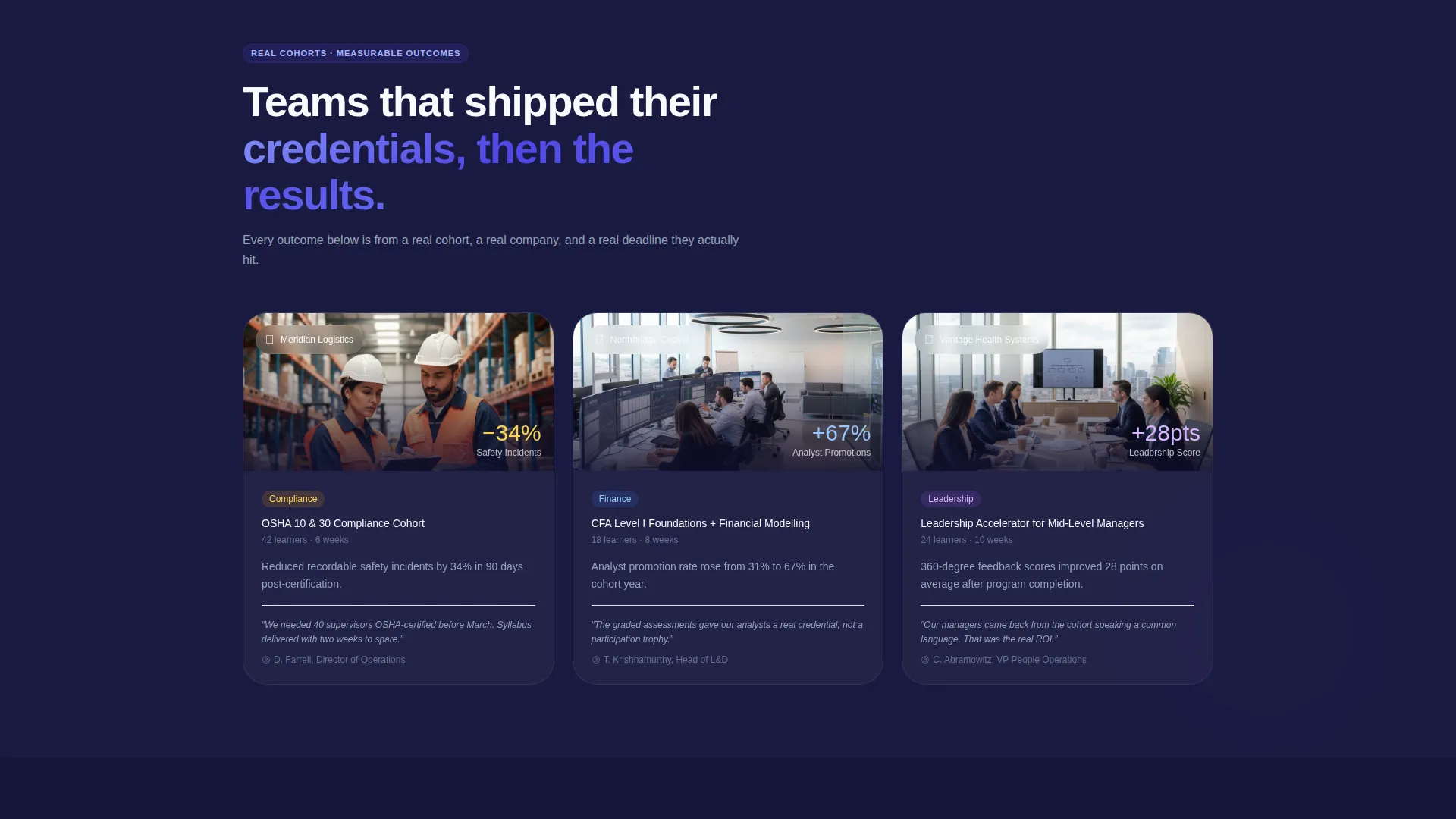
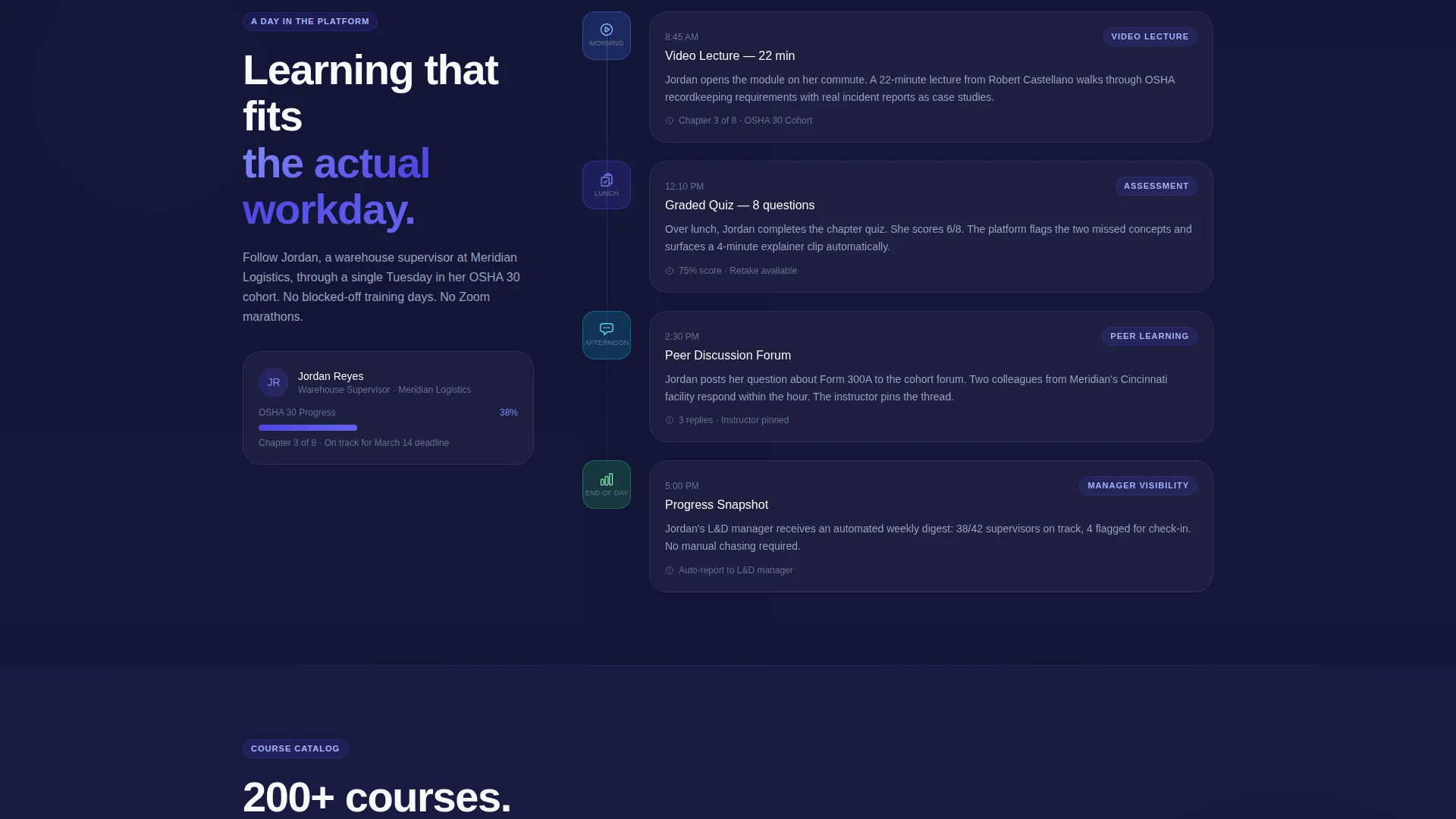
- A horizontal instructor scroll, a three-card learner cohort stack, and a day-in-the-life module timeline
- Two conversion paths: a slide-up inquiry form for team buyers and a gated course catalog download for early-stage visitors
Feature list
This template is built around purposeful sections and conversion-focused design choices drawn directly from the brief.
Half-Page Header Composition
The header splits into two zones. The left side holds a shoulder-height conference table photograph showing four professionals mid-conversation with laptops open. The right side carries a bold geometric headline, a single-line subhead listing course count and subject breadth, and a primary call-to-action button in electric indigo.
Instructor Portrait Scroll
A horizontal scroll row presents instructor portraits with name, credential, and a one-line teaching philosophy beneath each. This section positions the platform's educators as credible professionals, not anonymous content creators.
Learner Cohort Card Stack
Three cards display real cohort stories. Each card includes a team photo, a company logo, the course completed, and a specific measurable outcome. This format answers the "does it work?" question with concrete evidence rather than testimonials.
Day-in-the-Life Module Timeline
A visual timeline traces how one employee moves through a single module: morning video lecture, lunch quiz, and afternoon peer discussion. This section makes the platform feel like a lived experience, not a product brochure.
Slide-Up Lead Capture Form
The primary conversion tool opens as a slide-up panel triggered by the "Build Your Team's Plan" call to action. It collects company name, team size via dropdown, primary training need via multi-select, and a work email. No credit card or pricing is shown. Submissions route to a solutions advisor for a custom curriculum proposal.
Gated Course Catalog Download
A secondary conversion path offers a downloadable course catalog as a PDF. Visitors provide only their email and role title. This path captures prospective buyers who are not yet ready to speak with an advisor.
Page sections overview
| Section | Purpose |
|---|---|
| Header with call to action | Establish credibility and prompt first action |
| Instructor Portrait Scroll | Build trust through educator credentials |
| Learner Cohort Cards | Show measurable outcomes from real teams |
| Module Day Timeline | Make the learning experience feel tangible |
| Outcomes Section | Reinforce results before the second call to action |
| Repeat call to action Block | Re-engage visitors who scrolled past the header |
| Catalog Download Section | Capture early-stage visitors via gated PDF |
| Sticky Mobile Bar | Keep the primary call to action accessible on all screens |
Design & branding system
The Corporate Precision theme uses an Electric Indigo color system to create a focused, boardroom-ready visual tone. Every color choice reinforces authority and modern professionalism.
- Deep boardroom navy (#1A1A40) as the primary background, electric indigo (#4F46E5) on buttons, progress bars, and active states
- Cool slate (#64748B) for body text and secondary labels, with crisp white (#F8FAFC) used on card surfaces and section breaks
- Typography uses a tight geometric sans-serif that suits bold display headlines and clean body copy at any scale
Mobile & speed optimization
The template is built as a single-column flow, which naturally adapts to narrower screens without layout conflicts. Mobile-specific behavior is built into the conversion layer.
- The "Build Your Team's Plan" call-to-action button appears as a sticky bottom bar on mobile, keeping it visible without interrupting scroll
- The slide-up form panel is designed to open cleanly on smaller screens with the same field set as the desktop version
How this template helps you convert
The page is structured to move three distinct buyer types toward action, using social proof as the main conversion engine.
- The header call to action captures high-intent visitors immediately, before they need further convincing, by placing the form trigger above the fold.
- The cohort card stack and outcomes section rebuild momentum mid-page for visitors who scrolled past the header, leading directly into a repeated call-to-action block.
- The gated catalog download gives undecided visitors a low-friction first step, turning a passive browser into a named lead for follow-up.
Other information about this template
This template works particularly well for platforms positioning themselves against self-paced video libraries. The semester-style framing, cohort deadlines, graded assessments, and HR-recognized completion certificates are all visible in the page structure, signaling rigor to skeptical corporate buyers.
- The template supports Finance, Leadership, Data Science, and Compliance as named course categories, each suited to a different buyer segment
- The multi-select training need field in the lead form accommodates custom curriculum requests alongside standard categories
- Occupational Safety and Health Administration (OSHA) certification timelines are a supported use case, reflected in the operations director audience segment built into the page's messaging approach
Theme
Corporate Precision
Creative direction
Team & People
Color system
Electric Indigo
Style
Single Column Flow
Direction
Lead Generation
Page Sections
Half-page Photo and Text Header
Horizontal Instructor Portrait Scroll
Three-card Learner Cohort Stack
Day-in-the-life Module Timeline
Slide-up Lead Generation Form
Gated Course Catalog Download
Related questions
Who is the primary buyer this landing page targets?
Does this template include a pricing section?
What does the secondary conversion path look like?
What course subjects does this template support?
What makes this template different from a standard course listing page?



