AI-Powered ERP Landing Page Template
Synapse is an AI-powered ERP landing page template built for operations directors who need to make a fast, confident case for modern enterprise software. It leads with a live ROI calculator, a syntax-highlighted API code snippet header, and a side-by-side comparison table, all styled in a forge-black and electric-green Monochrome Steel palette that signals speed, precision, and zero legacy bloat.
by Rocket studio
Quick summary
Synapse is a single-page, comparison-table landing page template for an AI-powered enterprise resource planning platform. It opens with a live code snippet header, routes visitors straight to an interactive ROI calculator, and builds the case through animated workflow diagrams and a side-by-side legacy-versus-modern interface comparison. The design is sharp, dark, and terminal-cool.
Who this template is for
This template is built for go-to-market teams promoting AI-powered enterprise software to mid-market manufacturers and distributors. The target buyer is an operations director at a company with 200 to 2,000 employees who has outgrown entry-level accounting software but fears the complexity of a traditional enterprise rollout.
- Marketing and product teams launching an AI-powered ERP platform to mid-market buyers
- Founders and growth teams who need a high-converting, tool-first landing page fast
- Agencies building demand-generation assets for enterprise software clients
What problem this template solves
Mid-market operations teams face a painful gap. Entry-level tools are too limited, but legacy enterprise resource planning systems carry enormous implementation cost, long rollout timelines, and steep technical overhead. A generic landing page cannot close that trust gap. Synapse is designed specifically to address it.
- Buyers arrive skeptical; the ROI calculator shows personal savings before any pitch copy appears
- Legacy ERP comparisons are abstract; the side-by-side table and interface screenshots make the difference concrete
- Prospects need proof the switch is safe; the live uptime ticker and workflow diagrams provide visible operational confidence
What you get with this template
You get a fully structured, section-led landing page designed around a single conversion flow. Every section earns its place by either building trust or reducing friction on the path to the primary call to action.
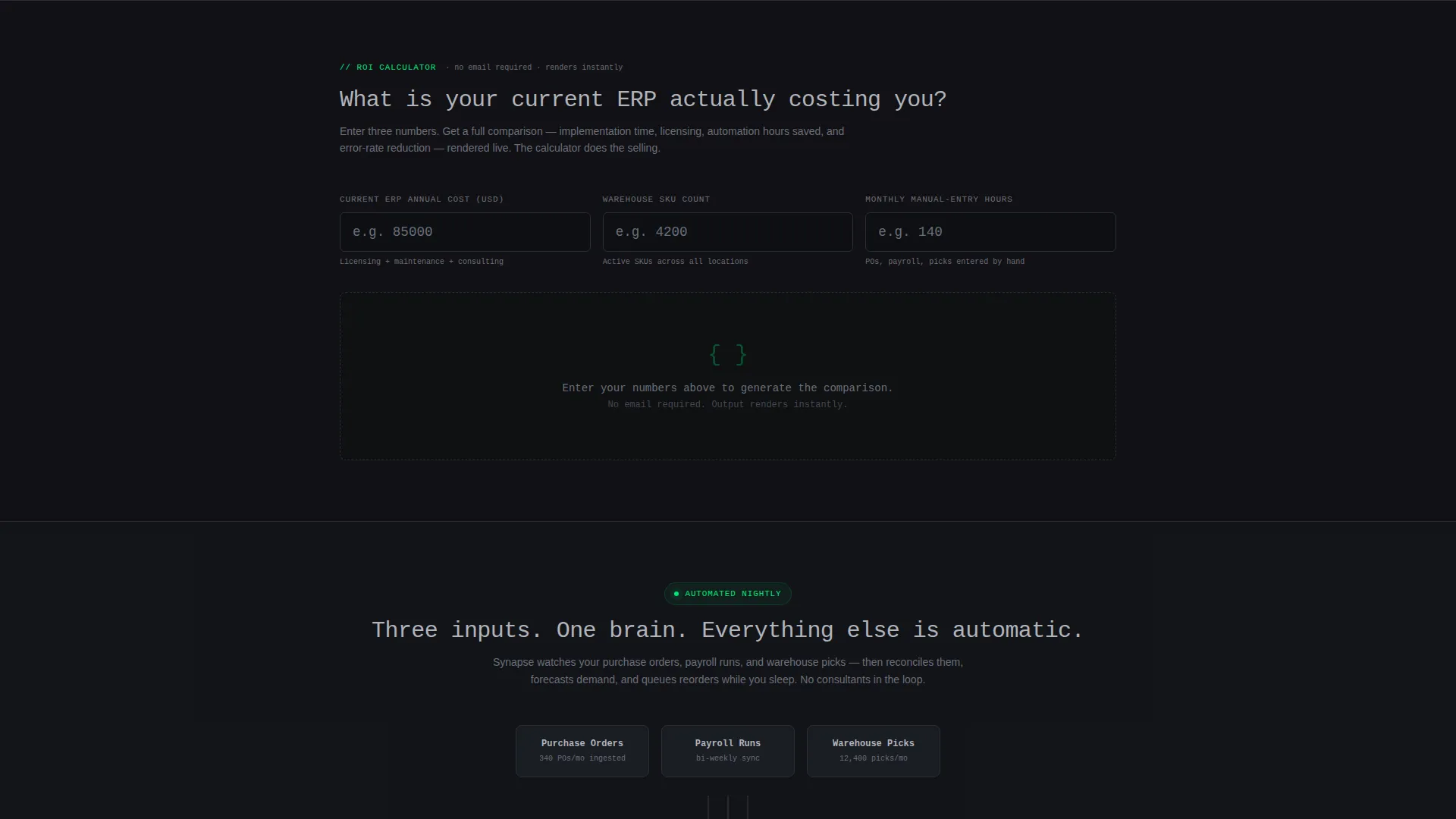
- An interactive ROI calculator section with three inputs and an instant comparison table output
- A live-style API code snippet header block with syntax highlighting and line-by-line animation
- A sticky call-to-action bar, animated workflow diagrams, a live uptime ticker, and a gated secondary conversion link
Feature list
This template is built around a tightly sequenced set of functional sections and design components. Each one does a specific job in the conversion flow.
Interactive ROI Calculator with Comparison Table
The calculator asks three inputs: current enterprise resource planning annual cost, number of warehouse stock-keeping units, and average monthly manual-entry hours. It instantly renders a side-by-side table comparing the visitor's current stack against Synapse across implementation time, annual licensing, automation hours saved, and error-rate reduction. Every Synapse cell pulses in electric green.
Live API Code Snippet Header
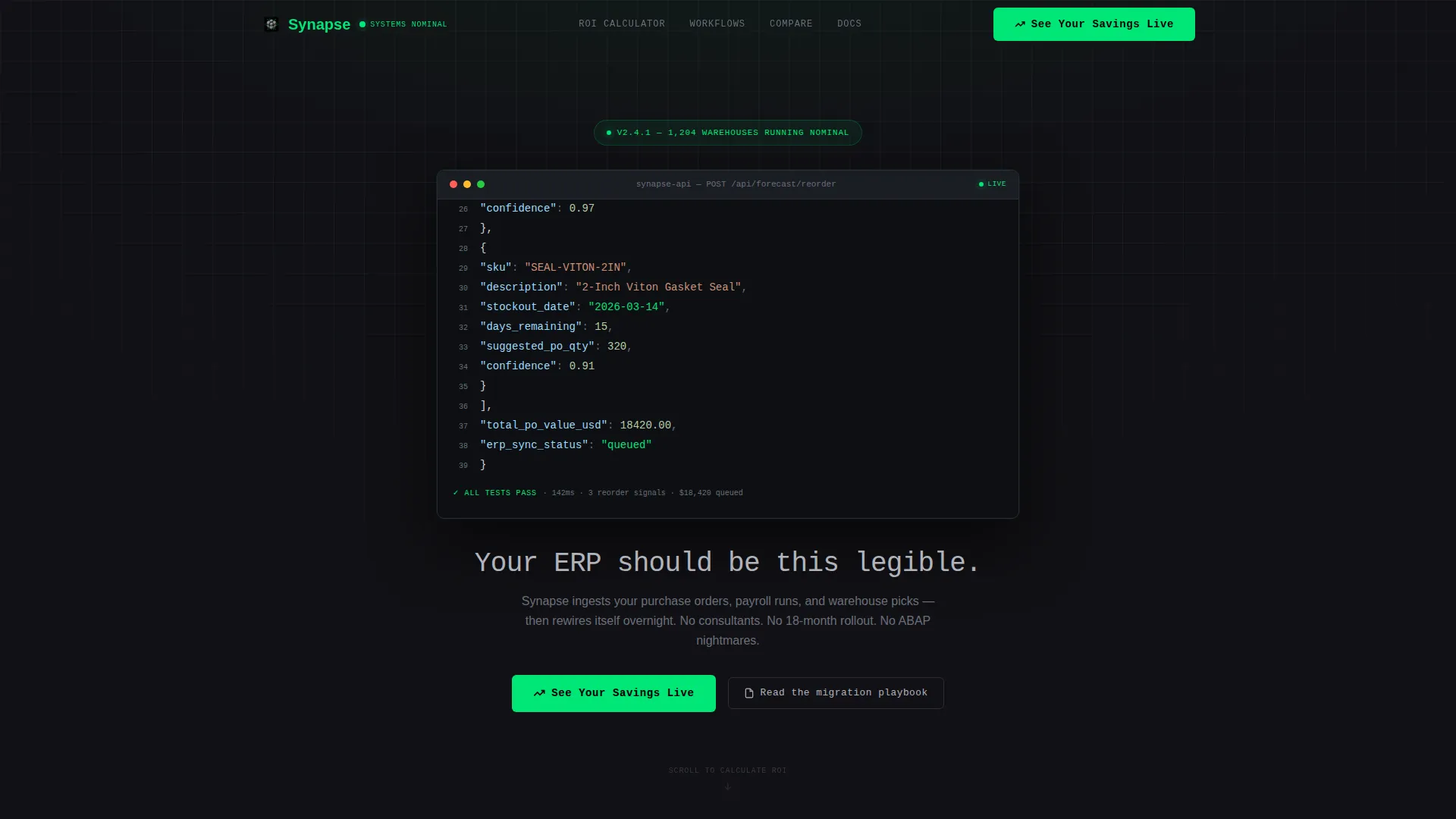
The page opens with a syntax-highlighted block showing a real API call returning a JSON payload. Fields include stock-keeping unit names, predicted stockout dates, and suggested purchase order quantities. The response animates line by line as if the server is processing in real time, making the product itself the visual centerpiece.
Sticky Click-Through Call to Action
The primary call to action, "See Your Savings Live," appears first anchored to the calculator output. After the visitor scrolls past 40 percent of the page, it reappears as a persistent sticky bar. Clicking routes to a guided product demo environment pre-loaded with the visitor's calculator inputs.
Animated Workflow Diagrams
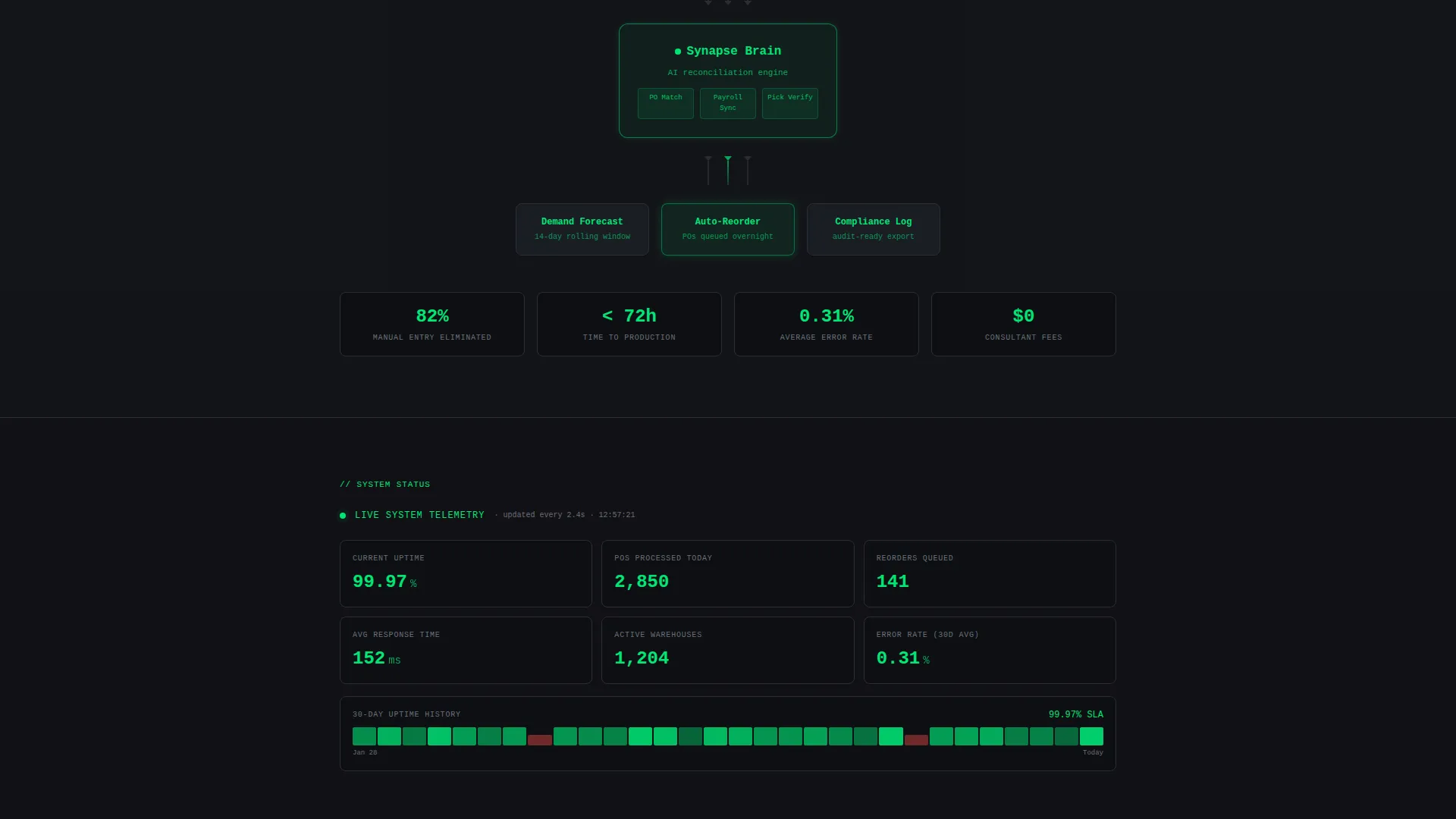
Below the calculator, the page includes animated diagrams showing how purchase orders, payroll runs, and warehouse picks flow through the platform. These visuals shift the pitch from personal savings to operational proof, reinforcing the core argument at a process level.
Legacy Versus Modern Interface Comparison
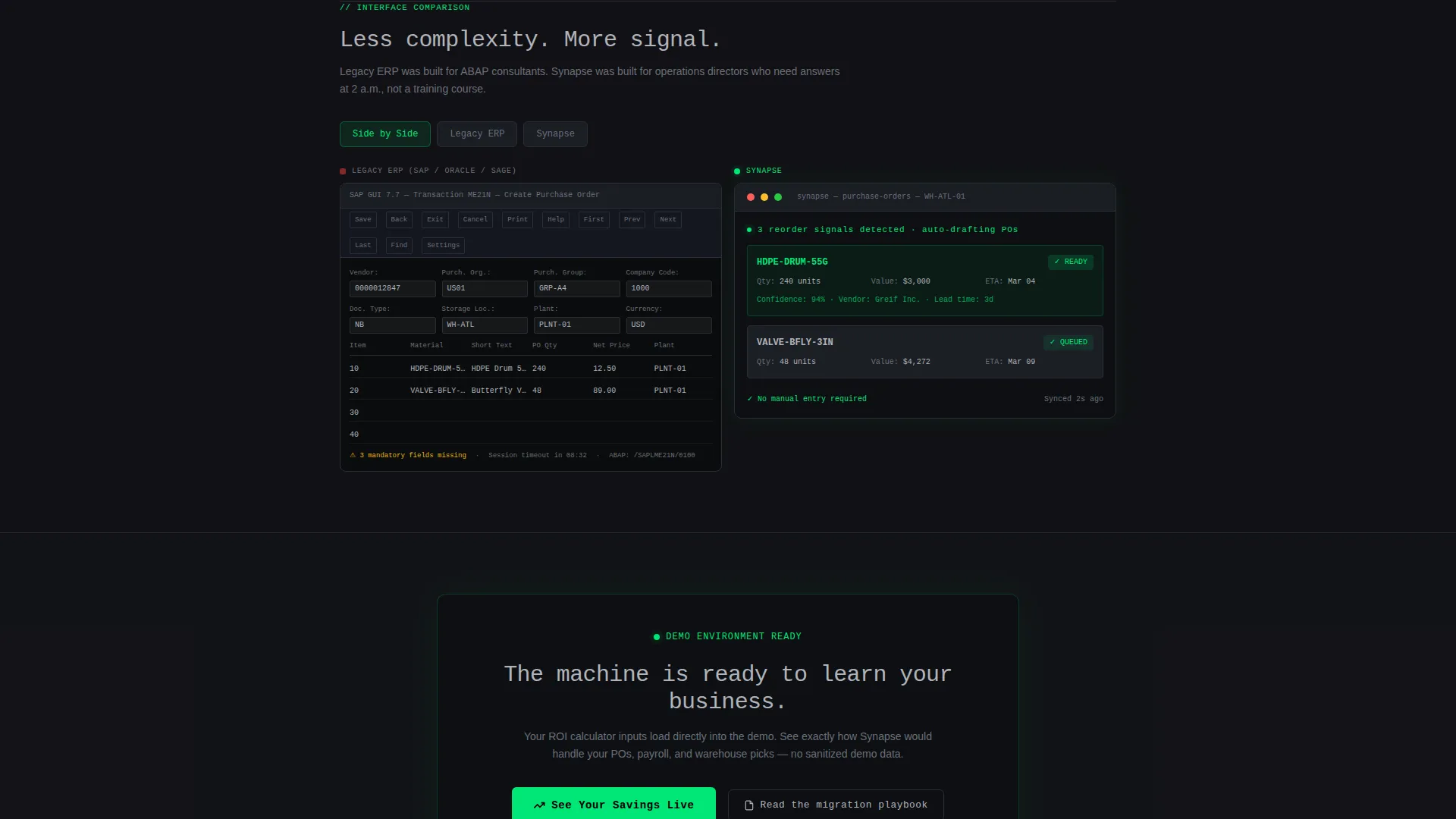
A dedicated section places legacy enterprise resource planning screenshots side by side with Synapse's clean terminal interface. The contrast is direct and visual, requiring no explanatory copy to land its point.
Secondary Gated Conversion Path
A text link labeled "Read the migration playbook" captures higher-funnel visitors who are not yet ready to demo. It leads to a gated PDF, giving the page two distinct conversion outcomes from one session.
Page sections overview
| Section | Purpose |
|---|---|
| API Code Header | Opens with live syntax-animated API response to establish product credibility immediately |
| ROI Calculator | Three-input tool that renders an instant current-stack-versus-Synapse comparison table |
| Savings Comparison Table | Visualizes implementation time, licensing cost, automation hours, and error-rate differences |
| Workflow Diagrams | Animated diagrams showing purchase order, payroll, and warehouse pick flows |
| Live Uptime Ticker | Provides real-time operational proof and builds confidence in platform reliability |
| Interface Comparison | Side-by-side legacy ERP screenshots versus Synapse terminal interface |
| Sticky call to action Bar | Persists after 40 percent scroll depth; anchors the primary click-through conversion |
| Secondary Gated Link | Text link to migration playbook PDF for higher-funnel prospect capture |
Design & branding system
The visual identity follows a Startup Velocity theme through a Monochrome Steel color system. The palette is built around four values: forge-black (#111115) as the dominant background, brushed gunmetal (#2A2D35) for surface differentiation, milled aluminum (#B0B3BA) for body text and user interface labels, and a single electric-green accent (#00E676) reserved exclusively for positive states, live data, and calls to action. Typography uses monospaced type throughout to reinforce the terminal aesthetic.
- Forge-black base with gunmetal surface layers creates a server-rack-at-midnight atmosphere
- Electric-green (#00E676) is used only on pulsing comparison table cells, live data indicators, and primary call to action buttons
- Monospaced typeface in the hero headline and code snippet header anchors the product-as-visual concept
Mobile & speed optimization
The template layout is designed to translate the desktop terminal aesthetic into a clean, scrollable mobile experience. The calculator inputs, comparison table, and sticky call-to-action bar are all structured to function clearly at smaller viewport sizes.
- Single-column scroll flow keeps the ROI calculator and comparison table readable on narrow screens
- Sticky call to action bar is positioned to remain visible without obscuring key content on mobile viewports
- Animated elements such as the code snippet and workflow diagrams are scoped to enhance rather than obstruct the reading experience
How this template helps you convert
Synapse is built around a calculator-first conversion strategy. Rather than leading with pitch copy, it leads with a tool that makes the value personal and immediate. Every subsequent section reinforces the output the visitor already calculated.
- The ROI calculator delivers a personalized comparison before any marketing claim appears, replacing skepticism with visible data
- The sticky "See Your Savings Live" bar keeps the primary call to action present throughout the scroll without interrupting the content experience
- The secondary migration playbook link creates a second conversion path for visitors who need more context before committing to a demo
Other information about this template
This template is a strong fit for teams entering a competitive AI-powered enterprise resource planning market where buyer trust is low and switching costs feel high. The tool-first creative direction and comparison table format are particularly effective in that context.
- Template style is Comparison Table, built specifically for side-by-side evaluation scenarios common in enterprise software marketing
- The Click-Through landing page direction means the primary goal is routing qualified visitors to a demo environment, not collecting a form submission on-page
- The Code Snippet header concept is a deliberate product-as-visual strategy: the API response IS the hero, replacing stock photography entirely
- The Startup Velocity theme and Monochrome Steel color system are designed to signal technical credibility to an engineering-aware operations audience
- Suitable for teams replacing or competing against legacy platforms such as SAP, Oracle, or similar traditional enterprise resource planning systems where implementation complexity is a primary buyer objection
Theme
Startup Velocity
Creative direction
Calculator/Tool First
Color system
Monochrome Steel
Style
Comparison Table
Direction
Click-Through
Page Sections
Interactive ROI Calculator
Live API Code Snippet Header
Sticky Click-through Call to Action Bar
Animated Workflow Diagrams
Legacy Versus. Modern Interface Comparison
Secondary Gated Conversion Path
Related questions
What type of business is this landing page template built for?
Does the ROI calculator require custom development to work?
Can this template support a SaaS product outside the ERP category?
How does the two-path conversion flow work?
When does the sticky call to action bar appear?



