Neuromorphic Computing Technology Cost Calculator Website Template
Synapse is a brutalist bento grid landing page built for a neuromorphic computing framework that compiles spiking neural networks onto edge chips. It opens with a live power estimator, escalates through dense benchmark grids comparing neuromorphic versus GPU versus TPU performance, and closes with a sandbox call to action that lets engineers run their own numbers.
by Rocket studio
Quick summary
Synapse is a single-page brutalist landing page for a neuromorphic framework that maps spiking neural networks onto edge chips at microwatt power levels. The page opens with a live estimator, drives visitors through benchmark-backed evidence grids, and converts them through a hosted sandbox where their own model does the selling.
Who this template is for
This template is built for technical teams who need to communicate real performance advantages, not marketing promises. It speaks directly to engineers and researchers who evaluate frameworks by numbers, not narratives.
- Embedded machine learning engineers profiling power budgets on edge deployments
- Research teams hand-placing neurons on neuromorphic boards
- Robotics leads who need real-time sensory processing without thermal management overhead
What problem this template solves
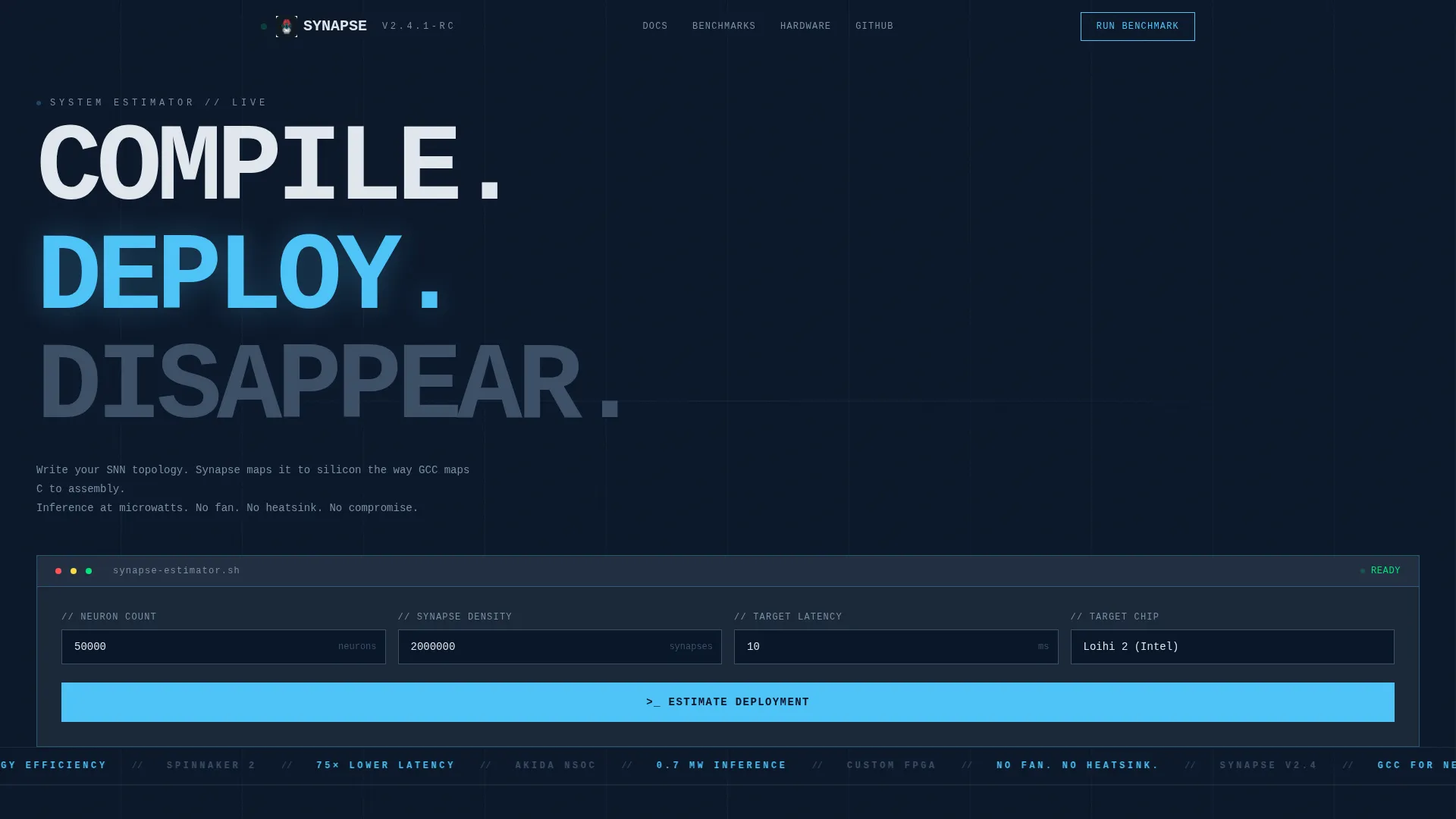
Most framework landing pages lead with features and bury the proof. Synapse flips that order. The visitor sees their own power and latency numbers before they read a single claim about the product.
- GPU and TPU comparison figures appear in red against dark backgrounds, making the gap impossible to ignore
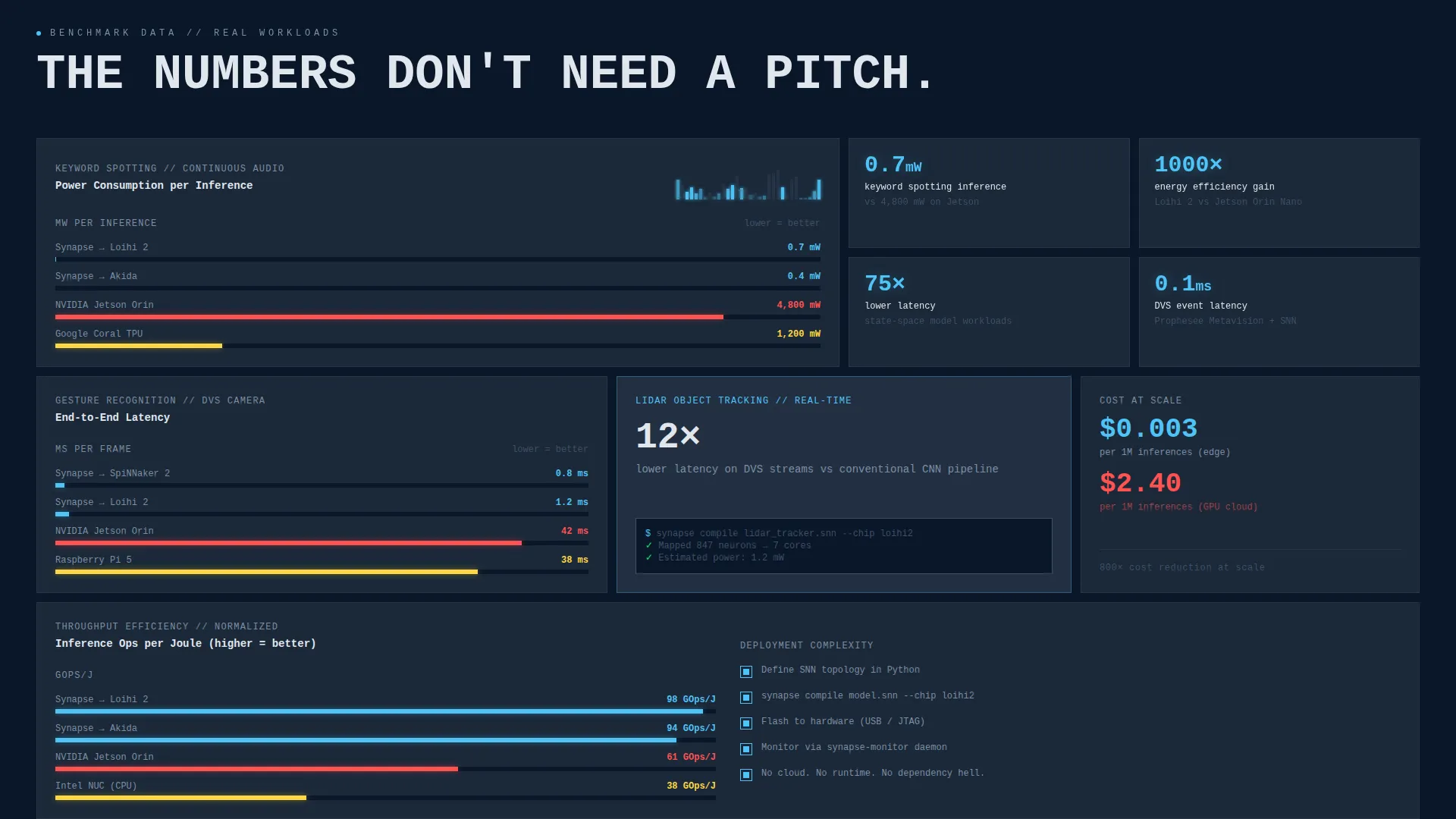
- Benchmark grids stack evidence row by row across power, latency, deployment complexity, and cost at scale
- The primary call to action feels like the logical conclusion, not a sales request
What you get with this template
You get a fully designed bento grid landing page built around a Problem to Solution arc. Every section is laid out in a dark, phosphor-lit brutalist system with asymmetric grid tiles and monospaced oversized type.
- A live calculator header panel with animated countup output columns for power, compile time, and chip utilization
- Asymmetric bento benchmark grids with side-by-side graphs and single-stat callout tiles
- A dual conversion path: a sandbox benchmark runner and a whitepaper email gate
Feature list
This section covers the core designed components delivered with the Synapse template.
Live Power and Latency Estimator
The header is a brutalist input panel where visitors enter neuron count, synapse density, target latency, and deployment chip from a dropdown. On submit, the panel splits into three animated output columns showing power draw in milliwatts, compile time estimate, and chip utilization percentage. GPU equivalent figures auto-populate in red below, already losing.
Asymmetric Bento Benchmark Grid
The bento grid below the header is intentionally dense and asymmetric. Large tiles render side-by-side benchmark graphs for latency, power, and throughput across neuromorphic, GPU, and TPU workloads including keyword spotting, gesture recognition, and LiDAR object tracking.
Single-Stat Callout Tiles
Smaller bento tiles interject across the grid with precise single-figure callouts. Examples include "0.7 mW inference" and "12x lower latency on DVS streams." These tiles keep the evidence rhythm tight and prevent the visitor from having to read full paragraphs to understand the magnitude of the advantage.
Problem-to-Solution Arc Layout
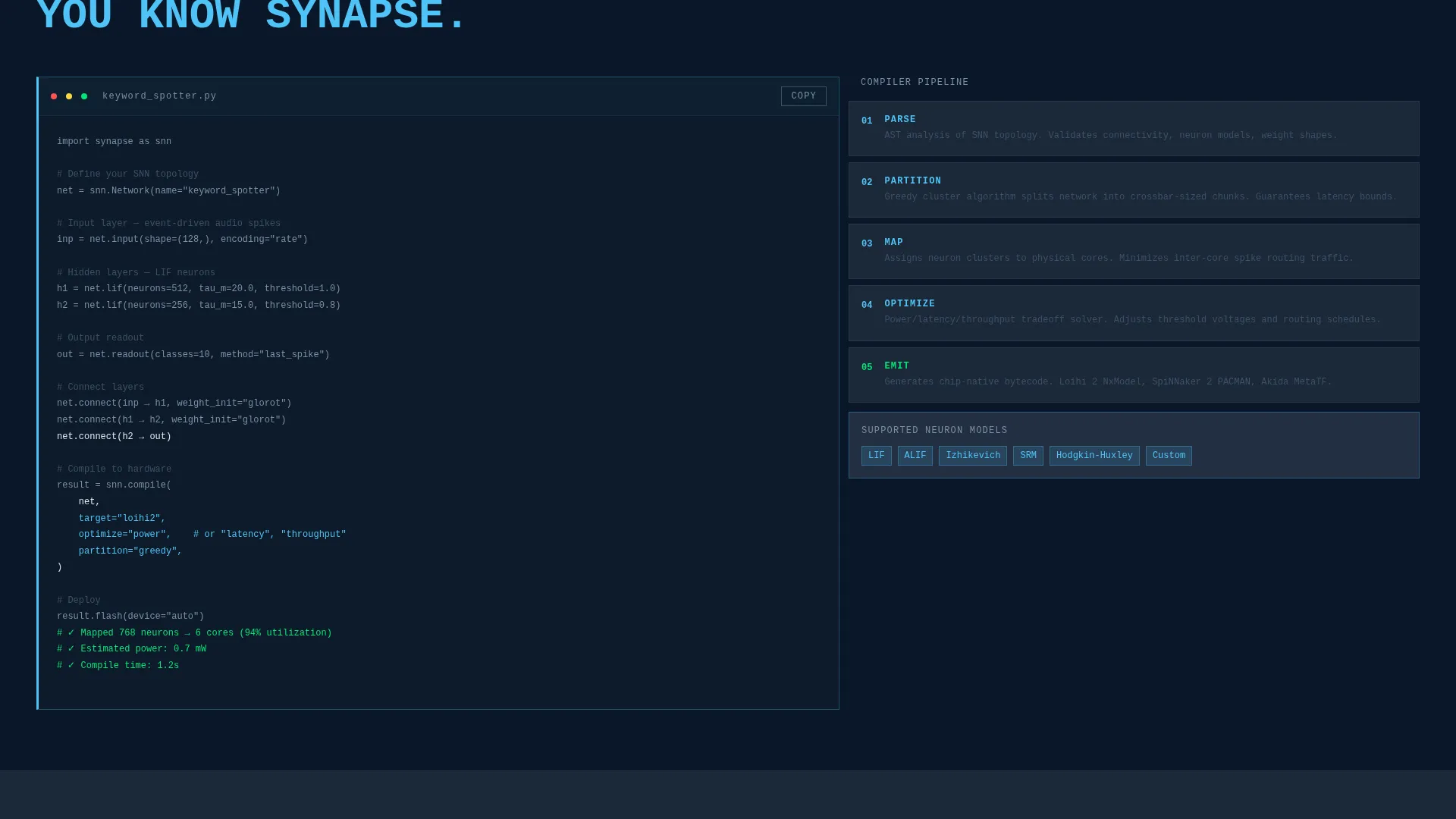
Each scroll row escalates a different dimension of the problem: power first, then latency, then deployment complexity, then cost at scale. The framework architecture diagram appears only after the visitor has already processed three grids of evidence they did not take on faith.
Dual Conversion Path
The primary call to action is "Run Your Own Benchmark," linking to a hosted sandbox where visitors upload a spiking neural network definition file and receive a compiled performance report. A secondary path offers "Read the Whitepaper" behind a single-field email gate.
Bold Brutalist Dark Theme
Typography is monospaced and oversized, slammed flush-left against grid edges with zero padding apology. Borders are 1px solid phosphor blue or nothing at all. Active states, graph lines, and blinking cursors carry the accent color; everything else stays in abyssal darkness.
Page sections overview
| Section | Purpose |
|---|---|
| Power Estimator Header | Let visitors input their own model parameters and see live output |
| GPU Comparison Line | Show neuromorphic versus. GPU figures in red immediately below estimator |
| Benchmark Graphs Grid | Display side-by-side latency, power, and throughput charts |
| Single-Stat Callout Tiles | Punctuate grid rows with precise single-figure evidence |
| Problem Escalation Rows | Step through power, latency, deployment complexity, and cost |
| Architecture Diagram | Reveal framework structure after evidence has accumulated |
| Primary call to action Block | Drive visitors to the hosted benchmark sandbox |
| Whitepaper Email Gate | Capture leads through a single-field form for the whitepaper |
Design & branding system
The visual identity is Bold Brutalist with a Midnight Blue color system. The palette reads like a powered-down data center where one machine just woke up, monolithic darkness interrupted by precise electric pulses.
- Background is abyssal navy (#0A1628); card surfaces use desaturated slate (#1B2838); accent is cold phosphor blue (#4FC3F7); type is raw terminal white (#E0E6ED)
- Accent blue appears only where the interface is alive: hover states, graph lines, blinking cursors, and animated countup numbers
- Typography is monospaced and oversized, set flush-left with 1px solid phosphor blue borders or bare edges
Mobile & speed optimization
The bento grid layout is structured for controlled reflow at smaller viewport widths. Asymmetric tile arrangements compress into stacked columns without losing the visual hierarchy of the benchmark evidence.
- Oversized monospaced type remains legible at reduced sizes due to its high contrast against dark surfaces
- Animated countup elements in the estimator header are self-contained and do not depend on external libraries
- Single-stat callout tiles retain full impact on mobile because they carry one number per tile
How this template helps you convert
Synapse converts by making the visitor's own data do the persuading before any product narrative appears.
- The live estimator at the top turns the visitor's own model parameters into a power comparison that already favors the framework, before they read a single feature bullet.
- Three escalating bento grid rows accumulate evidence across power, latency, and deployment complexity, so by the time the sandbox call to action appears, it feels like the obvious next step.
Other information about this template
Synapse is designed specifically for the neuromorphic computing niche, where the audience is technical enough to distrust marketing copy and trusts benchmark data above everything else. This template's layout philosophy reflects that reality directly.
- The template style is Bento Grid and the creative direction is a Problem to Solution Arc, making it well suited for framework and tooling products in the neuromorphic computing space
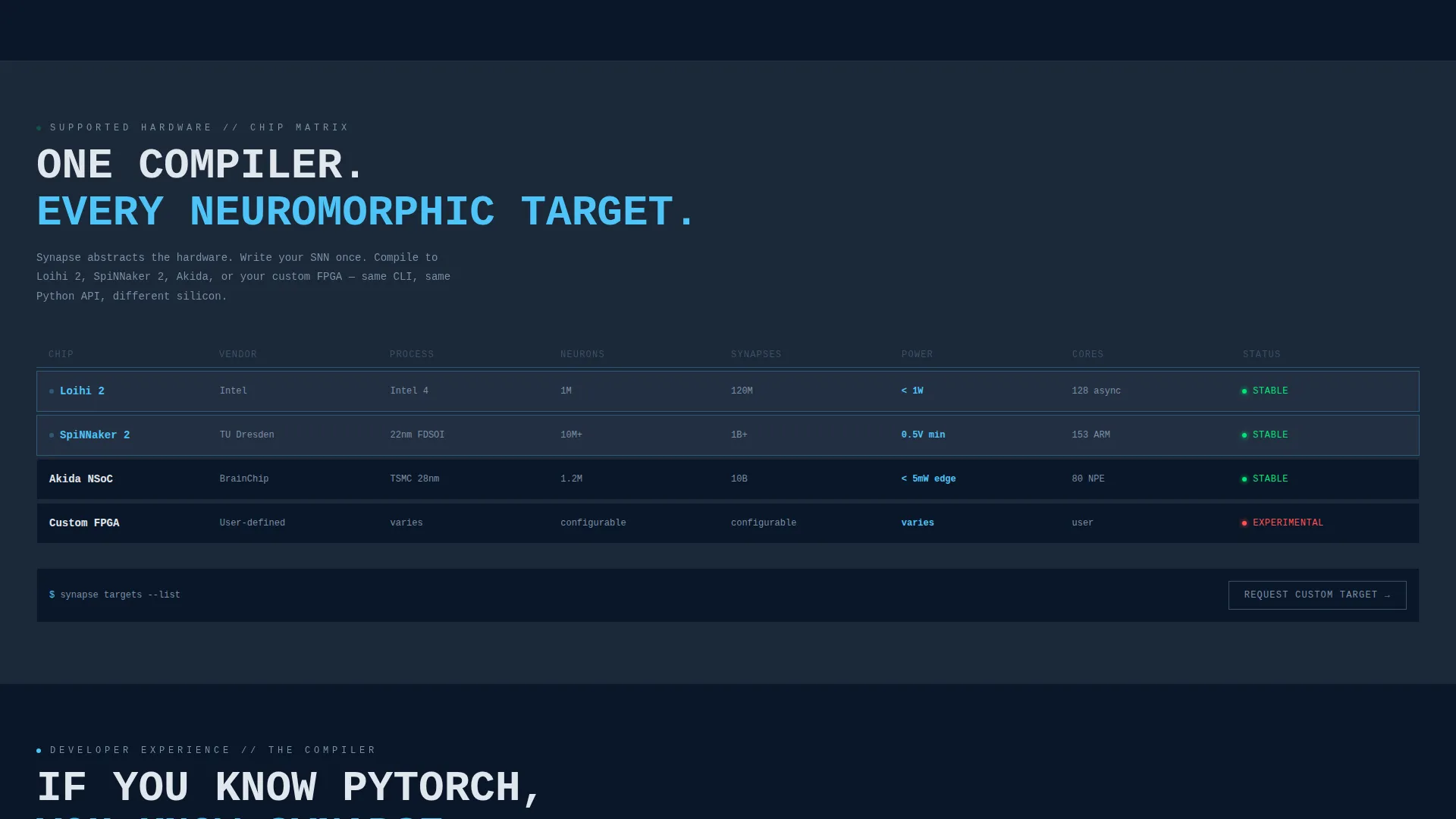
- The dropdown in the estimator includes chip targets: Loihi 2, SpiNNaker 2, Akida, and Custom FPGA
- The page is category-matched to Technology, subcategory Neuromorphic Computing Technology, for teams building or marketing spiking neural network tools
Theme
Bold Brutalist
Creative direction
Problem→Solution Arc
Color system
Midnight Blue
Style
Bento Grid
Direction
Comparison/Versus
Page Sections
Live Power and Latency Estimator
Asymmetric Bento Benchmark Grid
Single-stat Callout Tiles
Problem-to-solution Arc Scroll Flow
Dual Conversion Path Design
Bold Brutalist Dark Visual System
Related questions
Who is the Synapse landing page template built for?
What does the estimator header actually do?
Can I customize the benchmark data shown in the grid tiles?
What are the two conversion paths in this template?
Does the template include the sandbox benchmark tool itself?



