AI for SaaS B2B Professional Website Template
Sync is a dark-glass, terminal-aesthetic landing page built for AI scheduling assistant products targeting B2B SaaS ops teams. The modular card grid layout moves visitors through a Problem-to-Solution arc, from chaos stats and conflict heatmaps to resolved calendars and a lead-gen audit form. It converts ops managers, RevOps leads, and chiefs of staff into qualified leads.
by Rocket studio
Quick summary
Sync is a single-page, card-grid landing page template designed for an AI scheduling assistant product aimed at mid-market SaaS teams. It uses a terminal dark-glass visual system, a Problem-to-Solution scroll arc, and a lead-gen form anchored around a free Calendar Score audit. The design converts ops-focused visitors into qualified leads before they ever touch the product.
Who this template is for
This ai assistant landing page is purpose-built for founders, product marketers, and growth teams launching or repositioning an ai scheduling assistant product in the B2B SaaS space. If your product helps busy people eliminate calendar chaos and protect focus time, this landing page gives you a ready-made conversion machine.
- Ops managers at mid-market SaaS companies running 40-person sales floors
- RevOps leads who lose pipeline to scheduling friction and back and forth emails
- Chiefs of staff manually managing executive calendars across multiple time zones
What problem this template solves
Most ai assistant landing pages in the scheduling space fail because they describe features rather than demonstrate relief. Visitors arrive overwhelmed. They need to feel the problem resolved before they commit. The Sync template structures the scroll to do exactly that: show the pain, then immediately flip it.
- Double-bookings, no-shows, and back to back meetings drain SDR pipeline and revenue
- Manual scheduling tools force ops teams to assign tasks that an ai scheduler should handle automatically
- Generic landing page designs do not communicate the intelligence or speed of a modern ai calendar app
What you get with this template
The Sync landing page template is a fully designed, modular card-grid layout ready to adapt to your product's brand and copy. Every section is pre-structured so your team can plug in real data, testimonials, and integration logos without rebuilding the layout from scratch. The ai landing page is desktop-first with responsive mobile behavior built in.
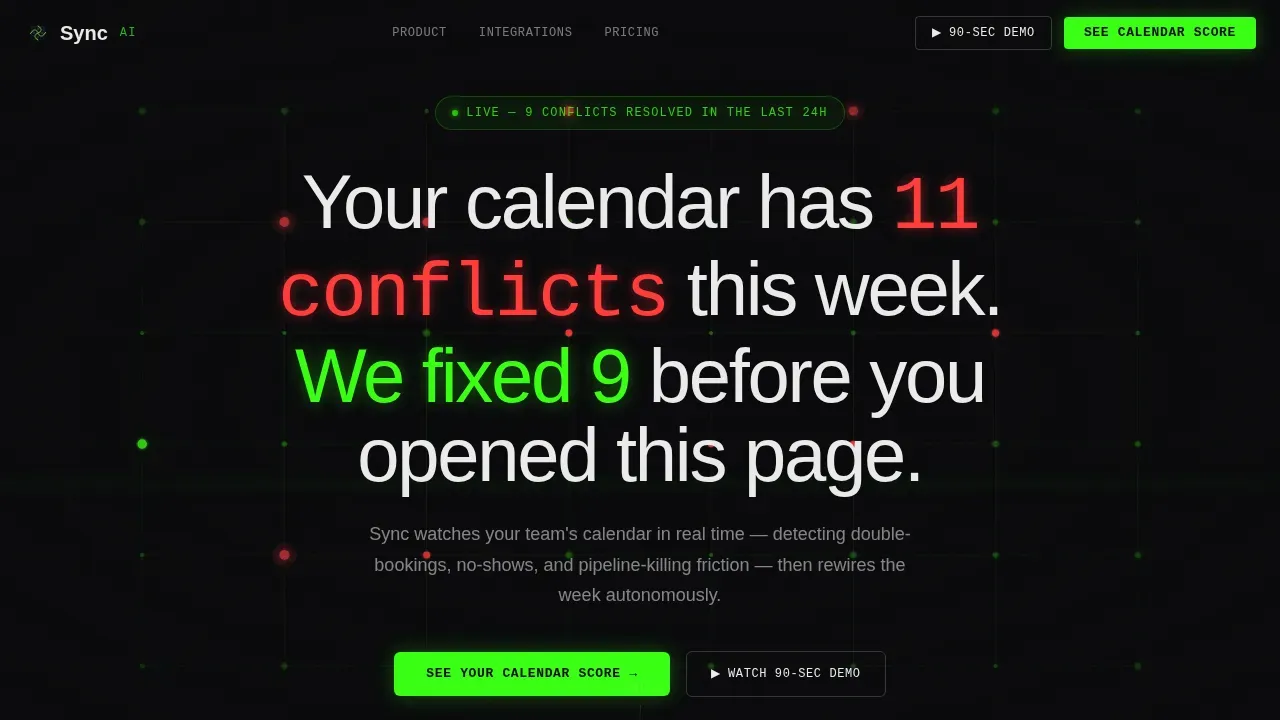
- A full-bleed hero section with a phosphor-green wireframe calendar animation and dual call-to-action buttons
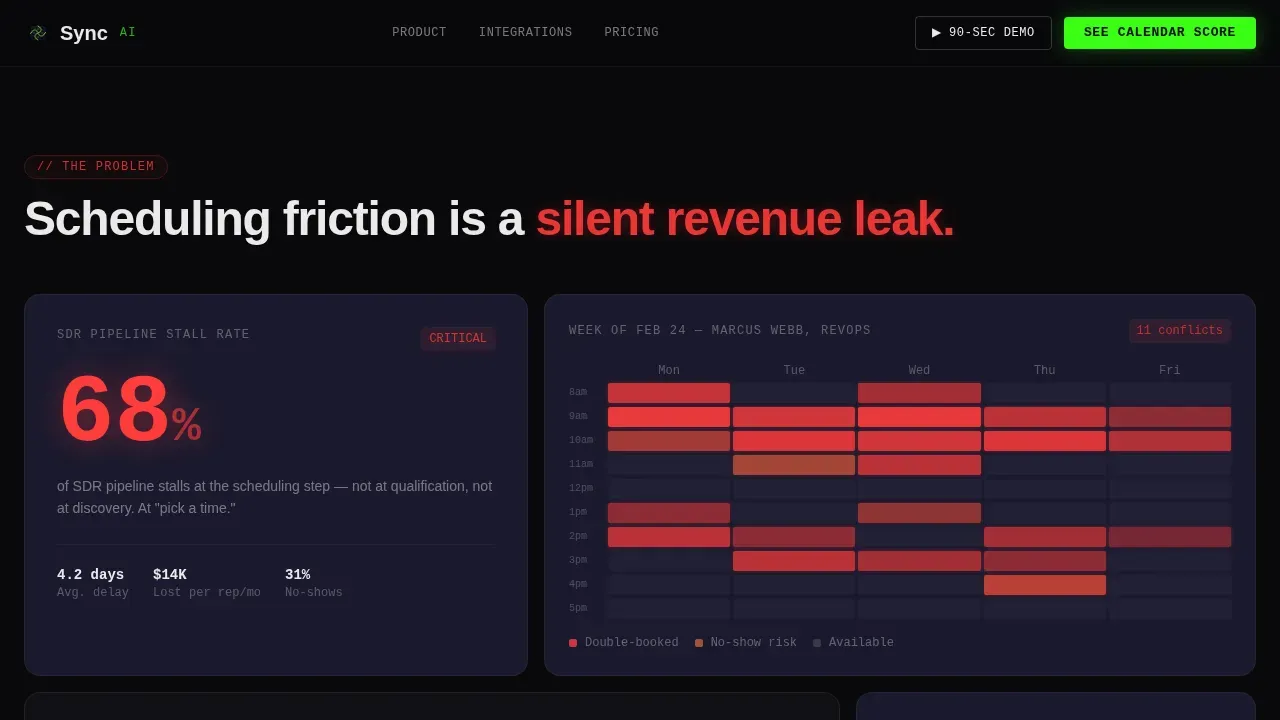
- A bento-grid Problem Arc with stat cards, a red-saturated week heatmap, and a testimonial card
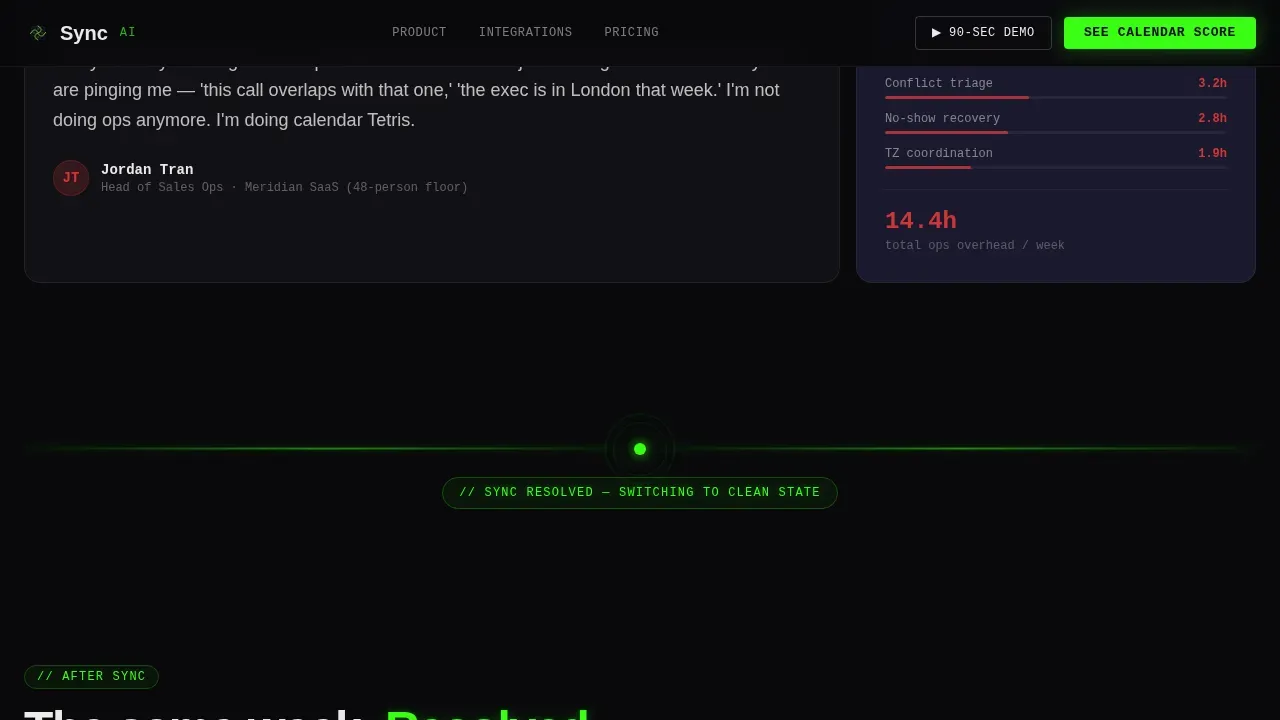
- An animated Pulse Divider that triggers the solution flip and leads into the lead-gen Calendar Score form
Feature list
This landing page template ships with a focused set of prompt-backed design and layout capabilities. Each feature below is grounded in the source brief and reflects what you will find inside the template files.
Animated Hero with Live Calendar Grid
The hero occupies a full-bleed void-black viewport. A wireframe calendar grid rendered in phosphor green materializes on load, with nodes pulsing softly at resolved meeting windows. A headline fades in over the animation. A primary call-to-action and a ghost button for the 90-second demo sit side by side, giving visitors two clear paths. Highlighting a dual call-to-action this way can improve user engagement and conversion rates for an ai landing page.
Problem-to-Solution Card Arc
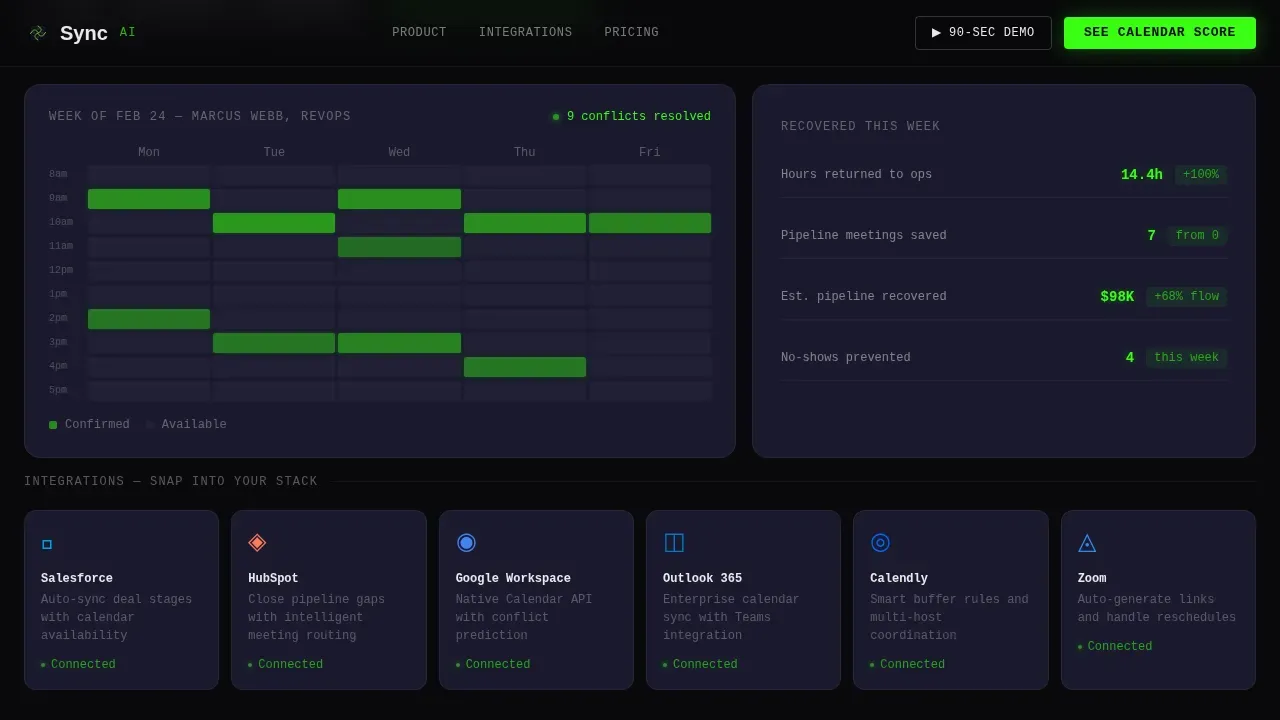
The scroll begins with chaos. A stat card reads "68% of SDR pipeline stalls at scheduling." A red-saturated heatmap visualizes a week of overlapping existing events. An ops-lead testimonial card anchors the emotional weight. A phosphor-green animated divider line fires, and the grid below flips to resolved: clean heatmaps, recovered hours visualized as revenue. This arc trains visitors to trust the ai assistant before they sign up. It is one of the most effective structures for an assistant landing page selling ai scheduling tools.
Lead-Gen Calendar Score Form
The ai assistant landing page pins a dark card with a phosphor-green border glow directly after the heatmap flip, at peak emotional contrast. The form collects work email, calendar platform via dropdown (supporting google calendar, outlook calendar, and Calendly), and team size (solo, 2-10, 11-50, 50+). This structured form design supports the scheduling process of turning anonymous visitors into qualified leads. Integrated scheduling tools like this simplify booking consultations and lower the learning curve for potential clients.
Integration Tile Grid
Modular integration tiles represent the product's calendar integrations with Salesforce, HubSpot, Google Workspace, and Outlook. Each tile uses hover states that visitors interact with naturally. The tile grid communicates real-time availability across multiple calendars and team calendars without a single word of explanation. Visitors mentally snap each tile into their own stack. This is a key feature for ops teams evaluating ai scheduling app options.
Social Proof and Trust Signal Section
Testimonial cards from named ops personas and stat callouts sit in their own card section after the integration grid. Client testimonials enhance trust among potential customers in a way that feature lists cannot. The section ends with a final call-to-action, giving late-stage visitors a clean conversion path. Effective testimonials that highlight time savings, such as "saves 5 hours per week," are placed here to quantify the ai assistant's value for busy people on the sales team.
Minimal Dark Footer
The footer follows a Vercel Horizontal Flow pattern. It is minimal, dark, and terminal-aesthetic, consistent with the overall Dashboard Pro design system. Meeting links, booking links, and navigation anchor links sit in a clean horizontal row against the void-black ground. The footer does not distract; it closes the page with the same visual language that opened it.
Page sections overview
| Section | Purpose |
|---|---|
| Full-Bleed Hero | Introduce the ai assistant with a live calendar animation and dual call-to-action |
| Problem Arc Cards | Show scheduling chaos through stat cards, heatmap, and ops-lead testimonial |
| Pulse Divider | Mark the shift from problem to solution with an animated phosphor-green line |
| Solution Flip Grid | Display resolved heatmaps and recovered hours visualized as revenue |
| Integration Tile Grid | Present calendar integrations as modular, snappable tiles with hover states |
| Calendar Score Form | Capture leads via a work-email form with calendar-platform and team-size dropdowns |
| Social Proof Section | Build trust with named testimonial cards, stat callouts, and a final call-to-action |
| Dark Minimal Footer | Close the page with navigation links and booking links in a horizontal flow layout |
Design & branding system
The Sync landing page runs on an Acid Digital color system layered over a Dashboard Pro architectural framework. The palette is deliberate: every color carries a specific role, and nothing fires without purpose. The ai landing page feels like a terminal at 2 a.m., dark glass with data pulsing underneath, every glow intentional, every highlight earned.
- Void black (#09090B) dominates all backgrounds; cool slate (#1A1A2E) separates card layers; phosphor green (#39FF14) is reserved for live data, active states, primary calls-to-action, and the animated divider; signal white (#EAEAEA) keeps body text razor-legible
- JetBrains Mono handles all data labels, stat callouts, and terminal-style text; Manrope governs headings and body paragraphs for a clean contrast between machine and human voice
- Customization options across the color system and typography stack let your team adapt the template to fit an existing brand without breaking the visual hierarchy
Mobile & speed optimization
The Sync landing page is desktop-first by design. Ops managers and RevOps leads typically evaluate tools at workstations, so the card grid and bento layout are optimized for wide viewports first. However, responsive mobile behavior is fully built in to meet user accessibility needs. The landing page should load in under 3 seconds to retain potential visitors, and the template's animation architecture is designed with that target in mind.
- Canvas powers the hero wireframe calendar animation; CSS custom properties manage the phosphor-green glow system; Intersection Observer handles scroll-triggered card reveals and staggered entrances
- Responsive breakpoints reflow the bento grid and card stack for smaller screens, keeping the ai assistant landing page readable and functional on mobile devices
- The user friendly interface carries through to mobile, ensuring that visitors interact with the form, integration tiles, and call-to-action buttons without friction on any device
How this template helps you convert
The Sync ai assistant landing page is engineered around a single conversion goal: turning ops-focused visitors into Calendar Score leads. Every layout decision, scroll beat, and color choice exists to move the visitor from recognition of pain to belief in the solution, then to form submission. A successful landing page should emphasize automation, intelligence, and time savings, and Sync does exactly that across every card section.
- The Problem-to-Solution arc raises stakes with real pain points (stat cards, heatmaps, testimonials), then resolves them visually at the Pulse Divider, so the visitor arrives at the form primed to act. Highlighting a dual call-to-action in the hero, with the primary "See Your Calendar Score" form and the ghost "Watch the 90-Second Demo" button, captures both ready-to-convert visitors and those who need motion before commitment.
- The Calendar Score form is positioned at peak emotional contrast, immediately after the solution flip. The form asks for only three inputs: work email, calendar platform, and team size. This low friction design reduces the learning curve for potential clients and makes the ai scheduling process feel effortless.
- The social proof section closes with named testimonial cards and stat callouts. Client testimonials enhance trust among potential customers and give late-stage visitors the final proof they need before converting.
Other information about this template
The Sync template is built for a specific intersection of design ambition and conversion function. It is not a general-purpose virtual assistant website template. It is a specialized ai assistant landing page for scheduling-intelligence products targeting mid-market B2B SaaS operations teams.
- The Sync ai scheduling assistant landing page template uses large language models-compatible messaging patterns, meaning the copy structure and layout can support natural language input prompts and ai calendar app positioning without modification
- For teams comparing ai scheduling app options, the integration tile section can be adapted to reflect any combination of google calendar, outlook calendar, or other calendar integrations your product supports
- The template's ai scheduler positioning is compatible with products that protect focus time, guard lunch breaks, block uninterrupted focus time, and prevent back to back meetings from collapsing a work schedule
- Teams building a virtual assistant product that handles personal tasks, manages appointments, or handles multiple tasks across team calendars and multiple calendars will find the layout adapts naturally to those use cases
- The free plan and pricing plans section is not included by default in the template layout; teams that need to communicate pricing plans or a free plan offering should add a pricing card section to the existing card grid
- For products using intelligent time blocking, the heatmap flip section provides an ideal visual context to demonstrate how the ai assistant finds the right time slot and reserves it before conflicts form
- The ai calendar section of the integration grid can be expanded to show additional scheduling tools, booking links, meeting links, and automated reminders without breaking the modular layout
- Google tasks and other task-management integrations can be represented as additional tiles in the integration grid section; the web app connection flow is pre-visualized in the solution flip cards
- Teams positioning their product as the best ai scheduling assistant in the mid-market SaaS space will find that the stat-card format (for example, "saves 5 hours per week") and the recovered-hours-as-revenue visualization make quantified claims legible and credible
- The template's advanced features, such as the canvas animation, scroll-triggered reveals, and heatmap flip transition, are high-animation by default; teams wanting a lower-animation version can reduce motion through CSS custom property overrides
- Powerful features like the phosphor-green glow system and staggered card entrances are controlled via CSS custom properties, making global adjustments straightforward for developers
- Virtual assistant website templates, including this one, often include sections for service listings, testimonials, and contact information; Sync covers all three within its modular card grid
- The template supports social media platforms sharing via standard open-graph metadata, making it straightforward to promote the landing page across channels
- Reclaim, Clockwise, Motion, SkedPal, Akiflow, Clara, Kronologic, Toki, and Structured are established ai scheduling assistants in the market; the Sync template is designed to help any competing product communicate a distinct, high-trust value proposition against that competitive field
- Reclaim integrates with Google Calendar and Outlook Calendar to manage scheduling and protect focus time; Clockwise helps teams find focus time and manage meetings; the Sync template's design language and layout can be used to position any ai scheduling product against these established tools
- Pricing for ai scheduling assistants varies widely, with some offering free plans and others starting at $6.75 per user per month; the Calendar Score free audit hook in the Sync template is designed to lower the barrier of entry and move potential customers into a trial or demo funnel before pricing becomes a consideration
- Premium features of the template, including the canvas hero animation, the heatmap flip transition, and the phosphor-green glow system, are included in the base template file with no additional purchase required
- The template includes basic features needed for a functional landing page (headline, form, testimonials, footer) alongside the advanced animation system, so teams with simpler needs can strip back the motion layer and still have a complete, high-trust ai assistant landing page
Theme
Dashboard Pro
Creative direction
Problem→Solution Arc
Color system
Acid Digital
Style
Card Grid (Modular)
Direction
Lead Generation
Page Sections
Animated Dark Hero with Dual Call-to-action
Problem-to-solution Bento Card Arc
Calendar Score Lead-gen Form Card
Modular Integration Tile Grid
Social Proof and Testimonial Section
Minimal Terminal-aesthetic Footer
Related questions
Can I change the color system to match my existing brand?
Does this landing page support Google Calendar and Outlook Calendar integrations out of the box?
Is the Calendar Score form connected to a backend or email marketing tool?
How much animation can I reduce if my audience prefers a simpler experience?
Who is this landing page template best suited for?



