Synth - Powerful AI Agent Landing Page Template
Synth is a bold brutalist landing page template built for AI agent frameworks. It combines a full-width product screenshot header, an interactive prompt playground, and anchor-nav spoke sections covering agents, guardrails, observability, and deployment. Designed for ML engineers and technical founders, it turns complex infrastructure into a compelling, conversion-ready single page.
by Rocket studio
Quick summary
Synth is a hub and spoke landing page template built for generative AI frameworks and developer tools. It opens with a full-width orchestration dashboard screenshot and drops visitors into an interactive agent playground before a single scroll. Every spoke section pairs code with architecture diagrams, and three precisely placed calls to action drive signups from first visit to final click.
Who this template is for
This template is made for technical builders who need to communicate a complex AI product without dumbing it down. It respects the reader's intelligence and rewards curiosity with depth.
- Machine learning engineers who need to showcase a production-grade agent framework to skeptical teams
- Startup CTOs evaluating foundation model orchestration tools and comparing fragile prototype alternatives
- Platform teams presenting guardrail and observability tooling to infrastructure decision-makers
What problem this template solves
Most landing pages for developer tools either oversimplify or overwhelm. Synth solves the gap between "what this does" and "why I should trust it" by letting the product demonstrate itself before the visitor reads a single line of marketing copy.
- Technical audiences leave pages that lead with benefits and bury the product; this template leads with the product running live
- Fragile prototypes and hallucination-prone pipelines need credibility signals, not testimonials; the interactive playground and live trace provide that proof
- Generic templates lack the visual authority to position a serious AI framework; the brutalist design system signals competence from the first pixel
What you get with this template
You get a fully structured, single-page layout designed specifically for an AI agent framework product. Every section is purposeful, every component earns its place.
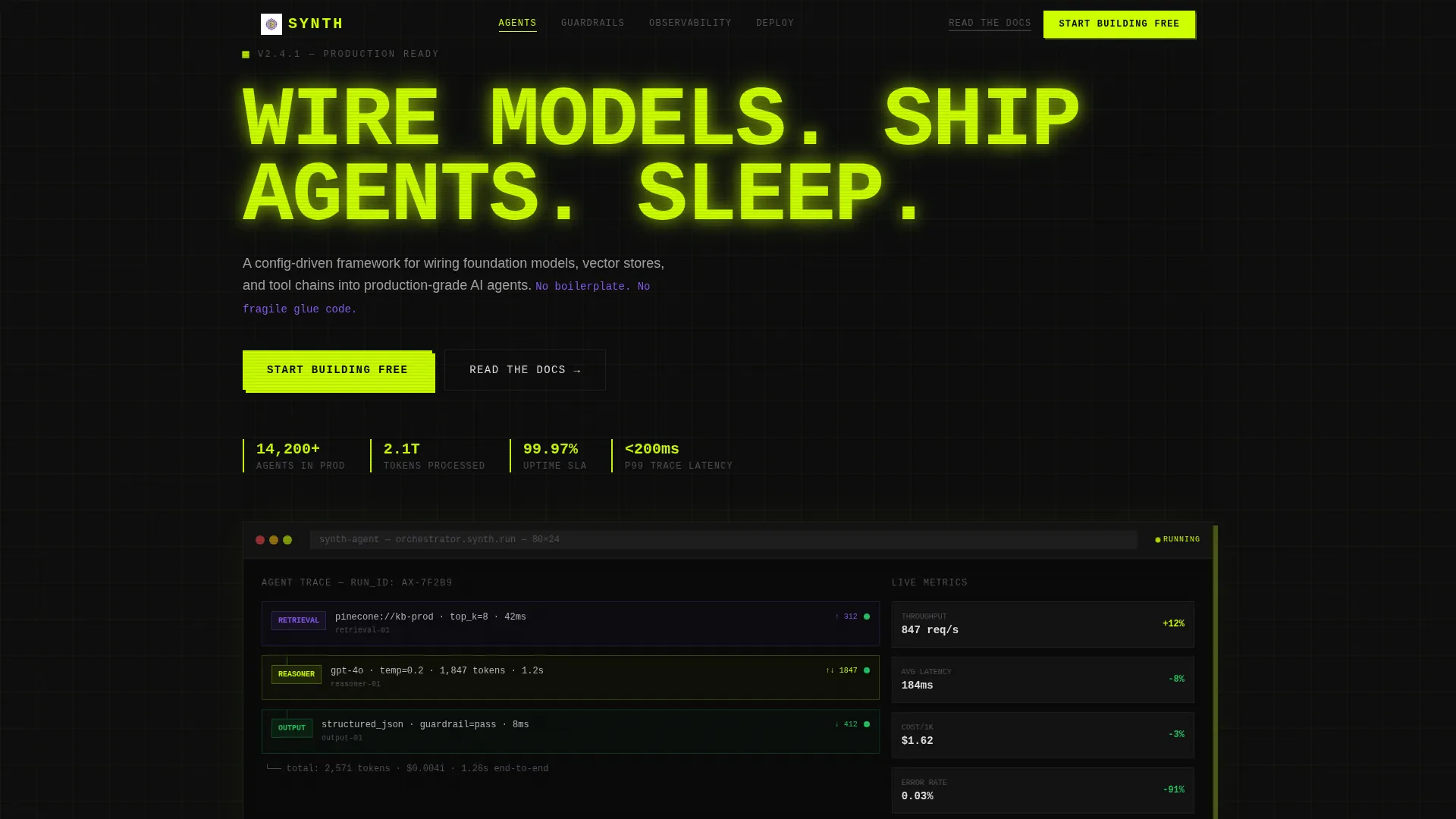
- A full-width product screenshot header with browser chrome, hard drop shadows, and a stamped oversized monospace headline
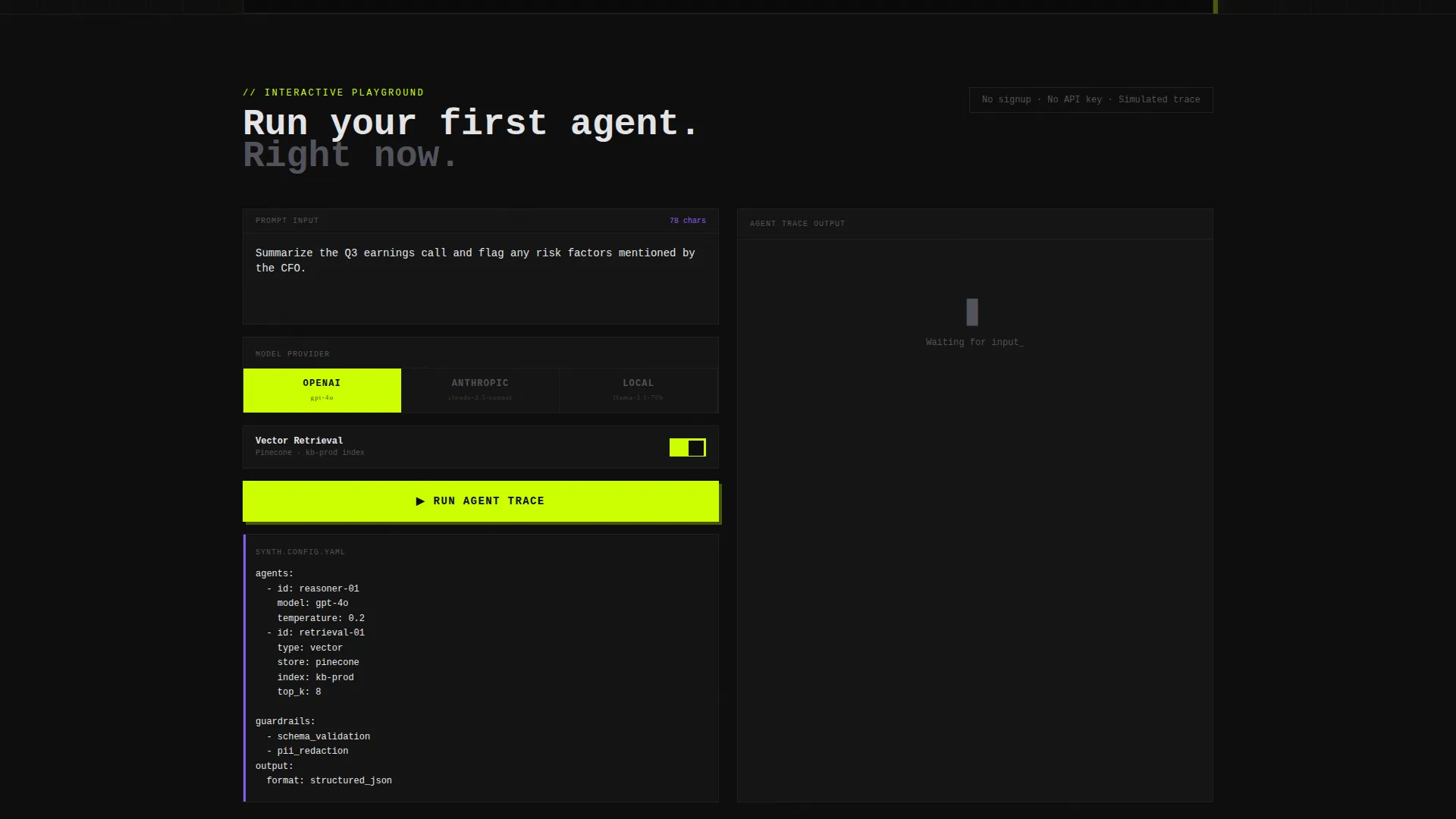
- An interactive prompt playground with model provider selection, retrieval toggle, and a simulated agent trace with latency and cost estimates
- Four anchor-nav spoke sections covering Agents, Guardrails, Observability, and Deploy, each pairing a code snippet with an animated architecture diagram
- A sticky call-to-action bar that activates after the visitor scrolls past the first spoke section
- Dual call-to-action placement throughout: a primary lime button and a secondary underlined documentation link beside every action point
Feature list
This section covers the core built-in components and design capabilities that make Synth function as a serious conversion tool for a technical audience.
Full-Width Orchestration Screenshot Hero
The header drops visitors directly into a pixel-sharp product screenshot showing three chained agents, live token counts, a retrieval node, and a green status badge. It sits inside brutalist browser chrome with hard drop shadows and zero decorative elements. The product is the hero, and it is already working.
Interactive Agent Playground
Directly below the header, visitors can paste a prompt, choose a model provider, toggle retrieval on or off, and watch a simulated agent trace render with latency and cost estimates. This interactive tool does the selling before any marketing copy is read. Once visitors see their own prompt traced through the framework, the call to action feels like a natural next step.
Anchor Navigation with Spoke Sections
The hub and spoke structure uses an anchor nav to link to four dedicated sections: Agents, Guardrails, Observability, and Deploy. Each spoke escalates in complexity, from single-call chains to multi-agent swarms. The scroll rewards technical curiosity by answering the question each previous section raised.
Code and Diagram Pairing
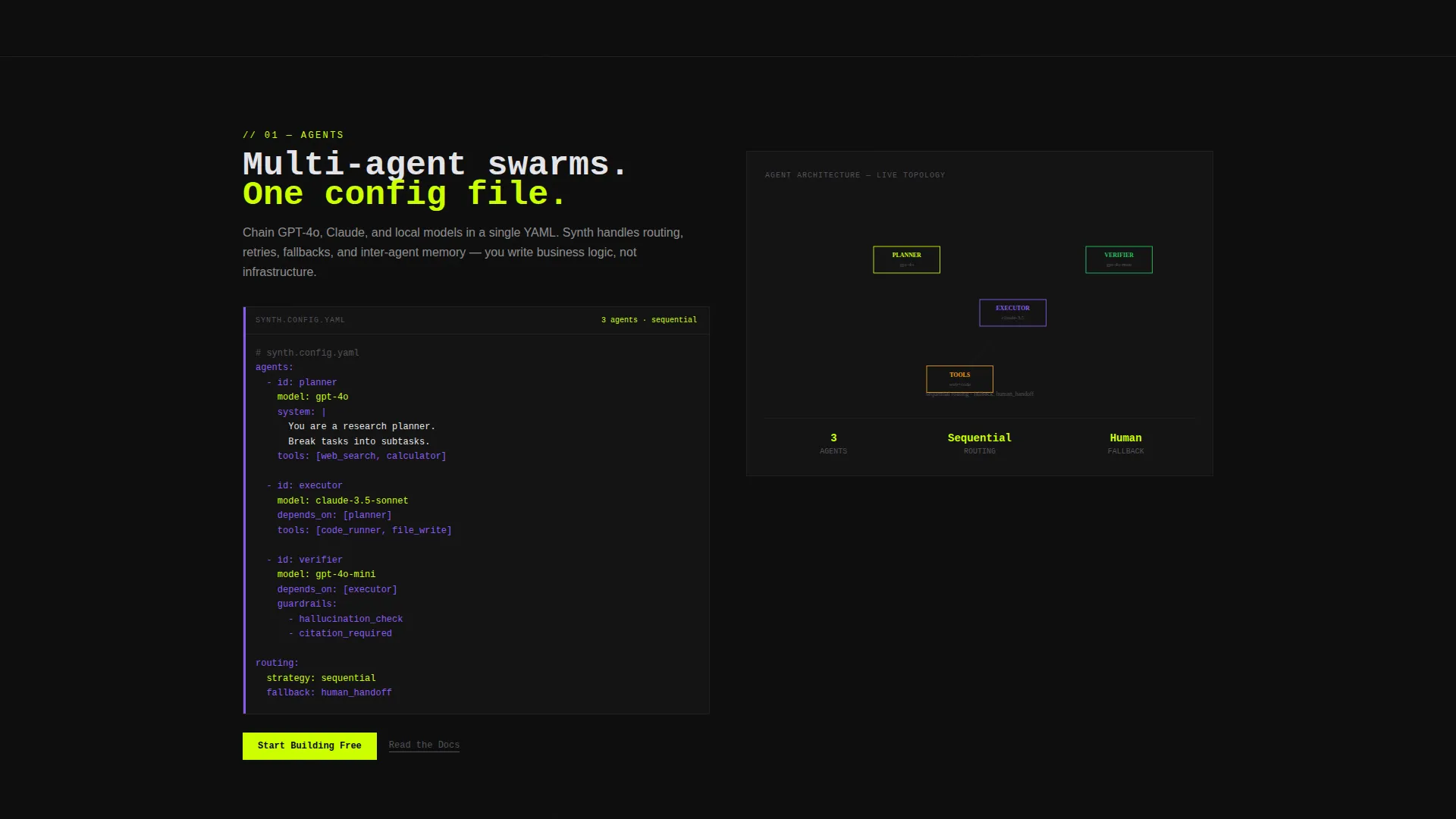
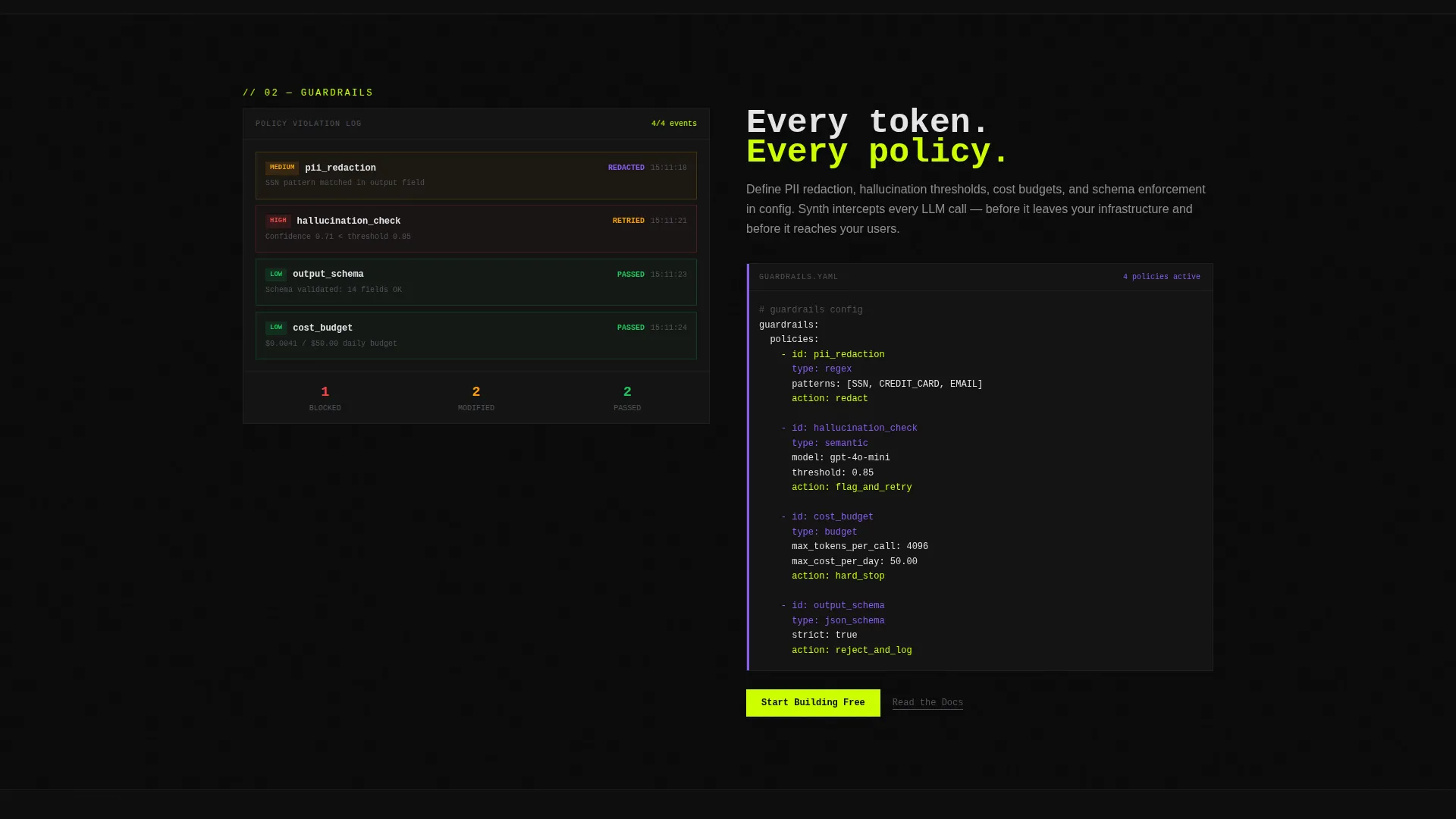
Every spoke section presents a code snippet on the left and an animated architecture diagram on the right. This layout communicates both implementation reality and system design at a glance. Technical visitors get proof; evaluators get context.
Sticky Conversion Bar
A sticky call-to-action bar activates on scroll past the first spoke section, keeping the primary signup action visible throughout the page. It uses the electric lime on void black color treatment for maximum visibility. Visitors never have to scroll back to find the action.
Dual Call-to-Action System
Every action point on the page pairs a primary "Start Building Free" lime button with a secondary "Read the Docs" underlined text link. This respects both the visitor ready to commit and the engineer who needs technical proof first. Neither audience is forced down the wrong path.
Page sections overview
| Section | Purpose |
|---|---|
| Header hero | Establishes product credibility with a live orchestration screenshot and stamped headline |
| Interactive playground | Lets visitors run a simulated agent trace with their own prompt before scrolling further |
| Anchor navigation | Orients visitors to the four spoke sections and enables direct jump navigation |
| Agents spoke | Introduces agent chaining concepts with a code snippet and escalating architecture diagram |
| Guardrails spoke | Shows token-level control and safety boundaries with paired code and diagram |
| Observability spoke | Covers tracing, latency visibility, and pipeline monitoring in a visual layout |
| Deploy spoke | Closes the technical story with production deployment context and a final call to action |
| Sticky call to action bar | Keeps the primary signup action persistent from first spoke scroll to page end |
Design & branding system
The visual identity follows a Bold Brutalist theme with an Acid Digital color palette. Nothing is soft, nothing is decorative, and every design choice signals technical competence.
- Void black (#0D0D0D) dominates every background; electric lime (#CCFF00) commands headlines and active navigation states; synthetic violet (#8B5CF6) marks secondary actions and code annotations; raw terminal white (#E4E4E7) handles body text and one-pixel borders
- Typography is oversized monospace for headlines, giving the page the feel of a terminal on a fresh machine, with the cursor blinking and every keystroke loaded with potential
- Visual treatment is CRT-inspired: phosphor burn on matte black, intentional glow, hard drop shadows, and brutalist browser chrome with no gradients and no illustrations
Mobile & speed optimization
The template is structured for clarity on smaller viewports without sacrificing the technical depth that makes it work for a developer audience.
- The hub and spoke anchor navigation collapses cleanly, keeping section jump links accessible on mobile without cluttering the header
- Code snippet and architecture diagram pairs stack vertically on narrow screens so both elements remain readable without horizontal scrolling
- The sticky call-to-action bar is designed to stay visible and tappable on mobile, ensuring the primary conversion path is never buried on any screen size
How this template helps you convert
Synth is built around a click-through conversion strategy. Every layout decision reduces friction for the visitor most likely to sign up.
- The interactive playground creates a personal proof moment before any sales copy appears, making the primary call to action feel like a conclusion rather than a request
- The sticky call-to-action bar ensures the "Start Building Free" button is always one tap away, regardless of how deep into the technical spoke sections a visitor travels
- The dual call-to-action system captures both the ready-to-commit visitor and the research-mode engineer by placing a documentation link beside every primary button, so neither audience hits a dead end
Other information about this template
This template is a strong fit for any generative AI tool or framework that targets a technical buyer who needs to see the product working before they trust the pitch.
- The template style is hub and spoke with anchor navigation, making it well-suited for products with multiple distinct capability areas that benefit from structured, scannable presentation
- The Bold Brutalist theme and Acid Digital color system are intentional positioning signals; they communicate that this is a serious engineering product, not a polished marketing artifact
- The creative direction is Calculator and Tool First, meaning the interactive component carries more conversion weight than any headline or testimonial on the page
- This template works well for generative AI tools built around foundation model orchestration, vector store integration, and multi-agent pipeline configuration
Theme
Bold Brutalist
Creative direction
Calculator/Tool First
Color system
Acid Digital
Style
Hub & Spoke (Anchor Nav)
Direction
Click-Through
Page Sections
Full-width Orchestration Screenshot Hero
Interactive Agent Playground
Anchor Navigation with Spoke Sections
Code and Architecture Diagram Pairing
Sticky Conversion Bar
Dual Call-to-action System
Related questions
Can I customize the color palette and typography?
Does the interactive playground require a live API connection?
Is this template suitable for a framework that is not yet in production?
Can I add or remove spoke sections from the anchor navigation?
Who is this template best suited for?



