Table — Premium Dining Landing Page Template
Reserve is a bold brutalist restaurant booking landing page template built around a live reservation dashboard. It visualizes real-time table status, covers seated, and waitlist data in one grid view. Designed for independent owners, front-of-house managers, and multi-unit operators, it converts visitors into trial sign-ups using a three-field form and a clear freemium call to action.
by Rocket studio
Quick summary
Reserve is a single-page restaurant booking and scheduling template built on a bold brutalist visual framework. It leads with a pixel-accurate dashboard preview, walks visitors through a problem-to-solution arc using data panels, and closes with a frictionless freemium sign-up. The design is dense, purposeful, and built to earn trust before a single word of copy is read.
Who this template is for
This template is built for people who run real restaurants and need a credible, conversion-ready page fast. It speaks directly to operators who live on the floor, not in spreadsheets.
- Independent restaurant owners who want to replace phone-tag reservations with a single live view
- Front-of-house managers juggling waitlists, walk-ins, and table turns during peak service
- Multi-unit operators who need all locations' cover counts visible at a glance
What problem this template solves
Restaurant booking is still broken for most operators. Double bookings, missed calls, and scattered reservation channels cost real covers every service. This template presents that problem honestly, then shows the resolution inside the same dashboard user interface.
- Double bookings and table conflicts that drain staff energy and guest trust
- Lost revenue from missed phone reservations and untracked walk-ins
- No single view showing all tables, all covers, and real-time floor status simultaneously
What you get with this template
You get a complete, ready-to-use restaurant booking landing page that leads with the product dashboard instead of lifestyle photography. Every section is designed to remove doubt and move a visitor toward signing up.
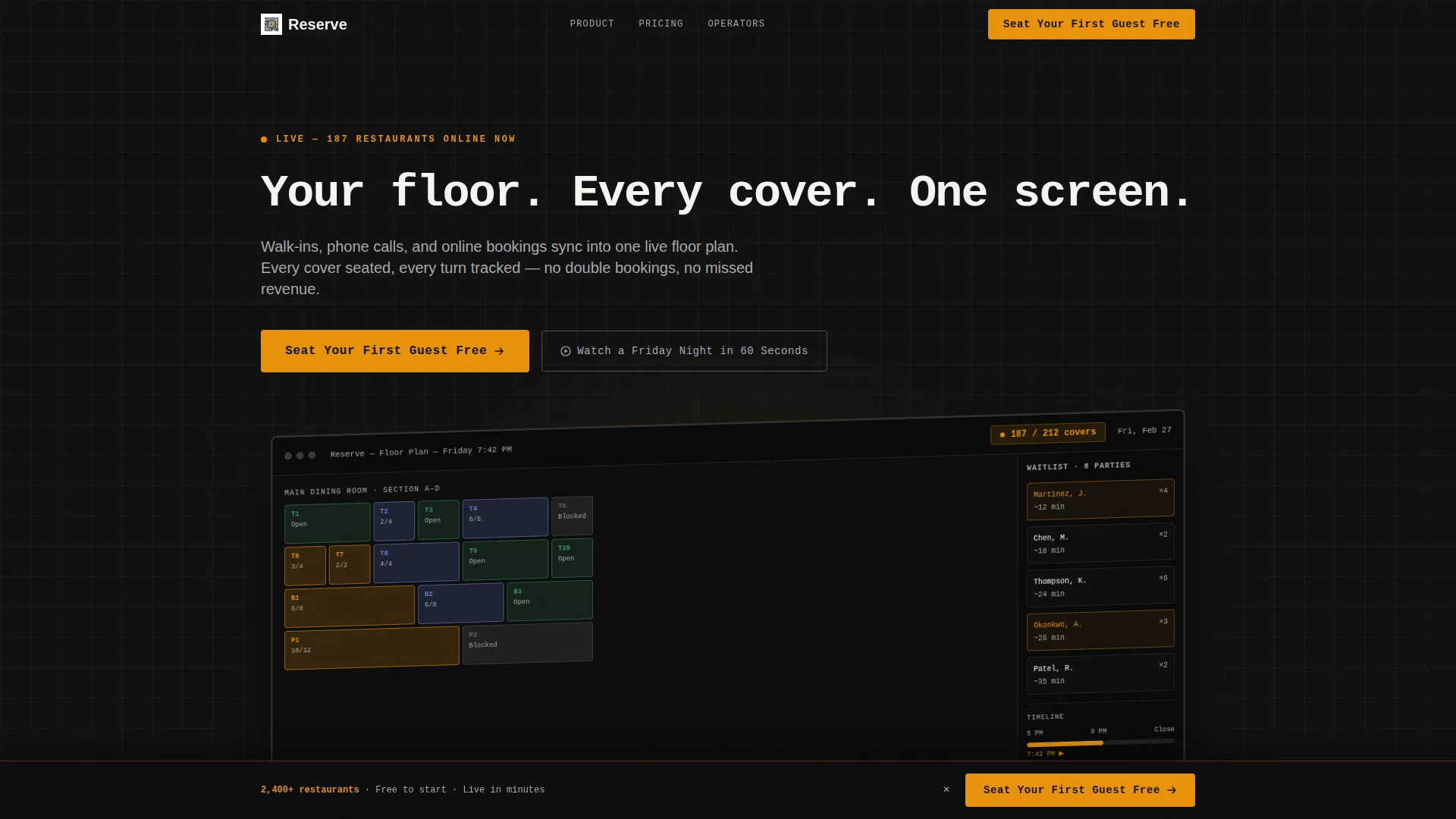
- A full-width isometric dashboard header showing live table statuses, a covers ticker, a waitlist sidebar, and a timeline scrubber from 5 PM to close
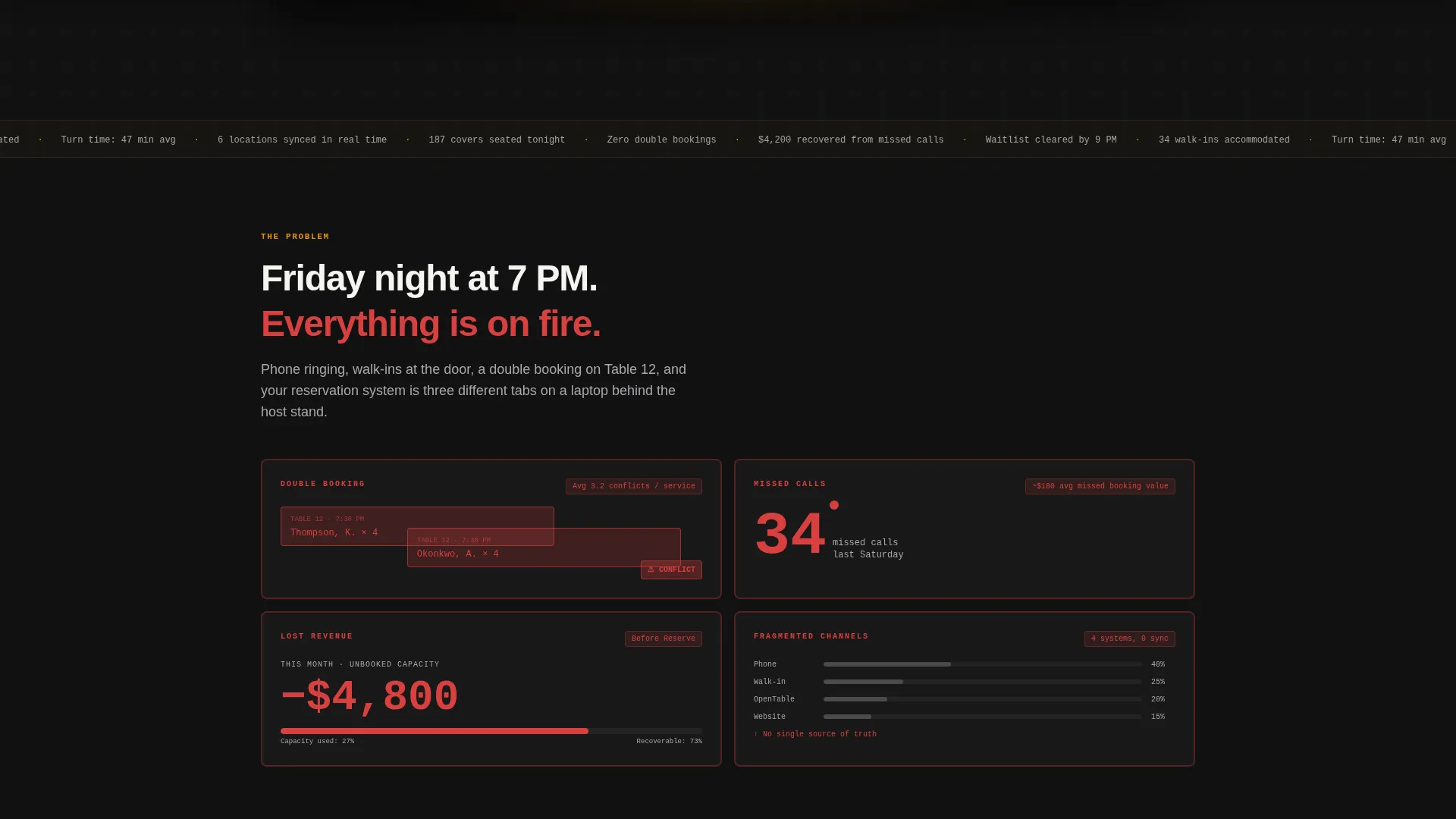
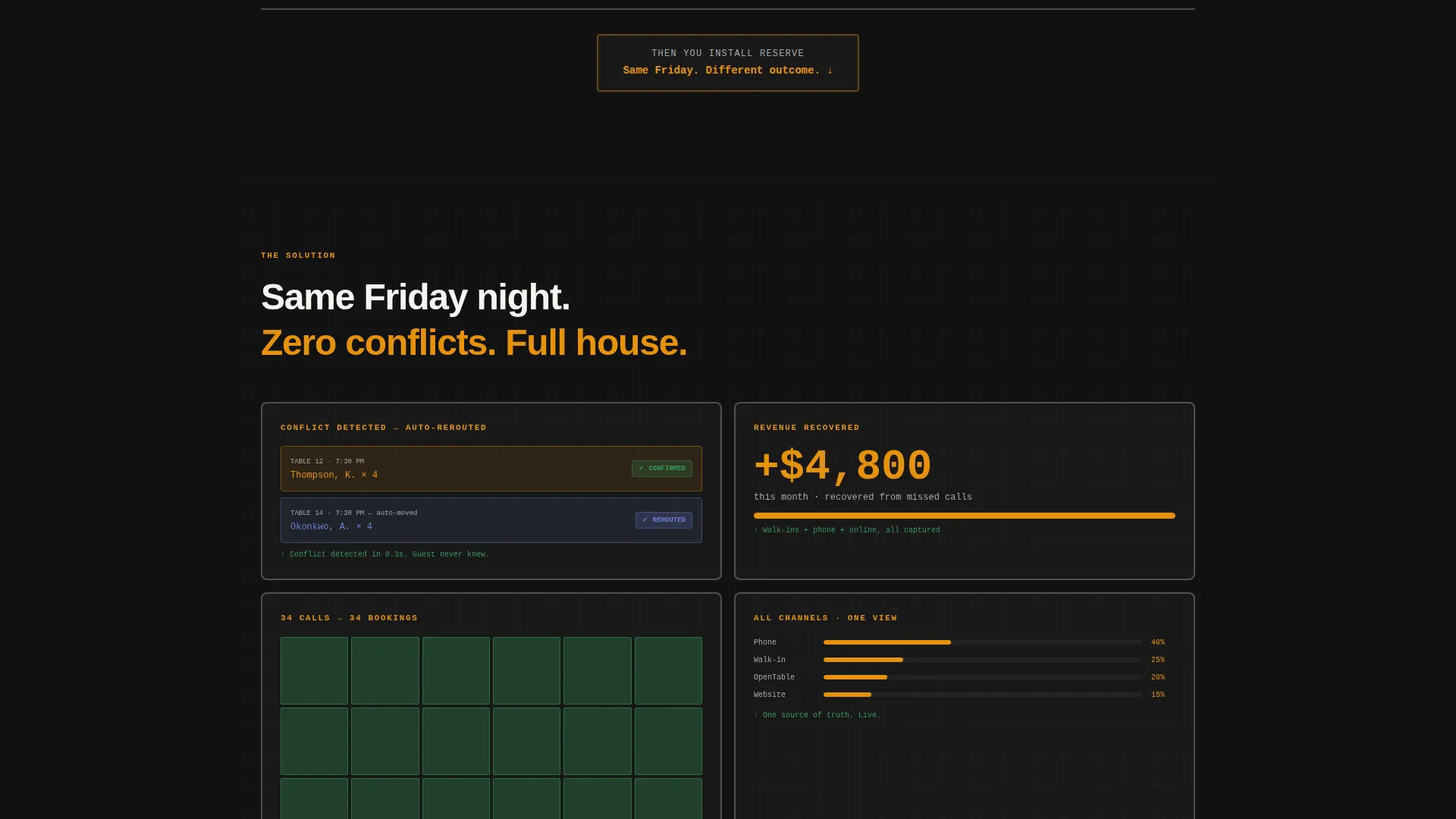
- A problem-to-solution scroll arc with brutalist data-viz cards, overlapping conflict blocks, and resolved user interface panels
- A sticky conversion bar, a three-field sign-up form, and a secondary video path for visitors not yet ready to commit
Feature list
This template ships with a focused set of purpose-built components. Each one serves the restaurant booking and scheduling use case directly.
Live Reservation Dashboard Header
The header is a full-width, pixel-accurate screenshot of the reservation grid rendered at a slight isometric tilt. It shows color-coded table statuses (seated, turning, available, blocked), a real-time covers ticker reading "187 / 212," a waitlist sidebar with estimated seat times, and a timeline scrubber spanning 5 PM to close. No stock photography. The tool proves itself before the first headline lands.
Terminal-Style Animated Headline
The primary headline types in like a terminal command: "Your floor. Every cover. One screen." The effect signals precision and speed, matching the mindset of operators who need information without noise.
Problem-to-Solution Data Arc
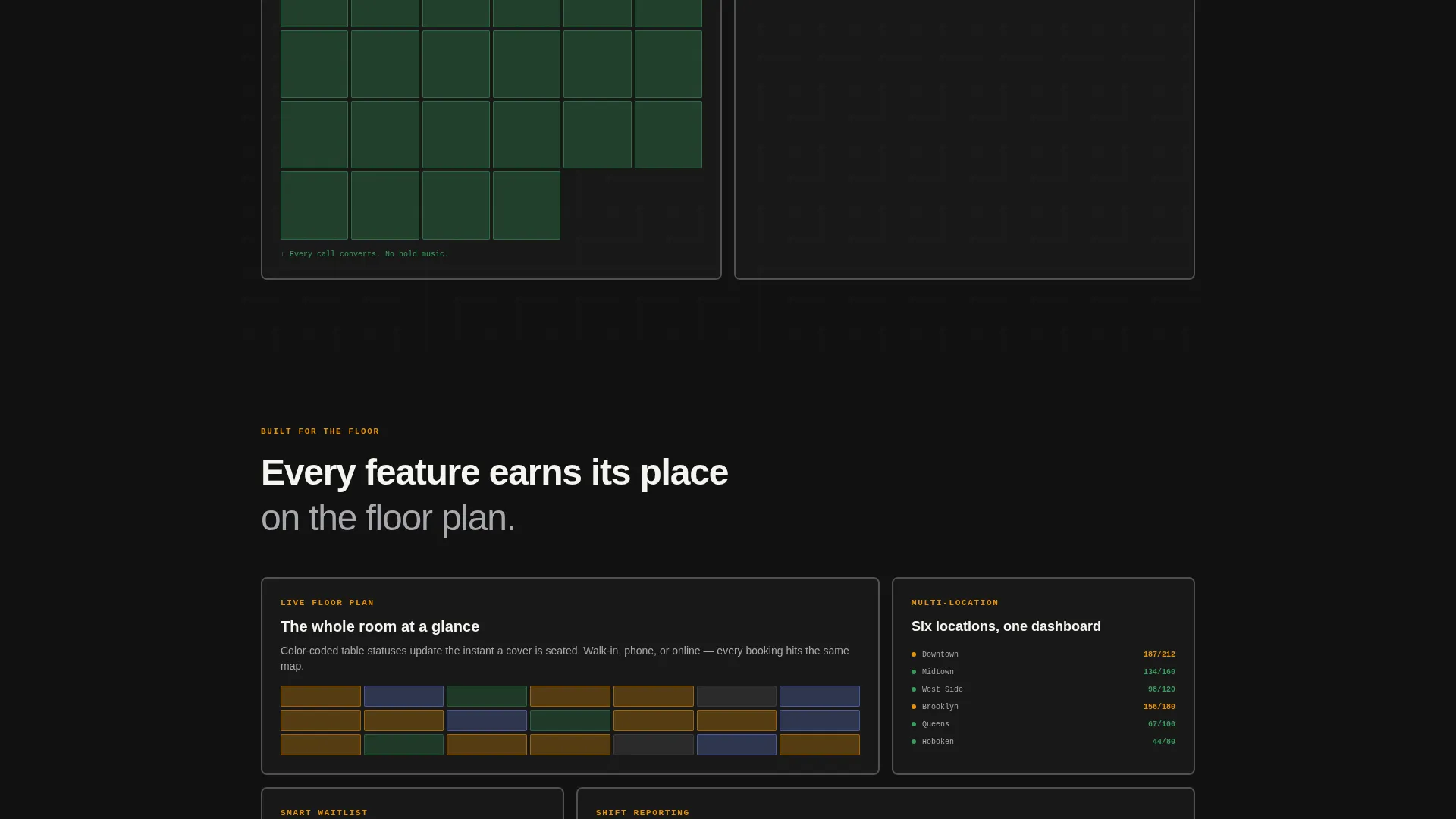
The scroll moves from chaos to control. Pain points appear as heavy-bordered grid cards showing overlapping booking blocks, a missed-call counter, and a stark revenue loss display. A single horizontal rule divides the problem from the resolution. Below it, the same scenarios play out inside the resolved dashboard user interface.
Freemium Sign-Up Form
The conversion form asks for three fields only: restaurant name, nightly cover count (dropdown with under 50, 50 to 150, and 150 or more), and email address. No credit card. No phone number. The primary call-to-action button reads "Seat Your First Guest Free" in amber on black.
Sticky Conversion Bar
After the third scroll section, a sticky bottom bar appears carrying the primary call to action. It stays visible as the visitor continues reading, keeping the sign-up path one tap away without interrupting the content flow.
Secondary Video Path
A second conversion option reads "Watch a Friday Night in 60 Seconds." It links to a compressed screen-recording of the dashboard during live service. This path serves curious visitors who want to see the product in motion before committing to sign up.
Page sections overview
| Section | Purpose |
|---|---|
| Dashboard Header | Leads with live reservation grid preview at isometric tilt |
| Terminal Headline | Delivers the core value statement in monospaced animated type |
| Problem Cards | Visualizes booking chaos with confrontational data-viz grid cards |
| Solution Panels | Resolves each pain point inside the live dashboard user interface |
| Freemium Sign-Up | Captures leads with a three-field form and amber call to action button |
| Sticky call to action Bar | Keeps the primary sign-up action visible after third scroll section |
| Secondary Video call to action | Offers a 60-second dashboard recording for undecided visitors |
Design & branding system
The visual identity follows a bold brutalist theme using a monochrome steel color system. The palette draws from back-of-house equipment: heavy-gauge steel, rubber floor mats, and the warm glow of a heat lamp over an industrial gray shelf.
- Core colors: slab black (#111111) for backgrounds, brushed stainless (#A8A9AD) for borders and secondary text, and ticket-paper white (#F5F5F0) for data cells
- Accent: service-lamp amber (#E8920B) reserved exclusively for live data indicators, active buttons, and notification pings
- Typography uses slab and monospaced type to reinforce the industrial, data-first aesthetic throughout every section
Mobile & speed optimization
The template is built with a single-page, section-led layout that keeps the scroll path tight and intentional. Heavy visual components like the dashboard header and data-viz cards are structured to render cleanly across screen sizes.
- The sticky call to action bar and three-field form are sized for thumb-friendly tap targets on smaller screens
- The isometric dashboard header and data panels use fixed-dimension grid structures that translate to mobile without losing their data-dense character
How this template helps you convert
Every design and copy decision in this template points toward one action: getting a restaurant operator to start a free trial. The page removes hesitation at each stage of the scroll.
- The dashboard header builds immediate credibility by showing the product in action. Visitors understand what they are signing up for before reading a single line of body copy.
- The problem-to-solution arc creates momentum. Each pain-point card mirrors a real service scenario, and each resolved panel shows the product as the logical answer. By the time the sign-up form appears, the decision feels obvious.
Other information about this template
This template is categorized under Technology, within the Restaurant Digital Presence subcategory, targeting the restaurant booking and scheduling niche. It is a strong fit for operators evaluating purpose-built reservation tools.
- The template style is a dashboard and data grid layout, making it well suited for software and booking platform marketing pages
- The creative direction follows a problem-to-solution arc, a format proven to build trust with skeptical, time-pressed operators
- The freemium and trial conversion path is built in from the start, with two distinct entry points: the sign-up form and the secondary video walkthrough
- This template can support product-led growth pages for restaurant technology platforms targeting independent operators and small multi-unit groups
Theme
Bold Brutalist
Creative direction
Problem→Solution Arc
Color system
Monochrome Steel
Style
Dashboard/Data Grid
Direction
Freemium/Trial
Page Sections
Live Reservation Dashboard Header
Terminal-style Animated Headline
Problem-to-solution Scroll Arc
Three-field Freemium Sign-up Form
Sticky Bottom Conversion Bar
Secondary Video Conversion Path
Related questions
Does this template require any coding knowledge to use?
Can I customize the sign-up form fields?
Is this template suitable for a software product page rather than a restaurant website?
How does the secondary video path work within the template?
Can multi-unit restaurant operators be targeted with this template?



