AI-Powered Enterprise Software Reviews Website Template
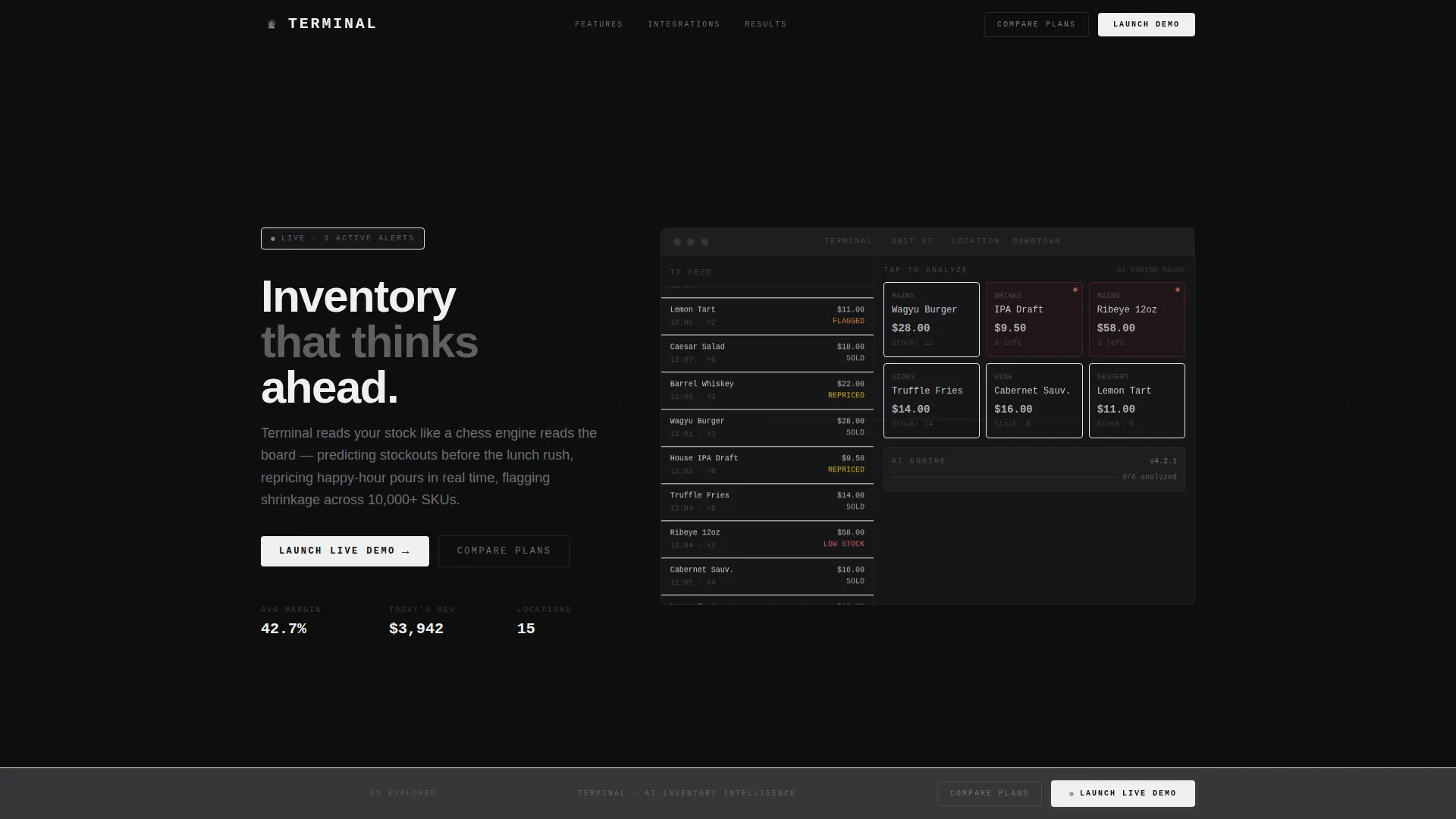
Terminal is a bold brutalist landing page template built for AI-powered point-of-sale systems. It features an interactive browser-rendered POS preview, a modular card grid with expandable mini-demos, and a persistent click-through call-to-action bar. The design uses a cold monochrome steel palette to communicate precision, speed, and intelligent inventory control.
by Rocket studio
Quick summary
Terminal is a single-page landing page template designed for AI-powered point-of-sale products. It opens with a live browser-rendered POS terminal, drives scroll through an interactive card grid, and closes with a gravity-building call-to-action bar. Every element is built to let visitors feel the product before they commit.
Who this template is for
This template is built for founders, product marketers, and growth teams promoting AI-driven point-of-sale software. It speaks directly to operators who need to show a technically complex product without long sales cycles.
- Multi-unit restaurant groups running several locations on tight margins
- Independent boutique owners tired of manual spreadsheet reconciliation
- Franchise managers who need one unified dashboard across every store
What problem this template solves
Most software landing pages describe a product. Terminal lets visitors experience it. The gap between a feature list and a felt conviction is exactly what this template closes.
- Visitors leave software pages without understanding what the product actually does
- Static hero images fail to communicate real-time intelligence and dynamic pricing behavior
- No single page format previously combined live demos, integration previews, and operator case studies in one modular grid
What you get with this template
You get a fully structured, interaction-led landing page that puts the product front and center. Every section is designed to build evidence before the call-to-action arrives.
- A browser-rendered interactive POS terminal in the header with animated transaction data
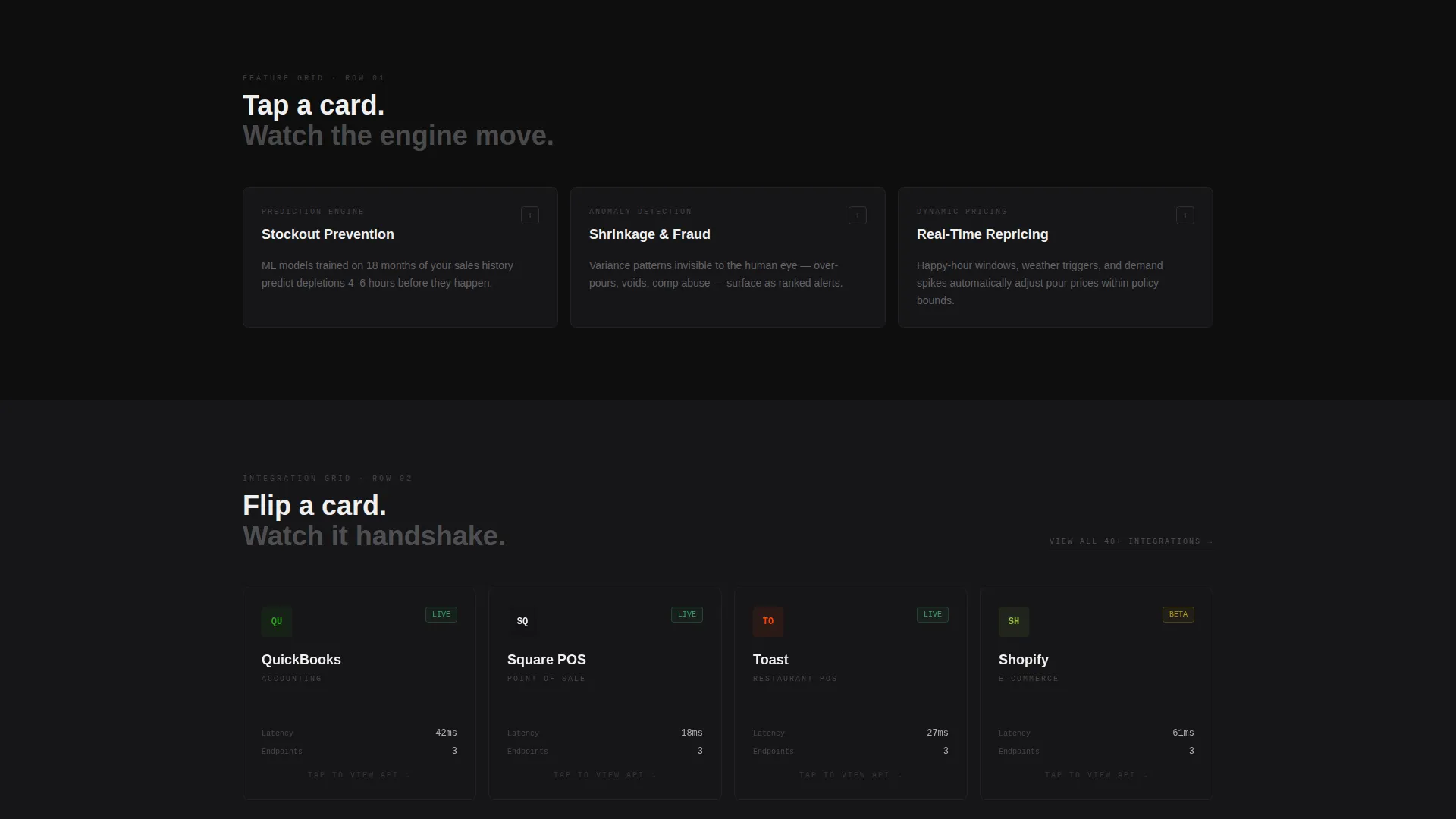
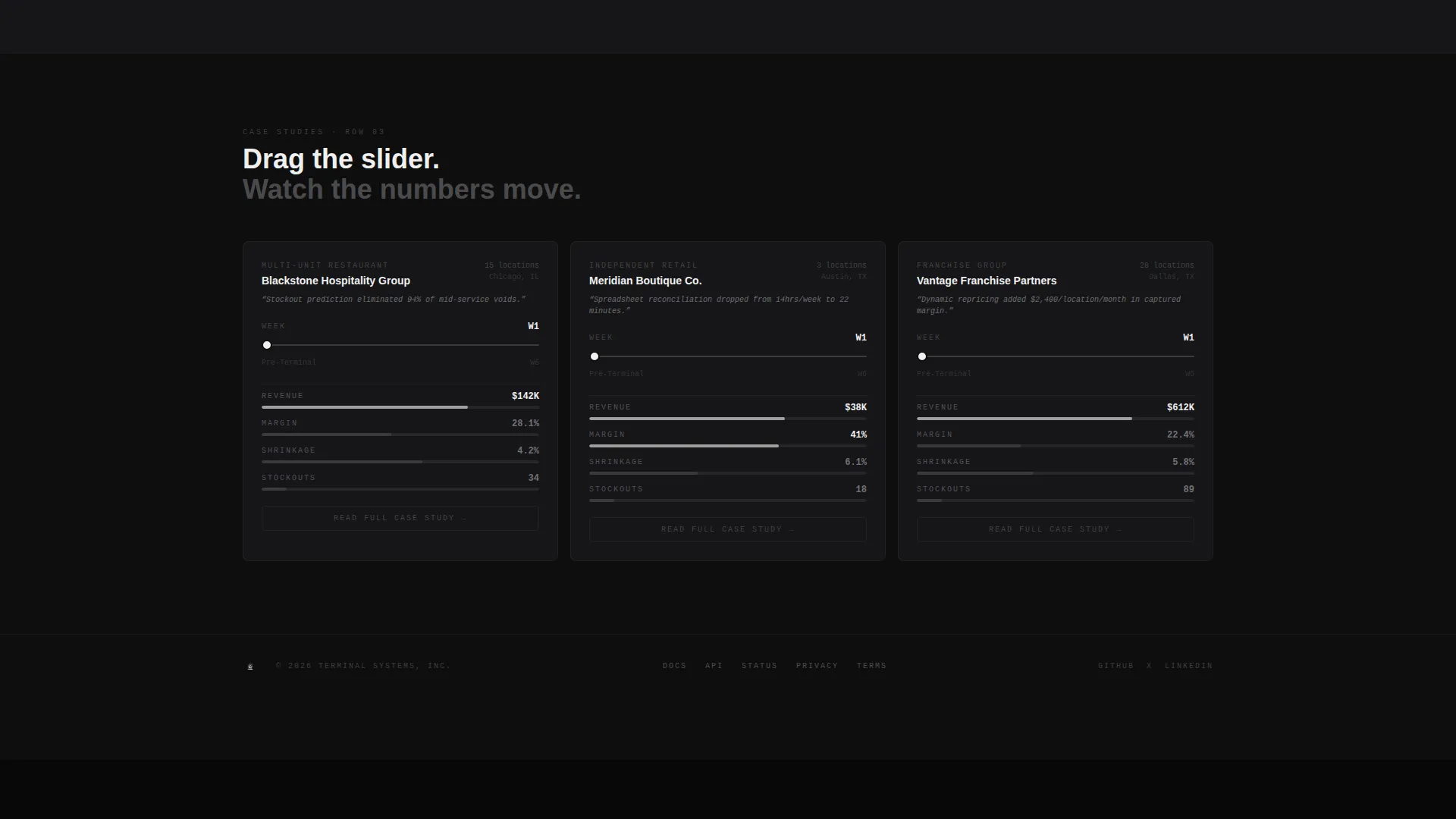
- A three-row modular card grid with expandable demos, integration flip cards, and timeline case-study cards
- A persistent bottom call-to-action bar with a primary "Launch Live Demo" button and a secondary "Compare Plans" ghost button
Feature list
This template is built around purposeful interaction. Each feature serves the visitor's need to evaluate before committing.
Interactive Header Terminal
The header renders a functioning POS terminal directly in the browser. Animated transaction data scrolls through in real time, showing item names, predictive restock alerts, and margin calculations flickering in signal white. Visitors can tap product tiles and watch the AI engine reclassify, reprice, and recommend through choreographed micro-animations.
Expandable Feature Demo Cards
The first row of the card grid holds three feature cards. Tapping any card expands it into a mini-demo showing inventory prediction, fraud detection, or dynamic pricing. Each demo uses synthetic data the visitor can manipulate, turning passive reading into active exploration.
Integration Flip Cards
The second card row displays integration cards that flip on interaction to reveal API handshake animations. These cards communicate platform connectivity through motion rather than bullet points, making technical depth feel immediate and tangible.
Operator Case Study Sliders
The third row contains case-study cards with draggable timeline sliders. Dragging the slider scrubs through a real operator's metrics improving week over week. This turns abstract performance claims into a visual, hands-on proof point.
Persistent Click-Through call to action Bar
A fixed bottom bar anchors the primary call-to-action on every scroll position. The bar darkens from brushed gunmetal to forge-black as the visitor scrolls deeper, building visual weight and urgency without interrupting the experience.
Breathing Modular Grid Layout
The card grid rearranges subtly as cards open and close. This keeps the brutalist layout alive and responsive without losing structural clarity. Nothing is static, and nothing is decorative.
Page sections overview
| Section | Purpose |
|---|---|
| Interactive Header Terminal | Immerses visitors in a live POS preview instantly |
| Feature Demo Cards | Lets visitors explore AI capabilities hands-on |
| Integration Flip Cards | Shows platform connectivity through motion |
| Case Study Sliders | Proves operator outcomes with draggable timelines |
| Persistent call to action Bar | Anchors the primary action at every scroll depth |
Design & branding system
The visual identity follows a bold brutalist theme built on a monochrome steel color system. Every color choice communicates industrial precision and zero visual noise.
- Forge-black (#0E0E0E) and brushed gunmetal (#3A3A3C) form the primary surface layers
- Cold-rolled silver (#B0B0B4) handles secondary text and structural dividers
- Signal white (#F0F0F0) fires exclusively on hover states and active elements, functioning like a cursor blinking on a terminal
Mobile & speed optimization
The template is structured to remain navigable and legible across screen sizes. The modular card grid collapses cleanly without losing the interactive behaviors that define the experience.
- Card interactions and tap targets are designed to work on both pointer and touch input
- The persistent call to action bar stays visible and functional on smaller viewports
- The brutalist grid scales without breaking visual hierarchy or layout rhythm
How this template helps you convert
Terminal earns the click by letting visitors accumulate evidence before any commitment is asked. The conversion path is built into the experience itself.
- The interactive header gives visitors an immediate product feel, replacing skepticism with hands-on familiarity before they read a single claim.
- The card grid builds layered proof across features, integrations, and real operator outcomes, so the call-to-action arrives after trust is already established.
- The persistent bottom bar with "Launch Live Demo" uses scroll-depth gravity to time the ask precisely, turning the final tap into the next logical step rather than a leap of faith.
Other information about this template
Terminal fits naturally into a broader ecosystem of AI-powered enterprise software go-to-market strategies. It is built as a card grid modular template using the bold brutalist theme and interactive explorer creative direction.
- The template style is card grid modular, making it straightforward to extend or rearrange sections for different product messaging priorities
- The interactive explorer direction makes this template a strong fit for products where live demonstration outperforms written description
- The click-through landing page direction means no form friction on the page itself; all conversion happens through the demo environment link
- This template pairs well with AI-powered point-of-sale products targeting food service, independent retail, and franchise operations

Theme
Bold Brutalist
Creative direction
Interactive Explorer
Color system
Monochrome Steel
Style
Card Grid (Modular)
Direction
Click-Through
Page Sections
Browser-rendered Interactive POS Header
Expandable AI Feature Demo Cards
Integration Flip Cards with Animation
Draggable Operator Case Study Sliders
Scroll-activated Persistent Call to Action Bar
Breathing Modular Card Grid
Related questions
Does this template include a contact form or lead capture form?
Can I replace the synthetic demo data with my own product data?
Is this template designed for a single product or a multi-product platform?
Can the integration cards be updated to show different platform connections?
How does the persistent call to action bar behave on smaller screens?



