Terms - Instant School Landing Page Template
Terms is a single-page landing page template built for school administrators, academy owners, and after-school program directors who need enforceable terms of service without the attorney bill. It generates attendance policies, device usage clauses, photo release language, and liability waivers in plain English, instantly, on-screen, the moment you enter your institution's name.
by Rocket studio
Quick summary
Terms is a single-page legal framework generator template designed for educational institutions. Administrators enter their school name, institution type, and state, then watch a complete terms of service document appear on screen. Attendance policies, device usage clauses, photo release language, and liability waivers materialize in plain English, no attorney required, no waiting.
Who this template is for
This template was built for the people who need legal documents fast and have no patience for billing cycles or boilerplate that doesn't fit their program.
- Charter school founders drafting enrollment packets outside business hours
- Dance academy and martial arts studio owners who are tired of paying attorneys for generic documents
- After-school program directors who have already learned the hard way what a missing liability clause costs
What problem this template solves
Most educational institutions either skip formal terms of service entirely or spend hundreds of dollars on attorney-drafted documents that still feel generic. Neither option protects the school or builds parent trust.
- Writing terms from scratch takes time most administrators don't have, and the language is inconsistent
- Hiring an attorney is expensive and slow, and often produces the same boilerplate you could have found online
- Using nothing leaves programs exposed to liability gaps that only become visible when something goes wrong
What you get with this template
You get a fully built, single-page landing page template that walks visitors through the problem, proves the solution with a side-by-side comparison, and converts them with a free document generation flow, all before asking for a credit card.
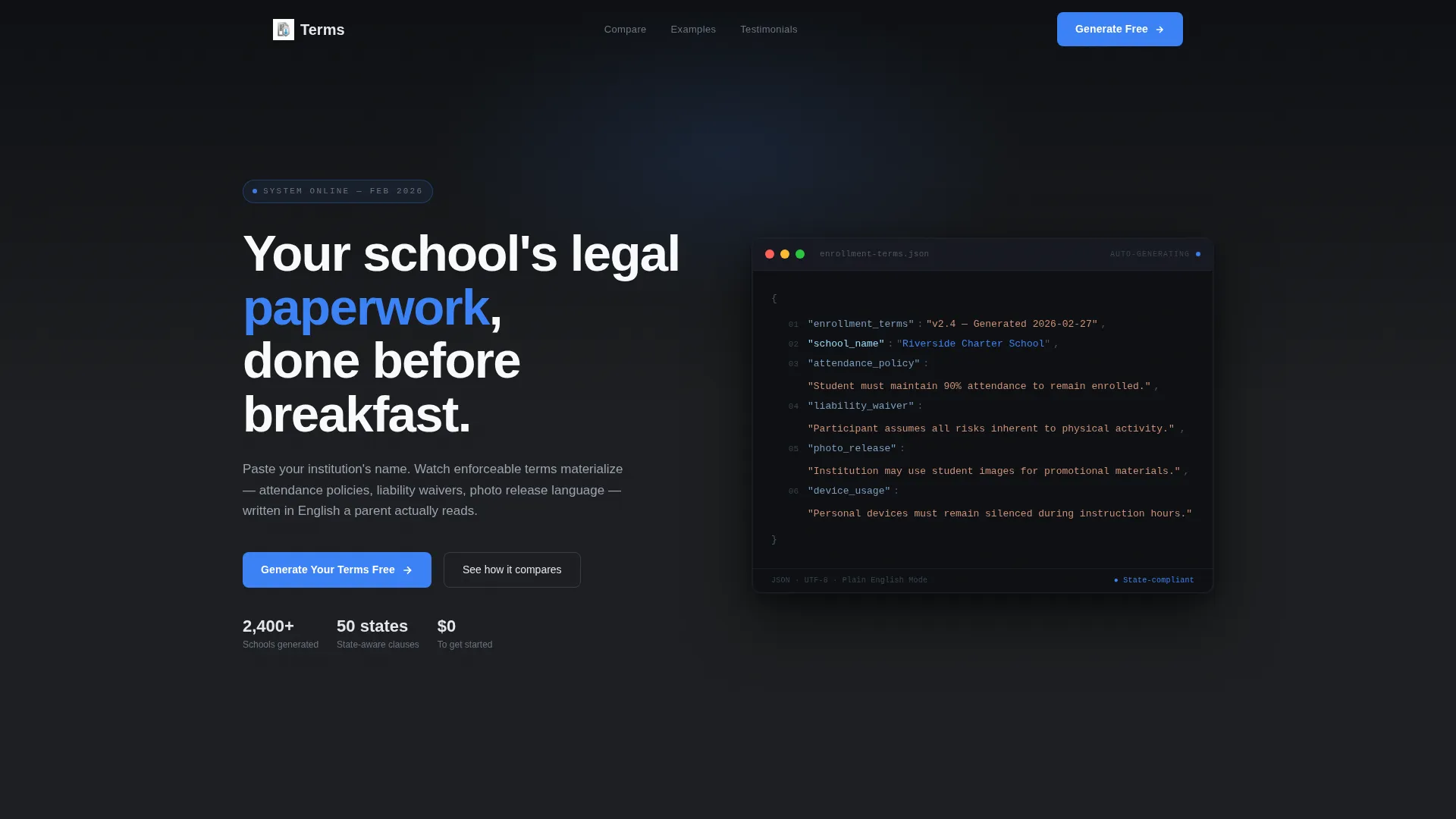
- A live code-snippet header that auto-types real policy language and resolves school name variables in real time
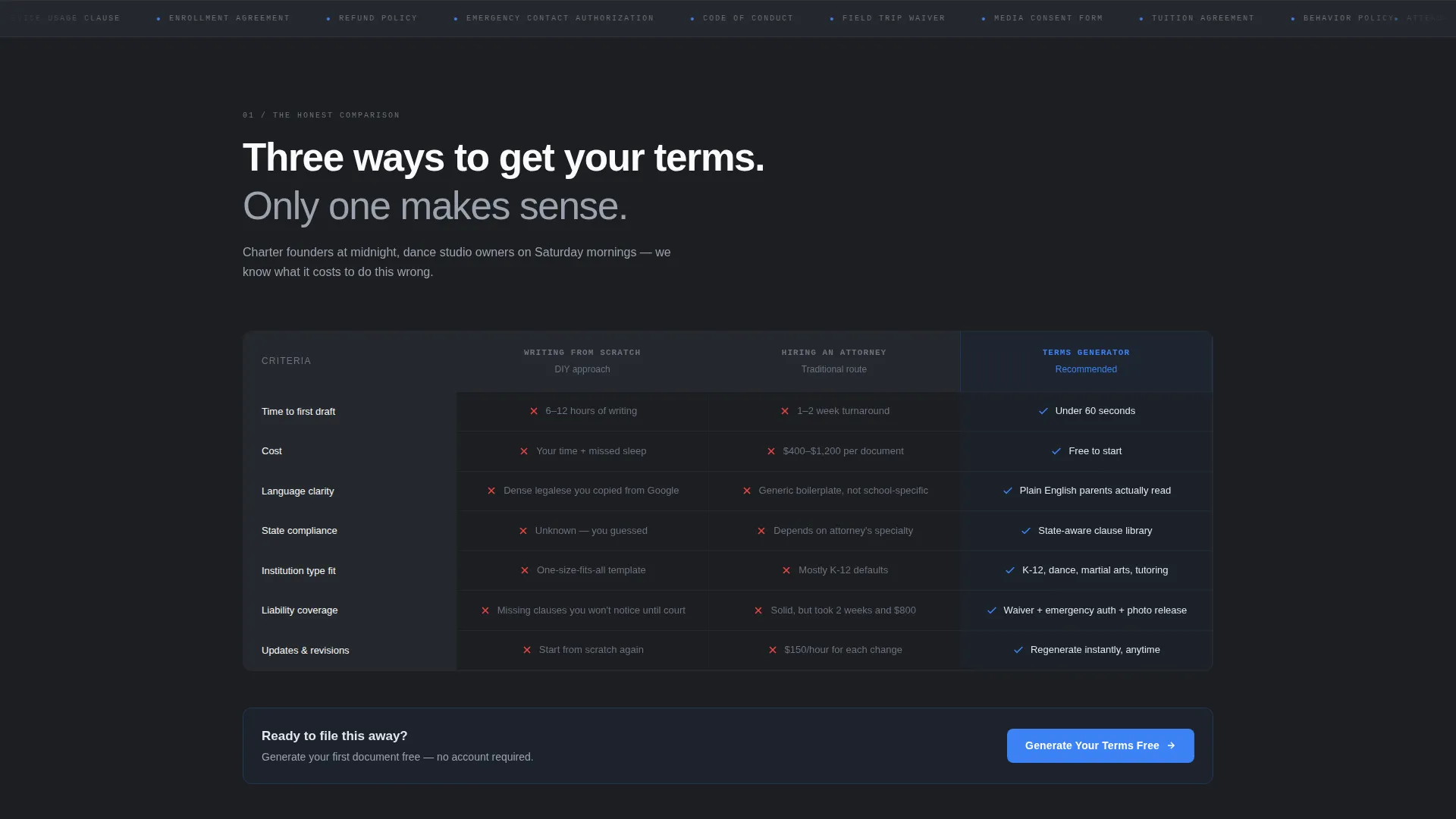
- A three-column comparison table contrasting writing from scratch, hiring an attorney, and using Terms
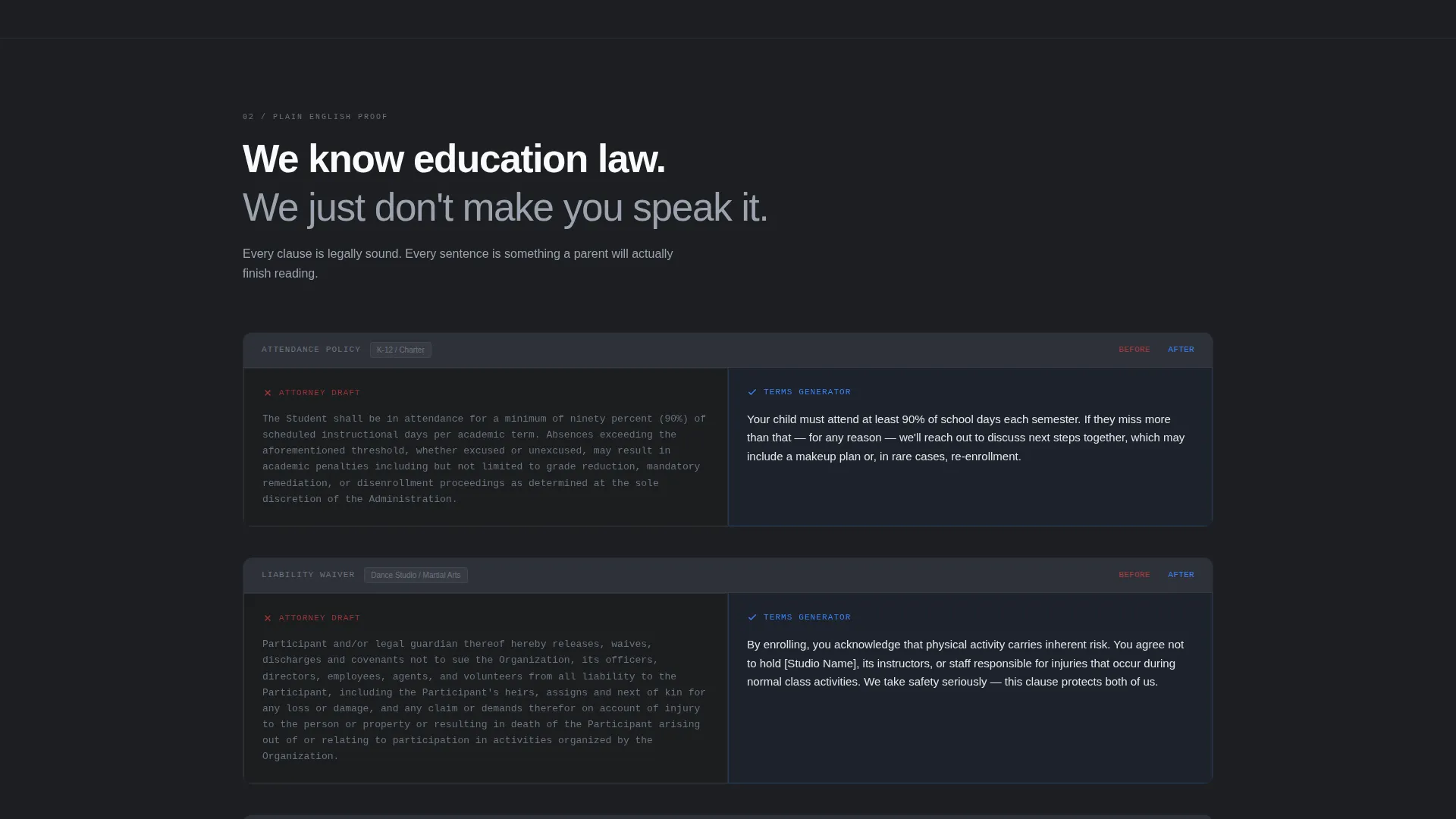
- Before-and-after clause pairs, an inline generation form, and a freemium upsell flow built directly into the page
Feature list
This template packs purposeful, prompt-backed functionality into every section. Here is what the build includes.
Live Code-Snippet Header
The header renders a dark-background code editor block where clause numbers appear in steel gray, policy keywords display in chrome white, and the {{school_name}} variable glows in signal-blue. It auto-types in real time, resolving to a sample institution name as the visitor watches. A blinking cursor moves through attendance policy language mid-keystroke, making the product feel immediate and intelligent.
Three-Column Comparison Table
The comparison section presents three columns side by side: "Writing From Scratch," "Hiring an Attorney," and "Terms." Each row covers a distinct pain point, time cost, dollar cost, language consistency, and legal risk. Rows reveal with a subtle scroll-triggered slide animation, stacking evidence until the first two columns feel obviously painful and the third feels like the only sensible choice.
Before-and-After Clause Pairs
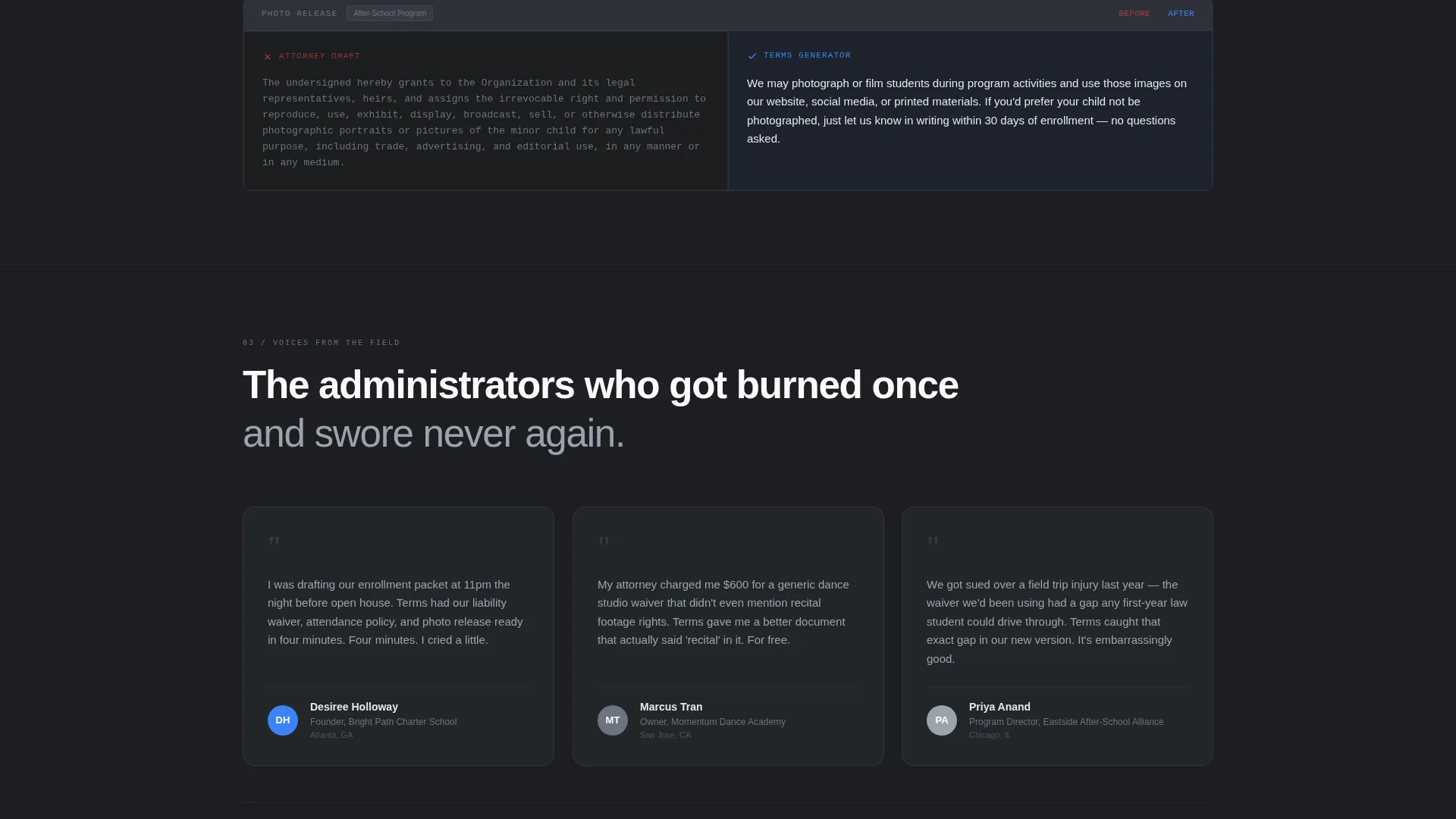
Below the comparison table, sample clauses appear in paired blocks. Dense legal jargon sits on the left. The same clause, rewritten in parent-friendly plain English, appears on the right. This section proves the template understands education-specific language, not just generic legal formatting.
Inline Three-Field Generation Form
Clicking the primary call to action opens a three-field inline form: school name, institution type from a dropdown menu, and state. The free tier generates a basic terms document instantly on-screen. No redirect, no waiting, no account required to see real output.
Freemium Upsell Flow
After the free document renders on screen, a soft upsell banner appears below it. The banner offers the full clause suite, photo release, device policy, and liability waiver, under a secondary call to action labeled "Unlock All Clauses." The page earns the conversion by delivering value before asking for anything.
Pinned Call-to-Action Navigation
The primary call to action, "Generate Your Terms Free," is pinned in the header navigation and repeated at the base of the comparison table. This dual placement ensures the action is always visible regardless of where the visitor is on the page.
Page sections overview
| Section | Purpose |
|---|---|
| Code Snippet Header | Auto-types live policy language and resolves school name variable in signal-blue |
| Comparison Table | Contrasts three approaches to school terms of service across cost, risk, and speed |
| Before and After Clauses | Shows plain-English rewrites of dense legal language side by side |
| Inline Generation Form | Collects school name, institution type, and state to generate a free document |
| Free Document Preview | Renders a basic terms of service document instantly on-screen after form submission |
| Freemium Upsell Banner | Offers the full clause suite below the free document with a secondary call to action |
Design & branding system
The visual identity follows a Directory and Discovery theme built on a Monochrome Steel color system. Every color decision reinforces the feeling that paperwork is already handled.
- Deep graphite (#1C1E21) covers primary backgrounds; brushed steel (#6B7280) handles secondary text and divider lines; bright chrome (#E5E7EB) surfaces cards and content blocks
- Signal-blue (#3B82F6) appears exclusively on interactive elements and calls to action, including the auto-typed school name variable in the header
Mobile & speed optimization
The layout is structured for a smooth scroll experience on any screen size. The comparison table and before-and-after clause pairs are formatted to remain readable on smaller viewports.
- The pinned header call to action stays accessible as visitors scroll on mobile devices
- The inline generation form uses a simple three-field structure that works cleanly on touch screens without requiring horizontal scrolling
How this template helps you convert
The page is built around a Problem to Solution Arc that earns trust before it asks for anything.
- The comparison table stacks concrete evidence, time, cost, and risk, until the free option is the obvious next step, then places the primary call to action directly below the final row
- The inline form delivers a real, on-screen terms document before any payment is requested, which means visitors experience the product value before they see the upsell
Other information about this template
This template is categorized under School and Academy Website Templates within the Technology category. It is purpose-built for the school and academy terms of service page use case.
- The template style is a Comparison Table layout, making it well suited for visitors who are actively evaluating their options before committing
- The freemium and trial landing page direction means the page is optimized for giving real value upfront, which builds the credibility needed to convert skeptical administrators
- Institution types supported by the dropdown include K-12 schools, dance studios, martial arts academies, tutoring centers, and after-school programs
Theme
Directory & Discovery
Creative direction
Problem→Solution Arc
Color system
Monochrome Steel
Style
Comparison Table
Direction
Freemium/Trial
Page Sections
Live Code-snippet Header
Three-column Comparison Table
Before-and-after Clause Pairs
Inline Three-field Generation Form
Freemium Upsell Flow
Pinned Dual Call-to-action Placement
Related questions
Does this template require any coding knowledge to use?
Can I customize the terms generated for my specific school type?
What does the free tier actually generate?
Is the comparison table editable?
Who is this template best suited for?



