Intelligent Environmental Science Landing Page Template
Catalyst is an environmental science exam prep landing page template built around a five-stage study arc, animated performance counters, and a free diagnostic quiz. It combines comparison tables, scroll-driven section reveals, and a field-notebook visual identity to guide students from first visit to a personalized study plan, without asking for an email until value is already delivered.
by Rocket studio
Quick summary
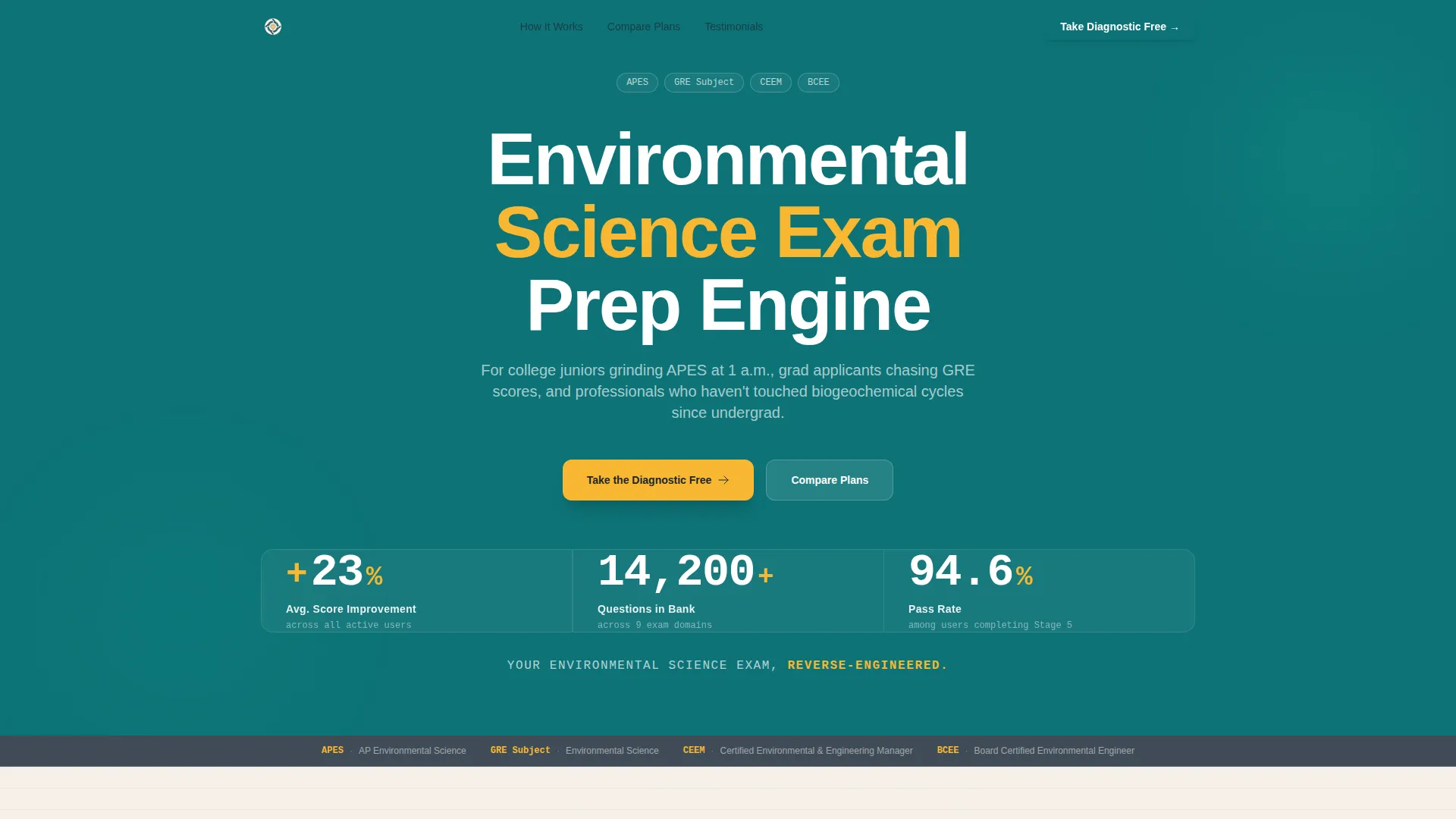
Catalyst is a single-page exam prep template purpose-built for environmental science review services. It opens with three animated performance counters, guides visitors through a five-stage study journey, and converts them via a live five-question diagnostic quiz. The design channels a university laboratory field notebook, dense, credible, and built to hold attention at 1 a.m.
Who this template is for
This template is built for EdTech founders and course creators running environmental science exam prep services. It fits businesses targeting students preparing for the Advanced Placement Environmental Science (APES) exam, graduate applicants studying for GRE subject tests, and working professionals pursuing environmental certifications. Environmental science instructors looking for a polished front-end for supplemental drill tools will also find the layout practical.
- Exam prep services targeting APES, GRE, and environmental certification candidates
- EdTech operators who need a comparison-table layout with quiz-led conversion
- Environmental science educators offering structured, stage-based study programs
What problem this template solves
Most exam prep landing pages either bury the value in a wall of text or ask for an email before proving anything. Catalyst solves both problems. The template leads with credibility through hard numbers, then earns the conversion by letting visitors experience the product before the gate appears.
- Visitors leave before understanding what they actually get at each plan tier
- Generic study platforms fail to show subject-specific depth for environmental science topics
- Conversion forms placed too early lose students who haven't yet seen enough to commit
What you get with this template
Catalyst delivers a fully structured single-page layout with every major section pre-built. The design system, typography choices, interactive components, and content hierarchy are all defined in the template so you can focus on customizing copy and data rather than starting from scratch.
- A five-section study arc with per-stage comparison tables (free plan versus Pro plan)
- Animated header counters, a live five-question diagnostic quiz, and a sticky navigation bar
- Social proof section, full pricing comparison table, and a linear single-row footer
Feature list
This template ships with a focused set of interactive and structural components grounded in the source brief.
Animated Stats Dashboard Header
Three oversized counters animate on load using a monospaced typeface against a deep lab teal background. They display average score improvement, total questions in the bank, and active-user pass rate. The effect reads like a field instrument calibrating, clinical, confident, and immediately credible.
Five-Stage Study Arc with Comparison Tables
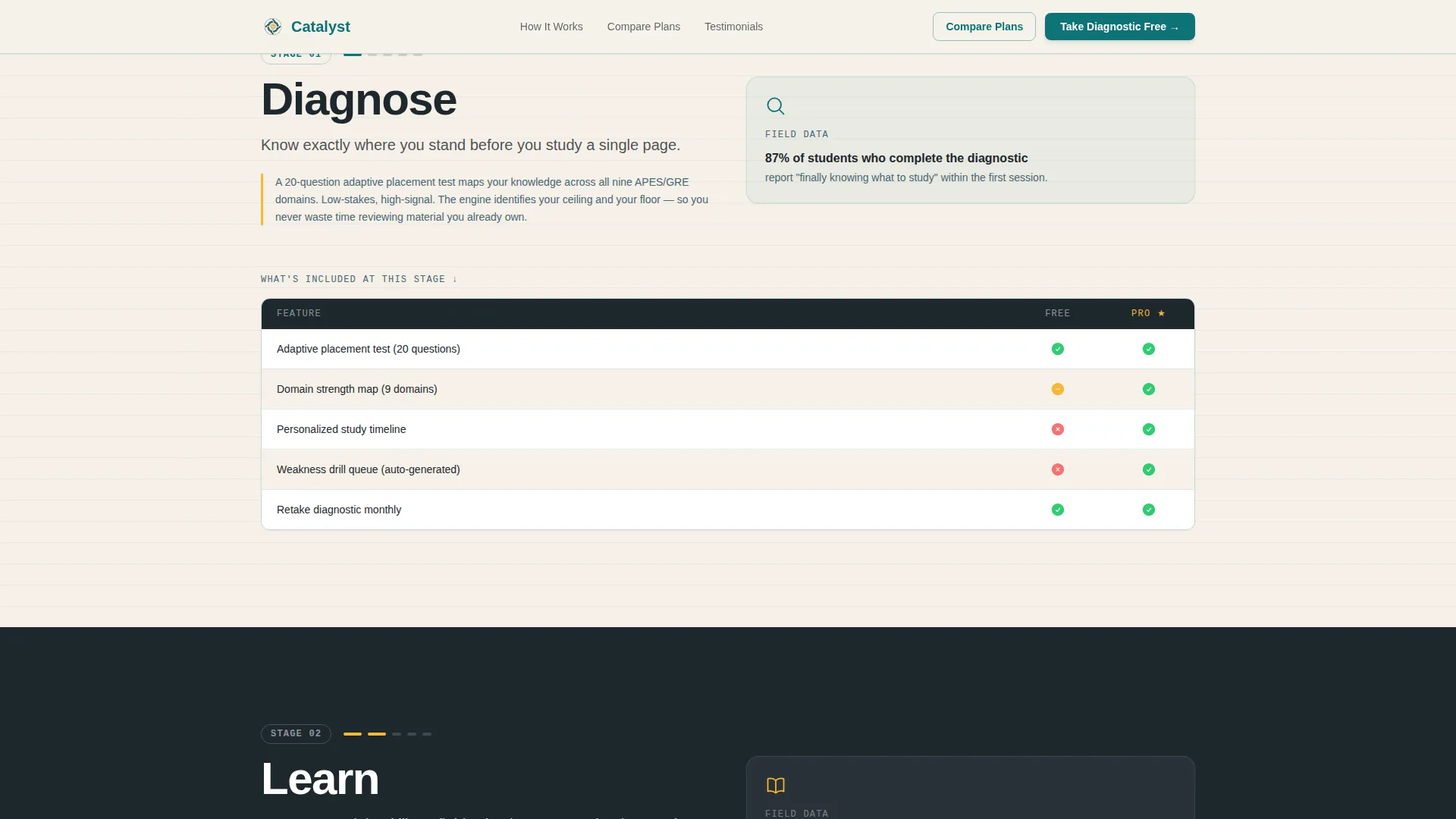
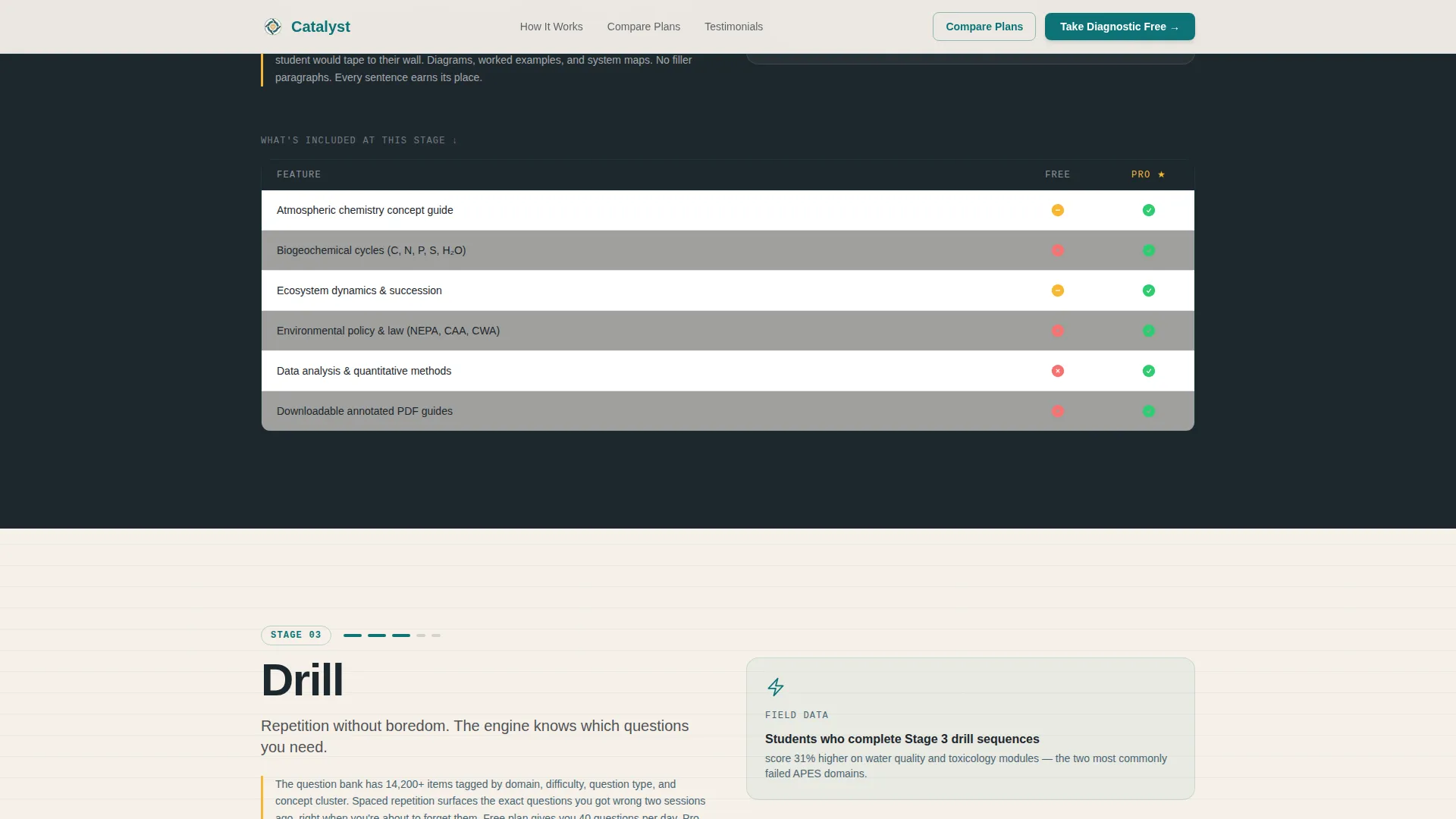
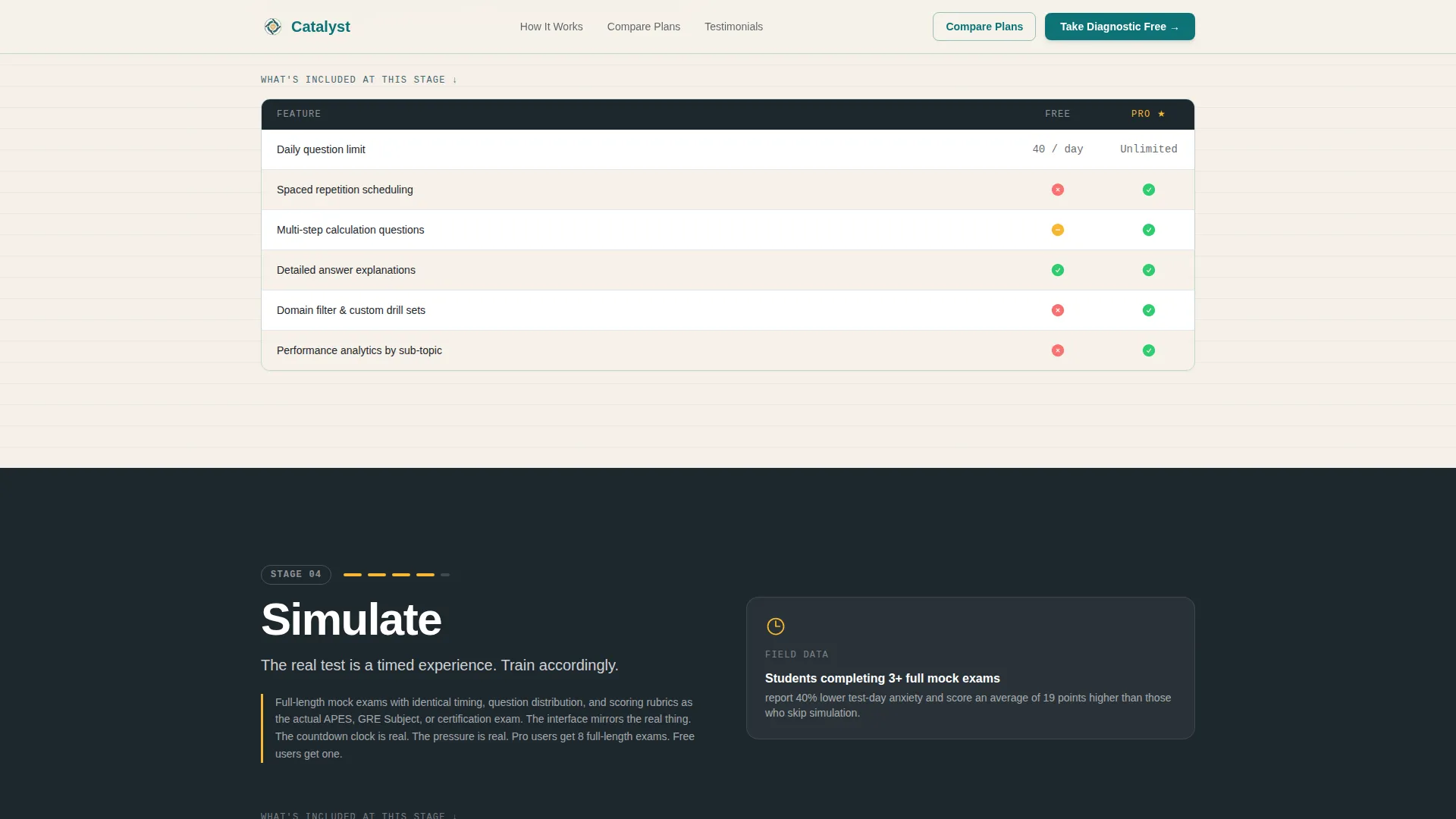
The page scrolls through five named stages: Diagnose, Learn, Drill, Simulate, and Pass. Each stage contains a comparison table showing exactly which resources are available on the free plan versus the Pro plan. Hovering a table row previews the actual question type or resource tied to that stage.
Free Diagnostic Quiz with Gated Study Plan
A five-question placement quiz covers atmosphere, hydrosphere, biodiversity, policy, and data analysis topics. It scores instantly and returns a personalized study plan preview. The email capture appears only after results are shown, so visitors receive value before being asked for anything.
Sticky Navigation with Compare Plans Anchor
A persistent navigation bar stays visible as visitors scroll. The "Compare Plans" link anchors directly to the full pricing comparison table, giving decision-ready visitors a shortcut without disrupting the linear scroll flow for everyone else.
Per-Stage Micro-Stat Social Proof
Each of the five study-arc sections closes with a specific performance statistic tied to that stage. These micro-stats build cumulative evidence as the visitor scrolls, reinforcing the case for upgrading at each step rather than only at the pricing section.
Testimonial and Social Proof Section
A rotating testimonial card stack sits between the study arc and pricing. Cards display student outcomes alongside the micro-stats already established per stage, creating layered social proof without requiring a separate page.
Page sections overview
| Section | Purpose |
|---|---|
| Hero Stats Dashboard | Display animated performance counters and primary call to action |
| Study Arc: Diagnose | Introduce low-pressure self-assessment with free versus. Pro table |
| Study Arc: Learn | Show learning resource unlock comparison by plan tier |
| Study Arc: Drill | Present question-drill access differences and stage micro-stat |
| Study Arc: Simulate | Feature timed mock exam screenshot and urgency-building content |
| Study Arc: Pass | Close the arc with final comparison table and conversion push |
| Diagnostic Quiz | Deliver five-question placement quiz with instant scoring |
| Social Proof Section | Rotate testimonial cards alongside cumulative micro-stats |
| Pricing Comparison | Full free versus. Pro comparison table anchored from sticky nav |
| Footer | Linear single-row pattern with navigation links |
Design & branding system
The visual identity follows an Educational Guide theme built around the Teal Catalyst color system. The palette references a university laboratory at golden hour, institutional structure softened by warmth. Every color has a functional role, so the design communicates state and meaning, not just aesthetics.
- Deep lab teal (#0D7377) dominates section backgrounds and header bars; chalkboard charcoal (#1E272E) anchors all body text
- Reaction-green (#2ECC71) marks correct answers and progress states; highlight amber (#F7B731) activates on hover and live quiz interactions
- JetBrains Mono drives counters and data displays; DM Sans handles body copy and interface text for comfortable reading at extended sessions
Mobile & speed optimization
The template is designed desktop-first, reflecting the reality that environmental science exam prep sessions typically happen on a laptop during late-night study blocks. Mobile layouts are included and structurally solid for on-the-go review moments.
- Counter animations, quiz state transitions, and scroll-reveal staggers are handled on the client side, keeping static sections server-rendered for faster initial load
- Comparison tables and the diagnostic quiz reflow cleanly for smaller screens without losing the interactive hover and preview behaviors
How this template helps you convert
Catalyst is structured around two distinct visitor paths and handles both without friction.
- The primary path delivers the free diagnostic quiz immediately after the header stats. Visitors experience the product before any form appears, which reduces drop-off at the gate and increases the quality of leads who do submit their email.
- The secondary path serves visitors who are already comparing plans. The sticky "Compare Plans" navigation anchor takes them directly to the full pricing table, removing scroll friction for high-intent buyers who are ready to decide.
Other information about this template
Catalyst is categorized under Education and Training, specifically within the Environmental Science Education subcategory. The template style is a Comparison Table layout, which makes it well-suited for services that need to clearly communicate tiered access across a structured learning journey.
- The template is localized for English-language markets with United States Dollar (USD) pricing and MM/DD/YYYY date formatting
- The field-notebook and university-laboratory aesthetic is intentional, it signals subject-matter depth to an audience that has spent time in real academic or professional environments
- Animation intensity is set to high throughout: counter tick-up on load, scroll-reveal stagger across study-arc sections, and quiz state transitions between question and results views
- The footer follows Pattern 1, a linear single-row layout, keeping the page exit clean and uncluttered
Theme
Educational Guide
Creative direction
Step-by-Step Guide
Color system
Teal Catalyst
Style
Comparison Table
Direction
Quiz/Assessment
Page Sections
Animated Stats Dashboard
Five-stage Study Arc Layout
Live Diagnostic Quiz with Instant Scoring
Sticky Navigation with Plan Anchor
Per-stage Micro-stat Proof Points
Rotating Testimonial Card Stack
Related questions
Who is this template designed for?
Can I customize the comparison tables for my own plan tiers?
How does the diagnostic quiz work within the template?
Does the template support both desktop and mobile layouts?
What makes this different from a generic course landing page template?



