Mathematics Video Lesson Library Landing Page
Theorem is a single-page mathematics video lesson library landing page template built around an FAQ-driven scroll, a competitor comparison table, and a two-step lead generation form. It guides students from first curiosity to course sign-up using structured proof-of-value sections, an embedded sample lesson, and a Slate and Sky color system that feels as credible as a university lecture hall.
by Rocket studio
Quick summary
Theorem is a focused landing page template for a mathematics video lesson library. It combines an FAQ-driven scroll structure, a competitor comparison table, and a lead generation flow into one cohesive page. The design uses an Institutional Authority visual theme that feels rigorous and approachable at the same time.
Who this template is for
This template is built for mathematics educators and course creators who need a landing page that earns trust quickly and converts anxious learners into registered students. It suits businesses selling structured video lesson libraries that span multiple difficulty levels.
- Mathematics tutoring platforms offering video courses from pre-algebra through calculus
- Independent educators building a self-paced digital library for high school or college students
- Homeschool curriculum providers who need to demonstrate topic depth and lesson quality
What problem this template solves
Students searching for math help at midnight carry a specific kind of doubt. They have been burned by resources that skipped their exact topic, used unclear notation, or buried the good content behind a paywall. This template addresses that doubt before it becomes a reason to leave.
- It answers the anxious questions students actually search for, using FAQ-structured sections with visible evidence
- It removes ambiguity about topic coverage by presenting a direct comparison table against competing resources
- It lowers the barrier to commitment by offering one full unlocked lesson before asking for an email address
What you get with this template
The template delivers a complete, single-page layout built around a logical trust-building progression. Every section has a defined job, and the design system ties them together visually without distraction.
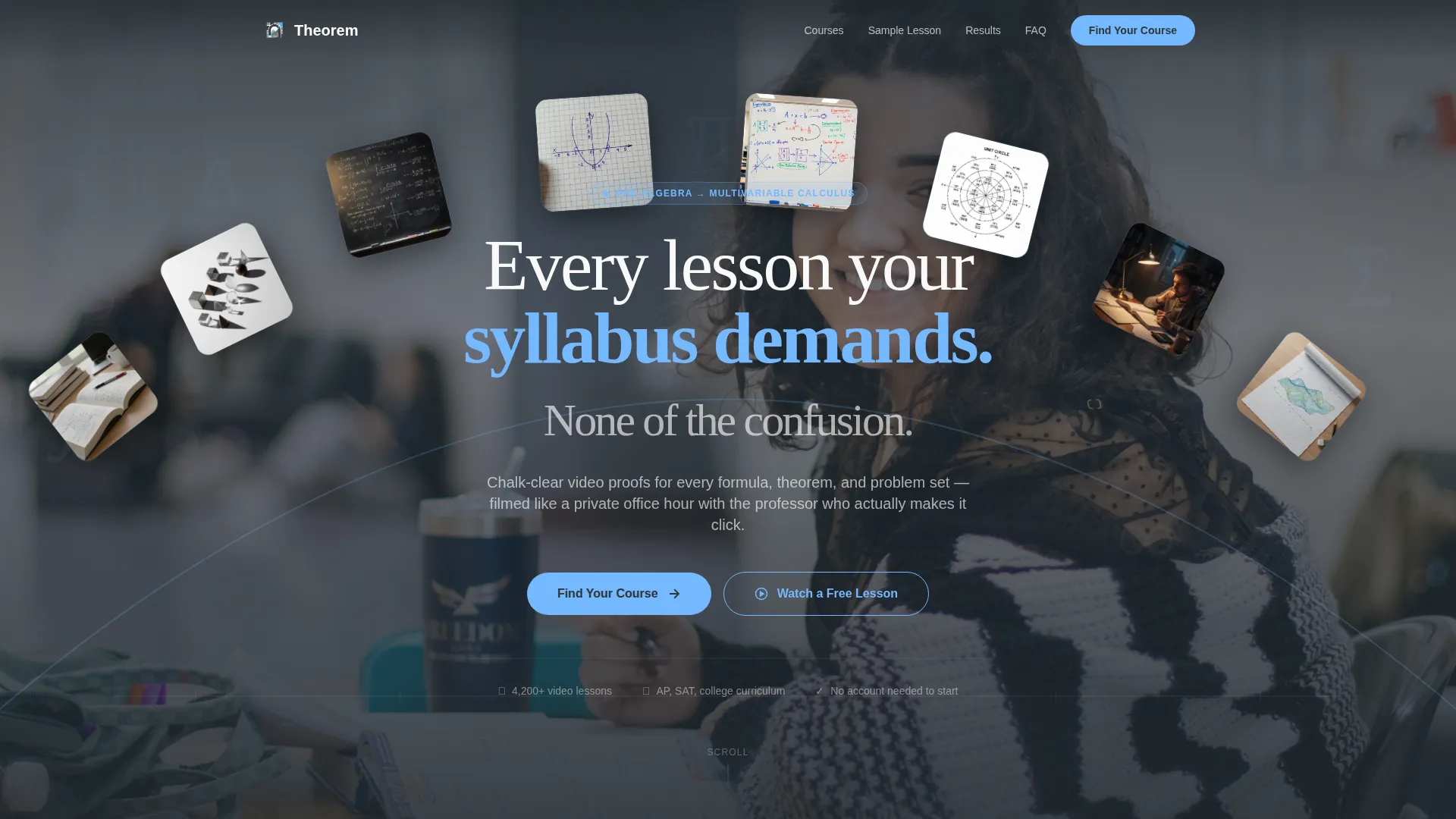
- A hand-drawn-style custom illustration header with a fade-in headline over mathematical objects
- A multi-section FAQ scroll that escalates from curiosity to commitment with embedded proof at each stage
- A two-step lead generation form with a grade-level and subject selector followed by an email capture field
Feature list
This template is built around several purposeful components that work together to move a visitor from skepticism to sign-up.
FAQ-Driven Scroll Structure
Each section is organized around a real question a student types into a search bar late at night. The scroll builds stakes progressively, from initial curiosity through visible evidence and finally to a clear call to action.
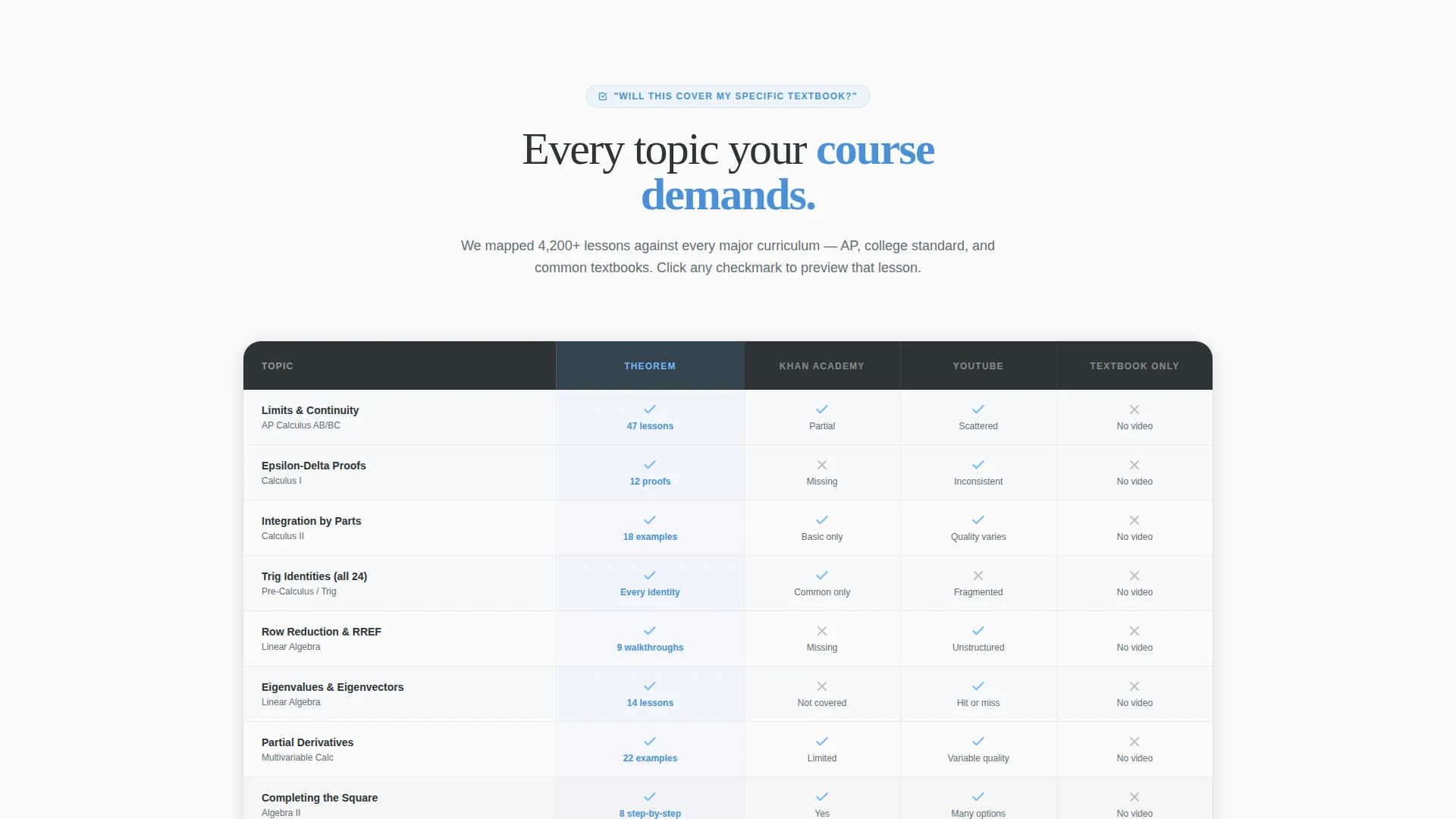
Competitor Comparison Table
A structured table shows topic coverage side by side against competing resources. Each checkmark in the table links to a lesson preview, turning a passive scan into an active journey deeper into the library.
Two-Step Lead Generation Form
The primary call to action opens a two-step form. The first step lets visitors select their grade level and subject, from Algebra I through Differential Equations. The second step collects an email address with a promise to deliver a personalized lesson roadmap within five minutes.
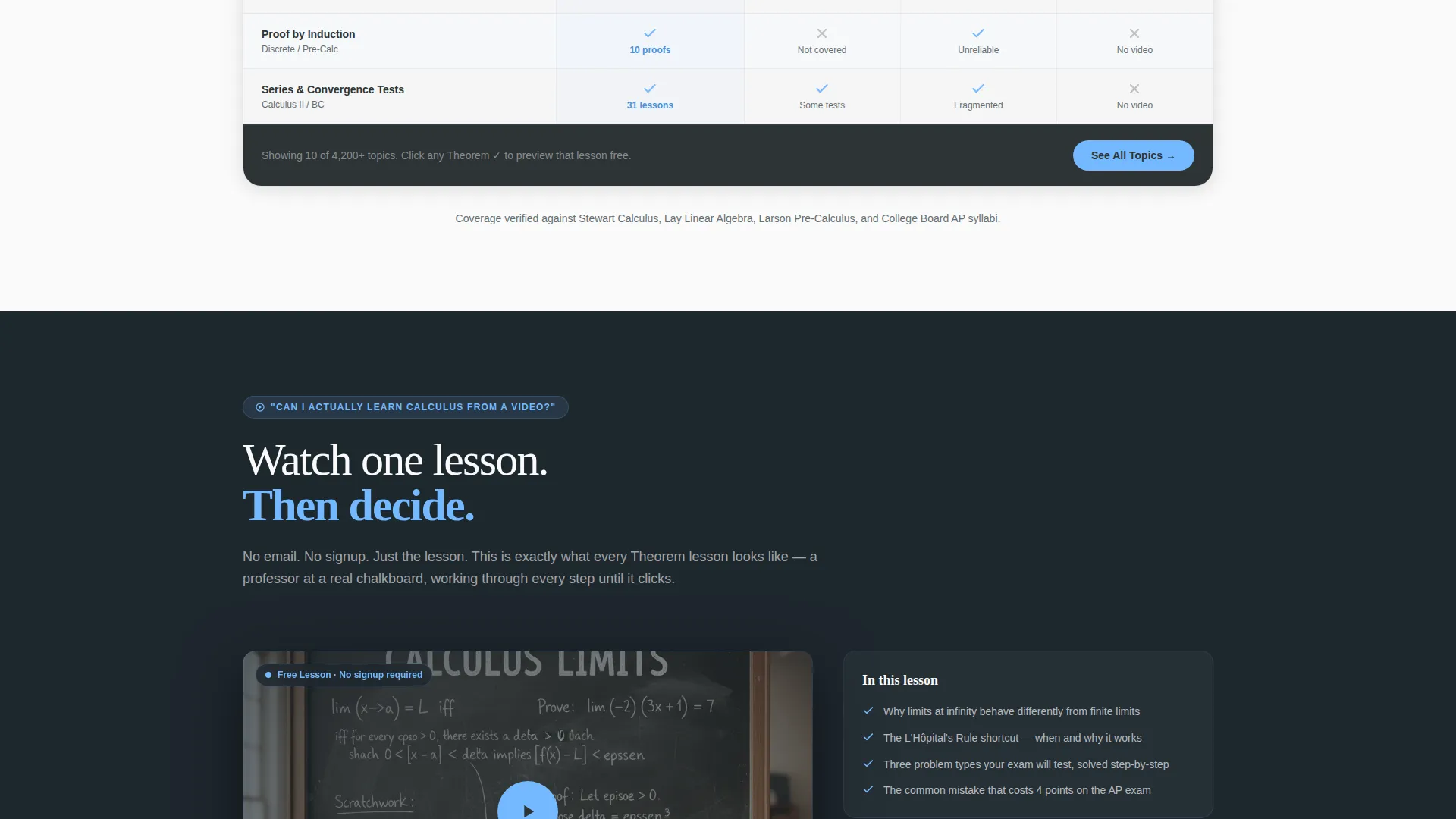
Unlocked Sample Lesson Path
A secondary conversion path lets visitors watch one complete lesson with no email required. This builds genuine trust before the main ask, reducing friction for the most skeptical visitors.
Custom Illustration Header
The header features a wide, hand-drawn-style panorama of mathematical objects: a parabola arcing over a number line, geometric solids with long shadows, and integral signs growing up a chalkboard margin. A single headline fades in over the scene.
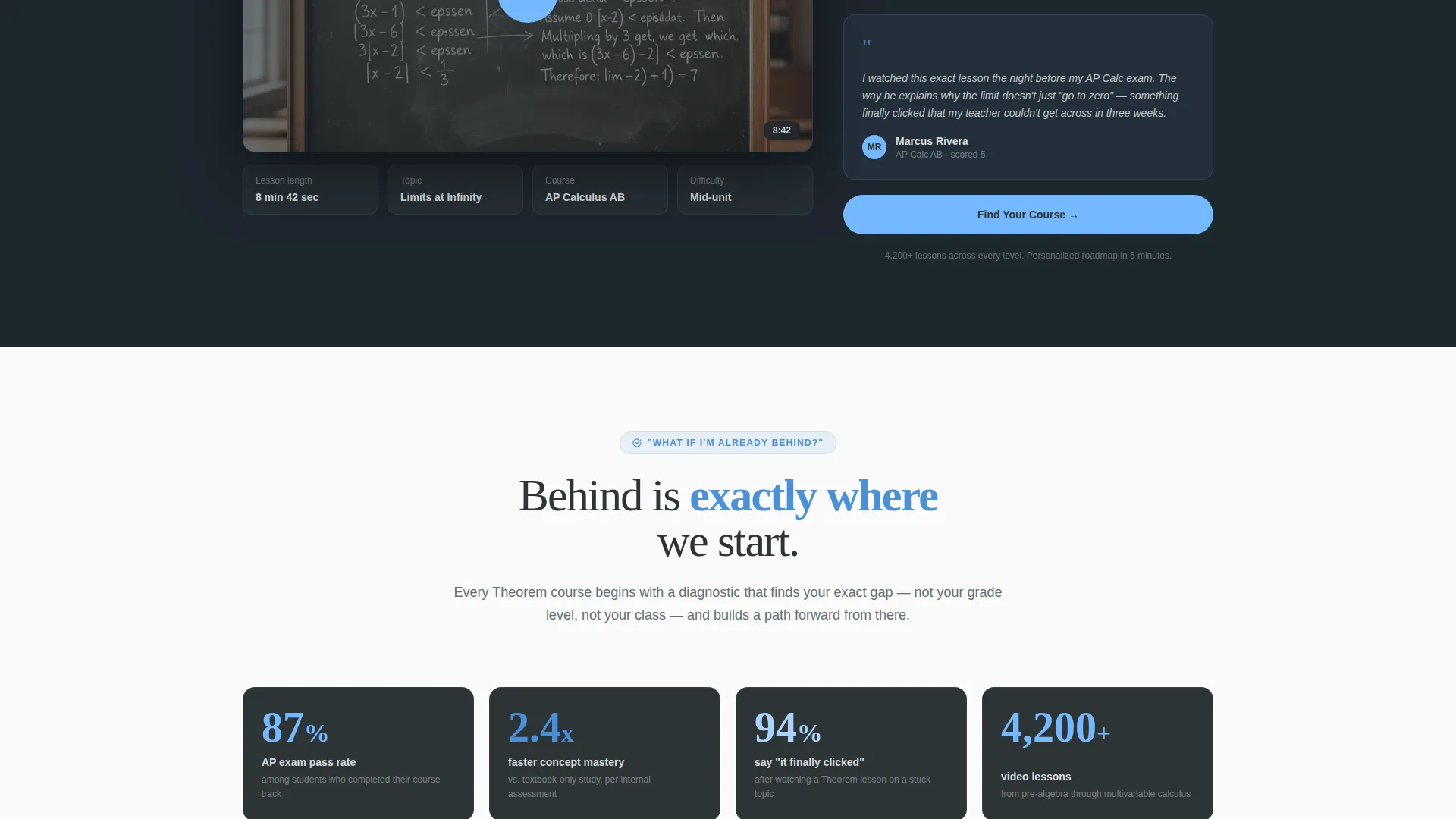
Stat Block and Social Proof Section
A dedicated stat block presents pass-rate improvement figures as evidence that the library works. It provides concrete reassurance to visitors who are weighing whether to invest time in yet another resource.
Page sections overview
| Section | Purpose |
|---|---|
| Illustration Header | Establish tone and headline |
| FAQ Section One | Address textbook coverage doubt |
| Comparison Table | Show topic depth versus. competitors |
| Sample Lesson Embed | Demonstrate teaching quality directly |
| Stat Block | Provide pass-rate evidence |
| FAQ Section Two | Handle "I'm already behind" concern |
| Primary call to action Form | Capture grade, subject, and email |
| Unlocked Lesson Path | Build trust before the main ask |
| Final call to action | Reinforce urgency to start tonight |
Design & branding system
The Slate and Sky color system gives the template the visual weight of a university setting without feeling cold or intimidating. Every color choice has a clear role in the hierarchy.
- Lecture-hall chalkboard (#2D3436) anchors headers and primary typography, while worn-slate gray (#636E72) handles supporting text and secondary panels
- Open-sky blue (#74B9FF) lands on buttons, progress indicators, and comparison table highlight rows to draw the eye toward action
- Clean-notebook white (#FAFAFA) keeps content panels light and readable, balancing the heavier chalkboard tones throughout the page
Mobile & speed optimization
The layout is designed to remain readable and functional across screen sizes, with the comparison table and form flow adapted for smaller viewports.
- The comparison table is structured for horizontal scrollability on mobile so no coverage data is hidden from smaller screens
- The two-step form keeps each step to a single focused interaction, reducing tap fatigue on touch devices
- Section spacing and typography scale are set to preserve the lecture-hall atmosphere on both desktop and mobile displays
How this template helps you convert
The template treats every section as a deliberate step in a conversion sequence, not just a content block.
- The FAQ-driven scroll mirrors the exact questions students search for, making every visitor feel immediately understood and reducing early bounce intent.
- The comparison table doubles as a discovery tool, with each checkmark linking to a lesson preview that pulls visitors deeper into the library before the email ask ever appears.
- The two-step form separates intent selection from email capture, which lowers perceived commitment and increases the likelihood a visitor completes the sign-up.
Other information about this template
This template is a strong fit for any mathematics education business that needs to convert high-intent but hesitant visitors into leads. A few additional details are worth knowing before you build with it.
- The template style is a Comparison Table landing page, which means the table is a structural centerpiece, not a decorative add-on
- The creative direction is FAQ-Driven, so the section order and copy architecture are both built around question-and-answer logic
- The Institutional Authority theme means the design signals credibility through restraint: clean type, structured layout, and a palette that references academic environments
- The header concept uses a Custom Illustration, meaning the panoramic mathematical scene is a designed asset included as part of the visual structure
- The landing page direction is Lead Generation, with the "Find Your Course" call to action as the primary goal and the unlocked lesson as a supporting trust-builder
Theme
Institutional Authority
Creative direction
FAQ-Driven
Color system
Slate & Sky
Style
Comparison Table
Direction
Lead Generation
Page Sections
Faq-driven Scroll Structure
Competitor Comparison Table
Two-step Lead Generation Form
Unlocked Sample Lesson Path
Custom Illustration Header
Stat Block with Pass-rate Evidence
Related questions
What type of page is this template?
Can I edit the comparison table to match my course library?
Who is this template designed for?
Does the template include the two-step form layout?
How does the unlocked lesson section work within the template?



