Thermostat - High Voltage HVAC Landing Page Template
Thermostat is a bold HVAC landing page template built for digital-first service operations. It uses a dark Acid Digital color system, a glowing comparison table layout, and a data-driven Industry Report structure to turn visitors into high-intent leads. Property managers, franchise owners, and homeowners all find a clear reason to act fast.
by Rocket studio
Quick summary
Thermostat is a single-page HVAC landing page template designed around hard data and urgency. It leads with an animated comparison table, layers in interactive cost and efficiency sections, and locks a persistent call-to-action bar to the viewport after the visitor scrolls past the table. The visual identity is sharp, dark, and engineered to feel authoritative.
Who this template is for
This template is built for HVAC businesses that want to compete on transparency, speed, and data rather than stock photography and generic promises. It speaks directly to visitors who need answers tonight, not a callback in three days.
- Property managers overseeing large multi-unit complexes with rooftop units under pressure
- Franchise owners scaling service fleets across multiple metro areas
- Homeowners who have seen their energy bills spike and want a clear diagnosis fast
What problem this template solves
Most HVAC service pages look interchangeable. They make promises without proof and ask for a call before earning any trust. Visitors leave without acting because nothing on the page makes the cost of waiting feel real.
- Legacy service model comparisons are never shown, so visitors have no frame of reference
- There is no interactive tool to help a visitor connect their building size to actual waste
- High-intent visitors scroll past a single static call to action and never return
What you get with this template
You get a fully structured HVAC landing page that guides the visitor through a staged, data-led experience. Each section escalates the stakes and then presents a direct path to action.
- A dark full-bleed header with an animated HVAC system schematic and a typewriter headline
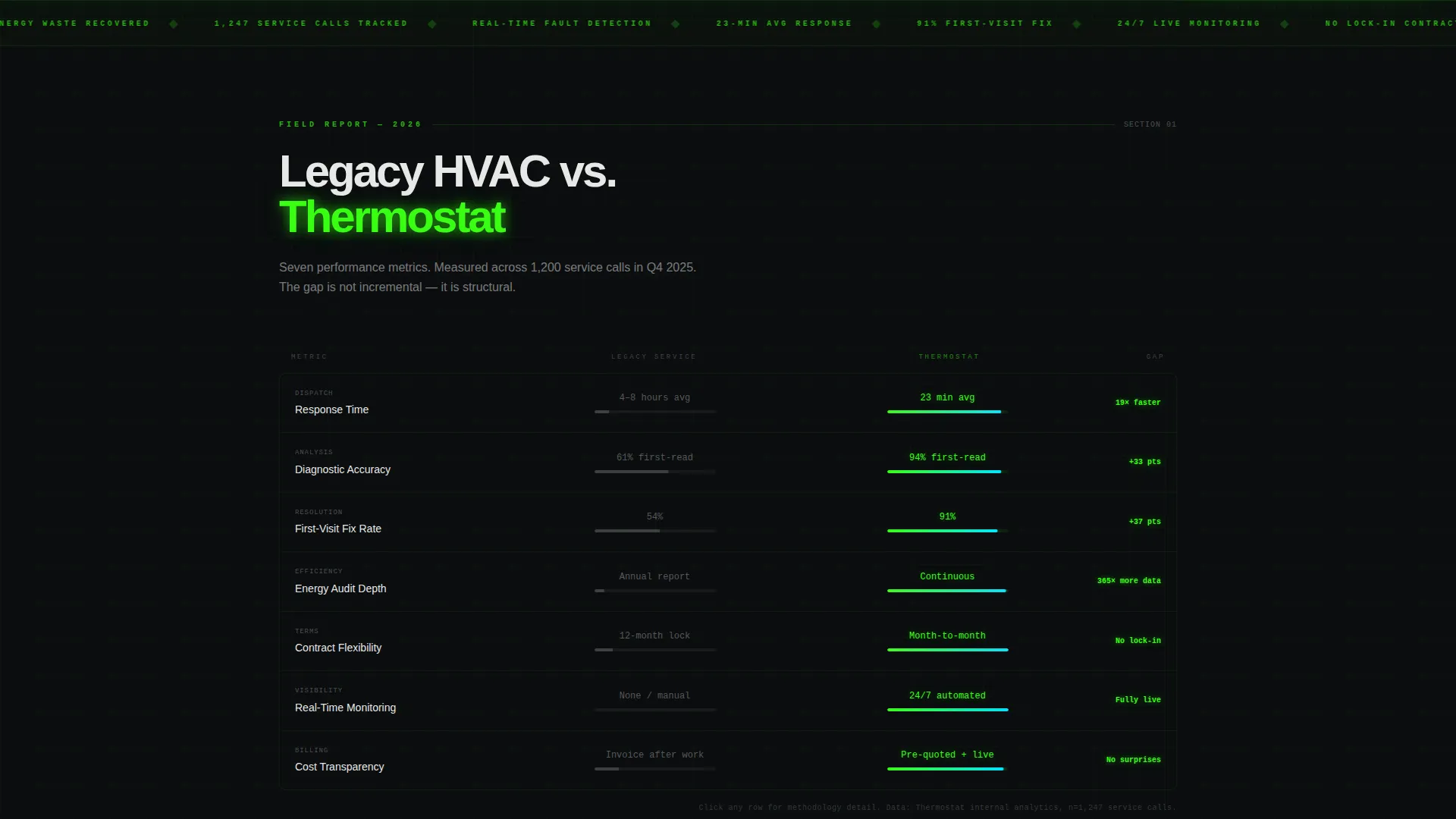
- A seven-metric animated comparison table pitting legacy models against the platform
- An adjustable cost-of-inaction calculator, a regional energy waste section, and a fleet efficiency benchmark
- A sticky viewport-locked call to action bar and a secondary call to action embedded inside the calculator
Feature list
This template delivers a focused set of purpose-built components. Every element is designed to move a skeptical visitor toward a high-intent click.
Animated Comparison Table
The core of the page is a seven-row comparison table. It covers response time, diagnostic accuracy, first-visit fix rate, energy audit depth, contract flexibility, real-time monitoring, and cost transparency. Each row reveals an animated verdict bar that slides to show the performance gap between legacy providers and this platform.
Typewriter Hero Headline
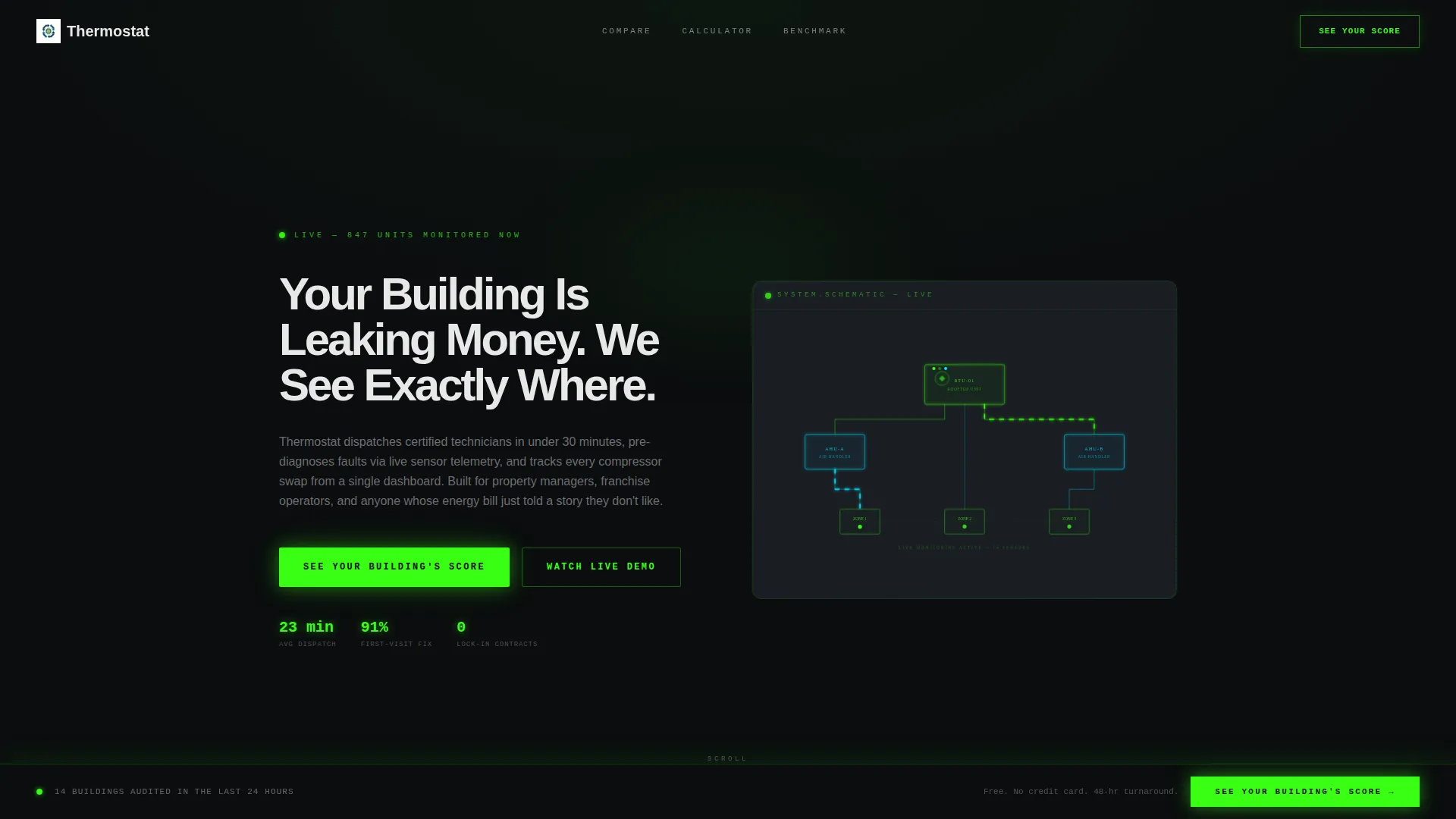
The header headline types in character by character on load. The copy reads "Your Building Is Leaking Money. We See Exactly Where." A subtle green light haze pools behind the text, making the message feel urgent and self-contained without relying on photography.
Glowing HVAC System Schematic
The full-bleed header replaces stock imagery with a thin-line HVAC system diagram rendered in reactor green and coolant blue. Airflow paths animate as slow particle trails, giving the hero section a live, technical feel that signals expertise immediately.
Cost-of-Inaction Calculator
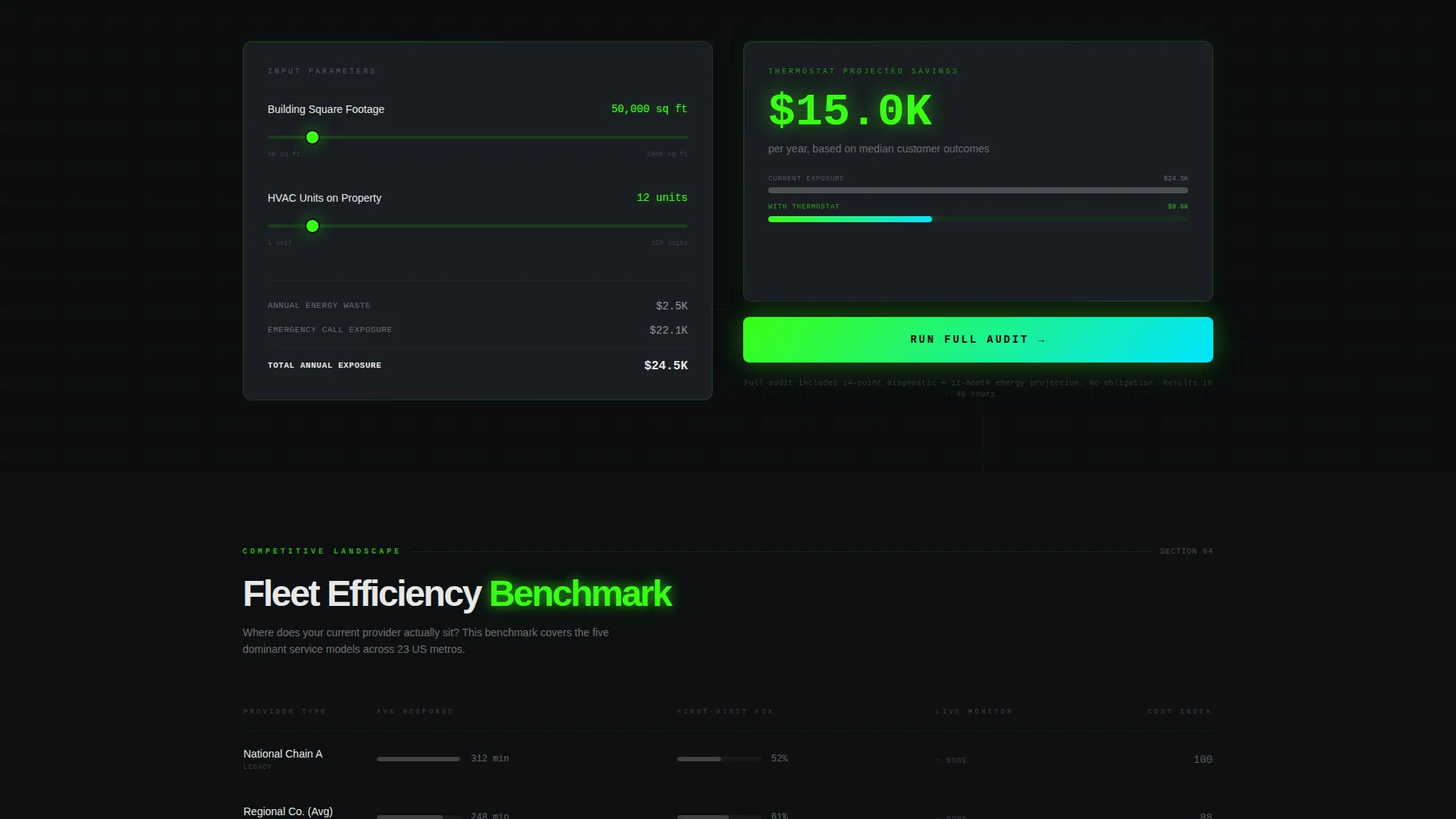
Visitors can adjust inputs by square footage to see a real-time estimate of what delayed or inefficient HVAC service costs them. A secondary call-to-action button labeled "Run Full Audit" is embedded directly inside the calculator to capture high-intent visitors mid-interaction.
Persistent Sticky call to action Bar
After the visitor scrolls past the comparison table, a slim glowing bar locks to the bottom of the viewport. It reads "See Your Building's Score" and stays visible throughout the rest of the scroll, routing clicks to a diagnostic intake on the next page.
Regional Energy Waste Section
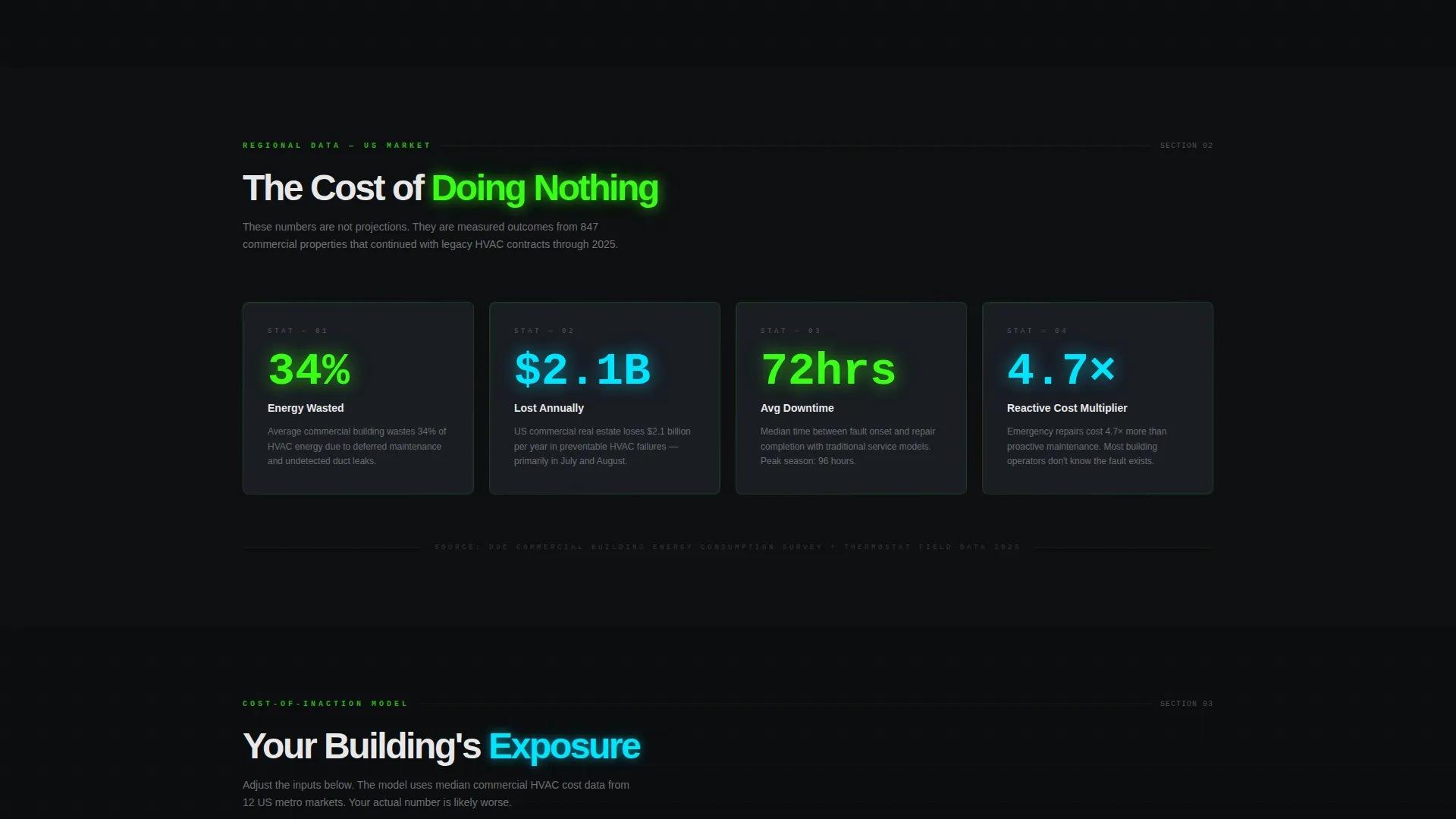
This section presents energy waste statistics with animated counters. Numbers build as the visitor scrolls into view, creating a sense of revealed data rather than a static claim. It frames the visitor's current situation within a broader regional cost context.
Page sections overview
| Section | Purpose |
|---|---|
| Dark hero header | Establishes urgency with animated schematic and typewriter headline |
| Comparison table | Shows seven-metric gap between legacy HVAC models and this platform |
| Energy waste stats | Animates regional cost data to contextualize the visitor's situation |
| Cost calculator | Lets visitors input square footage and see inaction costs in real time |
| Fleet efficiency benchmark | Frames the visitor's current provider against industry performance data |
| Sticky call to action bar | Keeps the primary conversion action visible after the comparison table |
Design & branding system
The visual identity follows a Startup Velocity theme built on an Acid Digital color system. Every color choice serves a functional role. Nothing is decorative.
- Void black (#0B0D0F) bleeds edge to edge as the base, making every glow element feel self-lit
- Reactor green (#39FF14) drives all primary calls-to-action and live data accents; coolant blue (#00E5FF) marks secondary highlights and hover states
- Panel gray (#1A1D23) surfaces card backgrounds, and scorched white (#E8E8E8) keeps body text readable against the dark base
Mobile & speed optimization
The layout is structured for clarity and fast comprehension across screen sizes. The sticky call to action bar and animated sections are designed to remain functional and legible on smaller viewports.
- The full-bleed dark background and vector-based schematic scale cleanly without heavy image assets
- Animated counters and verdict bars are lightweight interactions that do not require external libraries to render their core effect
- The sticky call to action bar repositions naturally within the mobile viewport so the conversion path is never buried
How this template helps you convert
This template earns the click by making the visitor feel informed and slightly alarmed before it ever asks them to act. Every section adds a layer of proof that raises the cost of doing nothing.
- The comparison table creates a direct, visual contrast between the old way and this platform, shifting the visitor's frame of reference before they reach any offer
- The cost-of-inaction calculator makes the financial risk personal and specific, and the embedded "Run Full Audit" button captures high-intent visitors the moment they see their own numbers
- The persistent sticky call to action bar means the primary conversion action is always one tap away, no matter how deep into the data the visitor scrolls
Other information about this template
This template fits within the broader HVAC digital presence category under Technology. It is suited to any HVAC business that wants to modernize its web presence with a data-first, high-contrast landing page experience.
- The Industry Report creative direction makes this template feel closer to a professional audit than a typical service page, which builds credibility with commercial decision-makers
- The Comparison Table template style is a strong fit for businesses entering competitive metro markets where differentiating from legacy providers is the primary sales challenge
- The Click-Through landing page direction means every design decision prioritizes the diagnostic intake conversion above all other outcomes
- This template can support HVAC businesses at any growth stage, from a single-location operator to a multi-metro franchise scaling its digital lead flow
Theme
Startup Velocity
Creative direction
Industry Report
Color system
Acid Digital
Style
Comparison Table
Direction
Click-Through
Page Sections
Animated Seven-metric Comparison Table
Typewriter Hero Headline with Glow Effect
Glowing HVAC Schematic Header
Interactive Cost-of-inaction Calculator
Persistent Viewport-locked Call to Action Bar
Animated Regional Energy Waste Section
Related questions
Who is this landing page template best suited for?
Can I edit the comparison table metrics to match my own service model?
What makes the sticky call to action bar effective?
Does this template include the cost calculator logic?
Is this template suitable for a single HVAC service area or a multi-metro operation?



