Thermostat - Powerful HVAC Knowledge Landing Page Template
Thermostat is a dashboard-style HVAC knowledge base landing page built for technical professionals. It presents 14,200+ articles, 860 indexed equipment models, and real-time search metrics through animated data counters, interactive fault-code cards, and a visual equipment taxonomy. The template drives leads with a 14-day free trial form and a gated fault code PDF download.
by Rocket studio
Quick summary
Thermostat is a single-page HVAC knowledge base landing page designed for technical trades. It uses a dark Data Command visual theme to display live platform metrics, an interactive equipment taxonomy, and a field-report case study. Two lead capture paths convert visitors at different commitment levels, making it equally useful for technicians and facilities managers.
Who this template is for
This template was built for businesses and teams that serve commercial HVAC professionals. It speaks directly to people who need fast, trustworthy technical data on the job.
- Commercial HVAC contractors who need quick access to compressor fault codes and equipment specifications in the field
- Facilities managers comparing chiller efficiency ratings across a multi-site building portfolio
- Junior HVAC technicians studying for certification exams such as the Environmental Protection Agency (EPA) 608 refrigerant certification
What problem this template solves
Field technicians and engineers waste time hunting through scattered manuals, outdated PDFs, and unreliable forums. A disorganized knowledge resource hurts diagnostic speed and increases callback rates. This template positions a knowledge base as the authoritative solution by showing its depth before asking for anything.
- Slow diagnostic workflows caused by fragmented technical resources spread across multiple sources
- No clear way for a knowledge base to demonstrate data density and credibility before a visitor commits
- Missed lead capture opportunities from visitors who are not ready to sign up but are willing to exchange an email
What you get with this template
The template delivers a full single-page layout structured like a state-of-the-industry briefing. Every section is designed to build trust through real data before presenting a call to action.
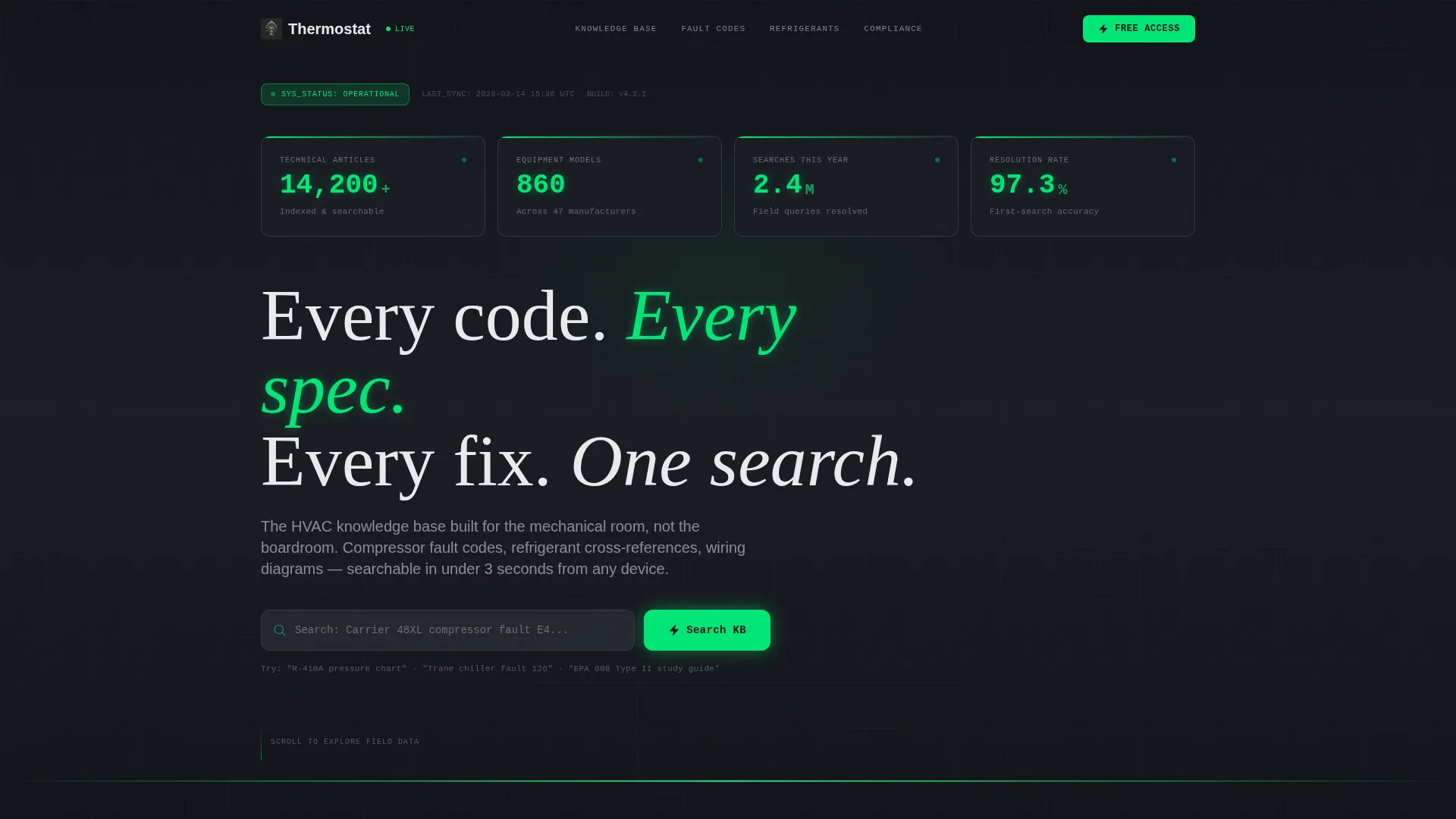
- An animated stats wall in the header showing live-style metrics: 14,200+ articles, 860 equipment models, 2.4 million searches served, and a 97.3% resolution rate
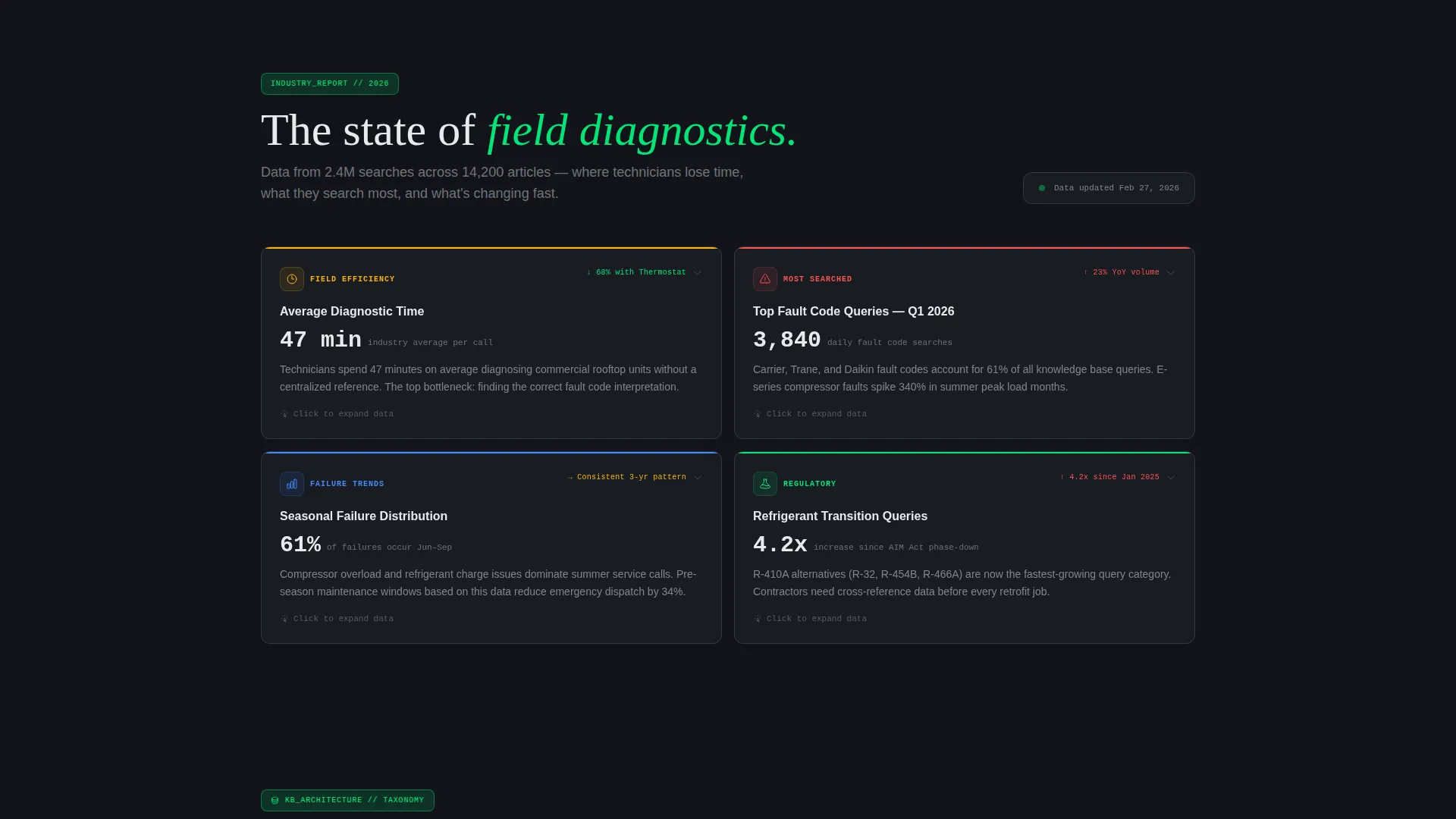
- An interactive problem snapshot section with hoverable data cards covering diagnostic time averages, top fault codes, and seasonal failure trends
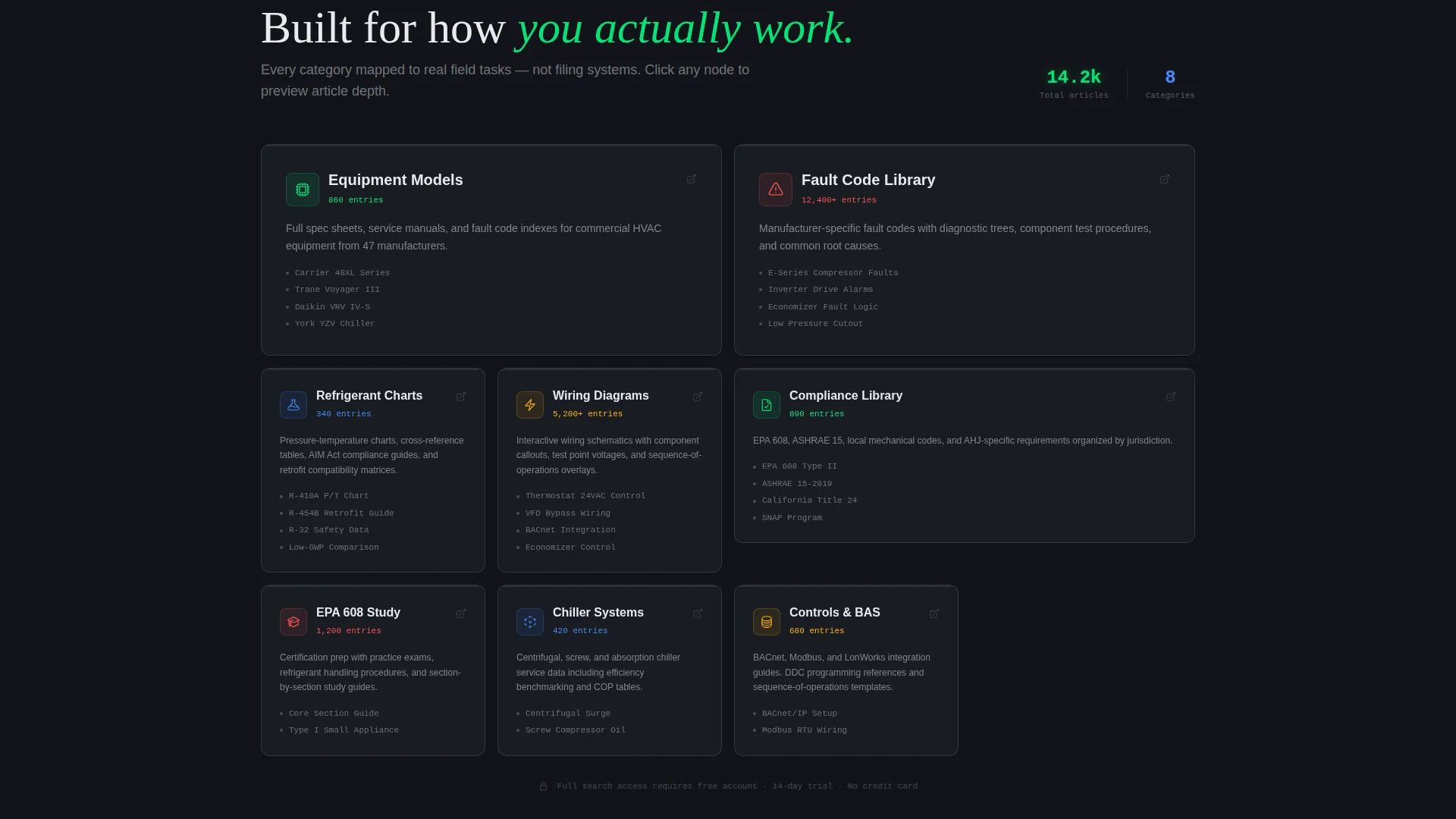
- A visual knowledge base taxonomy revealing equipment categories, compliance libraries, refrigerant cross-references, and wiring diagram nodes
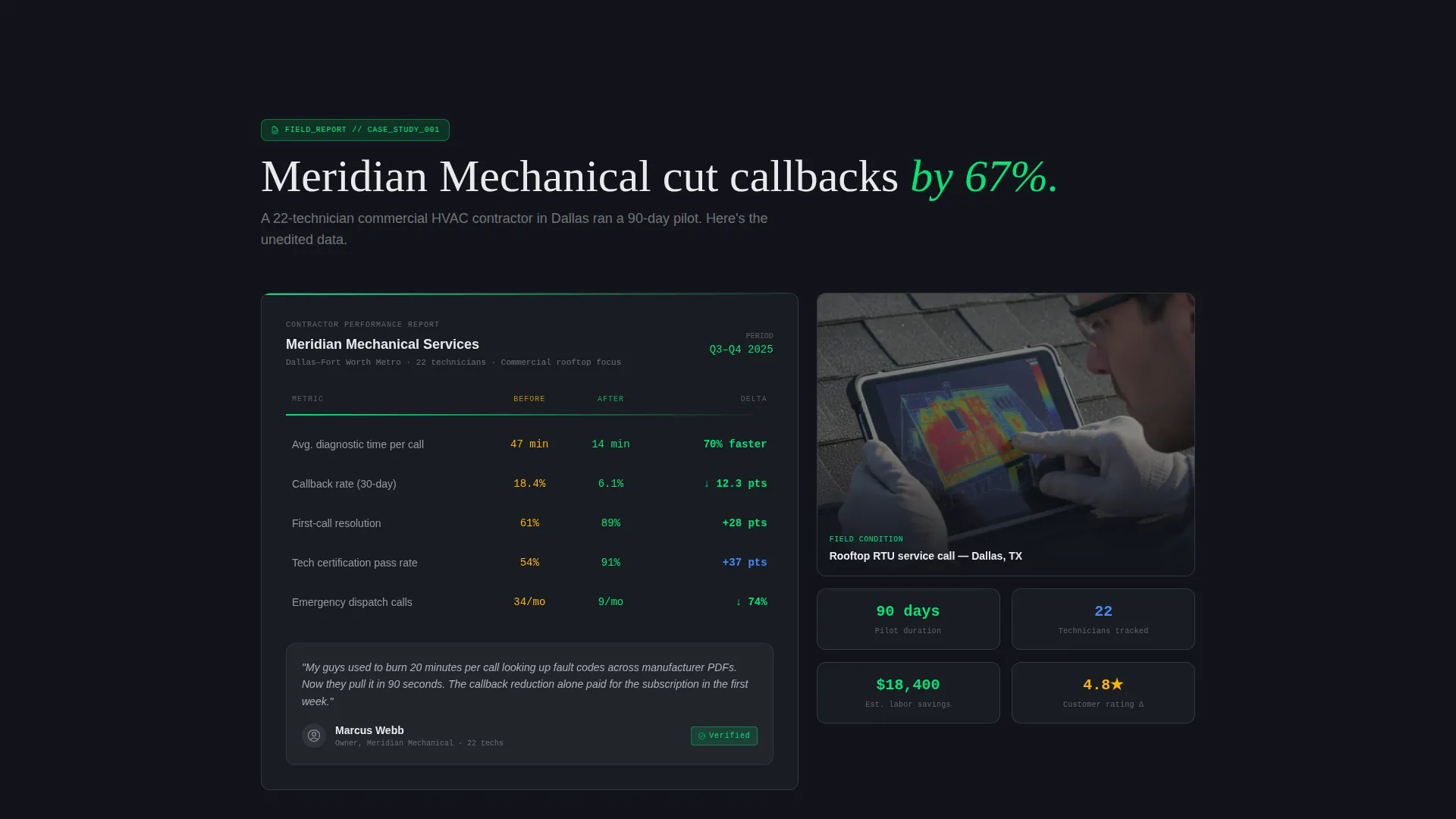
- A field-report case study section showing before-and-after callback rate metrics from a real contractor scenario
- Two lead generation paths: a three-field free trial form and a gated PDF download for the 2024 HVAC Fault Code Index
Feature list
This template combines data visualization design with a deliberate conversion flow. Each feature listed below is drawn directly from the template brief.
Animated Stats Counter Header
The header displays four key platform metrics as animated counters that tick upward like live sensor readings. A faint wireframe schematic of a rooftop unit pulses in status-green behind the numbers, grounding the visitor in the HVAC domain immediately.
Interactive Problem Snapshot Cards
The first scroll section presents industry data as hoverable cards. Each card expands to reveal detail on average diagnostic time, the most-searched fault codes, and seasonal equipment failure trends, rewarding visitor curiosity with sharper information.
Visual Equipment Taxonomy
A clickable node layout maps the full knowledge base architecture. Visitors can preview article depth across equipment categories, compliance libraries, refrigerant cross-references, and wiring diagram collections before they sign up.
Field Report Case Study
A dedicated section presents contractor results in a before-and-after format. Callback rate reductions are shown as field report metrics, giving prospective users a concrete, credible reason to trust the platform.
Dual Lead Capture System
The template includes two distinct conversion paths. The primary path is a three-field form offering 14 days of free access. The secondary path gates a downloadable PDF fault code index, capturing visitors who need more time before committing.
Page sections overview
| Section | Purpose |
|---|---|
| Stats Metrics Header | Displays animated platform counters and headline above a wireframe rooftop schematic |
| Problem Snapshot Cards | Presents hoverable industry data on diagnostics, fault codes, and failure trends |
| Knowledge Base Taxonomy | Reveals clickable equipment and compliance categories to show platform depth |
| Field Report Case Study | Shows before-and-after contractor callback metrics as a credibility signal |
| Primary Trial Form | Captures company name, role, and work email for 14-day free access |
| Fault Code Download | Offers a gated PDF download as a lower-commitment lead capture path |
Design & branding system
The visual identity follows a Data Command theme built around a Carbon Fiber color system. The overall effect feels like the backlit display panel of a building automation system viewed late at night: dark, dense, and precise.
- Deep graphite (#1A1D23) and brushed titanium mid-tone (#3A3F47) form the dark panel backgrounds that keep the layout dense and focused
- Status-green (#00E676) marks live data points, interactive highlights, and the pulsing wireframe schematic to signal active system readiness
- Technical white (#E8EAED) is used for body text and labels against dark panels, ensuring strong contrast for on-the-job readability
Mobile & speed optimization
The dashboard grid layout is designed to remain readable and functional on smaller screens used in the field. Technicians frequently access resources from phones or tablets in mechanical rooms, so mobile-friendly layout decisions are built into the template structure.
- Animated counter elements and hoverable cards are structured to reflow cleanly for vertical mobile viewports
- The dark panel color system reduces visual strain during low-light field use, such as in rooftop mechanical rooms or basement equipment areas
How this template helps you convert
The page earns conversions by demonstrating real data density before presenting any form. Visitors move through a deliberate trust-building sequence that ends at a natural decision point.
- The animated stats wall and problem snapshot cards establish platform credibility in the first two scroll sections, so visitors arrive at the taxonomy already convinced the resource is substantial.
- The visual taxonomy lets visitors explore article depth interactively, removing doubt about whether the knowledge base covers their specific equipment or fault code needs.
- Two staggered calls to action serve visitors at different readiness levels: the free trial form captures committed users, while the gated fault code PDF captures email addresses from visitors still evaluating.
Other information about this template
This template was designed as part of the Thermostat template family, built specifically for HVAC digital presence projects in the Technology category. A few additional details worth noting:
- The template style is a Dashboard and Data Grid layout, which suits any knowledge base or technical resource product needing to demonstrate data volume and credibility
- The creative direction follows an Industry Report format, making it adaptable for annual state-of-the-industry reports, technical briefings, or similar data-heavy content products beyond HVAC
- The header concept is a Stats and Metrics wall, which can be updated with real platform data once the knowledge base is live
- The color system and Data Command theme can be adapted to other technical trade niches such as electrical, plumbing, or building controls where a professional, precision-forward identity is appropriate
Theme
Data Command
Creative direction
Industry Report
Color system
Carbon Fiber
Style
Dashboard/Data Grid
Direction
Lead Generation
Page Sections
Animated Stats Counter Header
Interactive Problem Snapshot Cards
Visual Knowledge Base Taxonomy
Field Report Case Study Section
Dual Lead Capture Paths
Related questions
Who is this landing page template designed for?
Can I update the stats counters with my own platform numbers?
What are the two lead capture options included in this template?
Does the template include actual HVAC articles and technical content?
Can this template be adapted for a technical knowledge base outside of HVAC?



