Ticket - Powerful Automotive Landing Page Template
Ticket is a hub-and-spoke landing page template built for automotive help desk and ticketing platforms. It targets dealership service lanes, collision centers, and fleet garages. The design follows a Startup Velocity theme with an Electric Indigo color system. Every section guides visitors from first impression to demo request, using an interactive dashboard header and a persistent floating call to action.
by Rocket studio
Quick summary
Ticket is a single-page, anchor-nav landing page template designed for automotive help desk and ticketing software. It speaks directly to service managers, fixed operations directors, and fleet coordinators. The Electric Indigo color system and Launch Energy creative direction make the page feel urgent, focused, and alive. A live interactive header and a two-step lead form drive every visitor toward a demo.
Who this template is for
This template is built for automotive software companies selling ticketing or help desk platforms to the service side of the industry. If your buyers live inside dealership service lanes, this layout speaks their language from the first scroll.
- Service managers handling high volumes of repair order callbacks and open tickets
- Fixed operations directors tracking customer satisfaction scores across multiple rooftops
- Fleet coordinators who need vehicles back in service as fast as possible
What problem this template solves
Automotive service operations run on speed and accountability. Generic software landing pages fail to communicate urgency or show buyers how the platform fits their specific workflow. This template closes that gap.
- Buyers cannot picture the product working in their service bay without a demo
- Service managers need to see SLA tracking, routing logic, and resolution workflows before committing
- Fleet and dealership buyers are skeptical of software that does not understand their terminology or their pressure
What you get with this template
You get a full hub-and-spoke landing page structured around four operational spokes: Intake, Route, Resolve, and Measure. Each spoke is a self-contained section that answers a specific buyer question before they can raise it.
- An interactive preview header with three animating sample tickets that visitors can click and drag
- A persistent floating call-to-action button and a two-step lead capture form
- A self-serve repair order volume calculator that emails an instant capacity report to the visitor
Feature list
This template packs purpose-built components that match the way automotive service buyers evaluate software. Every feature below comes directly from the template design brief.
Interactive Ticketing Dashboard Header
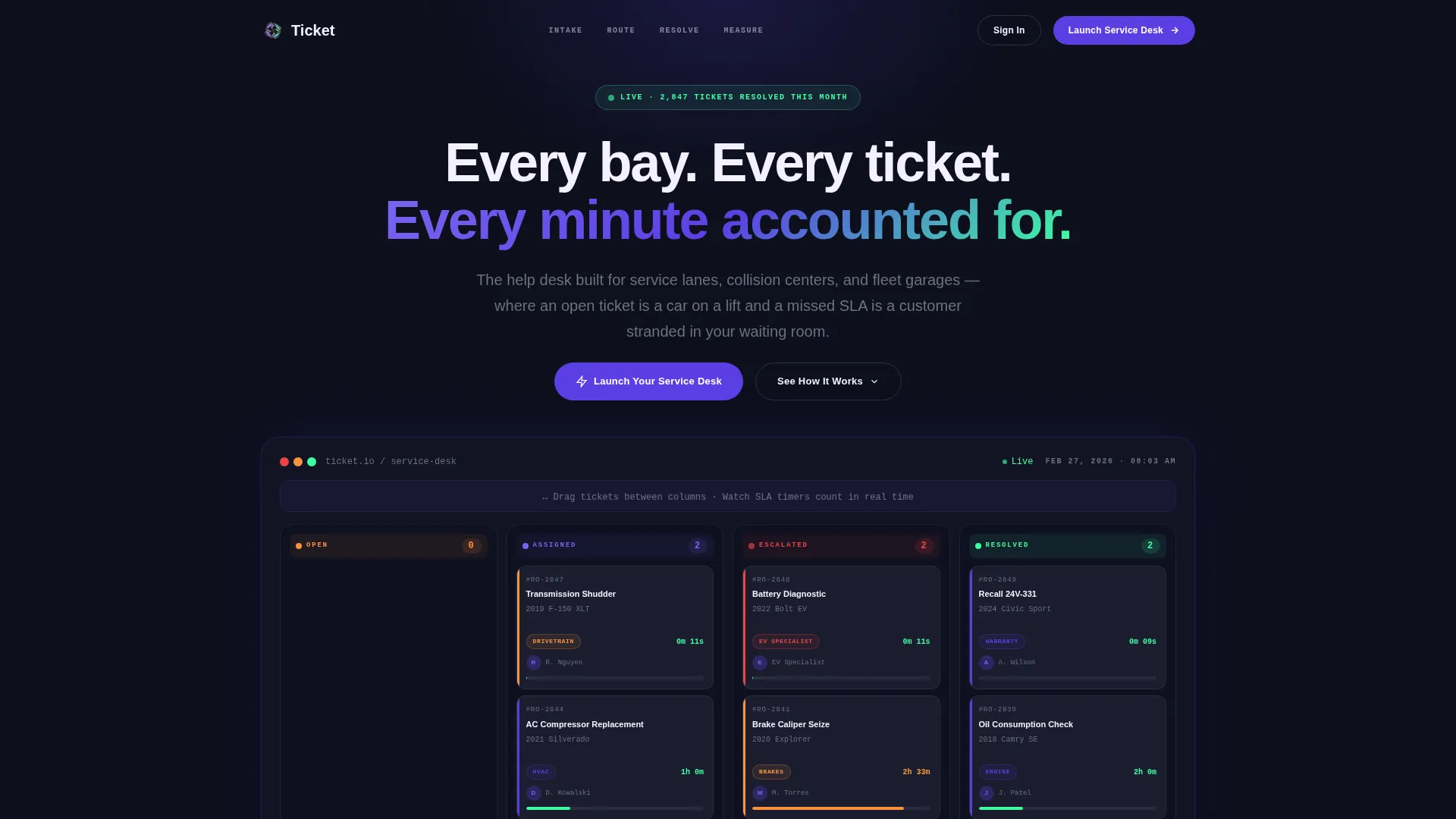
The header renders a functioning miniature of the ticketing dashboard inside the viewport. Three sample tickets animate through their full lifecycle in real time. Visitors can click tickets, drag them between columns, and watch response timers count live. This hands-on preview replaces a passive screenshot with an actual product moment.
Hub and Spoke Anchor Navigation
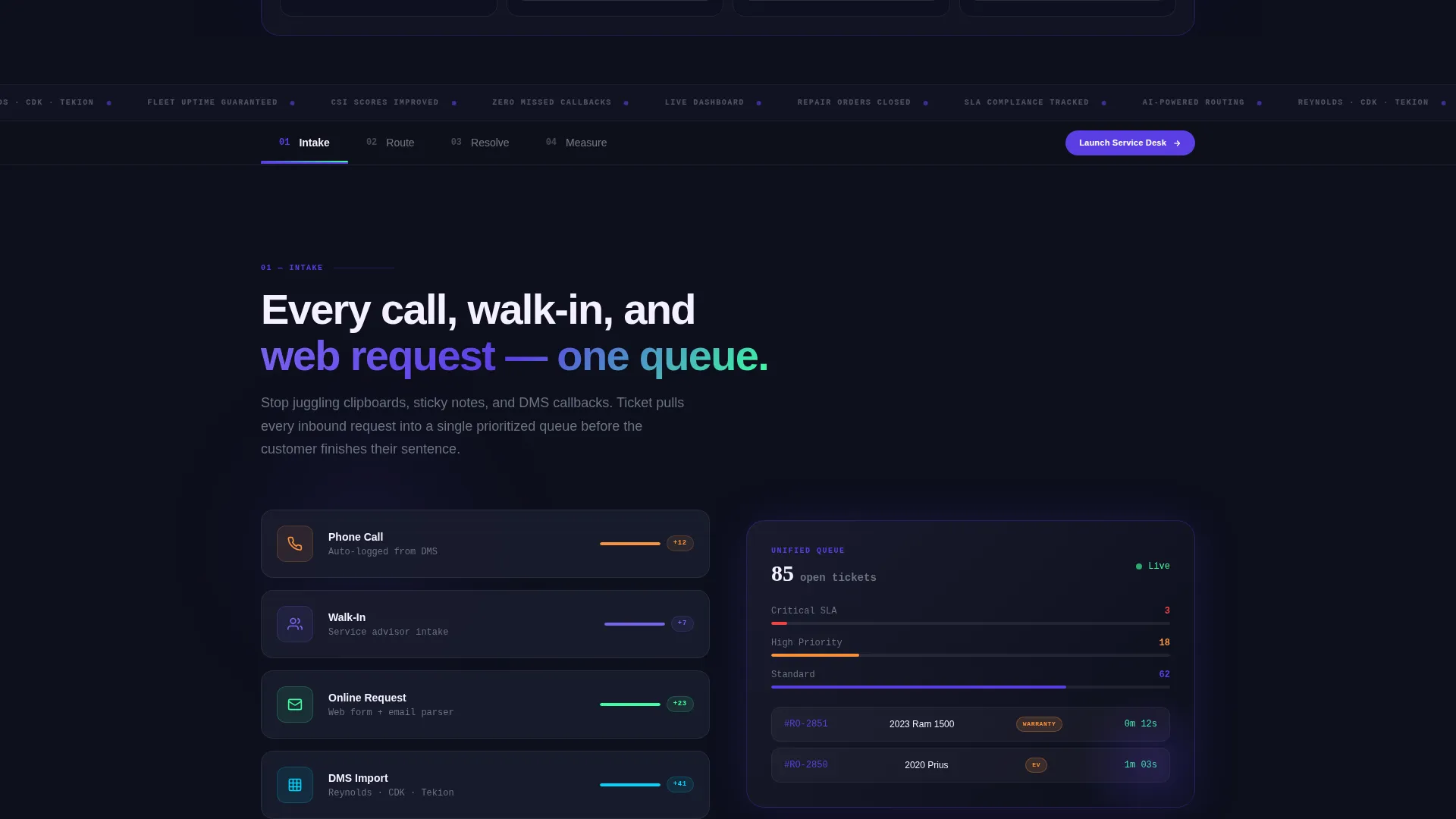
Four anchor-nav spokes structure the entire page: Intake, Route, Resolve, and Measure. Each spoke loads with kinetic motion, cards sliding in from the left like vehicles pulling into service bays. Visitors jump directly to the spoke that matches their biggest pain point without losing scroll context.
Persistent Floating Call to Action
A floating "Launch Your Service Desk" button follows visitors through every section of the page. It stays visible without interrupting the reading experience. This constant presence shortens the path from interest to conversion regardless of where a visitor is in the scroll.
Two-Step Lead Capture Form
Step one of the form collects dealership name, number of rooftops, and current dealer management system. Step two asks for the service manager's direct email and preferred demo time. The two-step structure reduces form friction and increases completion rates by breaking the ask into smaller commitments.
Self-Serve Capacity Calculator
A secondary conversion path lets visitors input their monthly repair order volume and receive an instant capacity report by email. This captures leads who are not ready for a demo but are actively evaluating the platform. It widens the top of the funnel without requiring a sales conversation.
Live CSI Metrics Dashboard Section
The Measure spoke reveals a live customer satisfaction index dashboard with net promoter score trends, average resolution time, and technician leaderboards. This section speaks directly to fixed operations directors who report on these numbers daily. Seeing familiar metrics in the platform builds immediate credibility.
Page sections overview
| Section | Purpose |
|---|---|
| Interactive Header Preview | Puts visitors inside the product instantly with live animating tickets |
| Anchor Navigation Bar | Lets buyers jump to the spoke most relevant to their role |
| Intake Spoke | Shows how calls, walk-ins, and online requests flow into one queue |
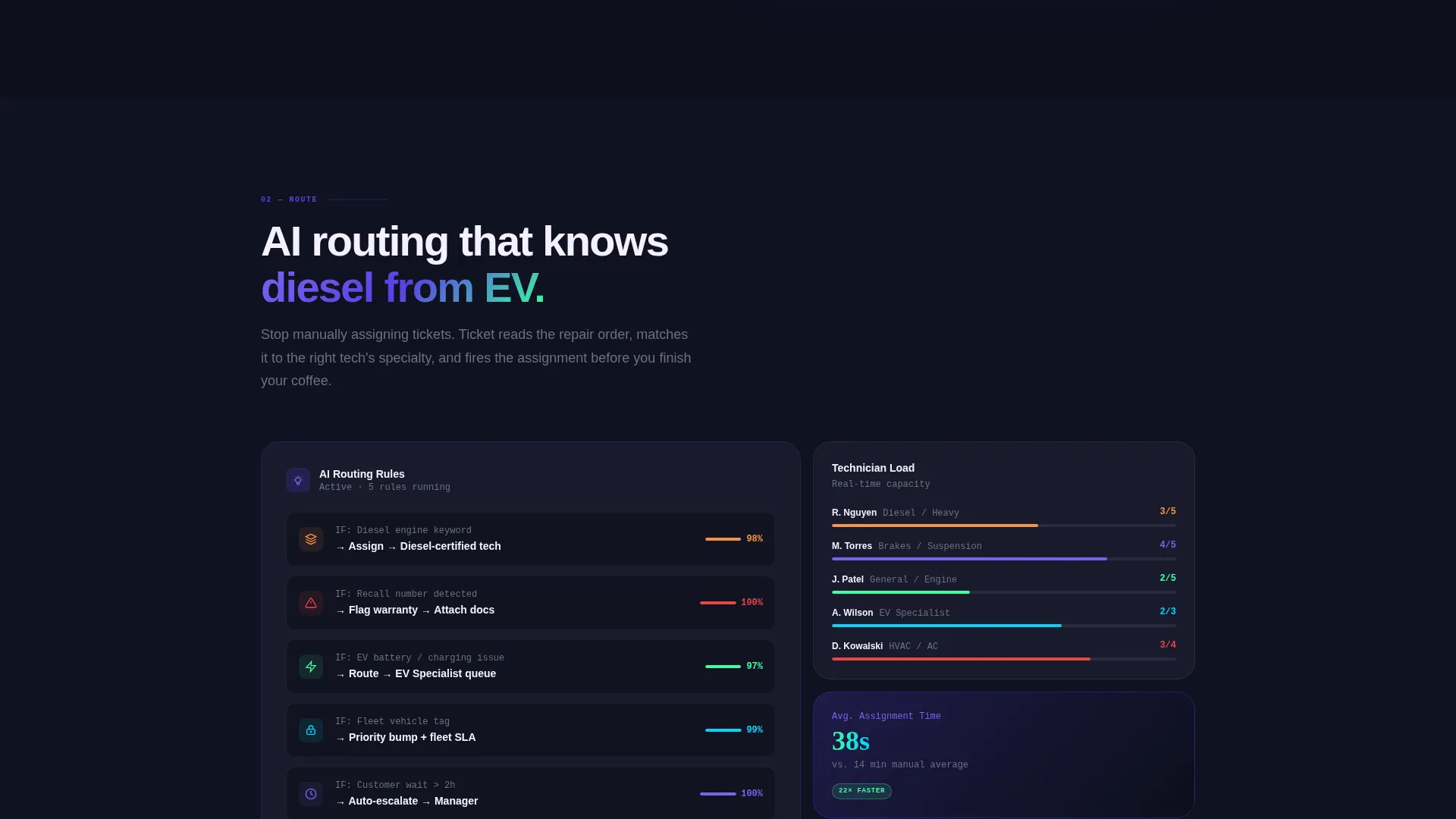
| Route Spoke | Demonstrates AI-powered assignment rules and warranty claim auto-flagging |
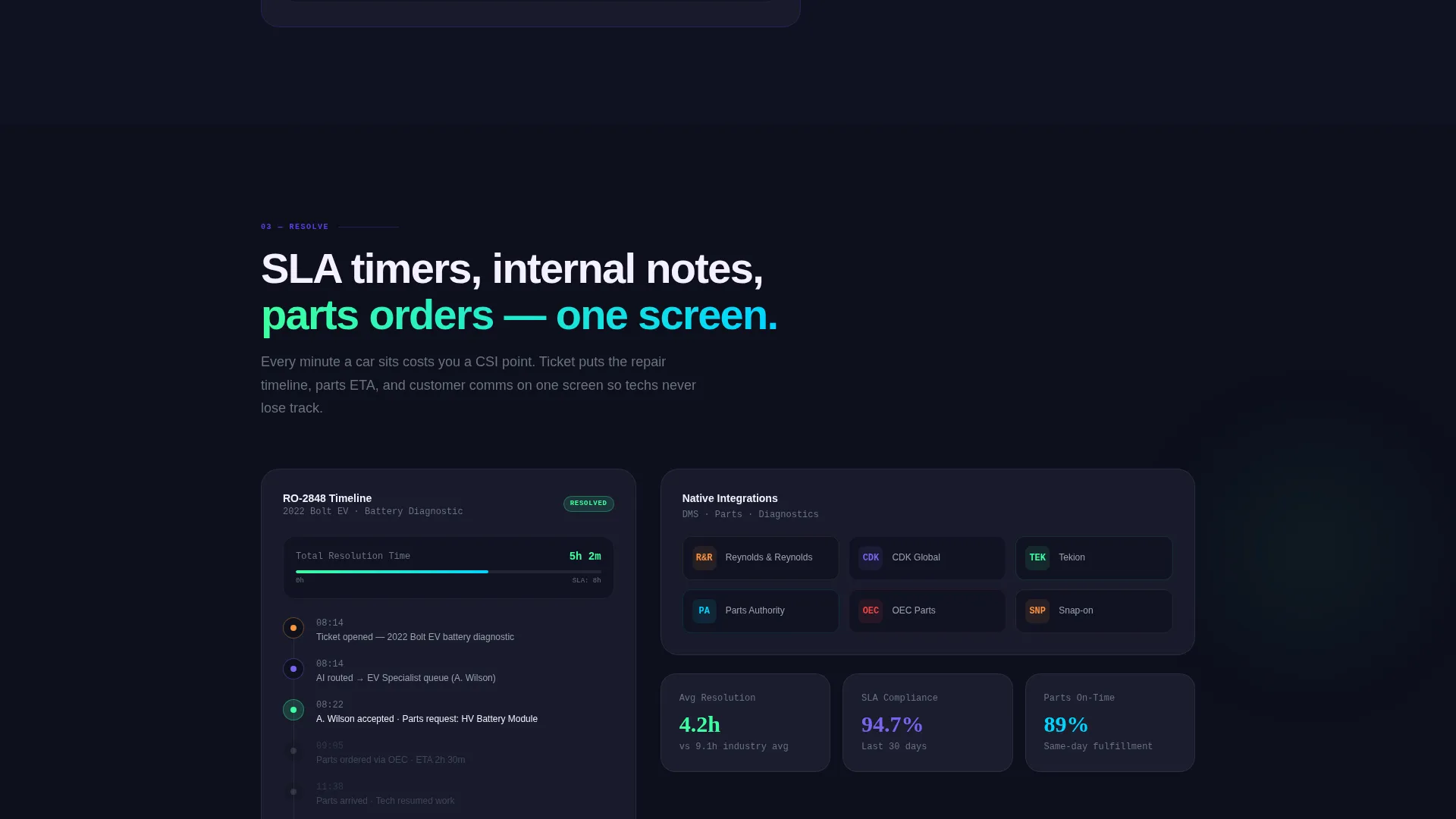
| Resolve Spoke | Visualizes SLA timers, internal notes, and parts-ordering integrations |
| Measure Spoke | Reveals CSI dashboard with NPS trends and technician leaderboards |
| Floating call to action Button | Maintains conversion pressure across every scroll position |
| Two-Step Lead Form | Captures dealership details and demo scheduling in two stages |
| Capacity Calculator | Converts undecided visitors into leads via a self-serve volume report |
Design & branding system
The visual identity follows a Startup Velocity theme built around an Electric Indigo color system. The palette is dark, focused, and technical, designed to feel like a pit crew heads-up display running at full brightness in the middle of the night.
- Deep dashboard black (#0D0F1C) as the primary background, electric indigo (#5B3FE4) for interactive elements, cool asphalt gray (#6B7280) for body text, and reactor white (#F4F0FF) for cards and open space
- Volt green (#3DFFA2) accent pops on status badges and success states to signal progress and completed actions
- Launch Energy creative direction turns each scroll step into a countdown stage, with cards animating in from the left and progress bars filling like torque gauges to maintain visual momentum
Mobile & speed optimization
The Launch Energy direction is built for responsive behavior, ensuring that every animated section and interactive element translates cleanly to smaller screens. Kinetic motion scales down gracefully so the urgency of the design does not get lost on mobile.
- The anchor navigation bar keeps spoke sections reachable on mobile without excessive scrolling
- The floating call-to-action button repositions for thumb reach on smaller viewports, maintaining conversion access throughout the mobile experience
How this template helps you convert
Conversion is built into the structure of this template, not added as an afterthought. Every design decision from the interactive header to the secondary calculator path serves a specific role in moving visitors toward a lead capture moment.
- The interactive header creates an immediate product experience, giving skeptical buyers hands-on familiarity before they read a single word of copy, which shortens the trust-building phase significantly.
- The persistent floating call-to-action button combined with the two-step form captures visitors at peak intent without forcing a long commitment, while the self-serve calculator creates a second conversion lane for buyers who need more time before booking a demo.
Other information about this template
This template is designed for the automotive software category and sits at the intersection of technology and automotive help desk and ticketing. It is built as a hub-and-spoke anchor-nav layout, making it a strong fit for platforms that need to communicate multiple product capabilities on a single page without overwhelming the visitor.
- The template style is Hub and Spoke with Anchor Navigation, suited for software products with distinct but connected feature sets
- The header concept is an Interactive Preview, a format that outperforms static hero images for software products by letting visitors experience the interface before reading about it
- The lead generation direction supports both high-intent buyers ready for a demo and mid-funnel evaluators who need a low-commitment first step
Theme
Startup Velocity
Creative direction
Launch Energy
Color system
Electric Indigo
Style
Hub & Spoke (Anchor Nav)
Direction
Lead Generation
Page Sections
Interactive Ticketing Dashboard Header
Hub and Spoke Anchor Navigation
Persistent Floating Call to Action
Two-step Lead Capture Form
Self-serve Capacity Calculator
Live CSI Metrics Dashboard Section
Related questions
Who is this landing page template designed for?
What makes the header different from a standard hero image?
How does the two-step form reduce drop-off?
Can the template support two different types of leads at once?
Is this template suitable for a fleet management software company?



