Timeseries - Blazing Database Landing Page Template
A hub-and-spoke landing page template built for time series database tools and frameworks. It pairs a glassmorphic Tech Glass visual system with a spec-sheet creative direction, putting benchmarks, query latency charts, and a one-line install command front and center. Designed for backend engineers, DevOps leads, and quant teams who need proof before they commit to a new data stack.
by Rocket studio
Quick summary
This is a single-page, anchor-nav landing page template for a time series database tool. It uses a glassmorphic dark-mode design system and a spec-sheet layout to surface hard numbers fast. Every section is reachable from a persistent left-side nav. The page ends at a clear install call-to-action with a copyable command-line instruction.
Who this template is for
This template is built for technical teams shipping or promoting a time series database product. It speaks directly to the people who evaluate infrastructure tools on benchmarks, not marketing copy.
- Backend engineers who need to see ingestion throughput and query latency before adopting a new database
- DevOps leads comparing monitoring stacks and looking for a cleaner path than patching multiple tools together
- Quant teams and data platform builders who require sub-millisecond aggregation across large historical datasets
What problem this template solves
Technical tools lose potential users when their landing page reads like a brochure. Engineers distrust vague superlatives and skip pages that bury the numbers. This template is designed to answer the hard questions before the visitor has to ask them.
- No clear benchmark presentation leaves engineers skeptical and searching for third-party reviews
- Scattered install instructions and missing compatibility specs slow down the evaluation process
- Pages without a structured anchor navigation force technical visitors to scroll blindly through content they may not need
What you get with this template
You get a fully structured, single-page layout with a persistent anchor navigation system and a logical spoke-based content flow. Every major section is a self-contained technical argument that builds toward a confident install decision.
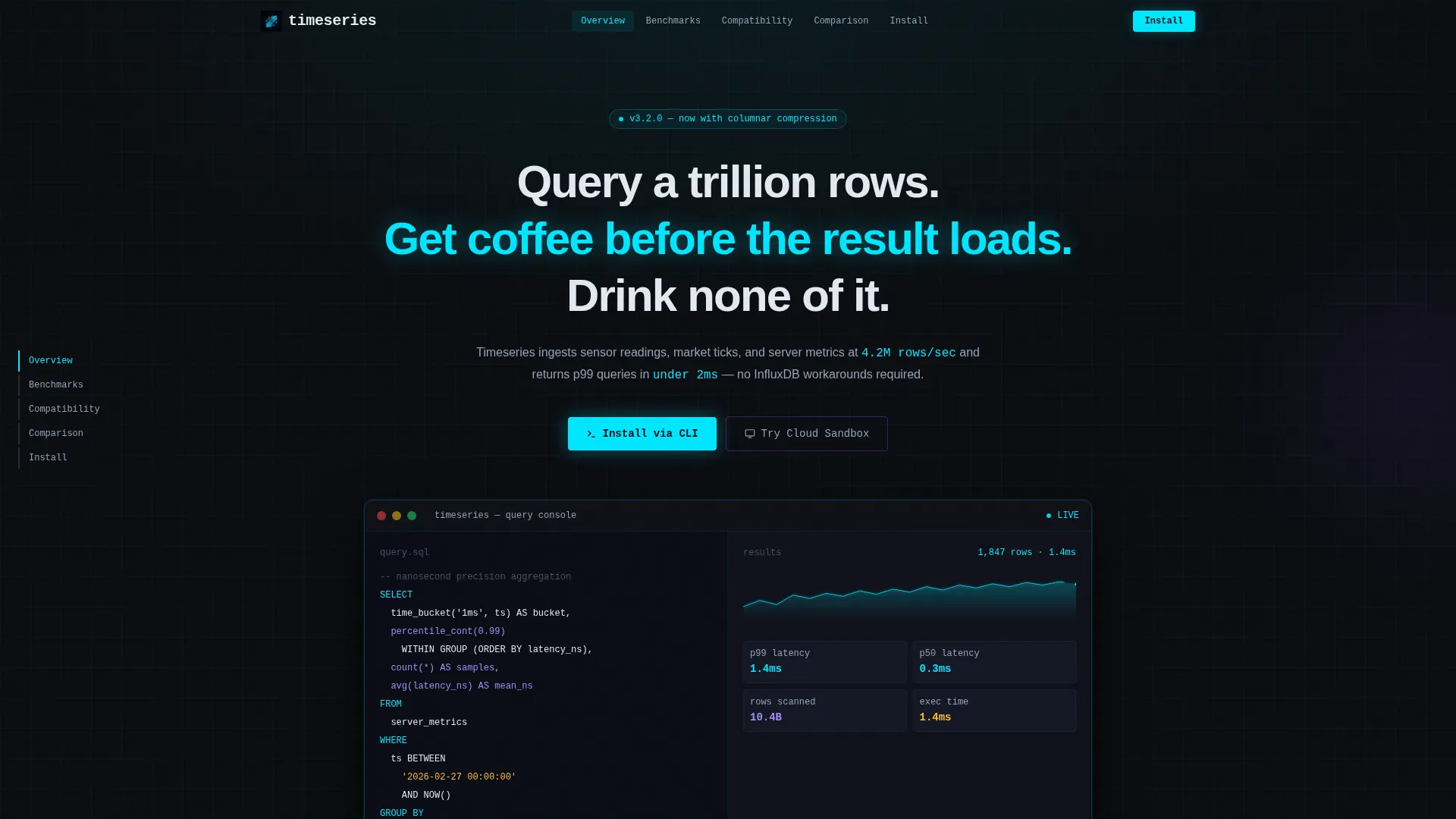
- A full-width product screenshot header showing the query console mid-execution, complete with a streaming line chart and an ingestion rate counter
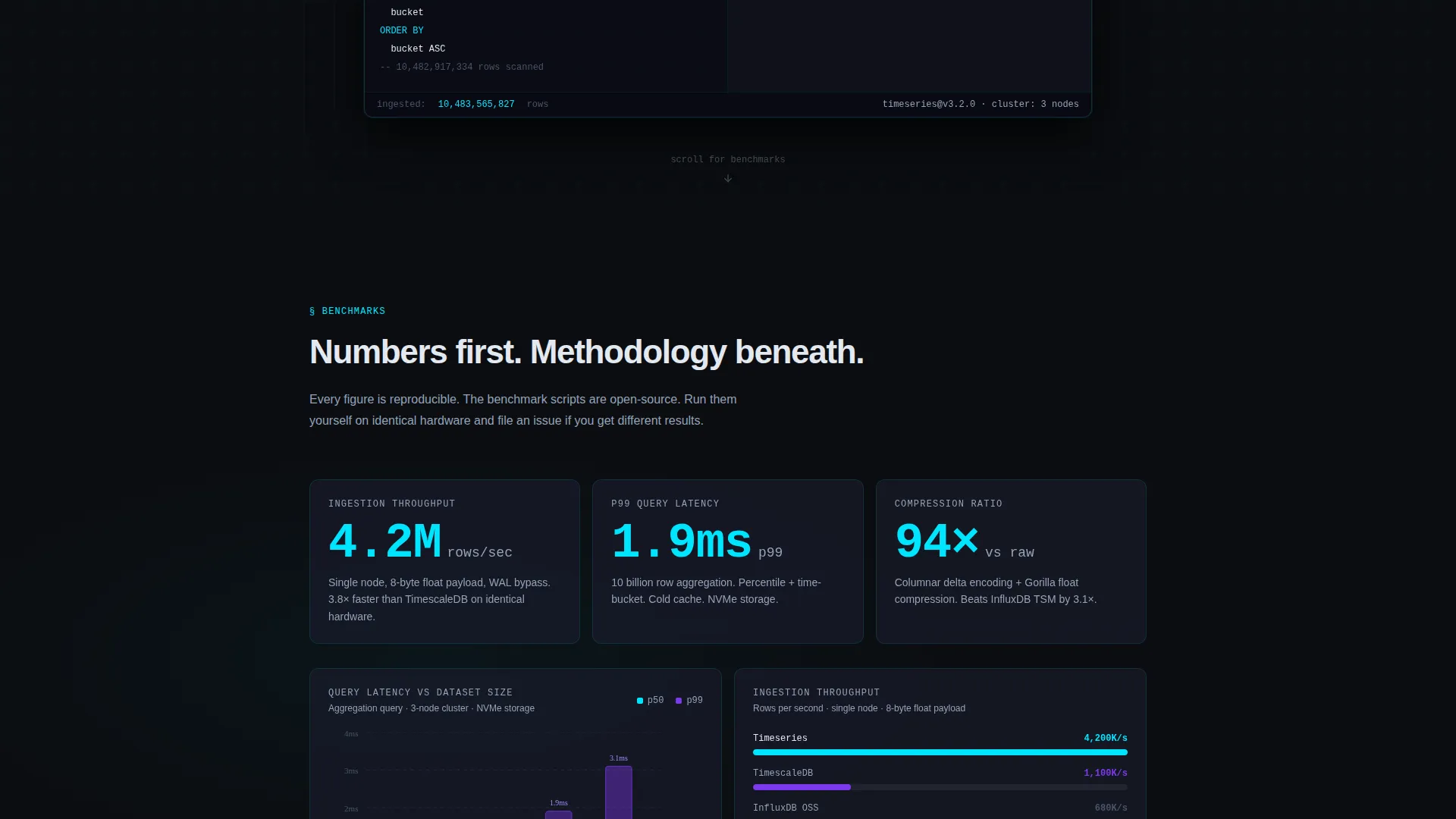
- Spec-sheet content spokes covering ingestion throughput, query latency, compression ratio, SQL compatibility, and cluster topology
- A primary install call-to-action block with a copyable curl command, tabbed alternatives for Docker and Homebrew, and an OS auto-detect badge
Feature list
This template includes purpose-built layout components matched to the needs of a time series database product page.
Anchor Navigation Hub
A persistent left-side navigation bar links to every spec spoke on the page. Visitors can jump directly to the section most relevant to their evaluation without scrolling through unrelated content.
Product Screenshot Header
The header section displays a full-width, pixel-perfect product screenshot on a frosted glass card. The card floats above the void background with a subtle parallax shift on scroll, and the headline fades in above the image.
Spec Sheet Content Spokes
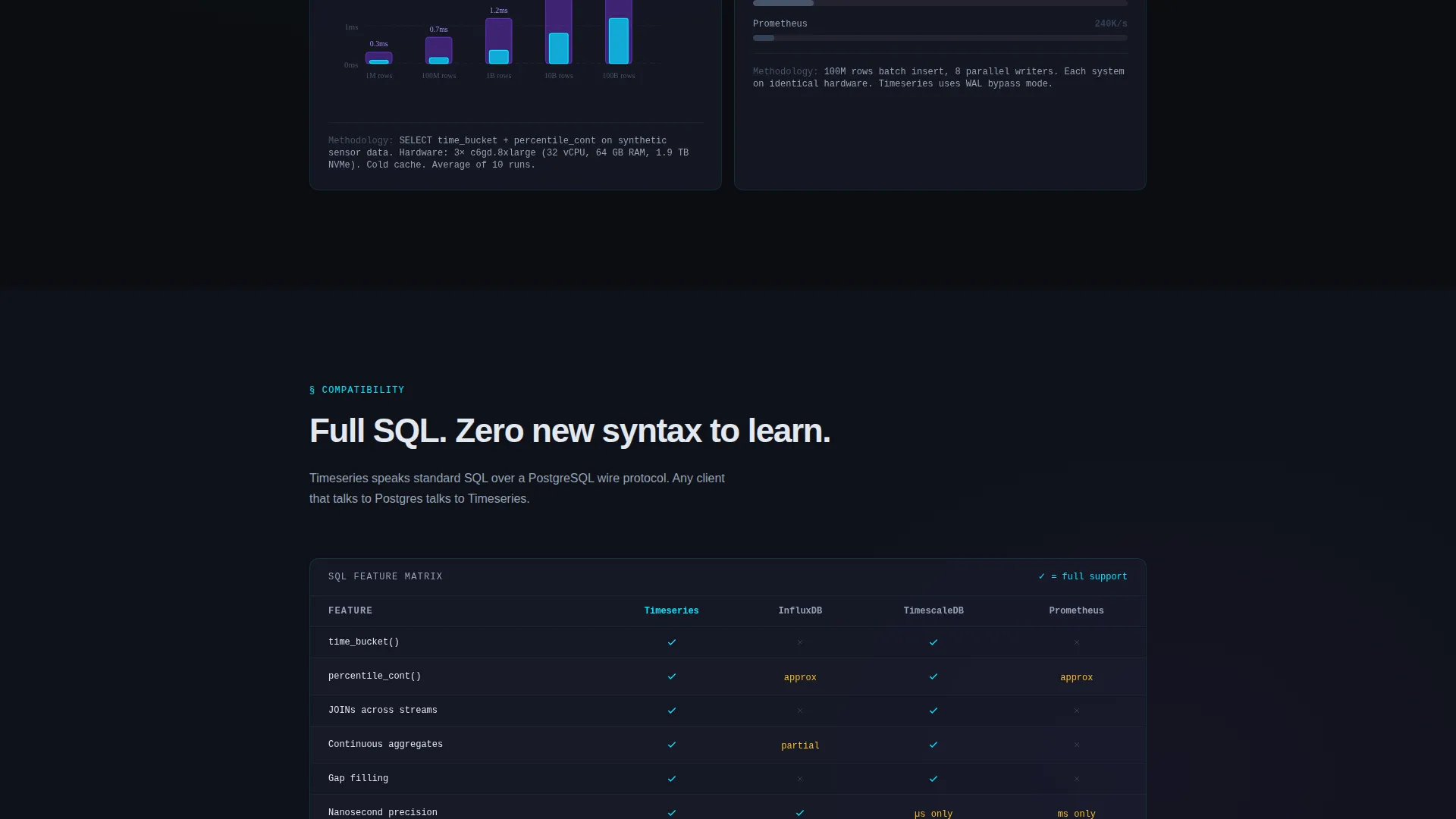
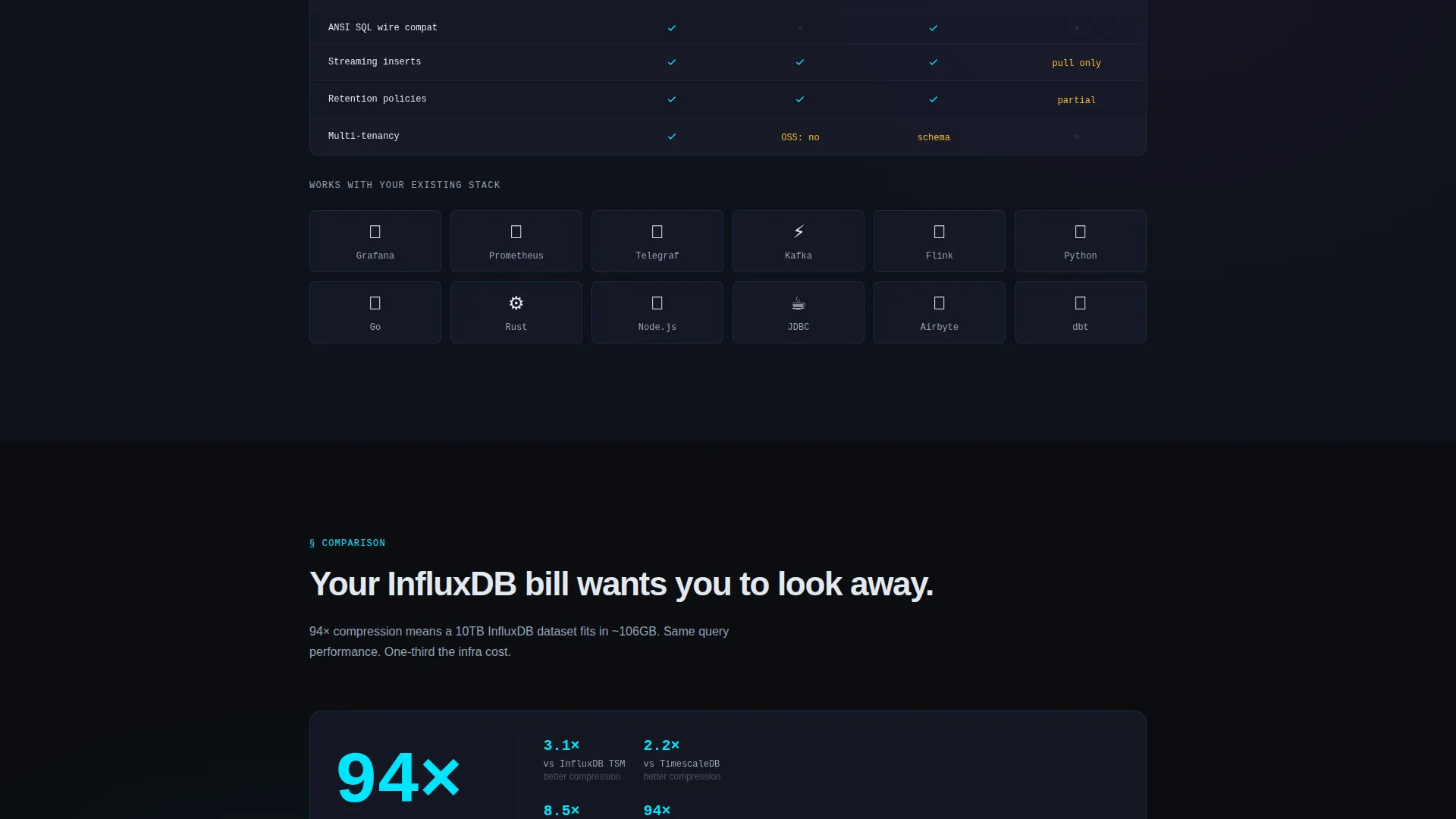
Each spoke opens with the key metric in oversized monospace type, then reveals the methodology underneath. Sections cover benchmarked ingestion throughput, charted p99 query latency, compression ratio comparisons, an SQL compatibility matrix, and a live cluster topology diagram.
CLI Install Block
The primary call-to-action presents a one-line curl command in a copyable code block. A tabbed interface offers Docker and Homebrew as secondary install paths, and an OS auto-detect badge surfaces the most relevant option automatically.
Cloud Sandbox Secondary Path
A quieter secondary call-to-action invites visitors to try a preloaded demo dataset in a cloud sandbox without installing anything. This path captures visitors who are not yet ready to commit to a local install.
Glassmorphic Component System
All cards, panels, and overlays use the frosted glass visual treatment. Components include void black backgrounds, frosted panels at 60 percent opacity with 12-pixel blur, electric cyan highlights, muted silver secondary text, and faint violet glow on hover states.
Page sections overview
| Section | Purpose |
|---|---|
| Header with Screenshot | Opens with query console image and headline |
| Anchor Nav Bar | Persistent left-side hub for spoke navigation |
| Ingestion Throughput Spoke | Shows benchmarked data ingestion rate |
| Query Latency Spoke | Presents p99 latency chart with methodology |
| Compression Ratio Spoke | Compares compression against three competitors |
| SQL Compatibility Matrix | Lists supported SQL syntax and query features |
| Cluster Topology Diagram | Visualizes live cluster architecture |
| Install call to action Block | curl, Docker, and Homebrew install options |
| Cloud Sandbox call to action | No-install demo dataset access path |
Design & branding system
The visual identity follows a Tech Glass theme built on a glassmorphic color system. Every surface is slightly reflective, every light source is intentional, and the overall palette reads like a server room viewed through glass at night.
- Core palette: void black (#0B0D11) background, frosted panel (#1A1D2E at 60% opacity with 12-pixel blur), electric cyan (#00E5FF) for active states and data highlights, muted silver (#94A3B8) for secondary text, and faint violet (#7C3AED) glow for hover states and chart accents
- Typography: oversized monospace type opens each spec spoke; the contrast between large metric numerals and smaller body text creates a clear reading hierarchy
- Component style: frosted glass cards float above the void background; parallax shift on scroll adds depth to the header screenshot without disrupting the layout
Mobile & speed optimization
The template is structured to remain usable and readable at smaller viewport sizes. The anchor navigation and spec spokes are designed to reflow cleanly.
- The persistent left-side anchor nav collapses appropriately for narrower screens so visitors can still jump between spokes
- Frosted glass card components are sized and layered to maintain visual clarity at mobile resolutions
- The copyable install code block and tabbed install options are touch-friendly for visitors reviewing on a phone or tablet
How this template helps you convert
This template is built to earn the install by front-loading proof. By the time a visitor reaches the call-to-action, every major technical objection has already been addressed by the spec content above it.
- The spec-sheet spoke structure answers benchmark questions early, so engineers arrive at the install block already informed and with fewer reasons to hesitate.
- The dual call-to-action strategy captures both ready-to-install visitors with the CLI block and early-stage evaluators with the cloud sandbox path, widening the conversion funnel without diluting the primary message.
Other information about this template
This template is part of the Tech Glass theme family and uses the glassmorphic color system throughout. It is categorized under Time Series Database Technology and is built specifically for the time series database tool and framework niche.
- Template style: Hub and Spoke with Anchor Navigation
- Creative direction: Spec Sheet
- Header concept: Product Screenshot
- Landing page direction: App Download
- Theme: Tech Glass with Glassmorphic color system
- Category intersection: Technology, Time Series Database Technology, Time Series Database Tool and Framework
Theme
Tech Glass
Creative direction
Spec Sheet
Color system
Glassmorphic
Style
Hub & Spoke (Anchor Nav)
Direction
App Download
Page Sections
Persistent Anchor Navigation
Product Screenshot Header Block
Spec Sheet Spoke Sections
CLI and Multi-path Install Block
Cloud Sandbox Secondary Call to Action
Glassmorphic Visual Components
Related questions
What kind of product is this template designed for?
Can I use this template for a cloud-only database product?
How does the anchor navigation work?
Does this template include real benchmark data or charts?
Is the install code block editable?



