Onboarding & User Guide Cost Calculator Website Template
Tooltip is a hub-and-spoke landing page template built for SDK and developer tool products. It features a live code animation header, three working interactive tools (an ROI Calculator, a Snippet Builder, and a Flow Simulator), and a terminal-style install call to action. The design runs on an Acid Digital color system built for developer and product audiences.
by Rocket studio
Quick summary
Tooltip is a single-page, anchor-navigated landing page template for a lightweight in-app guide SDK. It opens with a live-typed code block, then routes visitors through three functional tools before landing on a terminal install command. The template is built for developer tool and business-to-business software as a service products targeting product managers and growth engineers.
Who this template is for
This template is designed for teams building developer tools, onboarding software, or in-app guide products. It speaks directly to the people responsible for activation metrics and onboarding experiment velocity.
- Product managers at growth-stage software companies tracking activation funnel drop-off
- Growth engineers who need to demo SDK value without writing a lengthy pitch
- User experience leads who want to show stakeholders a working proof of concept before committing
What problem this template solves
Most developer tool landing pages pitch features. They do not show the tool working. Visitors leave without a clear sense of what integrating the SDK actually feels like or whether the return on investment justifies the effort.
- Visitors cannot evaluate the SDK without a live interaction or working example
- Long-form feature lists fail to answer the real question: how fast can I ship this?
- Static pages cannot build confidence in a tool that promises speed and simplicity
What you get with this template
You get a fully structured, anchor-navigated landing page with three embedded interactive tools and a conversion-focused terminal call to action. Every section is a functional experience, not a marketing placeholder.
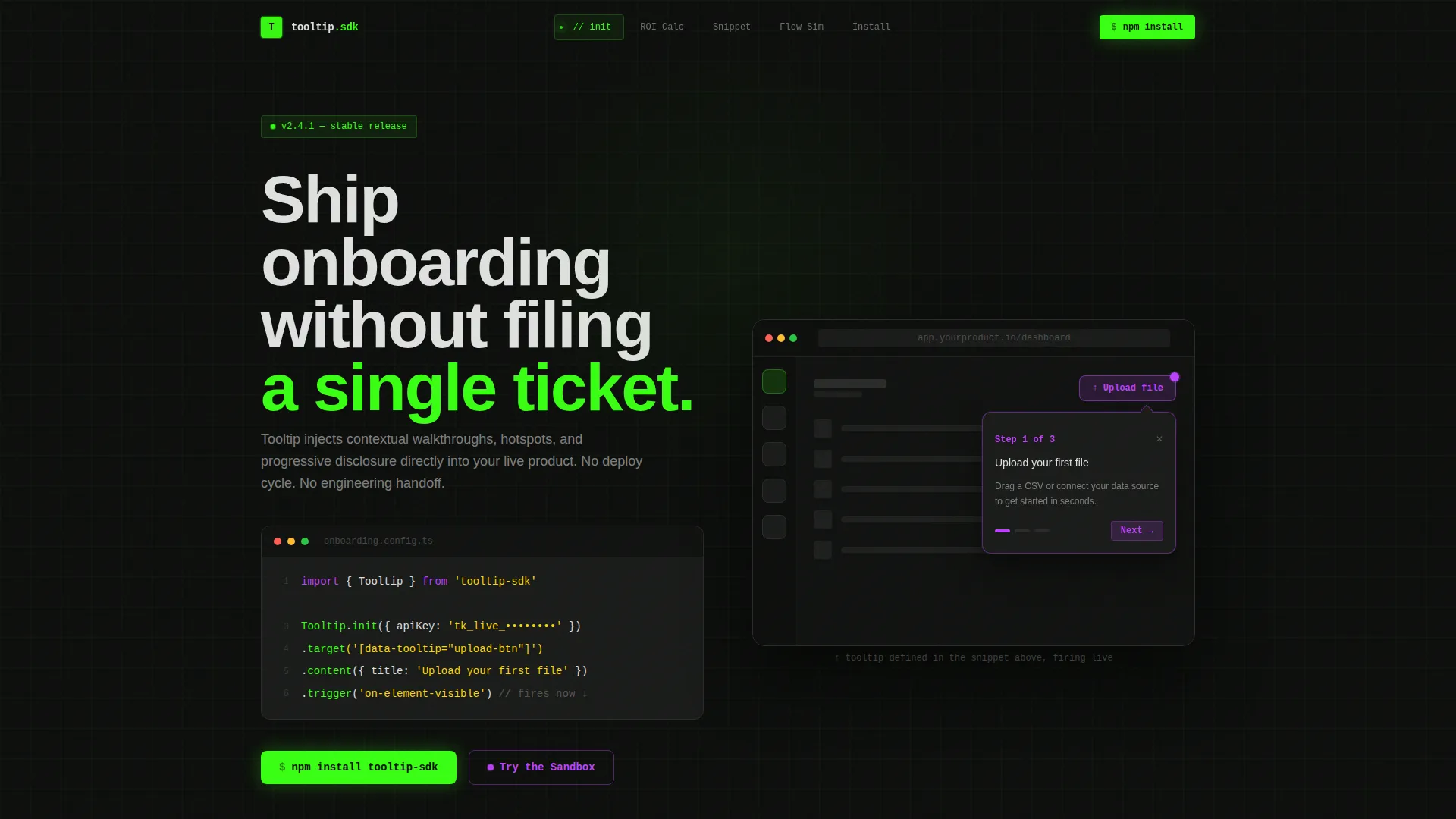
- A live code animation hero that fires a real tooltip in a simulated product interface
- Three working utility tools: ROI Calculator, Snippet Builder, and Flow Simulator
- A terminal-style install command with a clipboard copy button and phosphor green confirmation flash
Feature list
This template includes six purpose-built sections, each designed to move a technical visitor from curiosity to installation without breaking their mental model.
Live Code Animation Header
The hero opens with six lines of SDK initialization code rendered in a monospaced font. Each line appears with a typing animation, syntax-highlighted in phosphor green and ultraviolet. Below the snippet, a simulated product interface renders, and the tooltip defined in the code actually fires in real time.
Anchor Navigation Hub
A persistent hub navigation bar links to each interactive spoke section. The active spoke glows green, giving visitors a clear sense of where they are in the experience. Clicking any anchor jumps directly to a functional tool, not a scroll-to-text section.
ROI Calculator Tool
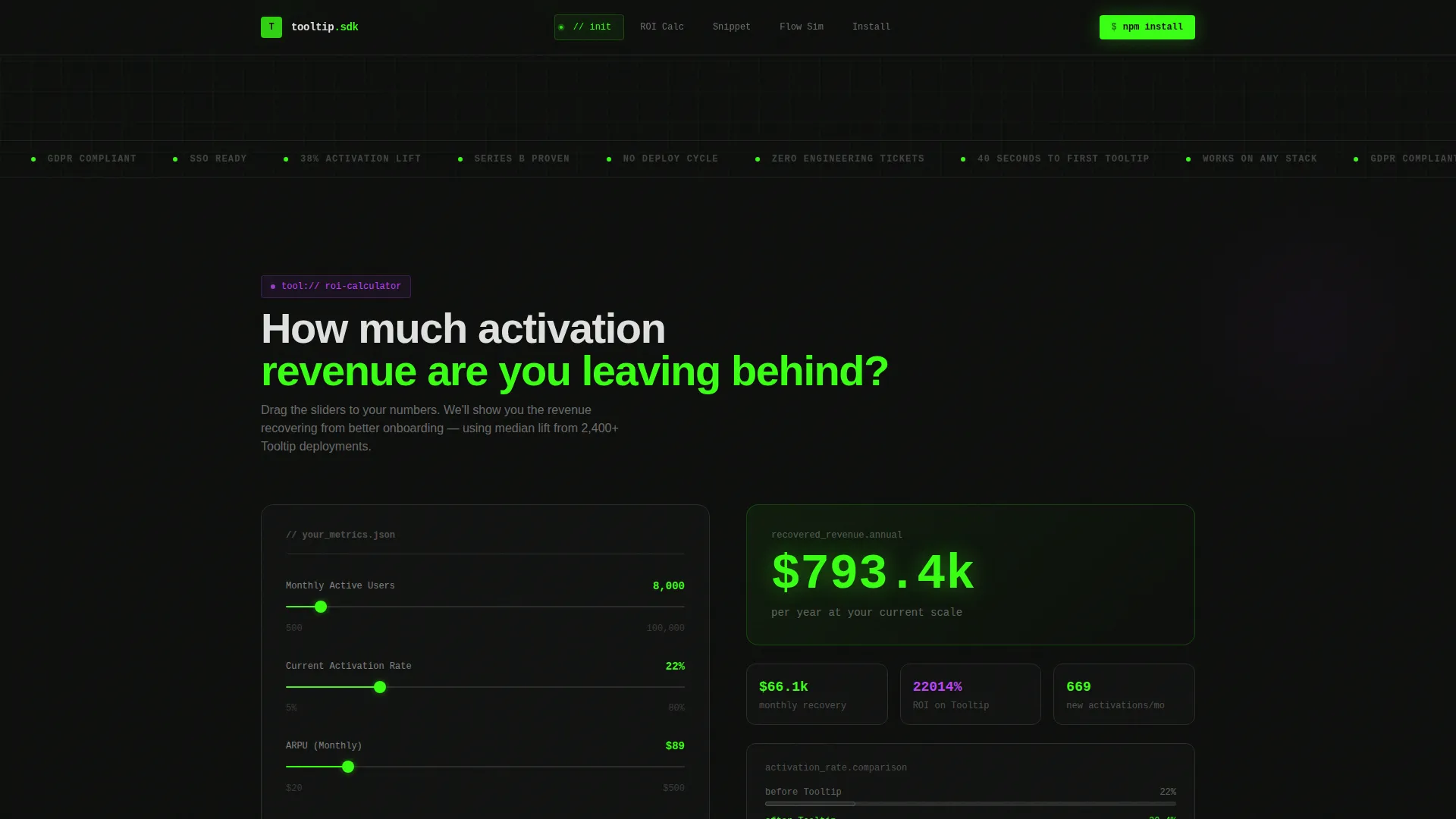
Visitors input their current activation rate and monthly churn figure. The calculator outputs estimated recovered revenue in United States dollars, making the business case for the SDK tangible before any download decision is made.
Snippet Builder Tool
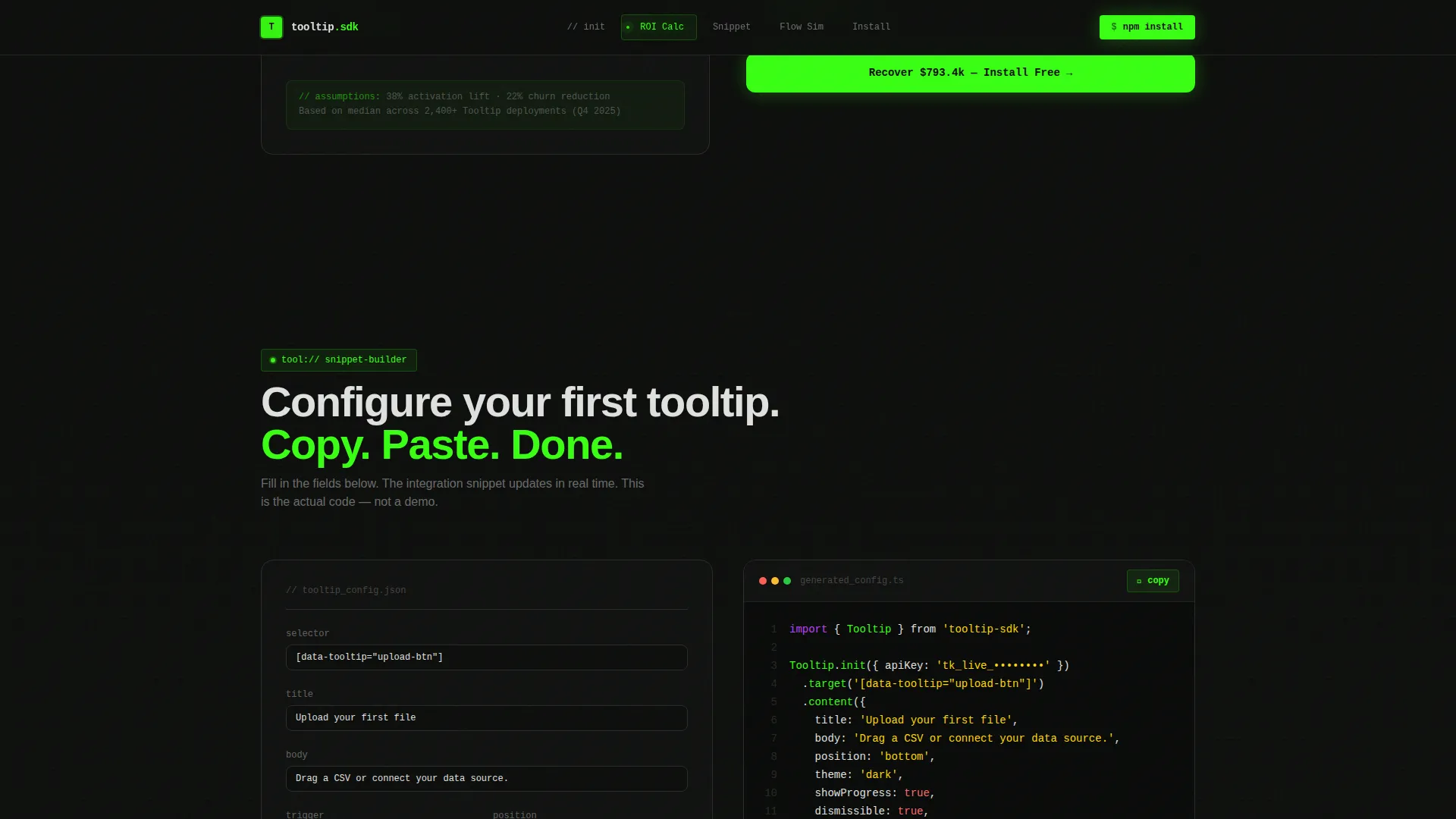
The Snippet Builder generates a real, copy-ready integration configuration based on visitor inputs. It produces a valid initialization call that a developer can paste directly into their codebase, reducing the perceived lift of getting started.
Flow Simulator Tool
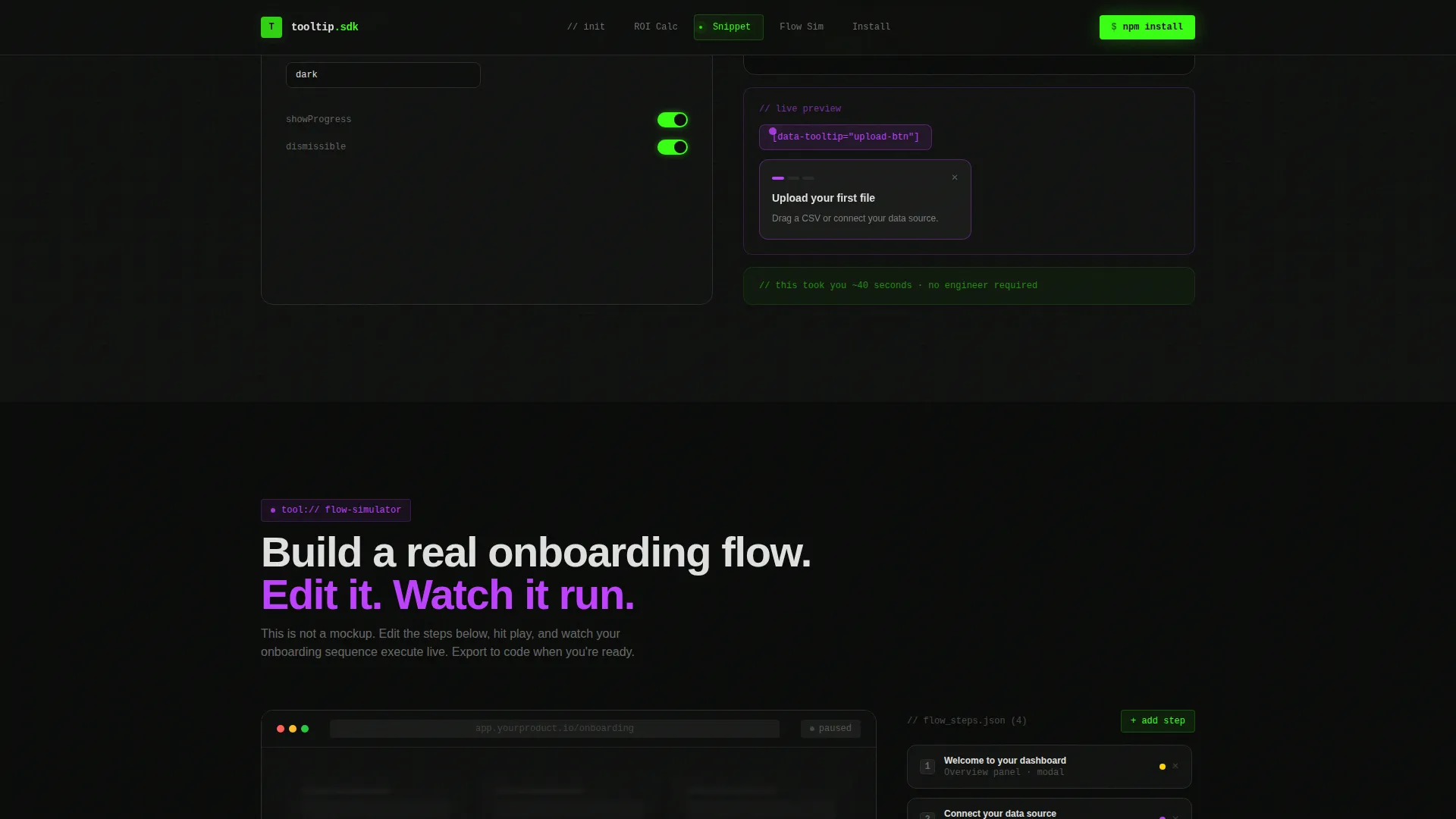
The Flow Simulator plays an interactive onboarding sequence that visitors can edit in real time. It demonstrates progressive disclosure and contextual walkthrough behavior, letting product teams see the end-user experience before committing to an integration.
Terminal Install Call to Action
The primary conversion point is a terminal-style command block showing the npm install command. A copy button triggers a confirmation flash in phosphor green. A secondary path labeled "Try the Sandbox" serves visitors who are not yet ready to install into their own codebase.
Page sections overview
| Section | Purpose |
|---|---|
| Live Code Hero | Opens with typed SDK code and a live tooltip firing in a simulated interface |
| Anchor Nav Hub | Persistent navigation that glows green on the active interactive spoke |
| ROI Calculator | Converts activation rate and churn inputs into recovered revenue output |
| Snippet Builder | Generates a copy-ready integration config based on visitor-provided values |
| Flow Simulator | Plays and edits an interactive onboarding sequence in real time |
| Terminal call to action | Presents the npm install command with a copy button and sandbox fallback path |
| Developer Footer | Minimal GitHub-style footer consistent with the developer console aesthetic |
Design & branding system
The visual identity follows an Acid Digital direction built around a developer console aesthetic. The palette is nocturnal and electric, designed to feel native to the tools this audience already uses every day.
- Void black (#0D0D0D) background, terminal phosphor green (#39FF14) for primary actions and active states, ultraviolet (#BF40FF) for interactive demo highlights, and scanner-line white (#E0E0E0) for body text
- JetBrains Mono handles all code and monospaced elements; DM Sans handles interface copy and descriptive text
- Hover states pulse green, interactive demo zones carry ultraviolet accents, and the black background persists throughout every section without relief
Mobile & speed optimization
This template is built desktop-first, reflecting the primary audience of product managers and growth engineers who evaluate developer tools on large screens. The layout and interactive tools are structured with that context in mind.
- Server components handle static sections to reduce initial load overhead; client components power the three interactive tools
- Typing animations, scroll reveals, pulse dots, and the green copy flash are all scoped to their respective sections to avoid unnecessary rendering cost
- The desktop-first approach ensures tool inputs, code blocks, and the anchor nav render at full fidelity for the intended audience
How this template helps you convert
The conversion strategy is product-led. Visitors do not encounter a call to action until they have already used the product. By the time the install command appears, they have built something real and seen it work.
- The live code header fires a working tooltip in under ten seconds, establishing immediate proof of concept before any scroll occurs.
- The three interactive tools (ROI Calculator, Snippet Builder, and Flow Simulator) give visitors a tangible output they own, making the install decision feel like a small next step rather than a leap of faith.
- The terminal call to action closes with two paths: a direct npm install for ready visitors and a sandbox trial for those who need one more touch point, so no intent goes unconverted.
Other information about this template
This template sits within the Documentation and Support category, aligned to the Onboarding and User Guide subcategory and the Tooltip and In-App Guide niche. It is structured as a hub-and-spoke single page with anchor navigation, making it well suited for product-led growth go-to-market motions where the product must demonstrate itself before asking for commitment.
- The footer follows a GitHub Developer Minimal pattern, keeping the developer aesthetic consistent through the last visible element
- Inline social proof, including activation lift percentages and time-to-first-value signals, appears within the tool sections rather than in a separate testimonials block
- The template supports English language copy, United States dollar currency formatting, and MM/DD/YYYY date formatting as configured in the source brief
- The intersection match for this template spans Documentation and Support, Onboarding and User Guide, and Tooltip and In-App Guide, making it a precise fit for teams building contextual guidance products
Theme
Directory & Discovery
Creative direction
Calculator/Tool First
Color system
Acid Digital
Style
Hub & Spoke (Anchor Nav)
Direction
App Download
Page Sections
Live Typing Code Animation Hero
Three Working Interactive Tools
Anchor Navigation Hub
Terminal-style Install Call to Action
Acid Digital Visual System
Inline Social Proof Signals
Related questions
Who is this landing page template built for?
Do the interactive tools actually work, or are they visual mockups?
Can I change the SDK name, colors, or code snippet content?
Is this template suitable for a product that is not a developer SDK?
What is the primary conversion goal of this template?



