Automotive LMS Landing Page Template | Comparison Table
Torque is a high-performance automotive learning management system landing page template built around a head-to-head comparison table. Designed for service managers, independent shop owners, and fleet directors, it uses a dynamic dashboard header, animated performance metrics, and a sticky spec comparison layout to turn technical credibility into conversion.
by Rocket studio
Quick summary
Torque is a single-page comparison landing page template built for an automotive learning management system. The layout opens with a live stats dashboard, locks a sticky comparison table into view, and closes with a two-step assessment qualifier. Every section is designed to let performance data argue the case before the call to action appears.
Who this template is for
This template is built for automotive training platforms that need to speak directly to high-stakes buyers. The layout prioritizes technical credibility over visual decoration, making it ideal for B2B software offers in the automotive education space.
- Service managers at multi-rooftop dealership groups focused on reducing comeback rates
- Independent shop owners pursuing original equipment manufacturer certification requirements
- Fleet maintenance directors onboarding diesel technicians who need Department of Transportation compliance sign-off
What problem this template solves
Automotive learning management system buyers do not convert on vague promises. They need to see proof, compare options side by side, and carry a business case into their next management meeting. Generic software landing pages fail this audience because they lead with features instead of outcomes.
- Buyers spend too long hunting for comparison data that justifies budget approval
- Platforms with strong content libraries lose deals because their advantages are buried in prose
- Evaluators need a leave-behind document to share internally before committing to a demo
What you get with this template
The template delivers a structured, single-page comparison flow with clearly defined conversion paths. Every section supports the buyer's decision process rather than interrupting it.
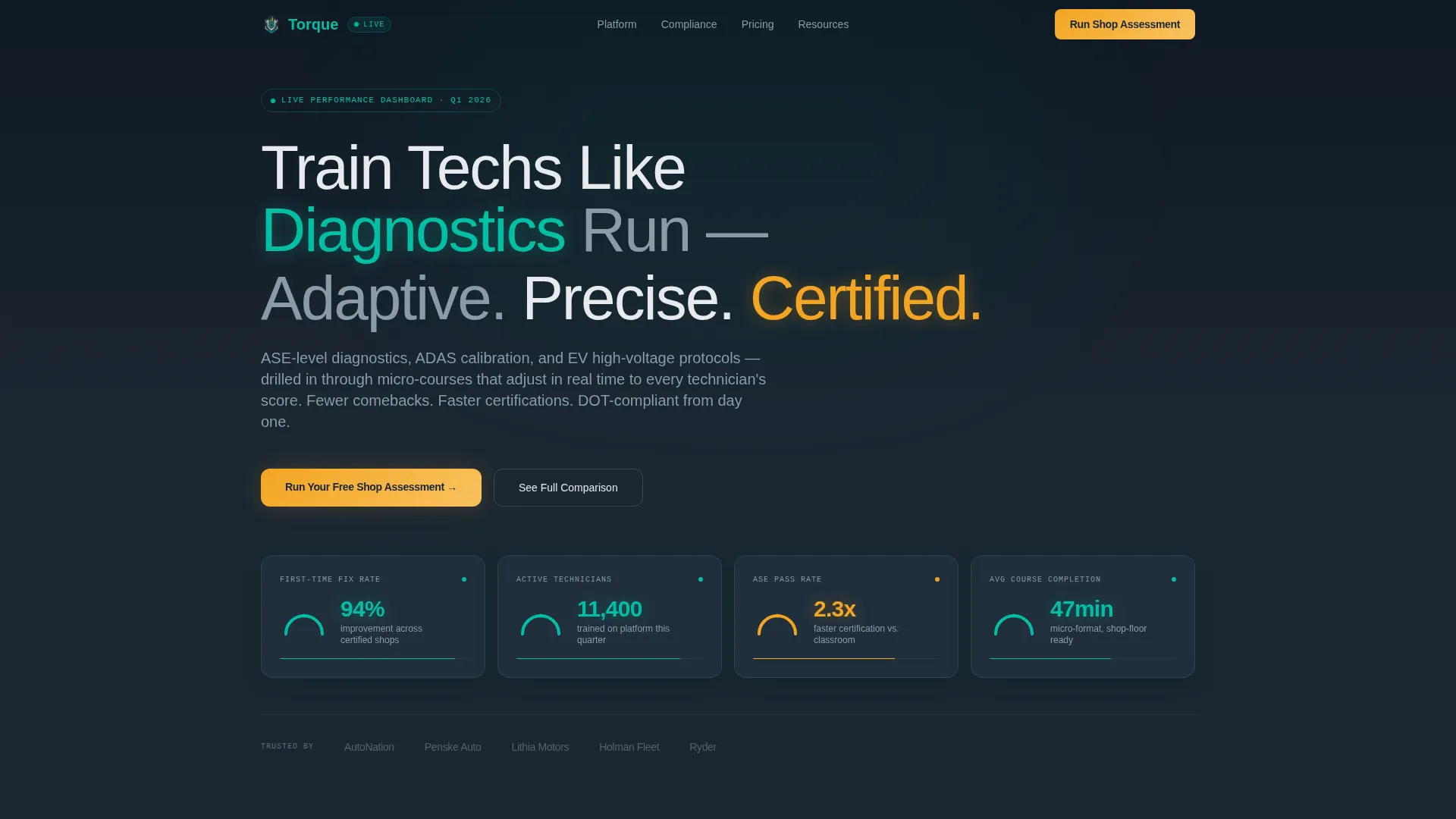
- A dark-paneled header dashboard showing animated performance metrics on load
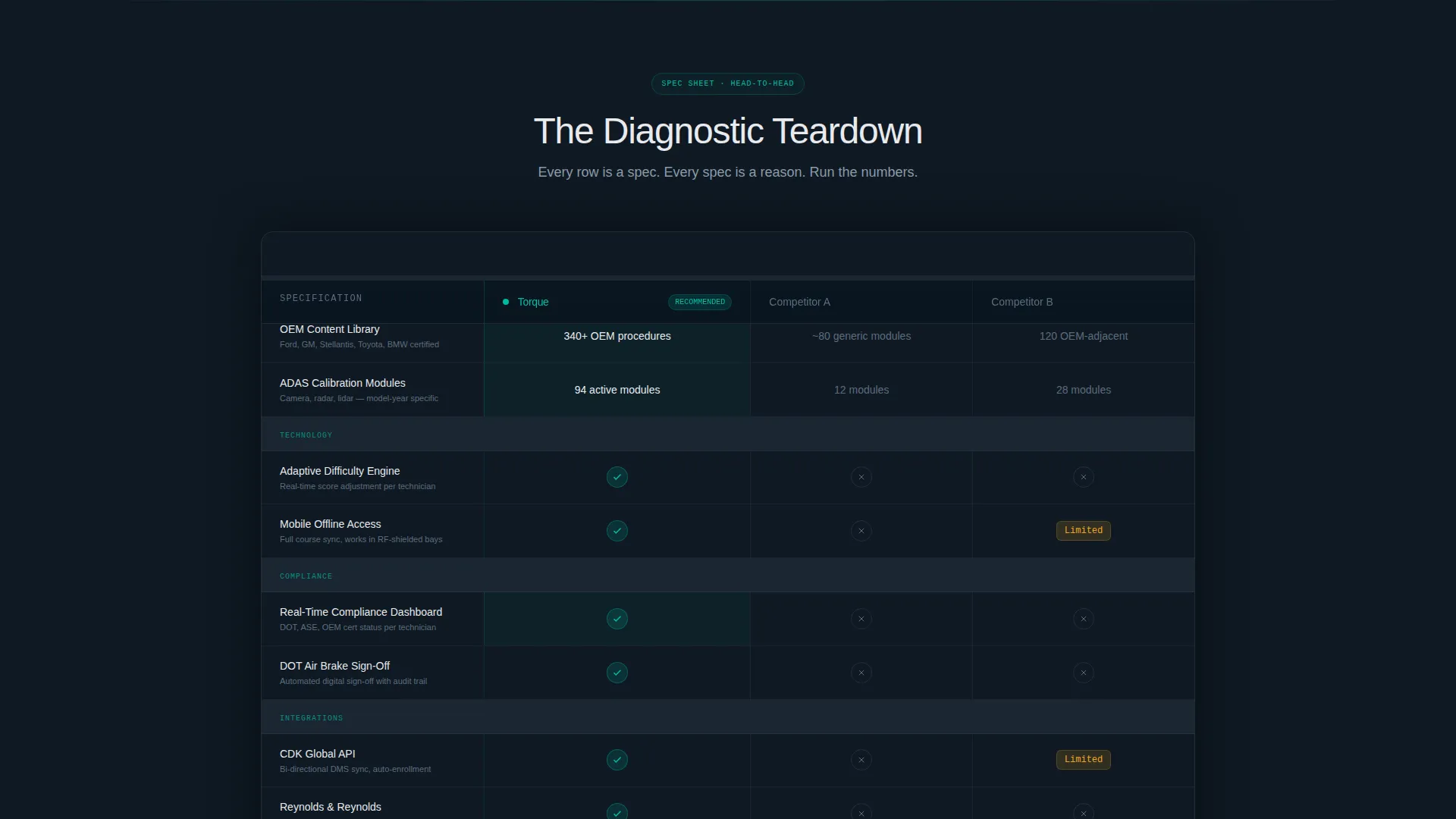
- A sticky side-by-side comparison table covering six rows of platform specifications
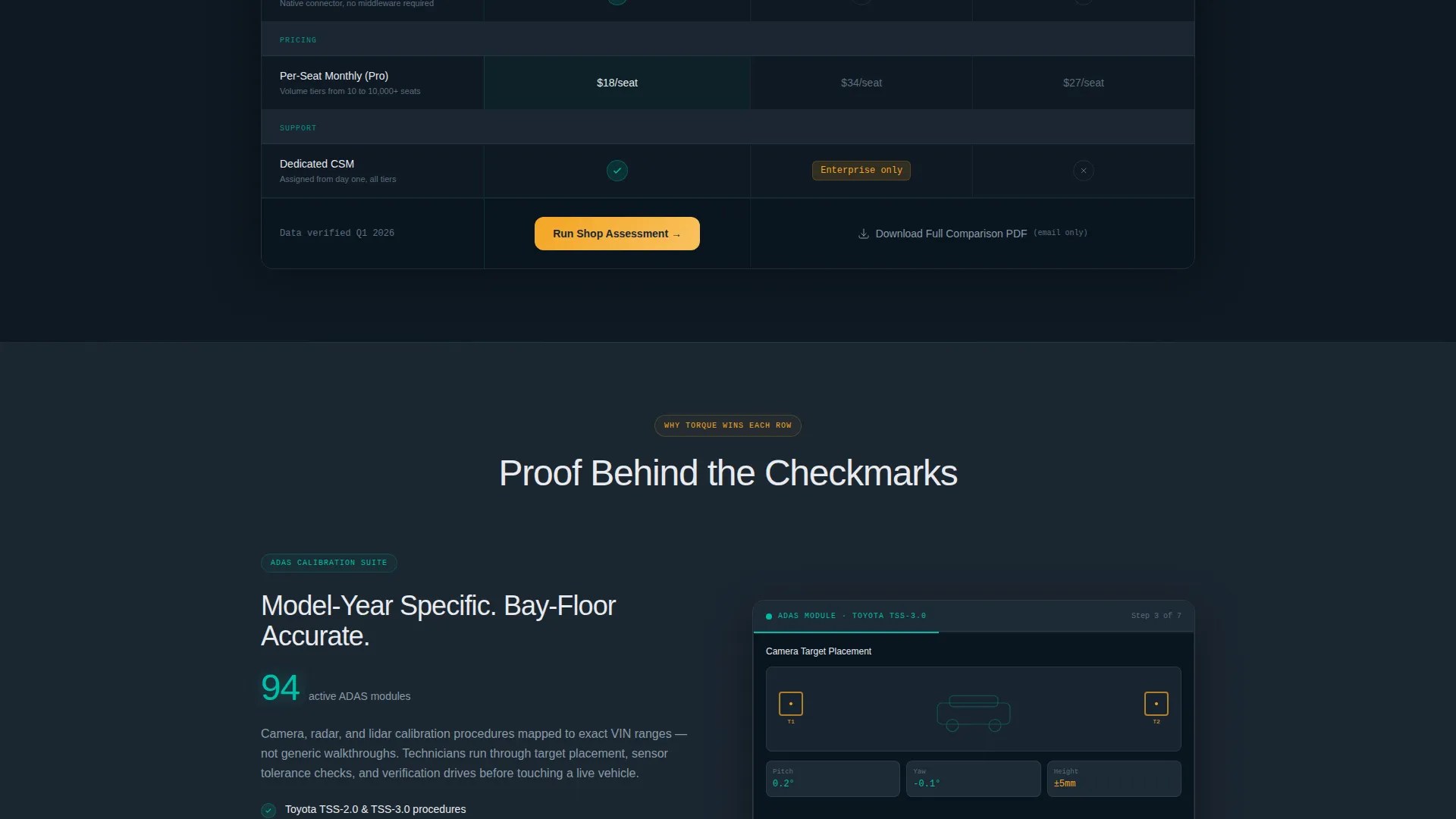
- Two conversion paths: a two-step shop assessment qualifier and a gated comparison PDF download
Feature list
This template ships with purpose-built sections and interaction patterns drawn directly from the brief. Each feature serves the comparison-led conversion goal.
Animated Stats Dashboard Header
The header opens like a cockpit powering up. Six real performance numbers animate upward on load, each housed in a gauge-inspired card with a teal needle arc. Metrics include first-time fix rate improvement, active technician count, faster ASE (Automotive Service Excellence) certification pass rates, and average course completion time.
Sticky Comparison Table
A head-to-head specification table locks into view as the user scrolls. It compares the platform against two grayed-out competitor placeholders across rows covering content library depth, ADAS (Advanced Driver Assistance Systems) module count, mobile offline access, real-time compliance dashboards, API integrations, and per-seat pricing tiers. Teal checkmarks and amber "limited" badges create instant visual hierarchy without requiring a single word of explanation.
Expandable Proof Blocks
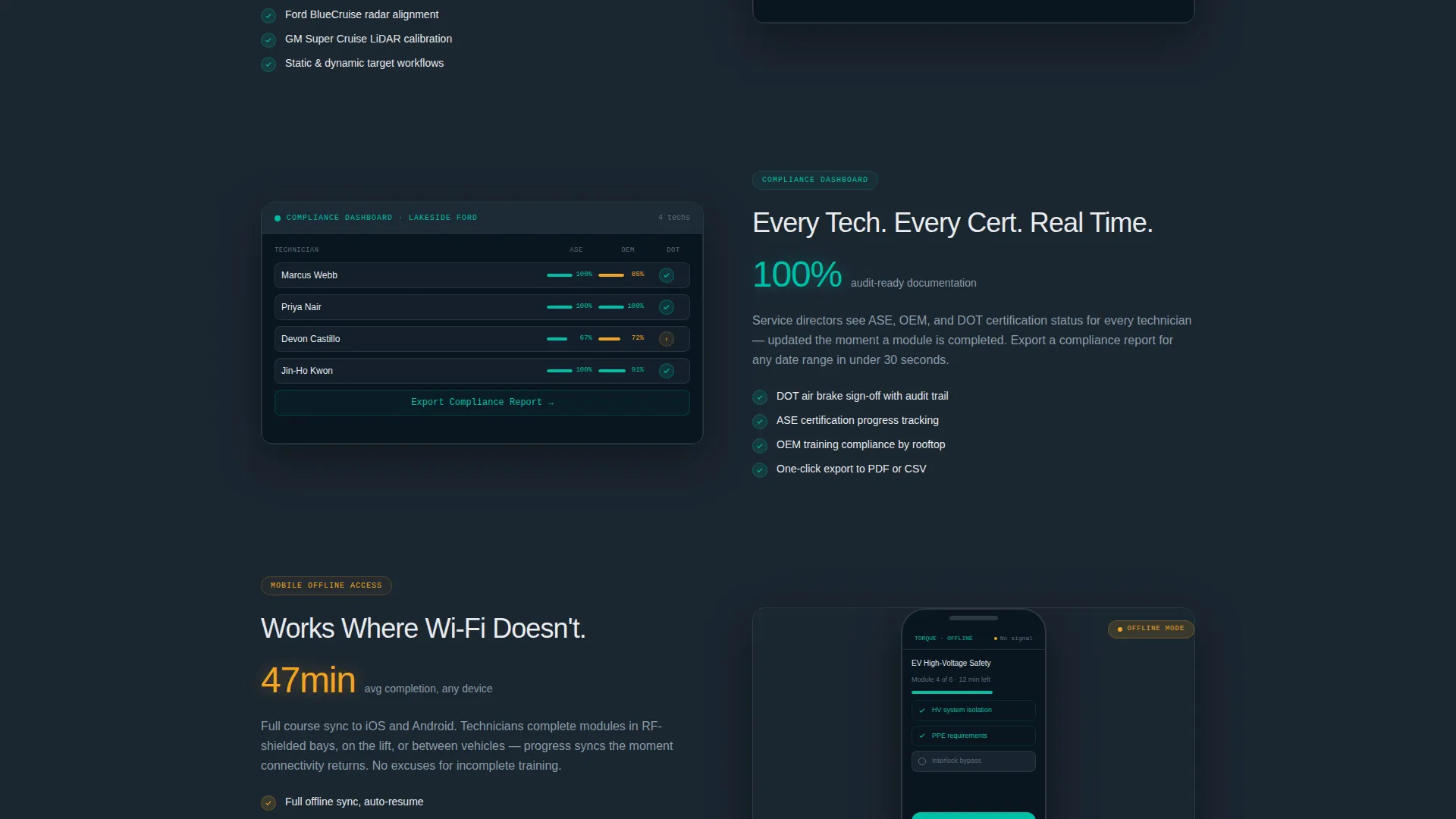
Below the comparison table, individual specification sections expand the winning categories with short supporting evidence blocks. Each block can display a screenshot, a compliance report sample, or a mobile interface view. The format reinforces why the comparison tilts the way it does.
Two-Step Assessment Qualifier
The primary call to action opens a two-step qualifier form. Step one collects shop type, technician headcount range, and current learning management system provider. Step two requests a work email and a preferred demo window. The flow qualifies leads without creating friction.
Gated PDF Download Path
A secondary conversion path offers a full comparison document gated behind email-only capture. This gives evaluators a shareable leave-behind for internal management meetings, extending the template's conversion reach beyond the initial page visit.
Dynamic Motion Visual Theme
Row animations, ticking metric counters, and subtle motion cues follow a Dynamic Motion theme throughout. Transitions feel purposeful rather than decorative, reinforcing the platform's positioning as a performance-tuned technical tool.
Page sections overview
| Section | Purpose |
|---|---|
| Stats Dashboard Header | Establishes credibility with animated live performance metrics |
| Sticky Comparison Table | Delivers head-to-head platform specification comparison |
| Spec Proof Blocks | Expands winning rows with visual evidence and context |
| Assessment call to action Footer | Captures qualified leads via two-step shop assessment form |
| PDF Download Gate | Provides a secondary email-capture path for evaluators |
Design & branding system
The visual identity follows a Dynamic Motion theme using the Teal Catalyst color system. The palette is built for industrial credibility, not consumer warmth. It reads like a well-organized tool chest under fluorescent bay lighting.
- Deep shop-floor charcoal (#1B2631) as the primary background, high-voltage teal (#00BFA6) for interactive and data elements, and brushed aluminum gray (#BDC3C7) for supporting structure
- Caution-stripe amber (#F4A523) reserved exclusively for calls to action and competitive differentiator badges
- No stock photography or human imagery; the design relies entirely on performance data, user interface screenshots, and gauge-inspired data visualizations
Mobile & speed optimization
The template is structured for use in shop environments where buyers may review the page on a tablet between service appointments. The layout prioritizes fast scanning and readable data on smaller screens.
- The sticky comparison table is designed to remain functional and legible on tablet-sized viewports
- Proof block screenshots are sized for shop-floor tablet displays, matching the target buyer's real-world context
- The two-step qualifier form is built as a compact modal, keeping the conversion path accessible without full-page navigation
How this template helps you convert
The page is engineered so that by the time a visitor reaches the call to action, they have already built their own business case using the data presented above it.
- The animated dashboard header establishes immediate numerical authority, giving buyers a reason to keep scrolling before reading a single line of marketing copy.
- The sticky comparison table keeps the platform's advantages in view at all times during the scroll, so no competitive advantage is lost as the reader moves through proof blocks.
- The dual conversion paths, a qualified demo request and a gated PDF download, capture buyers at different stages of readiness without forcing a single decision point.
Other information about this template
This template is designed specifically for automotive software platforms operating in the learning management system category. It suits products that serve technician training, compliance management, and certification preparation across dealership, independent, and fleet environments.
- The template style is a Comparison Table layout, matched to a Comparison/Versus landing page direction for high-consideration B2B software evaluation scenarios
- The Spec Sheet creative direction pairs naturally with platforms that have measurable technical advantages to display, such as ADAS module counts, compliance dashboard features, or API connectivity depth
- The header concept follows a Stats/Metrics dashboard pattern, making it well-suited for platforms that can support real performance numbers tied to technician outcomes
Theme
Dynamic Motion
Creative direction
Spec Sheet
Color system
Teal Catalyst
Style
Comparison Table
Direction
Comparison/Versus
Page Sections
Animated Performance Metrics Header
Sticky Head-to-head Comparison Table
Expandable Spec Proof Blocks
Two-step Lead Qualifier Form
Gated PDF Comparison Download
Dynamic Motion Interaction Theme
Related questions
Who is the Torque template designed for?
Can I customize the comparison table rows?
What are the two conversion paths in this template?
Does the template use real imagery or photography?
Is this a single-page layout or a multi-page template?



