Self-Hosted Enterprise Software Advanced Professional Website Template
Terminal is a split-screen landing page template built for self-hosted point-of-sale software. It uses a Stats-First Impact creative direction, a Slate and Sky color palette, and a Dynamic Motion theme to turn raw performance numbers into a compelling install-free trial funnel. The layout is direct, product-led, and designed for operators who own their hardware and want to own their narrative.
by Rocket studio
Quick summary
Terminal is a single-page landing page template for self-hosted point-of-sale systems. It opens with a product screenshot hero, delivers stats before explanations, and closes with a no-credit-card install form. The Slate and Sky palette and Dynamic Motion theme give it the feel of brushed steel under a clear morning window: calm, fast, and completely yours.
Who this template is for
This template was built for operators who rely on their own hardware and need a landing page that matches that independence. It speaks directly to buyers who are tired of recurring platform fees and third-party outages.
- Independent café owners managing multiple registers during peak hours
- Boutique retailers looking to escape monthly software subscription costs
- Restaurant groups that need transaction data stored on their own servers
What problem this template solves
Cloud-based point-of-sale services charge monthly fees, go down unexpectedly, and hold your transaction data on servers you do not control. Most landing pages for self-hosted tools bury those advantages under vague copy. Terminal fixes that by putting the numbers front and center before any explanation appears.
- Visitors see hard stats like throughput and zero platform fees before reading a single marketing paragraph
- The punch-then-prove scroll rhythm builds a case that makes subscription tools feel like a recurring cost the visitor cannot justify
- A one-step install form with no credit card removes every friction point between interest and download
What you get with this template
You get a fully structured, single-page layout with clearly defined sections, a working conversion flow, and a visual system ready to adapt to your brand colors and copy. Every design decision in the template comes directly from the brief, so nothing is vague or speculative.
- A split-screen 50/50 hero with a product screenshot panel and a live-stat panel
- An embedded demo iframe that lets visitors ring up fake transactions before committing to a download
- A two-path conversion system: a primary "Install It Free" call to action and a secondary live demo link
Feature list
This section covers the specific built-in capabilities defined by the template brief.
Split-Screen Hero Layout
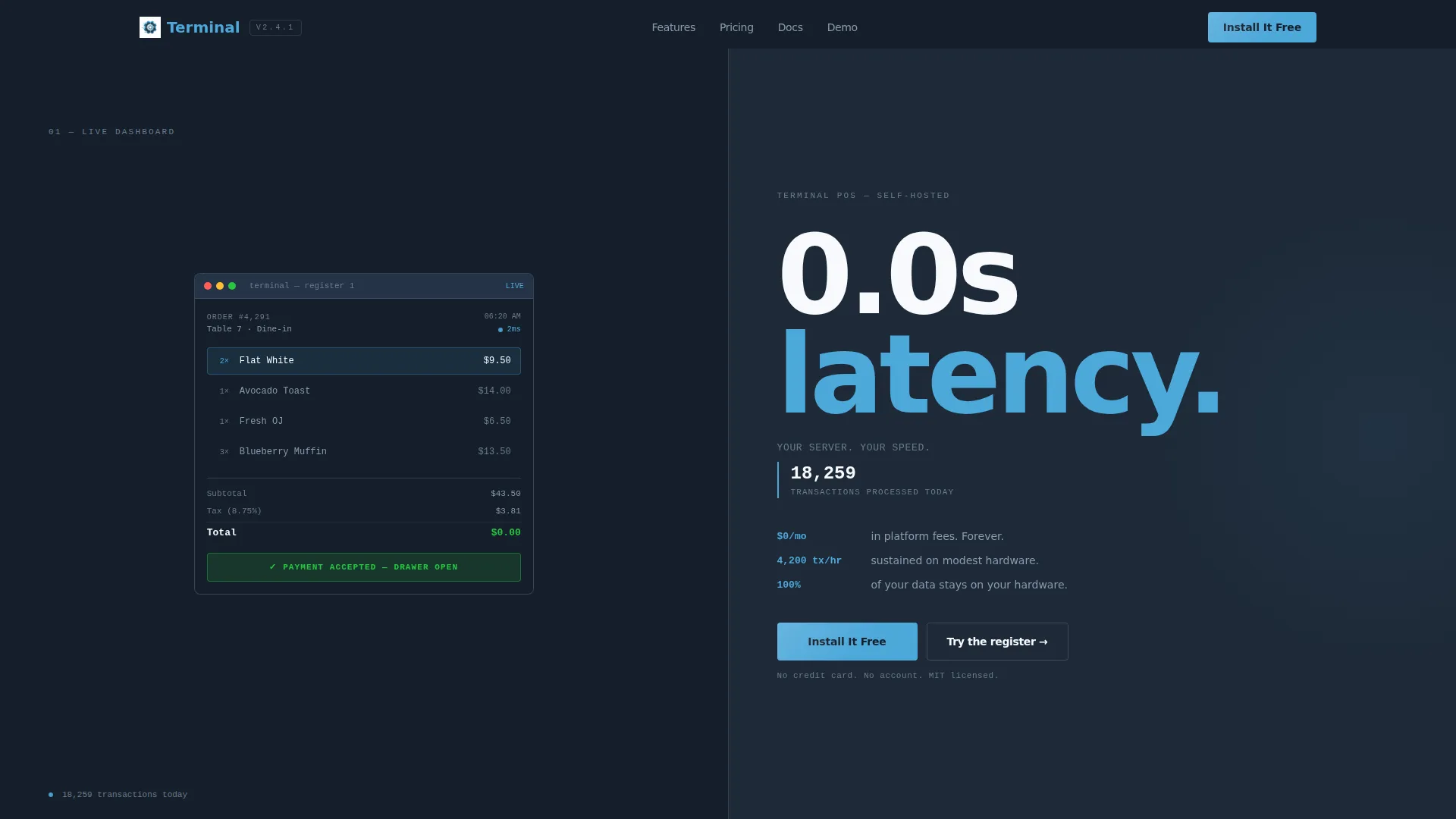
The header divides the viewport into two equal panels. The left panel displays a pixel-perfect product screenshot of the point-of-sale dashboard mid-transaction. The right panel anchors a single oversized stat with a live transaction counter ticking upward below it.
Stats-First Scroll Rhythm
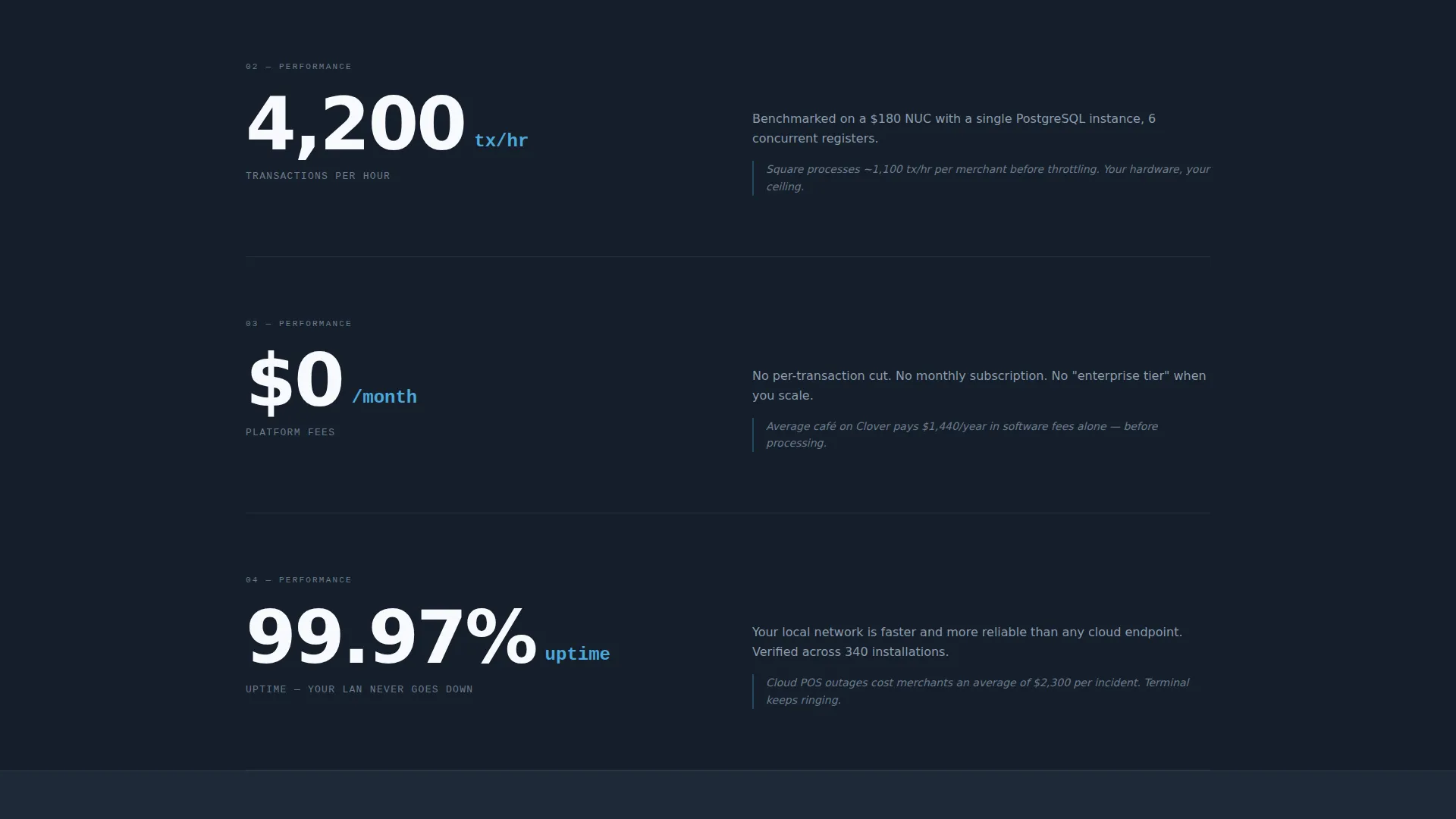
Every major scroll section leads with a bold number before any supporting copy appears. Stats like transaction throughput, monthly fee savings, and data ownership percentage each land in the viewport first. The explanation and proof follow immediately after, building a compounding argument with every scroll.
Freemium Install Conversion Form
The primary call to action opens a single-step form. Visitors choose their operating system (Linux, Windows, or macOS), select their number of terminals (1, 2 to 5, or 6 and above), and enter an email address to receive the download link. No credit card and no account creation are required.
Live Demo Iframe
An embedded iframe appears as a secondary conversion path. Visitors can interact with a live demo instance, ring up fake items, and feel the response speed before deciding to download. The demo sits below the headline stat blocks and links directly from the "Try the register right now" call to action.
Comparison Table Section
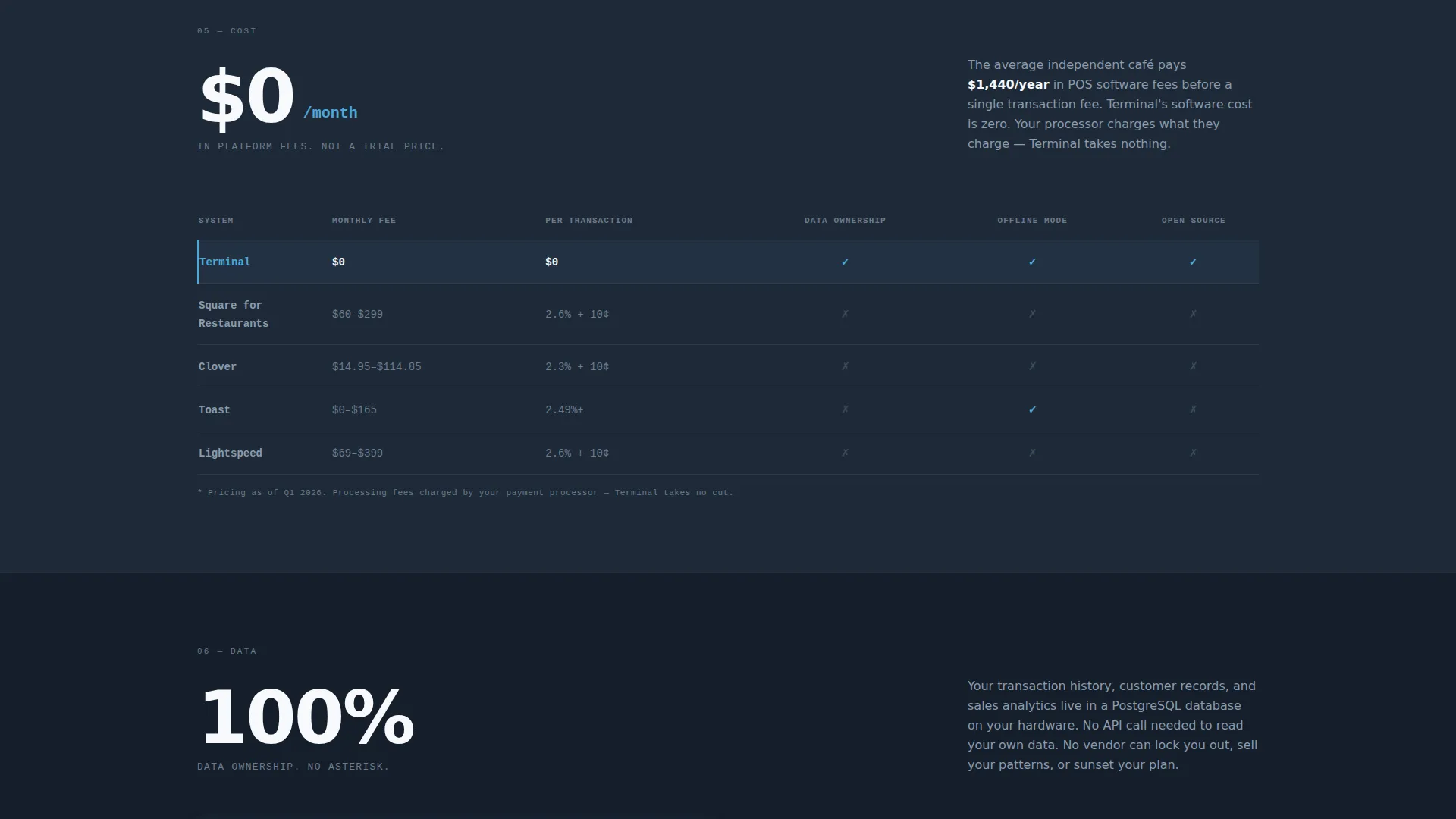
A fee comparison table appears alongside the "$0/month in platform fees" stat block. It materializes as the stat enters the viewport, giving visitors a side-by-side view of what they currently spend versus zero recurring cost. The table is a direct visual proof point inside the scroll narrative.
Data Ownership Diagram
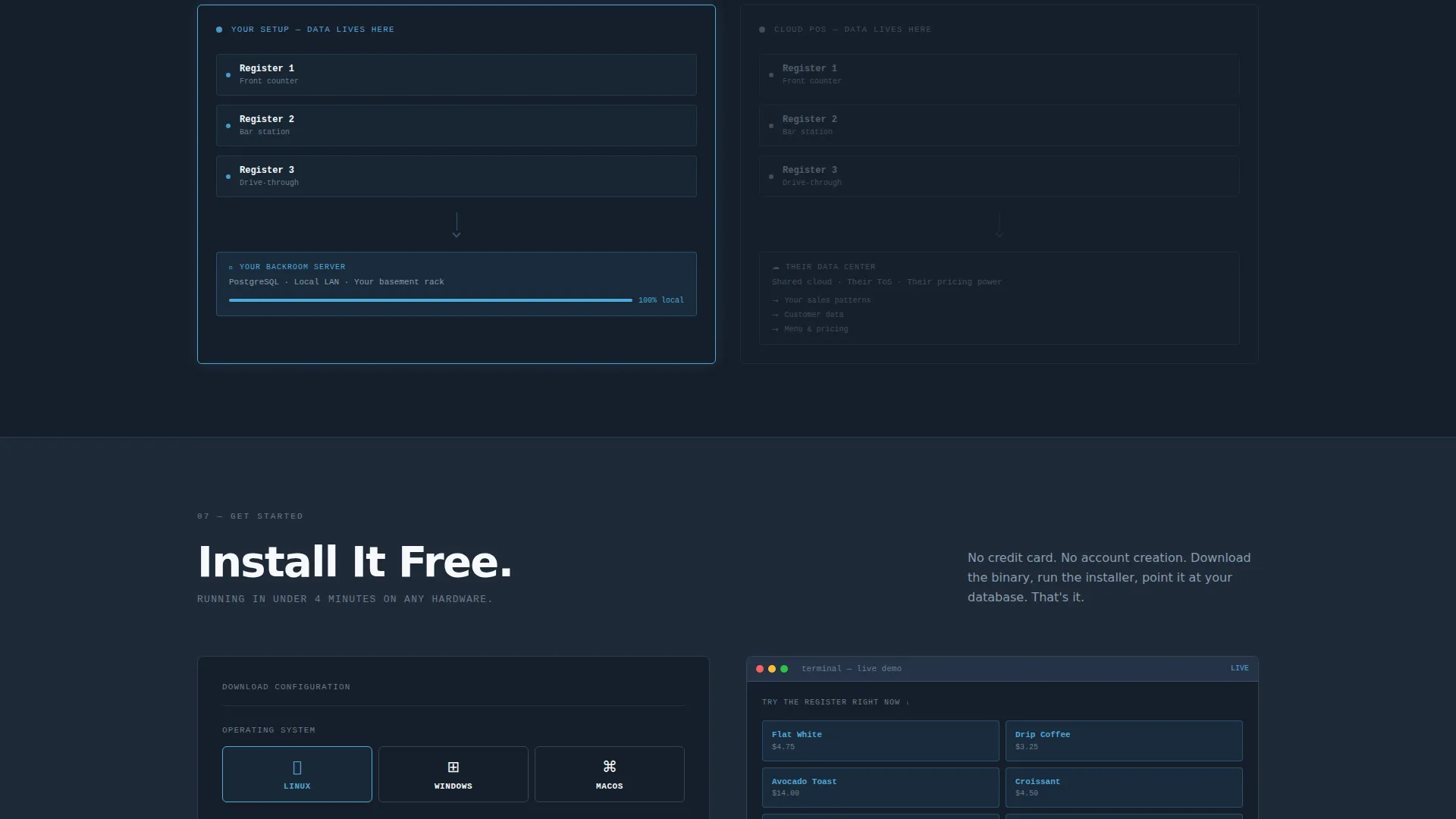
The "100% data ownership" stat is followed by a diagram showing where data lives on a self-hosted setup versus a cloud-based one. The diagram references concrete deployment examples like a basement rack or a backroom mini PC. It makes the ownership claim tangible rather than abstract.
Page sections overview
| Section | Purpose |
|---|---|
| Split-screen hero | Anchors product screenshot and live latency stat |
| Transaction counter | Shows real-time processed transaction count |
| Throughput stat block | Leads with 4,200 transactions per hour |
| Fee comparison table | Proves zero monthly platform cost |
| Data ownership diagram | Maps data location on self-hosted versus cloud |
| Primary install call to action | Drives download with a single-step form |
| Live demo iframe | Lets visitors interact before committing |
| Floating install call to action | Second "Install It Free" trigger after final stat |
Design & branding system
The Slate and Sky color system uses four purposeful values across the entire layout. Every color decision supports the functional, hardware-native feeling of the product.
- Deep terminal slate (#1E2A38) for backgrounds and structural surfaces
- Mid-gray register chrome (#6B7B8D) for secondary text and interface chrome
- Open-sky blue (#4DA8DA) for interactive elements, live data highlights, and call-to-action buttons
- Clean receipt white (#F7F9FC) for content surfaces and readable body text
Mobile & speed optimization
The Dynamic Motion theme and split-screen layout are built to remain clear and usable at smaller viewport sizes. Scroll-triggered stat reveals translate naturally to touch-based scrolling on phones and tablets.
- The 50/50 split-screen hero stacks vertically on narrow screens so both panels remain legible
- Stat-first sections reflow to single-column layouts without losing the punch-then-prove read order
How this template helps you convert
The entire page is structured as a compounding argument. Each section hands the reader a reason to install before asking them to act.
- The hero delivers a latency claim and a live counter in the first viewport, establishing credibility before a visitor scrolls even once.
- The stats-first scroll rhythm builds trust progressively, so by the time the install form appears, the visitor has already seen throughput numbers, a fee comparison, and a data ownership diagram.
- The two-path conversion system gives hesitant visitors a no-commitment live demo instead of forcing a binary install-or-leave decision.
Other information about this template
This template belongs to the Technology category under the Self-Hosted Enterprise Software subcategory. It is purpose-built for the self-hosted point-of-sale niche and reflects a design philosophy where the product is always the hero.
- Template style: Split Screen (50/50), single-page landing page layout
- Theme: Dynamic Motion, with scroll-triggered stat reveals and a transaction counter animation
- Header concept: Product Screenshot, with no lifestyle photography or stock imagery
- The Intersection Match Score for this template's niche alignment is 13, placing it in a focused, well-defined segment of the self-hosted enterprise software market
- The page is compatible with Linux, Windows, and macOS deployment contexts as reflected in the install form design
Theme
Dynamic Motion
Creative direction
Stats-First Impact
Color system
Slate & Sky
Style
Split Screen (50/50)
Direction
Freemium/Trial
Page Sections
Split-screen 50/50 Hero
Stats-first Scroll Narrative
Single-step Install Form
Embedded Live Demo
Fee Comparison Table
Data Ownership Diagram
Related questions
Does this template require a credit card to use the install flow?
Can I use this template for more than one register location?
What does the live demo iframe actually show?
Is the split-screen layout usable on mobile devices?
Who is the primary audience for this template?



