No-Code Enterprise Software Advanced Cost Calculator Website Template
Trackform is a no-code product lifecycle management (PLM) landing page template built for hardware and electronics teams. It opens with a live Cost-of-Chaos Calculator, walks visitors through five interactive PLM feature cards, and drives sign-ups with a two-step inline form. The dark Tech Glass visual system makes complex data feel sharp, organized, and immediately trustworthy.
by Rocket studio
Quick summary
Trackform is a single-page PLM landing page template designed for no-code software platforms. It leads with an interactive calculator that quantifies manual tracking waste, then guides visitors through modular glass cards covering every core PLM pillar. The layout converts by making visitors feel the problem before presenting the solution.
Who this template is for
This template is built for teams that manage physical products through complex development cycles. It speaks directly to the people who live inside spreadsheets, email threads, and shared drives trying to keep product data in sync.
- Hardware startup founders tracking their first bill of materials (BOM) without a dedicated operations team
- Operations leads at mid-market consumer electronics companies managing multiple contract manufacturers across different regions
- Quality engineers who need one living source of truth for revisions, compliance gates, and supplier changes
What problem this template solves
Product teams lose enormous amounts of time to fragmented tracking. Revisions get lost in email chains, supplier updates sit in separate files, and compliance gates slip through the cracks between handoffs. This template gives a no-code PLM platform the right first impression to fix that.
- Visitors arrive without understanding the true cost of manual product tracking
- Teams need a way to see platform value immediately, before reading a single feature bullet
- The page must convert both self-serve trial users and larger teams that need a guided demo
What you get with this template
This template delivers a fully structured, single-page layout built around interactive exploration and freemium conversion. Every section is modular and purpose-built, so the page flows from problem awareness to confident action.
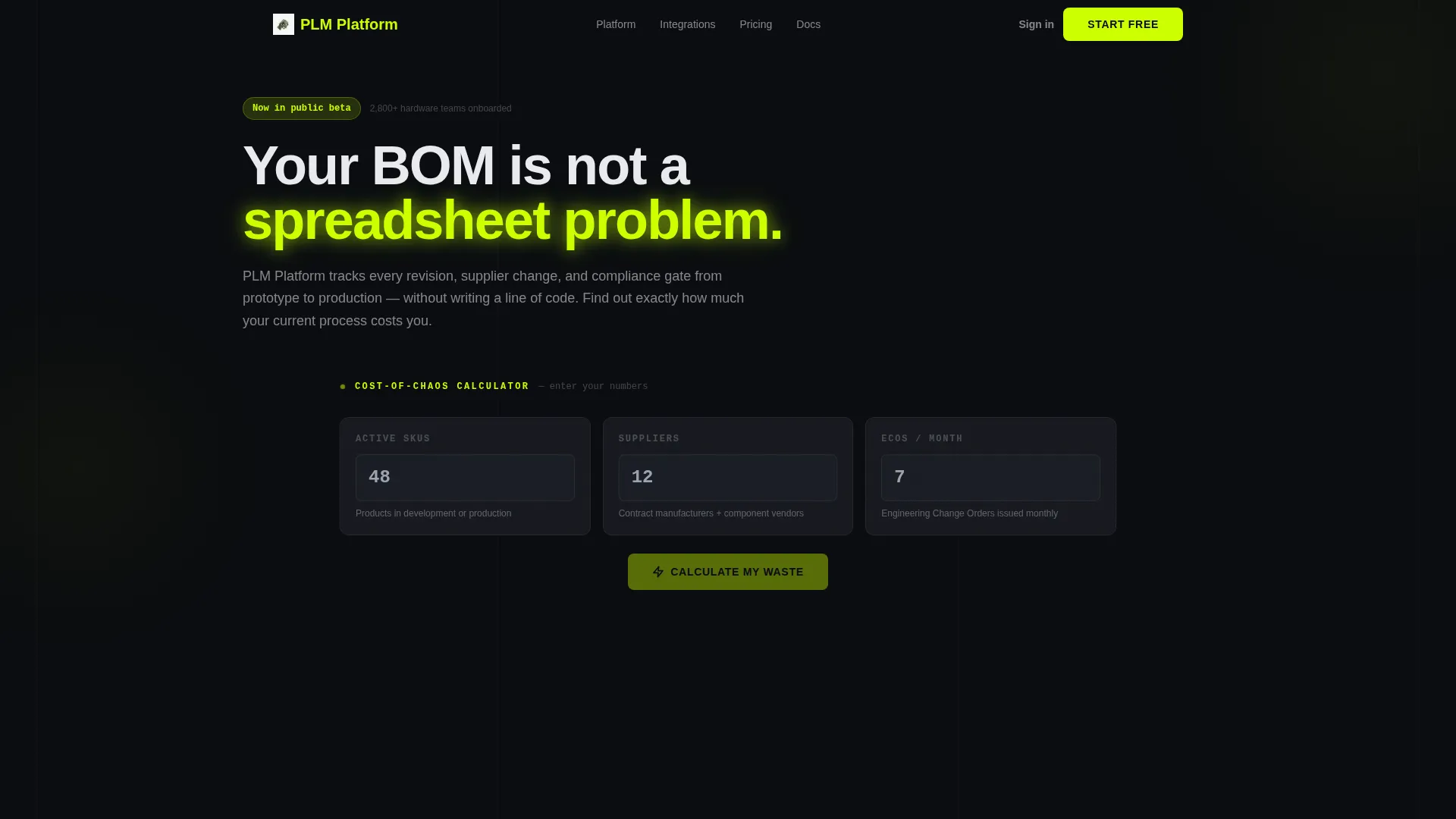
- A live Cost-of-Chaos Calculator in the hero section that accepts three inputs and returns animated waste estimates
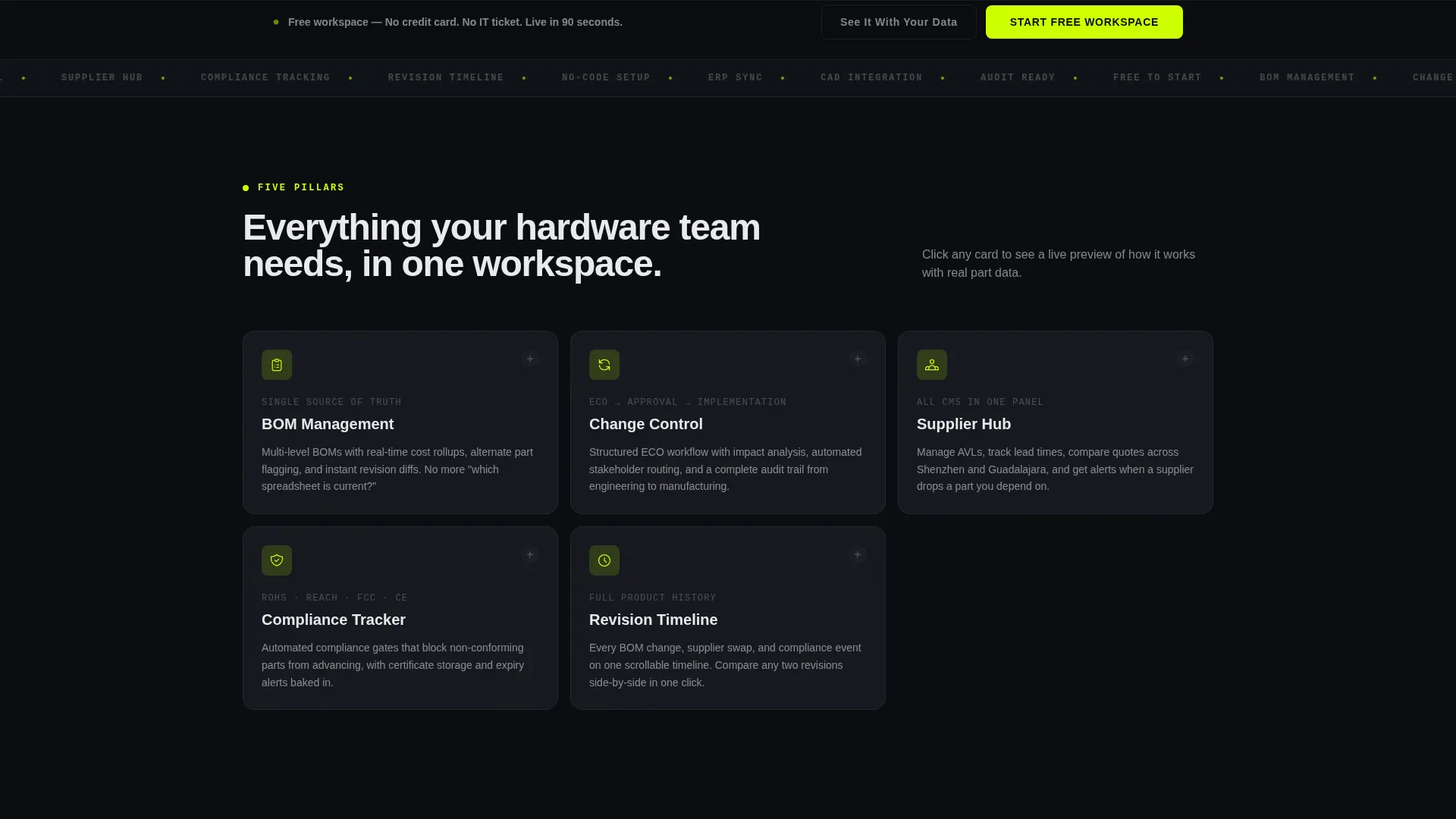
- Five expandable glass feature cards covering BOM Management, Change Control, Supplier Hub, Compliance Tracker, and Revision Timeline
- A two-step inline sign-up form and a secondary demo-booking path for larger teams
Feature list
This template comes with a set of purpose-built interactive components. Each one is designed to move the visitor from skepticism to conviction.
Live Cost-of-Chaos Calculator
The hero section is the calculator itself. Visitors enter their active SKU count, number of suppliers, and engineering change orders (ECOs) per month. The tool returns animated estimates of hours lost, average delay days per ECO, and projected error cost per year. Numbers roll up in electric chartreuse on a dark glass panel.
Expandable PLM Feature Cards
Five modular glass cards represent the core PLM pillars: BOM Management, Change Control, Supplier Hub, Compliance Tracker, and Revision Timeline. Each card expands on click to show a miniature interactive demo. The cards make features tangible rather than descriptive.
Proof and Social Evidence Section
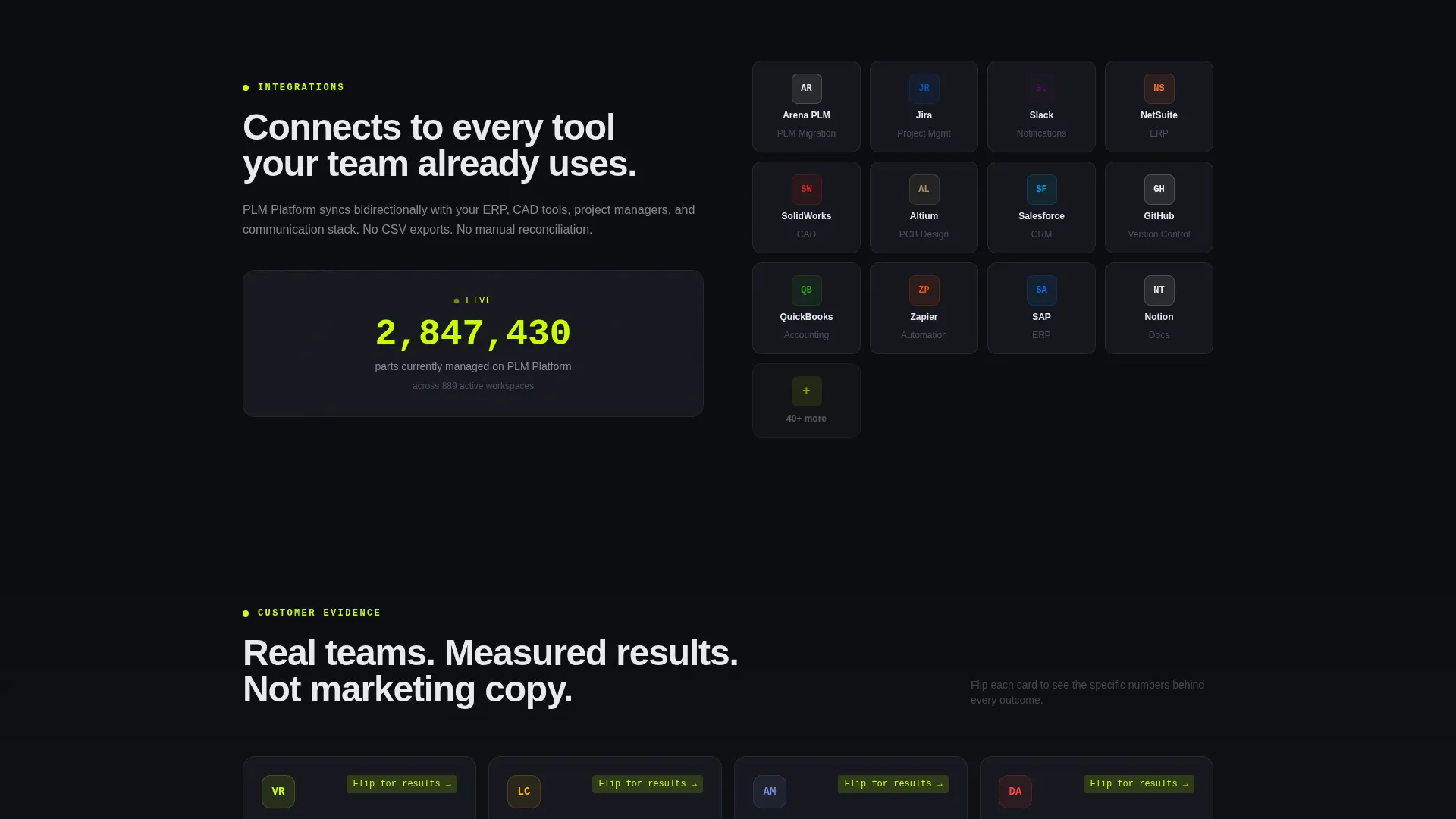
As the visitor scrolls deeper, cards shift from features to evidence. Integration logos snap into a mosaic layout, a live counter displays parts currently managed on the platform, and customer cards flip to reveal measurable outcomes. Credibility builds progressively.
Two-Step Inline Conversion Form
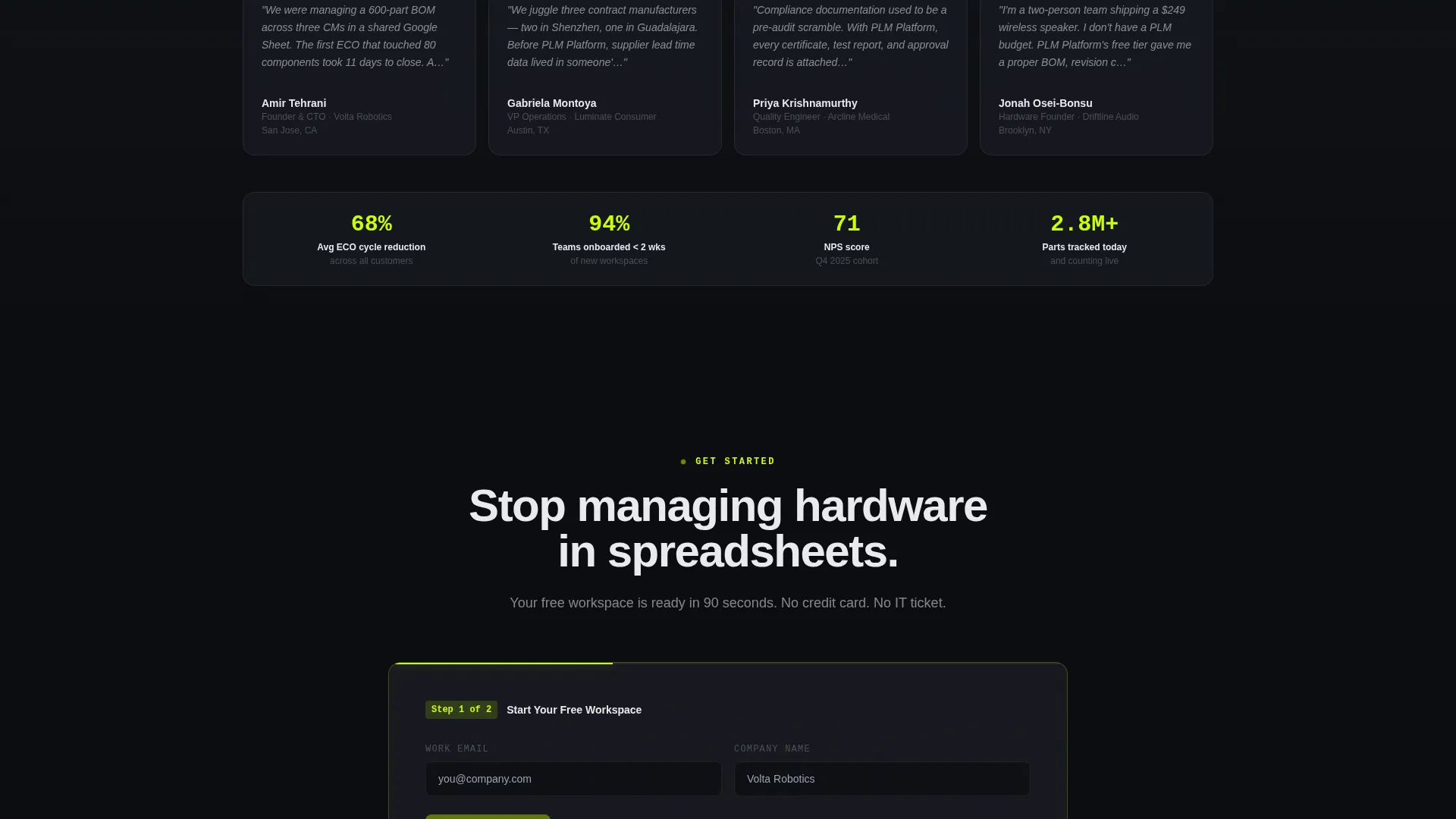
The primary call to action opens a two-step inline form. Step one collects work email and company name. Step two asks how many active products the user manages, then auto-provisions the right starting template. No redirect, no friction.
Persistent Conversion Bar
A slim sticky bar appears once the visitor scrolls past the first card row. It carries the primary call-to-action button and stays visible throughout the rest of the page. The secondary path offers a guided 15-minute demo booking for teams managing more than 50 products.
Demo Booking Path
Teams with over 50 active products can choose a secondary conversion path labeled "See It With Your Data." This books a guided 15-minute demo session. It keeps larger, higher-intent buyers from dropping off at a self-serve form that feels too small for their needs.
Page sections overview
| Section | Purpose |
|---|---|
| Calculator Hero | Quantify manual tracking waste with visitor inputs |
| PLM Pillar Cards | Explore five core feature areas interactively |
| Integration Mosaic | Show platform connectivity through logo grid |
| Live Parts Counter | Signal platform scale with real usage data |
| Customer Flip Cards | Reveal measurable outcomes from real users |
| Primary call to action Panel | Drive free workspace sign-ups after the calculator |
| Persistent Bottom Bar | Keep the conversion action visible while scrolling |
| Two-Step Inline Form | Collect email, company, and product volume details |
| Demo Booking Path | Capture high-intent teams needing guided onboarding |
Design & branding system
The visual language is built around a Tech Glass aesthetic using the Acid Digital color system. Every design decision reinforces precision, control, and clarity, the same qualities the PLM platform promises its users.
- Core palette: void black (#0B0D10) for backgrounds, translucent panel gray (#1A1D24 at 70% opacity) for glass card surfaces, electric chartreuse (#CCFF00) for all interactive accents and hover states, and cool interface white (#E8EAED) for body text
- Cards float on frosted-glass surfaces with subtle chartreuse border glows; backgrounds stay deep so data reads like holographic layers projected forward
- No stock photography or illustration; the calculator and interactive card components serve as the visual centerpiece
Mobile & speed optimization
The card grid layout is built to adapt across screen sizes. Modular components stack cleanly, and the calculator inputs remain usable on touch screens without losing the visual impact of the animated results.
- Glass card components are designed to reflow into single-column stacks on smaller viewports
- The persistent conversion bar and two-step inline form maintain full functionality across device sizes
- Interactive states such as card expansion and number roll-up animations are built to work within the modular grid on both desktop and mobile
How this template helps you convert
The page is structured so that persuasion happens before the ask. By the time a visitor sees the sign-up form, they have already measured their own inefficiency using their own numbers.
- The Cost-of-Chaos Calculator opens the page and immediately makes the problem personal. Visitors enter real figures and receive a sharp, data-driven summary of what manual tracking is costing them.
- The interactive PLM pillar cards let visitors explore features at their own pace. Each expanded card demo builds confidence that the platform can actually handle their workflow.
- The two-step inline form keeps the sign-up lightweight and contextual. The product volume question on step two auto-provisions the right starting template, reducing setup friction for new users.
Other information about this template
This template is categorized under Technology and No-Code Enterprise Software. It is purpose-built for the no-code PLM niche and is especially relevant for teams moving from spreadsheet-based product tracking to a structured, collaborative platform.
- The template style is a Card Grid (Modular) layout, making individual sections easy to rearrange or extend as a platform grows its feature set
- The Interactive Explorer creative direction means the page teaches through doing, not through reading static content blocks
- The Freemium/Trial landing page direction means every structural decision supports low-friction trial sign-ups while keeping a demo path open for enterprise-adjacent buyers
- The Calculator/Estimator header concept is a deliberate persuasion mechanism: it replaces vague marketing claims with personalized, visitor-generated proof of need
Theme
Tech Glass
Creative direction
Interactive Explorer
Color system
Acid Digital
Style
Card Grid (Modular)
Direction
Freemium/Trial
Page Sections
Live Cost-of-chaos Calculator
Expandable PLM Pillar Cards
Progressive Proof Section
Two-step Inline Sign-up Form
Persistent Sticky Conversion Bar
Guided Demo Booking Path
Related questions
Do I need to know how to code to use this template?
Who is this template best suited for?
Can I adjust the calculator inputs and output labels?
What does the two-step sign-up form do?
Is the demo booking path separate from the free trial flow?



