Speech Recognition Technology Pricing & Packages Website Template
Transcribe is a bold brutalist landing page template built for speech recognition platforms. It pairs a split-screen stats wall with a live waveform animation, then walks visitors through section-by-section benchmark data covering accuracy, latency, pricing, and industry verticals. The result is a high-conviction comparison page that earns trust before asking for a single click.
by Rocket studio
Quick summary
Transcribe is a single-page template designed for B2B speech recognition platforms that need to win visitors through data, not decoration. The layout is split 50/50, built on a Bold Brutalist aesthetic, and structured as an industry report that escalates its evidence case from the hero all the way to the footer call to action.
Who this template is for
This template is built for teams selling or marketing a speech-to-text platform to professional buyers. It speaks directly to people who evaluate tools on performance metrics, not marketing copy.
- Podcast production studios racing against publishing deadlines
- Legal firms and medical practitioners who need fast, accurate transcription of depositions and patient notes
- Engineering leads and product managers evaluating automatic speech recognition platforms for enterprise use
What problem this template solves
Most software landing pages rely on vague benefit statements. Buyers in legal, medical, and media verticals do not respond to vague. They need numbers, comparisons, and proof before they will commit to a trial.
- No single page layout combines benchmark data, latency comparisons, and a live audio test in one coherent scroll
- Visitors arrive skeptical and leave without converting because the evidence case is scattered or missing entirely
- Generic SaaS templates do not support the data-heavy, comparison-driven structure that enterprise buyers expect
What you get with this template
You get a fully structured, single-page layout designed around competitive proof. Every section is built to advance the evidence case one step further, from raw accuracy numbers down to cost per audio hour.
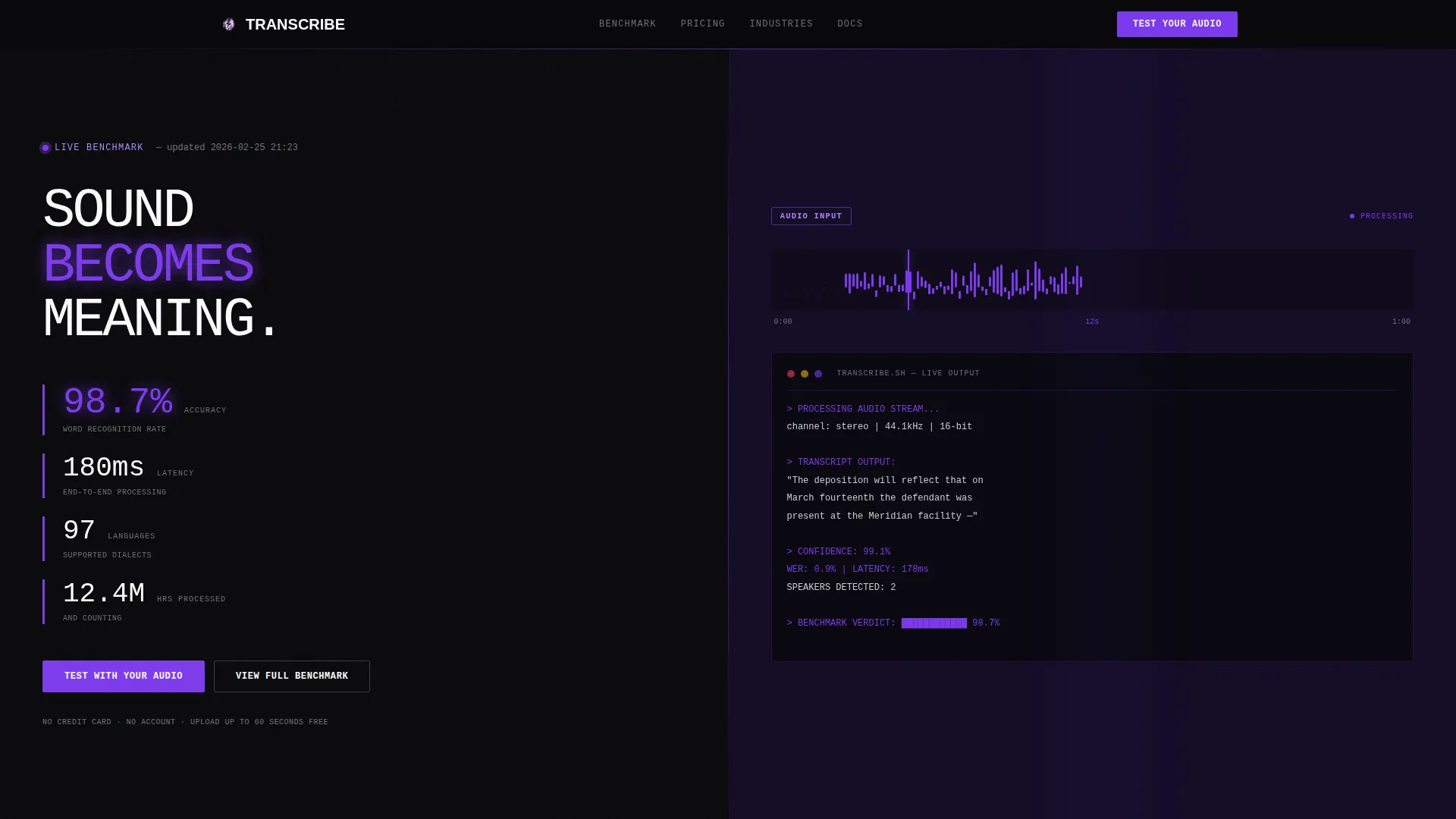
- A split-screen hero with a brutalist metrics wall on the left and a live waveform animation on the right
- Five content sections covering accuracy benchmarks, latency comparisons, industry vertical proof panels, and pricing data
- Two conversion paths: a file upload call to action for live audio testing and a gated benchmark report form
Feature list
This section details the core built-in capabilities that ship with the Transcribe template.
Split-Screen Stats Hero
The hero divides the viewport exactly 50/50. The left panel stacks oversized monospaced metrics vertically: accuracy climbing from 94.0% to 98.7%, latency at 180ms, 97 languages supported, and 12.4 million hours processed. The right panel shows a raw audio waveform being consumed in real time, with words appearing letter by letter as the playhead advances.
Brutalist Benchmark Data Sections
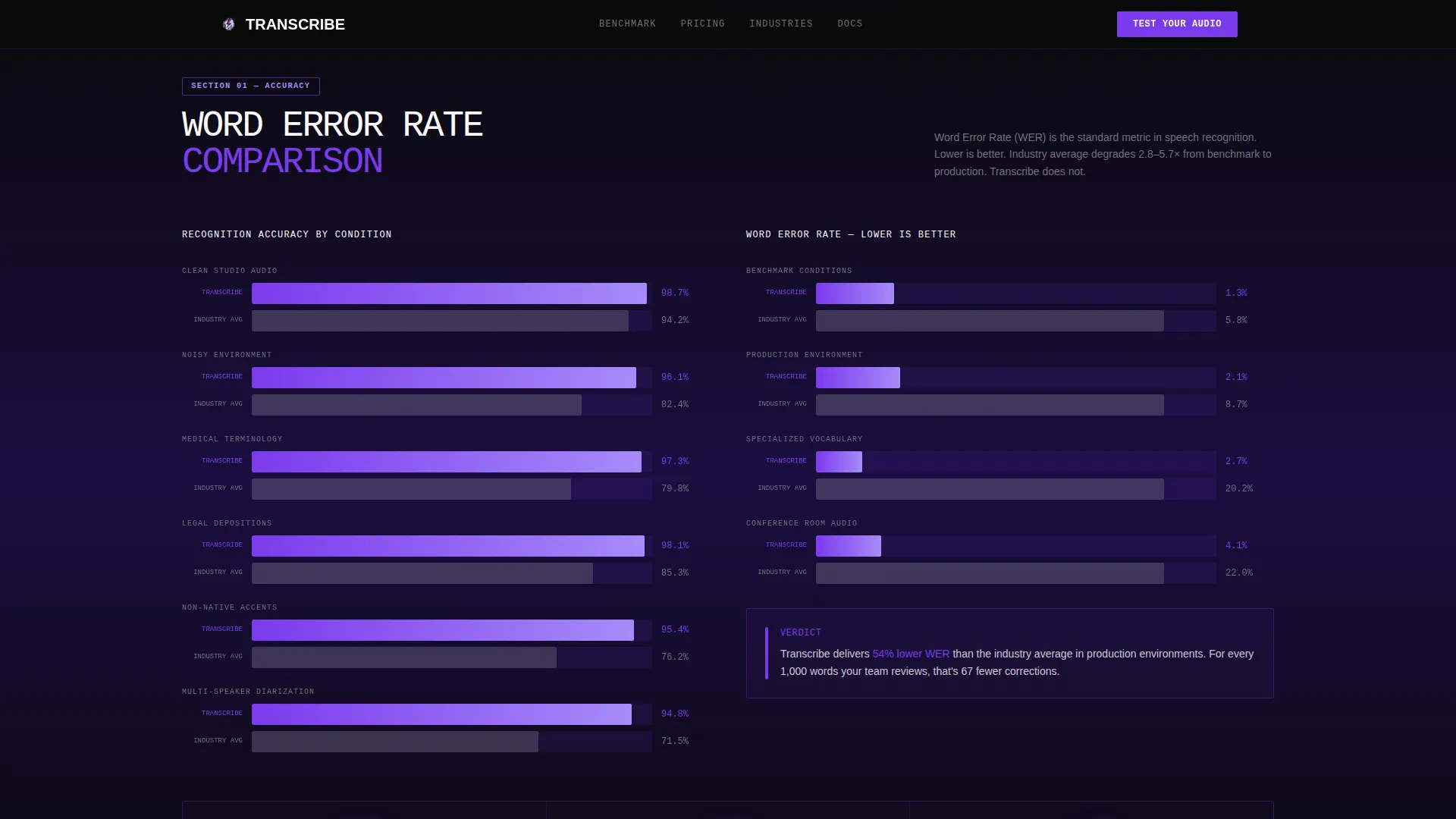
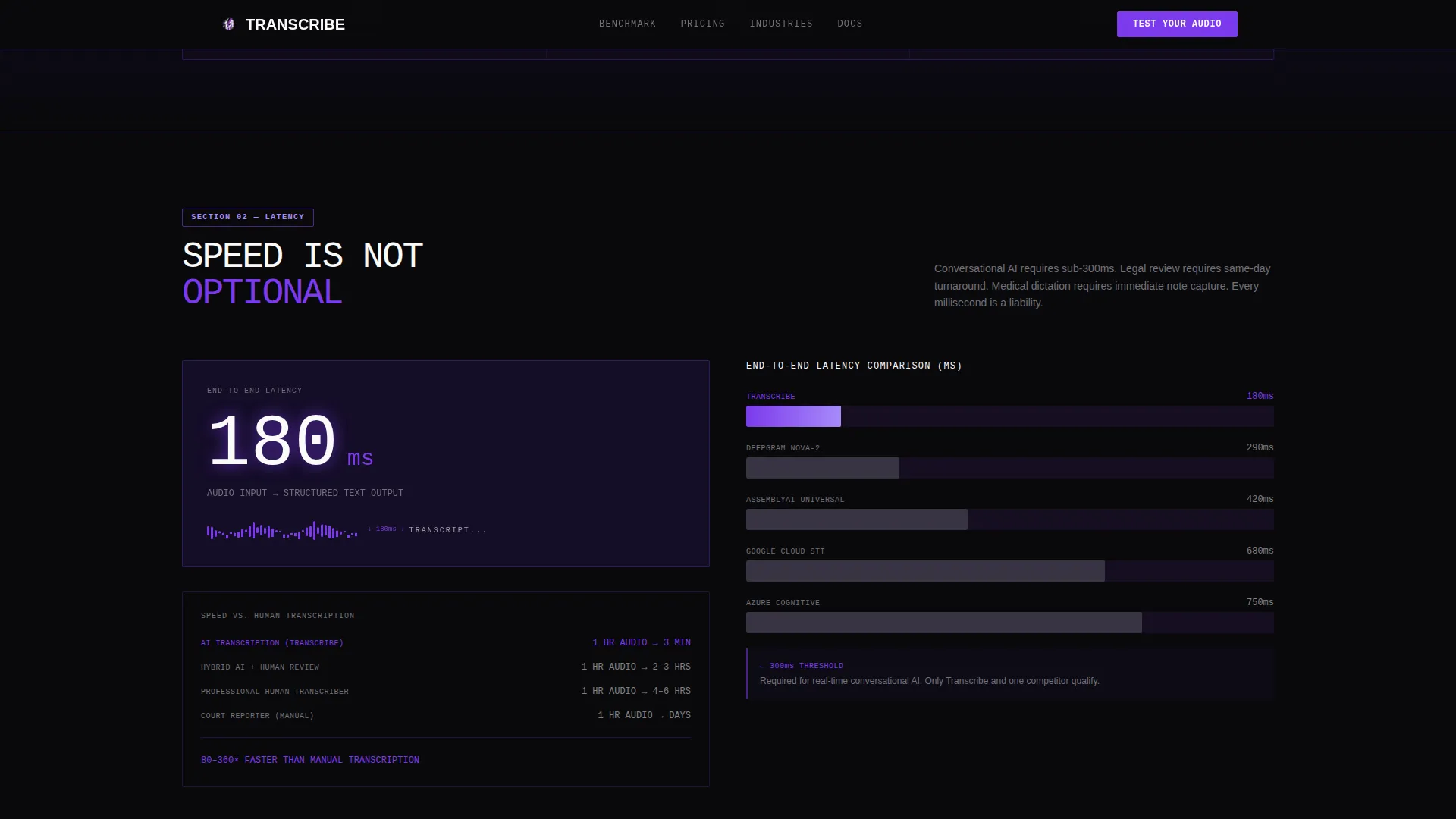
The accuracy benchmark section uses violet bar charts to display word error rate against industry averages across accents, background noise levels, and specialized vocabularies. Subsequent sections cover latency in milliseconds, speed versus human transcription, and pricing per audio hour, each rendered in the same stark brutalist data visualization style.
Industry Vertical Proof Panels
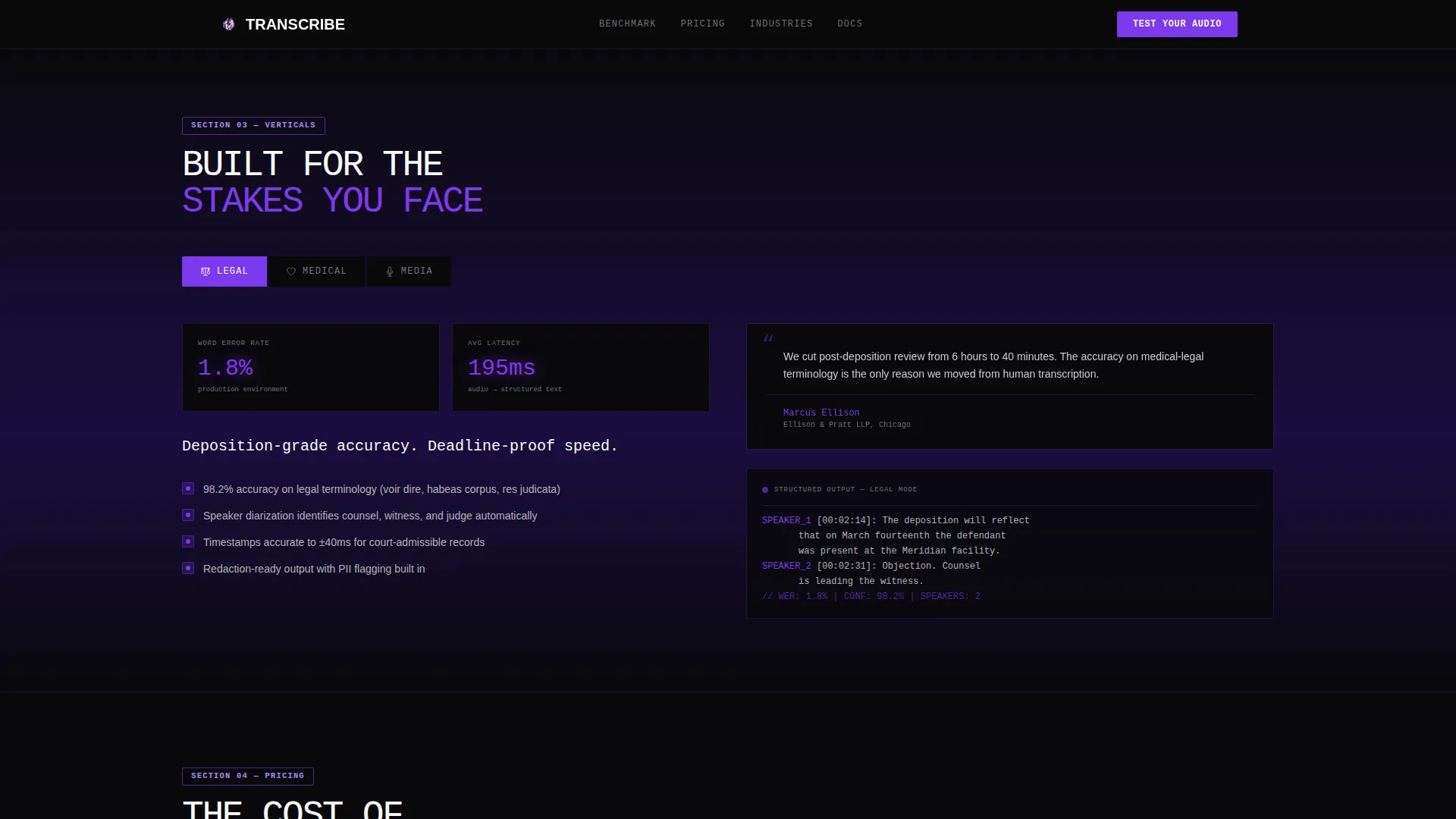
Three dedicated proof panels target legal, medical, and media use cases individually. Each panel presents the platform's performance in context, giving buyers from each vertical a reason to believe the numbers apply to their specific audio environment.
Live Audio Upload Call to Action
The primary conversion element is a file upload field that accepts audio samples up to 60 seconds. A dropdown lets visitors select their industry vertical, and a toggle enables side-by-side benchmarking against a competitor's output. This call to action appears at the page midpoint and again at the base.
Gated Benchmark Report Path
A secondary conversion path invites visitors to read the full benchmark report. Access requires a work email address. By the time visitors reach this gate, they have already consumed enough ungated comparative data to be pre-sold on the findings inside.
Counter and Waveform Animations
The template includes high-activity CSS-driven animations throughout. Metric counters animate on scroll, bar charts reveal progressively, and the waveform pulses in real time. All animations use CSS where possible, keeping JavaScript use minimal.
Page sections overview
| Section | Purpose |
|---|---|
| Hero Stats Wall | Establish platform credibility with oversized live metrics and waveform |
| Accuracy Benchmark | Compare word error rate against industry averages using violet bar charts |
| Latency and Speed | Show millisecond response time and speed advantage over human transcription |
| Industry Vertical Panels | Deliver proof specific to legal, medical, and media audio contexts |
| Pricing Comparison | Present cost per audio hour against competitor categories |
| Footer Row | Provide a linear single-row footer with final call to action |
Design & branding system
The visual identity follows a Bold Brutalist direction that treats data as the only decoration needed. The palette draws from a Void and Violet color system: absolute void black at #09090B, deep ultraviolet at #2D1B69, electric violet at #7C3AED, and bare exposed white at #FAFAFA. The result feels like a server room lit only by purple status indicators.
- Typography uses JetBrains Mono for all data and metric blocks, and Manrope for body text, creating a clear terminal-to-prose hierarchy
- Backgrounds alternate between void black and deep ultraviolet across sections, with violet applied to every interactive element, progress bar, and metric highlight
- No stock photography or illustrations appear anywhere; the visual language relies entirely on numbers, waveforms, and typographic weight
Mobile & speed optimization
The template is designed desktop-first, reflecting the data-heavy comparison format that enterprise buyers typically review on larger screens. Responsive behavior scales the layout for smaller viewports without removing any content.
- All animations are built using CSS animations as the primary method, keeping JavaScript use minimal and reducing render overhead
- The split-screen sections reflow to single-column stacks on mobile, preserving the benchmark data in a readable vertical format
How this template helps you convert
The conversion strategy is built on earning belief before asking for action. Every scroll step delivers a more damning data point, so visitors arrive at the call to action already convinced.
- The hero metrics wall sets an immediate credibility anchor with real numbers: accuracy, latency, languages, and total hours processed, all visible above the fold.
- The file upload call to action placed at the page midpoint and base lets visitors verify the platform's claims with their own audio, removing the last objection before signup.
Other information about this template
This template is categorized under Technology and targets the Speech Recognition Technology subcategory. It is built specifically for the Speech Recognition Platform niche, with an intersection match score of 13 reflecting a tightly aligned layout-to-use-case fit.
- The template style is Split Screen (50/50), and the creative direction is Industry Report
- The header concept is a Stats and Metrics wall, and the landing page direction is Comparison versus Competitor
- Localization defaults are set to English, USD currency, and United States date format
- The color system is labeled Void and Violet; the theme is Bold Brutalist
Theme
Bold Brutalist
Creative direction
Industry Report
Color system
Void & Violet
Style
Split Screen (50/50)
Direction
Comparison/Versus
Page Sections
Split-screen Brutalist Hero
Violet Benchmark Data Visualization
Industry Vertical Proof Panels
Live Audio Upload Conversion Tool
Gated Benchmark Report Form
Css-driven Counter and Chart Animations
Related questions
Who is this landing page template built for?
Can I customize the benchmark data shown in the charts?
Does the file upload call to action require backend configuration?
Is this template suitable for mobile visitors?
How many conversion paths does this template include?



