Speech Recognition Technology Professional Website Template
Transcribe is a bold brutalist speech recognition landing page template built for B2B platforms that turn raw audio into structured text. It uses a split-screen layout, a live waveform-to-text hero, and scroll-driven benchmark charts to make the accuracy and speed case before the visitor reaches the call to action.
by Rocket studio
Quick summary
Transcribe is a single-page landing page template for speech recognition platforms. It opens with a metrics wall and live waveform animation, then walks visitors through a competitive benchmark report covering accuracy, latency, pricing, and language coverage. Two conversion points invite visitors to test the platform with their own audio.
Who this template is for
This template is built for product and marketing teams behind high-volume, accuracy-critical transcription tools. It speaks directly to industries where speed and precision are non-negotiable requirements.
- Podcast production teams racing against publishing schedules
- Legal firms managing large volumes of deposition and hearing audio
- Medical practitioners who dictate patient notes between appointments
What problem this template solves
Manual transcription is slow, expensive, and inconsistent. Buyers evaluating a speech recognition platform need hard evidence before they commit. Most landing pages offer testimonials and feature lists. This template builds a comparative evidence case instead.
- Visitors leave without converting because claims feel unverified
- Decision-makers need side-by-side data, not marketing language
- A gated demo alone rarely earns trust from technical evaluators
What you get with this template
You get a fully structured, single-page landing page that guides the visitor from raw proof to a hands-on demo. Every section is built to escalate confidence before asking for a click.
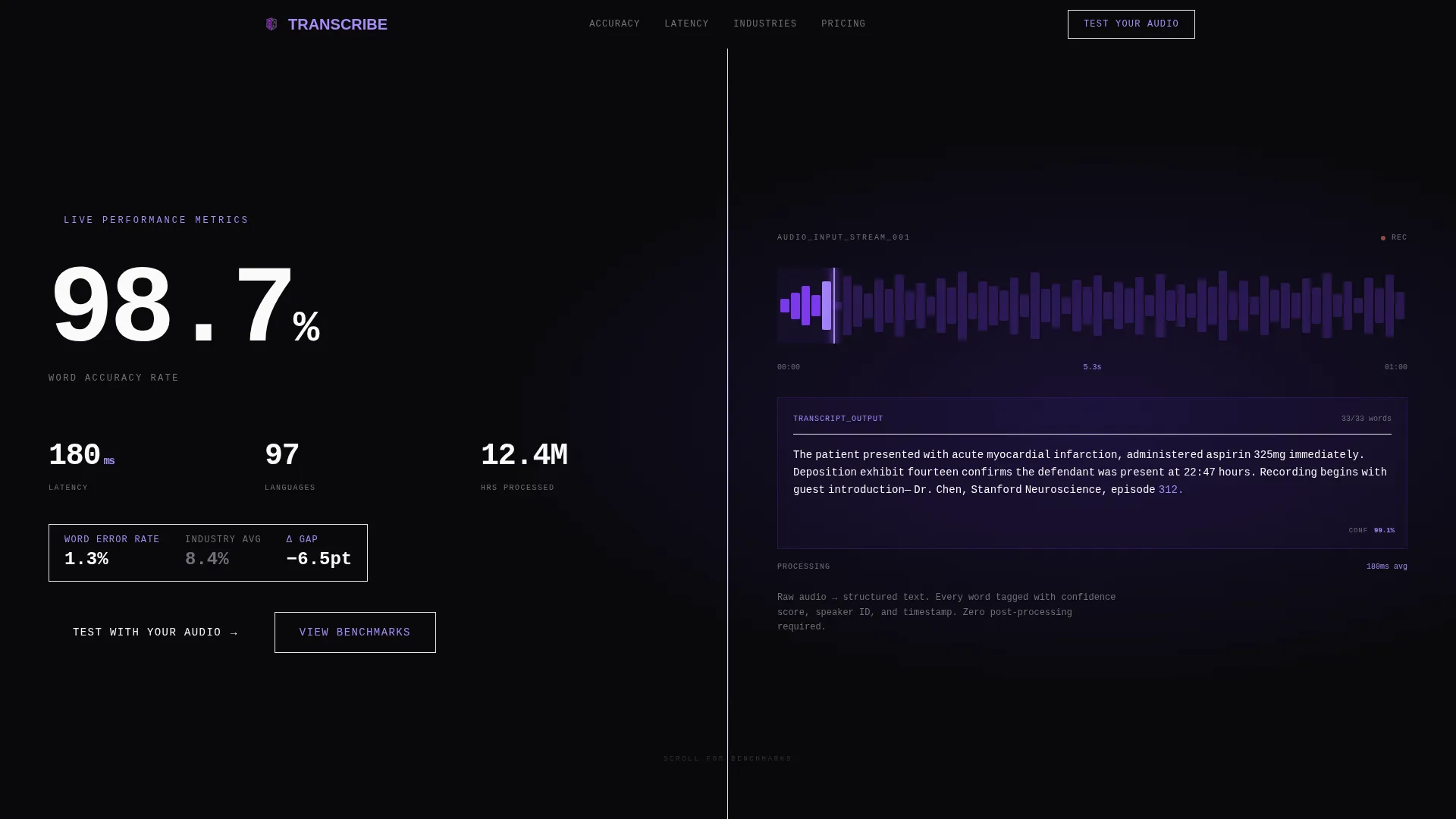
- A split-screen hero with a live accuracy metrics wall and an animated waveform-to-text panel
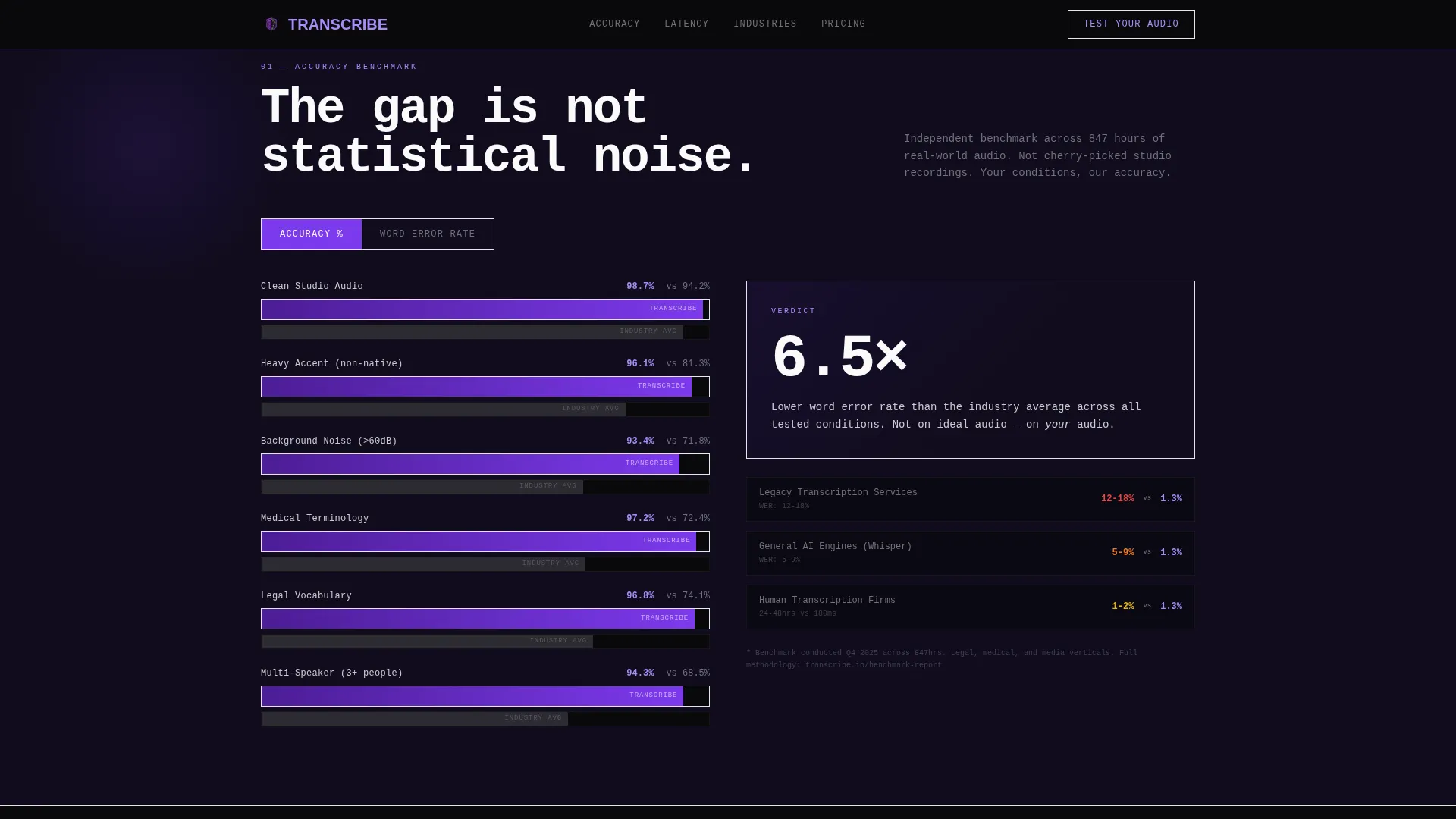
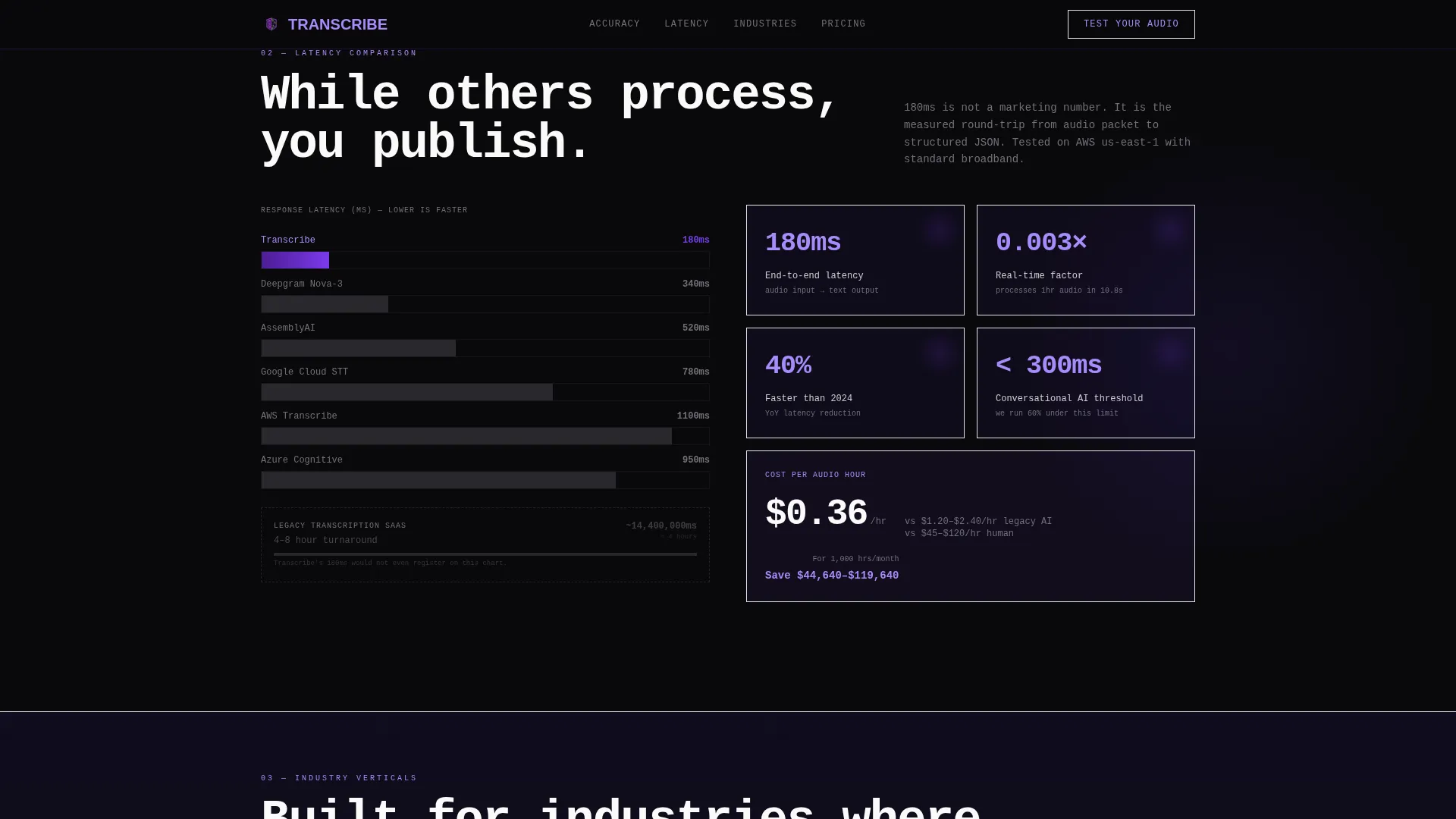
- Scroll-triggered brutalist bar charts comparing word error rate, latency, and pricing per audio hour
- A midpoint and base call-to-action block with an audio upload widget, industry vertical dropdown, and benchmark toggle
Feature list
This template packages six purpose-built sections into a single conversion flow. Each section is designed to carry the visitor one step further toward the upload call to action.
Split-Screen Stats Hero
The hero divides into two equal panels. The left panel stacks live-updating metrics in oversized monospaced typography: accuracy climbing to 98.7%, latency at 180 milliseconds, 97 languages supported, and 12.4 million hours processed. The right panel shows a raw audio waveform being consumed in real time, with words appearing letter by letter as the playhead moves forward.
Scroll-Triggered Benchmark Charts
Four benchmark sections build an evidence case as the visitor scrolls. Word error rate, latency, pricing per audio hour, and language coverage are each visualized in stark violet bar charts. Each chart compares the platform against legacy transcription services, other artificial intelligence engines, and human transcription firms.
Industry Vertical Split Cards
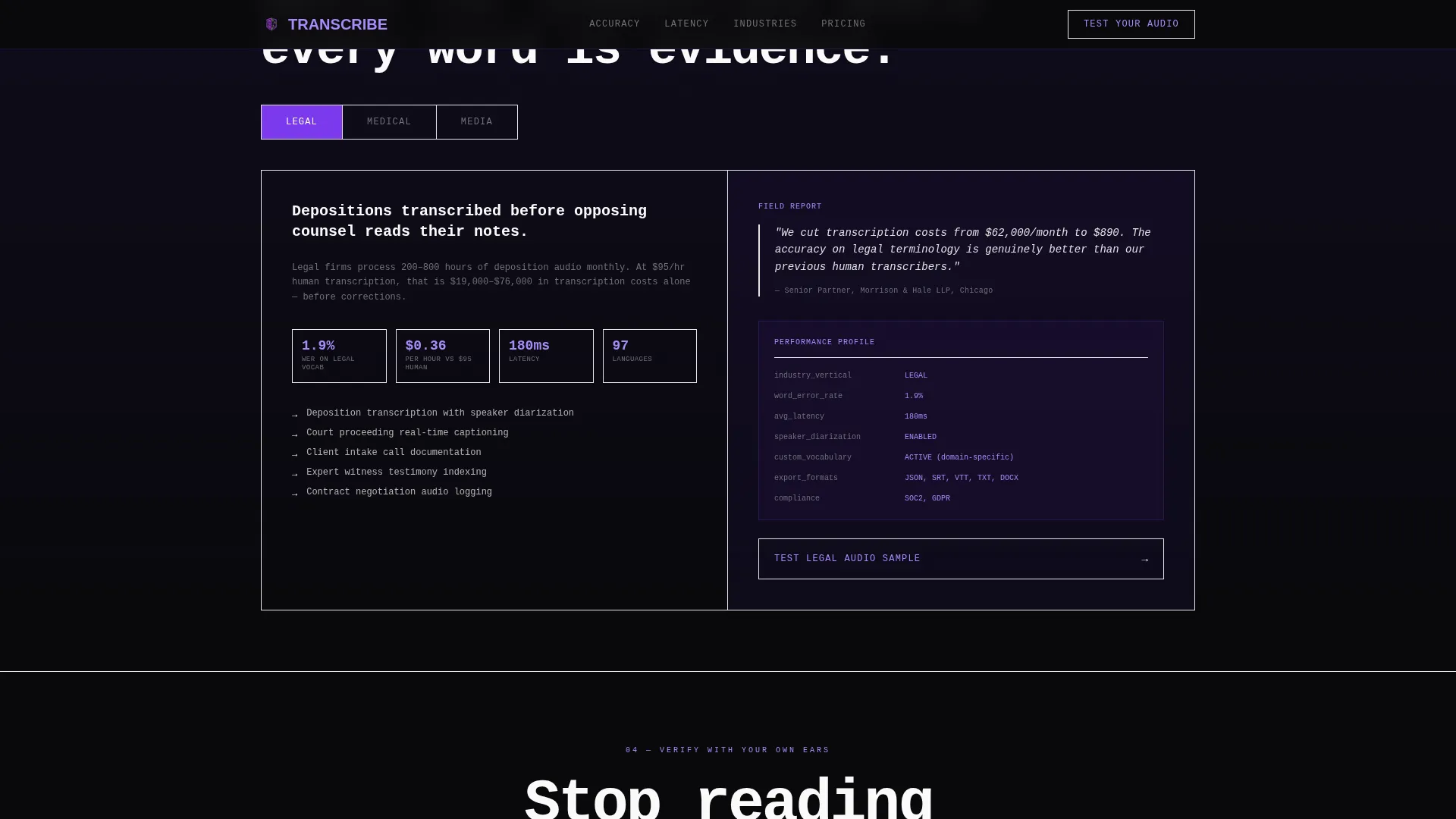
Three vertical-specific panels cover legal, medical, and media use cases. Each card frames the problem in industry language, making the platform feel purpose-built for each audience rather than generic.
Audio Upload Call-to-Action Widget
The primary conversion block includes a file upload field for audio samples up to 60 seconds, a dropdown to select an industry vertical, and a toggle to benchmark the output against a competitor side by side. This interactive block appears at both the midpoint and the base of the page.
Gated Benchmark Report Path
A secondary conversion path invites visitors to read the full benchmark report. Access is gated behind a work email field, creating a lead capture opportunity for visitors who prefer research over direct testing.
Terminal-Style Typography System
All display text is set in JetBrains Mono, a monospaced typeface that reinforces the platform's precision and technical credibility. Fraunces handles large display moments and DM Sans handles interface labels, creating a layered typographic hierarchy that feels architectural rather than decorative.
Page sections overview
| Section | Purpose |
|---|---|
| Hero Metrics Wall | Opens with live accuracy stats and animated waveform-to-text reveal |
| Accuracy Benchmark | Compares word error rate across accents, noise, and specialized vocabulary |
| Latency Speed Section | Visualizes response time versus competitor categories |
| Pricing Per Hour | Shows cost per audio minute against industry alternatives |
| Language Coverage Map | Displays 97-language support against competitor coverage |
| Industry Vertical Cards | Frames the platform for legal, medical, and media contexts |
| Midpoint Upload call to action | First conversion point with audio upload and benchmark toggle |
| Base Upload call to action | Final conversion point reinforcing the test-with-your-audio offer |
| Benchmark Report Gate | Secondary email-gated path to the full research report |
| Developer Minimal Footer | Clean footer following the GitHub developer minimal pattern |
Design & branding system
The visual identity follows a Bold Brutalist theme. The palette is called Void and Violet, built around four colors that feel like a server room lit by purple status LEDs.
- Void black (#09090B) and deep ultraviolet (#2D1B69) alternate as section backgrounds, creating a dense, industrial rhythm
- Electric violet (#7C3AED) hits every interactive element, progress bar, bar chart, and metric highlight
- Bare exposed white (#FAFAFA) carries all body and display text in heavy monospaced blocks
Mobile & speed optimization
This template is designed desktop-first, built for production teams working at workstations. A mobile fallback layout is included for visitors arriving from other devices.
- Animations use CSS and Intersection Observer, keeping the page light without heavy JavaScript libraries
- Waveform SVG animation, letter-by-letter text reveal, count-up number counters, and scroll-triggered bar charts are all CSS-driven
- The split-screen layout reflows gracefully for smaller viewports without dropping core benchmark content
How this template helps you convert
The conversion strategy is built on earned trust. By the time the visitor reaches the call-to-action block, they have already seen the evidence.
- The ungated benchmark data removes doubt before the ask, so the primary call to action feels like verification rather than a leap of faith.
- The audio upload widget lets visitors test accuracy with their own recordings, making the platform's claims personal and immediate.
- The gated benchmark report offers a second conversion path for decision-makers who need a document to share internally before committing.
Other information about this template
This template is categorized under Technology, specifically within the Speech Recognition Technology subcategory. It was built to serve the Speech Recognition Platform niche where conversion depends on technical credibility.
- The template is coded with JetBrains Mono, Fraunces, and DM Sans typography as specified in the design brief
- Interactivity level is high: the audio upload widget, benchmark toggle, and live metric counters are all included as designed components
- The footer follows the GitHub Developer Minimal pattern (Pattern 8), keeping the base of the page clean and technically minimal
- The template ships as a single-page landing page with a desktop-first layout and a mobile fallback
- Localization defaults are set to English, United States Dollar pricing format, and United States date format
Theme
Bold Brutalist
Creative direction
Industry Report
Color system
Void & Violet
Style
Split Screen (50/50)
Direction
Comparison/Versus
Page Sections
Split-screen Metrics Hero
Scroll-triggered Benchmark Charts
Industry Vertical Cards
Audio Upload Call to Action Widget
Gated Benchmark Report Path
Terminal Typography System
Related questions
What industries is this template designed for?
Can I customize the benchmark data shown in the charts?
Does the audio upload widget require a backend connection?
Is this template suitable for a developer-facing or API-focused audience?
What audio length does the upload widget support by design?



