Real-Time Rail Operations Landing Page Template
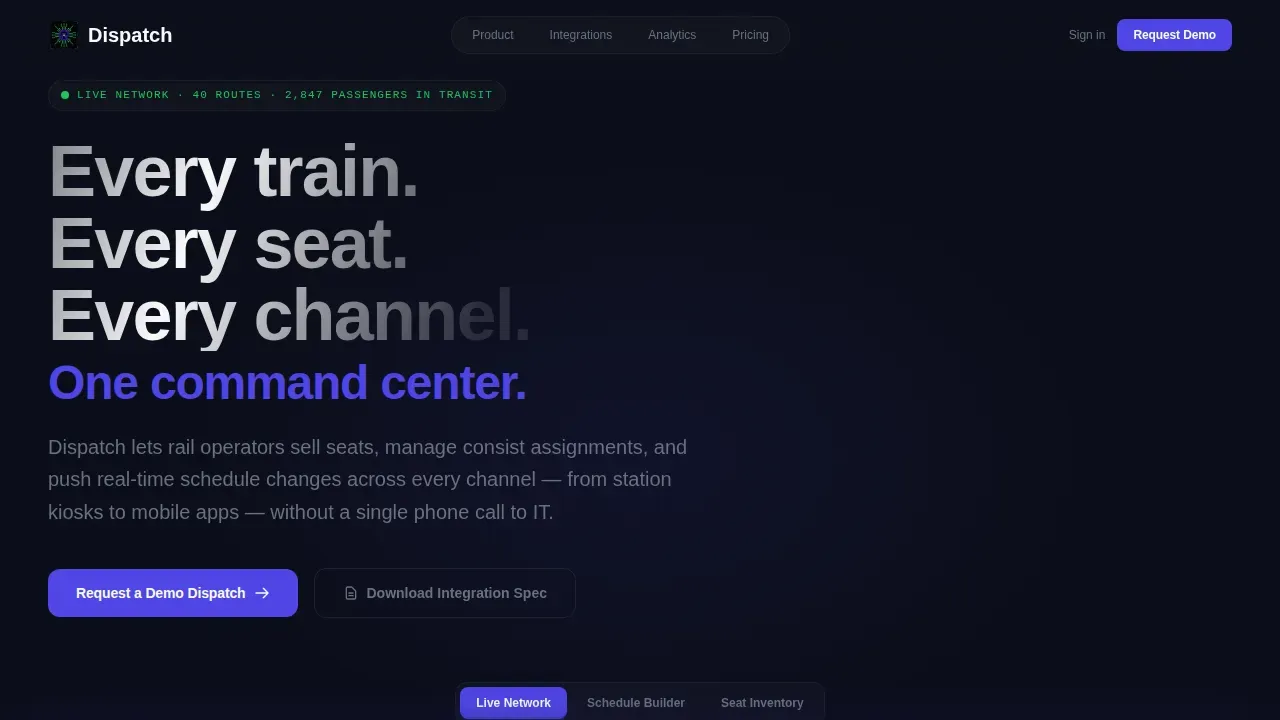
Dispatch is a scroll-reveal landing page template built for railroad booking systems and rail operations platforms. It opens with a three-tab interactive header showing Live Network, Schedule Builder, and Seat Inventory views. As visitors scroll, the booking flow, API integration layer, and analytics dashboard each animate into view. The result is a demo-request funnel that earns the conversion by showing the product working.
by Rocket studio
Quick summary
Dispatch is a dark, data-forward landing page template designed for B2B rail operations software. It gives regional passenger carriers, freight brokers, and tourism rail companies a credible front door for their dispatch system. Visitors scroll through an interactive booking flow, a live network map, and an analytics dashboard before reaching a lead generation form built to capture demo requests.
Who this template is for
Dispatch is built for teams selling complex rail operations software to buyers who evaluate products seriously before calling anyone. The template speaks the language of the dispatcher, the head of operations, and the chief technology officer equally well.
- Regional passenger carriers managing 40-route networks on legacy infrastructure who need to modernize their booking and dispatch operation without replacing core mainframe systems.
- Freight brokers coordinating intermodal handoffs across multiple Class I partners who require a clear, credible showcase for their dispatch system capabilities.
- Tourism rail companies selling dome-car upgrades and specialty services to passengers who still expect a paper ticket, alongside a digital booking experience on every other device.
What problem this template solves
Rail operations software is genuinely difficult to communicate. The products are dense, the buyers are skeptical, and the legacy context is always hovering. A generic software landing page fails because it cannot convey the depth, speed, or operational authority that dispatcher-level users demand before they will request a demo.
- Existing template options treat train control and real-time network visibility as afterthoughts, offering little more than a feature list and a contact form. Dispatch puts the product on screen from the first scroll.
- Rail operations buyers including operations vice presidents and chief technology officers need to see functional requirements addressed before they commit to a conversation. The interactive scroll layers demonstrate system depth without a single sales call.
- The gap between a promising product and a demo request is usually a credibility deficit. Dispatch closes that gap by letting visitors experience the booking flow, the integration layer, and the analytics dashboard before the form ever appears.
What you get with this template
Dispatch ships as a fully structured, single-page scroll-reveal layout. Every section is purpose-built for the railroad booking system use case. The template is ready to populate with real product data, real route network details, and real operator testimonials.
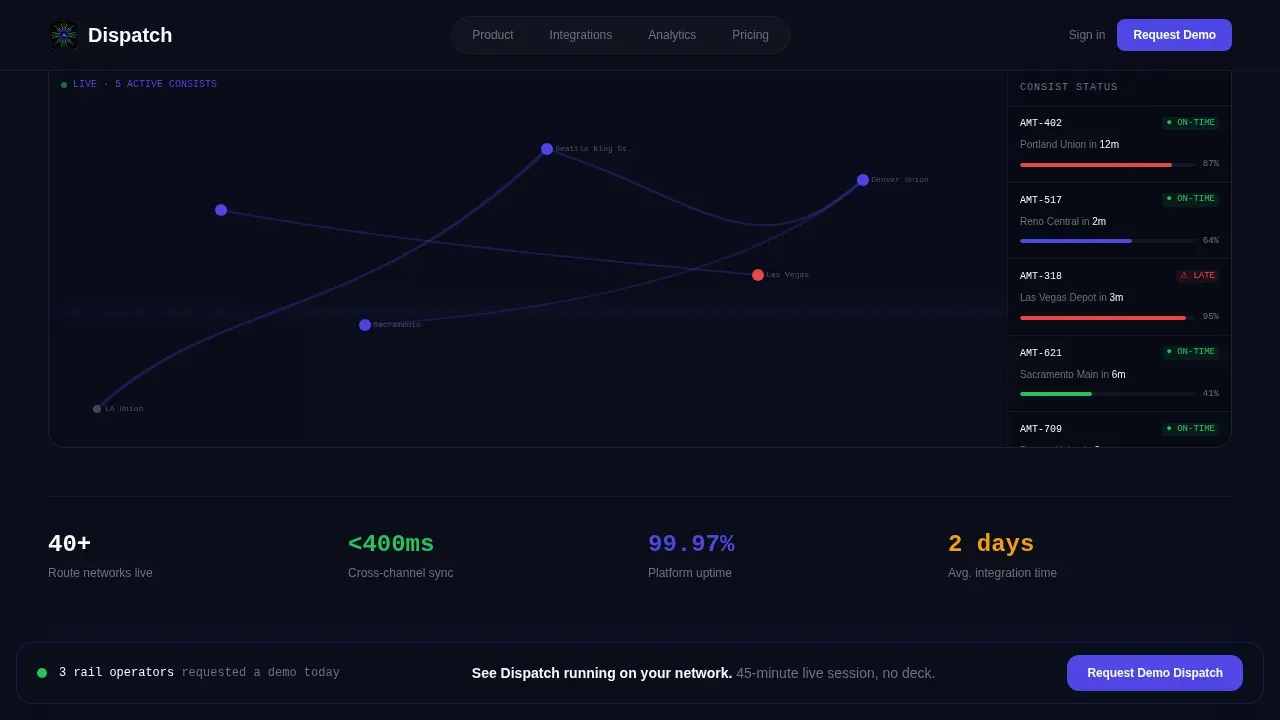
- A Feature Tab Switcher header with three distinct product screen states: Live Network with pulsing train position indicators, Schedule Builder with a drag-and-drop timetable interface, and Seat Inventory with a car cross-section diagram showing seat-level availability shading.
- Five progressive scroll sections covering the hero, the step-by-step booking flow, the API integration layer with animated pipeline visuals, the analytics dashboard with scroll-triggered chart population, and the social proof plus lead generation form section.
- Two conversion paths: a sticky bottom bar calling visitors to request a demo that appears after the second scroll section, and a gated PDF download labeled "Download the Integration Spec" for technical evaluators who need to prove feasibility before talking to sales.
Feature list
The following feature items describe what is built into the Dispatch template based on its design brief and functional requirements.
Interactive Feature Tab Switcher Header
The header opens with three labeled tabs: Schedule Builder, Seat Inventory, and Live Network. Each tab reveals a distinct product screen. The default display is the Live Network view, which shows a stylized route map with pulsing indigo dots marking active trains, arrival countdowns ticking in real time, and a sidebar reporting occupancy percentages per consist. Clicking Schedule Builder slides in a drag-and-drop timetable interface with color-coded service patterns. Selecting Seat Inventory reveals a car cross-section diagram with seat-level shading that moves from signal green through electric indigo to steel gray as availability changes. Every tab state feels like a working prototype of the dispatch system itself, dense enough to be credible and polished enough to be aspirational for every dispatcher or operations buyer who lands on the page.
Scroll-Reveal Progressive Booking Flow
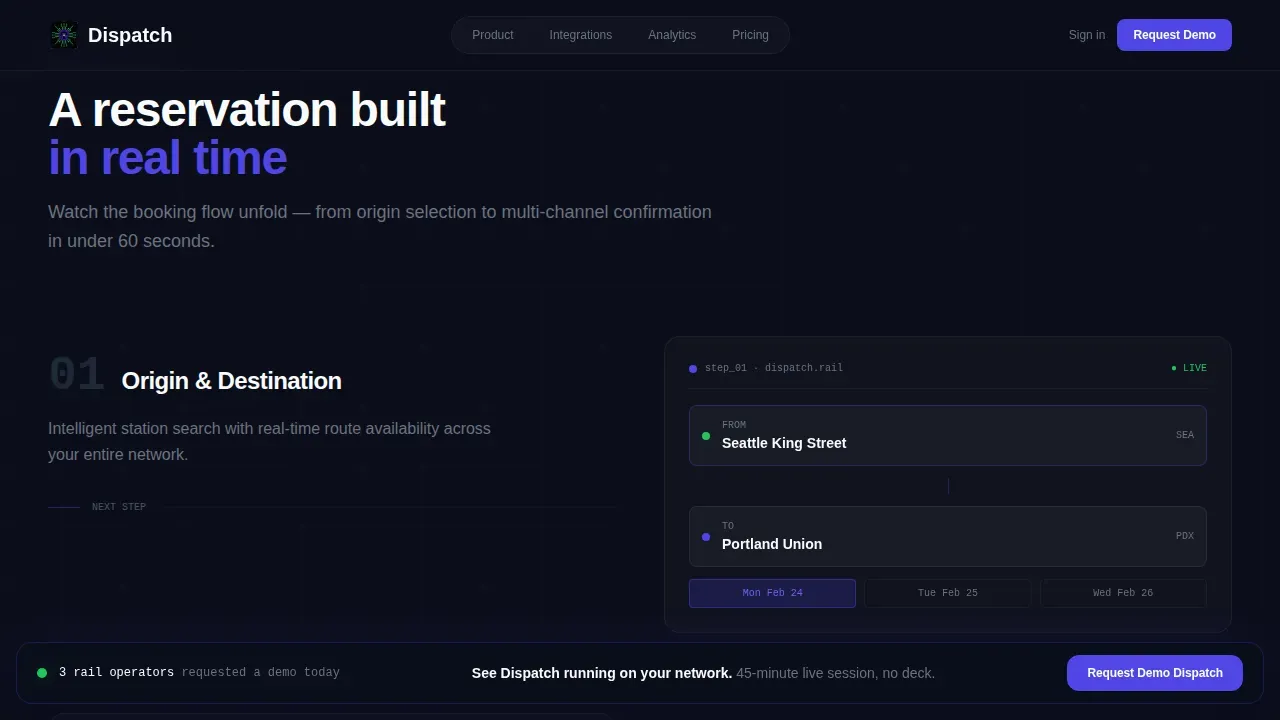
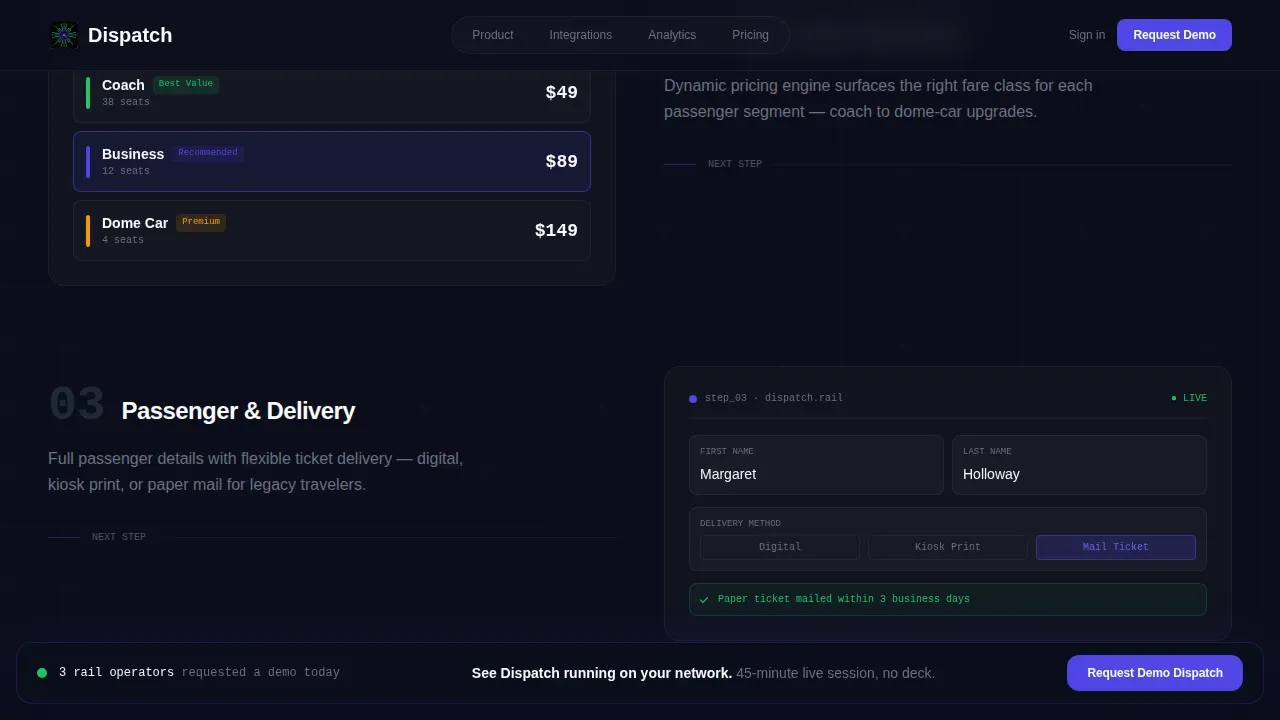
As visitors scroll past the header, the booking flow animates in step by step, as if a reservation is being built in slow motion on screen. Origin and destination pickers appear first, establishing the core train route context. Fare-class cards follow, then payment confirmation. Each element enters with a blur reveal stagger animation tied to scroll position. The effect communicates the full booking journey without requiring any real interaction, making the system feel immediately operational to a dispatcher or operations director evaluating the product. This section addresses the functional requirements that experienced buyers expect to see demonstrated rather than described.
Animated API Integration Layer
The integration section renders an SVG pipeline visualization that draws itself across the viewport as the visitor scrolls into the section. Connection lines extend from the dispatch system outward to Global Distribution System pipes, point-of-sale terminals, and mobile software development kit endpoints. The visual communicates that the platform is already connected to the channels that rail operators depend on: station kiosks, mobile apps, and third-party booking services. Real-time dispatch systems can utilize server-sent events for unidirectional updates from the server to the client, and the visual language of this section reflects exactly that kind of live data pipeline architecture. The animated API layer is critical for chief technology officers who need to assess integration feasibility before they approve a demo request.
Scroll-Triggered Analytics Dashboard
The analytics section materializes as the visitor enters the frame. Ridership heat maps, revenue-per-seat-mile graphs, and on-time performance gauges each populate with sample data as they scroll into view. The chart population animation is tied to scroll entry, so every data visual appears purposefully rather than all at once. This gives the dispatcher-level user and the operations executive a clear sense of the reporting depth available in the system. Real-time dispatch management systems enable efficient tracking and management of train operations, and this dashboard section makes that capability visible and tangible during the evaluation visit.
Dual Conversion Path Lead Generation System
The template includes two distinct conversion paths for different buyer readiness levels. The primary path is a sticky bottom bar calling visitors to request a demo. This bar appears after the second scroll section and stays anchored throughout the rest of the page, keeping the call to action visible without interrupting the experience. The secondary path is a gated PDF download offering the integration specification document for technical evaluators. The full-width form at the bottom of the page collects railroad name, fleet size via a dropdown covering three ranges, current booking system via free text, and work email. The form sequence earns trust by establishing operator identity before asking for contact details.
Data Command Visual Identity System
The template uses a terminal-dark visual identity built around electric indigo as the primary action and highlight color. Deep terminal black backgrounds anchor every section. Signal green marks live status indicators and confirmation states. Cool steel gray handles secondary text and divider lines. White is reserved for primary text and data values, appearing scarce enough to feel authoritative. Typography combines Manrope for all display and user interface text with JetBrains Mono for all data values and code-style labels. The result is a user interface that feels like a SCADA dashboard at 2 a.m., where every color earns its position by signaling something specific to the dispatcher or operator reading the screen.
Page sections overview
| Section | Purpose |
|---|---|
| Hero Tab Switcher | Displays Live Network, Schedule Builder, and Seat Inventory tabs with animated product screens |
| Booking Flow | Reveals the step-by-step reservation builder as visitors scroll, animating origin pickers, fare cards, and payment confirmation |
| API Integration Layer | Draws SVG connection lines from the dispatch system to distribution pipes, point-of-sale terminals, and mobile platforms |
| Analytics Dashboard | Populates ridership heat maps, revenue graphs, and on-time performance gauges on scroll entry |
| Social Proof Form | Combines a marquee testimonials strip with a full-width demo request form and fleet size dropdown |
| Footer Row | Single-row developer-minimal footer with essential links |
Design & branding system
Dispatch uses a Data Command visual identity designed to communicate authority, precision, and operational depth. Every color choice is functional: nothing decorative appears without meaning something specific in the context of train control and dispatch operations.
- Color system: deep terminal black (#0B0E1A to #111827) for all backgrounds, electric indigo (#4F46E5) for active states, buttons, route lines, and data highlights, signal green (#22C55E) for live status indicators and confirmation signals, cool rail-steel gray (#6B7280) for secondary text and dividers, and authority white (#F9FAFB) for primary text and critical data values.
- Typography: Manrope is used for all display headings and user interface labels, while JetBrains Mono handles all data values, timetables, code references, and terminal-style readouts, reinforcing the SCADA dashboard aesthetic across every section.
- Animation and interactivity: the template includes blur reveal, stagger, and character reveal animations on scroll entry, SVG beam draw animations in the integration layer, scroll-linked chart population in the analytics section, and tab switcher transitions in the header, all implemented as high-motion interactive states.
Mobile & speed optimization
Dispatch is designed desktop-first, reflecting the real working environment of rail operators and dispatchers who evaluate operations software at command consoles with large displays. Mobile fallback is included as a responsive layer so the page remains usable on any device.
- Desktop-first layout priority: the tab switcher, the integration pipeline visualization, and the analytics dashboard are all optimized for wide-screen displays where a dispatcher or operations director would typically evaluate a B2B rail software product.
- Server and client component architecture: static sections are built as server components for fast initial load, while interactive tabs, the sticky call-to-action bar, and the scroll-linked animations run as client components, keeping the page performant even with high animation density.
- Responsive mobile fallback: the layout adapts for smaller screens, ensuring that secondary users accessing the landing page from a mobile device or tablet can still navigate the booking flow, read the integration detail, and reach the lead generation form without loss of core content.
How this template helps you convert
Dispatch is structured so that every scroll section builds the visitor's confidence in the product before they reach the conversion point. The template treats demo request conversion as a conclusion that the visitor arrives at, not a demand placed on them immediately.
- The interactive header puts the dispatch system on screen from the first second. Visitors who are experienced dispatchers or operations buyers immediately recognize the Live Network view, the timetables interface, and the seat inventory diagram as signals of a credible, production-ready platform, not a mockup.
- The progressive scroll experience reveals the booking flow, the API integration layer, and the analytics dashboard in sequence. By the time a visitor completes the scroll, they have seen the system handle seat reservations, route network management, and revenue reporting. The sticky bar calling them to request a demo has been visible throughout, reinforcing the primary conversion path without interrupting the content.
- The dual conversion architecture serves two buyer types at once. Decision-makers can request a demo immediately. Technical evaluators can download the integration specification document and study the API detail before committing to a sales conversation. Both paths are present and visible at the same time, so no serious buyer leaves without a next step.
Other information about this template
Dispatch is built on principles that align with how modern real-time dispatch management systems are designed and documented. The following points provide further details for technical evaluators and platform teams considering this template for their rail operations software product.
- The Dispatcher User Interface Specification provides a comprehensive analysis for implementing a web-based dispatcher user interface, and the Dispatch template reflects that specification's approach: role-aware layouts, data-forward displays, and a user interface that supports dynamic role assignment across devices. The user interface must support role-based management and access controls to allow dynamic role assignment, which the template's design system accommodates through clearly differentiated visual states.
- The template's integration layer section is designed to communicate how a real-time dispatch system uses server-sent events, also known as SSE, for unidirectional updates from the server to the client. SSE is a standard mechanism for pushing live train position data, arrival countdowns, and status signals to connected displays across a network of station kiosks and mobile applications.
- Real-time dispatch management systems can integrate various communication methods including voice, data, and video. The Kontron Next-Gen Dispatcher is one example of an integrated terminal solution for voice, data, and video communications that combines point-to-point, group, and broadcast call functions with message-based communication delivery. The Cisco Connected Rail Solution provides an end-to-end solution design for service delivery to rail infrastructure, supporting voice communications between personnel on the train and personnel in the control center. Both represent the kind of integrated communication architecture that the Dispatch template is designed to showcase to buyers evaluating rail operations platforms.
- The Kontron Next-Gen Dispatcher features a dynamic overlay tracking map that displays the current real-time location and operational status of all localized subscribers. The Dispatch template's Live Network tab is designed to visually communicate this same concept: all the trains on the network visible at once, each pulsing in position, each connected to live arrival and occupancy data.
- The Cisco Connected Rail Solution provides a converged, multiservice, secure, and standards-based infrastructure for rail operators, and the Dispatch template's API integration animation is designed to illustrate exactly this kind of connected, multi-channel architecture to technical buyers.
- The template supports localization considerations. Localization is essential for the user interface to ensure a consistent experience across different countries and languages, and the template's component structure is organized to accommodate text replacement and locale-specific data formatting for operators running services across different countries.
- The system includes features for creating and editing train panels, managing routes, and setting up timetables. The Dispatcher System can automatically set up a network that finds the best route for trains between locations, and the template's Schedule Builder tab is designed to make that capability visible and understandable to a non-technical buyer in a first-pass evaluation.
- The template uses two options for conversion: a demo request form for sales-ready buyers, and a gated integration specification download for technical evaluators. Both conversion paths are present on the same landing page, so buyers at different stages of evaluation always have a relevant next step available.
- AI-powered rail operations solutions enhance operational efficiency by automating various processes including real-time tracking, resource management, and schedule optimization. AI applications can streamline communication between dispatchers and train operators, and AI-powered systems can analyze large datasets to optimize train schedules and reduce delays. The Dispatch template is designed to support product teams building AI-powered rail operations platforms, giving them a credible front end that communicates the depth and intelligence of their dispatch system to buyers who may not yet understand the technology behind it.
- The following types of buyers evaluate this template most often: operations directors at regional passenger carriers, chief technology officers at rail technology vendors, and product managers at intermodal transport and freight brokerage firms who need a high-quality lead generation page for a complex B2B product.
- The template's previous section structure, from hero through social proof, is designed so that each previous section sets up the next. The hero establishes authority, the booking flow demonstrates the product, the integration layer proves connectivity, and the analytics section shows reporting depth. Each previous section earns the next scroll, keeping the visitor engaged through to the form.
Theme
Data Command
Creative direction
Interactive Explorer
Color system
Electric Indigo
Style
Scroll Reveal (Progressive)
Direction
Lead Generation
Page Sections
Three-tab Interactive Product Header
Progressive Scroll Booking Flow
SVG Animated API Integration Layer
Scroll-triggered Analytics Dashboard
Dual Conversion Path Lead Generation
Data Command Dark User Interface Visual System
Related questions
What kind of rail operations product is this template designed for?
Can the tab switcher header be customized with real product screens?
Does the template support two conversion paths at the same time?
Is the template built for desktop or mobile users?
What animation and interactivity is included in this template?



