Transition — Seamless Flutter Migration Landing Page Template
The Migrate landing page template is built for Flutter migration consultancies targeting CTOs and engineering leads who need to retire legacy mobile codebases without a single day of downtime. It combines a terminal-dark Dashboard Pro aesthetic with an interactive data grid, a migration complexity calculator, and a dual lead-capture system to turn skeptical engineers into qualified prospects.
by Rocket studio
Quick summary
Migrate is a single-page Flutter migration landing page template designed for technical consultancies. It presents hard migration data, expandable scenario grids, and a cost-savings calculator inside a DevOps command-center visual system. Every section earns attention through evidence, not persuasion, guiding engineering decision-makers toward a codebase assessment submission.
Who this template is for
This template speaks directly to the engineers and leaders who feel the weight of deprecated mobile stacks every sprint. It is built for teams that need to migrate legacy systems and prove the business case before writing a single line of Flutter code.
- CTOs at Series B startups managing mounting tech debt on Xamarin, React Native, Swift, or Kotlin codebases
- Enterprise engineering leads tracking six-figure monthly maintenance costs on frameworks their vendors no longer support
- Agency directors who need to deliver cross-platform app solutions before runway disappears
What problem this template solves
Legacy mobile development creates compounding challenges. Teams spend critical resources maintaining deprecated systems instead of shipping new features. The real problem is that clients and stakeholders rarely trust a migration pitch without seeing concrete data first.
- There is no standard format for presenting migration data in a way that engineers can interrogate and trust
- Most migration landing pages rely on vague promises rather than scenario-level metrics, build time deltas, and cost efficiency breakdowns
- Capturing qualified leads from a technical audience requires earning the click, not just placing a form
What you get with this template
This template gives you a complete, data-dense landing page structure that lets your migration track record speak for itself. Every section is purposefully ordered to move a skeptical engineering leader from curiosity to qualified intent.
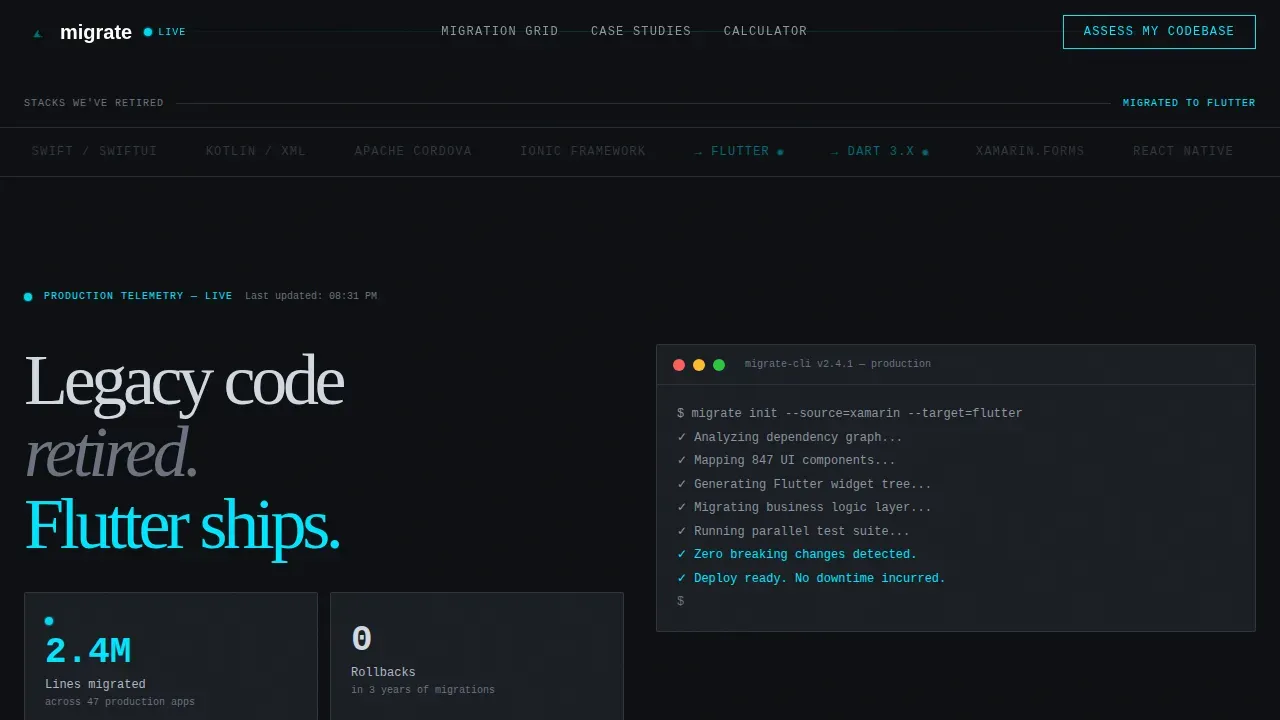
- A terminal-style hero with an animated logo marquee and a single high-impact metric stat
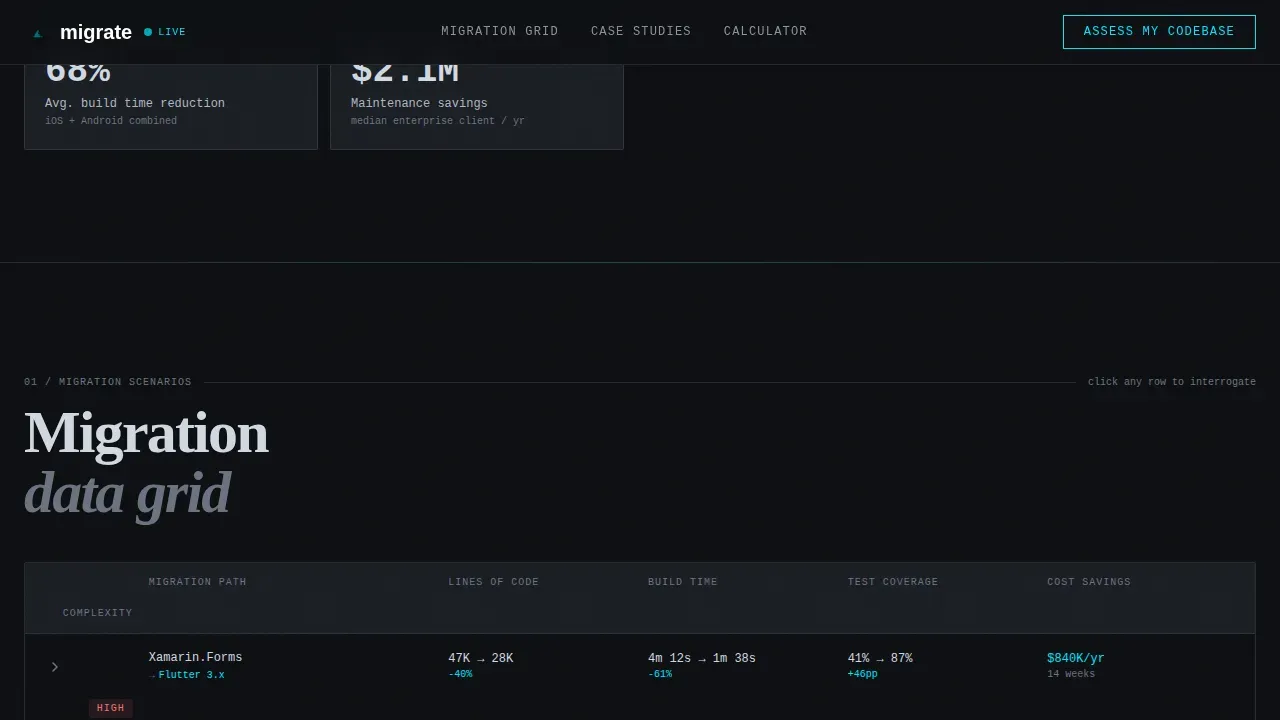
- An interactive migration data grid with expandable rows per scenario and a real-time cost calculator
- A dual lead-capture system: a persistent floating "Assess My Codebase" bar and a gated Migration Playbook PDF download
Feature list
This template includes purposefully engineered features. Each one serves the migration process from first impression to form submission.
Interactive Migration Data Grid
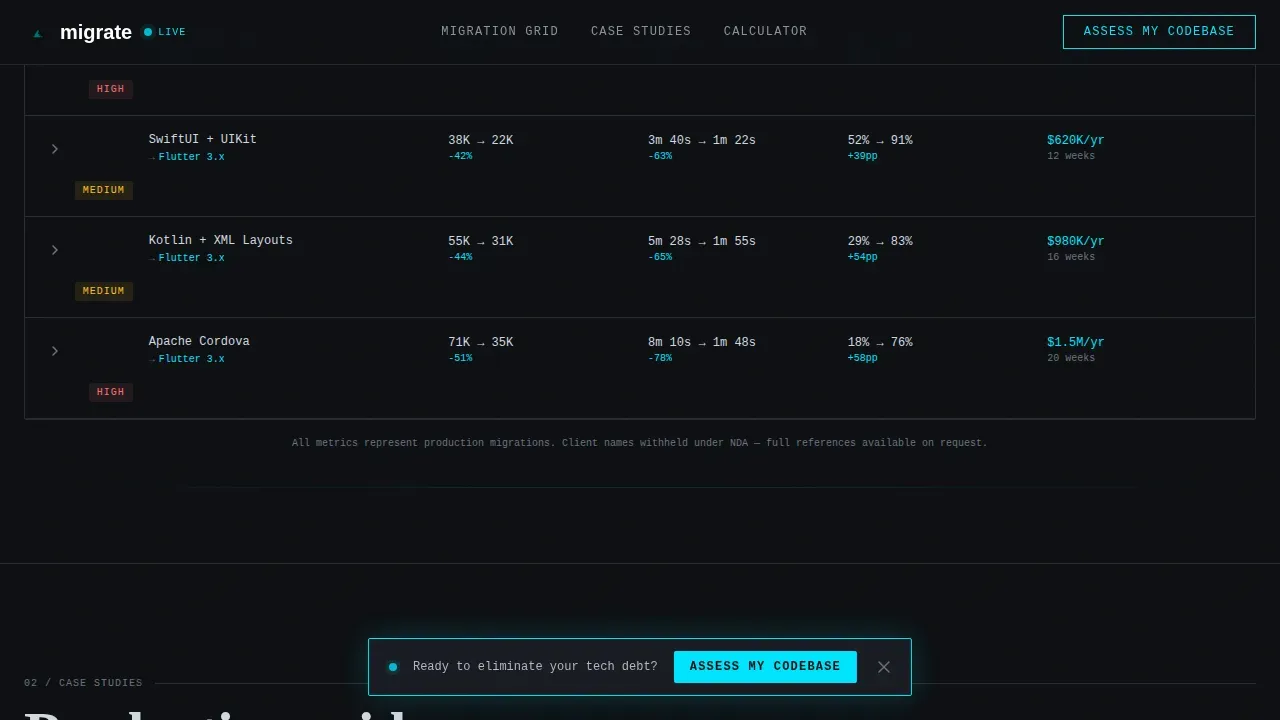
The centerpiece of the template is a live-data grid where each row represents a distinct migration scenario, such as Xamarin Forms to Flutter or React Native to Flutter. Visitors expand rows to reveal lines of code reduced, build time delta, test coverage change, and estimated cost savings. This lets developers and decision-makers query the data themselves rather than take your word for it.
Migration Complexity Calculator
The calculator section lets visitors input their current framework, approximate codebase size, and key concerns before seeing an estimated savings figure. It earns the call to action by delivering value before asking for contact details. This approach helps build confidence with technical audiences who expect proof before process.
Dual Lead Capture System
The primary conversion path is an "Assess My Codebase" form that appears as a persistent floating bar after the second scroll fold. It collects current framework, codebase size range, migration concerns via multi-select, and work email. A secondary path offers a gated Migration Playbook PDF download for visitors not ready to engage directly, capturing email and framework choice only.
Terminal Hero with Metric Dashboard
The hero opens with an animated logo marquee of legacy stacks, including Xamarin, React Native, Swift, Kotlin, Dart, and Flutter, rendered in monochrome steel and fading in left to right. Below it, a single metric dashboard tile displays the core proof statement. No hero image, no illustration, just data that sets the architecture of trust immediately.
Case Study Bento Grid
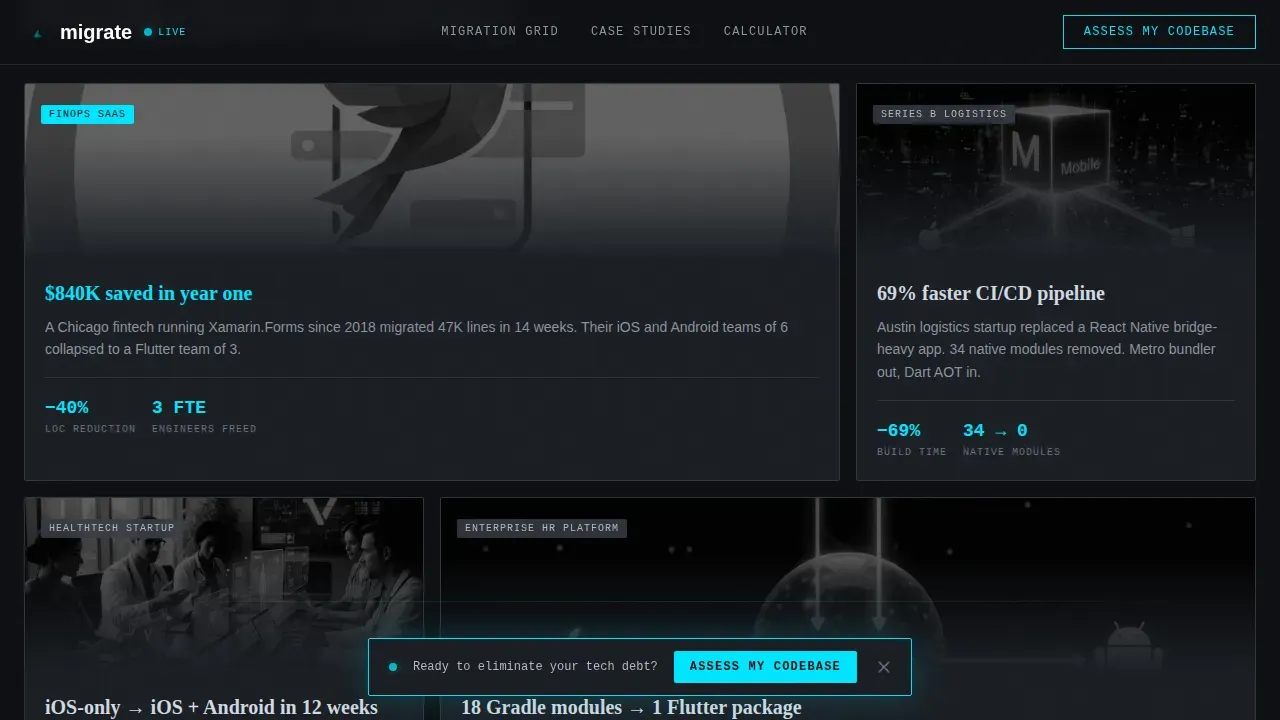
Project cards are laid out in an asymmetric bento format, each showing specific architecture details, dependency maps, and named migration outcomes. The layout lets visitors focus on the case study most relevant to their own stack without losing context of the broader track record.
Scroll-Reveal Animation System
The template uses a layered animation system: marquee scrolling for the logo bar, scroll-triggered reveals for each data section, row-expansion animations for the grid, and a live-update effect for the calculator. The floating call-to-action bar fades in with a terminal pulse effect, keeping the primary conversion route visible without interrupting the data exploration flow.
Page sections overview
| Section | Purpose |
|---|---|
| Hero Terminal Dashboard | Displays the core migration metric stat and animated legacy-stack logo marquee |
| Migration Data Grid | Interactive expandable rows showing per-scenario migration metrics and architecture details |
| Case Study Cards | Asymmetric bento layout with named project outcomes and dependency map animations |
| Migration Calculator | Real-time cost and savings estimator that earns the lead-capture click |
| Lead Capture Bar | Persistent floating "Assess My Codebase" form and gated playbook download path |
| Minimal Footer | Single-row linear footer with essential links and contact routes |
Design & branding system
The visual identity is built around a Monochrome Steel color system that feels like a DevOps command center at 2 a.m. Every color in the palette is earned by something functional. The typography pairs JetBrains Mono for data and code elements, DM Sans for body copy, and Fraunces for hero display text.
- Color palette: deep terminal black (#0D0F12) for backgrounds, brushed steel gray (#3A3F47) for surfaces, status-bar silver (#B0B8C1) for secondary text, and electric cyan (#00E5FF) reserved exclusively for interactive states, live data pulses, and primary calls to action
- Typography system: JetBrains Mono renders metric values and code strings; DM Sans handles all body and form text; Fraunces anchors the hero display headline
- The overall aesthetic follows a Dashboard Pro theme, data-dense, dark, and deliberate, where every visual decision supports legibility and technical credibility
Mobile & speed optimization
The template is designed desktop-first, reflecting how CTOs and engineering leads evaluate vendors. It is built with responsive behavior so the experience holds on mobile without losing the data-grid clarity that makes the template effective.
- Server Components power the static sections of the page, while Client Components handle the interactive grid, calculator, and floating call-to-action bar
- The animated logo marquee, scroll-reveal system, and row-expansion grid are implemented as client-side interactions that do not block the initial page load
- The floating lead-capture bar and gated download path remain accessible and functional at all viewport sizes
How this template helps you convert
The migration process from legacy mobile stacks to Flutter is complex, and skeptical engineers do not convert on vague promises. This template is structured to move technical buyers through a logical evidence chain.
- The hero metric stat and logo marquee immediately establish credibility by surfacing a concrete proof statement before a visitor has scrolled once, addressing the most common early objection around track record and scale
- The interactive data grid and case study bento layout let visitors self-qualify by querying the migration data most relevant to their own stack, building trust through transparency rather than sales copy
- The calculator reveals estimated savings before requesting contact details, so the "Assess My Codebase" submission feels like a natural next step rather than a cold form fill
Other information about this template
This template follows a set of migration best practices baked into both its structure and its messaging framework. Understanding them helps you get the most value when customizing it for your consultancy.
- The template is designed to communicate gradual migration strategy clearly. In the Migrate Phase, the data grid shows how app logic and data shift to new structures before decommissioning old ones, which reflects the Expand-Contract Pattern for handling database schema changes.
- Feature flag messaging is built into the calculator and case study sections. Feature flags allow teams to toggle new Flutter features on or off for specific user groups without redeploying code, which is a key point of reassurance for enterprise clients.
- Blue-green deployments are referenced in the migration scenario rows. Blue-Green Deployment maintains two identical, independent production environments simultaneously while traffic is shifted gradually via load balancers, achieving zero downtime even at scale.
- The template separates the landing page from the Flutter app itself. Building the landing page outside the Flutter project avoids common SEO issues and keeps the production environment clean.
- User Acceptance Testing on a subdomain is recommended before directing live traffic to the new app. The template includes a section placeholder for communicating this process step to prospective clients.
- Change Data Capture tools keep data between old and new systems in real-time synchronization during the migration process. This fact can be surfaced in your case study cards to address concerns around data integrity.
- The Server-controlled Maintenance Screen pattern informs users about read-only feature status during data synchronization, and this context can be reflected in your hero metric tile messaging.
- If a brief pause of the main app is necessary, a static maintenance page hosted on a reliable platform is the recommended fallback. The template's hero section is designed to communicate this kind of transparency clearly.
- Lowering DNS TTL to 60 to 300 seconds before migration enables quick traffic shifts when updating records, a detail worth including in your Migration Playbook PDF for technical readers.
- The gated playbook download is structured to capture email and framework choice only, keeping friction low for visitors in the early stages of their migration evaluation.
Theme
Dashboard Pro
Creative direction
Interactive Explorer
Color system
Monochrome Steel
Style
Dashboard/Data Grid
Direction
Lead Generation
Page Sections
Interactive Migration Data Grid
Migration Complexity Calculator
Dual Lead Capture System
Terminal Hero with Animated Logo Bar
Case Study Bento Layout
Scroll-reveal and Row-expansion Animations
Related questions
What migration scenarios does the data grid cover?
How does the migration complexity calculator work?
Does the template communicate a rollback plan to prospective clients?
Is this template suited for targeting enterprise engineering leads?
Can the gated playbook function as a secondary lead capture route?



