Transition — Seamless Infrastructure Management Landing Page Template
Migrate is a bold brutalist landing page template built as a technical command center for web migration. It walks designers, developers, and agency teams through every phase of moving a site into Webflow, from audit and CMS remapping to DNS propagation, using scroll-linked interactive components, glassmorphic dark-mode design, and a structured checklist approach that replaces migration anxiety with confident clarity.
by Rocket studio
Quick summary
Migrate is a single-page landing page template designed as a full migration command center. It guides technical users through a structured, phase-by-phase process of moving websites from legacy platforms into Webflow. The page uses scroll-linked reveals, interactive hover states, and a bold brutalist glassmorphic design to make every migration step feel deliberate and achievable.
Who this template is for
This template is built for technical practitioners who work with real migration projects under real pressure. It speaks directly to people who need structure, not stock imagery, and who want a landing page that earns trust by demonstrating competence.
- Freelance web designers managing a client migration mid-project and needing a clear, shareable process view
- Agency operations leads responsible for moving multiple WordPress websites before a quarter-end deadline
- Solo founders who have outgrown their current platform and need to migrate to a more capable website environment
What problem this template solves
Web migration is genuinely hard. The steps are rarely linear, the data dependencies are easy to miss, and the cost of breaking a live website is high. Most documentation reads like a dry checklist. This landing page template solves that by making the migration process itself the product experience.
- Visitors arrive with migration anxiety and leave with a clear mental model of every step involved
- The interactive phases replace abstract guidance with a live, scrollable simulation of the actual migration process
- The page earns the download before asking for it, reducing friction and increasing conversion on the final call to action
What you get with this template
You get a fully designed, scroll-reveal landing page that functions as an interactive migration guide and a high-converting download page. Every section is built to build confidence and move visitors toward action.
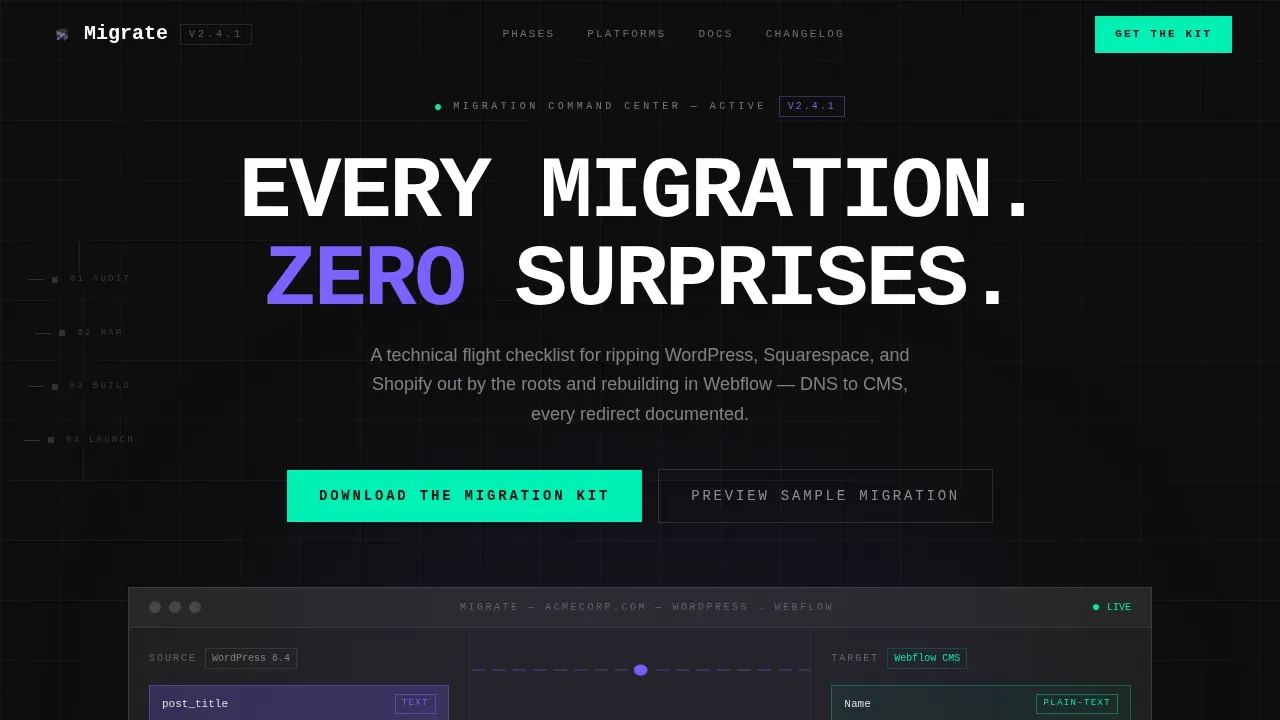
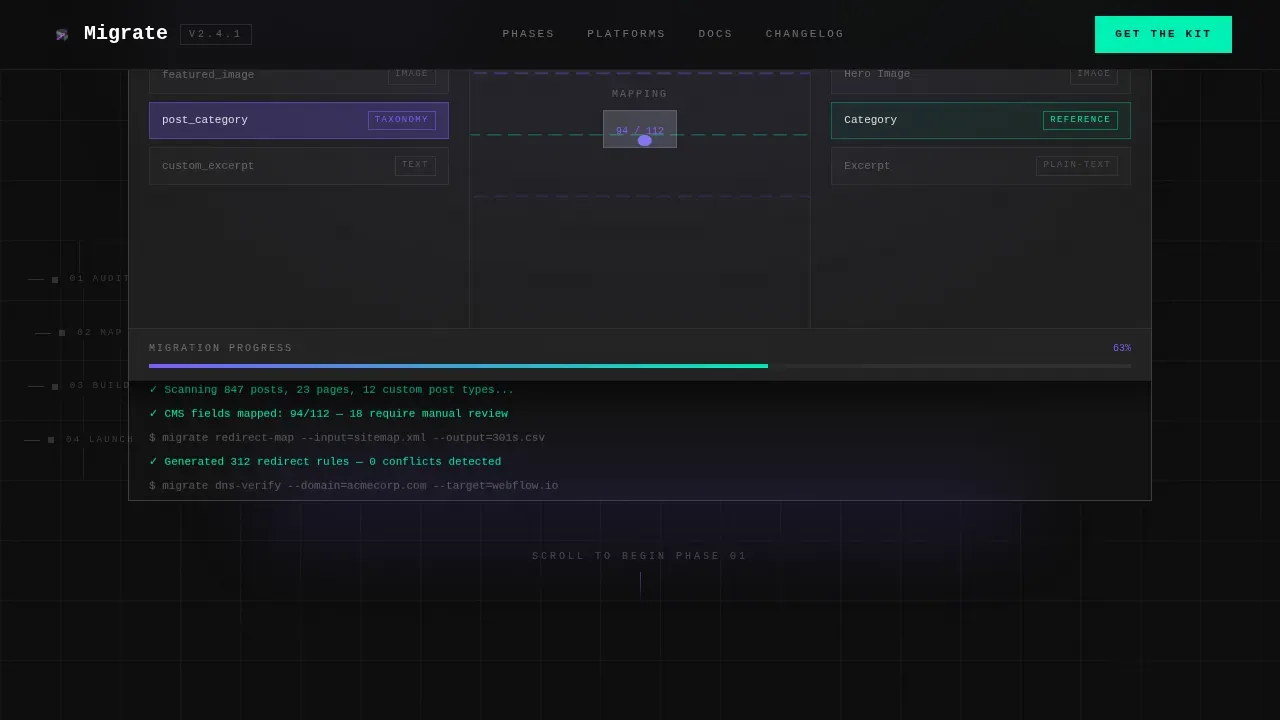
- A full-viewport dashboard preview hero with a 3D-tilted glass panel, animated CMS field mapping, and a live progress bar
- Four interactive phase sections that respond to scroll, each adding a new layer of migration logic and visual depth
- A fixed-bottom call-to-action bar and a terminal-style full-width download block, both styled with mint-green brutalist buttons and a two-field capture form
Feature list
This landing page template is built around a small set of carefully constructed components. Each one serves a functional purpose inside the migration narrative.
Scroll-Linked Phase Reveal System
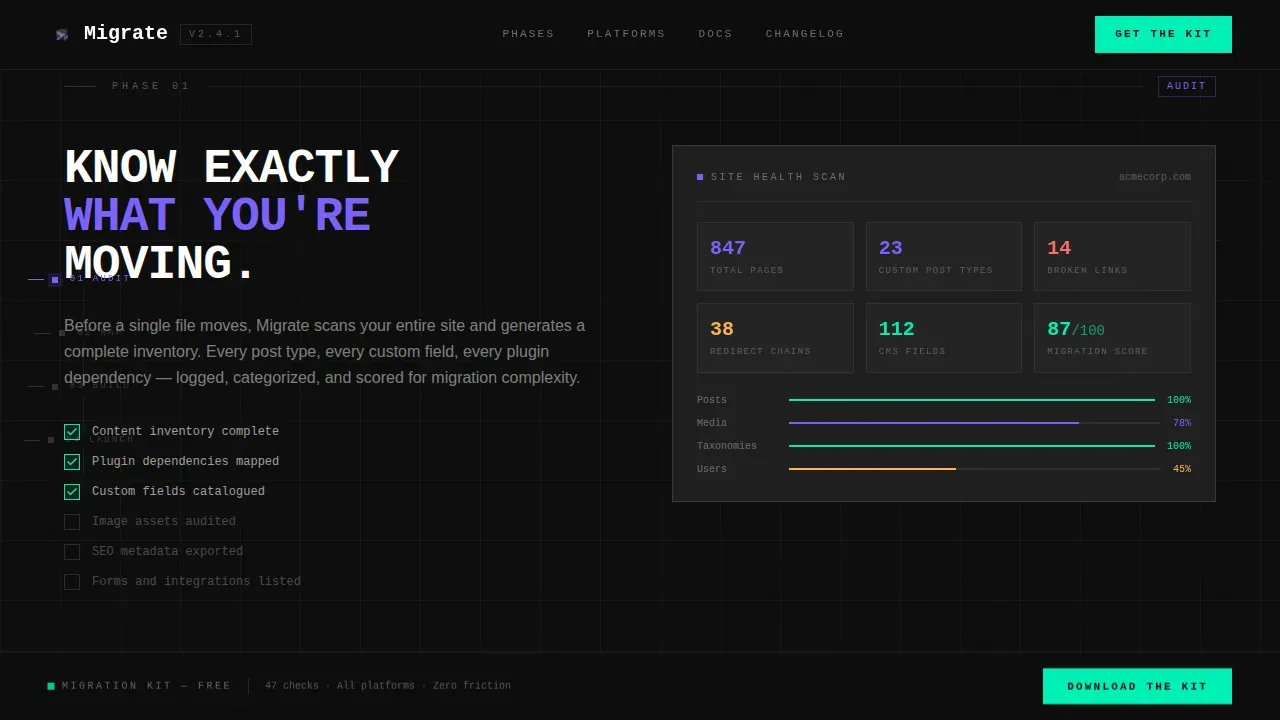
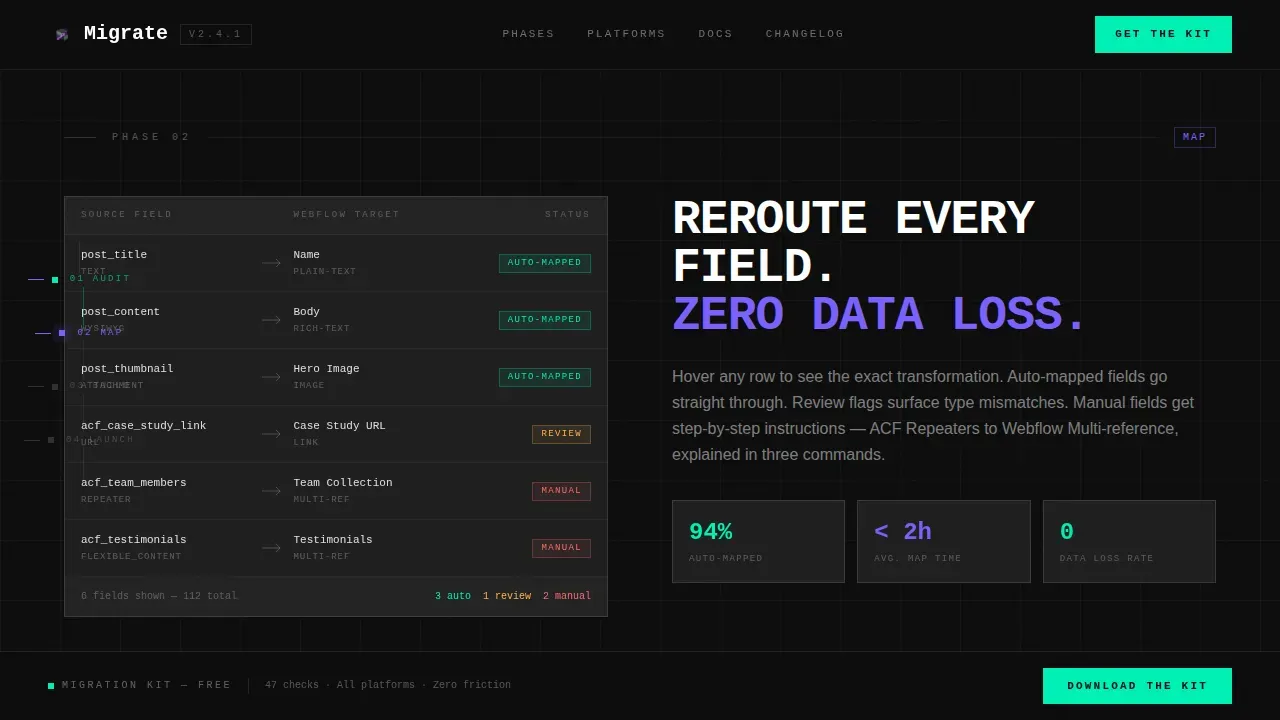
The page is organized into four migration phases, each unlocking as the visitor scrolls. Phase one shows an animated site health scan with populating metrics. Phase two lets visitors hover over CMS field types and watch them visually reroute to their Webflow equivalents. Phase three progressively assembles a Webflow project structure in real time. Phase four triggers a simulated DNS propagation animation paired with inline social proof. A persistent vertical progress rail with brutalist tick marks tracks position throughout.
Full-Viewport Dashboard Hero
The hero section renders a pixel-perfect dashboard preview of the migration guide interface inside a frosted glass container tilted at a subtle 3D angle. The screen shows a live migration in progress: a source platform column on the left, animated connector lines mapping content types, a Webflow CMS column on the right, and a terminal log scrolling real migration commands at the bottom. The violet glow pulses on active nodes. No stock imagery is used.
Brutalist Glassmorphic Design System
The visual design combines bold brutalist layout principles with a glassmorphic dark-mode color system. Frosted glass panels sit at 8% white opacity with 24-pixel blur over a void black background. Electric violet marks active states and progress indicators. Sharp mint is reserved exclusively for call-to-action surfaces and success confirmations. Borders are 1-pixel strokes. Body copy is set in off-white. Headlines are pure white. Oversized monospaced type and visible raw grid lines reinforce the brutalist aesthetic without compromising readability.
Interactive CMS Mapping Explorer
Phase two of the page gives visitors the ability to hover over CMS field type cards and watch animated connector lines reroute data from legacy platform structures to Webflow collection fields. This interaction makes the abstract concept of field remapping tangible and immediate. It is one of the most technically instructive interactive components on the page.
Two-Path Conversion Architecture
The template offers two conversion routes. The primary path prompts visitors to download the Migration Kit using a mint brutalist button. The form requires only an email address and a platform dropdown covering WordPress, Squarespace, Wix, Shopify, and Other. The secondary path opens an interactive demo modal with no form gate, letting visitors preview a sample migration before committing. Both paths appear at strategic points across the landing page.
Terminal-Style Typography and Motion
Headlines and code-style labels are set in a monospaced typeface that reinforces the command-center concept. Body copy is set in a clean humanist sans-serif for readability. Scroll-triggered motion reveals each phase section with purposeful timing. The animation system uses GPU-accelerated transforms and IntersectionObserver for smooth landing page performance. The overall motion design feels like opening a terminal window: precise, intentional, and deeply satisfying.
Page sections overview
| Section | Purpose |
|---|---|
| Hero Dashboard Preview | Full-viewport 3D glass panel showing a live migration in progress with animated CMS mapping and terminal log |
| Phase 1 Audit | Animated site health scan with metrics populating in real time as the visitor scrolls into view |
| Phase 2 Map | Hover-interactive CMS field remapping panel showing data routing from source platform to Webflow |
| Phase 3 Build | Progressive Webflow project structure assembly, building visually as the visitor scrolls through the section |
| Phase 4 Launch | Simulated DNS propagation animation with inline testimonials and social proof |
| Download call to action Block | Full-width terminal-style block with mint button, email field, and platform dropdown |
| Fixed Bottom Bar | Persistent post-hero call-to-action bar appearing after the dashboard preview section |
| Footer Row | Linear single-row footer with clean layout and minimal navigation |
Design & branding system
The design system for this landing page is built around the tension between severity and precision. Every element earns its place. Brutalist design maintains a raw aesthetic while maximizing information density, and this template carries that principle through every panel, type choice, and motion detail.
- Color palette: void black (#0D0D0D) background, frosted white glass panels at 8% opacity with 24-pixel blur, electric violet (#7B61FF) for active states, sharp mint (#00F0B5) for call-to-action and success surfaces, 1-pixel borders at 12% white opacity, off-white (#E0E0E0) body text, pure white (#FFFFFF) headlines
- Typography: oversized monospaced type for headlines and code labels, clean humanist sans-serif for body copy, bold contrast between the two creates a raw command-center reading experience
Mobile & speed optimization
This landing page template is designed desktop-first, built around the wide-monitor terminal aesthetic that its target audience uses daily. The layout, motion system, and visual density are calibrated for large screens. The animation system is constructed with GPU-accelerated transforms and IntersectionObserver to keep the page moving smoothly even during high-interactivity scroll sequences.
- Desktop-first layout optimized for wide viewport widths, with the full visual depth of the glassmorphic panel system intact
- GPU-accelerated motion components and IntersectionObserver-based triggers keep scroll-linked animations clean without layout-blocking scripts
How this template helps you convert
This landing page is built to earn the download before it asks for it. The structure is deliberate: visitors experience the migration logic firsthand before they see the final call to action.
- The scroll-reveal phase system walks visitors through the exact process they are trying to solve, building confidence and familiarity with each section they unlock
- The two-field download form and the gate-free demo modal remove friction at both conversion entry points, making it easy to take action at whatever trust level the visitor has reached
Other information about this template
This section covers additional technical context, build details, and reference information useful to designers and developers customizing or extending the template.
- The template is built as a scroll-reveal (progressive) single landing page using high-interactivity animation architecture with IntersectionObserver-based section triggers
- Designers working with tools like Framer or motion libraries such as Framer Motion will find the scroll-reveal concept familiar; the phase unlock pattern maps closely to how Framer Motion handles scroll-linked animation sequences in React-based projects
- The page components are organized so that each phase section is a self-contained design and code block, making it straightforward to add, reorder, or drop individual phases without breaking the overall layout
- The template ships with scripts that handle the progress rail logic, phase unlock timing, and terminal log scroll behavior; these scripts are modular and do not depend on one another
- TypeScript-friendly component structure means developers building on top of this template in a React or TypeScript environment can integrate the interaction logic cleanly
- Brutalist design enhances technical credibility by showcasing a raw, under-the-hood look that resonates with developers and IT professionals; this template uses that principle to make the landing page itself feel like a tool, not a brochure
- The migrate brutalist migration command center landing page template is a strong portfolio piece for agencies and freelancers who want to share examples of technically ambitious landing page design with prospective clients
- The page is recommended for projects where the audience is already technically literate; the design assumes familiarity with concepts like CMS fields, DNS propagation, and redirect chains, and does not over-explain them
- For teams sharing the template internally, the file is structured to make onboarding a new designer or developer fast; the section naming and component grouping follow a logical build order
- Resources such as the free demo modal and the Migration Kit download flow are self-contained inside the page; no external dependencies are required to preview or publish the landing page
- Legal copy placement and link slots are included in the footer row for teams that need to add privacy or terms references before going live to production
Theme
Bold Brutalist
Creative direction
Interactive Explorer
Color system
Glassmorphic
Style
Scroll Reveal (Progressive)
Direction
App Download
Page Sections
Scroll-linked Phase Reveal System
Full-viewport Dashboard Hero
Interactive CMS Mapping Explorer
Two-path Conversion Architecture
Brutalist Glassmorphic Design System
Terminal-style Motion and Scripts
Related questions
What platforms does the migration guide cover?
Does the demo modal require a sign-up?
What migration best practices does the guide reflect?
Can I customize the phase sections for a different migration context?
Is this template suitable for a developer portfolio or agency showcase?



