Veterinary Software Appointment Booking Website Template
Triage is a dashboard-style veterinary appointment scheduling landing page template built for practice managers and multi-clinic operators who need to eliminate double-bookings, prioritize urgent cases, and automate front-desk workflows. It combines an interactive efficiency calculator, a live comparison grid, and a migration form into one focused, data-command design that converts visitors into confident sign-ups.
by Rocket studio
Quick summary
Triage is a single-page scheduling platform template built for veterinary clinics that need real order at the front desk. It leads with an interactive calculator, moves through a detailed comparison grid, and closes with a low-friction migration form. The dark Data Command aesthetic makes every data point feel precise, purposeful, and trustworthy to practice managers and corporate veterinary group directors alike.
Who this template is for
This template is designed for professionals who manage appointment-heavy veterinary practices and need a website that communicates capability before anything else. It speaks directly to people who have outgrown paper schedules and generic booking tools.
- Practice managers at multi-veterinarian clinics, typically running two to eight doctors, who need to prioritize and schedule appointments without collision
- Corporate veterinary group operations directors rolling out standardized booking across ten or more clinic locations
- Independent veterinary clinics moving from legacy practice management software and looking for a structured way to demonstrate their upgrade
What problem this template solves
Veterinary clinics that serve dogs, cats, exotic animals, and urgent walk-in cases all day face a chaotic scheduling reality. When different types of appointments, from a feline dental to a canine post-op recheck, compete for the same slots across multiple veterinarians, front-desk teams lose hours to conflict resolution. Pet owners waiting on confirmation grow frustrated, and critical cases risk delay.
- Double-bookings across doctor columns waste clinical hours and erode client relationships built on reliable, on-time care
- Receptionists juggle urgent triage calls, current medications queries, and payment collection inquiries simultaneously, with no single screen to manage it all
- Corporate groups struggle to deliver consistent triage protocols and scheduling standards across every clinic location
What you get with this template
This template gives you a complete, production-ready landing page organized around five primary sections. Each section has a specific job: attract, quantify, compare, validate, and convert. You get a finished website that lets practice managers assess value before they ever read a headline.
- An interactive scheduling efficiency calculator that outputs recovered appointment slots, recaptured revenue, and front-desk hours saved, based on inputs the visitor provides
- A side-by-side comparison data grid that scores this platform against generic scheduling tools and legacy systems across eight veterinary-specific criteria
- A migration form with a live difficulty badge that personalizes the transition estimate based on the visitor's current software
Feature list
This template is built with five high-interactivity sections, precise dark-mode styling, and component-level logic designed for veterinary scheduling use cases.
Interactive Efficiency Calculator
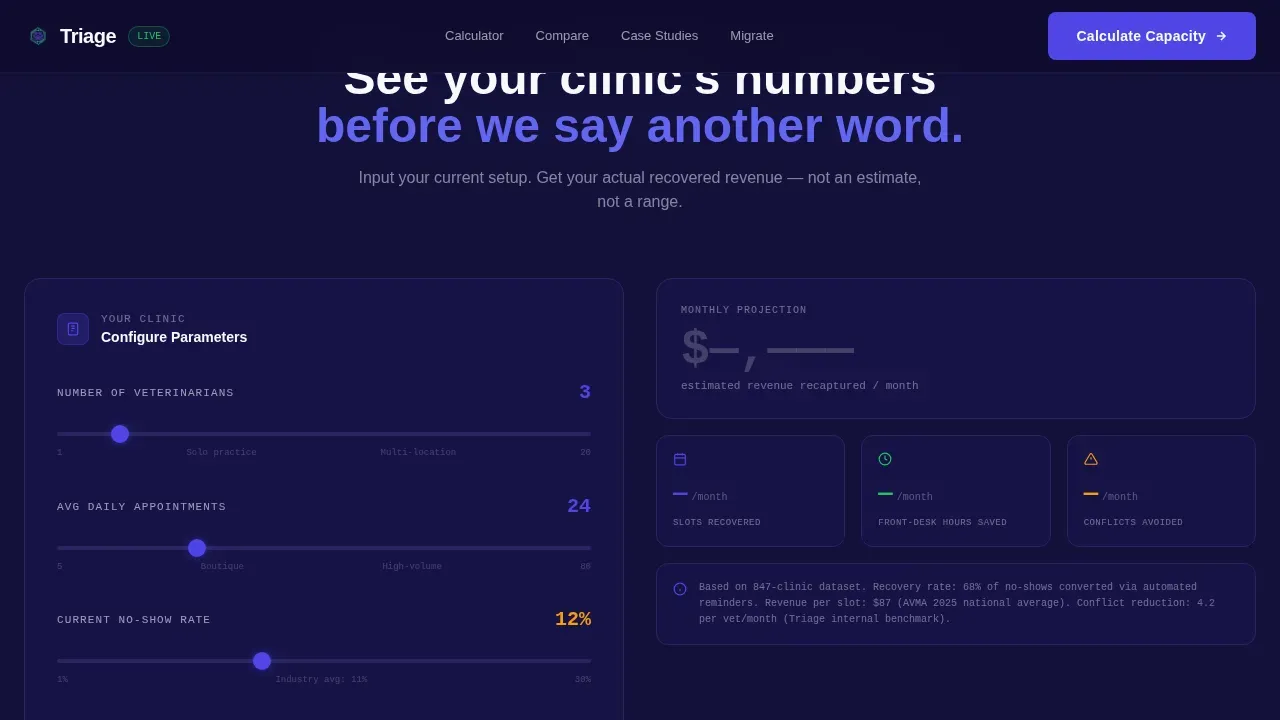
The calculator is the first thing visitors interact with. They enter their number of veterinarians, average daily appointments, and current no-show percentage. The tool instantly renders a glowing data card showing recovered appointment slots per month, estimated revenue recaptured, and front-desk hours saved. This lets pet practice teams see their own numbers before any persuasion copy appears.
Live Scheduling Grid Hero
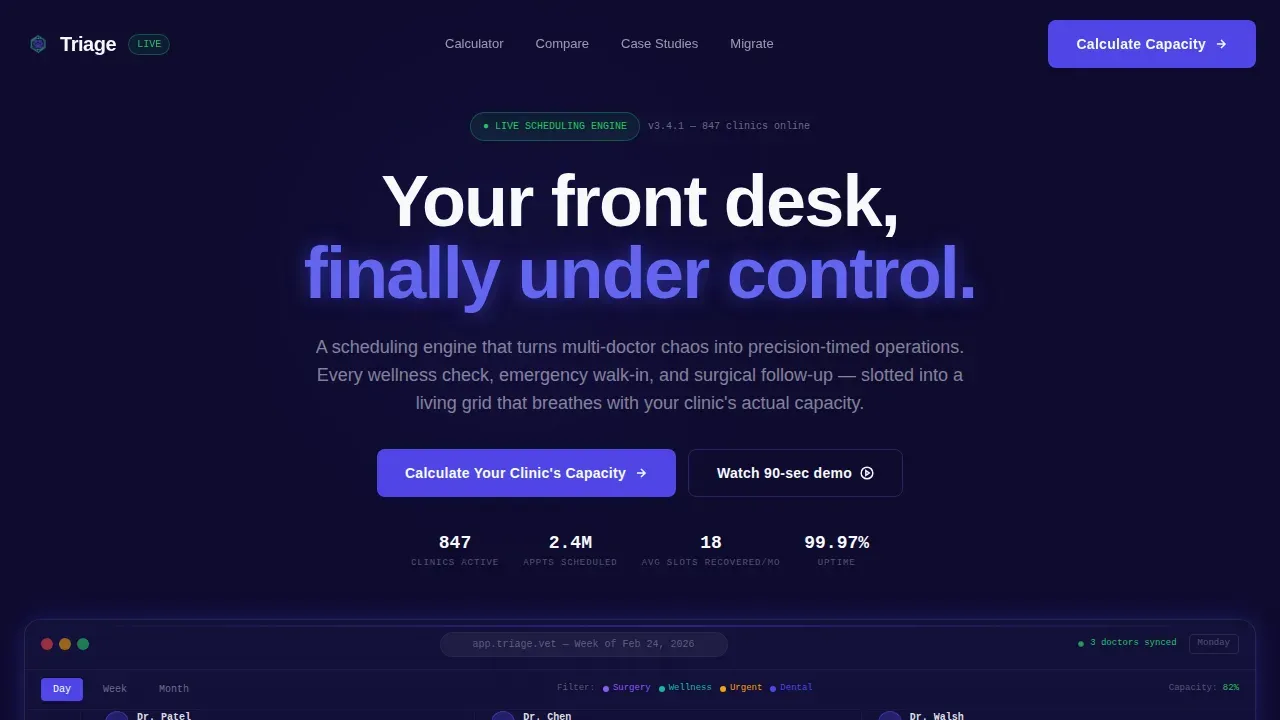
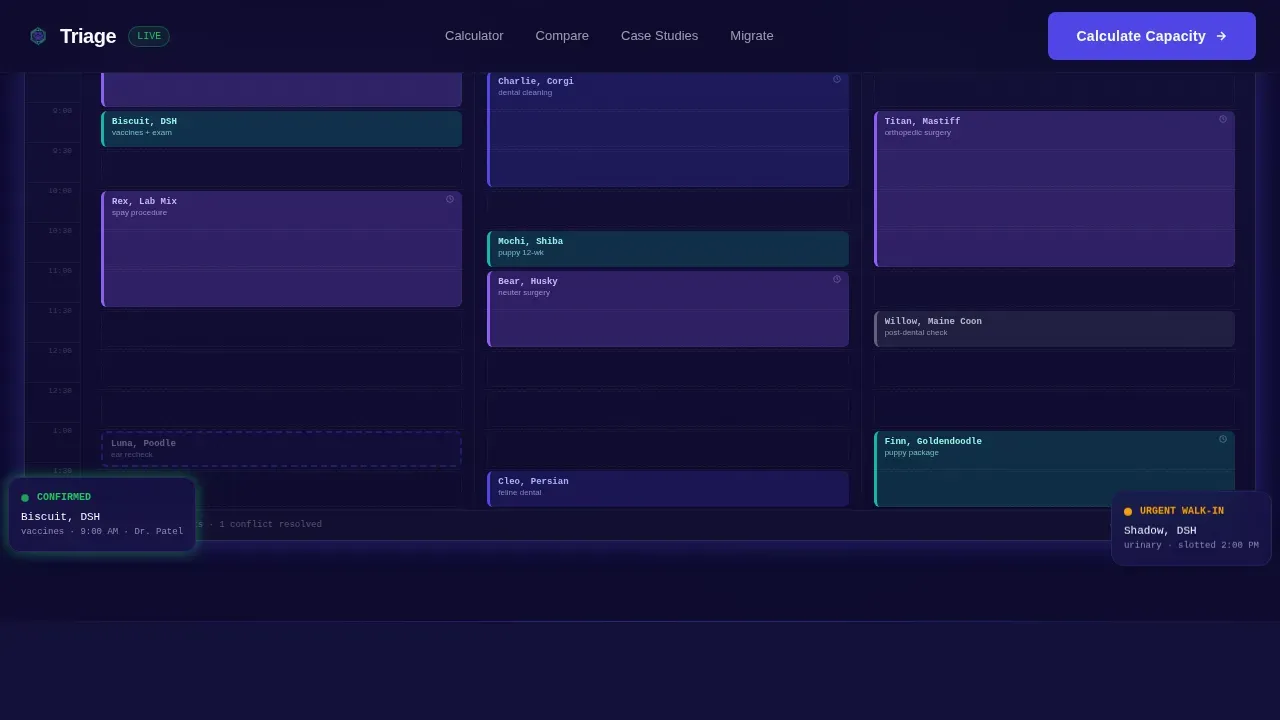
The hero section displays a pixel-perfect product screenshot of the weekly scheduling grid in operation. Three doctor columns, color-coded appointment blocks (surgery in violet, wellness in teal, urgent in amber), and a drag-in-progress cursor are all visible. Real pet names like "Biscuit, DSH, vaccines" and "Moose, Golden, post-op" appear in the grid, making the product feel immediately real and credible to any veterinarian or clinic team reviewing the page.
Veterinary-Specific Comparison Grid
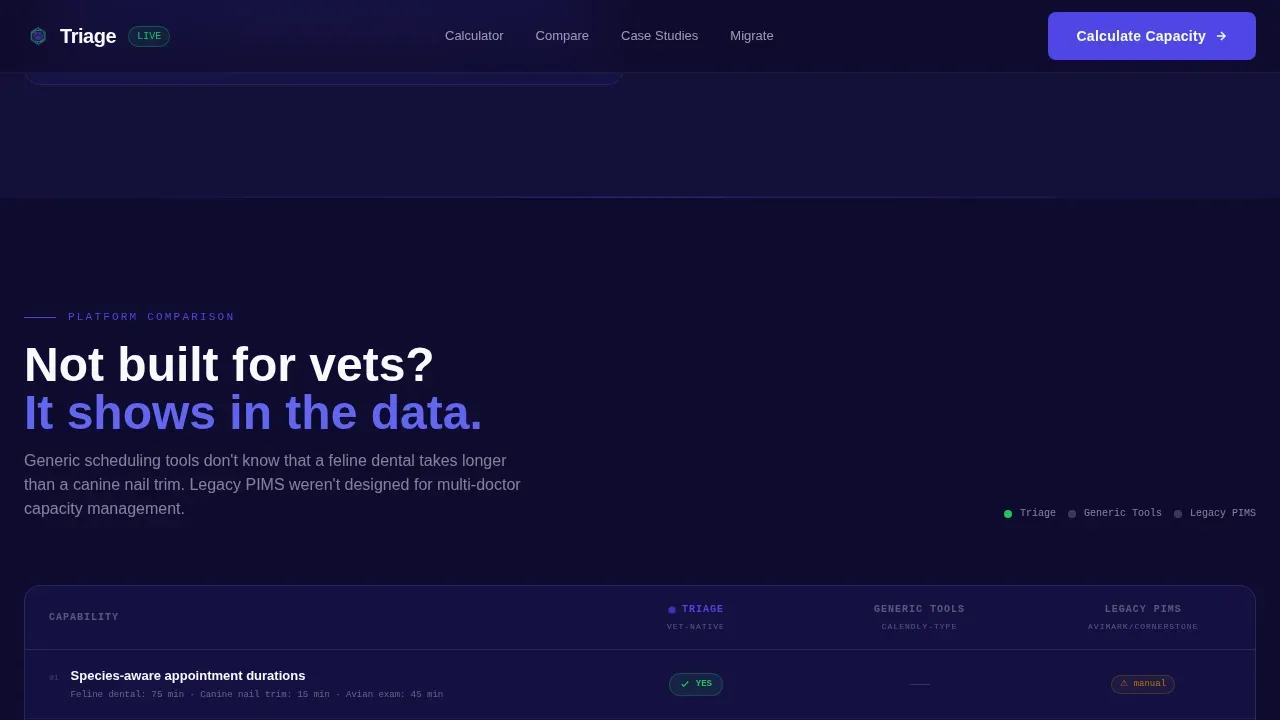
The comparison section is a structured data table that pits the platform against two competitor categories: generic scheduling tools and legacy practice management systems. Eight criteria cover what matters to veterinary teams, including species-aware appointment durations, automated triage protocols reminders, multi-provider block scheduling, and integration depth. Pulse-green checkmarks and muted gray dashes deliver the verdict at a glance.
Migration Form with Live Difficulty Badge
The closing call-to-action section includes a three-field form: clinic name, current software, and number of practitioners. A live badge reads the current software field and renders a migration-difficulty estimate in real time. Clinics on older legacy platforms see a message like "We have migrated 200 or more clinics from that exact platform," which directly addresses the fear of a painful transition and helps veterinary practices decide with confidence.
Bento-Style Testimonial Grid
The testimonials section uses a bento card layout to display social proof from named practice managers with specific clinic sizes and recovered revenue figures. Each card focuses on one measurable outcome, making feedback feel data-backed rather than promotional. This section helps new clients and returning visitors alike trust the platform before submitting any forms.
Page sections overview
| Section | Purpose |
|---|---|
| Hero with Grid | Displays live scheduling grid screenshot with primary headline and calculator anchor call to action |
| Efficiency Calculator | Interactive tool where visitors input clinic data and receive a personalized output data card |
| Comparison Data Grid | Side-by-side table scoring platform against generic tools and legacy systems on eight veterinary criteria |
| Testimonials Bento | Bento-layout social proof cards with named managers, clinic sizes, and specific recovered-revenue figures |
| Migration call to action Form | Three-field form with live difficulty badge and secondary call to action to begin onboarding |
| Footer Row | Single-row linear footer with contact, legal links, and practice-facing navigation |
Design & branding system
The visual identity follows a Data Command theme. Every surface, card, and interactive element is calibrated to feel like a mission control room: dark, precise, and information-first. The palette makes urgent data readable at a glance without visual noise.
- Deep terminal navy (#0E0B2E) as the page background, charged indigo (#4F46E5) for all interactive elements and hover states, clinical white (#F8F9FC) for body text, and pulse-green (#22C55E) reserved only for confirmed appointments and success states
- DM Sans for all readable body and heading text, JetBrains Mono for all data values, calculator outputs, and monospace-heavy data fields to reinforce the precision-tool aesthetic
- You can customize and adjust colors, swap typography, and update clinic branding without coding knowledge, keeping the template adaptable to any professional practice identity
Mobile & speed optimization
The template is built desktop-first, which matches how practice managers and veterinary teams actually use scheduling tools: on clinic monitors at the front desk. The layout is structured so data grids, calculator outputs, and comparison tables all read cleanly at full width.
- Responsive breakpoints ensure the calculator, comparison grid, and forms remain usable on tablet and mobile devices, where over 60 percent of general web searches happen
- Static sections use server-rendered components for fast initial load, while the calculator and migration form load as interactive client components only when needed, keeping the page responsive
- Animations use GSAP ScrollTrigger for section reveals and CSS keyframes for grid pulse effects, adding motion without sacrificing page stability
How this template helps you convert
This template is built around a Calculator-first, Comparison-close conversion architecture. Every section earns the next scroll by delivering value before asking for anything in return.
- The efficiency calculator captures email in exchange for a full PDF efficiency report, so the first conversion happens before the visitor even reads about the platform's features, turning curiosity into a qualified lead with appointment details specific to their clinic
- The comparison grid builds the case systematically, scoring eight veterinary-specific criteria and using pulse-green indicators to highlight where the platform wins, so the practice manager can decide confidently rather than just trust a headline
- The migration form with its live difficulty badge dissolves the single biggest objection, which is switching costs, by surfacing a personalized transition estimate and reassuring hesitant teams that patient care continuity is protected throughout the process
Other information about this template
This template is designed to serve the full spectrum of veterinary scheduling complexity. Whether a single-location practice is managing dogs, cats, and exotic animals through a busy morning, or a corporate group needs to automate triage across thirty locations, the page structure supports both conversations.
- The forms in this template support conditional logic so that intake fields adapt based on the visitor's current software or clinic size, reducing friction and improving the quality of data captured
- Veterinary receptionists are often the first person a pet owner speaks to during a stressful situation, such as a pet that is en route with difficulty breathing or seizures; this template's triage protocols section supports training-oriented messaging so clinics can communicate their intake process clearly to pet owners before they call
- The template supports structured data capture so that client information, medical history entries, and current medications fields can feed into downstream systems; practices can export data to a spreadsheet tool like Google Sheets if needed before a full practice management system integration is in place
- A supervisor or operations lead at a corporate group can use the comparison grid and calculator outputs to build an internal business case for rolling out standardized scheduling across the group
- The page can automate client communication touchpoints such as confirmation messages, reminders, and next steps instructions, reducing manual follow-up and letting veterinary teams focus on patient care
- Payment collection information and service costs are supported as part of the appointment details flow, so clients know what to expect before they arrive
- Efficient triage processes demonstrated through the page content help improve client satisfaction by setting clear expectations around urgency, wait times, and available services
Theme
Data Command
Creative direction
Calculator/Tool First
Color system
Electric Indigo
Style
Dashboard/Data Grid
Direction
Comparison/Versus
Page Sections
Interactive Scheduling Efficiency Calculator
Live Scheduling Grid Hero Section
Veterinary-specific Comparison Data Grid
Migration Form with Live Difficulty Badge
Bento-style Social Proof Testimonials
Related questions
Can this template be customized for different clinic sizes?
Does the calculator section require a developer to configure?
What appointment types does the scheduling grid support?
How does the live migration badge work for clinics on legacy software?
Can the intake forms support conditional logic for urgent triage cases?



