Transparent Daycare Landing Page Template
The Tuition landing page template is built for daycare and preschool programs that need to show parents exactly what care costs. A live tuition estimator sits front and center, letting visitors configure age, schedule, and add-ons to see a real weekly total. The scroll-reveal layout progressively uncovers a competitor comparison, a cost breakdown, parent testimonials, and a week-view calendar.
by Rocket studio
Quick summary
This is a single-page, scroll-reveal landing page template purpose-built for daycare and preschool tuition transparency. The interactive tuition estimator loads immediately below the header. Parents configure their child's age, schedule type, and add-ons, then see a live weekly total. Supporting sections fade in as visitors scroll, building trust before the app download call to action appears.
Who this template is for
This template is designed for daycare centers and preschool programs that offer layered pricing. It fits operators who want parents to arrive informed rather than confused.
- Neighborhood daycare centers with hourly, daily, weekly, full-time, and part-time rate structures
- Preschools offering sibling discounts, meal add-ons, and summer-only enrollment options
- School directors who want to replace "call for rates" with a clear, self-serve pricing experience
What problem this template solves
Parents comparing childcare costs are often stuck toggling between multiple center websites, none of which show actual prices. This template removes that friction by putting a fully configured price estimate on screen before a parent has to ask.
- Dual-income families running late-night spreadsheet comparisons can get a real number in seconds
- Single parents comparing three centers on a lunch break get instant, apples-to-apples clarity
- Relocating families who need a tuition figure before signing a lease can self-serve without a phone call
What you get with this template
The template delivers a complete, ready-to-customize scroll-reveal landing page. Every section is pre-structured around the parent decision journey, from first glance to download.
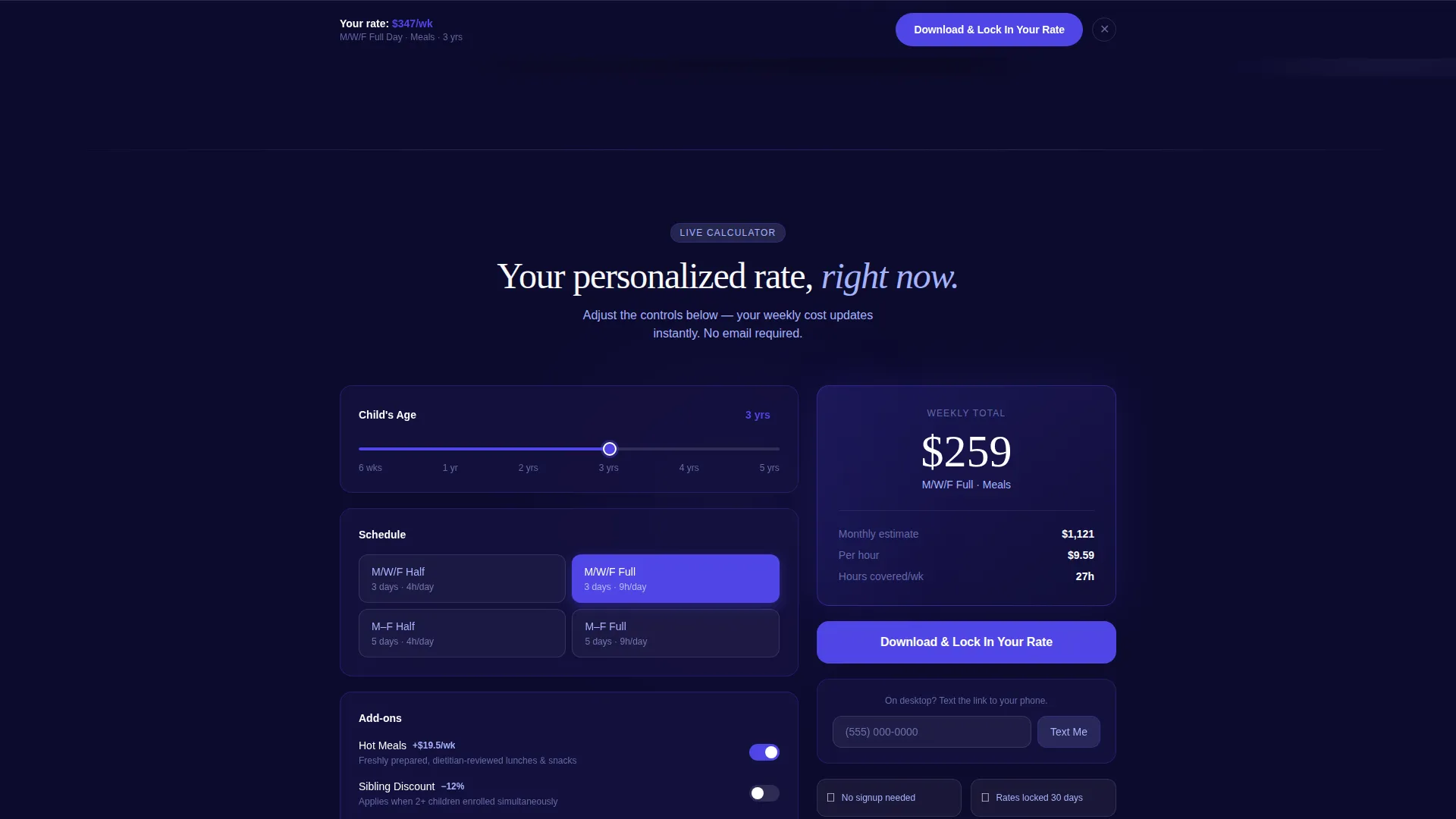
- An interactive tuition estimator with age slider, schedule toggle, meal checkbox, and sibling-discount toggle that updates a live weekly total
- A competitor comparison table, a visual tuition breakdown by spending category, and a week-view calendar showing covered hours
- Parent testimonial cards quoting specific savings, a sticky app-download bottom bar, and a desktop "Text Me the Link" secondary path
Feature list
This template packs a focused set of functional and visual components. Each one is drawn directly from the brief and serves the parent decision journey.
Live Tuition Estimator
The calculator sits immediately below the header. Parents set a child's age slider, choose a schedule toggle such as Monday, Wednesday, Friday full day, tick a meals checkbox, and watch a bold weekly total update in real time. A sibling-discount toggle is also present and ready to interact with.
Scroll-Reveal Progressive Layout
Each section fades and slides upward only when it enters the viewport. The reveal order matches the parent decision flow: calculator result first, then comparative context, then social proof, then scheduling detail, then the call to action.
Competitor Comparison Table
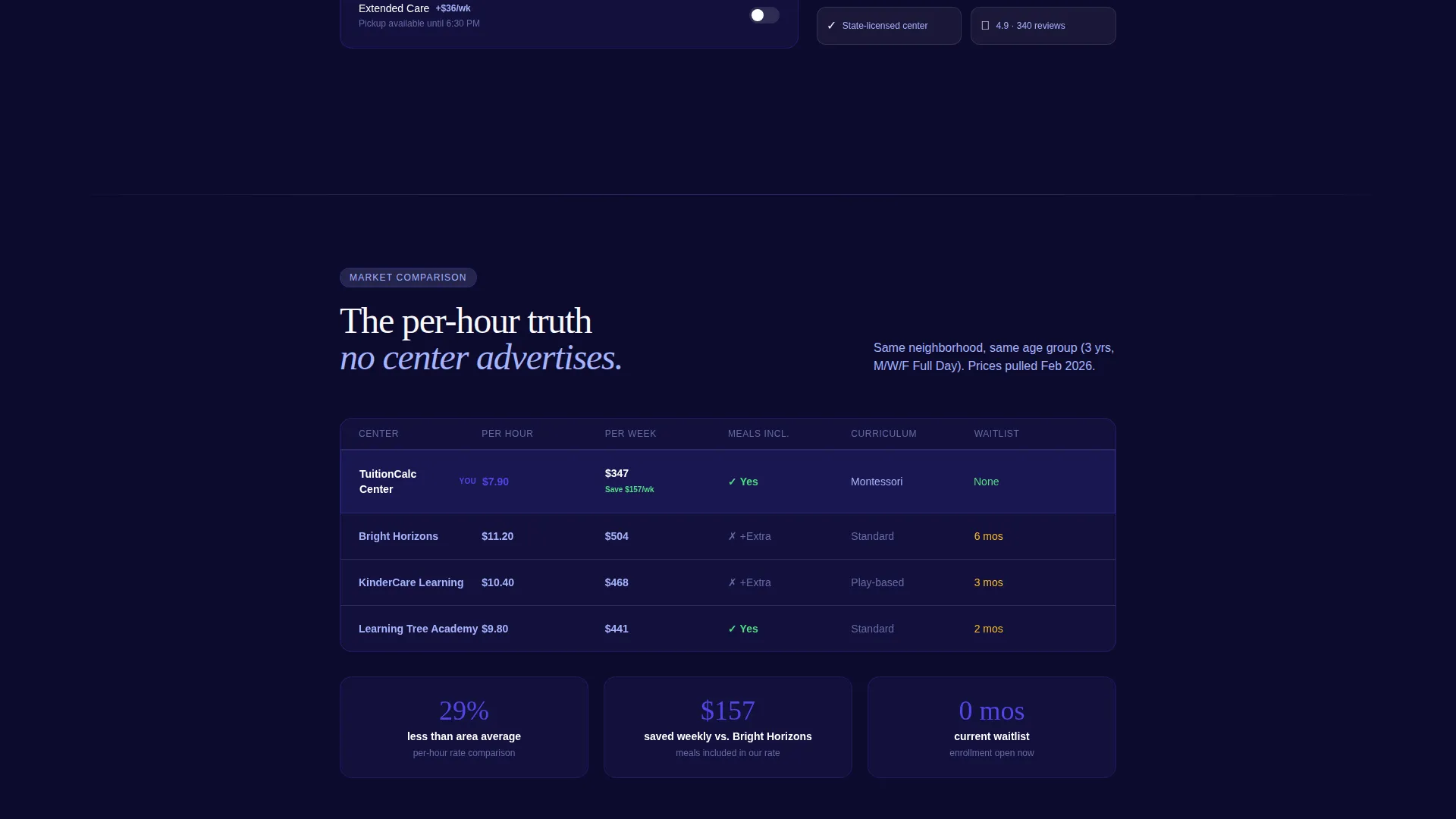
A structured table shows the per-hour value of this center's rates against local competitors. Parents can see relative value without leaving the page or opening another tab.
Tuition Breakdown Visual
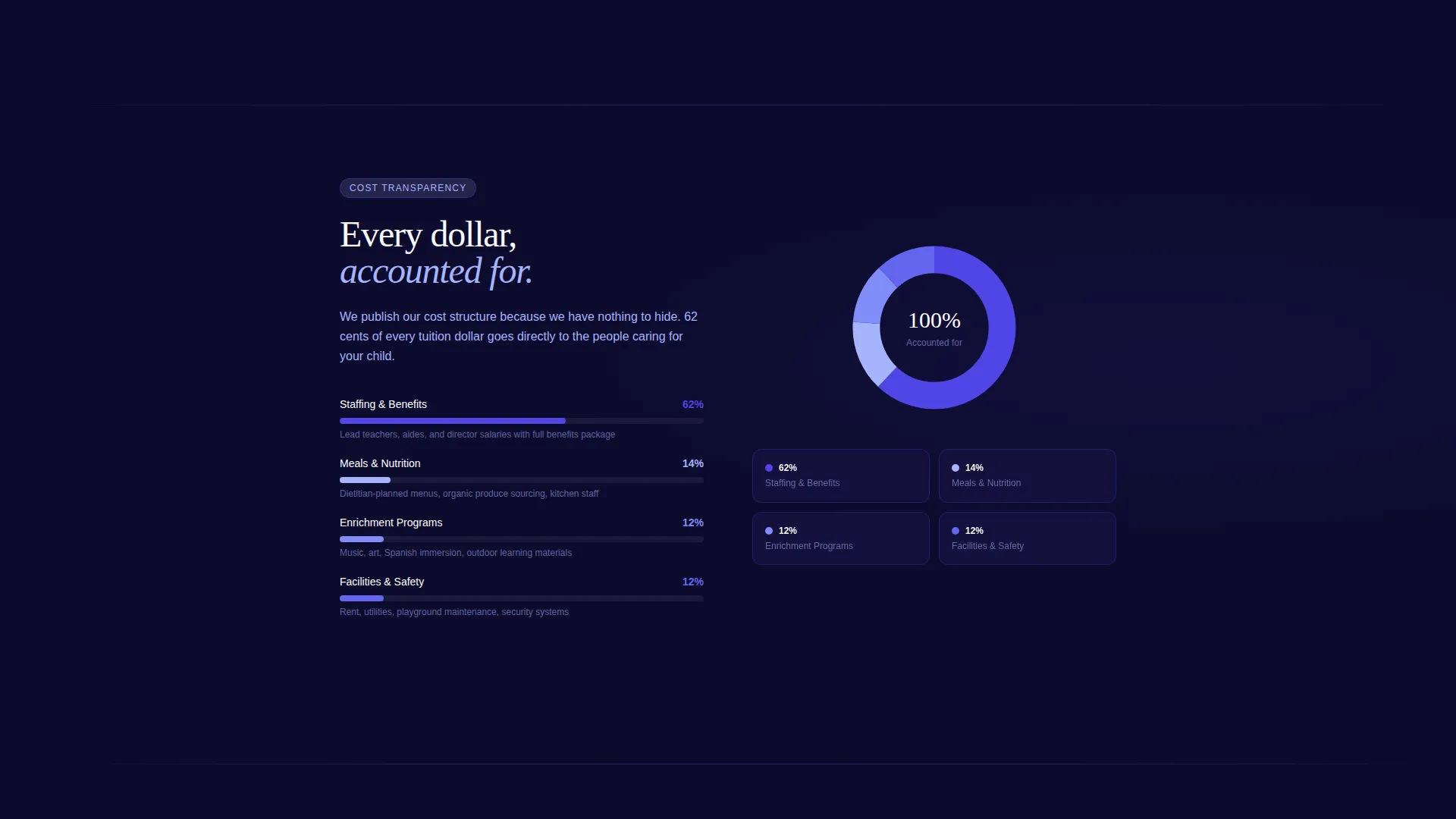
A visual breakdown shows where tuition dollars go across four categories: staffing at 62 percent, meals at 14 percent, enrichment at 12 percent, and facilities at 12 percent. This transparency builds confidence in the pricing.
Dual Call-to-Action System
The primary call to action, "Download and Lock In Your Rate," appears first beneath the calculator result and again as a sticky bottom bar after the second scroll section. A secondary path offers "Text Me the Link" with a single phone-number field for parents on desktop.
Week-View Schedule Calendar
A week-view calendar displays exactly which hours are covered by the selected schedule. It gives parents a concrete visual of what they are paying for, reducing follow-up questions.
Page sections overview
| Section | Purpose |
|---|---|
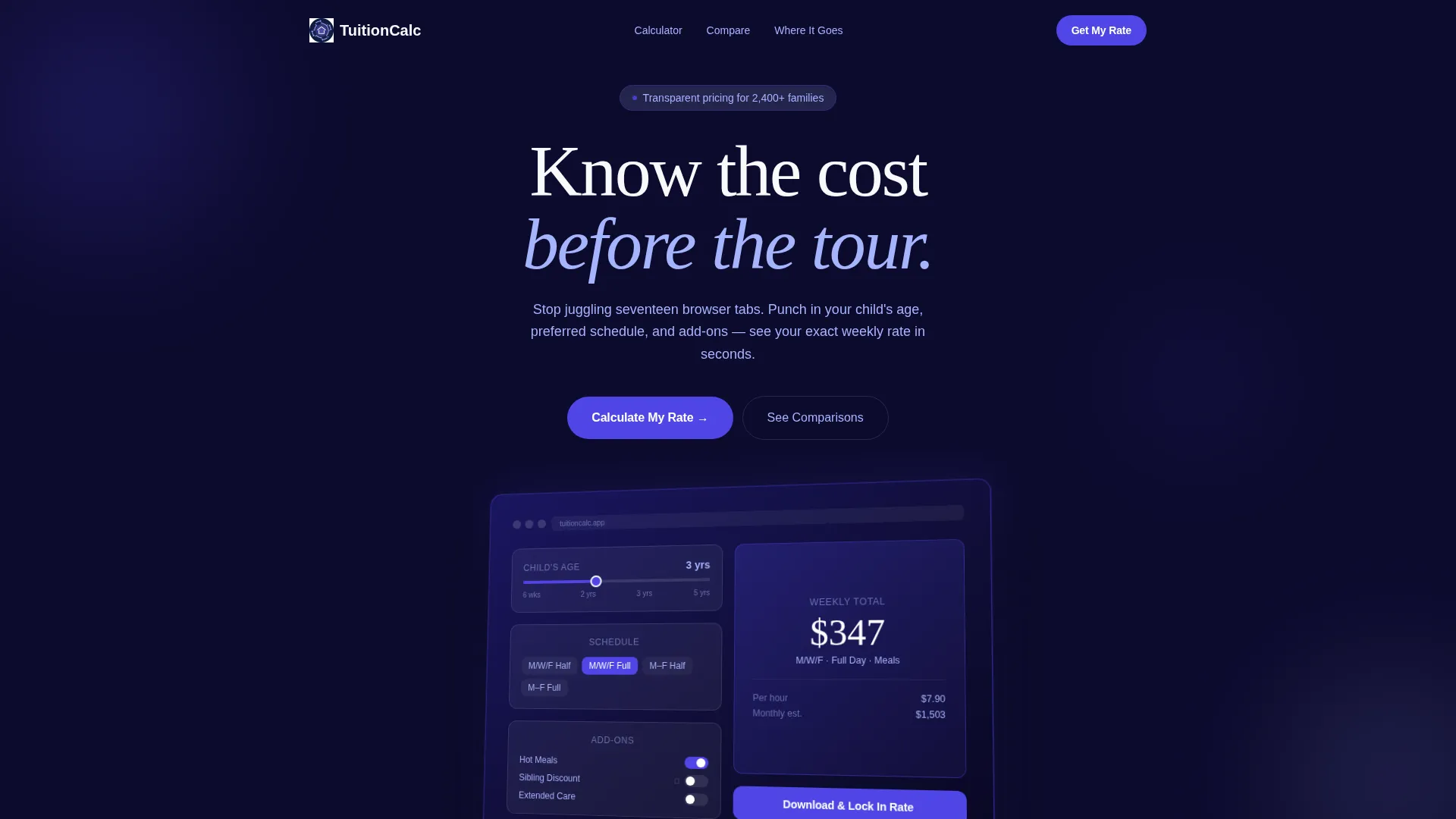
| Header with Screenshot | Establishes the calculator product preview and headline |
| Tuition Estimator | Lets parents build their personalized weekly cost |
| Competitor Comparison | Shows per-hour value against nearby centers |
| Tuition Breakdown Visual | Explains how tuition dollars are allocated |
| Parent Testimonials | Provides social proof with specific savings quotes |
| Week-View Calendar | Visualizes exact hours covered by the chosen schedule |
| App Download call to action | Drives the primary conversion action |
| Sticky Bottom Bar | Keeps the download prompt visible during scroll |
Design & branding system
The visual identity follows a Data Command theme. The palette is described in the brief as feeling like a Bloomberg terminal redesigned by a Montessori teacher: precise and data-dense, yet warm enough to trust with a toddler.
- Deep dashboard navy (#0D0B2E) as the primary background, vivid indigo (#4F46E5) on interactive controls and active states, and soft periwinkle (#A5B4FC) for secondary labels and chart fills
- Clean nursery white (#F8F9FC) for card backgrounds and breathing room throughout the layout
- The header features a pixel-perfect product screenshot of the tuition calculator at a slight three-quarter angle, floating on the navy field with the screen glowing
Mobile & speed optimization
The template is designed with parents browsing on mobile during short windows of time. The layout prioritizes fast comprehension and minimal friction on small screens.
- The sticky bottom bar keeps the download call to action reachable without requiring a scroll back to the top
- The "Text Me the Link" field offers a desktop-to-mobile handoff so parents can continue on their phone later
- The scroll-reveal sections load progressively, so each new piece of information arrives as the parent is ready for it
How this template helps you convert
The conversion strategy is built into the layout sequence. By the time a parent reaches the call to action, the calculator has already done the persuasion.
- The live estimator generates a personalized weekly cost so the download feels like saving a useful result, not starting a commitment
- The competitor comparison and tuition breakdown build trust in the pricing before any action is requested
- The sticky bottom bar and dual call-to-action placement ensure the download prompt is always one tap away, whether a parent is mid-scroll or at the bottom of the page
Other information about this template
This template is categorized under Technology, specifically within the Daycare and Preschool Website Templates subcategory, targeting the Daycare and Preschool Pricing Page niche. It is a strong fit for programs that have complex rate structures and want to self-qualify parents before a tour or enrollment conversation.
- The Electric Indigo color system and Data Command theme give the page a distinctive, modern look that stands apart from typical pastel-heavy childcare sites
- The template style is Scroll Reveal (Progressive), meaning the page rewards attention rather than front-loading all information at once
- The landing page direction is App Download, making it well suited for programs that have a companion app for enrollment, rate locking, or scheduling
Theme
Data Command
Creative direction
Calculator/Tool First
Color system
Electric Indigo
Style
Scroll Reveal (Progressive)
Direction
App Download
Page Sections
Live Tuition Estimator
Scroll-reveal Progressive Layout
Competitor Comparison Table
Visual Tuition Breakdown
Dual Call-to-action System
Week-view Schedule Calendar
Related questions
Can I customize the pricing values in the tuition estimator?
Does the template support sibling discounts and meal add-ons?
Is this template suitable for a preschool with a simple, single-rate structure?
How does the app download call to action work?
Can desktop visitors receive the app link without downloading on the spot?



