Auto Repair Shop Advanced Booking Website Template
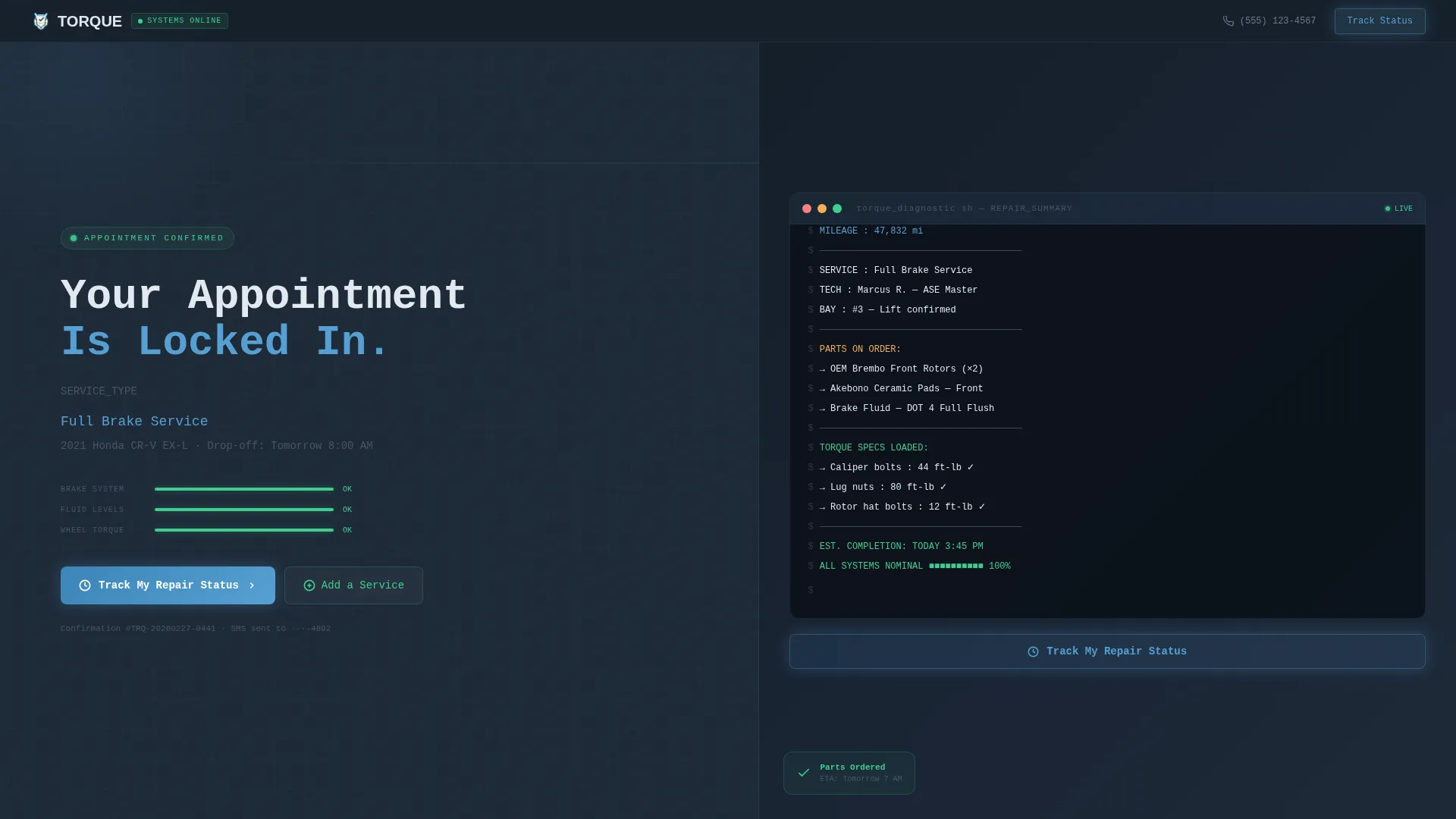
Torque is a split-screen thank-you landing page built for auto repair shops. It uses a Data Command visual theme with a live diagnostic code-snippet header, an interactive vehicle diagram, and a sticky "Track My Repair Status" call-to-action. The design turns a routine appointment confirmation into a transparent, trust-building experience for every type of car owner.
by Rocket studio
Quick summary
Torque is a single-page, split-screen thank-you landing page designed for auto repair shops. The left panel holds a bold appointment confirmation headline. The right panel runs a live-terminal diagnostic code snippet. Together they create the calm, clinical feeling of watching your own vehicle's systems report one green status after another.
Who this template is for
This template is built for auto repair shop owners and service managers who want their post-booking experience to feel as professional as the repair itself. It suits shops that serve a broad daily clientele and want to stand out with a modern, data-forward presentation.
- Auto repair shops that offer diagnostic scanning, OEM parts service, or multi-point inspections
- Shop owners who want to reduce post-booking anxiety and build long-term customer loyalty
- Mechanics or service advisors who want a sleek confirmation page that encourages upsells without pressure
What problem this template solves
Most auto repair shop confirmation pages do one thing: say "thanks, see you then." That dead-end experience leaves customers uncertain, disengaged, and unlikely to add services or return. Torque replaces that blank wall with a living, informative page.
- Customers arrive with questions about what will happen to their vehicle and leave feeling informed
- Shops lose easy upsell opportunities because there is no lightweight add-on mechanic after booking
- A generic confirmation page wastes the moment of highest customer attention and trust
What you get with this template
You get a fully designed, single-page landing page layout built around a 50/50 split-screen structure. Every section is purpose-built to confirm, educate, and convert at the same time.
- A split-screen hero with a monospaced confirmation headline on the left and an animated diagnostic code snippet on the right
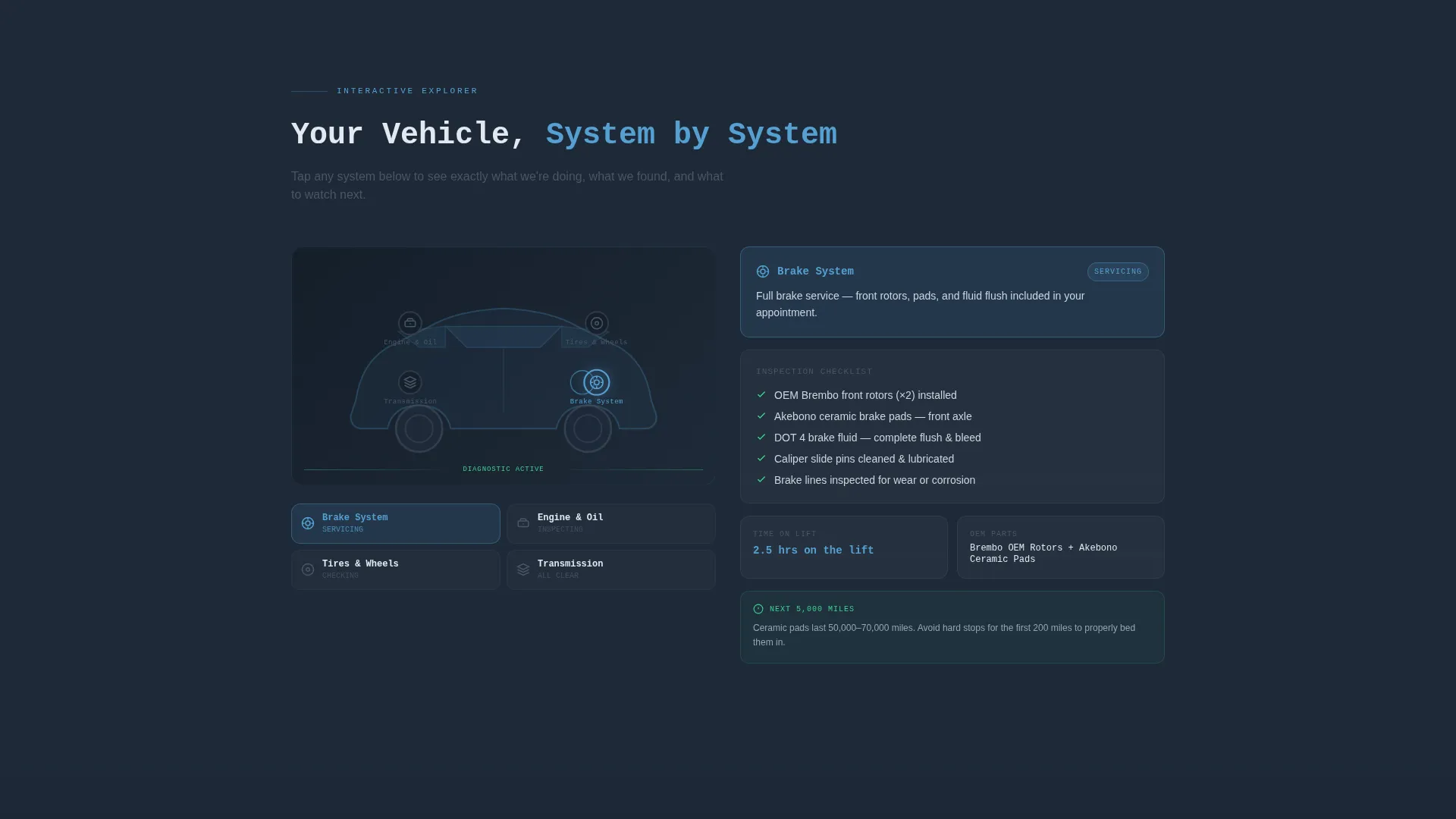
- An interactive vehicle diagram where visitors tap engine, brakes, tires, or transmission to explore service details
- A primary sticky call-to-action bar and an inline button, both pointing to a live job-status dashboard
Feature list
This template packs several purpose-built components into a single cohesive page. Each feature is designed to reduce customer anxiety while keeping the shop's brand looking sharp and credible.
Split-Screen Hero Layout
The hero divides the viewport evenly. The left side shows the bold "Your Appointment Is Locked In" headline in a monospaced typeface against deep charcoal. The right side displays the live-terminal code snippet with vehicle make, service completed, parts replaced, and torque specs applied.
Live Diagnostic Code Snippet Header
The right panel renders a mock OBD-II (On-Board Diagnostics) style readout. Each line of the repair summary appears character by character, mimicking a real shop diagnostic system printing in real time. This creates immediate visual trust and a sense of precision.
Interactive Vehicle Diagram
Visitors tap labeled hotspots on a vehicle diagram to expand service details. Each hotspot reveals what was inspected, what parts are on order, and maintenance tips for the next 5,000 miles. A short looping video of that repair being performed can accompany each section.
Sticky Click-Through Call-to-Action Bar
A "Track My Repair Status" button sits beneath the code snippet header and reappears as a sticky bottom bar when the user scrolls down. This dual placement keeps the primary action visible throughout the entire page without feeling intrusive.
Single-Tap Add-a-Service Module
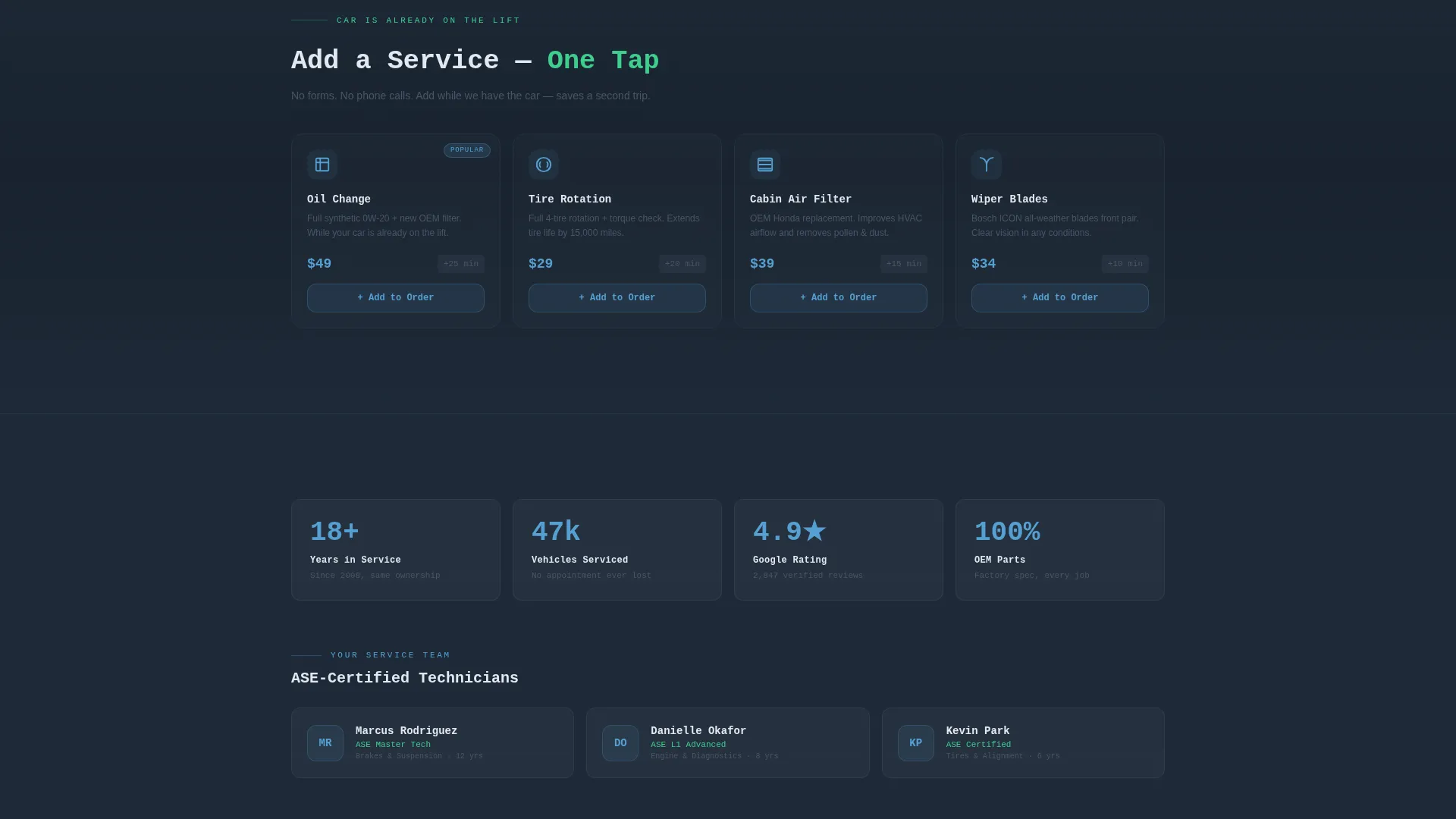
The secondary call-to-action lets customers add an oil change, tire rotation, or cabin-filter swap with a single tap. No form is required. This lightweight add-to-order mechanic captures upsell revenue while the vehicle is already on the lift.
Sky-Blue Service Echo Line
Beneath the main confirmation headline, the customer's specific service type is displayed in open-sky blue text. This small detail makes the page feel personalized and reinforces that the shop has the right vehicle and the right job queued up.
Page sections overview
| Section | Purpose |
|---|---|
| Split-Screen Hero | Confirms appointment with headline and live code snippet |
| Service Echo Line | Reflects booked service type in sky-blue text |
| Diagnostic Code Snippet | Prints mock repair summary line by line |
| Primary call to action Block | Links to live job-status dashboard |
| Interactive Vehicle Diagram | Lets visitors explore service details by tapping hotspots |
| Per-System Detail Panel | Shows inspected parts, OEM orders, and maintenance tips |
| Looping Repair Video | Builds trust by showing the actual repair in progress |
| Add-a-Service Module | Enables single-tap upsells with no form required |
| Sticky call to action Bar | Keeps "Track My Repair Status" visible on scroll |
Design & branding system
The visual identity follows a Data Command theme. Every color choice, type decision, and layout detail reinforces the feeling of a technician's OBD-II screen glowing in a dim service bay: cool, clinical, and quietly reassuring.
- Slate and Sky color system: deep shop-floor charcoal (#1E2A38) for backgrounds, brushed tool-steel gray (#4A5568) for secondary elements, open-sky blue (#56A0D3) for interactive highlights, and diagnostic green (#3ECF8E) for confirmation states
- Monospaced typeface used throughout the hero and code-snippet panel to echo a real diagnostic terminal
- Diagnostic green flashes reserved for confirmed or cleared states, giving every green element a specific, meaningful signal
Mobile & speed optimization
The split-screen layout is designed to adapt gracefully to smaller viewports. Interactive elements like the vehicle diagram hotspots and sticky call to action bar are built for touch-first use.
- The 50/50 split-screen stacks vertically on mobile so both panels remain fully readable without horizontal scrolling
- Sticky bottom bar stays anchored at the base of the screen on mobile, keeping the primary call-to-action reachable with one thumb
- Looping video segments in the vehicle diagram detail panels are kept short to support smooth playback on mobile connections
How this template helps you convert
Every design decision on this page is aimed at earning the next click, not demanding it. The page earns trust first, then presents the action.
- The live diagnostic code snippet immediately signals precision and professionalism, making customers more likely to trust the shop with additional services.
- The interactive vehicle diagram turns passive waiting into active engagement, which increases the time customers spend on the page and raises the likelihood they tap "Add a Service."
- The dual-placement "Track My Repair Status" button, appearing both inline and as a sticky bar, keeps the conversion action visible at every scroll depth without disrupting the reading experience.
Other information about this template
This template is categorized under auto repair shop website templates and is specifically designed for the thank-you page moment after a service appointment is booked. It is built with the Technology category in mind, meaning the layout favors data-forward visuals over traditional garage aesthetics.
- The template style is Split Screen (50/50), which works well for pairing a human message with a technical readout side by side
- The creative direction follows an Interactive Explorer model, meaning the page rewards curiosity and gives visitors something to do beyond reading
- The theme is Data Command, and the lp direction is Click-Through, meaning every layout choice is oriented toward one clear next action
- This template can support shops of any size, from independent single-bay garages to multi-location service centers, as long as the page content is updated to match the shop's actual services
Theme
Data Command
Creative direction
Interactive Explorer
Color system
Slate & Sky
Style
Split Screen (50/50)
Direction
Click-Through
Page Sections
Split-screen Hero Layout
Live Diagnostic Code Snippet
Interactive Vehicle Diagram
Dual-placement Repair Tracking Call to Action
Single-tap Add-a-service Module
Related questions
Can I customize the services shown in the interactive vehicle diagram?
Does the Add a Service button require a payment system to work?
Is this template only suitable for a thank-you page?
Can I replace the looping repair videos with static images?
What typeface style is used in the hero and code-snippet panel?



