Advanced Tutoring Digital Presence Cost Estimator Website Template
The Tutor landing page template is built for tutoring mobile apps that need to convert skeptical visitors fast. It leads with a live cost-and-grade estimator, then layers in a comparison data grid and a real-time platform stats widget. The Tech Glass visual identity and progressive-disclosure form make the product feel as instant and trustworthy as the app itself.
by Rocket studio
Quick summary
This single-page template turns a tutoring app's homepage into an interactive proof engine. The hero is a glassmorphic calculator that estimates cost and grade improvement in real time. Below it, a versus grid compares the app against traditional tutoring centers, freelance tutors, and video platforms. The result is a landing page that earns trust through live data, not marketing language.
Who this template is for
This template suits founders, product teams, and marketers who are launching or scaling a tutoring mobile app. It works best when the product's main selling point is speed, affordability, and verified tutor quality.
- App teams who need a landing page that mirrors the product's own onboarding flow
- Tutoring platforms targeting high-school and college students, as well as parents booking on the go
- Growth marketers running paid campaigns who need a high-converting comparison page
What problem this template solves
Most tutoring app landing pages read like brochures. They list features but never prove them. Skeptical visitors, especially parents and students comparing options, leave before they reach the call to action.
- Visitors have no easy way to estimate what the service will cost them personally
- Generic feature lists fail to differentiate the app from tutoring centers or freelance alternatives
- Long sign-up forms create friction before the visitor has seen enough value to commit
What you get with this template
You get a fully structured, single-page layout designed around a Calculator/Tool First creative direction. Every section is purpose-built to move a visitor from curiosity to action in one smooth scroll.
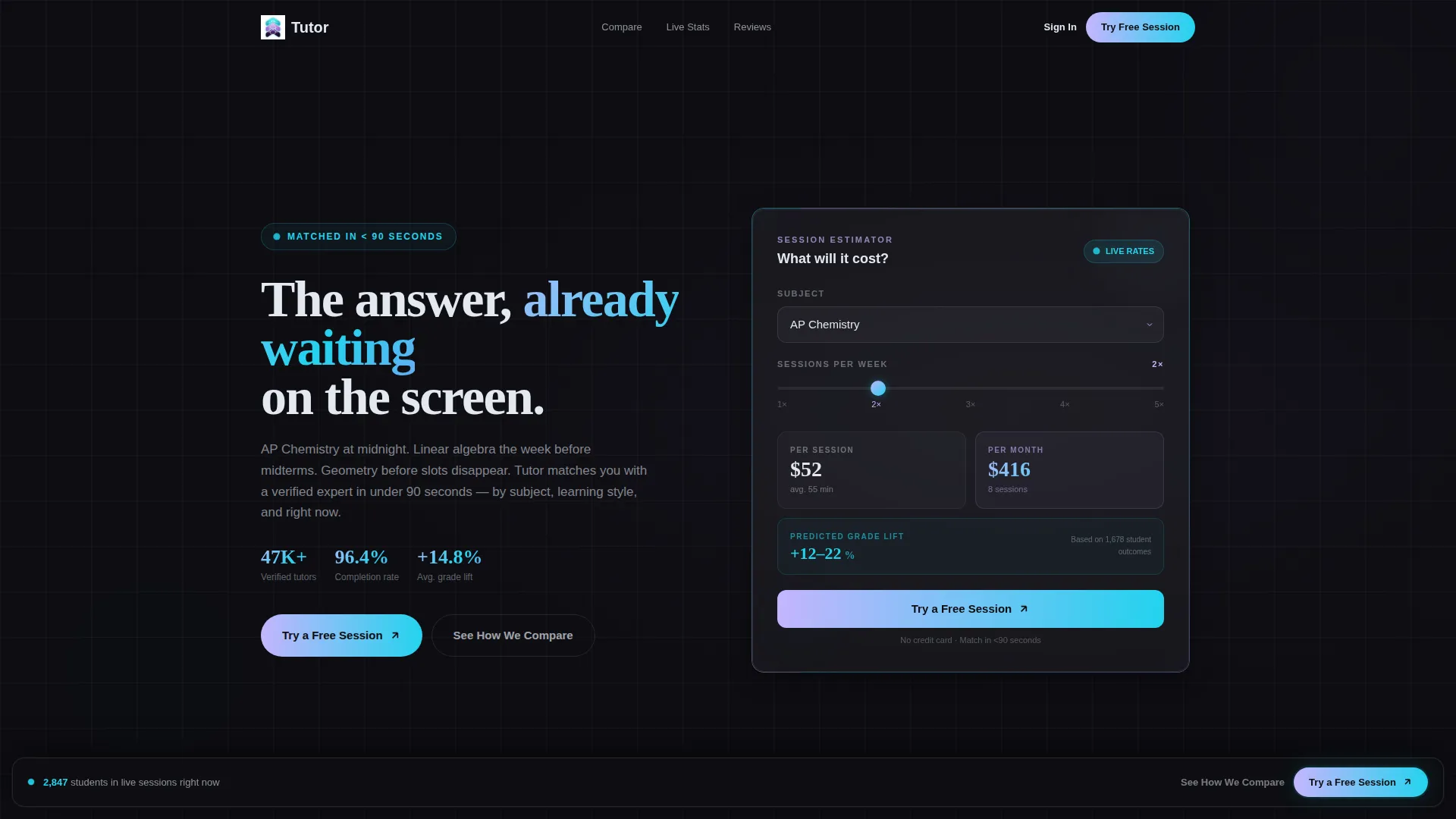
- A glassmorphic hero estimator with subject dropdown, sessions-per-week dial, and animated cost and grade-improvement output
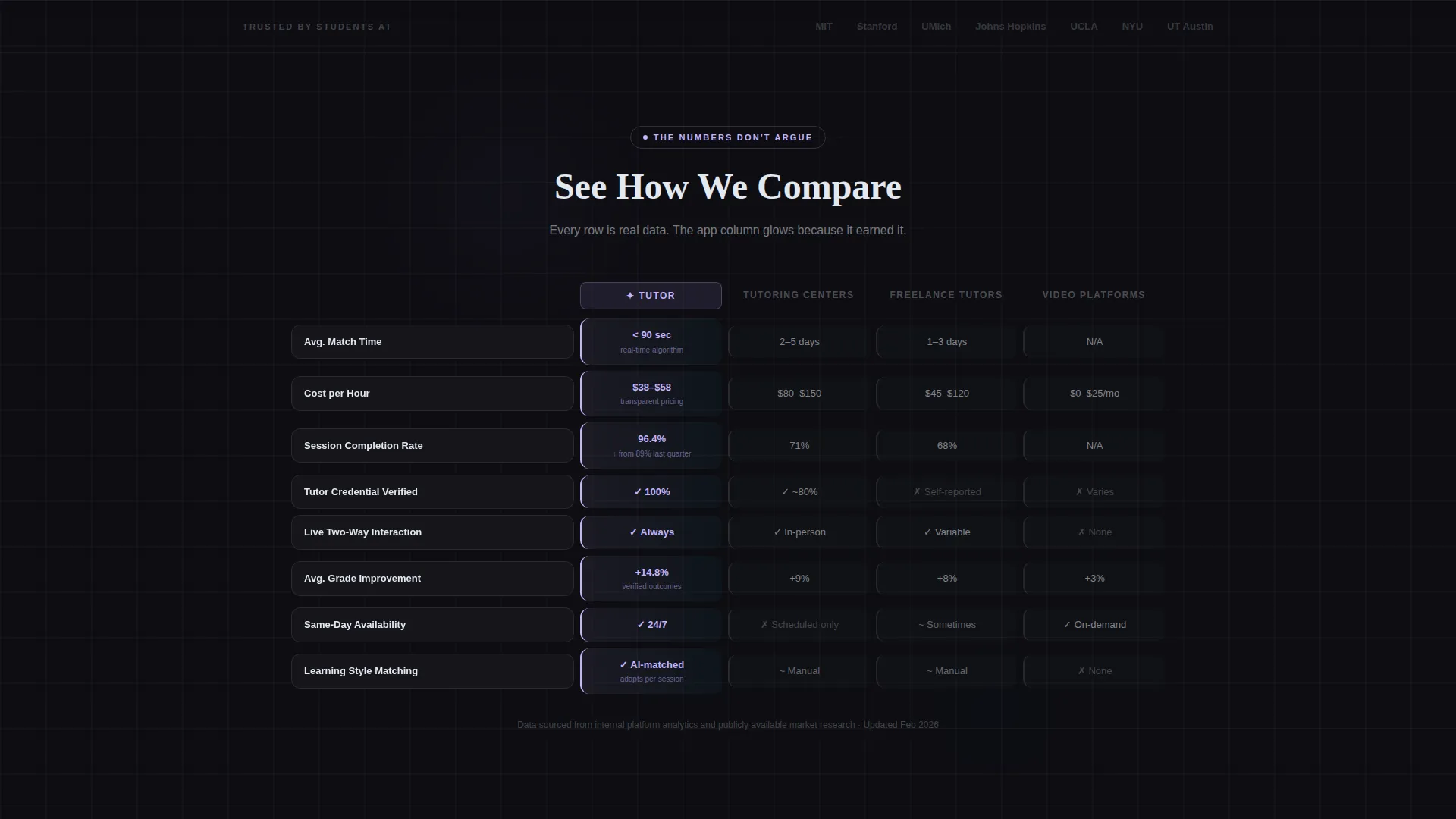
- A versus data grid comparing the app against three competitor types across four measurable rows
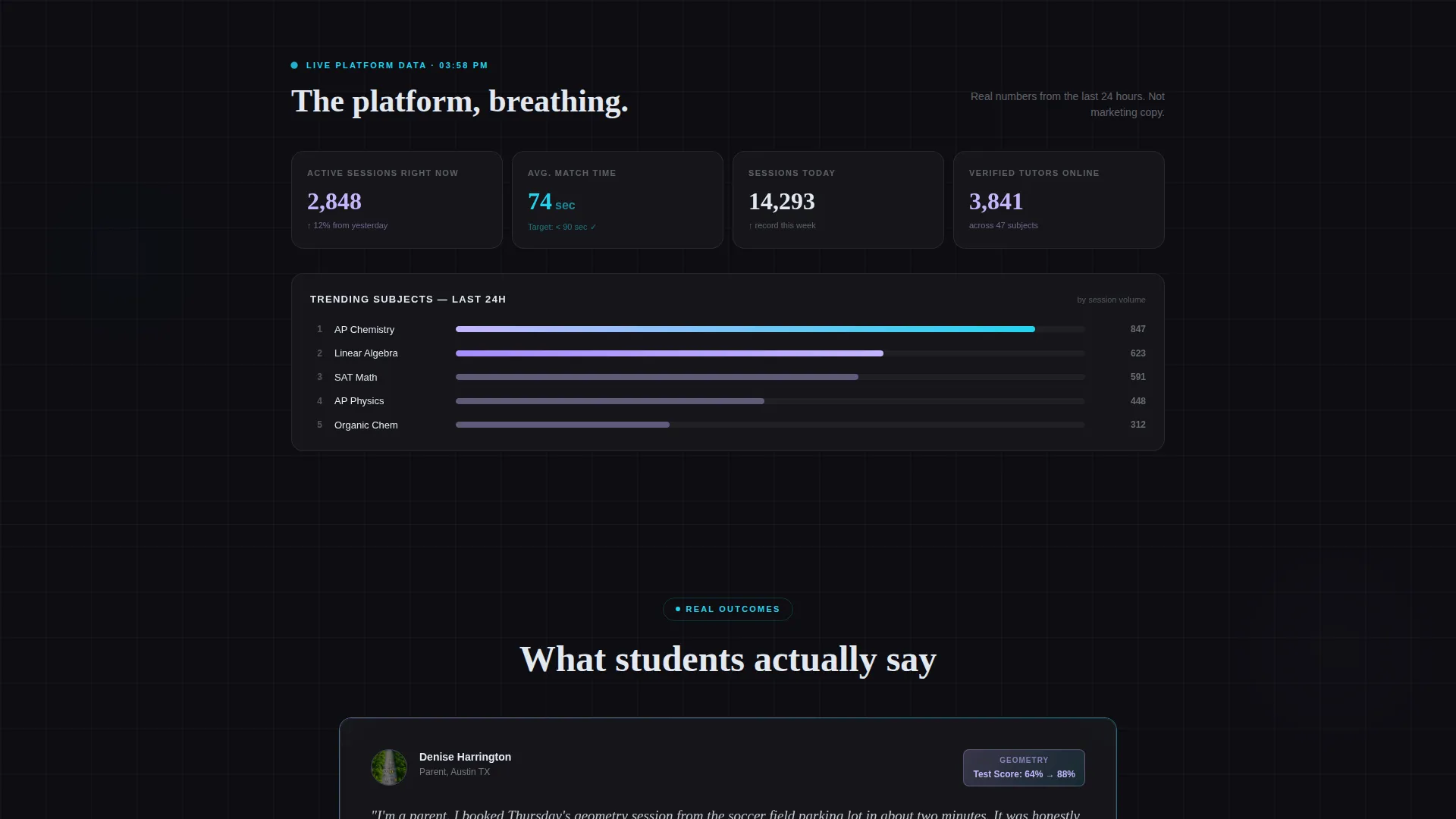
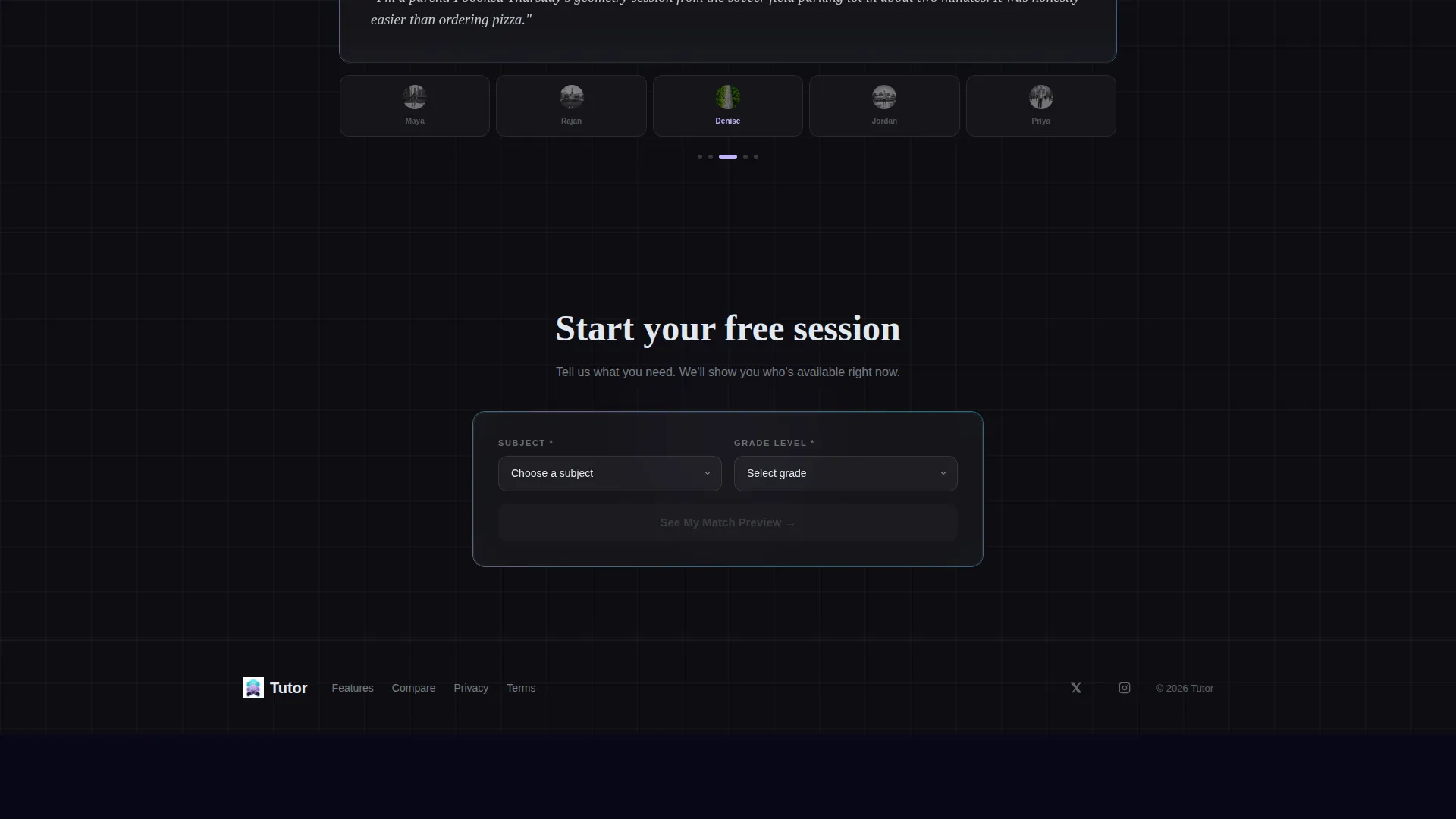
- A live platform stats widget, a sticky frosted-glass call-to-action bar, and a progressive-disclosure sign-up form
Feature list
This section covers the core interactive and visual components built into this template.
Interactive Cost and Grade Estimator
The hero section is a working calculator, not a static banner. Visitors choose a subject from a dropdown and slide a sessions-per-week dial. The card instantly animates a cost-per-session estimate alongside a predicted grade-improvement range drawn from aggregate platform data. Numbers update live as inputs change, so the visitor is already using the product before they scroll.
Versus Comparison Data Grid
Below the fold, a two-column grid places the app against traditional tutoring centers, freelance forum tutors, and passive video platforms. Each row is a data card covering response time, cost per hour, session completion rate, and tutor credential verification. The app column glows in iridescent lilac; competitor columns sit in muted chrome. The grid communicates advantage without a single persuasive claim.
Live Platform Stats Widget
A mid-page dashboard widget displays real-time platform figures: active sessions, average match time, and trending subjects. The data feels current and operational rather than static and polished. This section makes the platform feel alive and in use, which builds credibility at exactly the moment a visitor is weighing whether to trust the numbers in the estimator.
Progressive Disclosure Sign-Up Form
The sign-up form opens with only two fields: subject and grade level. After the match preview loads, it expands to ask for email and preferred session time. This mirrors the app's own onboarding so the act of filling the form already feels like using the product. The reduced upfront ask lowers abandonment without hiding the commitment.
Sticky Frosted-Glass Call-to-Action Bar
A persistent call-to-action bar follows the visitor's scroll after they interact with the estimator. It presents the primary action, "Try a Free Session," in a frosted-glass strip that stays visible without blocking content. A secondary anchor link, "See How We Compare," targets the versus grid for visitors who need more evidence before acting.
Tech Glass Visual Identity System
The entire layout uses a cohesive AI Iridescent color palette. Deep obsidian serves as the page background. Holographic lilac highlights active states and data wins. Cool chrome silver handles secondary text and grid lines. Refracted cyan pulses on interactive elements. The visual result feels clinical enough to trust with academic outcomes and luminous enough to signal modern technology.
Page sections overview
| Section | Purpose |
|---|---|
| Hero Estimator Card | Let visitors calculate personal cost and grade-improvement estimates instantly |
| Sticky call to action Bar | Keep the primary and secondary actions visible throughout the scroll |
| Versus Comparison Grid | Show measurable advantages over tutoring centers, freelancers, and video platforms |
| Live Stats Widget | Display active sessions and match-time data to prove the platform is real and in use |
| Progressive Sign-Up Form | Collect subject and grade level first, then expand to email and time preference |
Design & branding system
The template uses a Tech Glass theme with an AI Iridescent color system. Every design decision reinforces the feeling of a fast, intelligent, trustworthy product.
- Color palette: deep obsidian (#0D0D12) background, holographic lilac (#C4B5FD) for active states, cool chrome silver (#E2E8F0) for secondary text and grid lines, and refracted cyan (#22D3EE) on interactive elements
- Surface treatment: glassmorphic cards with iridescent edge sheens float over the dark background, creating depth without photography or illustration
- No stock photography or mascots; the interactive estimator tool and data visuals carry all the visual weight
Mobile & speed optimization
The layout is designed for visitors who arrive mid-task, including students studying late and parents booking sessions between activities. Every interactive element is sized and positioned for thumb-friendly use.
- The estimator dropdown, sessions dial, and animated output are sized for mobile touch targets
- The sticky call-to-action bar and progressive form are structured for small-screen scroll behavior
- The versus grid cards and live stats widget stack cleanly on narrow viewports without losing their comparison clarity
How this template helps you convert
The conversion architecture follows the Calculator/Tool First and Comparison/Versus strategies defined in the brief. Each step of the page reduces a specific objection before asking for commitment.
- The interactive estimator creates personal investment early. When a visitor has already entered their subject and sessions-per-week, they have a reason to keep scrolling and a number to evaluate against competing options.
- The versus grid and live stats widget address the skeptic's core question: is this actually better? Real data rows and live platform figures answer that question without requiring the visitor to take the brand's word for it.
- The progressive form lowers the commitment barrier at the exact moment the visitor is most convinced. Asking for subject and grade level first feels like the app is already working, not like a form wall blocking access.
Other information about this template
This template is categorized under Technology and built specifically for the tutoring mobile app niche. It is part of a broader set of templates designed for tutoring digital presence use cases.
- The template style is Dashboard/Data Grid, making it well suited for data-forward product categories where proof matters more than aesthetics alone
- The header concept is Calculator/Estimator, a pattern that performs strongly for service products where pricing and outcome uncertainty are the main conversion barriers
- The landing page direction is Comparison/Versus, which is effective for markets where multiple competing formats exist and buyers need structured evidence to choose
Theme
Tech Glass
Creative direction
Calculator/Tool First
Color system
AI Iridescent
Style
Dashboard/Data Grid
Direction
Comparison/Versus
Page Sections
Interactive Cost and Grade Estimator
Versus Comparison Data Grid
Live Platform Stats Widget
Sticky Frosted-glass Call to Action Bar
Progressive Disclosure Sign-up Form
Tech Glass Visual Identity System
Related questions
Can I customize the estimator values and grade-improvement ranges?
Does this template work without coding skills?
Can I change the competitor categories in the versus grid?
How does the progressive sign-up form work?
Can this template be used for a web-based tutoring service, not just a mobile app?



