Complete Tutoring Digital Presence Professional Website Template
Tutorgrid is a single-page tutoring landing page built around a dashboard and data grid layout. It combines a full-viewport product screenshot header, live-style tutor availability grids, animated grade trajectory charts, and a persistent app download call-to-action bar. The result is a high-energy, mission-control visual experience designed to convert parents, students, and late-night learners into app downloads fast.
by Rocket studio
Quick summary
Tutorgrid is a bold, single-page tutoring landing page that puts the product front and center before asking for anything. The design follows a data command theme, using dark mission-control backgrounds, electric teal accents, and animated data grids to communicate instant tutor availability. Every section builds urgency and proof, driving visitors toward one clear action: downloading the app.
Who this template is for
This template is built for tutoring platforms and edtech startups that need to convert first-time visitors into app downloads without a lengthy sign-up flow. It works equally well for solo tutors scaling into a platform model and for founders launching a tutor-matching service.
- Edtech founders launching a tutor-matching app and needing a fast, credible first impression
- Tutoring platforms targeting parents, high schoolers, and college students looking for immediate academic help
- Marketers running paid campaigns who need a focused, no-distraction download landing page
What problem this template solves
Most tutoring landing pages bury the proof. They lead with pricing tables or paragraph-heavy descriptions before a visitor ever sees the product working. By the time the value is clear, the visitor has already left.
- Students and parents need to see that real tutors are available right now, not after a form submission
- Generic education templates fail to communicate speed and live availability, which are the core selling points of instant-match tutoring
- A download-focused page needs a frictionless path, without form fields that interrupt momentum
What you get with this template
You get a fully structured, section-led landing page designed specifically for an app-download conversion goal. The layout is pre-built so every section escalates urgency while stacking social proof through data visualization.
- A full-viewport product screenshot header with headline overlay and teal glow treatment
- A live-style tutor availability data grid, animated grade trajectory charts, and a network map visualization section
- A persistent floating bottom bar with app download buttons, platform badges, and a desktop SMS link option
Feature list
This template includes purpose-built sections and visual components drawn directly from the brief. Each one is designed to move a hesitant visitor closer to tapping the download button.
Full-Viewport Product Screenshot Header
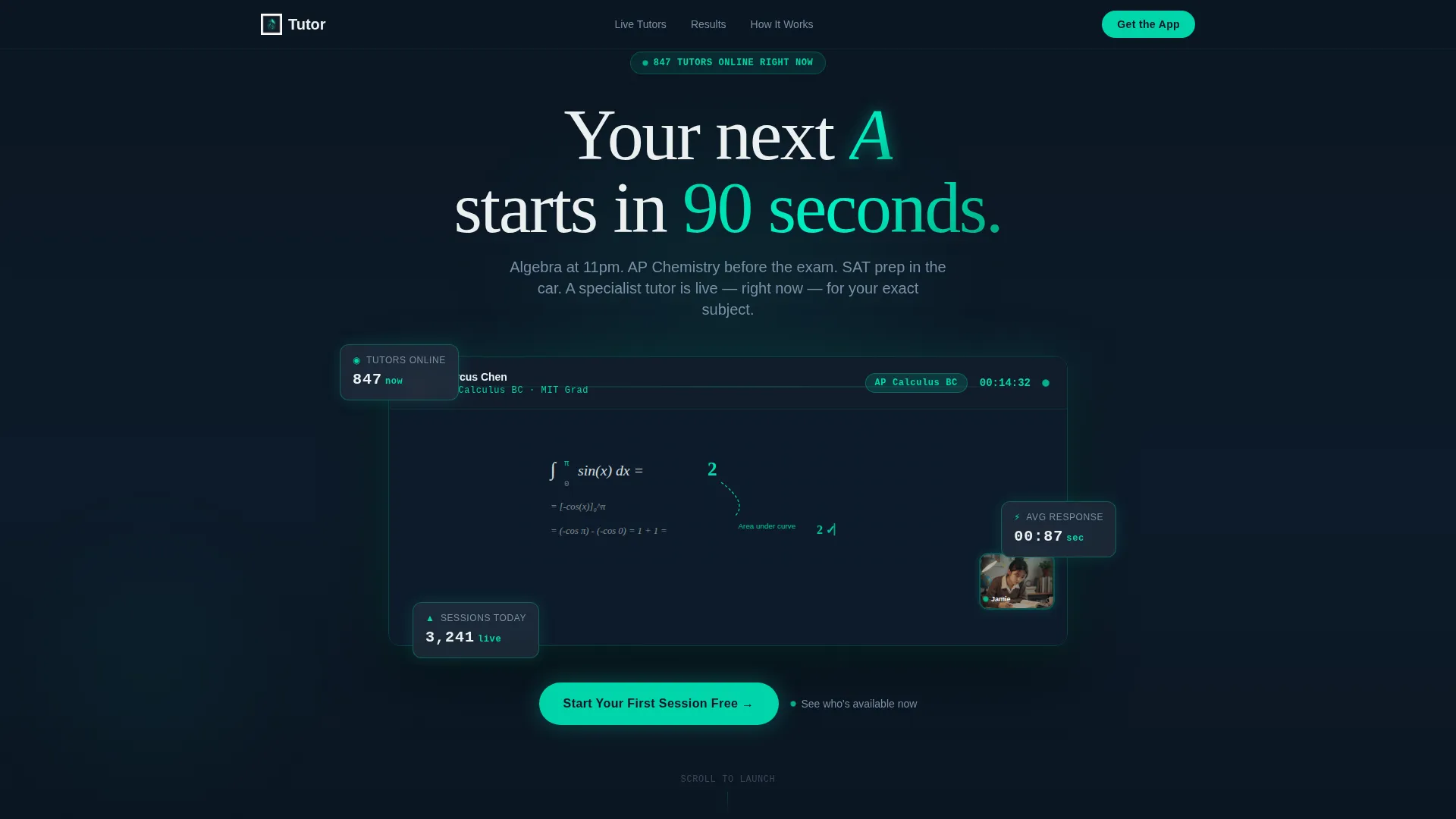
The header fills the entire browser window with a product screenshot showing a live tutoring session in progress. A shared whiteboard with a handwritten equation, a student video thumbnail, a session timer, and a subject tag labeled "AP Calculus BC" are all visible. A headline fades in above: "Your next A starts in 90 seconds." The screen sits on a subtle isometric tilt with a faint teal glow bleeding from behind.
Live-Style Tutor Availability Grid
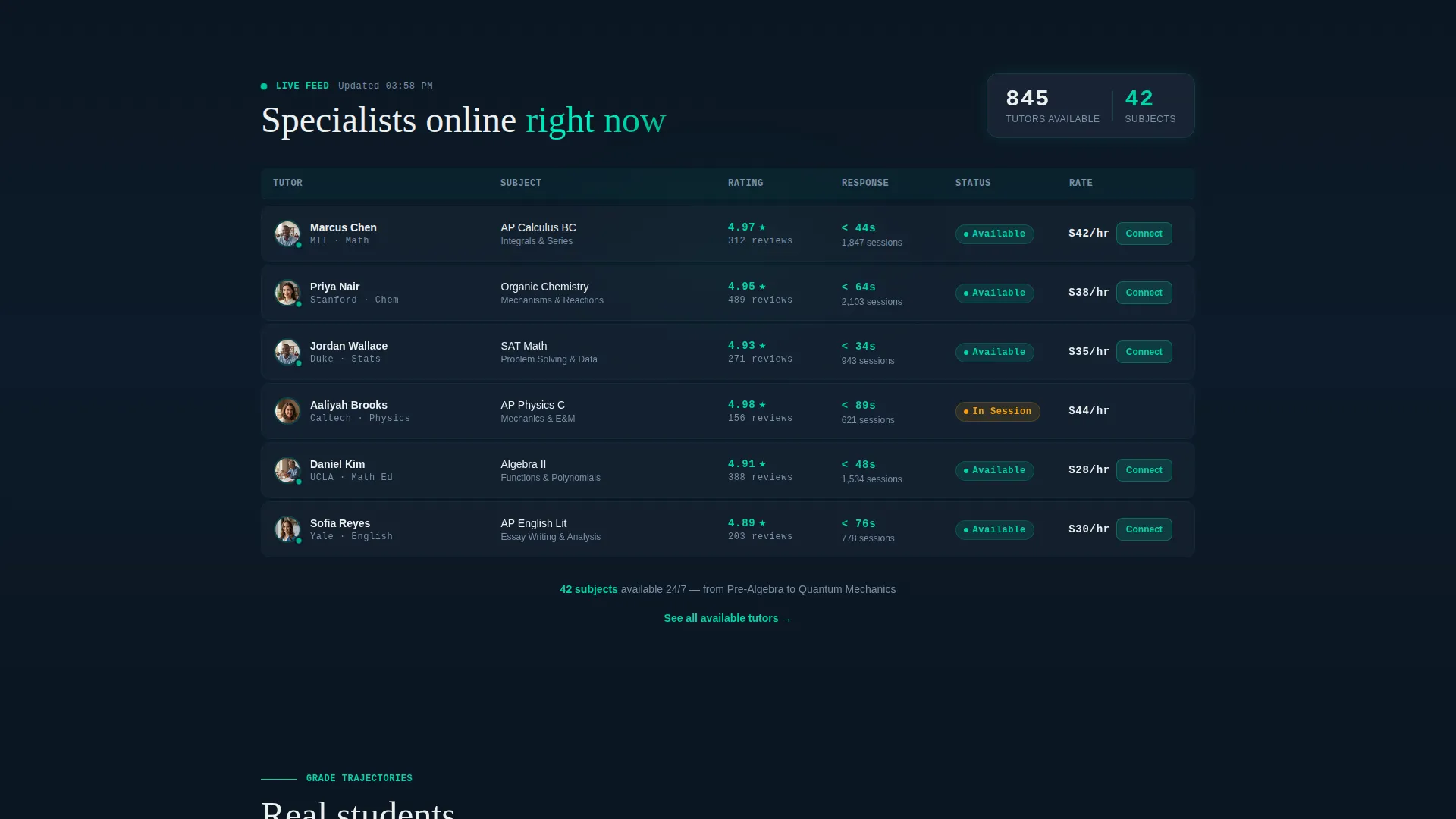
The first content section presents a data grid of tutors currently available. Each row shows a tutor's subject, star rating, and response time displayed as ticking counters. The grid communicates instant matchmaking without a single word of explanation, letting the data do the selling.
Animated Grade Trajectory Charts
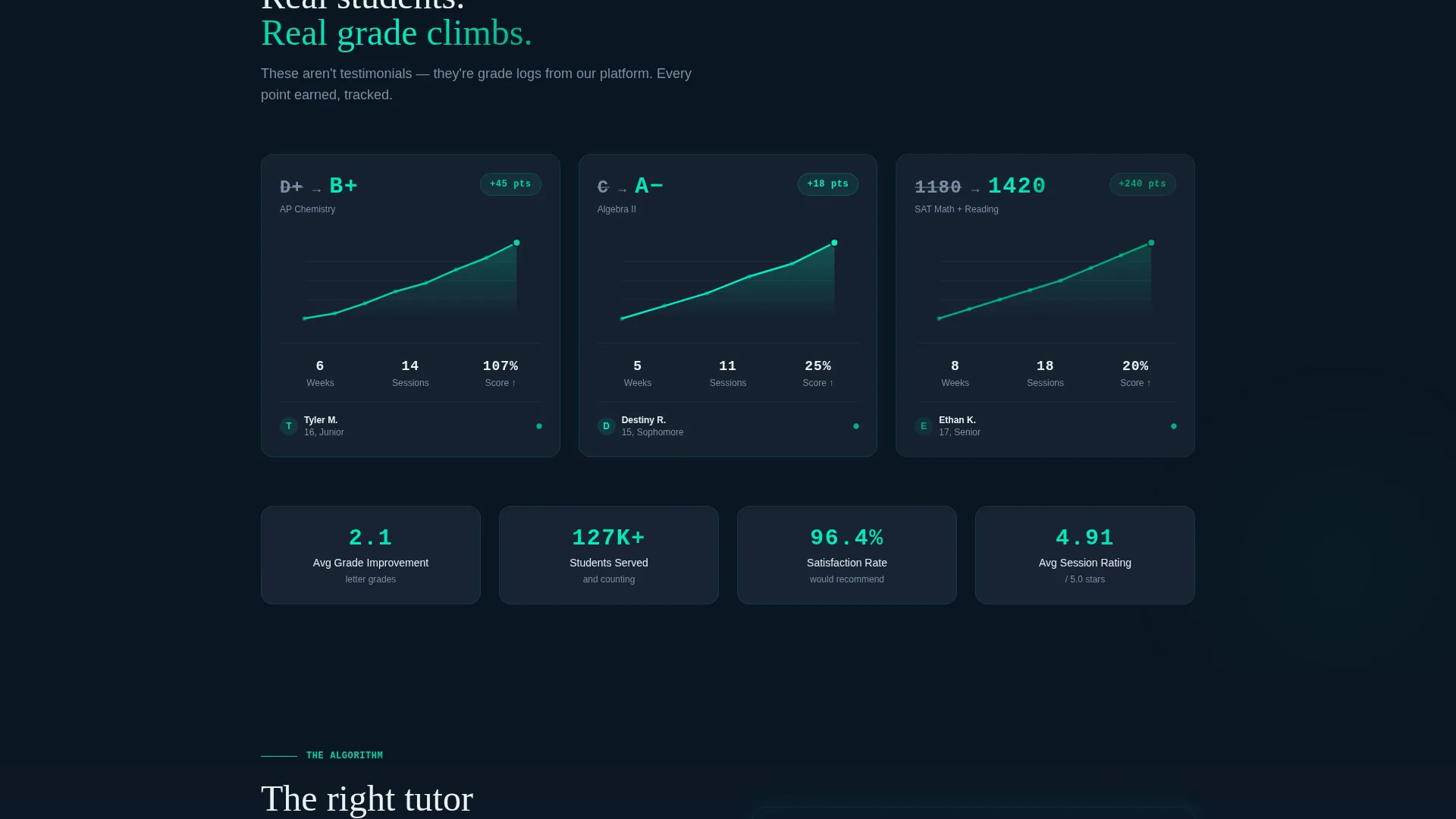
Three student dashboard cards each show a before-and-after grade journey: D+ to B+, C to A-, and an SAT score rise from 1180 to 1420. The line charts draw themselves as the visitor scrolls into view, making the proof feel live and earned rather than static.
Algorithm Network Map Visualization
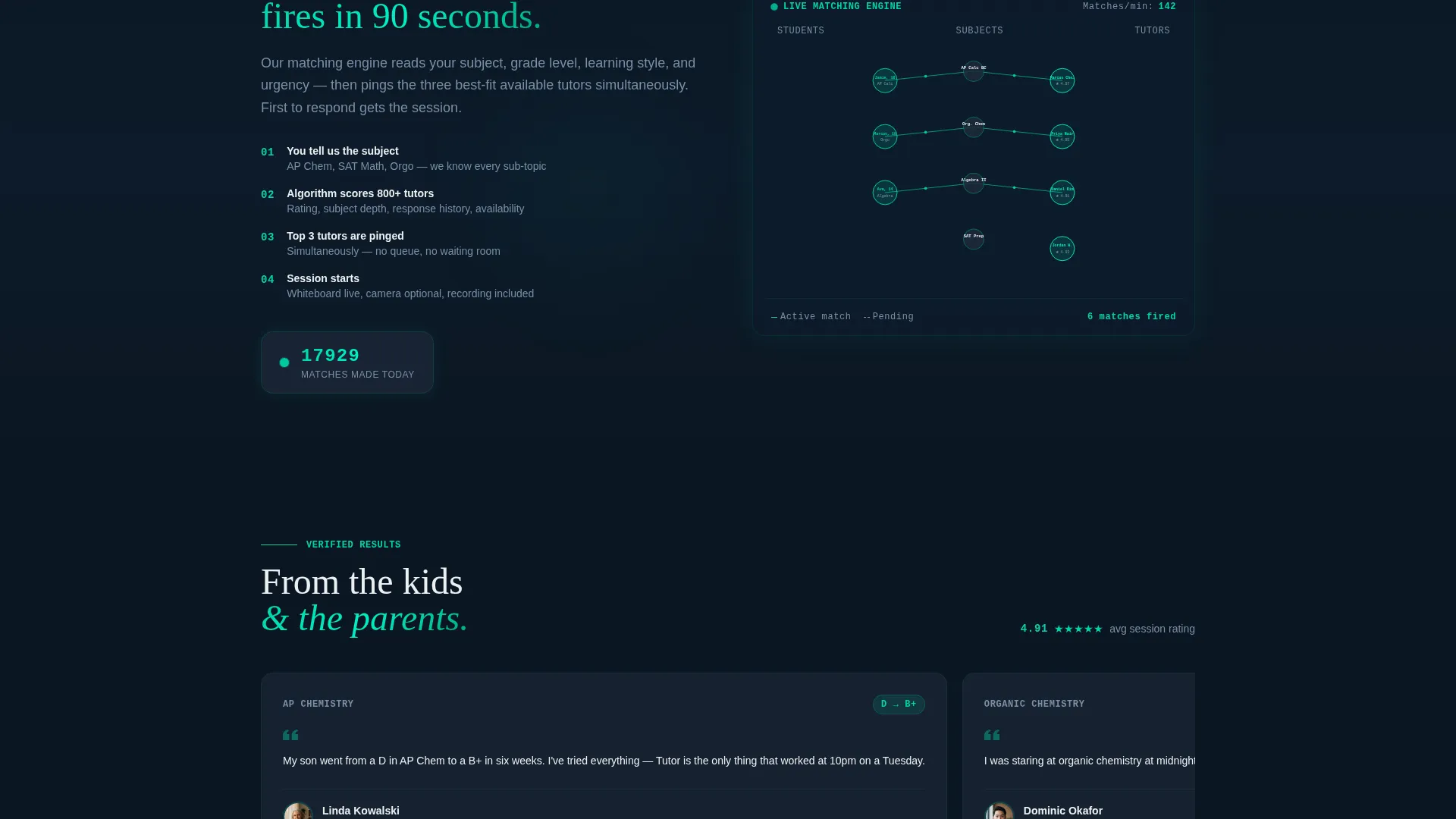
A dedicated section visualizes the tutor-student matching process as an interactive network map. Nodes light up as connections form between tutors and students, reinforcing the speed and intelligence of the matching system in a visually memorable way.
Persistent Floating App Download Bar
A bottom bar stays pinned as visitors scroll. It features the primary call-to-action button "Start Your First Session Free" glowing in electric teal, flanked by App Store and Google Play badges. A secondary "Text Me the Link" option serves desktop visitors who want to switch to mobile.
Countdown-Scroll Section Sequence
The page is structured as a launch countdown. Each section escalates urgency and adds a new layer of proof. Visitors move from seeing the product, to seeing available tutors, to seeing real grade results, to understanding the matching system, before arriving at the download prompt fully convinced.
Page sections overview
| Section | Purpose |
|---|---|
| Hero Header | Showcase live session screenshot with headline overlay |
| Tutor Availability Grid | Display real-time tutor subjects, ratings, response times |
| Grade Trajectory Cards | Animate student grade improvements on scroll |
| Matching Network Map | Visualize the tutor-student algorithm in motion |
| Floating Download Bar | Pin app download call to action and SMS link throughout scroll |
Design & branding system
The visual identity follows a Data Command theme. Every color choice reinforces focus, precision, and forward momentum, drawing from a Teal Catalyst palette that feels equal parts control room and cutting-edge edtech.
- Deep mission-control black (#0B1622) as the base background, cool slate (#1E2A3A) on card and grid surfaces, and sharp signal white (#ECF0F1) for all typography and data labels
- Electric teal (#00D4AA) reserved for active states, progress indicators, glow effects, and the primary call-to-action button to draw the eye exactly where it needs to go
- The overall aesthetic reads like a NASA control room at a critical countdown moment: dark, focused, and every illuminated element earning its place
Mobile & speed optimization
The template is designed with a mobile-first use case in mind. The core audience includes students reaching for help late at night on a phone, which means the layout must perform cleanly on small screens.
- The floating download bar and app badge layout are optimized for thumb-reach tapping on mobile devices
- The data grid, chart cards, and network map sections are structured to reflow cleanly from desktop to mobile viewports
- Scroll-triggered animations are scoped to visible sections so they feel responsive and intentional on both touch and cursor-based browsing
How this template helps you convert
The conversion strategy is baked into the section order. Visitors see the product working before they are ever asked to do anything. Trust builds section by section, and the download action feels like joining something already in motion rather than signing up for a promise.
- The product screenshot header shows a real tutoring session in progress, so the first thing a visitor sees is proof the platform works, not a headline about features
- The animated grade data and live availability grid stack credibility fast, making the download decision feel low-risk and obvious by the time the visitor reaches the floating call-to-action bar
Other information about this template
This template fits naturally within the tutoring digital presence category under edtech and technology-focused marketplace listings. It is built as a single landing page, not a multi-page website, which keeps the visitor's attention on one conversion goal throughout.
- The template style is Dashboard and Data Grid, making it a strong visual differentiator compared to standard card-and-text tutoring page layouts
- The Launch Energy creative direction means the scroll pacing is intentional: each section is designed to feel like a stage in a countdown sequence, not a passive information scroll
- The header concept is a Product Screenshot at full viewport scale, which sets Tutorgrid apart from templates that lead with illustration or stock photography
Theme
Data Command
Creative direction
Launch Energy
Color system
Teal Catalyst
Style
Dashboard/Data Grid
Direction
App Download
Page Sections
Full-viewport Product Screenshot Header
Live-style Tutor Availability Data Grid
Scroll-triggered Grade Trajectory Charts
Tutor-student Network Map
Persistent Floating App Download Bar
Related questions
Who is the ideal user for this landing page template?
Does this template include form fields for lead capture?
Can I update the data grid and chart sections with my own content?
What makes this template different from a standard tutoring page layout?
Does this template work for a single-subject tutor or a multi-subject platform?



