Unschooling Community Landing Page Template
Unlearn is a single-page landing page template built for unschooling communities and educators. It guides hesitant families through a warm, step-by-step scroll that opens with animated stats, moves into a side-by-side comparison table, and closes with a lead-capture form. The botanical color system and nature-journal tone make the case for curiosity-led learning without ever feeling preachy.
by Rocket studio
Quick summary
Unlearn is a comparison table landing page template designed for unschooling resources and community platforms. It opens with three animated statistics, walks visitors through a numbered step-by-step guide, and captures leads through a warm, vulnerability-first form. The botanical color palette and Community Hearth theme give the page the feeling of a friend's well-lit kitchen rather than a sales funnel.
Who this template is for
This template speaks directly to the people standing at the edge of a very personal decision. It is built for creators, educators, and community organizers who serve families considering child-led learning outside the traditional school system.
- First-generation unschooling families who need reassurance before they take the first step
- Veteran homeschoolers ready to move beyond structured curriculum into fully self-directed learning
- Burnt-out educators and community builders launching an unschooling resource or membership platform
What problem this template solves
Most families arrive at unschooling carrying a quiet fear: "What if I ruin my child?" Generic education landing pages ignore that fear entirely. This template is built around it. The page structure moves from evidence to empathy to invitation, meeting every stage of a nervous parent's decision-making process.
- There is no clear comparison showing how unschooling differs from homeschooling, Montessori-at-home, or traditional school
- Parents cannot find a simple, human-readable starting point that answers "But how do I actually begin?"
- Lead capture forms feel cold and transactional, which repels the cautious audience this niche demands
What you get with this template
You get a fully structured single-page layout that handles the entire conversion journey, from first impression to email capture, without a single stock photograph.
- An animated stats header with three oversized numerals that tick upward on load
- A side-by-side comparison table covering autonomy, cost, socialization, and legal requirements across four education approaches
- Two distinct lead capture paths: a primary free-trial sign-up form and a secondary PDF download gated by email only
Feature list
This section details every functional and design component built into the Unlearn template.
Animated Statistics Header
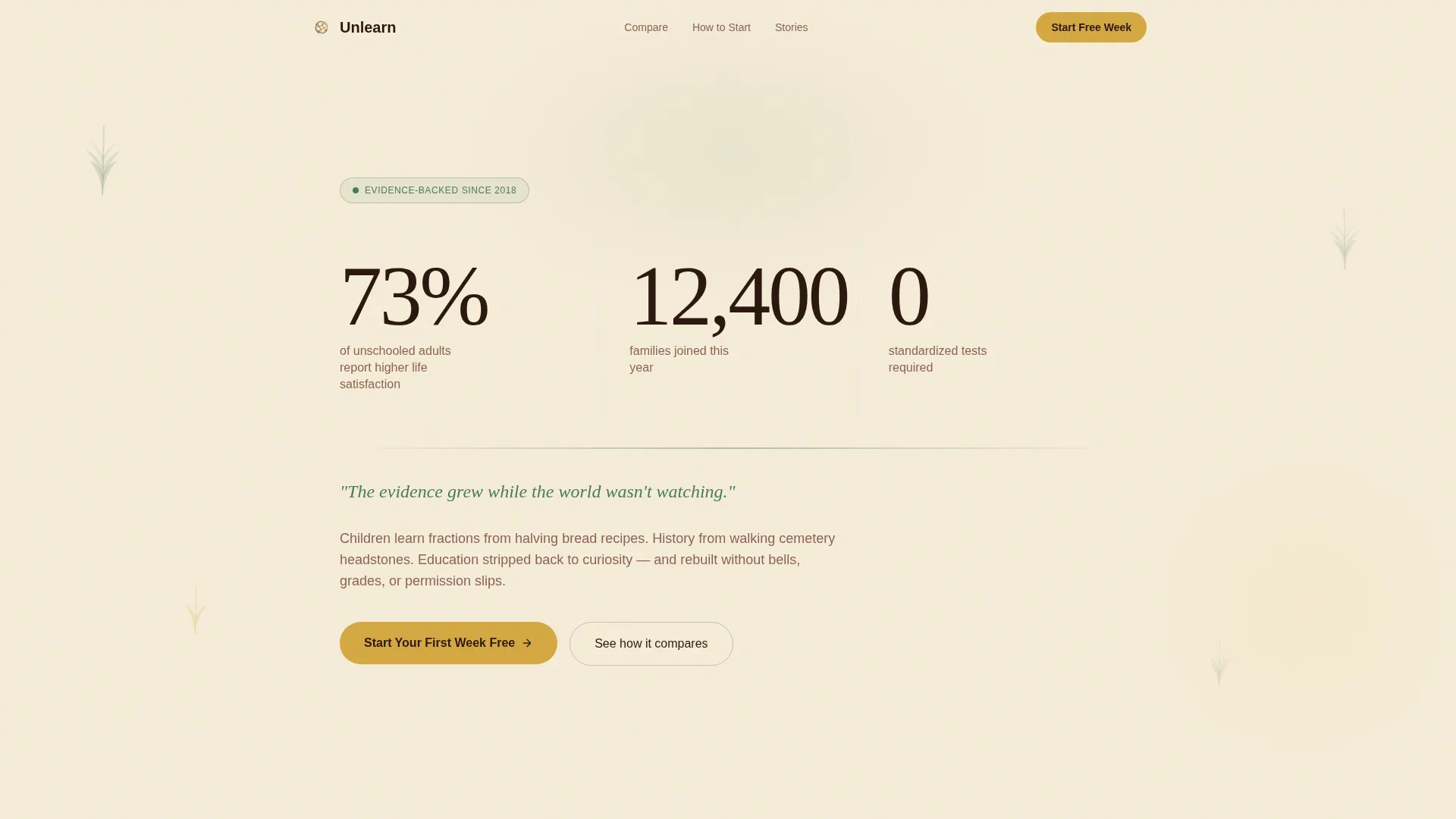
Three large serif numerals animate upward against a parchment background on page load. Each counter represents a real data point about unschooling outcomes. A single fern-green tagline anchors the header below the numbers, replacing stock imagery with evidence-led confidence.
Side-by-Side Comparison Table
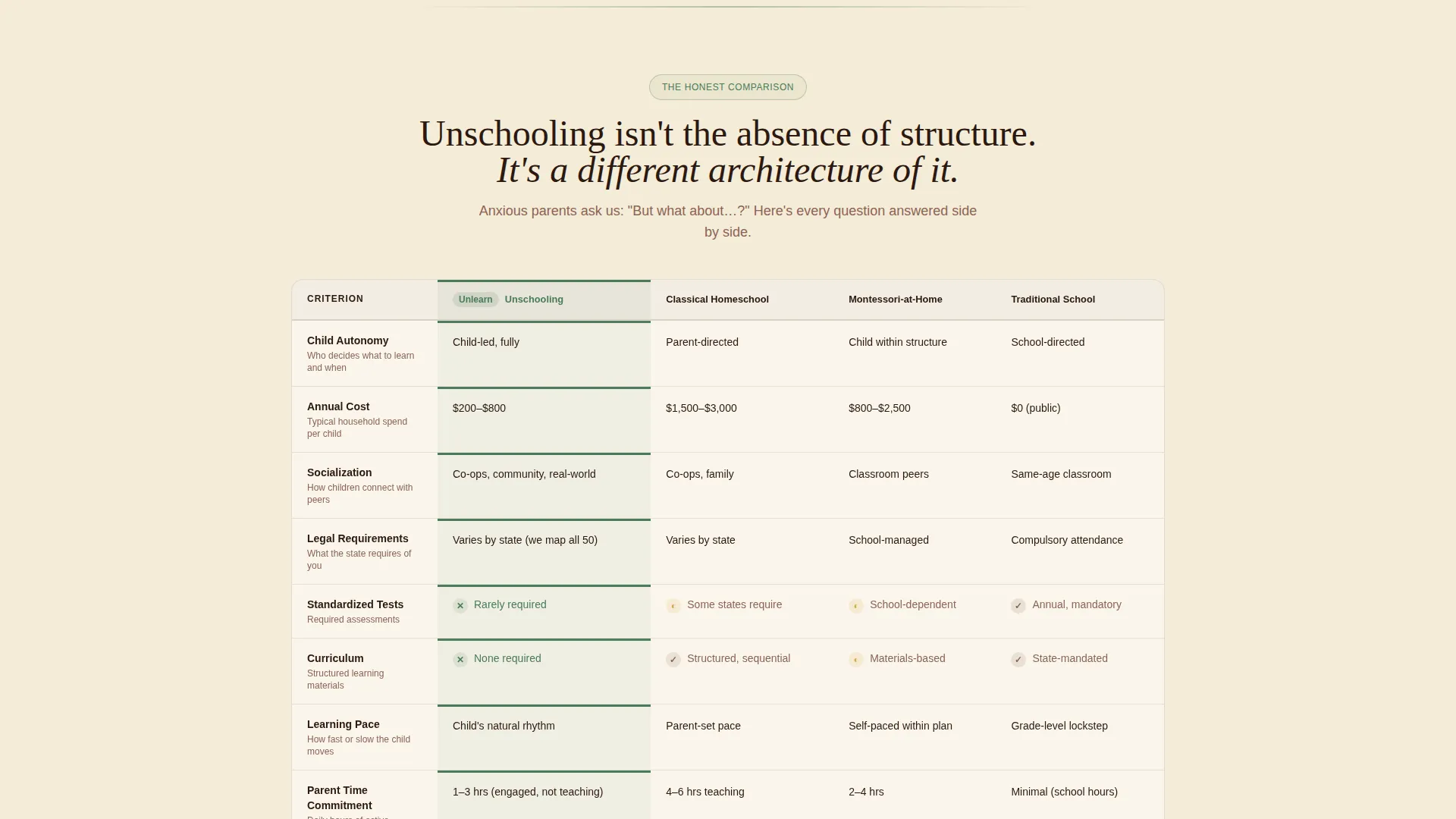
A structured table places unschooling next to classical homeschooling, Montessori-at-home, and traditional school. It compares four dimensions: autonomy, cost, socialization, and legal requirements. This layout helps anxious parents see that unschooling is a different architecture of learning, not the absence of one.
Numbered Step-by-Step Scroll
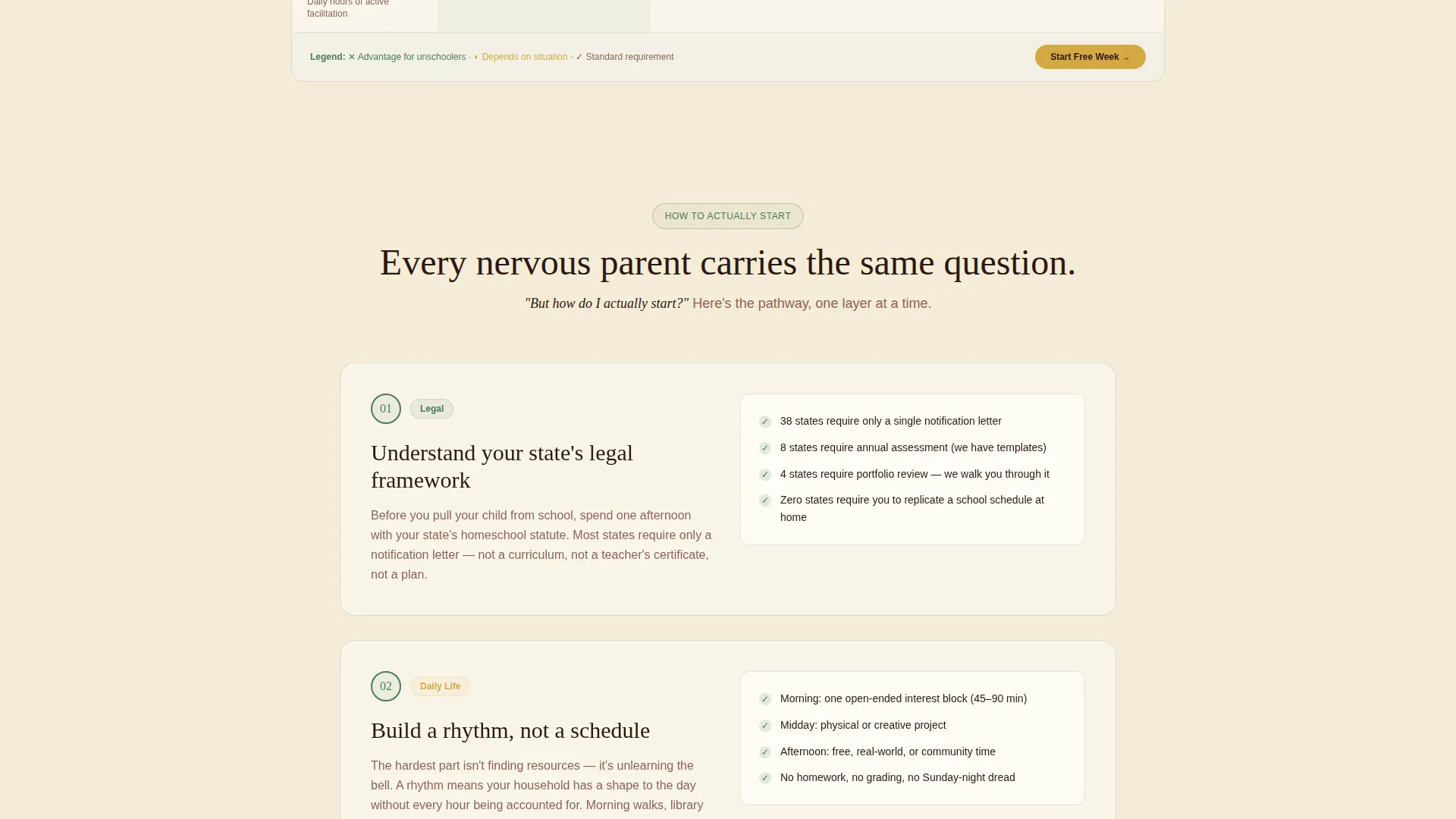
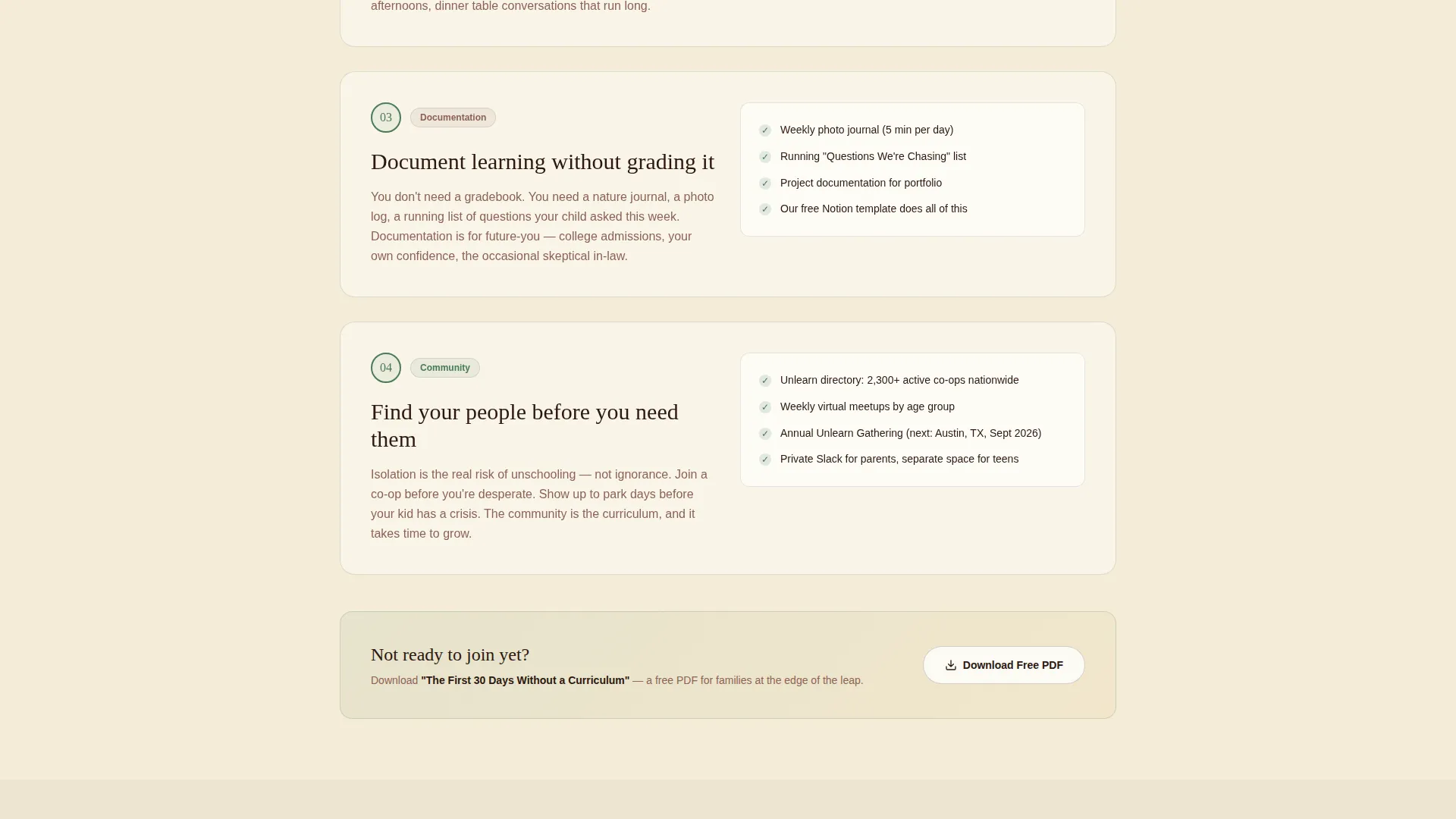
After the header, the page becomes a numbered pathway. Each section peels back one practical layer, covering legal steps, building a rhythm without a schedule, documenting learning without grades, and finding local co-ops. Hand-numbered botanical illustrations introduce each section, giving the page the feeling of a nature journal being filled in.
Vulnerability-First Lead Capture Form
The primary form asks for first name, a child's age range via dropdown (3 to 6, 7 to 10, 11 to 14, and 15 to 18), and an open text field labeled "What scares you most about starting?" That question signals to the visitor that the community already understands their fear, which is the core conversion driver.
Sticky Secondary Call to Action
After the comparison table, a sticky bar appears and stays visible through the rest of the scroll. It repeats the primary call to action, keeping the sign-up option accessible without interrupting the reading experience.
Downloadable PDF Lead Magnet Gate
A secondary conversion path offers a free downloadable guide titled "The First 30 Days Without a Curriculum." It is gated behind an email-only capture form. This path serves visitors who are curious but not yet ready to commit to the full community sign-up.
Page sections overview
| Section | Purpose |
|---|---|
| Animated Stats Header | Opens with three animated numerals and a single fern-green tagline to establish credibility instantly |
| Comparison Table | Compares unschooling, classical homeschooling, Montessori-at-home, and traditional school across four key dimensions |
| Step 1: Legal Steps | Explains state-by-state legal requirements so families understand what is actually required of them |
| Step 2: Daily Rhythm | Shows how to build a daily rhythm without a fixed schedule or curriculum |
| Step 3: Documenting Learning | Explains how to record and track a child's progress without grades or tests |
| Step 4: Finding Co-ops | Guides families toward local co-ops and community connections |
| Primary call to action Form | Captures first name, child's age range, and biggest hesitation to start the free first week |
| Sticky call to action Bar | Repeats the primary sign-up prompt after the comparison table throughout the scroll |
| PDF Lead Magnet | Offers a free 30-day guide gated behind email-only capture for undecided visitors |
Design & branding system
The Botanical color system and Community Hearth theme work together to make the page feel warm, grounded, and alive. Every color has a clear role, and nothing competes with the content for attention.
- Deep loam (#2C1810) anchors headlines and navigation with the visual weight of turned soil; sun-warmed parchment (#F5ECD7) fills the background like natural light in a room
- Living fern (#4A7C59) runs through section dividers and iconography like something growing between the cracks; wildflower ochre (#D4A843) is reserved exclusively for buttons, badges, and interactive highlights
- Typography uses a warm serif at display scale for numerals and headlines, with hand-numbered botanical illustrations introducing each step section as if drawn into a nature journal
Mobile & speed optimization
The layout is designed to read cleanly on any screen size. The step-by-step scroll structure means content is organized in focused, single-idea sections rather than dense blocks, which works naturally on smaller displays.
- The comparison table is structured for horizontal readability, keeping the four-column format scannable without requiring side-scrolling on mobile
- The sticky call-to-action bar is positioned to remain visible without obscuring the main content on smaller screens
How this template helps you convert
The page is built around a single truth: a hesitant parent converts when they feel understood, not when they feel sold to. Every structural and copy decision reinforces that principle.
- The animated stats header replaces vague promises with specific, evidence-backed numbers, building trust before the visitor reads a single line of body copy
- The comparison table removes the fear of the unknown by showing exactly where unschooling sits relative to familiar alternatives, giving the nervous parent a reference point
- The vulnerability question in the sign-up form ("What scares you most about starting?") tells the visitor that this community already expects and welcomes their fear, lowering the barrier to submit
Other information about this template
This template is built specifically for the unschooling resource and community niche inside the broader education and training category. It suits creators launching a first community, as well as established platforms refreshing their lead generation page.
- The template style is a Comparison Table landing page, and the creative direction follows a Step-by-Step Guide structure with a Stats/Metrics header concept
- The lead generation focus means the page is purpose-built to collect qualified contacts, not just page views
- The two-path conversion system (free trial form and PDF download) accommodates both ready-to-join visitors and those still in the research phase
- No stock photography is used anywhere in the template; the design relies entirely on data display, botanical illustration, and typographic hierarchy for visual impact
- The Community Hearth theme and Botanical color system are consistent across every section, creating a cohesive feel from header to footer
Theme
Community Hearth
Creative direction
Step-by-Step Guide
Color system
Botanical
Style
Comparison Table
Direction
Lead Generation
Page Sections
Animated Statistics Header
Side-by-side Comparison Table
Numbered Step-by-step Pathway
Vulnerability-first Sign-up Form
Sticky Call-to-action Bar
Email-gated PDF Lead Magnet
Related questions
Does this template include the comparison table layout already built in?
Can I use both lead capture paths at the same time?
What age ranges are included in the child age dropdown on the form?
Is this template suitable for someone launching their first unschooling community?
Does the template use stock photography?



