Special Education & Learning Center Education Website Template
The Decode special education landing page template gives dyslexia and learning disability practices a warm, parent-focused digital presence that turns anxious late-night searches into confident registrations. Built around a personalized quiz screener, modular workshop cards, and an event sign-up flow, it guides families from confusion to clarity with a kitchen-table tone and a calming Slate & Sky visual identity.
by Rocket studio
Quick summary
Decode is a modular card-grid landing page template built for dyslexia and learning disability practices. It pairs an interactive three-question screener with a personalized workshop card grid, guiding each parent to the right event track for their child. The Slate & Sky color system and Fraunces serif typography keep the experience warm, clear, and completely free of clinical anxiety.
Who this template is for
This template is built for any educator, specialist, or practice owner working in the dyslexia and learning disability space who needs a focused event-registration page. It speaks directly to the people most likely to arrive at midnight, phone in hand, searching for answers their child's school has not been able to give them.
- Dyslexia assessment practices and learning centers hosting free parent workshops
- Special education consultants and reading specialists who teach reading to struggling learners
- School coordinators seeking an outside evaluator or a clear referral resource for families
What problem this template solves
Parents of kids who learn differently face a painful gap: something is clearly wrong, but nobody has named it yet. The child reverses letters, loses track of individual words mid-sentence, and cries through homework. Most teachers do their best, but a general classroom was not designed for a brain that processes phonological awareness, phonemic awareness, and decoding in a non-standard sequence. The parent turns to Google and finds a wall of clinical language and unanswered calls.
This template solves the communication problem between a specialist practice and the families who need it most. It replaces confusion with a clear, personalized path.
- Eliminates the generic "contact us" dead end by routing visitors to a specific, matched workshop track based on their child's grade and observed challenges
- Gives the practice a voice that feels human and warm, not institutional, reducing the hesitation that stops exhausted parents from registering
- Bridges the gap between a parent's first search and a confirmed seat at a free, structured event
What you get with this template
Every section of this landing page is designed to do one thing: move a worried parent from reading to registering. The layout is modular, meaning each card block can be rearranged to reflect new workshop dates, age groups, or session focuses without rebuilding the page from scratch.
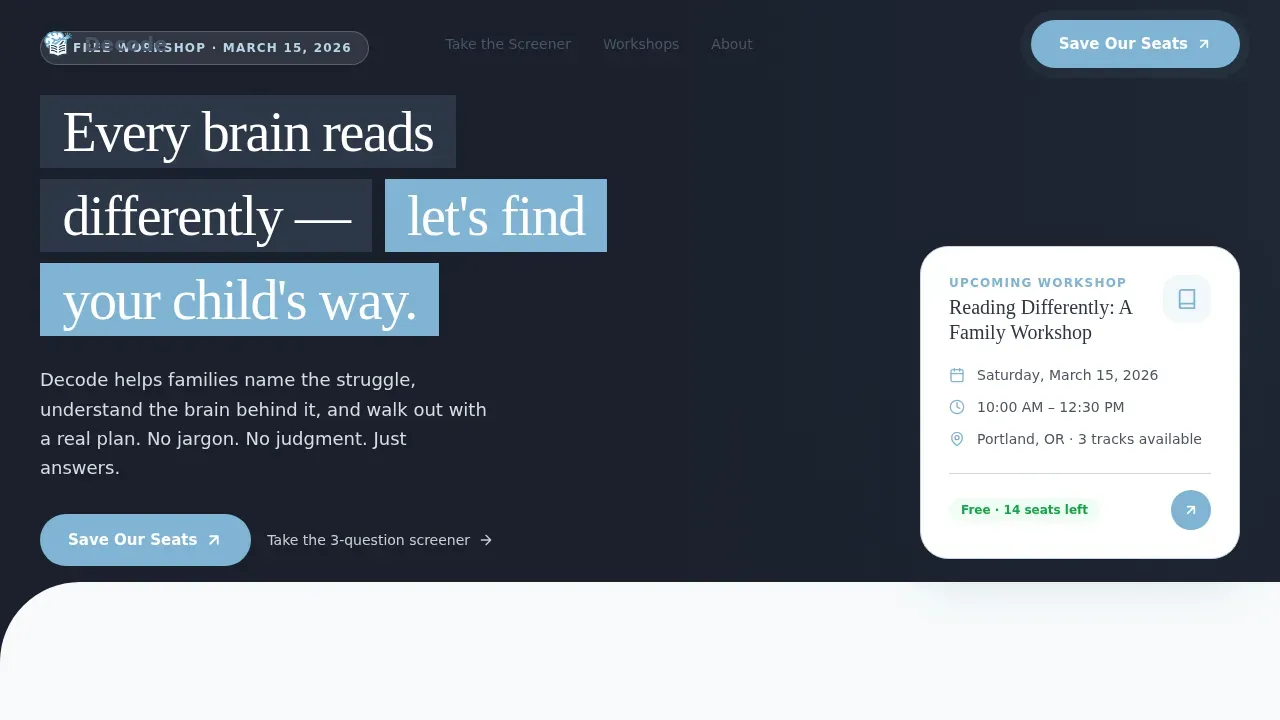
- A half-page photo-and-text hero header with a warm, naturally lit parent-and-child photograph, a headline, a workshop event subline, and a sky-blue "Save Our Seats" button
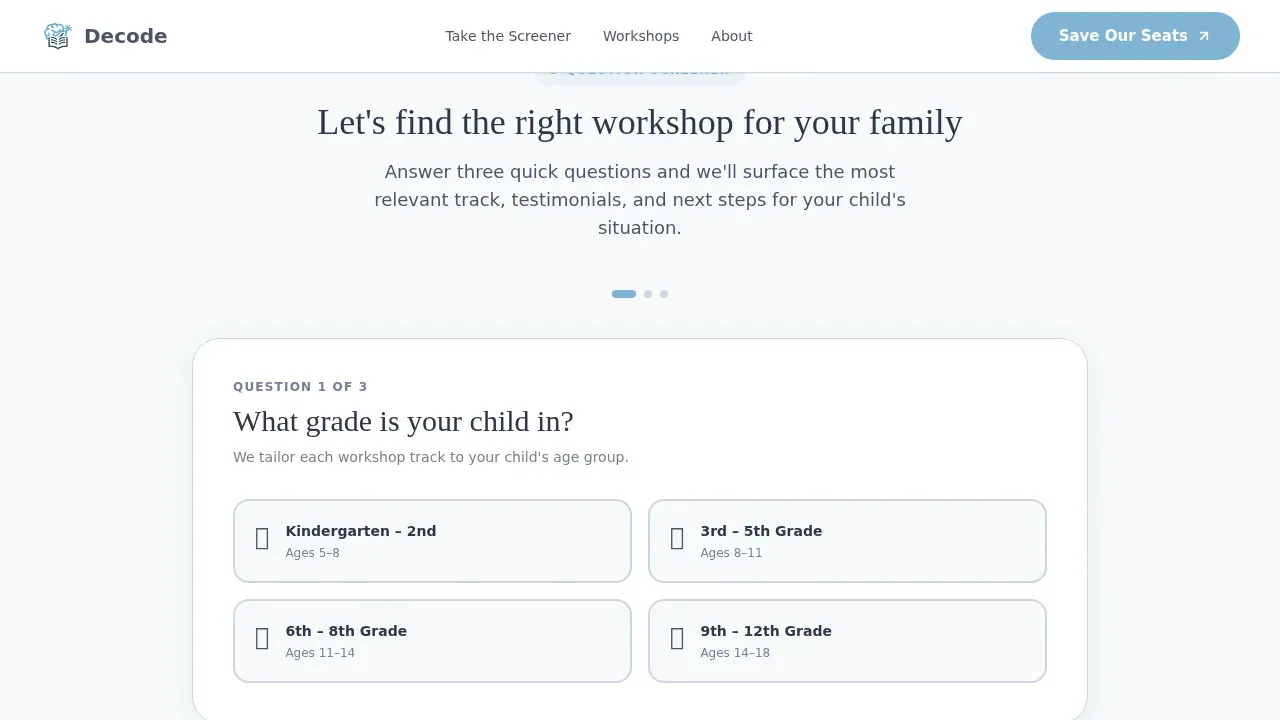
- A three-question interactive screener with illustrated, flip-on-selection cards that reflow the card grid below based on answers, surfacing the most relevant workshop track
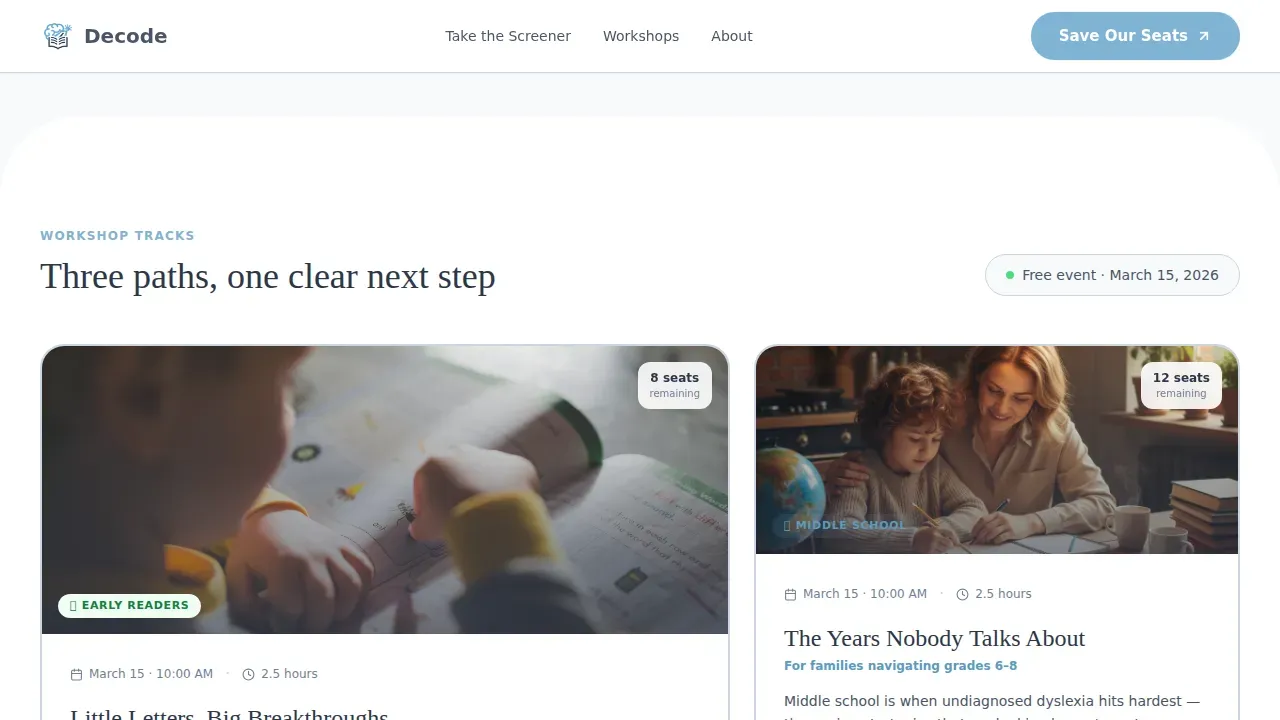
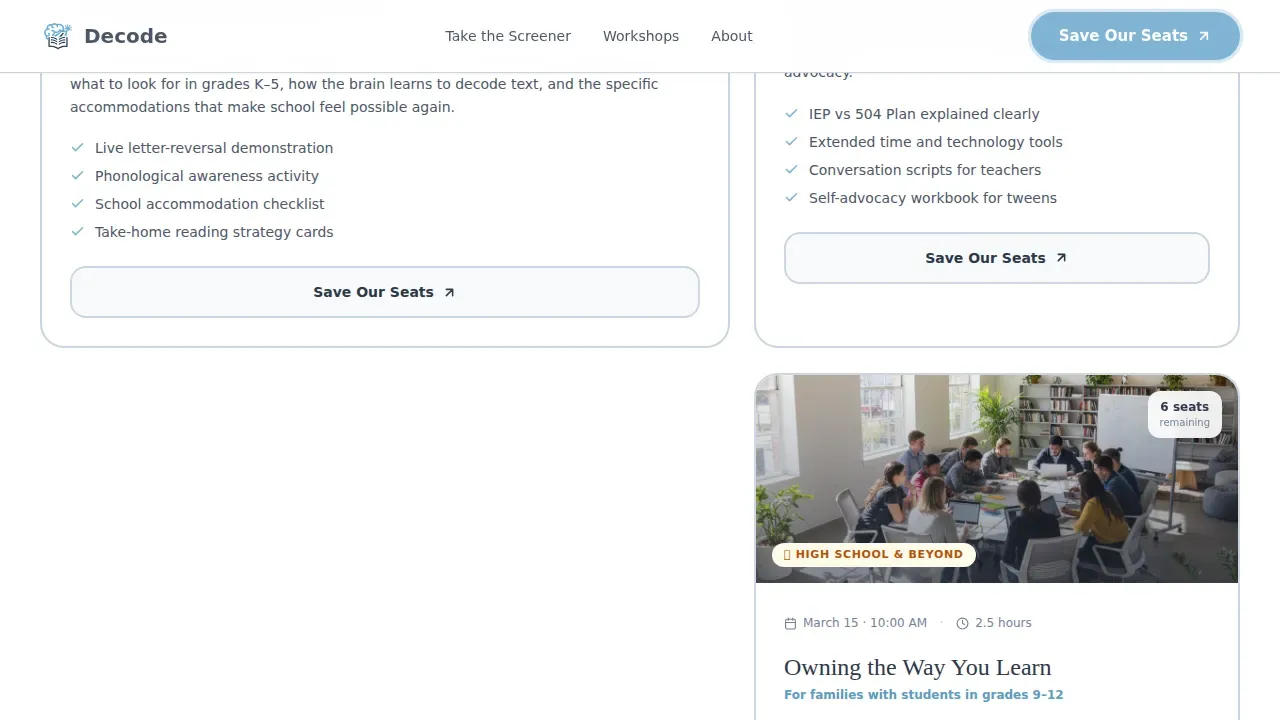
- A personalized modular card grid organized by three workshop tracks: Early Readers, Middle School, and Teen, each with matched testimonials and its own "Save Our Seats" button
- A free event registration form that collects the parent's first name, child's grade, workshop track (pre-filled from the quiz), email, and an optional open field, closing with a confirmation message and a downloadable PDF checklist
- A secondary "Not Ready Yet? Get the Home Guide" email capture path that nurtures undecided visitors over the following week
Feature list
The template ships with a set of purpose-built components that reflect the specific needs of a dyslexia practice running free parent workshops. Each feature is designed to lower the barrier to registration while honoring the emotional state of families who learn differently.
Interactive Quiz Screener
A three-question card-flip screener sits directly below the hero. It asks what grade the child is in, which challenges the parent notices most (such as letter reversals, difficulty with basic words, or poor reading fluency), and whether the child has been evaluated before. Answers drive a visible page reflow, so the experience feels responsive and personal rather than static.
Personalized Workshop Card Grid
Below the screener, a modular card grid reorganizes itself to surface the most relevant workshop track: Early Readers for children in first grade through early elementary, Middle School for pre-teens developing reading comprehension and vocabulary, and Teen for older students working on reading fluency and confidence. Each card carries its own "Save Our Seats" call to action and a matched parent testimonial, so every visitor sees social proof that reflects their specific situation.
Matched Parent Testimonials
Testimonials appear inside the card grid, matched to the quiz result rather than displayed in a generic row. This placement gives each testimonial specific context, making the social proof feel earned rather than decorative. Testimonials use first names and child ages, with specific outcome language grounded in real reading and decoding progress.
Free Event Registration Form
The registration form is frictionless and free. It pre-fills the workshop track from the quiz, asks only what is necessary, and ends with a confirmation screen that includes a downloadable PDF checklist titled "What to Bring to Your First Workshop." The optional open field, "Anything you'd like us to know about your child," gives parents a place to share context before the event, making the first meeting feel prepared rather than cold.
Sticky Mobile Call-to-Action Bar
On mobile devices, a sticky bottom bar keeps "Save Our Seats" visible at all times as the parent scrolls. Because many families search for reading support and dyslexia resources on their phones late at night, this bar ensures the primary action is never more than a thumb-tap away regardless of where the visitor is on the page.
Secondary Nurture Capture Path
Not every visitor is ready to register on the first visit. The "Not Ready Yet? Get the Home Guide" email capture delivers a dyslexia-signs resource and nurtures those visitors toward registration over the following week. This path ensures the practice continues to support and engage families who need a little more time before committing to a seat.
Page sections overview
| Section | Purpose |
|---|---|
| Hero Header | Introduce the practice and drive initial registration clicks |
| Quiz Screener | Personalize the page experience by grade and challenge |
| Workshop Card Grid | Display matched workshop tracks with registration calls to action |
| Parent Testimonials | Build trust through matched, specific social proof |
| Registration Form | Capture event sign-ups with a frictionless free-event flow |
| Nurture Capture | Retain undecided visitors with a home guide email path |
| Footer | Close the page with horizontal navigation and contact context |
Design & branding system
The visual language of this template is deliberately anti-clinical. Every color, font, and layout choice was made to feel like a Saturday morning at a kitchen table, not a waiting room. The Slate & Sky palette keeps the page calm and readable without the sterile brightness of a medical or academic site. Typography pairs a warm editorial serif for headlines with a clean humanist sans-serif for body copy and interface labels, creating a combination that feels knowledgeable without being cold.
- Colors: warm slate (#4A5568) for body text and card borders, soft sky blue (#7FB3D3) on buttons and highlighted cards, cloud white (#F7FAFC) across page and card backgrounds, and dusk navy (#2D3748) for all primary headlines
- Typography: Fraunces serif for headlines, DM Sans for body text and form labels, both chosen to reinforce a warm editorial tone while keeping reading comprehension high across all age groups of adult visitors
- Layout style: organic card shapes, generous whitespace, and a minimalist menu structure that helps reduce cognitive load for neurodivergent visitors who may feel overwhelmed by cluttered navigation
Mobile & speed optimization
Parents searching for dyslexia support rarely do it from a desktop. They are on a phone, often late at night, often mid-worry. This template was designed mobile-first, with every interactive component tested for thumb-friendly use and every text block sized for easy reading on small screens.
- The sticky bottom call-to-action bar keeps "Save Our Seats" accessible throughout the mobile scroll without interrupting the reading flow
- Card flip interactions, quiz reflow animations, and scroll reveals are implemented with medium animation weight, keeping the experience engaging without creating distraction or disorienting learners with sensory sensitivities
- Server Components handle all static sections for fast initial load, while the quiz state management and registration form run as Client Components, keeping interactive behaviors isolated and performant
How this template helps you convert
The entire page is structured around a single conversion goal: a confirmed seat at a free workshop. Every design and content decision points toward that moment when a parent types their name into the registration form and feels the relief of having done something concrete for their child.
- The quiz screener personalizes the experience immediately, so visitors do not scroll past a generic card grid. Instead, they see a page that appears to already understand their child's specific reading challenges, letter reversals, or decoding gaps, making registration feel like the obvious next step.
- The matched testimonials and pre-filled registration form remove two of the biggest friction points: doubt that the program is right for their child, and the effort of re-entering information they already provided in the quiz.
- The secondary nurture path captures visitors who leave without registering, continuing to support and educate them through a dyslexia-signs home guide that keeps the practice present and trusted until they are ready to commit.
Other information about this template
This template is designed with a deep understanding of how families encounter learning disabilities for the first time. Research consistently shows that parents are often the first to notice when their child may have a learning disability. Early intervention is critical to a child's success in school, and the earliest possible identification of challenges like dyslexia gives children the best chance of reaching normal reading ability. Approximately 80% of children with disabilities in reading have a specific learning disability, and learning disabilities are due to neurobiological factors that affect how the brain processes language and decoding tasks.
The page's educational context draws on the Science of Reading, which emphasizes the importance of phonics and decoding strategies in literacy instruction. Phonics instruction is effective and helps young children learn to read. Including phonics in a comprehensive reading program reduces reading failure and raises average literacy levels across a classroom. Students need continual practice with phonics skills to solidify those skills and transfer them to reading in context. Multisensory strategies, chunking words into manageable units, working with cvc words and basic words in small groups, and building phonological awareness through structured lessons are all strategies that research supports for students with dyslexia and related disabilities.
The template's quiz and card grid structure reflects Universal Design for Learning (UDL) principles: Engagement, Representation, and Action and Expression. UDL encourages teachers and educators to anticipate variability in learners and design lessons that remove barriers. The UDL framework supports the varied identities, competencies, and learning strengths of every learner. Representation in UDL means presenting information in varied formats so all learners can access and comprehend the content. This template applies those ideas visually: infographics and mixed media slots, authentic classroom imagery, and a muted color palette that avoids pure high-contrast combinations, all help create a calming design appropriate for neurodivergent users.
The Decode every brain learns differently special education landing page template is also a practical tool for educators and specialists who want to build a professional digital presence quickly. AI-powered no-code tools enable users to create educational resources without traditional programming skills, and no-code platforms can facilitate development of applications tailored for special education needs. Natural language prompts in no-code tools simplify the build process, and the template's modular card grid is easy to iterate based on student feedback and workshop outcomes.
- Designed to reflect guidance from the learning disabilities association community on strength-based language and individualized support
- Supports practices that address specific learning differences including dyslexia, ADHD, and other disabilities, clearly defining the unique needs each workshop track addresses
- Useful tips and resources can be added to the nurture email path and the confirmation PDF without requiring changes to the core page layout
- The national center for learning disabilities research base supports the evidence-based framing used in the quiz screener and workshop descriptions throughout the page
- Background knowledge and language skills sections within each workshop card can be customized to reflect the specific curriculum your practice uses
- Small group instruction models, small groups of students work formats, and structured phonics lessons are all representable within the workshop track cards
- The page structure supports behavior management context for school coordinators who need to explain the referral path to parents of students with co-occurring challenges
- Word recognition, reading fluency, and reading comprehension outcomes can be highlighted per track, giving each card specific and believable progress language
Theme
Family First
Creative direction
Quiz & Personalize
Color system
Slate & Sky
Style
Card Grid (Modular)
Direction
Event Registration
Page Sections
Interactive Three-question Quiz Screener
Personalized Modular Workshop Card Grid
Free Event Registration Form with PDF Confirmation
Sticky Mobile Call-to-action Bar
Secondary Nurture Email Capture Path
Half-page Photo and Text Hero Header
Related questions
Can I customize the quiz questions for a different age range or subject area?
Does the registration form work as a free event sign-up without a payment step?
Can the workshop card grid be used without the quiz screener?
Is this template suitable for a school coordinator seeking an outside evaluator?
What happens to visitors who do not register on their first visit?



