Uplink - Intelligent Telecom Landing Page Template
Uplink is a dashboard-style landing page template built for telecommunications client management platforms. It showcases a live-feeling data grid interface, a three-tab feature switcher, and a progressive lead capture form. The Tech Glass visual theme, Monochrome Steel color palette, and Spec Sheet layout work together to signal precision and control from the first scroll.
by Rocket studio
Quick summary
Uplink is a single-page landing page template designed for telecom client management platforms. It opens with a browser-chrome header that renders three switchable dashboard views. A scrollable Spec Sheet body builds a technical business case, section by section. The primary call to action, "Request a Portfolio Audit," drives qualified lead capture through a three-step progressive form.
Who this template is for
This template is built for teams selling or promoting telecom client management software. The layout, language, and visual logic are tuned for audiences who live inside operational dashboards every day.
- Telecom channel managers overseeing large enterprise account portfolios across regions
- Operations directors reconciling usage data against committed spend targets
- Resellers who need to provision, monitor, and bill clients without switching between multiple legacy portals
What problem this template solves
Managing thousands of SIMs, multiple rate plans, and overlapping contract cycles across separate legacy systems creates costly blind spots. Teams lose time toggling between portals and struggle to build a coherent, real-time view of client portfolios. A generic marketing page cannot communicate the depth of a platform built to solve this problem. This template solves that communication gap directly.
- It shows the product interface before a prospect fills out a single form field
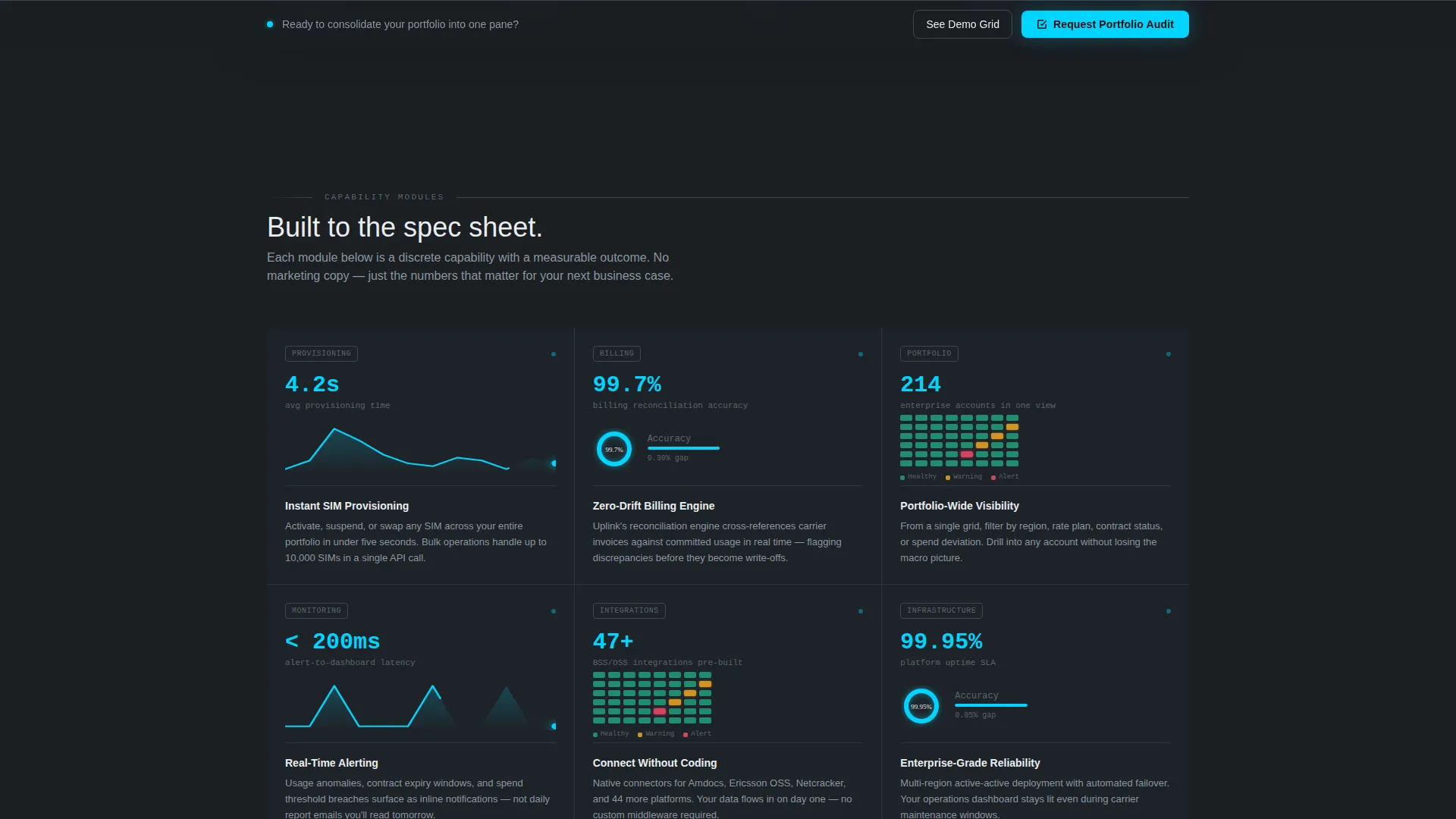
- It replaces vague benefit claims with metric-led specification cards that buyers can use internally
- It removes form anxiety by offering an interactive sandbox path alongside the primary lead capture flow
What you get with this template
The template delivers a complete, conversion-ready landing page structure with every section pre-built and logically ordered. Visual identity, interaction logic, and form structure are all defined in the source design.
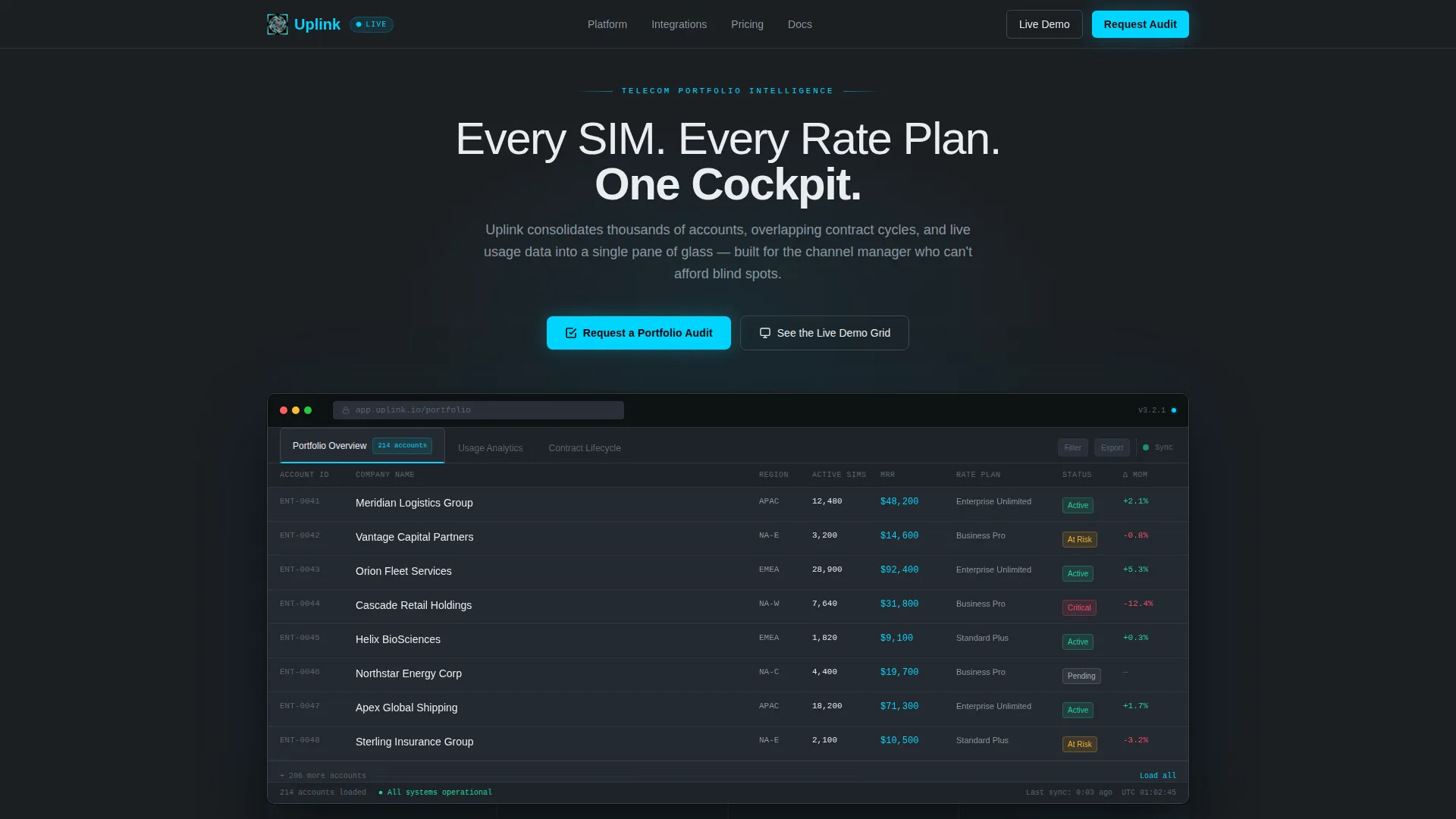
- A Feature Tab Switcher header with three switchable live dashboard views inside a browser-chrome frame
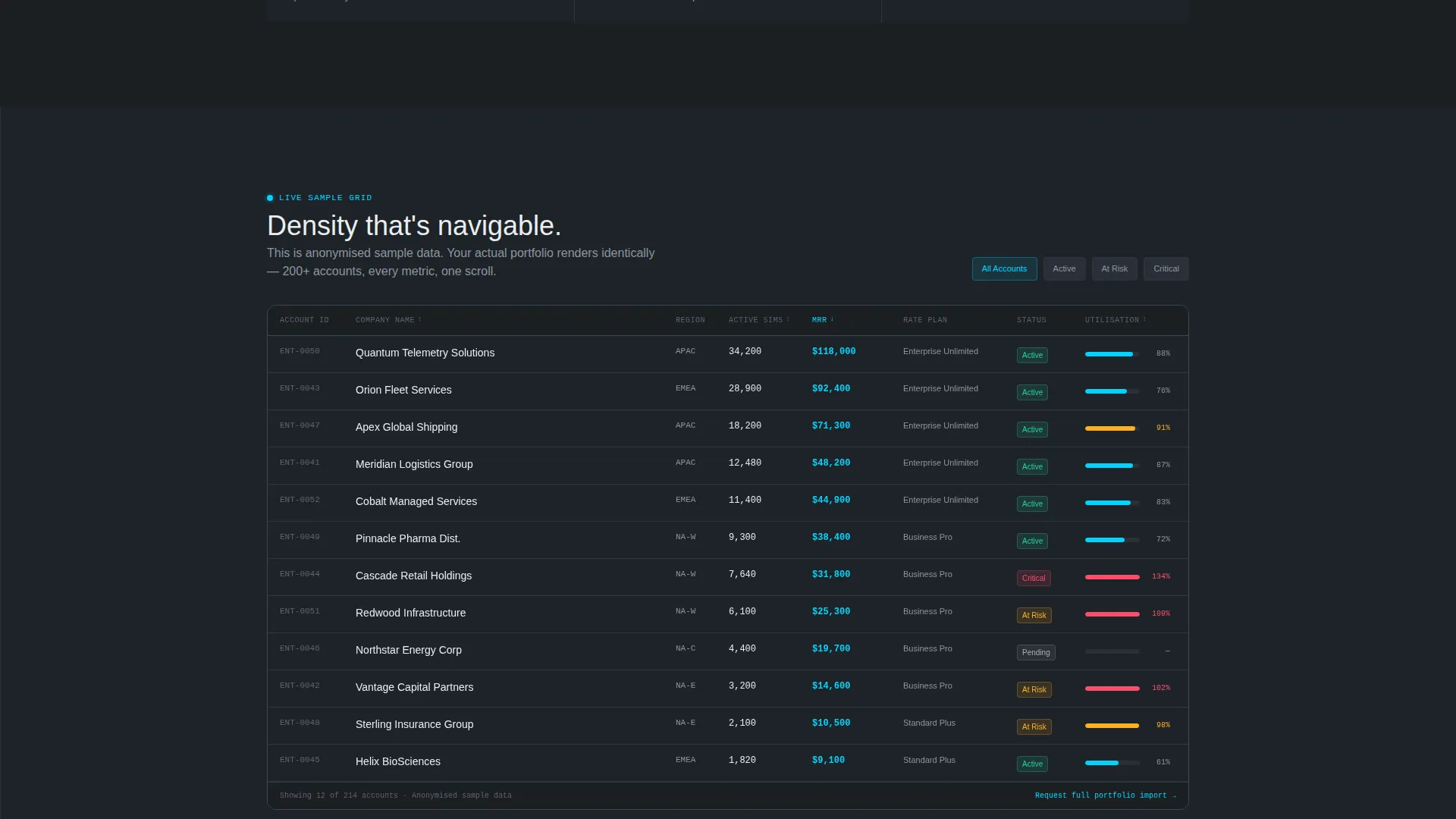
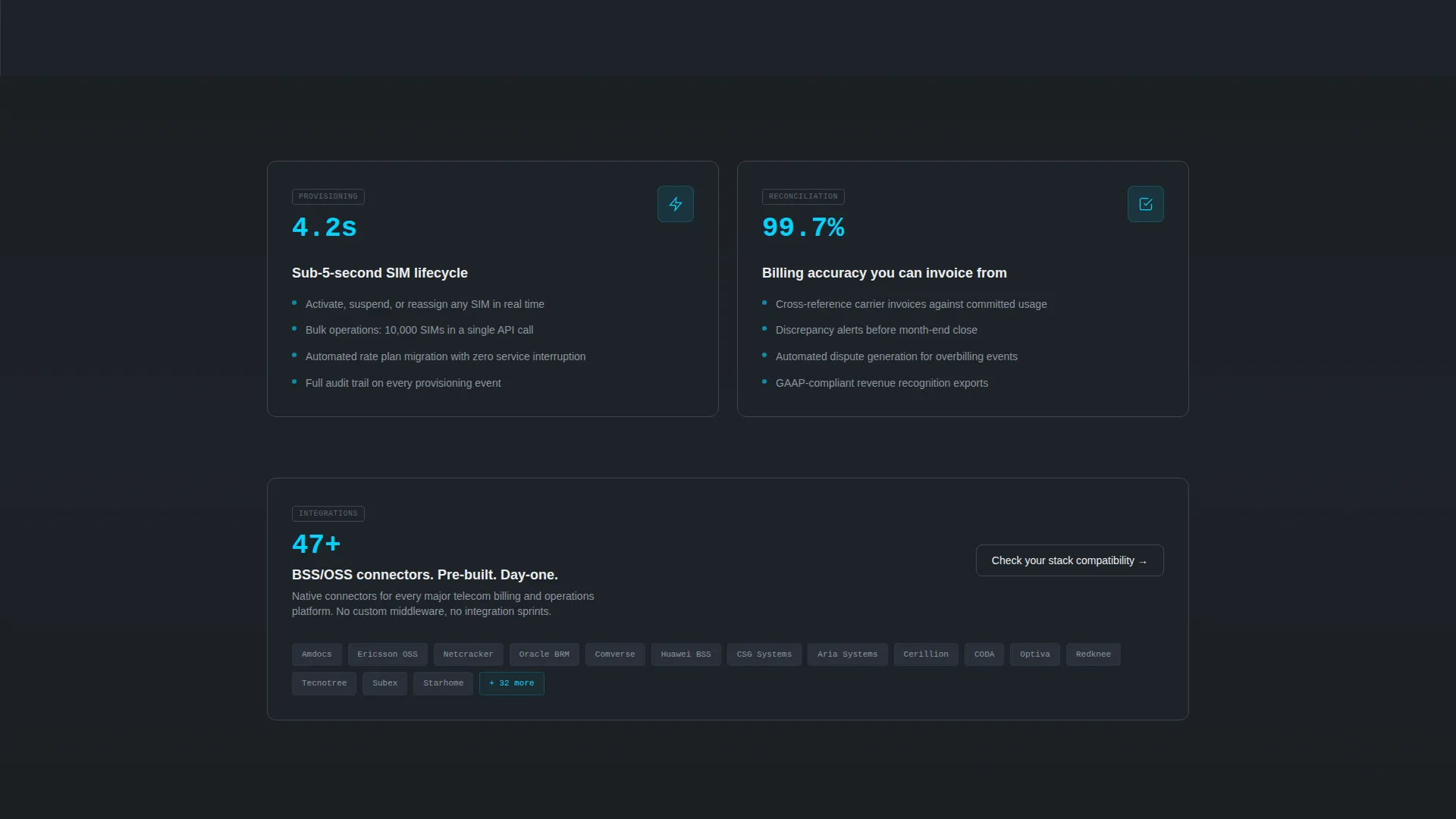
- A scrollable Spec Sheet body with alternating full-width data grids and two-column specification card pairs
- A three-step progressive disclosure lead capture form with dropdown fields and an optional open-text input
- A sticky bottom call-to-action bar that appears after the third specification card during scroll
- A ghost-button secondary path labeled "See the Live Demo Grid" that opens an anonymized interactive sandbox
Feature list
This template is built around specific, functional design decisions. Each feature below reflects a defined component from the source brief.
Three-Tab Dashboard Header
The header renders as a browser-chrome frame containing three clickable tabs: "Portfolio Overview," "Usage Analytics," and "Contract Lifecycle." Each tab reveals a distinct dashboard view. The active tab is marked with a cyan underline, and switching between tabs triggers a glass-morphism crossfade animation.
Portfolio Overview Data Grid
The Portfolio Overview tab displays a data grid of 200 or more accounts. Each row includes status pills and a monthly recurring revenue column. The layout gives visitors immediate exposure to the platform's core capability before any scroll occurs.
Usage Analytics Charts
The Usage Analytics tab renders stacked bar charts tracking voice, data, and SMS consumption trends across a twelve-month window. This view demonstrates longitudinal reporting depth to prospects evaluating platform maturity.
Contract Lifecycle Timeline
The Contract Lifecycle tab presents a Gantt-style timeline of renewal windows. Each window is color-coded by risk level, giving operations-focused buyers an immediate read on how the platform surfaces contract exposure.
Spec Sheet Scroll Sections
Each scroll section is a discrete capability module formatted as a technical specification card. Cards include a metric header, a two-sentence functional description, and a supporting micro-visualization such as a sparkline, donut chart, or status matrix. Sections alternate between full-width data grids and two-column spec pairs.
Three-Step Lead Capture Form
The primary form uses progressive disclosure across three steps. Step one captures company name and SIM volume tier. Step two asks for the current platform in use. Step three collects contact details and an optional field for the prospect's biggest operational pain point.
Page sections overview
| Section | Purpose |
|---|---|
| Feature Tab Header | Renders three switchable dashboard views inside a browser-chrome frame |
| Portfolio Overview Tab | Displays a 200-plus account data grid with status pills and revenue columns |
| Usage Analytics Tab | Shows twelve-month stacked bar charts for voice, data, and SMS |
| Contract Lifecycle Tab | Presents a Gantt-style renewal timeline color-coded by risk |
| Spec Card Sections | Delivers metric-led capability modules with micro-visualizations |
| Primary Audit Form | Captures lead data through a three-step progressive disclosure flow |
| Sticky call to action Bar | Persists the "Request a Portfolio Audit" action after the third spec card |
| Demo Grid Path | Opens an anonymized interactive sandbox via a ghost-button secondary call to action |
Design & branding system
The visual identity follows a Tech Glass theme built on a Monochrome Steel color system. Every design decision reinforces the feeling of a high-precision operational environment, where warmth appears only where something demands attention.
- Deep gunmetal (#1B1F23) forms the primary background, brushed chromium (#A8B0B8) handles secondary surfaces and data table borders, and cold white (#EAEDF0) is used for typography and active-state cells
- Signal cyan (#00D4FF) is reserved exclusively for live-data accents, notification pulses, and primary interaction states including the active tab underline and call to action button fills
- Glass-morphism panel transitions, transparent card restacking animations, and a browser-chrome header frame reinforce the cockpit-at-night visual language throughout
Mobile & speed optimization
The template's layout is designed with a dashboard-first visual hierarchy that maintains clarity at smaller viewport sizes. Dense data grids and specification card pairs are structured to remain readable without horizontal scrolling.
- The sticky bottom call-to-action bar is designed to remain visible and functional across screen sizes, keeping lead capture accessible throughout the scroll experience
- The three-step form uses progressive disclosure to reduce the perceived complexity of the input flow, which also benefits smaller screen interactions by showing one focused step at a time
How this template helps you convert
The conversion strategy is built on reducing skepticism and lowering commitment friction at every stage of the page. Every structural decision serves lead generation.
- The interactive dashboard header puts the product interface in front of visitors immediately, so they experience navigable density before reading a single marketing claim, which builds confidence in the platform before any ask is made.
- The "See the Live Demo Grid" ghost-button secondary path lets prospects explore anonymized sample data before committing to the primary form, reducing form anxiety and increasing the likelihood that the main call to action feels like a natural next step rather than a cold request.
- The Spec Sheet scroll structure accumulates metric-led evidence with each card, giving prospects concrete figures and functional descriptions they can carry into an internal business case, which shortens the internal approval cycle for platform evaluation decisions.
Other information about this template
This template is categorized under Technology, specifically within the Telecommunications Software and SaaS subcategory. It is purpose-built for the telecommunications client management niche, where buyers are technically fluent and skeptical of vague promises.
- The template style is Dashboard and Data Grid, making it well-suited for platforms where showing the interface is more persuasive than describing it
- The creative direction follows a Spec Sheet logic, meaning the page accumulates evidence rather than narrating a brand story
- The header concept is a Feature Tab Switcher, a pattern commonly associated with product-led marketing pages in the software-as-a-service space
- No stock photography or hero illustrations are used; the product interface itself serves as the visual anchor throughout the page
Theme
Tech Glass
Creative direction
Spec Sheet
Color system
Monochrome Steel
Style
Dashboard/Data Grid
Direction
Lead Generation
Page Sections
Feature Tab Switcher Header
Plus Account Data Grid
Twelve-month Usage Charts
Gantt-style Contract Timeline
Metric-led Spec Card Sections
Progressive Three-step Lead Form
Related questions
Who is this landing page template designed for?
Can I customize the tab labels and dashboard data in the header?
What information does the three-step lead capture form collect?
Is the interactive demo sandbox included in the template?
When does the sticky call-to-action bar appear on the page?



