Uplink - Powerful TowerCRM Landing Page Template
Uplink is a bento grid landing page template built for a telecom tower customer relationship management platform. It combines a Feature Tab Switcher header, an interactive ROI calculator, and glassmorphic bento cards to showcase lease tracking, maintenance queues, and tenant management. The design targets tower operations teams and drives app downloads through a sticky, context-triggered call to action.
by Rocket studio
Quick summary
Uplink is a single-page landing page template designed for a telecom tower CRM platform. It opens with a three-tab product showcase, drops visitors into a live ROI calculator before asking for anything, then walks them through layered bento cards covering leases, work orders, and tenant threads. The page ends with a mobile-first app download prompt.
Who this template is for
This template is built for teams running complex tower portfolios at scale. It speaks directly to the people who feel the daily friction of managing hundreds of sites without a unified view.
- Regional tower operations managers overseeing hundreds of sites across multiple states
- Leasing coordinators tracking rent escalations and upcoming lease reviews
- Field technicians who need work orders pushed to their devices before losing signal
What problem this template solves
Tower operations teams lose revenue and time when leases, maintenance tickets, and tenant communications live in disconnected spreadsheets. This template presents a platform that pulls every signal into one place.
- Missed rent escalations that quietly drain annual revenue across large portfolios
- Work orders that never reach field techs in time or get lost between systems
- No single view that connects lease status, site health, and tenant conversations
What you get with this template
You get a fully designed bento grid landing page that showcases the core platform experience without hiding it behind a wall of text or a generic hero image. Every section is built to earn attention before asking for it.
- A Feature Tab Switcher header with three glass-paneled tabs revealing live-feeling product screenshots
- An embedded ROI calculator tile that renders a personalized annual revenue recovery figure in real time
- A sticky frosted call-to-action bar with App Store and Google Play badges that appears after calculator interaction
Feature list
This template delivers a set of purpose-built components that work together to build trust and drive action across a specialized audience.
Feature Tab Switcher Header
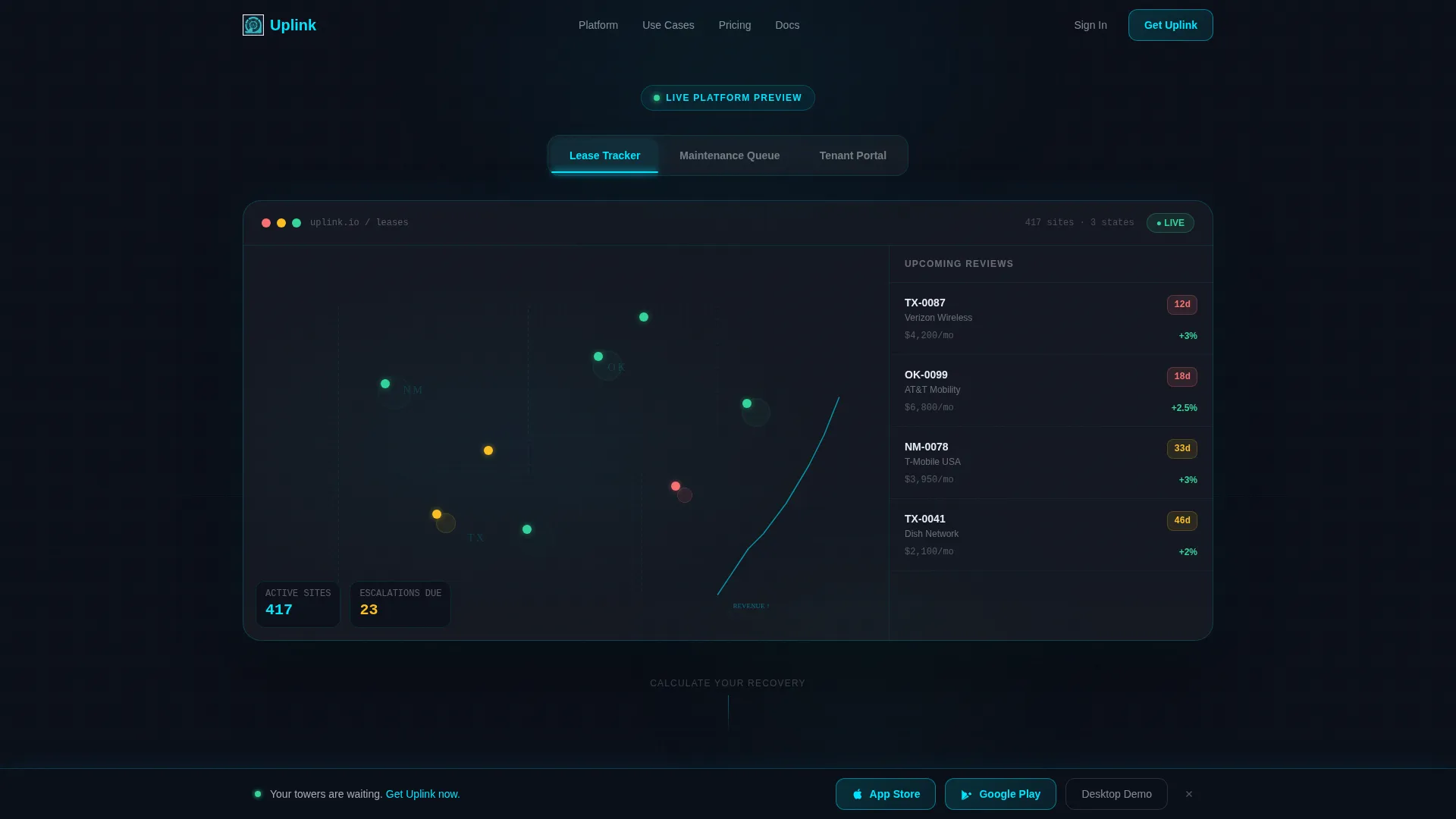
Three glass-paneled tabs labeled "Lease Tracker," "Maintenance Queue," and "Tenant Portal" sit at the top of the page. Each tab reveals a different product screenshot inside a frosted bento frame, with a cyan underline on the active state and a smooth parallax depth-shift transition between views.
Interactive ROI Calculator
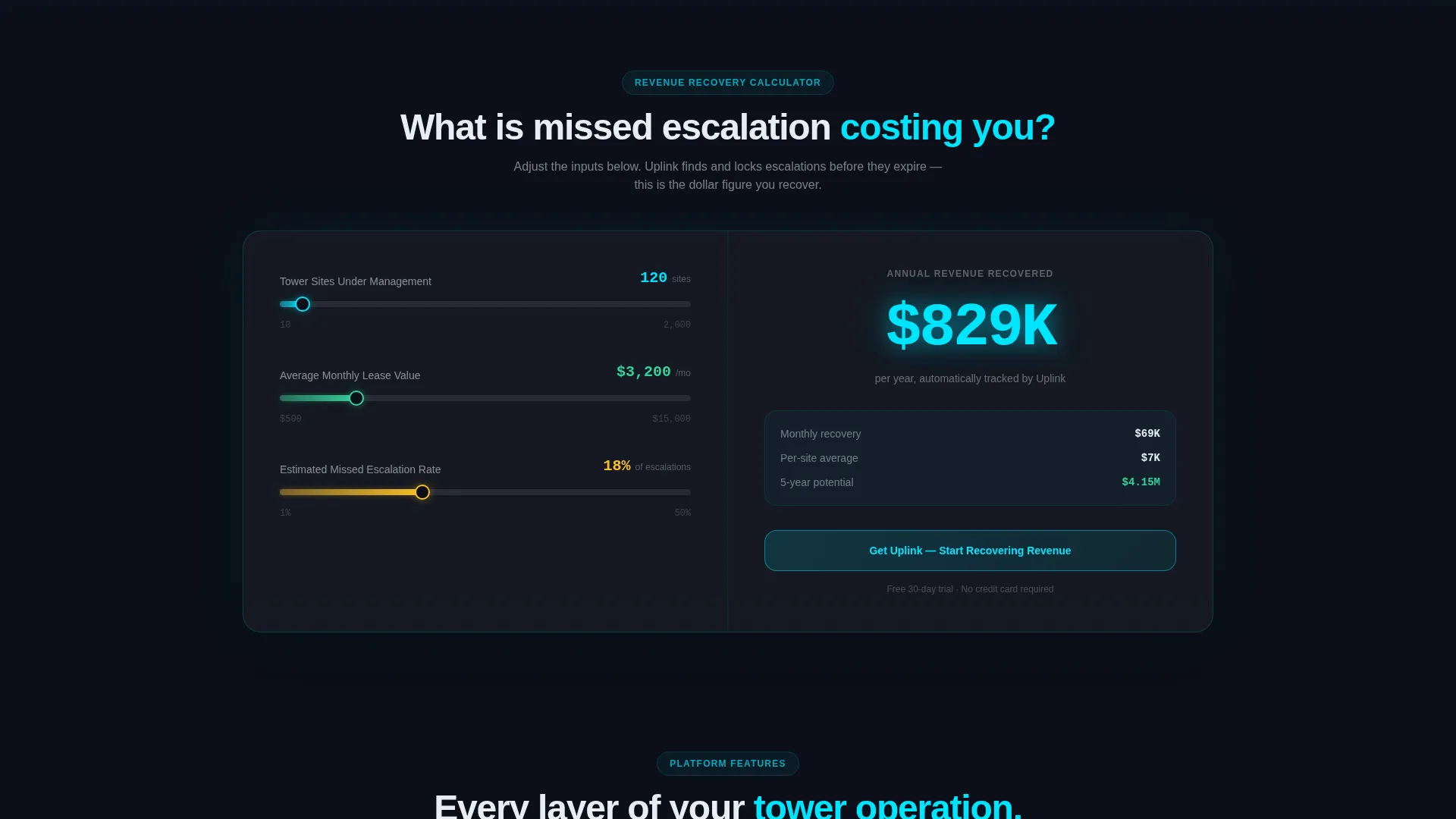
Placed directly below the fold, the calculator lets visitors input their number of tower sites, average lease value, and current missed-escalation rate. The tool instantly outputs an annual revenue recovery figure in glowing cyan digits, creating a personal earned-value moment before any signup request appears.
Bento Grid Layout
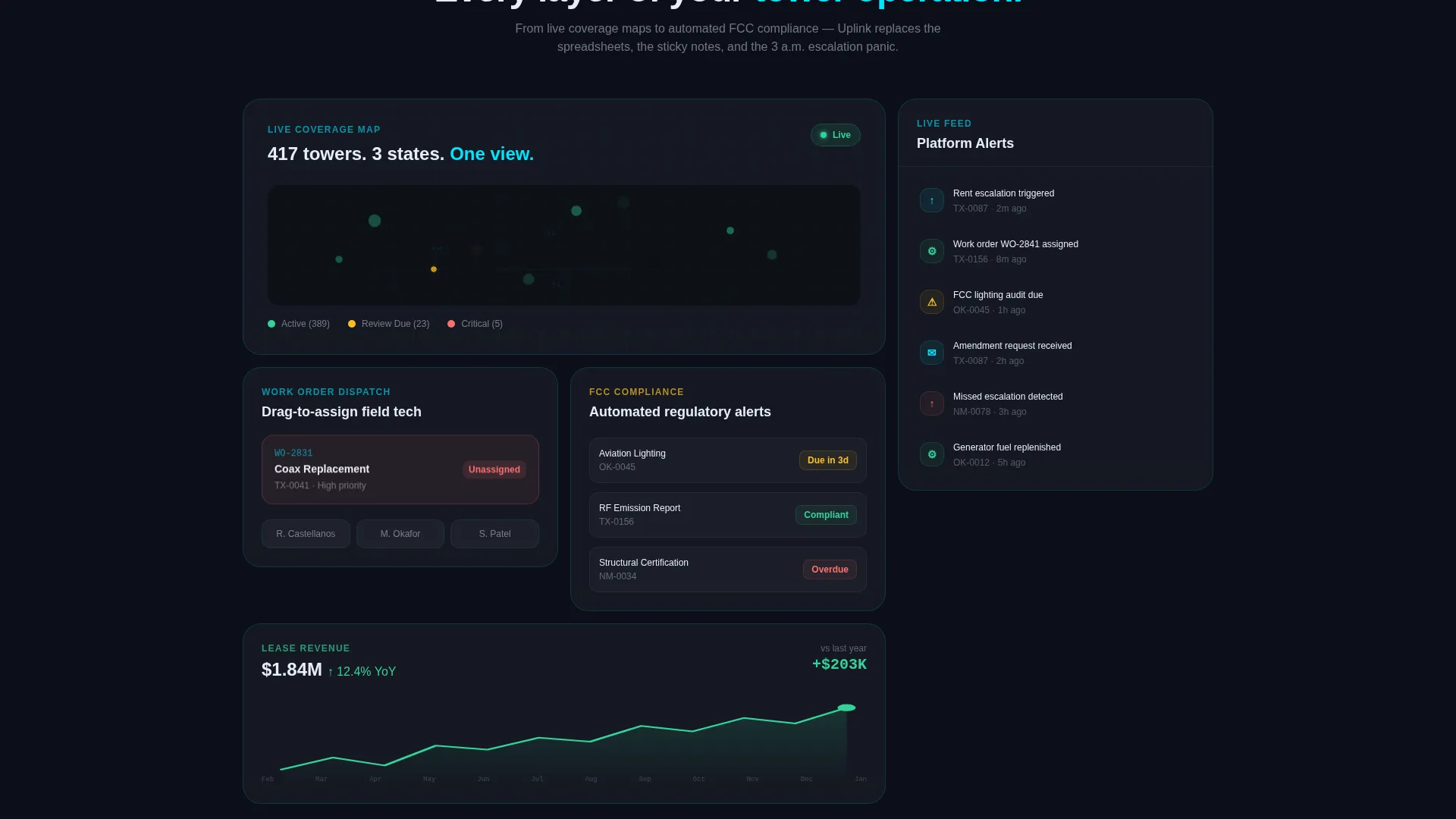
The page uses a variable bento card grid where card sizes shift with content weight. The map view spans double-wide; the notification feed runs tall and narrow. This visual rhythm mirrors a real operations dashboard and keeps the scroll feeling purposeful.
Sticky App Download Bar
After the calculator interaction, a frosted sticky bar locks to the bottom of the viewport. It pairs App Store and Google Play badges side by side and a secondary link to a desktop demo, targeting both mobile-first field techs and office-based operations managers.
Animated Feature Cards
Individual bento cards each hold a single feature animation: drag-to-assign work orders, automated Federal Communications Commission compliance alerts, and tenant communication threads. Each animation runs inside its own frosted tile so nothing competes for attention.
Live Lease Tracker View
The default tab view shows a map dotted with tower pins color-coded by escalation status. A sidebar lists upcoming rent reviews with countdown badges. A revenue graph climbs in the corner, giving operations managers an immediate read on portfolio health.
Page sections overview
| Section | Purpose |
|---|---|
| Feature Tab Header | Showcases Lease Tracker, Maintenance Queue, and Tenant Portal screenshots |
| ROI Calculator Tile | Delivers personalized revenue recovery figure before any signup ask |
| Map & Lease View | Displays tower pins, rent review sidebar, and revenue graph |
| Bento Feature Cards | Reveals drag-to-assign, compliance alerts, and tenant thread animations |
| Notification Feed Card | Shows tall narrow feed of live site alerts and escalation flags |
| Sticky Download Bar | Anchors App Store and Google Play calls to action after calculator interaction |
Design & branding system
The visual identity follows a Tech Glass theme built on a Glassmorphic color system. Every element reinforces the feeling of a radar screen embedded in smoked glass, where frosted panels float above a dark mesh and edges catch light like beveled fiber optic connectors.
- Core palette: deep tower-night black (#0B0F19), frosted glass panels at 8% white opacity with backdrop blur, signal-pulse cyan (#00E5FF), and status-green (#34D399) for active indicators
- Borders are 1-pixel cyan strokes at low opacity; backgrounds layer frosted panels over a subtle topographic grid pattern that evokes coverage maps
- Card sizing varies deliberately: double-wide tiles for map views, tall and narrow tiles for feed columns, creating visual rhythm that mirrors a real operations dashboard
Mobile & speed optimization
The template is structured for field use as much as office use. Field technicians are a named audience, and the design accounts for on-the-go access before signal drops.
- Sticky call to action bar keeps the app download prompt reachable on any screen size without interrupting scroll flow
- Bento grid proportions adapt naturally to narrower viewports, keeping card content readable without horizontal scrolling
- The ROI calculator tile is self-contained and input-light, requiring only three fields so mobile users can complete it quickly
How this template helps you convert
The page is engineered around a specific moment: the instant a visitor sees a dollar figure they personally calculated. Everything before and after that moment serves the conversion.
- The ROI calculator creates a concrete, personalized value before any ask is made, making the sticky download bar feel earned rather than intrusive
- The Feature Tab Switcher puts the product itself front and center from the first scroll, replacing a generic headline with a live-feeling demo that answers "what does this actually do" immediately
- The secondary desktop demo path captures operations managers who need the full map view before committing, so no qualified visitor hits a dead end
Other information about this template
This template is a strong fit for vertical SaaS platforms in the telecom infrastructure space that need to communicate operational complexity to a technical but non-developer audience.
- The bento grid layout makes it straightforward to adapt card content for different platform tiers or regional market variations
- The Tech Glass theme and Glassmorphic color system are production-ready as designed and do not require additional third-party design assets
- The template works as a standalone app download landing page or as the top-of-funnel entry point before a longer product demo sequence
Theme
Tech Glass
Creative direction
Calculator/Tool First
Color system
Glassmorphic
Style
Bento Grid
Direction
App Download
Page Sections
Feature Tab Switcher Header
Embedded ROI Calculator
Variable Bento Grid Layout
Sticky App Download Call to Action
Animated Feature Bento Cards
Live Lease Tracker Map View
Related questions
Can I change the tab labels in the Feature Tab Switcher?
Do I need real data to launch the ROI calculator?
Is this a single-page landing page or a multi-page website?
Does the template support both app and desktop conversion paths?
Can the sticky call to action bar trigger point be adjusted?



