Real Estate LMS Landing Page Template
Upskill is a real estate learning management landing page built for managing brokers, franchise training directors, and team leads. It presents a mission-control dashboard experience with animated compliance metrics, drag-and-drop course builder previews, and a side-by-side before/after conversion section. The Midnight Blue Data Command design communicates authority and operational clarity from the first scroll.
by Rocket studio
Quick summary
Upskill is a single-page, lead generation landing page for a real estate learning management system. It uses a dark Data Command visual theme, animated stat counters, and data-grid product sections to show managing brokers exactly how one dashboard tracks every agent's continuing education credits, onboarding progress, and exam results.
Who this template is for
This template is built for professionals who manage agent compliance and training at scale. If your job involves tracking licenses across multiple offices or onboarding new hires on tight timelines, this layout speaks directly to your situation.
- Managing brokers handling state-by-state continuing education deadlines across a full roster
- Franchise learning and development directors rolling training programs across dozens of offices
- Team leads who need new agents producing results before their first listing appointment
What problem this template solves
Compliance tracking for large real estate teams is messy. Brokerages often rely on spreadsheets, email reminders, and manual checks, creating real risk when a deadline slips through.
- Agents missing continuing education deadlines due to fragmented tracking across states
- No single view connecting onboarding progress, exam pass rates, and license status
- New hire ramp-up taking too long because training modules are scattered or untracked
What you get with this template
You get a fully designed, section-led landing page that mirrors a live compliance command center. Every section is purpose-built to earn trust and drive a lead capture action.
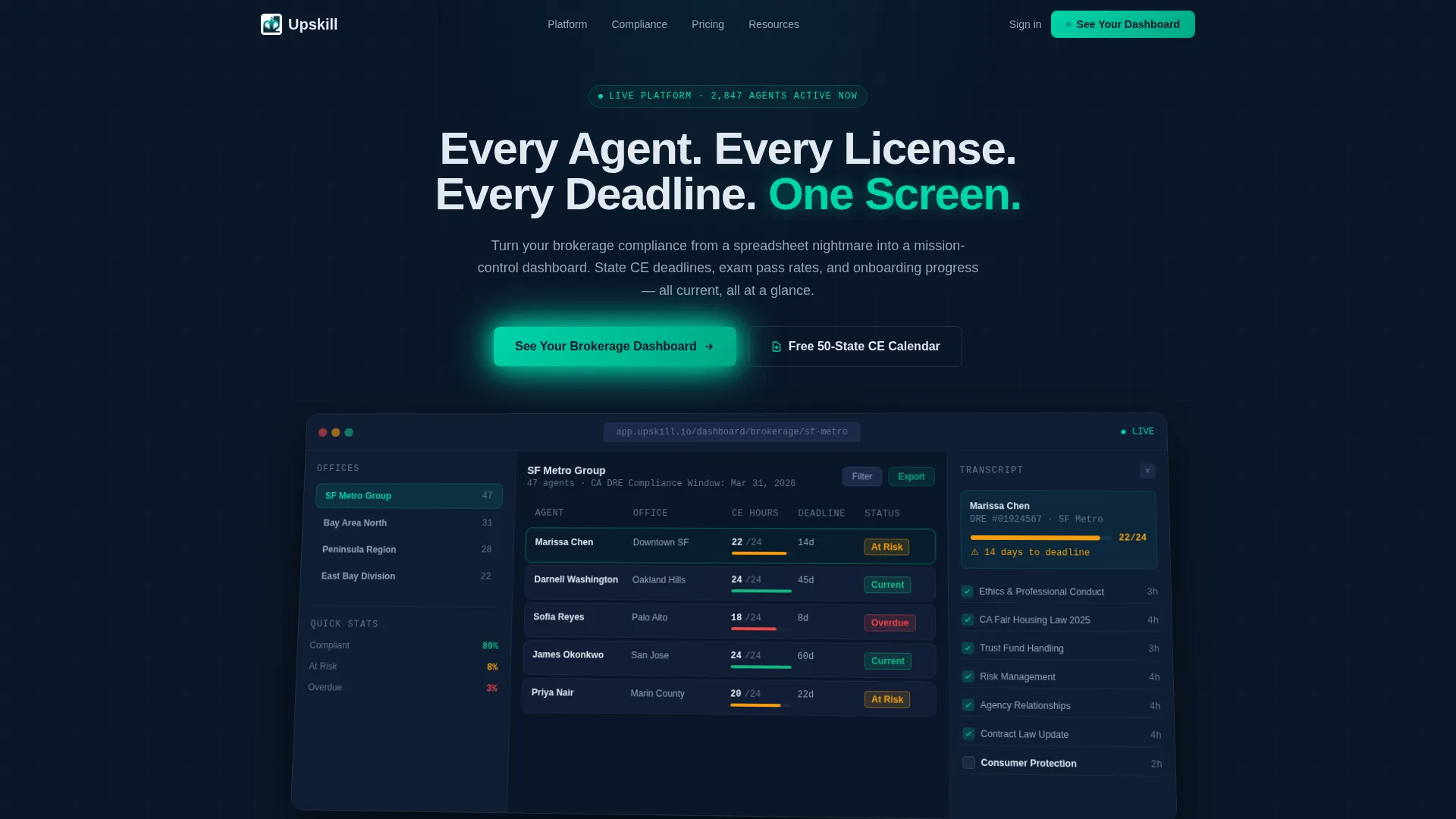
- A high-fidelity product screenshot header showing a real dashboard mid-session with compliance heat map and agent transcript
- Three animated stat counters that tick upward on scroll entry, establishing platform scale immediately
- A three-field progressive lead capture form and a secondary email-gated PDF offer for longer-consideration visitors
Feature list
This template includes a focused set of visual and functional sections, each designed to move a qualified visitor closer to submitting their brokerage details.
Animated Stats Counter Section
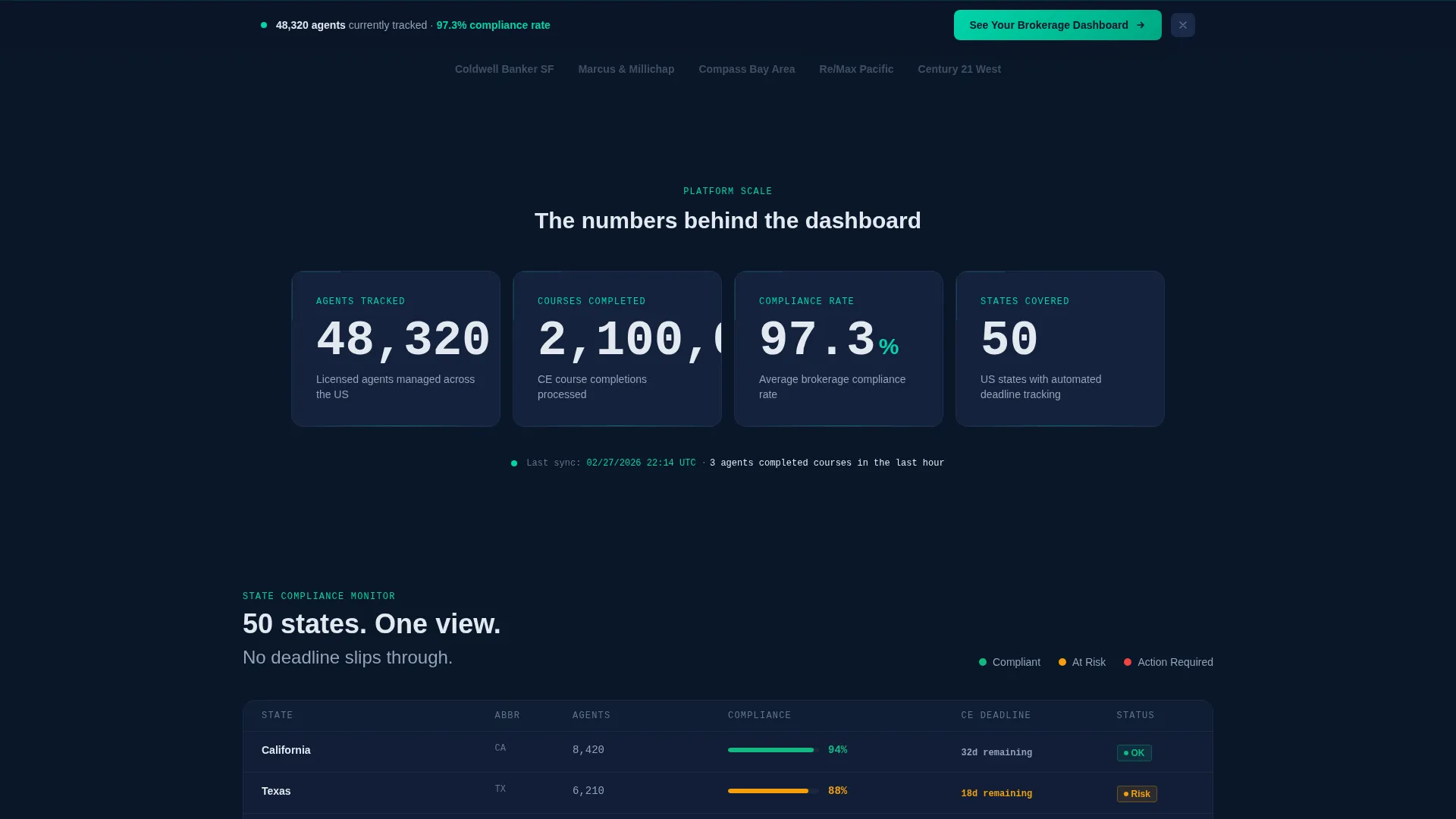
Three large, viewport-triggered counters display agents managed, courses completed, and compliance rate percentage. They tick upward on entry, setting a tone of scale before any feature explanation begins.
Compliance Heat Map Product Card
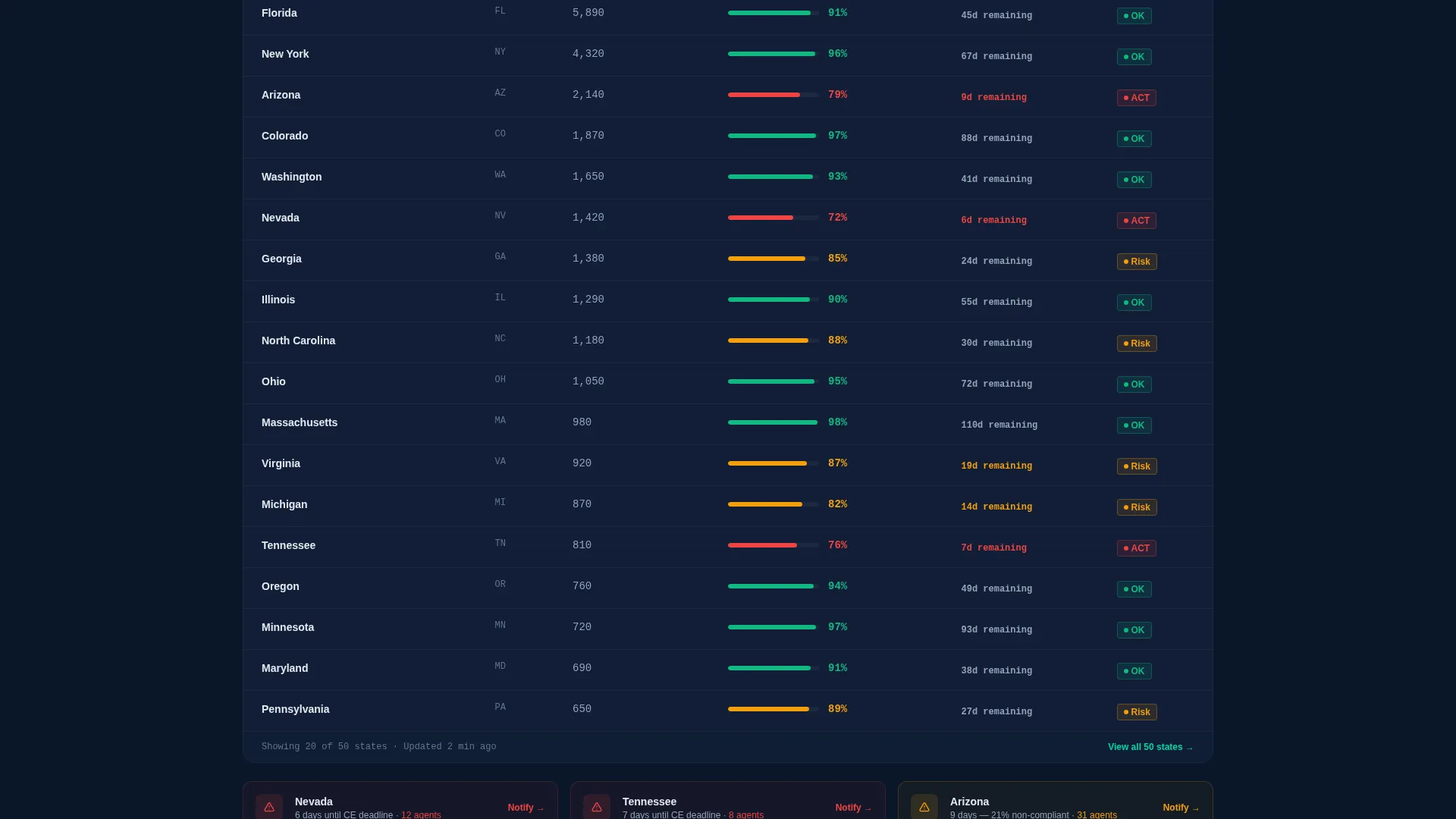
A data-grid card section reproduces the platform's compliance heat map interface. Green, amber, and red cell tagging gives visitors an instant read on how state-deadline monitoring is visualized inside the product.
Course Builder Interface Preview
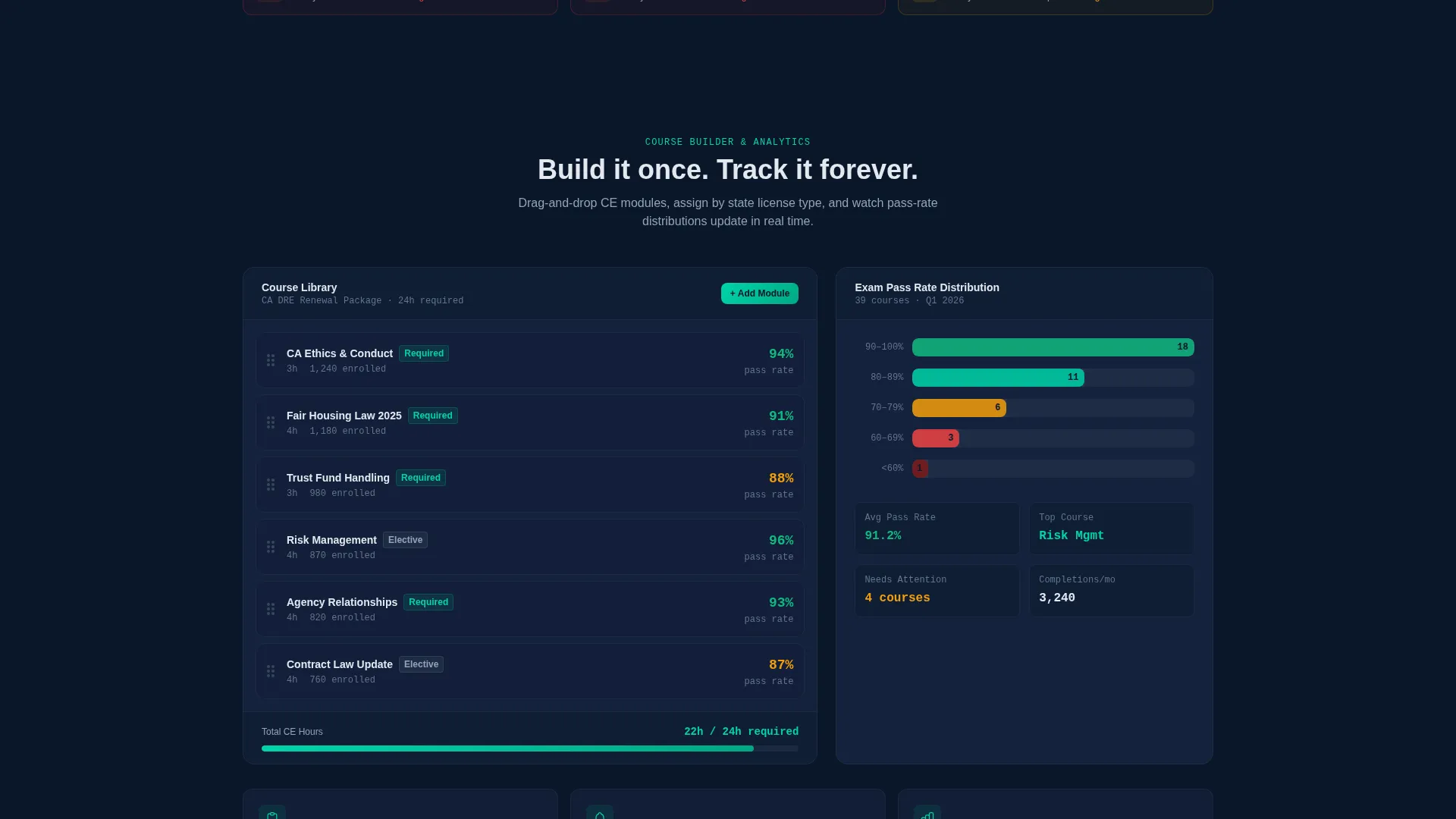
A dedicated section shows the drag-and-drop module builder with real typography and real data density. Visitors see exactly how training content is structured and sequenced inside the platform.
Exam Analytics Data Card
A card section displays exam pass-rate distributions and performance breakdowns. This section addresses the analytics side of the platform, showing results beyond simple completion tracking.
Before/After Conversion Section
The final content section places a manual spreadsheet view side-by-side with the live teal-glow dashboard. The visual contrast makes the value shift immediate and concrete for any visitor still weighing the switch.
Sticky Lead Capture Bar
A sticky bottom bar appears after the first scroll and persists throughout the page. It carries the primary call to action alongside the three-field brokerage form, keeping conversion always within reach.
Page sections overview
| Section | Purpose |
|---|---|
| Header with Screenshot | Anchors the page with a high-fidelity dashboard render and the primary headline |
| Animated Stats Block | Opens the scroll with large counters that establish platform scale |
| Compliance Heat Map Card | Shows state-deadline monitoring through a color-tagged data grid |
| Course Builder Preview | Demonstrates drag-and-drop module assembly with real interface detail |
| Exam Analytics Card | Highlights pass-rate distributions and training outcome data |
| Before/After Section | Contrasts manual spreadsheet chaos with the live compliance dashboard |
| Lead Capture Form | Collects brokerage name, agent count, and work email for sandbox access |
| Secondary PDF Offer | Captures research-stage visitors with an email-gated CE deadline calendar |
| Sticky Bottom Bar | Keeps the primary call to action visible throughout the scroll experience |
Design & branding system
The design follows a Data Command theme built entirely in Midnight Blue. Every color choice reinforces calm authority, like a cockpit where everything is backlit just enough to read without strain.
- Deep terminal navy (#0A1628) as the primary background, steel-panel gray (#1B2A4A) for card surfaces, and cool interface white (#E2E8F0) for all body and heading typography
- Electric teal (#00D4AA) used exclusively for live-status indicators, progress bars, and primary action buttons to draw the eye without breaking the dark palette
Mobile & speed optimization
The layout is structured for a single-page scroll experience that adapts across screen sizes. Data-dense sections like the heat map card and stats counters are composed to remain readable at smaller viewports.
- Sticky bottom bar and lead capture form are positioned to stay functional and visible on mobile screens without obscuring content
- Product screenshot header uses a slight 3D tilt effect against the dark background, designed to render crisply on both desktop and tablet displays
How this template helps you convert
The page is built around two distinct conversion paths, so visitors at different stages of the buying decision both have a clear next step.
- The primary path delivers a personalized sandbox link immediately after a visitor submits the three-field form, removing demo-scheduling friction entirely.
- The secondary path offers a free downloadable PDF titled "50-State CE Deadline Calendar" gated behind email-only capture, converting research-stage visitors who are not yet ready to see the product.
Other information about this template
This template sits at the intersection of real estate software and learning management system design. It is purpose-built for the compliance-heavy side of brokerage operations, where the cost of a missed deadline is real.
- The template style is Dashboard/Data Grid, making it well suited for platforms where data visualization is a core product differentiator
- The creative direction is Stats-First Impact, meaning credibility is established through scale metrics before feature descriptions appear
- The header concept is a Product Screenshot, which reduces abstraction and helps visitors form a concrete mental model of the platform before reading a single feature bullet
- This template is categorized under Technology and Real Estate Software, positioning it for buyers already searching for compliance and training solutions in a brokerage context
Theme
Data Command
Creative direction
Stats-First Impact
Color system
Midnight Blue
Style
Dashboard/Data Grid
Direction
Lead Generation
Page Sections
Animated Compliance Stat Counters
Compliance Heat Map Data Card
Drag-and-drop Course Builder Preview
Exam Analytics and Pass-rate Card
Before/after Conversion Section
Progressive Three-field Lead Form
Related questions
Who is this landing page template designed for?
What does the lead capture form collect?
Can smaller brokerage teams use this template effectively?
Does the template include the downloadable PDF content?
What makes this template different from a generic software landing page?



