Self-Hosted Enterprise Software Professional Website Template
The Uptime self-hosted MES comparison landing page template gives plant managers and IT leads a high-impact page to position their on-premises manufacturing execution system against cloud alternatives. It combines a dark Dashboard Pro aesthetic, a 12-row comparison table, a simulated outage pain arc, and deployment proof sections to move skeptical buyers toward a demo with confidence.
by Rocket studio
Quick summary
This template is built for one specific job: convincing operations teams that self-hosted manufacturing execution software is the safer, smarter choice. It opens with three live-data glass panels, walks visitors through a visceral problem arc, and lands on a comparison table that lets the product win on every row. The result is a page that earns trust before it asks for anything.
Who this template is for
This template serves teams who need to make a clear, credible case for on-premises software over cloud-dependent alternatives. It is designed for professionals who monitor production systems and cannot afford vendor-caused downtime.
- Plant managers running three-shift operations on legacy equipment who need uptime monitoring they fully control
- Operations directors and IT leads who manage incident management decisions and answer to compliance officers
- Internal teams at mid-market discrete manufacturers evaluating self-hosted infrastructure for data residency reasons
What problem this template solves
Cloud-based manufacturing software creates a real vulnerability. When a vendor experiences degraded performance, your production dashboard goes dark and your teams lose visibility into what is happening on the floor. The page addresses this directly, explaining the cost of that dependency before offering a clear alternative.
- Visitors have no structured way to compare self-hosted versus cloud MES across the metrics that matter to plant operations
- The status of data residency, legacy PLC integration, and total cost of ownership are rarely shown side by side in a single layout
- Teams struggle to justify on-premises software to stakeholders without a page that shows reliability and deployment proof together
What you get with this template
You get a fully structured, single-page layout built around a Problem-to-Solution arc. Every section reinforces the core message: your data, your uptime, your control. The page is designed desktop-first because plant managers and operations directors work from workstations and control room monitors.
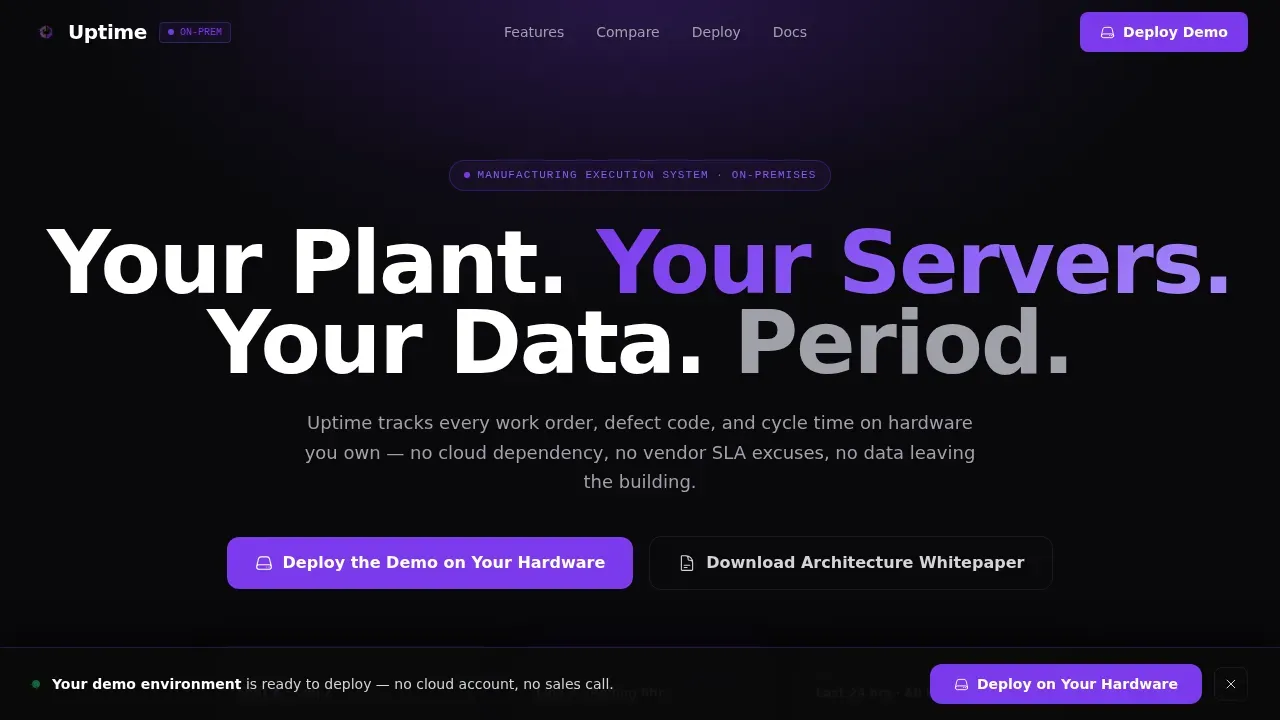
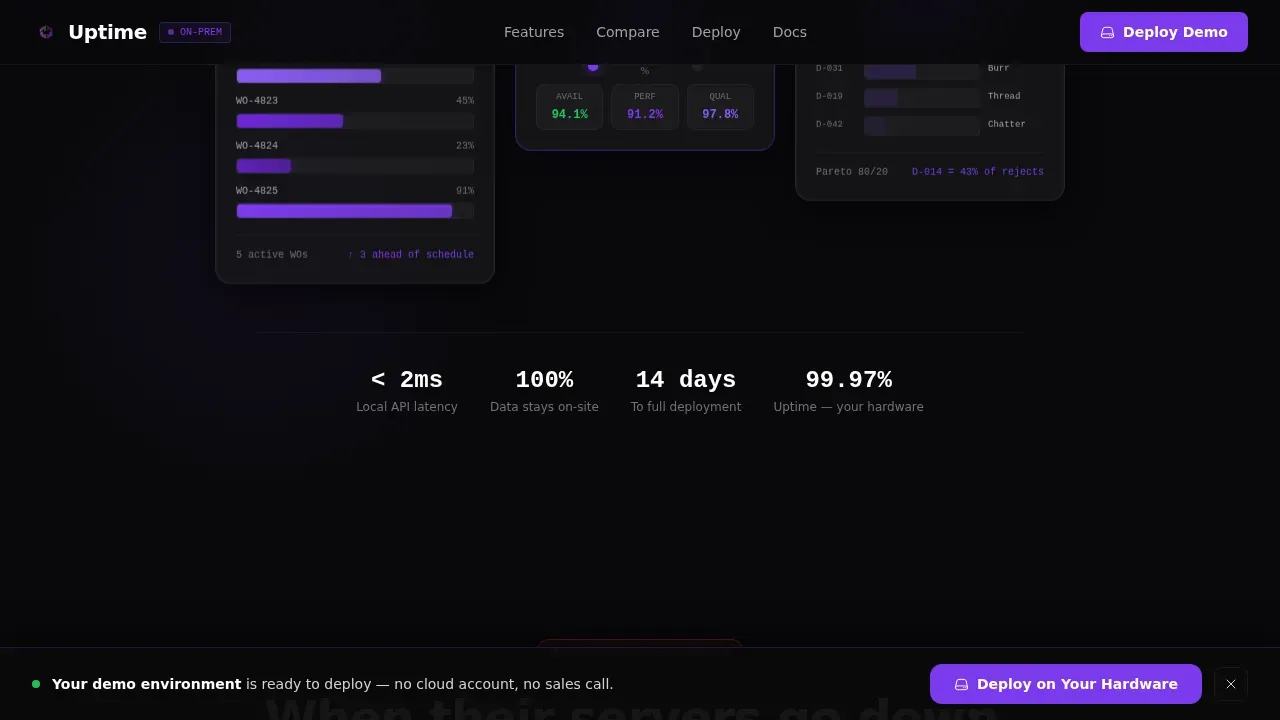
- A hero section with three floating dark glass panels displaying a Gantt schedule, an OEE gauge, and a defect Pareto chart
- A 12-row comparison table where self-hosted wins every row with a violet pulse checkmark on scroll-in
- Deployment proof section including a 14-day on-premises installation timeline, a Docker terminal screenshot, and three anonymized plant case studies with cycle-time improvement percentages
Feature list
This template is structured to give every page component a clear job. Nothing is decorative without purpose.
Dark Glass Panel Hero
Three translucent, frosted-glass user interface cards float against a void black background. Each panel displays a different live manufacturing execution system module: a Gantt-style production schedule, an OEE gauge holding at 87.3 percent, and a defect Pareto chart. The panels establish the product as the visual, replacing stock photography entirely.
Simulated Outage Pain Arc
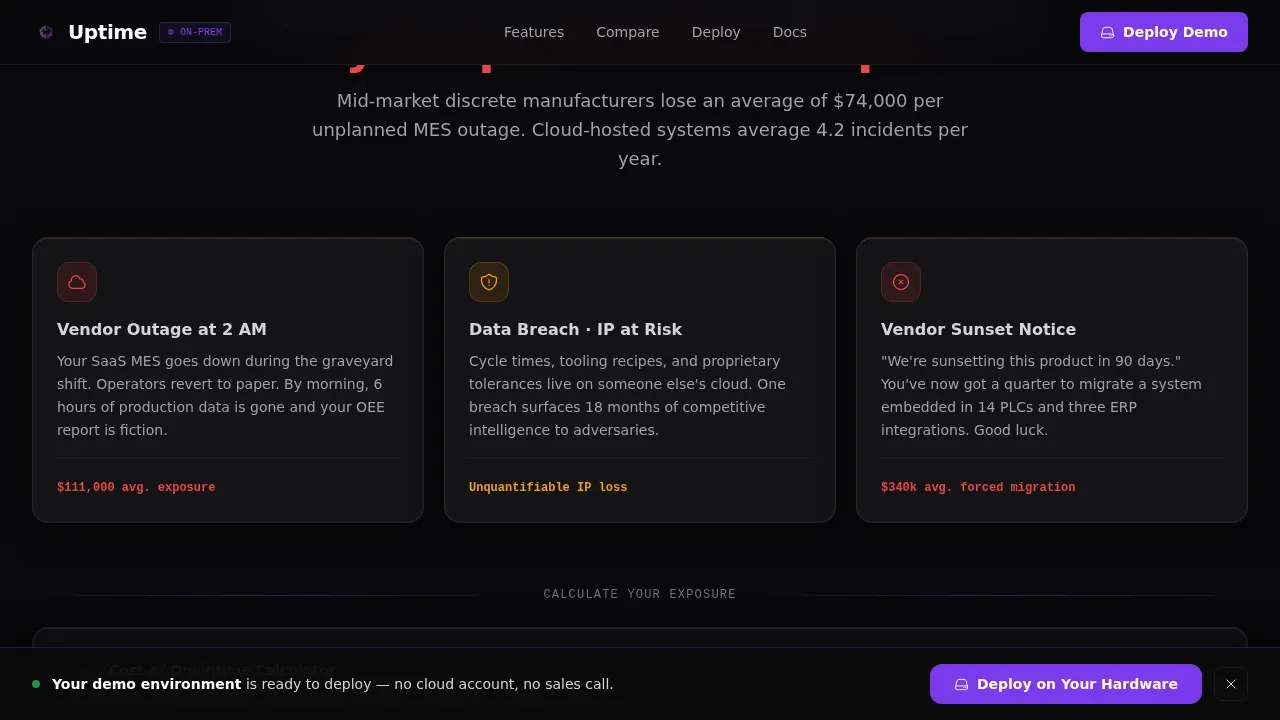
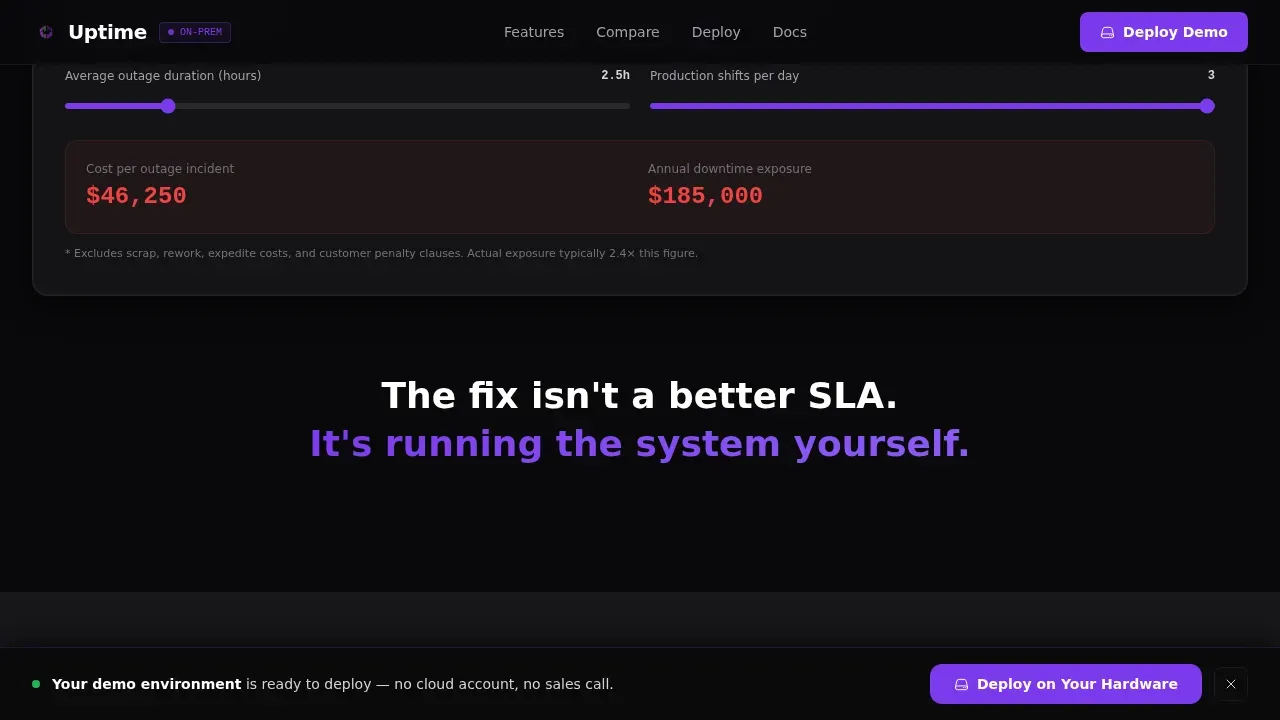
The page opens the pain section with a realistic toast alert that reads "Your MES provider is experiencing degraded performance." This is layered over a dimmed production dashboard to show exactly what goes wrong when a vendor's systems fail. A cost-of-downtime calculator follows, auto-populated with industry averages so visitors immediately understand what is affected.
12-Row Comparison Table
The comparison table is the centerpiece of the page. It covers twelve decision-relevant rows including data residency, uptime service level, customization depth, legacy PLC integration, and three-year total cost of ownership. Every row the self-hosted column wins triggers a violet checkmark that pulses once on scroll-in, making the difference immediately visible.
Deployment Proof Section
Below the comparison table, the page shifts to confidence-building evidence. A timeline shows a 14-day on-premises installation path. A real terminal screenshot shows the Docker deployment command in JetBrains Mono code typography. Three anonymized plant case studies each include a cycle-time improvement percentage to support credibility without exposing client data.
Dual Call-to-Action Structure
The primary call to action, "Deploy the Demo on Your Hardware," appears first beneath the hero panels and repeats as a sticky bottom bar after the comparison table. A secondary path captures earlier-funnel visitors with an email form and job-title dropdown to send the architecture whitepaper. This creates two clear response paths without competing for the same audience.
Scroll-Linked Animation System
The template uses high-intensity scroll-linked animations throughout. Violet pulse effects fire on comparison checkmarks. Gauge components animate on entry. Staggered reveals keep the page alive as users scroll. GPU-accelerated transforms and IntersectionObserver logic keep performance stable even with heavy animation density.
Page sections overview
| Section | Purpose |
|---|---|
| Hero Glass Panels | Display live MES module previews and headline |
| Pain Arc Opening | Simulate vendor outage and show downtime cost |
| Failure Scenario Cards | Cover three specific risk categories in detail |
| Comparison Table | Compare self-hosted versus cloud across 12 rows |
| Deployment Proof | Show timeline, terminal code, and case studies |
| Primary Call to Action | Route visitors to hardware demo deployment page |
| Whitepaper Capture Form | Collect email and job title for architecture asset |
| Sticky Bottom Bar | Repeat primary call to action after table scroll |
| Footer | Horizontal flow layout for navigation and links |
Design & branding system
The visual system is built around a control room aesthetic. Every color choice references the environment where plant managers actually work: dark surfaces, precise luminescence, and no ambient noise. The dashboard feels like infrastructure, not marketing.
- Void black (#09090B) backgrounds, deep charcoal (#18181B) card surfaces, electric violet (#7C3AED) for active states, and zinc (#A1A1AA) for secondary text and grid lines
- Dark mode interface with violet accents that pulse on call-to-action buttons, toggle states, and winning comparison checkmarks
- DM Sans for body copy and headings, JetBrains Mono for terminal code elements and data readouts throughout the page
Mobile & speed optimization
The page is built desktop-first to match how plant managers and operations directors actually access it. Performance is a design constraint, not an afterthought, because a slow page undermines the message of system reliability.
- GPU-accelerated CSS transforms keep scroll-linked animations smooth without frame drops on large monitors
- IntersectionObserver logic triggers section reveals and pulse effects only when components enter the viewport, reducing idle resource use
- Animation-heavy components are structured to degrade gracefully so the page remains usable even when motion preferences vary
How this template helps you convert
The page earns the click by proving control at every scroll depth. Visitors do not arrive at a call to action cold. They arrive after experiencing a structured narrative that has already addressed their specific objections.
- The simulated outage alert creates immediate emotional resonance for operations teams who have been through vendor degradation, making the self-hosted alternative feel like a solution they already know they need.
- The comparison table removes the research burden. Visitors do not need to evaluate tools separately. The page does the comparison for them, with clear metrics, data residency details, and a visual system that shows reliability row by row.
- The deployment environment selector on the destination page lets visitors choose bare metal, virtual machine, Docker, or Kubernetes before receiving a scoped trial image, so the call to action feels like a technical decision, not a sales step.
Other information about this template
This template exists in a broader landscape of uptime monitoring and status page tools that teams commonly evaluate before committing to on-premises infrastructure. Understanding that landscape helps explain the positioning choices built into the page structure.
- Uptime Kuma is a popular self-hosted monitoring tool that lets users monitor websites, servers, and services with a real-time dashboard and easy Docker deployment, making it a familiar reference point for technical buyers visiting this page
- Uptime Kuma supports HTTP, TCP, DNS, and Docker container monitoring types, and a basic server with minimal resources is generally sufficient to run it, which sets realistic expectations for visitors evaluating self-hosted infrastructure costs
- Tools like Uptime Robot allow teams to create a status page quickly with no code required, while self-hosted solutions like Uptime Kuma provide full control over monitoring and incident management, representing a different approach to the same problem
- A public status page helps communicate incidents effectively and adds transparency for users; a well-maintained status page can reduce support tickets during outages and shows reliability to customers and internal teams alike
- The top self-hosted uptime monitoring solutions of 2026 include Uptime Kuma, Gatus, and Prometheus with Grafana; Gatus is designed for teams using automated deployments and defines its entire configuration in a single YAML file
- Prometheus and Grafana is the industry standard for full-stack monitoring and is known for scalability and visualization; Vigil is a high-performance monitoring tool written in Rust and is suitable for microservice architectures
- Statping-ng excels at creating public-facing status pages with incident history and beautiful graphs; Upptime is technically self-hosted on GitHub and uses GitHub Actions for health checks, making pull requests part of its incident workflow
- A good status page keeps users informed about ongoing incidents, degraded service, and maintenance windows in real time; it should include uptime metrics, component statuses, and a recent incident history so visitors understand the current state of services
- Subscriber notifications help keep users informed during incidents; tools that send alerts via email, Slack, Discord, Telegram, and webhooks give teams flexibility in how they respond and communicate across channels
- Self-hosted uptime monitoring provides data sovereignty and cost savings; self-hosted solutions allow monitoring behind firewalls for internal services, which is essential for compliance-driven teams who cannot allow external data residency
- Better Stack is one example of a commercial platform that bundles monitoring and status page features, illustrating why teams who want full control and lower long-term cost increasingly evaluate open-source and self-hosted alternatives
- This is the uptime self-hosted MES comparison landing page template built for the Dashboard Pro theme using the Void and Violet color system with a Problem-to-Solution Arc creative direction
Theme
Dashboard Pro
Creative direction
Problem→Solution Arc
Color system
Void & Violet
Style
Comparison Table
Direction
Click-Through
Page Sections
Dark Glass Panel Hero Section
Simulated Outage Pain Section
Row Self-hosted Versus. Cloud Comparison Table
Deployment Proof and Case Study Section
Dual Conversion Path Architecture
Scroll-linked Animation and Interactivity System
Related questions
What kind of teams is this landing page template designed for?
Can I adapt the comparison table rows to match my own services?
Does the template include the downtime calculator logic?
How does the sticky call-to-action bar work after the comparison table?
Is the whitepaper capture section a separate page?



