Privacy-First Enterprise Software Specialist Privacy Policy Website Template
Uptime is a scroll-reveal landing page template built for a privacy-first manufacturing execution system. It pairs an interactive in-browser MES dashboard with a progressive feature comparison matrix, guiding compliance-driven plant managers through a persuasive side-by-side evaluation. Every section is designed to build trust in on-premise data control and move qualified buyers toward a security audit request.
by Rocket studio
Quick summary
Uptime is a single-page, scroll-reveal landing page template for a privacy-first manufacturing execution system (MES). It opens with a live, interactive dashboard mockup and unfolds into a feature-by-feature competitive comparison. The layout targets plant managers in regulated industries who need proof, not promises, that their production data stays on site.
Who this template is for
This template is built for software vendors and product teams selling on-premise MES solutions to buyers who live under strict regulatory and data-sovereignty requirements.
- Plant managers and operations leads at pharmaceutical manufacturers
- Procurement and IT teams at defense subcontractors handling controlled production lines
- Mid-market food and beverage processors evaluating alternatives to cloud-dependent MES vendors
What problem this template solves
Many MES buyers have been burned by cloud vendors who changed API terms, introduced telemetry requirements, or moved data off site without clear consent. A standard product landing page cannot answer the compliance questions these buyers bring. This template is built to answer those questions visually and sequentially, before a sales call ever happens.
- Buyers need to see data flow paths, not just read about them
- Compliance-heavy industries require feature-by-feature proof against specific regulatory standards
- Visitors need a low-friction way to request a security audit or download a whitepaper without committing to a full demo
What you get with this template
This template delivers a fully structured, scroll-reveal landing page where each section animates into view as the visitor reaches it. The layout builds a procurement-style argument across the full scroll, ending with two distinct conversion paths.
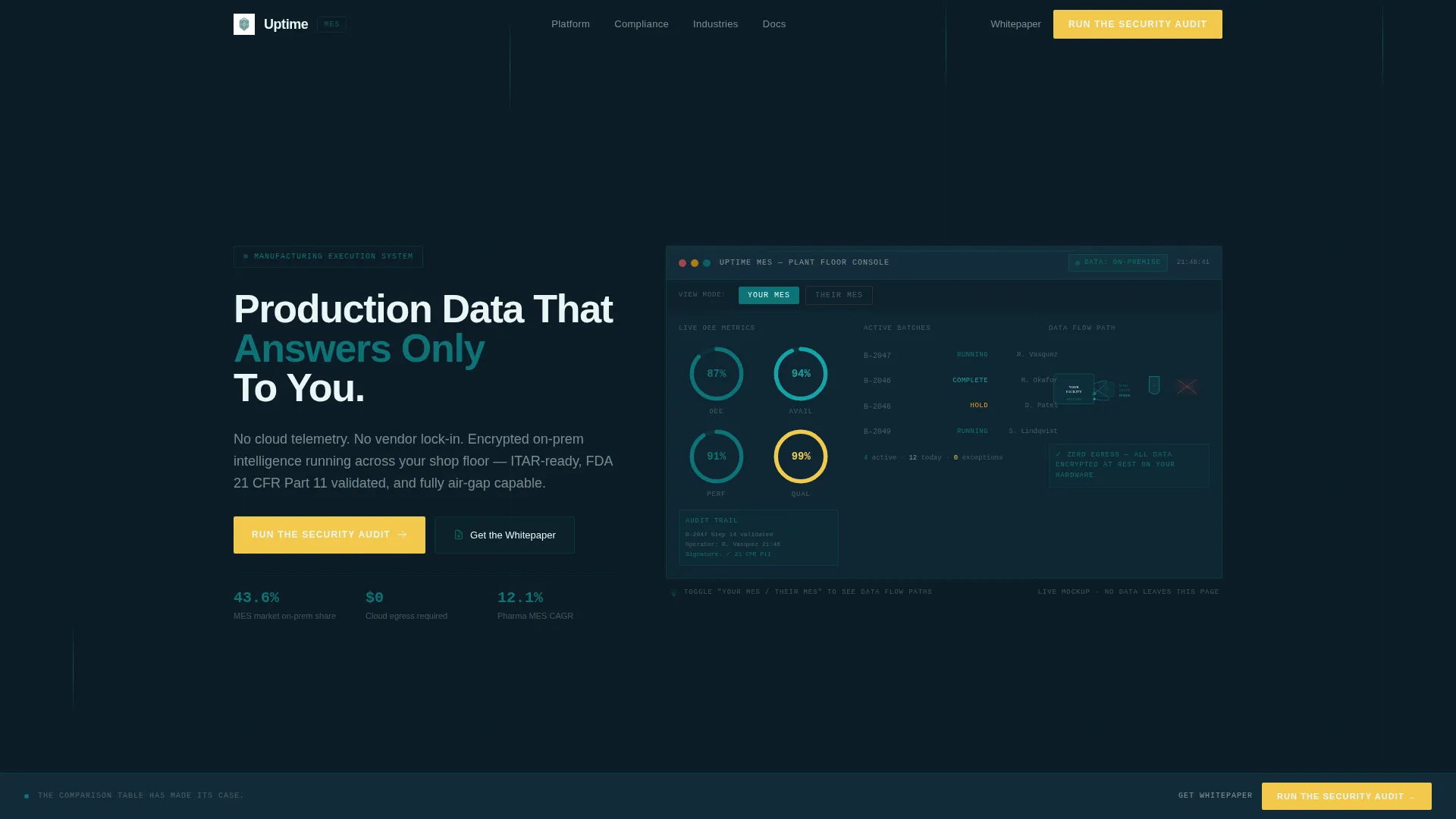
- An interactive in-browser MES dashboard mockup with OEE gauges, batch tracking, and a toggleable data-flow comparison
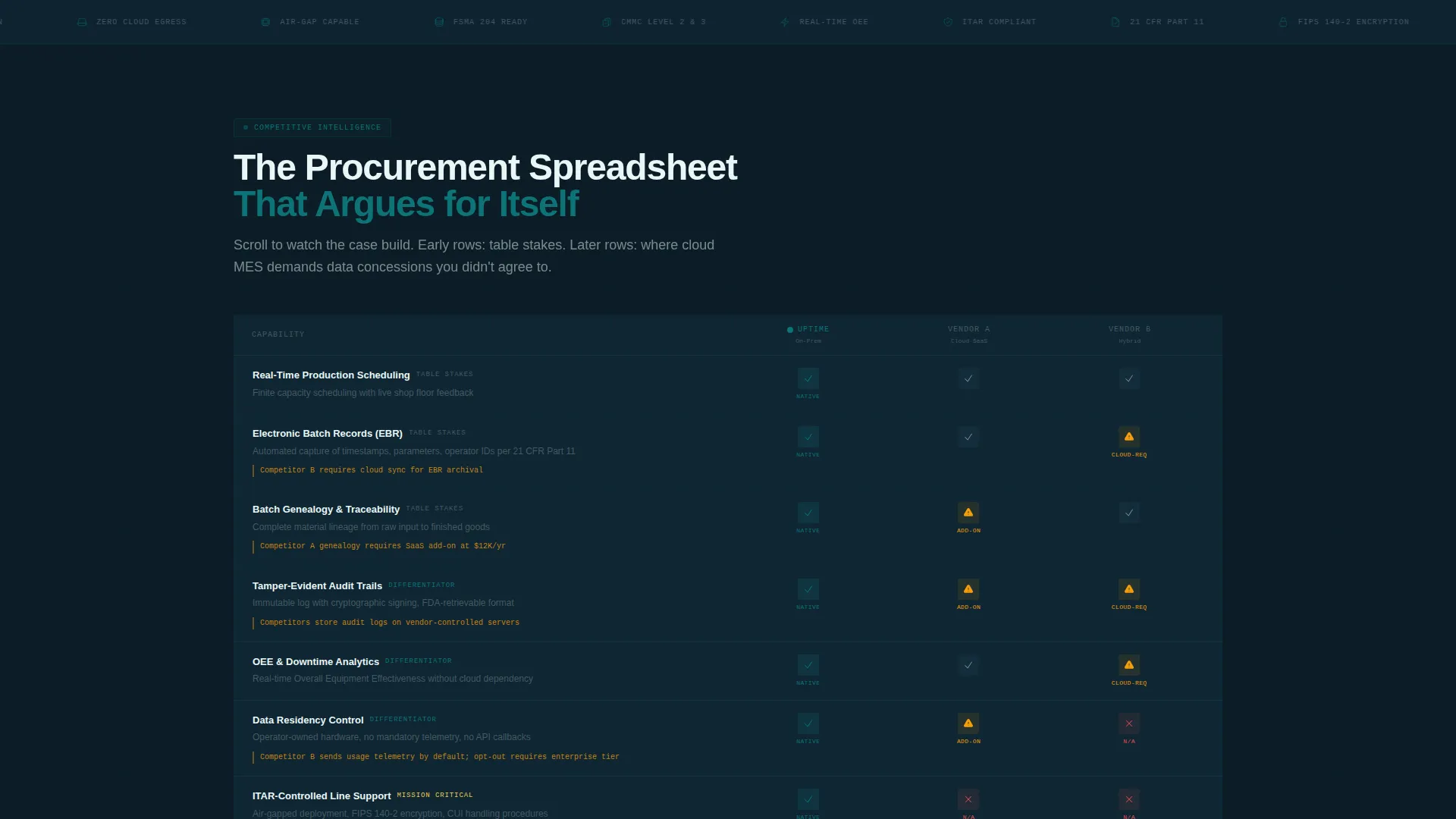
- A progressive feature matrix with animated row reveals, checkmarks, partial-support cautions, and hard gaps across competitor columns
- A two-step gated form for a security audit request and a secondary email-gated whitepaper download link
Feature list
This template includes the following built-in capabilities grounded in the source brief.
Interactive MES Dashboard Header
The header renders a functioning MES dashboard mockup directly in the browser. It displays live production line indicators including Overall Equipment Effectiveness (OEE) gauges, batch tracking readouts, and a persistent "Data Location: On-Premise" badge. Visitors can toggle between "Your MES" and "Their MES" to watch data flow paths animate inside or scatter outward to third-party cloud icons.
Progressive Feature Matrix
The scroll reveal powers a competitive comparison table that builds row by row as the visitor scrolls. Each row covers a specific MES capability such as real-time scheduling, batch genealogy, electronic batch records, and audit trails. The template places your product in a teal-highlighted left column with two anonymized competitor columns fading in to the right, using checkmarks, amber caution icons, and red gaps to communicate capability honestly.
Compliance-Tier Reveal Sequence
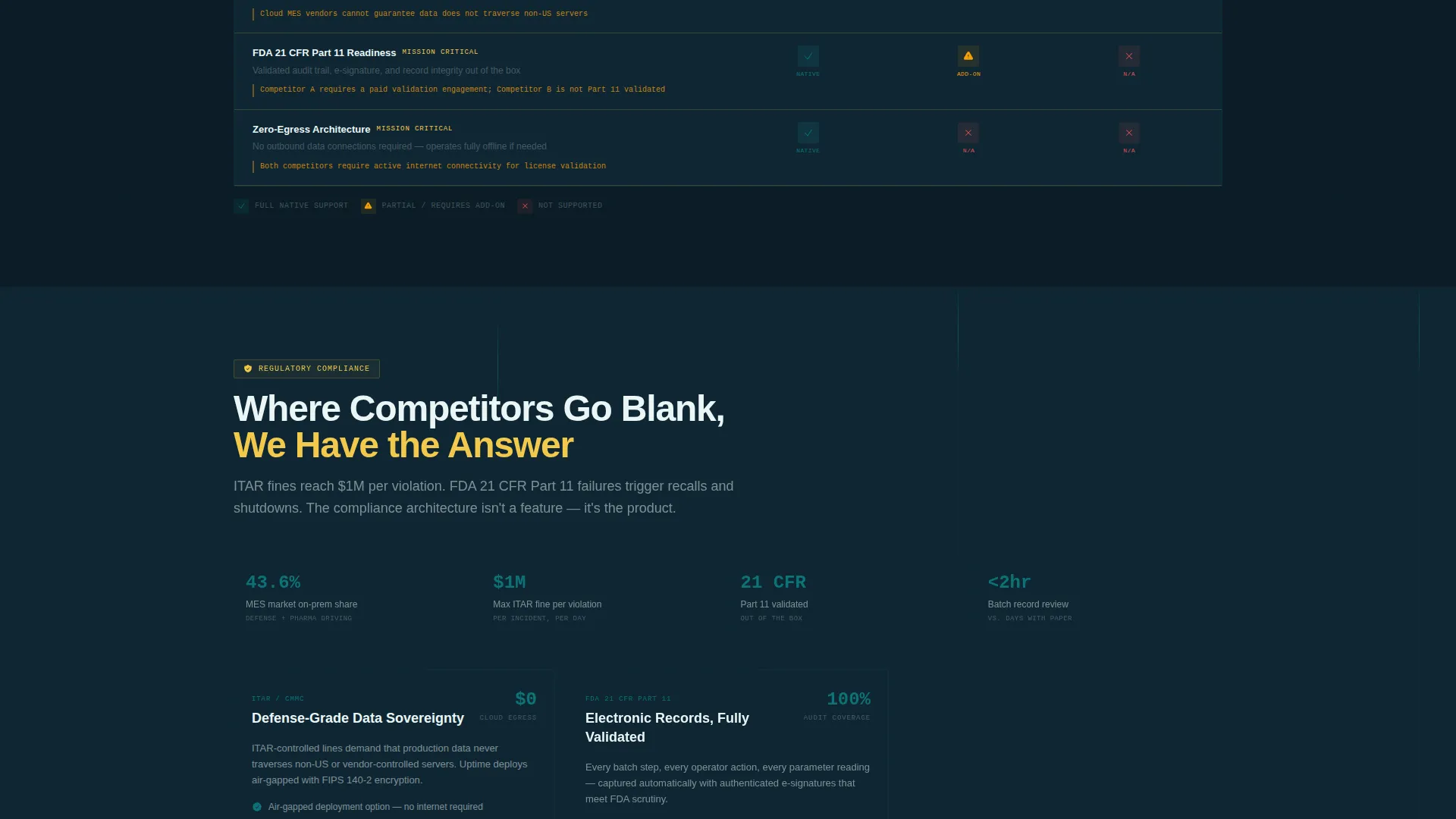
The matrix escalates in stakes as the visitor scrolls deeper. Early rows cover common table-stakes features. Mid-scroll rows expose where cloud MES platforms require data-sharing concessions. Final rows cover ITAR compliance, FDA 21 CFR Part 11 readiness, and zero-egress architecture, where competitor columns go intentionally blank.
Pinned Security Audit call to action
The primary call to action, labeled "Run the Security Audit," first appears after the third feature row and then pins to the bottom navigation rail for the remainder of the scroll. This ensures the conversion entry point is always visible without interrupting the comparison flow.
Two-Step Audit Request Form
Clicking the primary call to action opens a two-step inline form. Step one asks the visitor to select their facility type from four options and choose their current MES vendor from a dropdown. Step two captures name, work email, and a single opt-in checkbox for the compliance comparison PDF.
Secondary Whitepaper Download Path
Below the final matrix row, a secondary conversion path offers a direct download of an on-premises versus cloud MES whitepaper. It is gated only by email, designed to convert visitors who are not yet ready for a sales conversation but want to continue their own evaluation.
Page sections overview
| Section | Purpose |
|---|---|
| Interactive Dashboard Header | Immerse visitors in a live MES mockup with a data-flow toggle |
| Data Flow Toggle | Show on-premise versus cloud routing paths through animation |
| Feature Matrix Rows | Reveal capability comparisons progressively as visitor scrolls |
| Compliance Tier Reveals | Escalate stakes with ITAR, FDA 21 CFR Part 11, and zero-egress rows |
| Pinned call to action Rail | Keep "Run the Security Audit" accessible throughout the scroll |
| Audit Request Form | Capture facility type, vendor, and contact details in two steps |
| Whitepaper Download Section | Convert research-stage visitors via email-only gated download |
Design & branding system
The visual identity follows the Teal Catalyst color system inside a Startup Velocity theme. The palette is clinical and charged, evoking a secured operations environment rather than a typical SaaS product page.
- Deep operations teal (#0D7377) is the primary brand color used for interactive elements and active states; reactor-core dark (#0B1D26) fills all backgrounds to create a secured-terminal feel; signal white (#EAF6F6) handles typography and negative space
- Catalyst yellow (#F2C94C) is reserved strictly for call to action buttons and competitive advantage callouts, giving those elements immediate visual priority
- There is no stock photography or hero illustration; the interactive dashboard mockup serves as the sole hero element, making the product itself the visual anchor
Mobile & speed optimization
The scroll-reveal animations and matrix rows are structured to work across screen sizes without breaking the sequential reveal logic.
- The pinned call to action rail adapts to the bottom edge of mobile viewports, keeping the conversion action reachable throughout the scroll
- The two-step form and email-gated download are built as lightweight inline components, reducing friction on smaller screens
How this template helps you convert
This template is structured specifically for comparison-stage buyers who arrive already skeptical and mid-evaluation. The layout does the qualification work so the call to action carries real weight.
- The interactive data-flow toggle creates an immediate, visceral demonstration of the on-premise difference before a single line of copy is read, building conviction early in the scroll
- The progressive feature matrix mimics a procurement spreadsheet, letting the visitor feel they have completed their own evaluation by the time the "Run the Security Audit" call to action pins into view
Other information about this template
This template is categorized under Technology and the Privacy-First Enterprise Software subcategory, targeting the Privacy-First MES niche. It is built with a scroll-reveal progressive style and a Comparison/Versus landing page direction, meaning the entire layout is optimized for buyers who are actively comparing vendors.
- The template uses the Feature Matrix creative direction and Interactive Preview header concept, both matched from the intersection context for this niche
- The Teal Catalyst color system and Startup Velocity theme together produce a visual language suited to enterprise operations software that needs to feel trustworthy and controlled
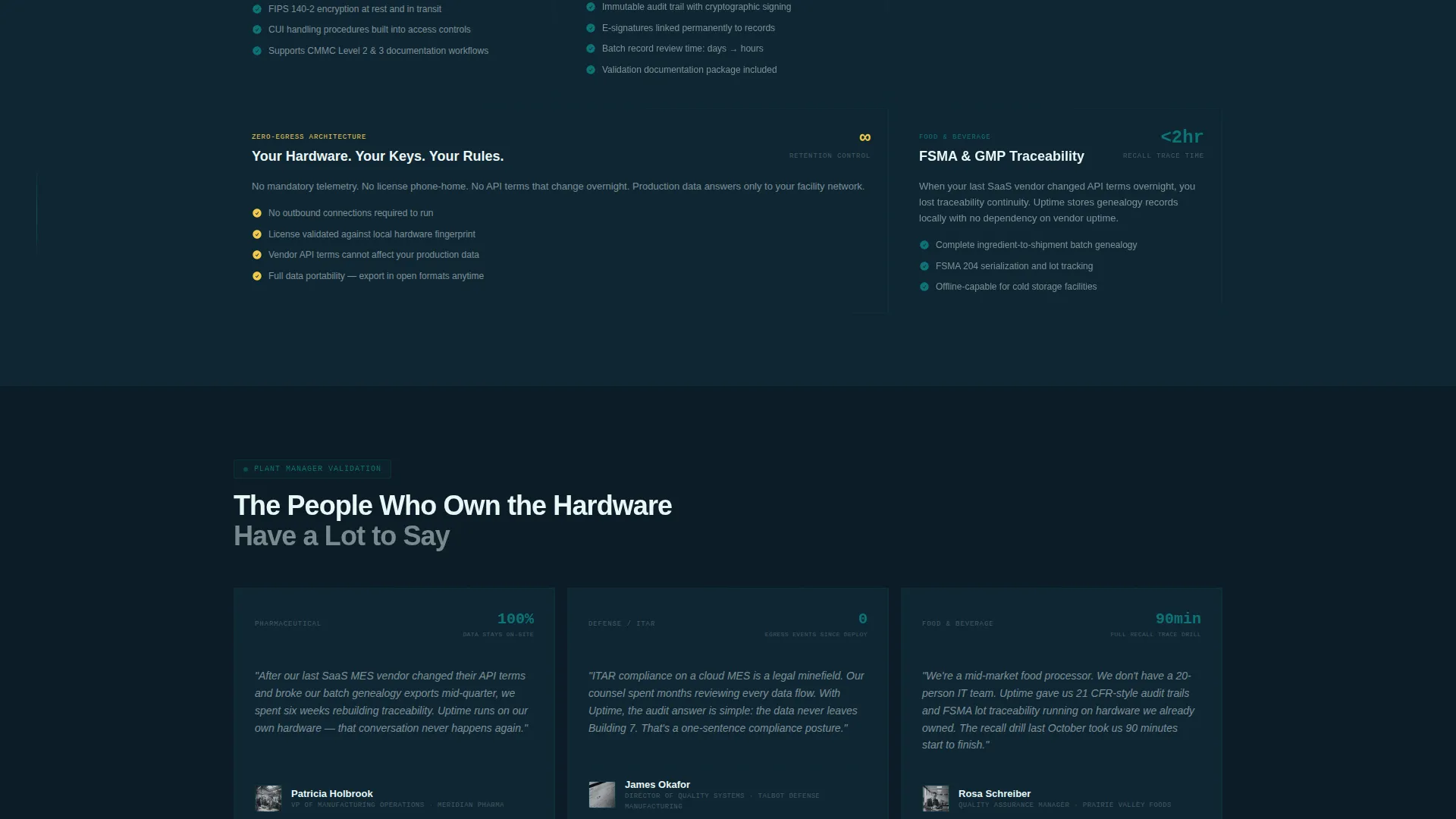
- The compliance rows covering ITAR and FDA 21 CFR Part 11 readiness are positioned at the deepest scroll depth, where the visitor has already built context and is most receptive to the product's strongest differentiators
- The secondary whitepaper download path is intentionally lower-commitment, designed to capture mid-funnel researchers and return them to the primary call to action at a later stage
Theme
Startup Velocity
Creative direction
Feature Matrix
Color system
Teal Catalyst
Style
Scroll Reveal (Progressive)
Direction
Comparison/Versus
Page Sections
Interactive MES Dashboard Header
Progressive Scroll-reveal Feature Matrix
Compliance-tier Escalation Sequence
Pinned Security Audit Call to Action Rail
Two-step Audit Request Form
Email-gated Whitepaper Download
Related questions
Who is this template designed for?
How does the interactive dashboard header work?
Can the feature matrix rows be edited to match real competitors?
What are the two conversion paths built into this template?
Does this template require any specific platform or framework to run?



