Plumbing Client Portal Landing Page Template
Valve is a plumbing client portal landing page built for property managers, landlords, and facility teams who need full job visibility in one place. It combines an animated dashboard header, a spec-by-spec comparison table, a cost-of-downtime calculator, and a qualification form into a single hub-and-spoke page that earns trust before asking for the click.
by Rocket studio
Quick summary
Valve is a purpose-built plumbing client portal landing page template. It gives property managers and homeowners one screen to track open tickets, technician locations, and invoices. The page is designed around a comparison-first structure that proves value before presenting a call to action, making it ideal for plumbing businesses ready to win clients away from generic software.
Who this template is for
This template is built for plumbing businesses and service operators who manage multiple clients and need a credible digital presence that converts. It speaks directly to buyers who already use a competing tool and are weighing a switch.
- Plumbing companies serving landlords managing large property portfolios
- Facility managers at commercial or medical office buildings with compliance concerns
- Plumbing operators targeting homeowners in active renovation projects
What problem this template solves
Property managers and homeowners lose time and money when repair visibility is poor. Missed updates, lost invoices, and untracked technicians create midnight calls, billing disputes, and broken trust. This template solves the credibility gap by showing, not just telling, what a purpose-built plumbing portal delivers.
- Generic property management tools lack plumbing-specific tracking and invoice automation
- Clients have no easy way to compare portals side by side before committing
- Switching hesitation grows when migration costs and setup effort feel unknown
What you get with this template
You get a fully structured, single-page hub-and-spoke landing page with anchor navigation and multiple conversion paths. Every section is laid out and ready to customize with your own branding, pricing, and portal details.
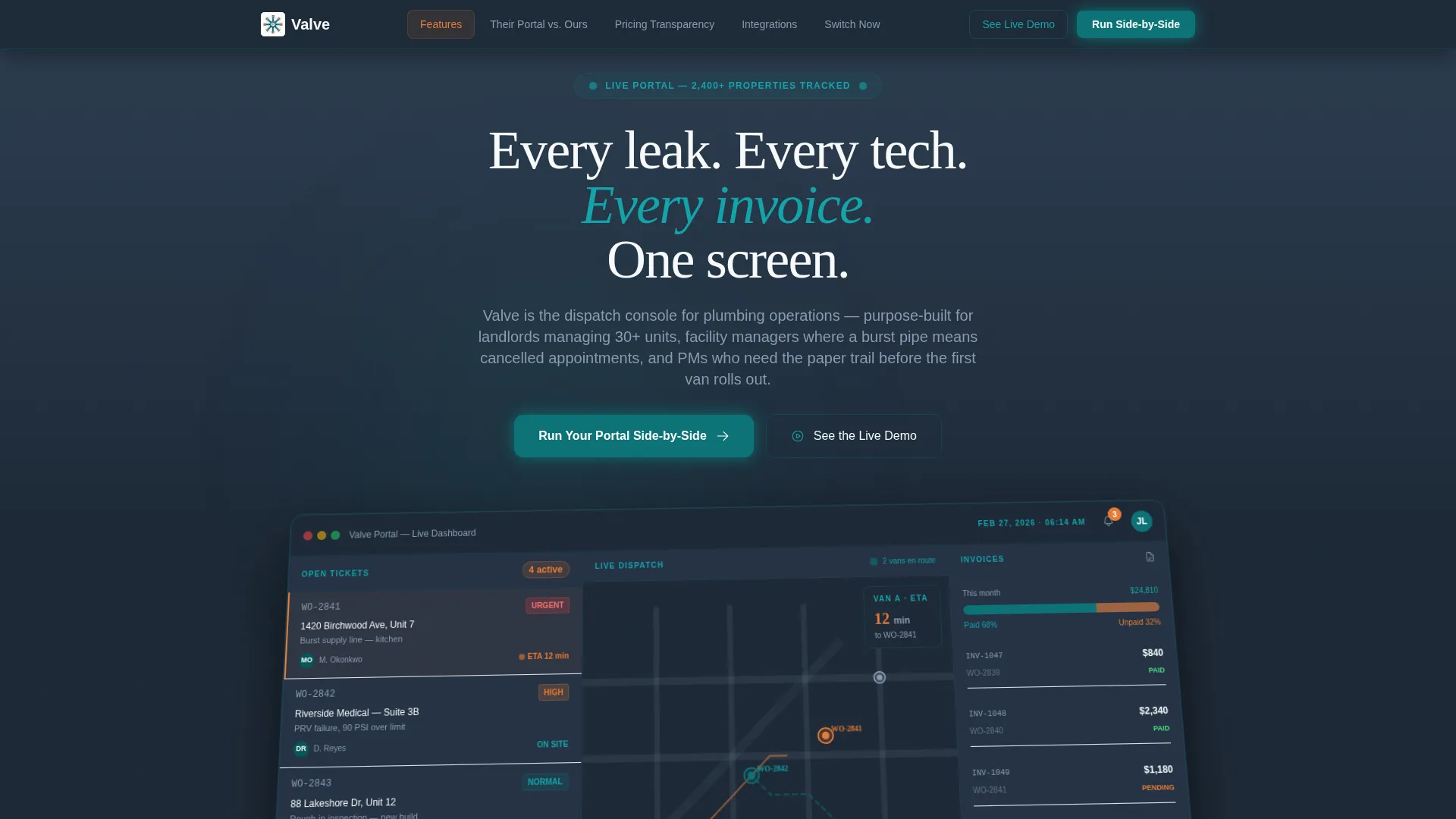
- An animated dashboard header mockup showing live work orders, a map view, and invoice status
- A versus comparison table, a downtime cost calculator, and a dual-call to action conversion section
- A qualification form with dropdown, slider, and radio-button inputs built into the page
Feature list
This template delivers a set of focused, prompt-backed features designed for a plumbing client portal sales page.
Animated Dashboard Header
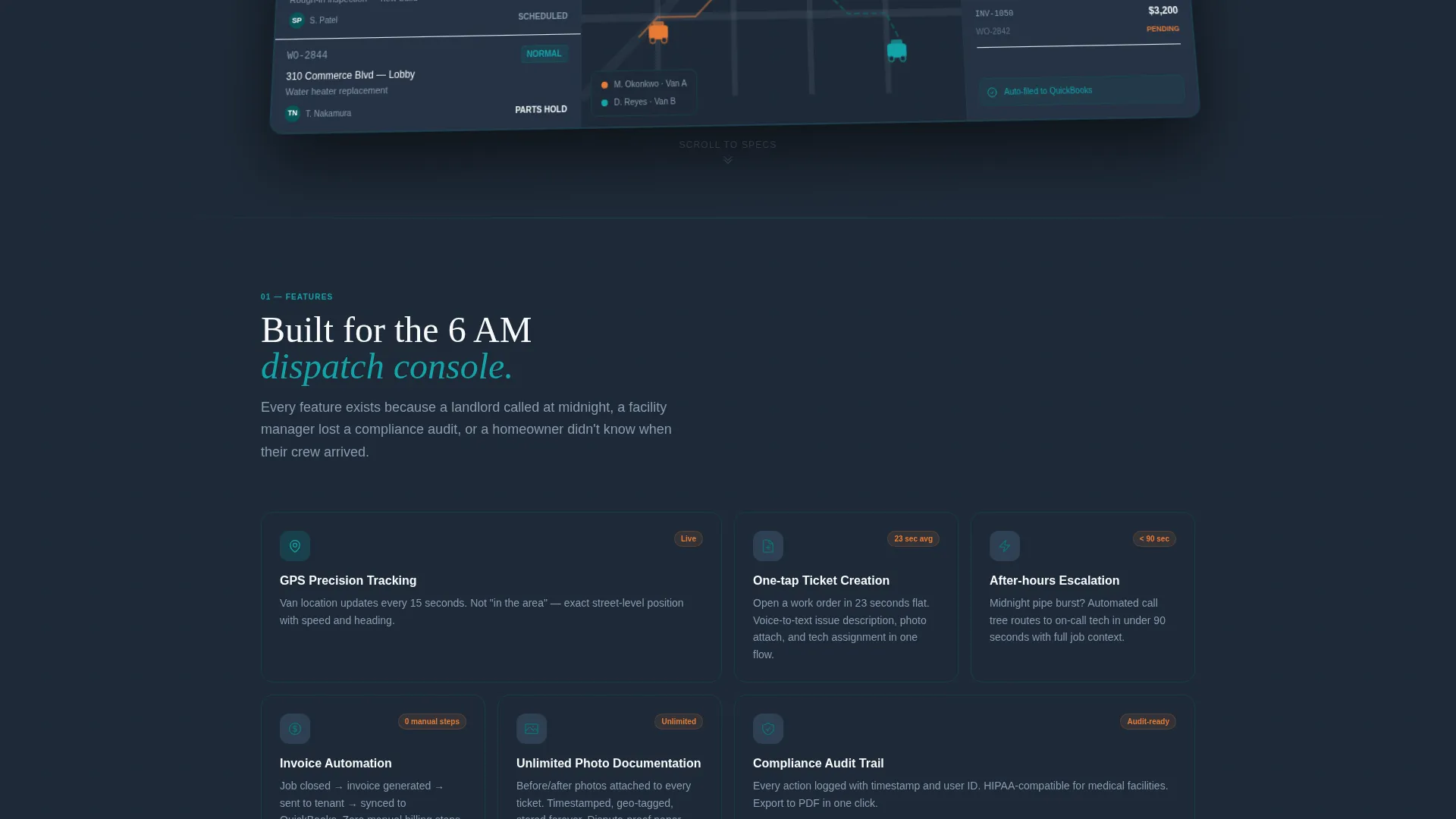
The header fills the viewport at a slight isometric tilt. It shows four open work orders with technician avatars, a two-van map view with animated route pulses, a paid-versus-unpaid invoice split bar, and a notification bell showing a count of three in copper accent. A countdown timer ticks from twelve to eleven minutes to reinforce live-system feel.
Hub and Spoke Anchor Navigation
A sticky anchor navigation bar pins to the top of the page with five spoke labels: Features, Their Portal versus. Ours, Pricing Transparency, Integrations, and Switch Now. Visitors can jump to any section instantly, reducing scroll friction and keeping intent-driven buyers on track.
Spec Sheet Comparison Table
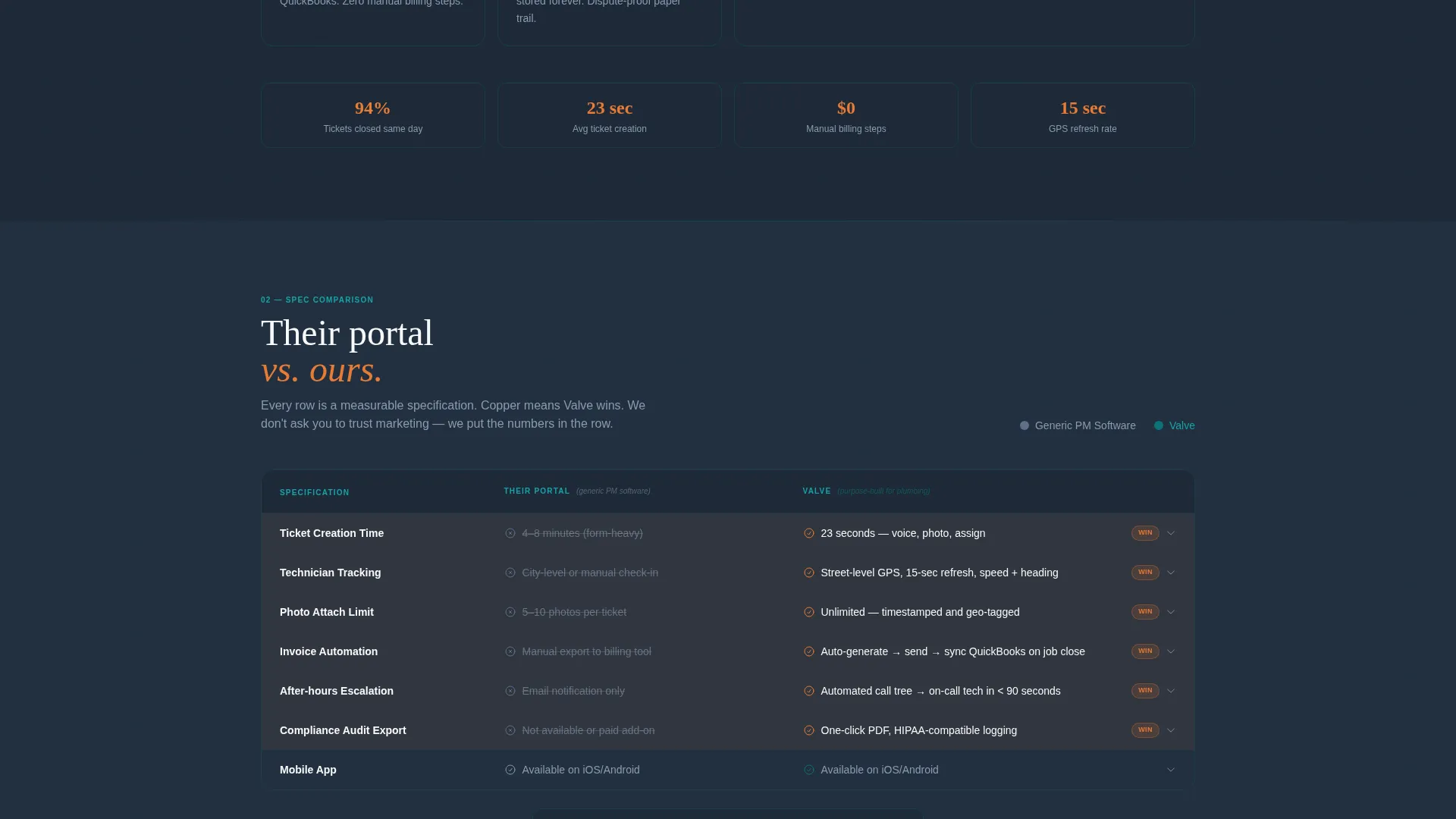
A row-by-row versus table compares a generic portal against this purpose-built plumbing portal. Rows cover ticket creation time, technician tracking granularity, photo attachment limits, invoice automation, and after-hours escalation routing. Each row lights up in copper accent color when the plumbing portal wins the specification.
Cost-of-Downtime Calculator
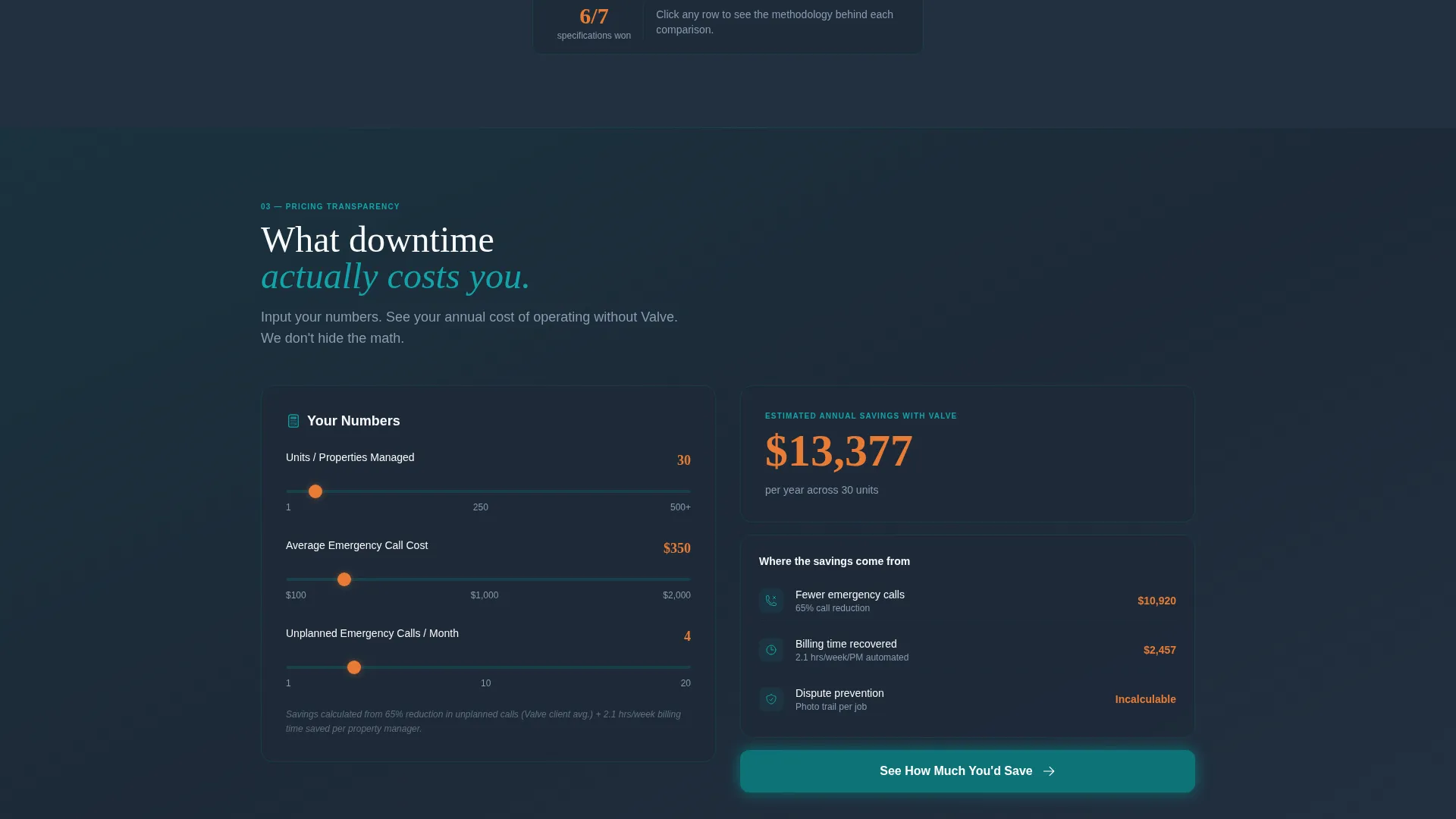
Visitors input their unit count and average emergency call cost to see a projected annual savings figure. This interactive calculator makes the financial case concrete before any form appears, reducing resistance and increasing form completion intent.
Qualification and Comparison Form
The primary call to action opens a short qualification form. It asks for current software name via a dropdown of eight common platforms plus a spreadsheets-or-none option, number of properties managed via a slider from one to five hundred or more, and biggest pain point via radio buttons covering visibility, billing, scheduling, and communication.
Live Demo Conversion Path
A secondary call to action offers access to a sandboxed portal loaded with dummy data. This path removes commitment pressure for visitors who are not ready to fill out the qualification form but still want to see the product in action.
Page sections overview
| Section | Purpose |
|---|---|
| Dashboard Header | Animated portal mockup to establish credibility immediately |
| Anchor Navigation Bar | Sticky hub nav linking all five spoke sections |
| Features Spoke | Highlights core portal capabilities in spec-sheet style |
| Versus Comparison Table | Side-by-side rows proving superiority over generic tools |
| Pricing Transparency Spoke | Communicates cost structure and value clearly |
| Integrations Spoke | Shows depth of third-party software connections |
| Downtime Cost Calculator | Interactive tool to quantify annual savings |
| Switch Now Section | Free migration guarantee displayed above the qualification form |
| Qualification Form | Dropdown, slider, and radio inputs to qualify the lead |
| Live Demo Path | Secondary call to action linking to sandboxed portal with dummy data |
Design & branding system
The visual identity follows a Dashboard Pro theme with a Teal Catalyst color system. The palette draws from a mechanical room aesthetic where every element is labeled, color-coded, and readable at a glance.
- Deep pipeline teal (#0D7377) anchors the navigation bar and section headers
- Pressure-gauge charcoal (#1E2A38) fills backgrounds and data panel surfaces, with copper fitting accent (#E87B35) on active states and notification badges
- Clean porcelain white (#F7F9FA) covers card surfaces and input fields for contrast and readability
Mobile & speed optimization
The template layout is structured to translate cleanly across screen sizes. The hub-and-spoke anchor navigation and data-panel layouts are designed with compact viewports in mind.
- The sticky anchor nav collapses gracefully on smaller screens to keep spoke links accessible
- Data panels, the versus table, and the calculator maintain readable column widths on mobile
- The qualification form inputs, including the slider and radio buttons, are sized for comfortable touch interaction
How this template helps you convert
The page is built around a Comparison and Versus conversion strategy. It earns trust through proof before presenting any form or commitment.
- The animated dashboard header creates an immediate impression of a live, capable product, pulling visitors past the fold with a sense of operational confidence.
- The spec-by-spec comparison table and cost calculator eliminate generic objections with hard data, so visitors arrive at the form already sold on the concept.
- The free migration guarantee displayed directly above the qualification form removes the last friction point, and the sandboxed demo path captures visitors who need more time before committing.
Other information about this template
This template is part of a broader set of plumbing digital presence assets designed for technology-forward service businesses. It pairs well with any plumbing operator building a branded client-facing portal experience.
- The template style is Hub and Spoke with Anchor Navigation, making it well suited to long-form single-page sales flows
- The creative direction follows a Spec Sheet approach, which works across field service niches beyond plumbing
- The page references integration depth with platforms such as QuickBooks, ServiceTitan, and Housecall Pro as spoke-section content areas, consistent with the source brief
Theme
Dashboard Pro
Creative direction
Spec Sheet
Color system
Teal Catalyst
Style
Hub & Spoke (Anchor Nav)
Direction
Comparison/Versus
Page Sections
Animated Dashboard Header Mockup
Hub and Spoke Anchor Navigation
Spec Sheet Comparison Table
Cost-of-downtime Calculator
Qualification and Lead Form
Dual Conversion Path Design
Related questions
Who is this landing page template designed for?
Can I customize the versus table rows?
What does the qualification form collect?
Do I need to build the calculator logic myself?
Is this a multi-page template or a single landing page?



