Plumbing Wholesale Vertical SaaS Reviews Website Template
Valve is a scroll-reveal landing page template built for plumbing wholesale CRM platforms. It features an interactive browser-rendered dashboard preview, five animated capability layers that activate on scroll, and a dual conversion path toward app download. The Void & Violet color system gives it the focused intensity of a live dispatch screen, built for wholesale distributors ready to modernize.
by Rocket studio
Quick summary
Valve is a single-page, scroll-reveal landing page template designed for plumbing wholesale vertical SaaS products. It opens with a fully interactive dashboard preview rendered in the browser, then progressively hands control to the visitor through five animated capability layers. The primary call to action drives app installs, supported by App Store, Google Play, and a demo path.
Who this template is for
This template is built for SaaS founders and product teams launching a plumbing wholesale CRM platform. It speaks directly to the operational pain points of regional supply houses and their staff.
- Wholesale plumbing distributors managing multi-warehouse operations and contractor accounts
- Inside sales teams and operations managers who need a credible, modern product presence
- SaaS product teams who want visitors to experience the platform before committing to a download
What problem this template solves
Regional plumbing supply houses run complex operations across fleets, warehouses, and hundreds of contractor accounts. A generic SaaS landing page fails to communicate the specific value of a tool built for that world.
- Visitors cannot visualize how a CRM handles pipe fittings catalogs, delivery routes, and account history in one screen
- Static screenshots do not build the trust needed to drive a mobile app install
- Teams lose potential sign-ups because the product value is explained rather than demonstrated
What you get with this template
You get a fully structured, scroll-reveal landing page that lets visitors interact with the product concept before they ever tap the install button. Every section is built to progress from curiosity to confidence.
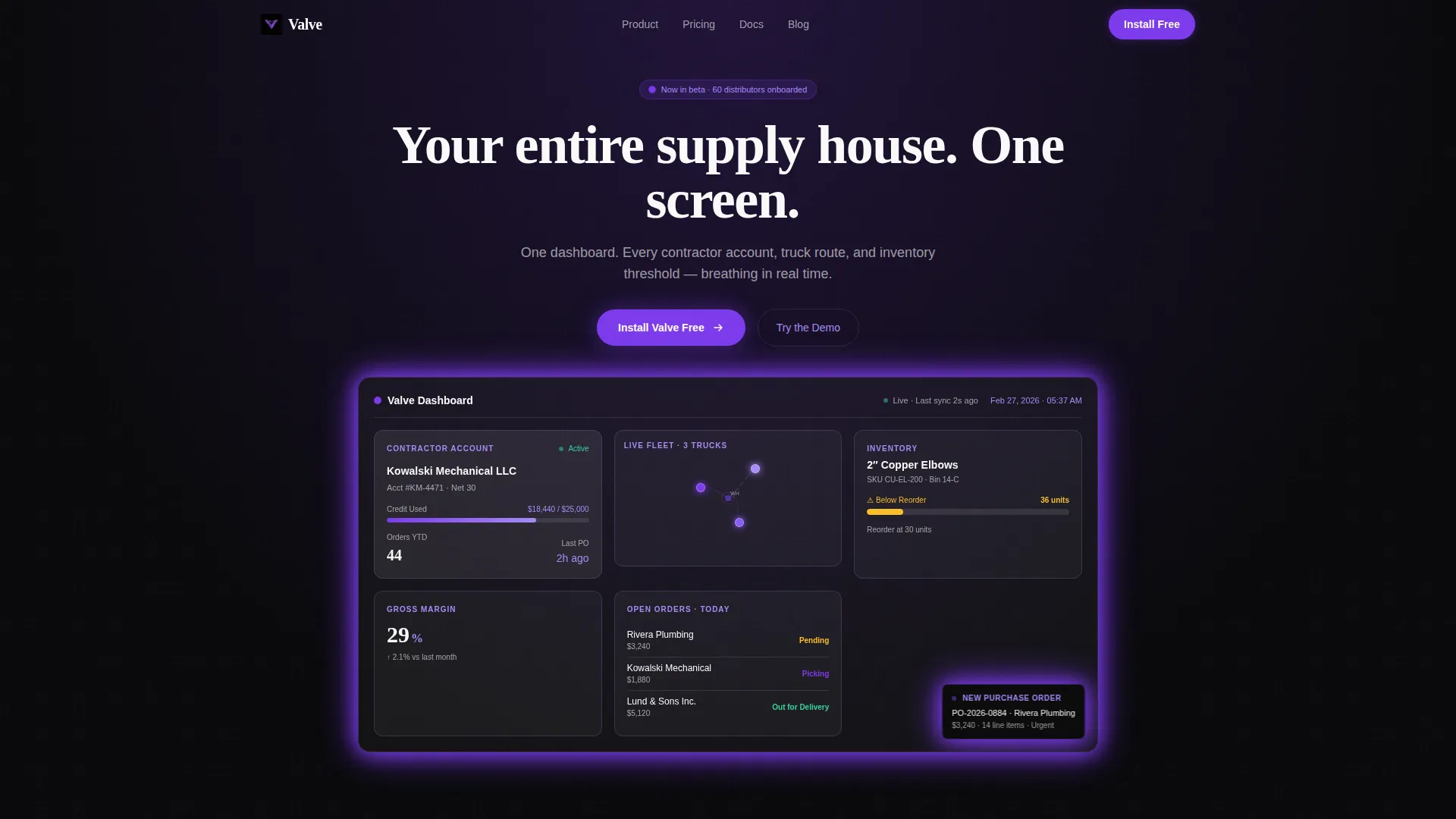
- An interactive browser-rendered dashboard in the header with live-ticking data, a delivery route map, contractor account cards, and an inventory gauge
- Five progressive capability layers that animate into view on scroll, each presenting a real data scenario the visitor can interact with
- A dual conversion path with a fixed app install pill, full-width bottom call to action, App Store and Google Play badges, a QR code, and a secondary demo trigger
Feature list
This template is built around a set of specific interactive and visual components drawn directly from the product concept.
Interactive Dashboard Header
The header renders a mock CRM dashboard directly in the browser. Numbers tick in real time, a purchase order notification slides in, and a margin percentage recalculates. The visitor's cursor changes behavior on hover: hovering a truck icon surfaces an estimated time of arrival update, and hovering an inventory bar reveals supplier lead times.
Scroll-Activated Capability Layers
Five capability sections remain dormant until scrolled into view. Each layer animates to life with a real data scenario. The background dashboard evolves as the visitor scrolls, adding modules and data flows so the experience feels like genuine onboarding rather than a product tour.
Contractor Account Search Layer
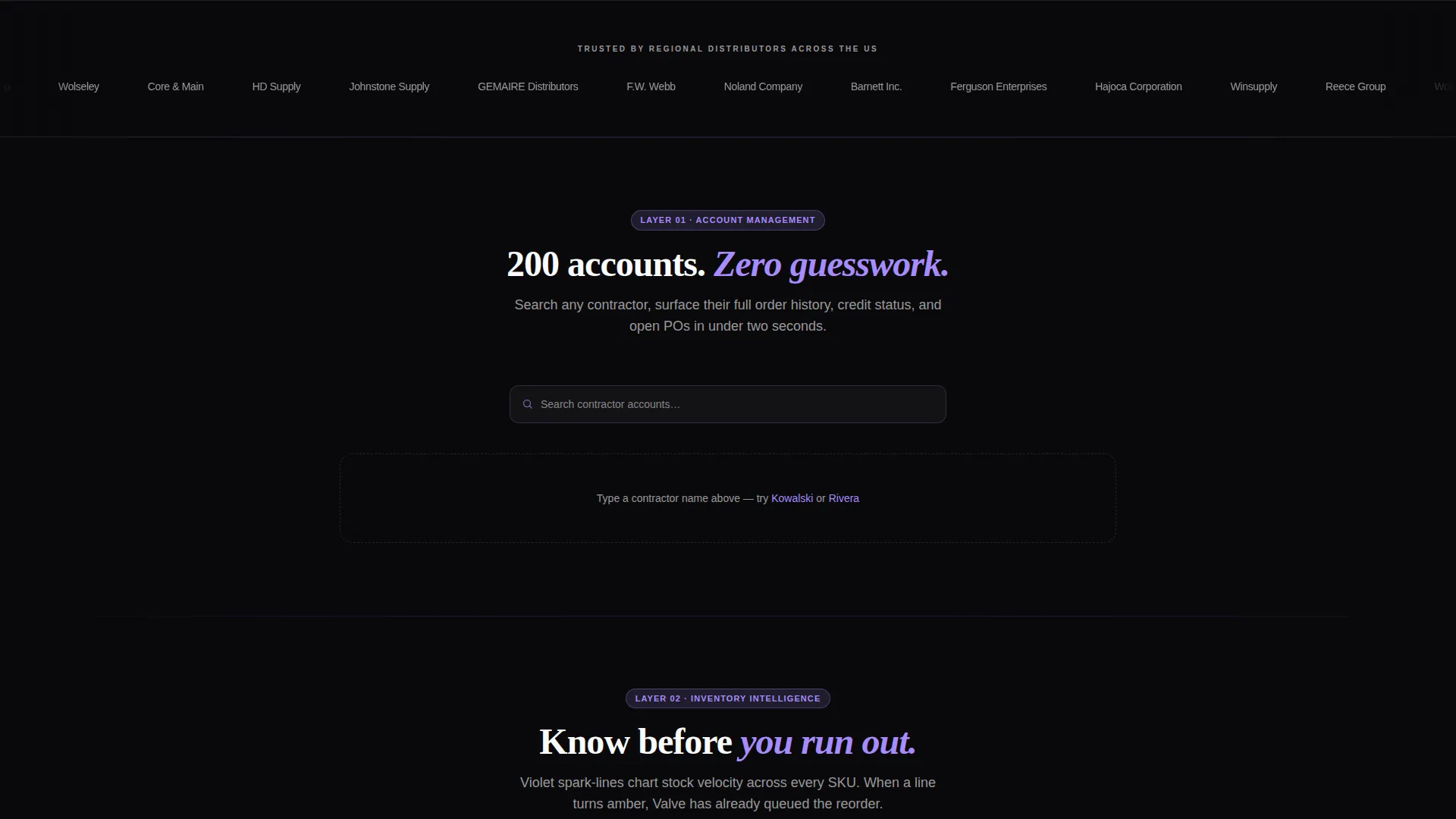
The first capability layer demonstrates account management with a live auto-complete contractor search. It surfaces fake but realistic order history, showing visitors exactly how inside sales reps would navigate two hundred contractor accounts from a single interface.
Inventory Intelligence Layer
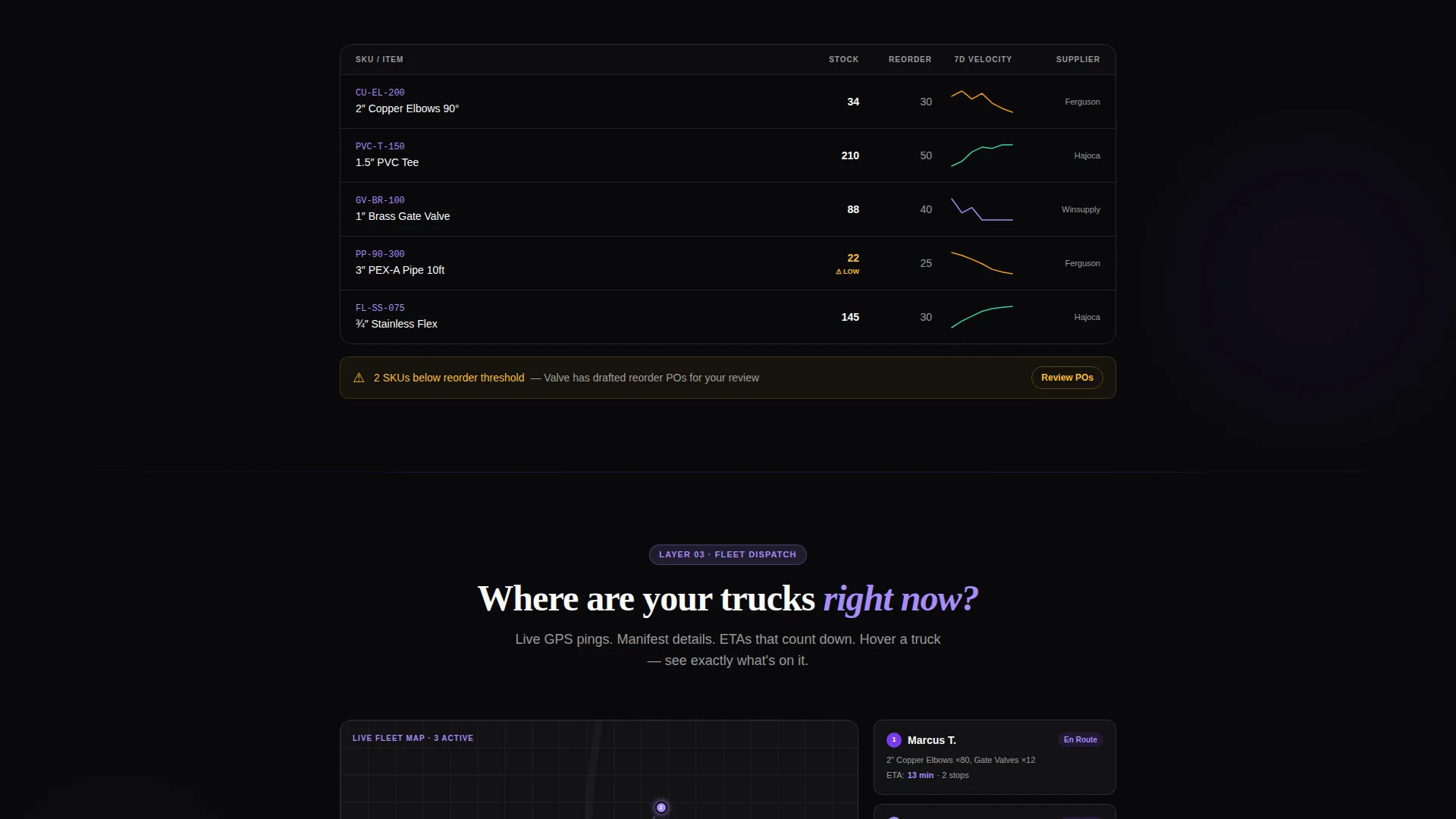
The second capability layer reveals inventory data through violet spark-line charts that visualize stock velocity. The layer is designed to communicate the reorder threshold mechanic using the two-inch copper elbow scenario described in the product concept.
Dual-Path App Download call to action
The primary conversion path drives toward app download through two surfaces. A subtle fixed pill in the top-right corner appears after the visitor scrolls past the header. A full-width section at the bottom presents paired App Store and Google Play badges alongside a QR code for instant mobile install.
Demo Walkthrough Path
A secondary call to action labeled "Try the Demo" returns the visitor to the interactive header in an expanded mode. A thirty-second guided walkthrough runs automatically, giving hesitant visitors a structured introduction to the platform before they decide to install.
Page sections overview
| Section | Purpose |
|---|---|
| Interactive Dashboard Header | Opens with a live mock dashboard and animated data points to immediately demonstrate product value |
| Headline Type Animation | Headline types itself into view above the dashboard to anchor the core product promise |
| Capability Layer One | Auto-complete contractor search demonstrating account management in a realistic scenario |
| Capability Layer Two | Spark-line inventory charts showing stock velocity and reorder threshold behavior |
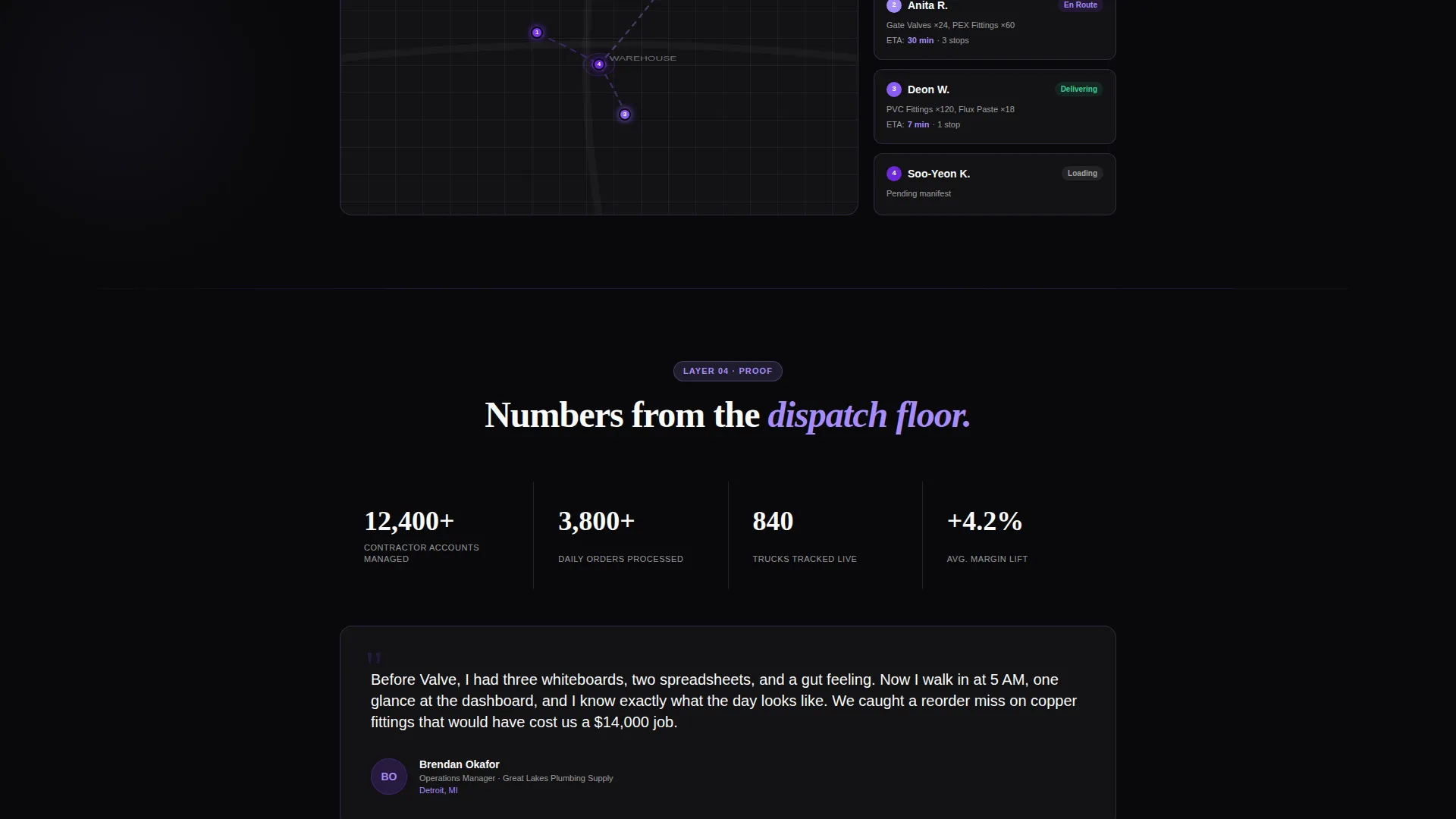
| Capability Layers Three to Five | Three additional progressive layers that add platform modules as the visitor scrolls |
| Fixed Install Pill | Persistent top-right app install button that appears after the visitor passes the header |
| Demo Trigger Section | Secondary call to action that launches the expanded interactive demo with guided walkthrough |
| Full-Width Download call to action | Bottom section with App Store badges, Google Play badges, and a QR code for instant install |
Design & branding system
The Void & Violet color system is central to this template's visual identity. Every design decision reinforces the feeling of a live operational dispatch screen viewed in a dark warehouse environment.
- Absolute void black (#09090B) forms the full-page canvas, pushing all data and interactive elements forward
- Electric violet (#7C3AED) marks every interactive element, data highlight, and decision point, while a softer iris (#A78BFA) colors secondary labels and spark-line graph lines
- Sharp titanium white (#FAFAFA) is used for text and card surfaces, ensuring strong contrast against the dark canvas
Mobile & speed optimization
The template is designed with mobile conversion as a priority, given that the primary call to action targets app downloads on both major mobile platforms.
- The QR code in the bottom call to action section enables instant mobile install without requiring the visitor to search app stores manually
- The fixed app install pill persists during scroll so mobile visitors always have a direct path to the download action
- The interactive layers are built for progressive disclosure, loading each capability section only when it enters the viewport
How this template helps you convert
The template earns the install by letting visitors use the product before they commit. Every interactive layer functions as evidence rather than a claim.
- The live dashboard header creates immediate product comprehension by showing a contractor card, delivery map, and inventory gauge in motion before the visitor has read a single line of body copy.
- The five scroll-activated capability layers act as a self-guided product tour, so by the time a visitor reaches the bottom call to action they have already experienced the core platform behaviors firsthand.
- The dual conversion path accommodates two buyer states: visitors ready to install immediately and visitors who need the thirty-second guided demo before committing.
Other information about this template
This template is part of a focused set of vertical SaaS landing page designs built around the Startup Velocity theme. It is designed for teams that need to communicate a complex operational product quickly and credibly.
- The Startup Velocity theme combines high-contrast dark-mode aesthetics with motion-led interactivity to position the product as modern and operationally serious
- The Interactive Explorer creative direction means the visitor is given control at every scroll stage rather than being shown passive content
- The template style is Scroll Reveal (Progressive), meaning each section is dormant and activates only when it enters the browser viewport
Theme
Startup Velocity
Creative direction
Interactive Explorer
Color system
Void & Violet
Style
Scroll Reveal (Progressive)
Direction
App Download
Page Sections
Live Interactive Dashboard Header
Scroll-activated Capability Layers
Contractor Account Search
Inventory Spark-line Charts
Dual App Download Call to Action
Guided Demo Walkthrough
Related questions
What kind of product is this template designed for?
Can I edit the interactive dashboard and data scenarios?
What are the two conversion paths included in this template?
How many interactive sections does this template include?
Does the scroll-reveal animation require any special setup?



