Vault — Accounting Operations Landing Page Template
Ledger is a split-screen landing page template built for home services accounting software. It leads with a live profit-and-loss stats wall and an interactive Job Profit Calculator, then guides trade contractors toward a lead capture form. The Slate and Sky color system keeps every section clean, functional, and focused on converting owner-operators into qualified demo requests.
by Rocket studio
Quick summary
Ledger is a single-page template designed for home services accounting software targeting plumbers, electricians, and HVAC technicians. It opens with an animated financial dashboard, moves immediately into an interactive Job Profit Calculator, and closes with a lead generation form. Every section builds trust through utility before asking for contact details.
Who this template is for
This template is built for software companies selling accounting or financial management tools to trade contractors. It speaks directly to the people running those shops, not just the developers building for them.
- Owner-operators managing multiple service trucks who need a clear financial picture without manual spreadsheet work
- Office managers handling subcontractor tax documents and year-end reporting for growing home services businesses
- Software founders and marketers who want a high-converting landing page that demonstrates product value before asking for a sign-up
What problem this template solves
Trade contractors often run profitable businesses but lose control of the numbers. Invoices pile up, job costs are tracked inconsistently, and payroll becomes a weekend task. A generic software landing page cannot close that gap because it does not speak the right language.
- Visitors from the trades leave pages that feel corporate or overly abstract before they reach the call to action
- A static feature list does not show contractors what their own numbers could look like inside the software
- Lead forms placed before any proof of value produce low conversion rates from this skeptical, time-short audience
What you get with this template
This template delivers a fully structured split-screen landing page with every section designed around the contractor buyer journey. The layout earns attention at the top and guides visitors toward a form by the time they have already seen their own projected numbers.
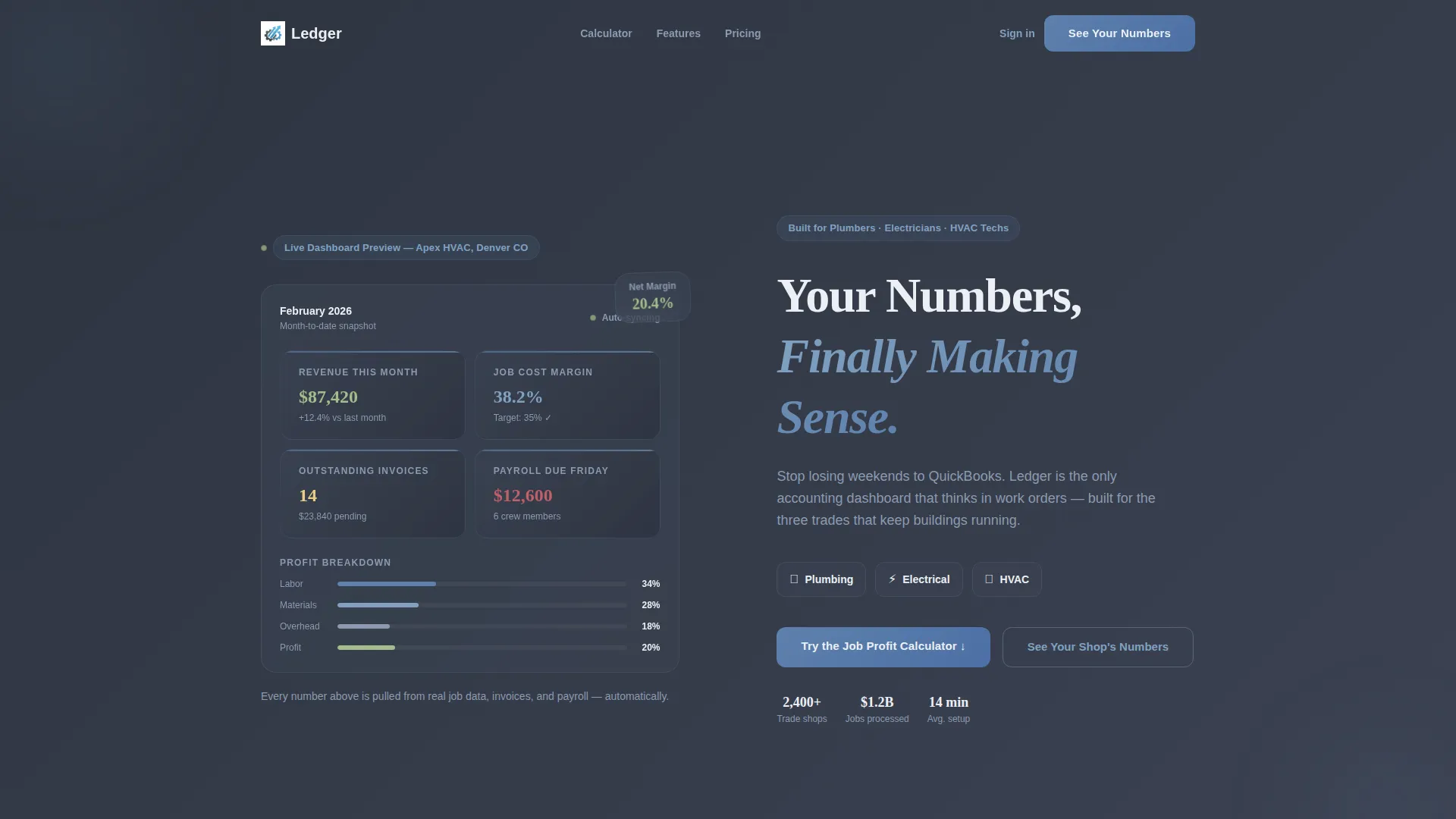
- An animated stats wall header showing a fictional profit-and-loss snapshot with live-style number animations on load
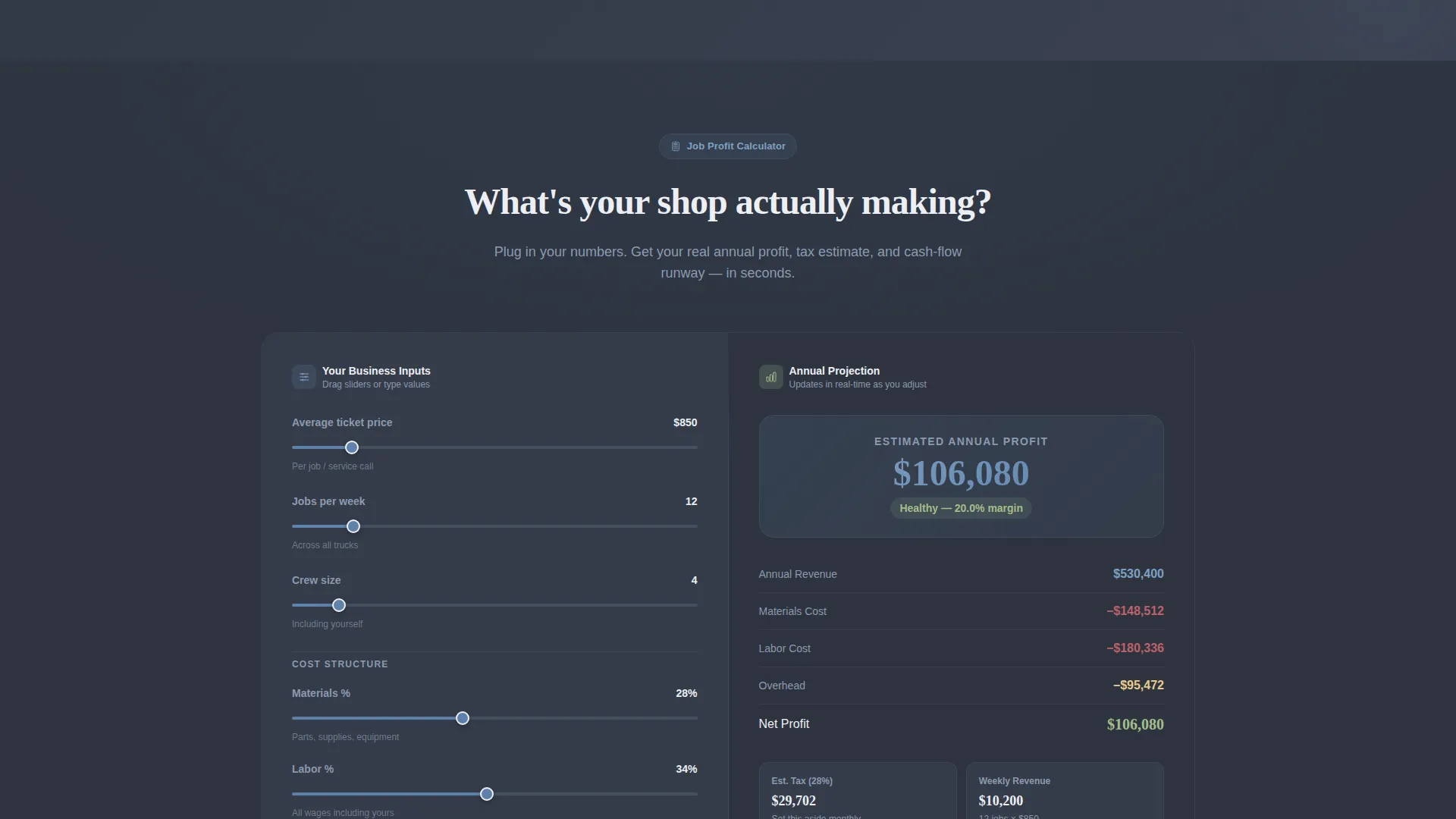
- An interactive Job Profit Calculator with input fields on the left and a live annual projection panel on the right
- A lead generation form capturing company name, trade type, employee count, and email, plus a secondary gated PDF offer for visitors not ready to demo
Feature list
This template is built around a clear set of components that work together to qualify and convert contractor visitors.
Animated Financial Stats Header
The header splits into two panels. The left side displays a fictional HVAC company's real-time profit-and-loss snapshot: monthly revenue, job cost margin, outstanding invoices, and payroll due. Numbers animate on page load to simulate a dashboard waking up. The right panel holds the primary headline and a prompt to engage the calculator.
Interactive Job Profit Calculator
Visitors enter their average ticket price, jobs per week, crew size, and material percentage. The right column instantly renders an annual profit projection, estimated tax figure, and cash-flow runway. The calculator is the central selling tool on the page, personalizing the software's value before any form appears.
Section-by-Section Before and After Layout
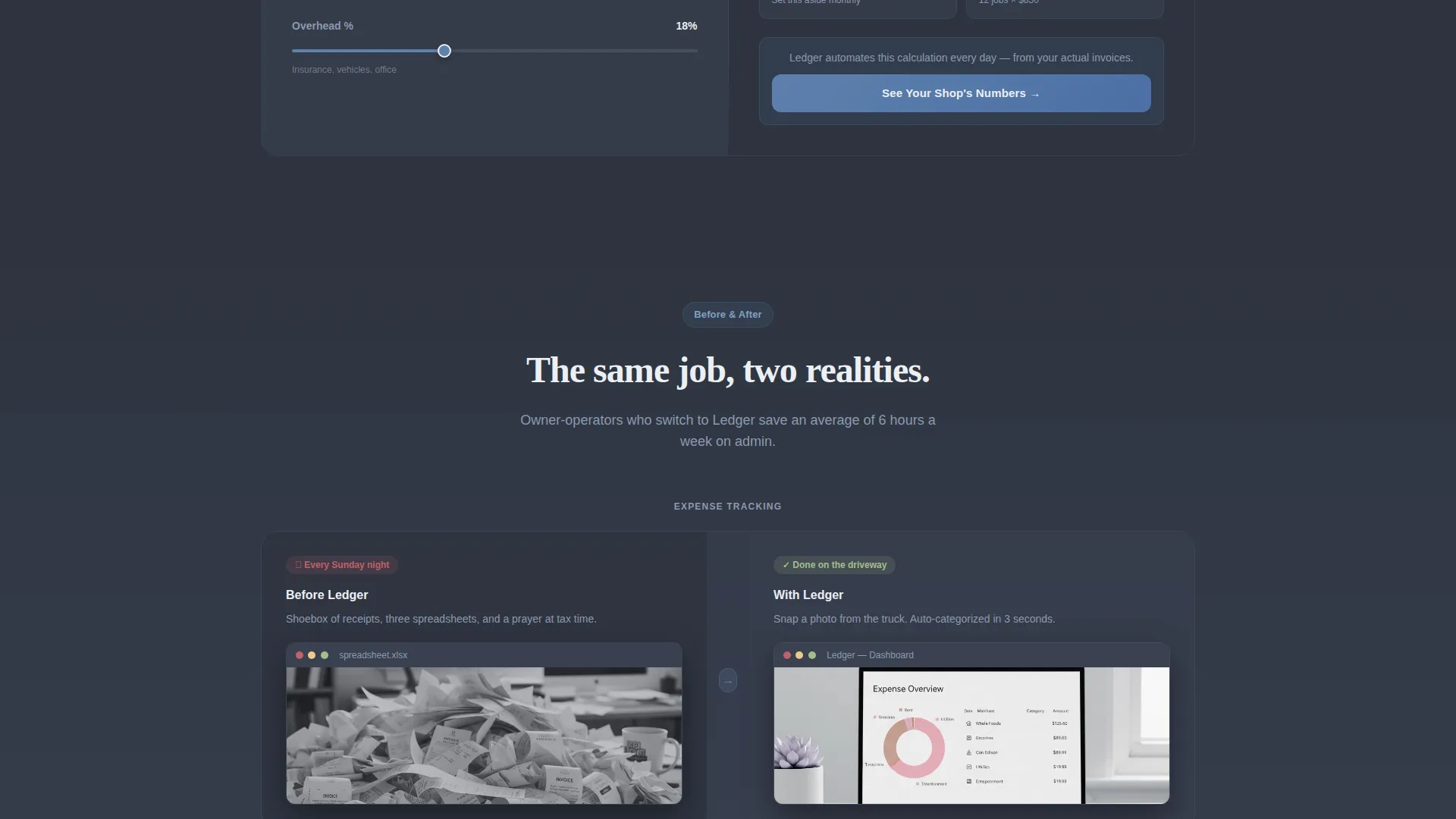
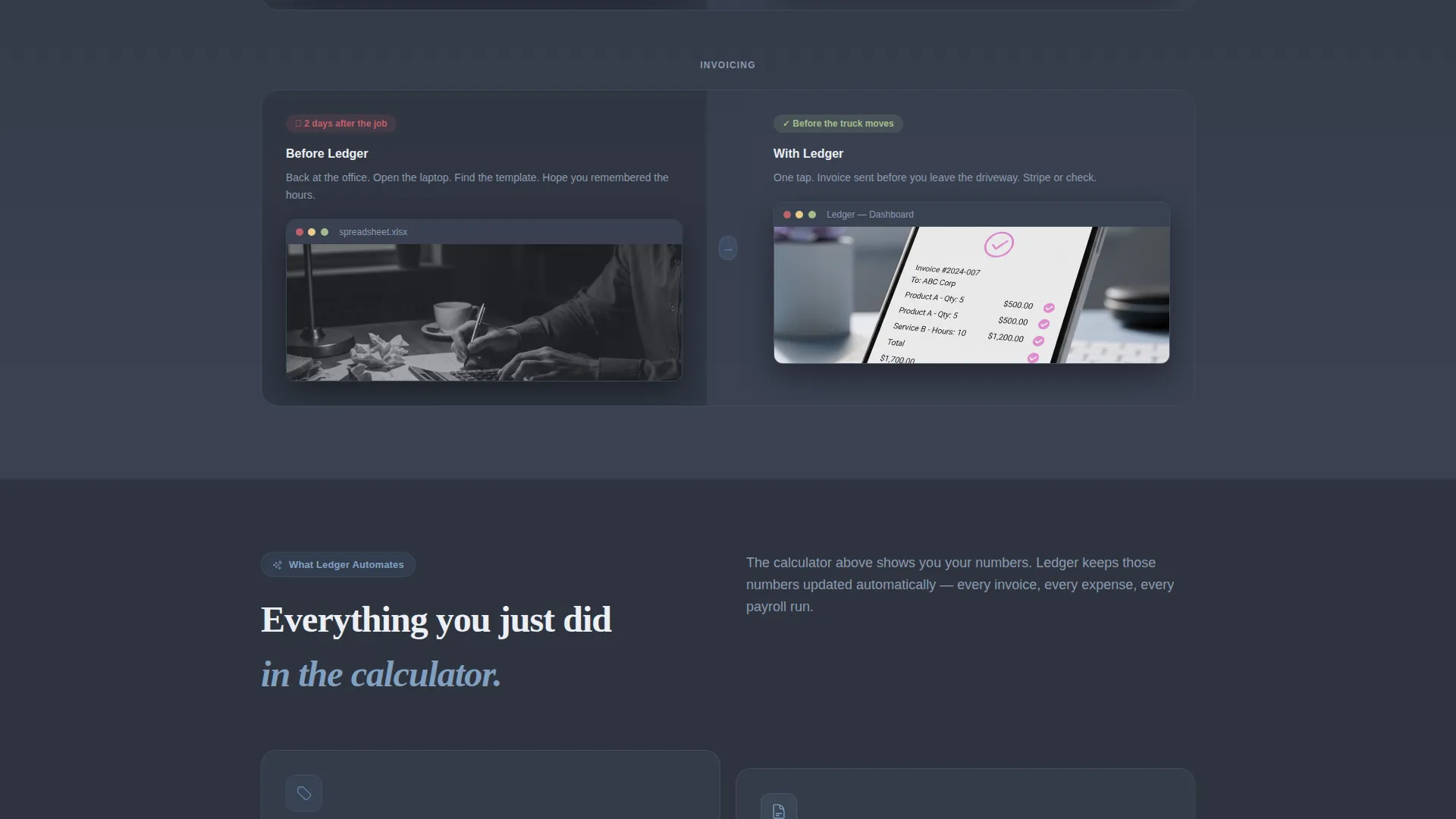
After the calculator, each content section pairs a before screenshot on the left with the software's clean interface on the right. The contrast moves from a messy spreadsheet or shoebox of receipts to auto-categorized expenses, one-tap invoicing, and a quarterly tax prep view with a CPA export button.
Primary Lead Capture Form
The main call-to-action form sits directly below the calculator output. It collects company name, trade type via a dropdown with four options, number of employees, and email address. Placement after the calculator means visitors arrive already convinced the software understands their numbers.
Gated PDF Secondary Offer
A secondary conversion path offers a downloadable tax checklist for contractors. This captures email addresses from visitors who are interested but not yet ready for a demo. It keeps the page useful for every stage of the buyer decision process.
Split-Screen 50/50 Layout System
Every section uses a consistent two-column structure. Left and right panels balance inputs with outputs, problems with solutions, and rough data with clean interfaces. The split-screen format gives the page a structured, tool-like feel that matches the software's own dashboard aesthetic.
Page sections overview
| Section | Purpose |
|---|---|
| Animated Stats Header | Opens with live-style profit-and-loss figures to establish immediate relevance |
| Headline and Subline | Names the three target trades and directs visitors to the calculator |
| Job Profit Calculator | Delivers a personalized annual projection from four simple inputs |
| Calculator call to action Form | Captures lead details directly after the visitor sees their own numbers |
| Before and After: Expenses | Contrasts a messy spreadsheet with auto-categorized expense tracking |
| Before and After: Invoicing | Shows one-tap invoicing from the truck against a paper-based process |
| Before and After: Tax Prep | Highlights quarterly tax prep view and CPA export against a shoebox of receipts |
| Gated PDF Offer | Provides a tax checklist download for visitors not ready to request a demo |
Design & branding system
The visual identity follows a Directory and Discovery theme built on a Slate and Sky color system. The palette is drawn from the physical world of the trades: steel tools against an open morning sky, clean and weather-tested. Every color choice serves a functional role on the page.
- Workshop slate (#3B4252) and pipe-fitting charcoal (#2E3440) dominate backgrounds and the navigation bar, grounding the page in a familiar job-site tone
- Open-sky blue (#81A1C1) marks every clickable surface and live data point, while estimate-highlight white (#ECEFF4) fills cards and calculator input fields to keep output areas easy to read
- Signal blue (#5E81AC) fires on interactive hover and focus states, creating a clear visual cue for every action point without adding noise to the layout
Mobile & speed optimization
The split-screen layout is structured to adapt across screen sizes. Each 50/50 column is designed to restack vertically on smaller devices so the calculator inputs and output panels remain usable without horizontal scrolling.
- The calculator input and output panels stack in a logical top-to-bottom order on mobile, keeping the tool functional on any screen size
- Before and after screenshot sections reorder so the problem image appears above the solution, preserving the intended narrative flow on narrow screens
How this template helps you convert
The page is designed around a single principle: earn trust through utility before asking for anything. The conversion path is built into the layout sequence itself.
- The animated stats header uses real trade numbers to signal immediately that this software was built for contractors, not generic small businesses, pulling the right visitors deeper into the page
- The Job Profit Calculator delivers a personalized annual projection before any form appears, so when visitors reach the lead capture section, the software has already demonstrated it understands their specific math and workflow
Other information about this template
This template is part of the Ledger series, a design concept for home services accounting software landing pages. It is built for teams marketing financial tools to the trades.
- The template style is classified as Split Screen (50/50), a layout approach well suited to software tools that need to show inputs alongside live outputs
- The creative direction is Calculator/Tool First, a pattern that prioritizes demonstrating value through interaction rather than through feature lists or testimonials
- The header concept is Stats/Metrics, using animated financial figures to communicate product depth before a visitor reads a single line of body copy
- The page direction is Lead Generation, with both a primary demo request form and a secondary gated content offer built into the flow
- The theme is Directory and Discovery, adapted here to give the page a structured, reference-tool quality that resonates with contractors who think in checklists and work orders
Theme
Directory & Discovery
Creative direction
Calculator/Tool First
Color system
Slate & Sky
Style
Split Screen (50/50)
Direction
Lead Generation
Page Sections
Animated Profit-and-loss Stats Header
Interactive Job Profit Calculator
Before and After Section Pairs
Primary Lead Capture Form
Gated PDF Secondary Offer
Consistent Split-screen Layout
Related questions
What trades is this landing page template designed for?
How does the Job Profit Calculator work in this template?
What are the two conversion paths built into this page?
Is the financial data in the stats header real?
Can this template support a software product that serves more than one trade?



