Vault - Powerful Whitelabel Landing Page Template
Vault is a scroll-reveal landing page template built for white-label digital asset management platforms. It combines a Stats-First Impact creative direction with a dark Dashboard Pro visual theme to help agencies, SaaS companies, and reseller partners show off their branded DAM offering with instant credibility. Deploy a polished, conversion-ready landing page in days, not months.
by Rocket studio
Quick summary
Vault is a single-page, scroll-reveal landing page template designed for white-label digital asset management platforms. It leads with a logo bar, arresting statistics, a live brand simulator, and a head-to-head comparison table. The result is a high-trust, conversion-focused page that helps agencies and technology resellers launch their branded offering fast.
Who this template is for
Vault is built for people who need to sell a complex software product quickly and credibly. The template speaks directly to buyers who understand enterprise software but have no time for a long build cycle.
- Operations leads at mid-size agencies managing client files across scattered shared drives
- Chief Technology Officers at martech firms who need a digital asset management module without an eighteen-month build
- Reseller partners looking for a recurring-revenue product they can brand and deploy immediately
What problem this template solves
Most software landing pages bury the value proposition under generic hero images and paragraph-heavy feature lists. Vault flips that approach. It leads with proof, not promises, so visitors understand the scale and speed of the platform before they read a single marketing line.
- Agencies struggle to communicate a white-label software product without showing it in action
- Resellers lack a ready-made page that positions their offering against in-house builds and known competitors
- Prospects drop off before the call to action because they never feel the product is real or ready
What you get with this template
Vault delivers a fully structured, scroll-reveal landing page with every section pre-built and ready to customize. You get a dark, dashboard-style visual system, a working brand simulator concept, and a tight conversion path from first impression to form submission.
- A complete single-page layout with logo bar, stats sections, comparison table, inline simulator, and a low-friction lead form
- A Slate and Sky color system with deep charcoal backgrounds, gunmetal card surfaces, altitude blue accents, and cloud white text
- A persistent mobile call-to-action bar and a dual conversion path supporting both direct sign-up and an exploratory simulator flow
Feature list
Vault ships with a focused set of purpose-built components. Each one is designed to move a skeptical, time-pressed buyer closer to a decision.
Stats-First Scroll Sections
Each new section reveals on scroll with a single large statistic before any supporting text appears. The rhythm is number, then proof, repeating across the page. This creates a staircase of conviction that builds trust as the visitor scrolls.
Logo Bar with Social Proof Metric
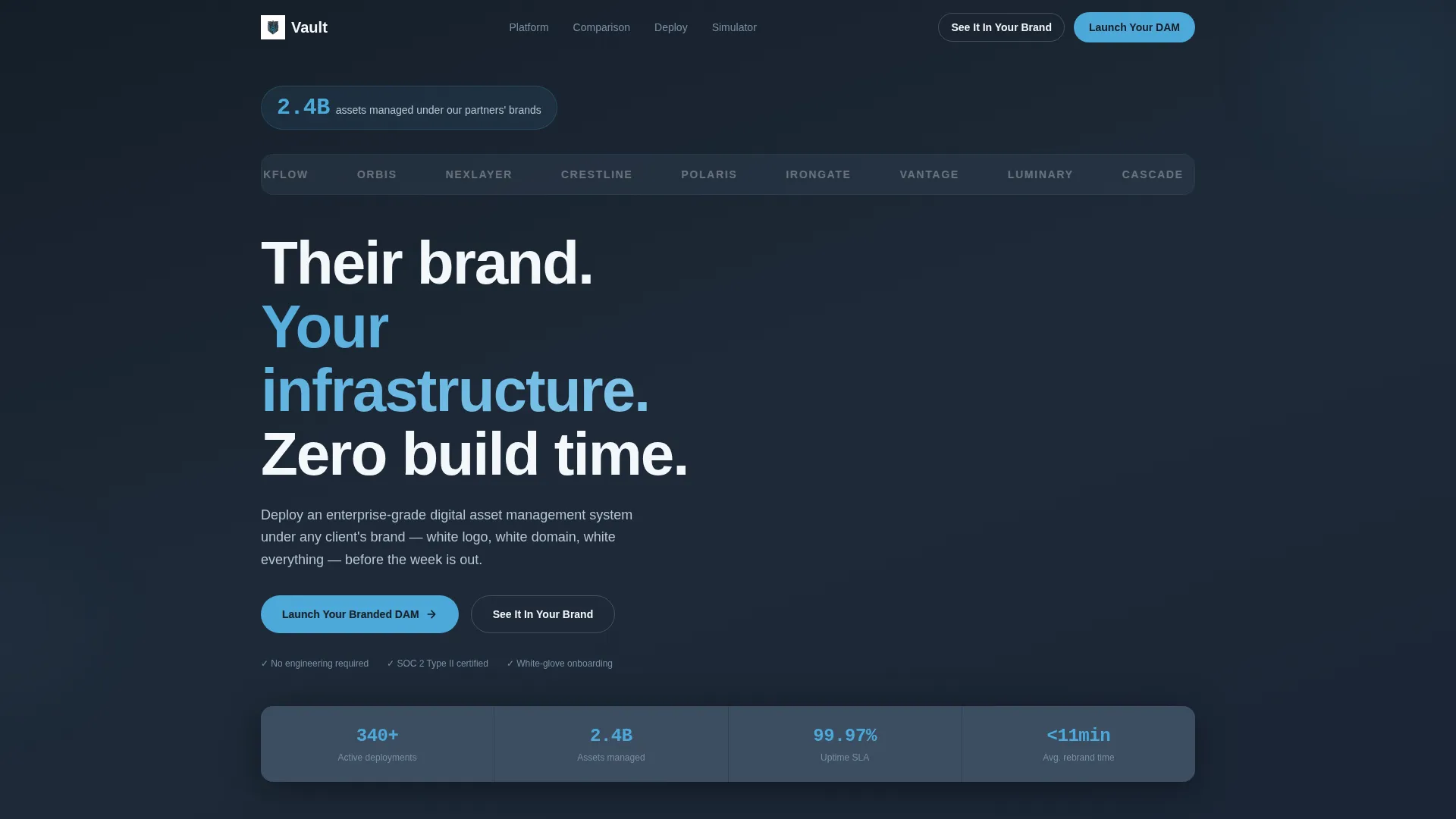
The header opens with twelve partner and client logos auto-scrolling in monochrome white against the deep charcoal background. A single oversized metric in altitude blue anchors the bar above the logos, giving visitors an immediate sense of scale before they engage with any copy.
Live Brand Skin Simulator
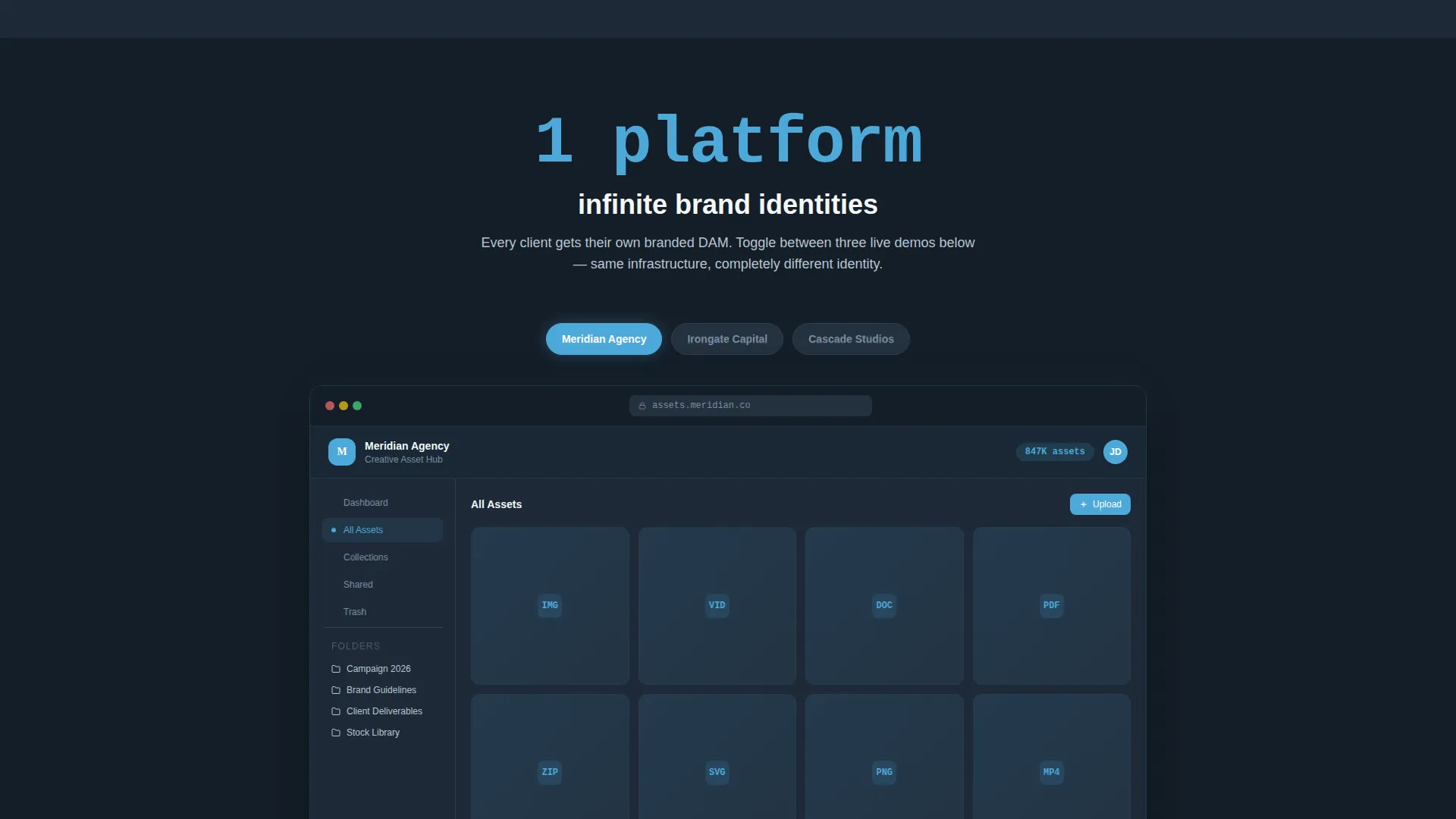
A mid-page interactive toggle lets visitors switch the digital asset management interface between three fictional brand skins. Different logos, colors, and domain labels update in real time. Visitors physically experience the white-label promise rather than just reading about it.
Inline Rebranding Demo Form
A secondary conversion path invites visitors to type their company name and pick a brand color. A mock interface re-skins in real time before the visitor ever fills out the main lead form. This lowers resistance and creates a sense of ownership early.
Three-Column Comparison Table
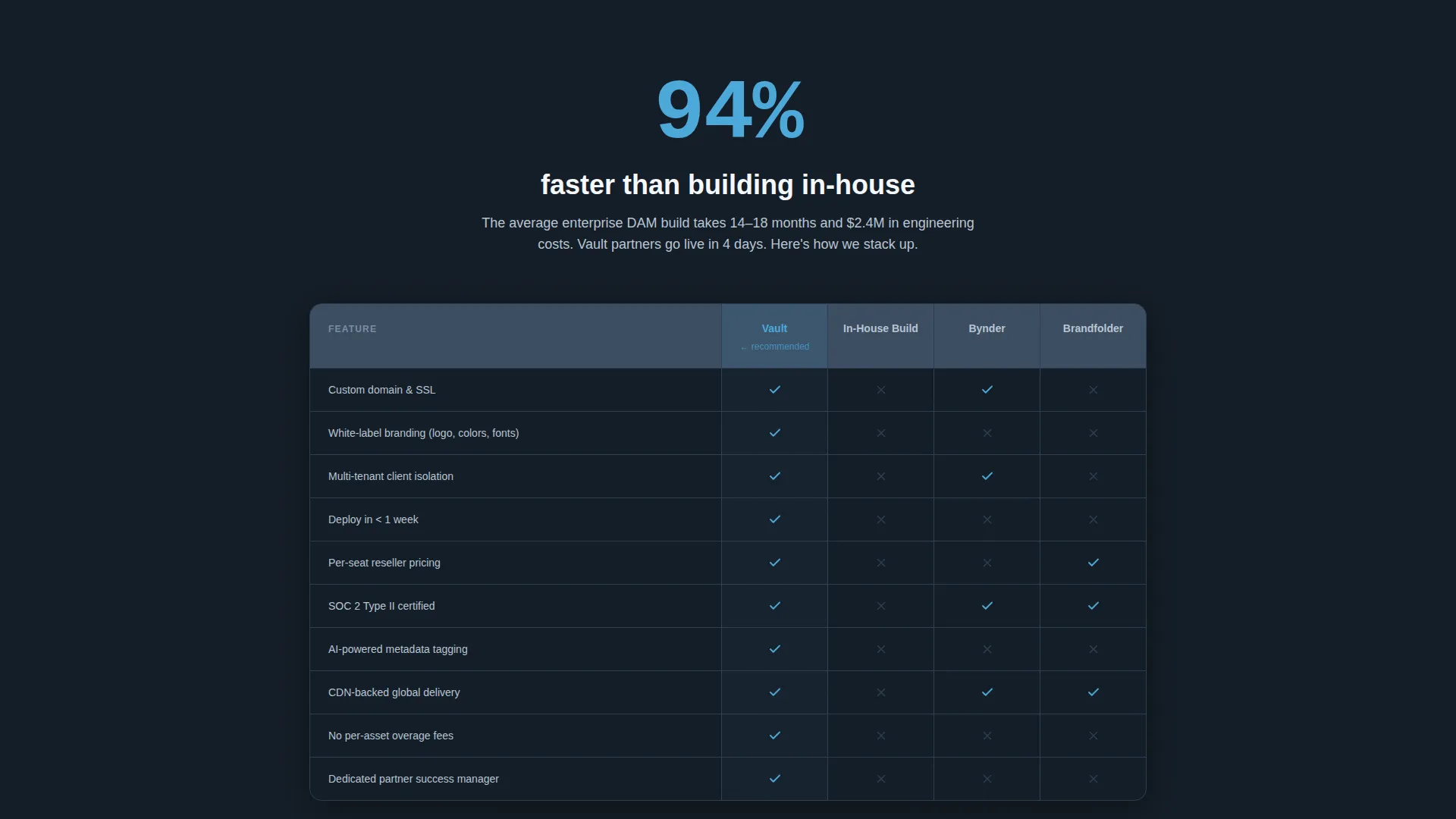
A sticky comparison section presents Vault alongside two alternative options in a clear three-column layout. Altitude blue checkmarks highlight Vault's advantages. Empty gunmetal cells make gaps in competing options visible at a glance, without requiring the visitor to interpret complex text.
Low-Friction Lead Form
The primary call-to-action form collects just three fields: company name, estimated asset volume via a slider, and work email. No phone number is required. The form sits below the comparison table and again as a persistent bottom bar on mobile.
Page sections overview
| Section | Purpose |
|---|---|
| Logo Bar Header | Establish credibility before any headline appears |
| Oversized Scale Metric | Anchor visitor expectations with a single platform stat |
| Hero Headline Block | Deliver the core value proposition in one tight line |
| Stats Reveal One | Lead the first content section with an arresting figure |
| Comparison Table | Pit Vault against in-house builds and competitors |
| Brand Skin Toggle | Let visitors experience white-label switching live |
| Inline Simulator | Allow real-time re-skinning before form submission |
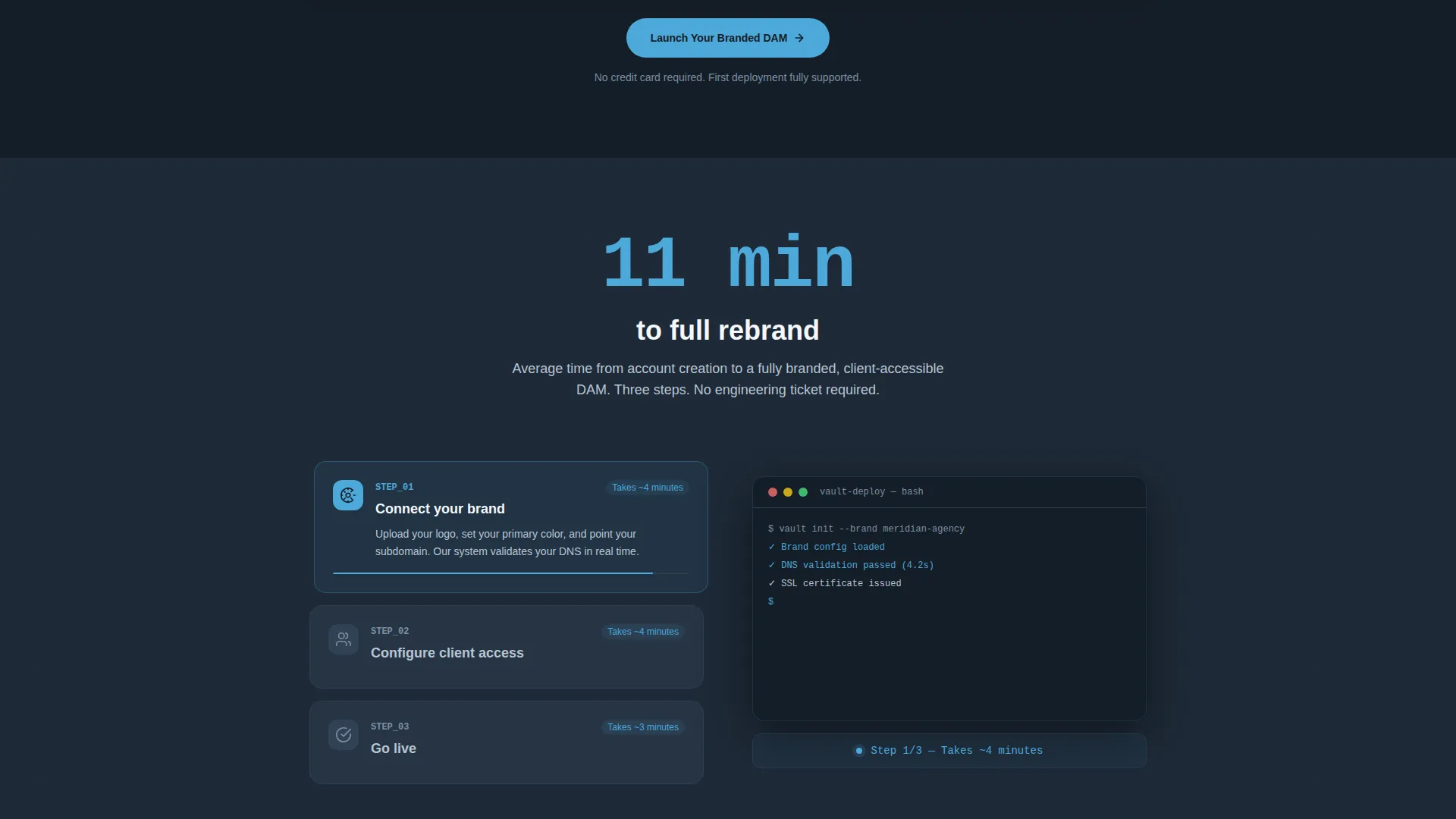
| Three-Step Deployment | Show how fast setup works with an animated sequence |
| Primary call to action Form | Collect company name, asset volume, and work email |
| Mobile Persistent Bar | Keep the primary call to action visible while scrolling |
Design & branding system
Vault uses the Dashboard Pro theme built on the Slate and Sky color system. The palette is dark, information-dense, and directional. Every color choice has a specific job on the page.
- Deep charcoal slate (#1E2A38) for primary backgrounds, mid-tone gunmetal (#3B4D61) for card surfaces, altitude blue (#4DA8DA) for interactive accents and data highlights, and cloud white (#F4F7FA) for text and negative space
- The visual tone references a cockpit instrument panel: dark and confident, with blue indicators that draw the eye exactly where action is needed
- Screenshots and interface previews are placed against slate backgrounds so they stand out clearly without competing with the surrounding layout
Mobile & speed optimization
The template is structured to deliver a clean, readable experience on smaller screens without sacrificing the visual impact of the desktop layout. The conversion path stays accessible at every scroll depth.
- The persistent bottom bar keeps the primary call to action visible on mobile throughout the entire page scroll
- Section-by-section scroll reveal is designed to work progressively, so content loads and appears in a controlled, readable sequence
- The three-field lead form is intentionally minimal, reducing friction on touch devices where long forms cause drop-off
How this template helps you convert
Vault is engineered around a single idea: make the visitor feel like they have already started before they submit a form. Every structural decision serves that goal.
- The Stats-First scroll rhythm builds conviction progressively. Each statistic lands before its supporting context, creating a steady accumulation of trust as the visitor moves down the page.
- The inline brand simulator removes the biggest barrier in white-label software sales. Visitors see their own company name and colors on the interface, which shifts the conversation from "could this work for us" to "when do we start."
- The comparison table and dual call-to-action path serve two different buyer mindsets simultaneously. Decision-ready visitors go straight to the form. Exploratory visitors enter the simulator and arrive at the same destination with higher confidence.
Other information about this template
Vault is a focused template built for a specific sales context. A few additional details will help you decide if it is the right fit for your project.
- The template is categorized under Technology, White-Label Enterprise Software, with a niche focus on white-label digital asset management platforms
- The Scroll Reveal (Progressive) template style means sections animate into view as the visitor scrolls, reinforcing the Stats-First creative direction throughout the page
- The Comparison and Versus landing page direction makes Vault a strong fit for any team that needs to position its product against known alternatives or against the cost of building in-house
- The header concept, a Logo Bar with a social proof metric, works well for platforms that already have a partner or client roster to display
- Vault can support use cases beyond digital asset management wherever the white-label resale model and the need for rapid client deployment are the primary selling points
Theme
Dashboard Pro
Creative direction
Stats-First Impact
Color system
Slate & Sky
Style
Scroll Reveal (Progressive)
Direction
Comparison/Versus
Page Sections
Stats-first Scroll Reveal Layout
Logo Bar with Scale Metric
Live White-label Brand Simulator
Inline Rebranding Demo Path
Three-column Comparison Table
Low-friction Three-field Form
Related questions
Can I customize the brand skins and color system in this template?
Does this template work for products other than digital asset management?
How many fields does the lead form include?
Is there a second way for visitors to engage before filling out the form?
What type of buyer is this landing page template designed to persuade?



