Automotive Digital Presence Booking Website Template
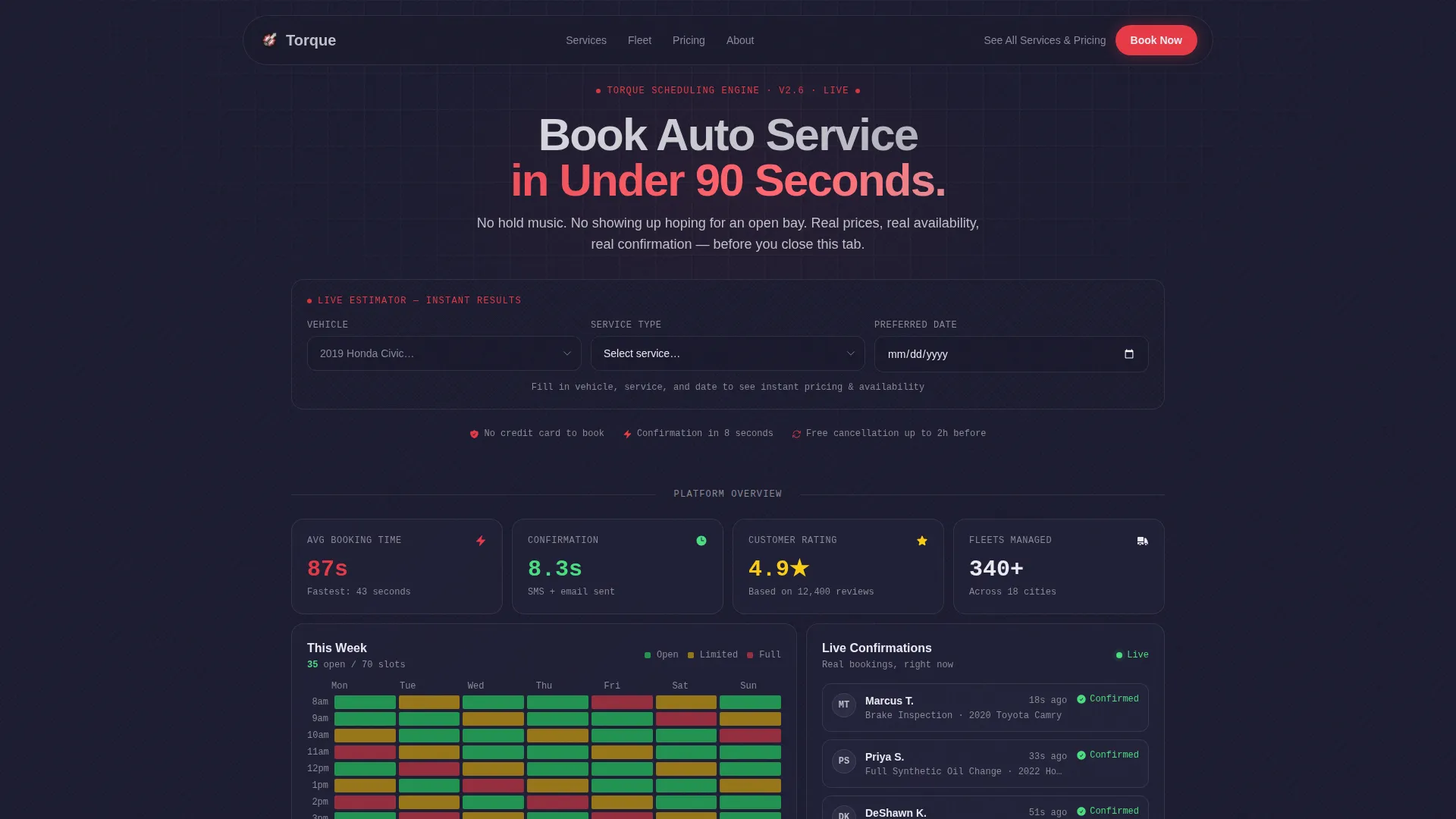
Torque is a high-performance automotive booking landing page built on a bento grid layout. A live service estimator sits above the fold, letting visitors enter their vehicle, service type, and date to instantly see pricing, duration, and available time slots. The result is a frictionless path from first visit to confirmed appointment, no phone calls required.
by Rocket studio
Quick summary
Torque is a single-page automotive booking and scheduling landing page. Its defining feature is a fully functional service estimator that loads above the fold and delivers real results before asking for anything in return. The bento grid layout below it reveals every dimension of the platform at a glance, from real-time availability to fleet management tools.
Who this template is for
This template is built for automotive service businesses that want to replace phone-based booking with a fast, self-serve digital experience. It suits shops ready to convert web visitors into confirmed appointments without friction.
- Automotive service centers offering oil changes, brake jobs, tire work, inspections, and diagnostics
- Fleet managers who need to coordinate staggered maintenance schedules across multiple vehicles
- Independent garages or mobile mechanics targeting time-pressed drivers who want instant answers on cost and availability
What problem this template solves
Most automotive service pages bury the booking process behind hero images, tagline copy, and contact forms. Visitors leave before they ever find the information they actually need. This template fixes that by leading with the answer.
- Drivers can not quickly find estimated pricing or open slots without calling the shop
- First-time car owners feel uncertain and overwhelmed by vague service descriptions
- Fleet managers lack a clear interface to visualize and schedule maintenance across a vehicle roster
What you get with this template
You get a complete, ready-to-customize automotive booking landing page built around a tool-first creative direction. Every section is intentional and conversion-oriented from the first pixel.
- A live service estimator header with vehicle make/model autocomplete, service type selector, and date picker
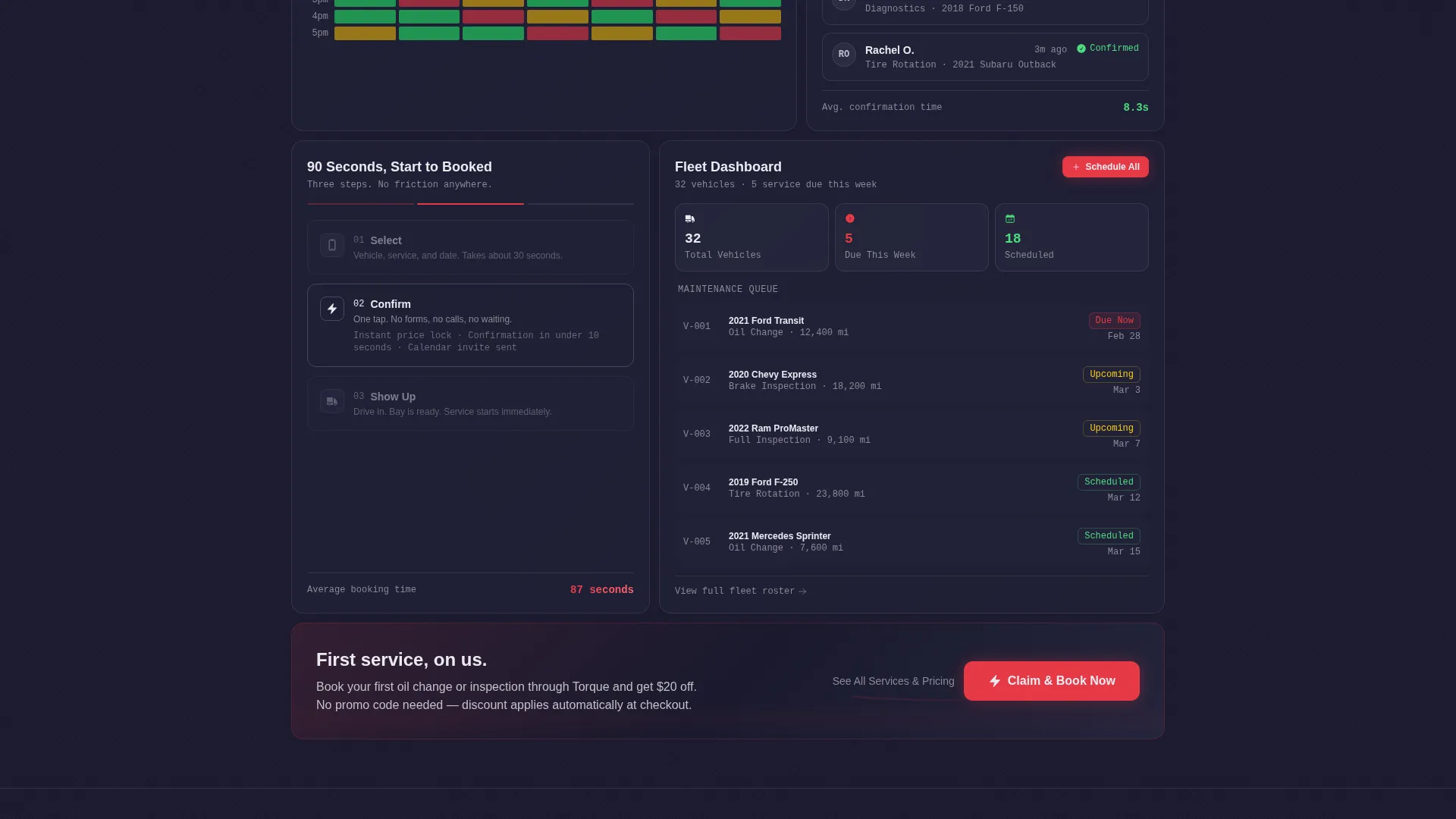
- An animated bento grid body with self-contained cards for availability, confirmations, step-by-step flow, and fleet management
- A sticky bottom bar carrying the primary call-to-action after the visitor scrolls past the estimator
Feature list
This template ships with a focused set of components that work together as one cohesive system.
Above-the-Fold Service Estimator
The header is the product. Three input fields sit in a single horizontal row: vehicle make/model with autocomplete, service type dropdown, and preferred date. The visitor completes the inputs and a bento card animates open below to show estimated cost, estimated duration, and three available time slots. No scrolling required to get real value.
Animated Bento Grid Layout
Below the estimator, the page unfolds as a grid of self-contained cards. Each card reveals a different capability of the platform. The scroll feels like opening the hood, not reading a brochure. Cards are visually independent but read as a unified dashboard system.
Real-Time Availability Heatmap Card
One dedicated bento card displays a weekly availability heatmap. Green slots visually outnumber red, giving visitors immediate confidence that getting an appointment is straightforward. The visualization builds trust without requiring any interaction.
Instant Confirmation Indicator Card
A stacked card shows three customer messages with timestamps confirming bookings received in under ten seconds. This social proof element is embedded directly in the grid, reinforcing speed and reliability at a glance.
Fleet Management Feature Card
A tall bento card presents fleet management capabilities with a vehicle roster and staggered maintenance schedule display. Fleet managers can immediately see that the platform supports multi-vehicle coordination, not just single-car bookings.
Sticky Call-to-Action Bar
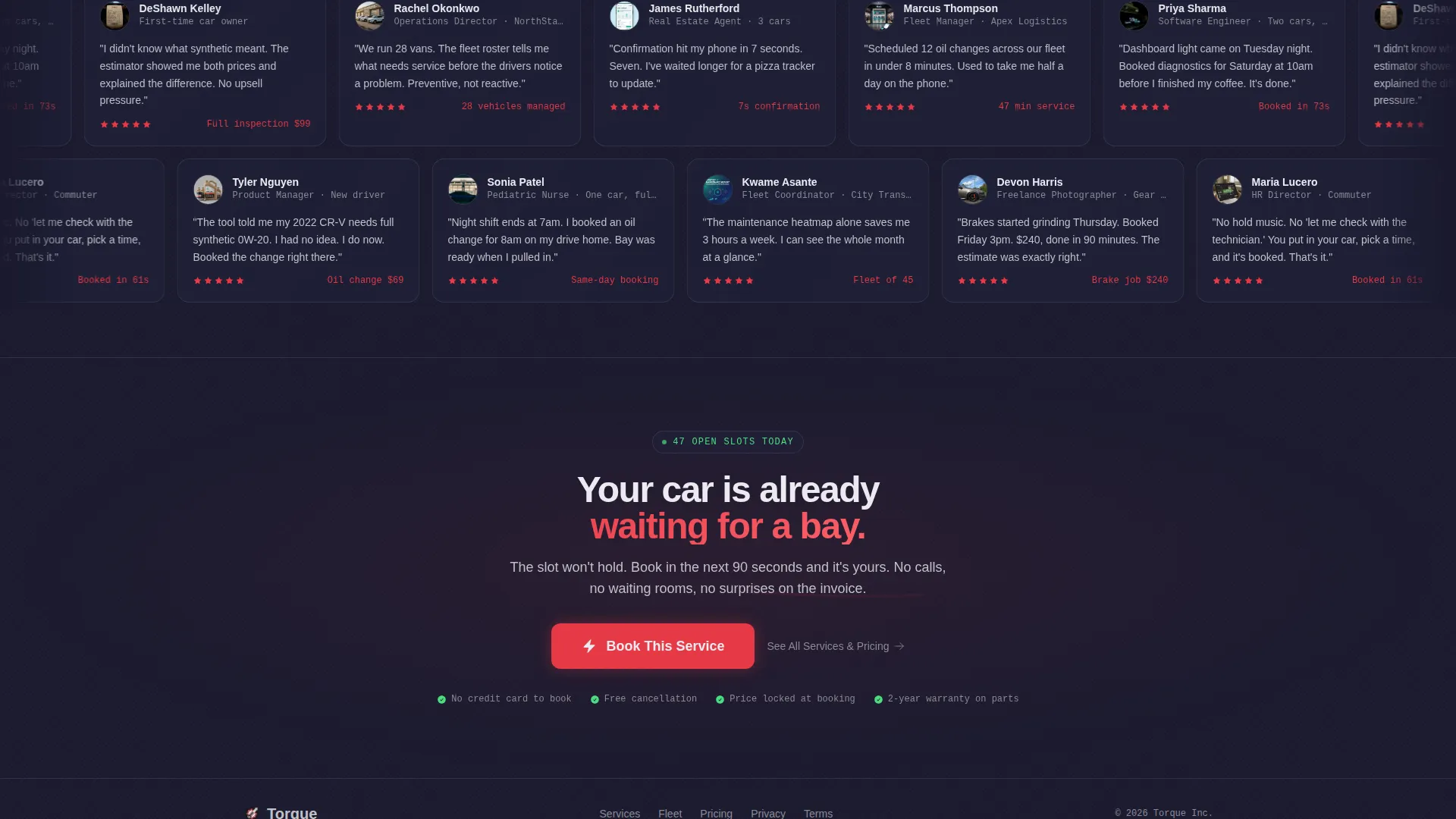
After the visitor scrolls past the fold, a sticky bottom bar anchors the primary booking button at all times. The button carries forward the vehicle, service, and date already captured by the estimator, so the visitor is confirming a decision they have already made.
Page sections overview
| Section | Purpose |
|---|---|
| Service Estimator Header | Delivers instant pricing, duration, and available slots above the fold |
| Estimator Results Card | Animates open with cost, time estimate, and slot options plus primary call to action |
| Availability Heatmap Card | Shows weekly open slots visually to build booking confidence |
| Confirmation Messages Card | Displays timestamped confirmations as embedded social proof |
| Three-Step Flow Card | Walks through select, confirm, show up with micro-animations |
| Fleet Management Card | Presents vehicle roster and staggered maintenance schedules |
| Sticky Bottom Bar | Keeps the primary booking call to action accessible throughout the scroll |
Design & branding system
The visual identity draws from a Carbon Fiber color system that channels technical precision. Every color choice maps to a specific role in the interface, so the page reads like an instrument cluster rather than a generic website.
- Deep carbon black (#1A1A2E) dominates backgrounds and card surfaces for a premium, engineered feel
- Machined aluminum (#C0C0C8) carries body text and dividers, while ignition red (#E63946) fires on calls-to-action and active states
- Dashboard glow white (#EAEAF0) illuminates headlines and input fields so they read like instrument cluster readouts under showroom lighting
Mobile & speed optimization
The bento grid structure is designed to translate cleanly from wide desktop layouts to narrower mobile viewports. Each card is self-contained, which makes reordering and stacking for smaller screens a natural part of the layout logic.
- Cards restack vertically on mobile without losing their individual visual identity or content hierarchy
- The sticky bottom bar remains persistently accessible on mobile, keeping the booking call to action within thumb reach at all times
- Input fields in the estimator are sized and spaced for comfortable touch interaction on phone screens
How this template helps you convert
Every design and layout decision in this template points toward a single outcome: a visitor who arrives uncertain and leaves with a confirmed appointment.
- The estimator gives real value before asking for anything, so the visitor arrives at the booking button already knowing the price, the time, and the open slot. The call-to-action is a confirmation, not a leap of faith.
- The sticky bottom bar ensures the primary booking button is never more than a glance away after the visitor scrolls past the fold, reducing the friction of having to scroll back up to act.
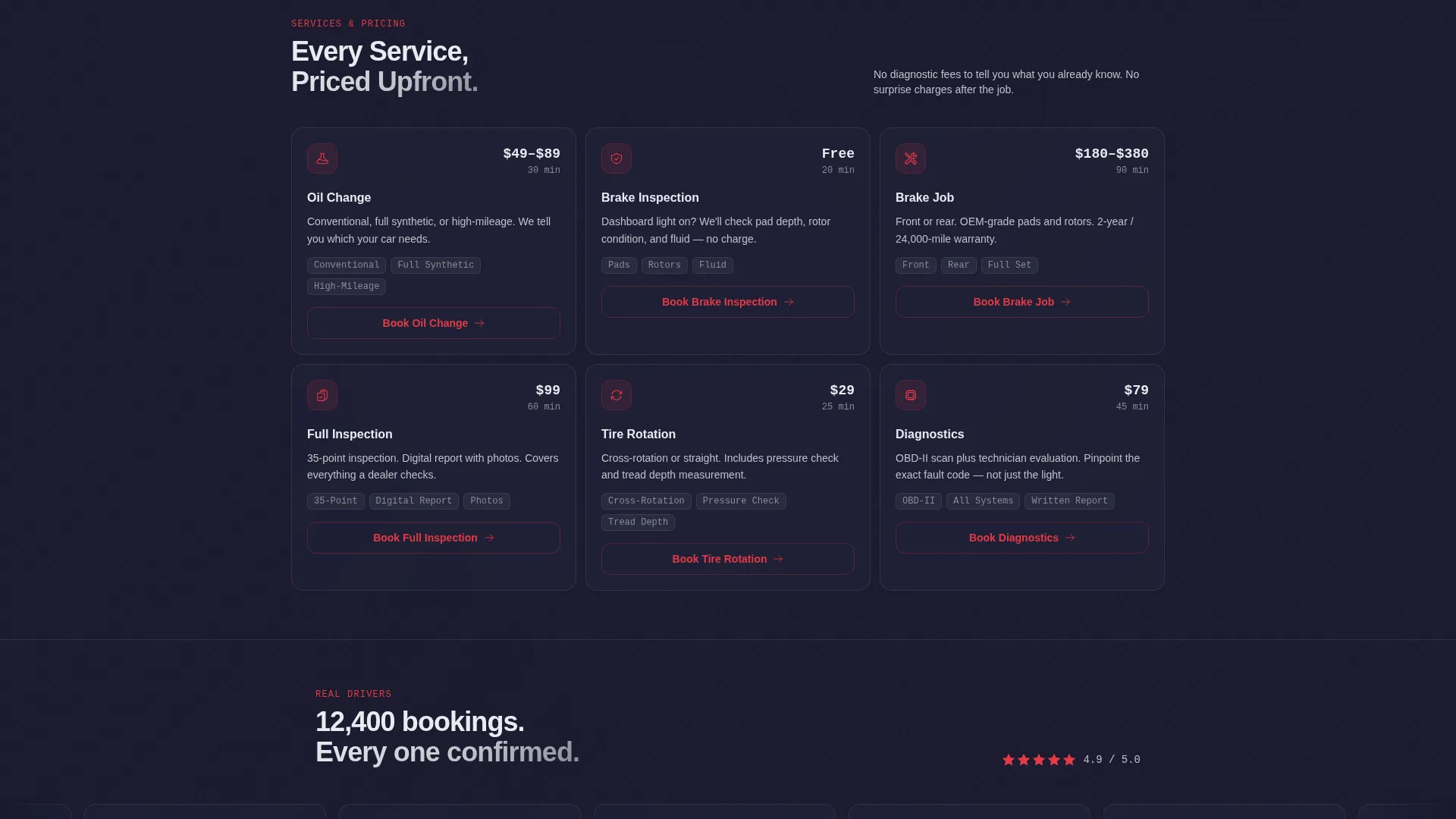
- The secondary path, a subdued aluminum-text link reading "See All Services and Pricing," gives comparison shoppers a low-commitment option that keeps them on the page rather than bouncing to a competitor.
Other information about this template
This template is categorized under Technology with a focus on Automotive Digital Presence. It is designed as a single-page, section-led landing page rather than a multi-page site, keeping the visitor journey linear and intentional from estimator to booking confirmation.
- The theme is Startup Velocity, which shapes the overall energy of the layout: fast, focused, and built to move visitors forward
- The creative direction is Calculator/Tool First, meaning the estimator is not a supporting element but the central product experience of the page
- The template style is Bento Grid, a modular card-based layout that lets each feature section breathe while contributing to a unified visual system
- The landing page direction is Click-Through, meaning every interaction is designed to carry captured data forward into a booking flow rather than asking visitors to re-enter information
Theme
Startup Velocity
Creative direction
Calculator/Tool First
Color system
Carbon Fiber
Style
Bento Grid
Direction
Click-Through
Page Sections
Above-the-fold Service Estimator
Animated Bento Grid Body
Real-time Availability Heatmap
Fleet Management Feature Card
Sticky Booking Call-to-action Bar
Three-step Flow Visualization
Related questions
Can I customize the services listed in the estimator dropdown?
Does the estimator carry data forward into the booking flow?
Is this template suitable for a fleet management business?
Can a visitor explore pricing without committing to a booking?
What layout structure does this template use?



